MAKING
SENSE OF
DATA
A Learning Lab forThird Sector organisations
Facilitated by:
Ian J Seath
© Improvement Skills
Consulting Ltd. 2021
2
|
Contents
“Withoutdatayou’rejustanother
personwithanopinion.”
DrWEdwardsDeming
❑ Some basic principles for displaying
data
❑ How to select appropriate types of
chart to analyse and present data
❑ Why an “average” could be very
misleading
❑ A simple chart to identify priorities
and achieve focus
❑ The one chart you need if you want
to demonstrate improvement
3
|
Data-rich,
information-poor
The way we communicate is
changing. In our time-
strapped world, we like
information that is quick and
easy to consume.
Most organisations are overwhelmed
by data, some of which gets analysed
and turned into reports, but all too
often senior and front-line managers
simply don’t have the skills to get
real insight from the data.
Perhaps some people are “scared of
maths”, others may not have the time
and yet others may not see data
analysis and interpretation as part of
their role. Plus, too many people
think that “numbers speak for
themselves”.
Add to that the manipulation of data
by the media and the political spin
put on “official statistics” and it’s no
wonder that managing by numbers
gets a bad press.
Organisations large and small are
grappling with ever more complex
data to improve their performance.
They look to staff at all levels to make
sense of the numbers, provide insight
and guidance.
Paradoxically, traditional education
and training often ignores simple
tools (like Pareto and Run Charts) to
make numbers work harder. Training
rarely shows you how to
communicate what the numbers
mean in a compelling, persuasive
way.
“AMathematicianisadevicefor
turningcoffeeintotheorems.”
PaulErdos
(HungarianMathematician)
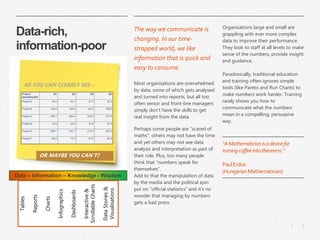
AS YOU CAN CLEARLY SEE…
OR MAYBE YOU CAN’T?
Data – Information – Knowledge - Wisdom
Tables
Reports
Charts
Infographics
Dashboards
Interactive
&
Scrollable
Charts
Data
Stories
&
Visualisations
4
|
Charts or Tables?
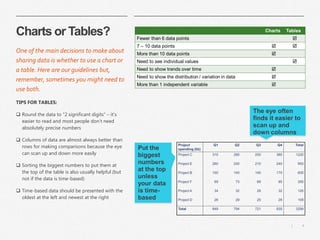
TIPS FOR TABLES:
❑ Round the data to “2 significant digits” – it’s
easier to read and most people don’t need
absolutely precise numbers
❑ Columns of data are almost always better than
rows for making comparisons because the eye
can scan up and down more easily
❑ Sorting the biggest numbers to put them at
the top of the table is also usually helpful (but
not if the data is time-based)
❑ Time-based data should be presented with the
oldest at the left and newest at the right
One of the main decisions to make about
sharing data is whether to use a chart or
a table. Here are our guidelines but,
remember, sometimes you might need to
use both.
The eye often
finds it easier to
scan up and
down columns
Put the
biggest
numbers
at the top
unless
your data
is time-
based
5
|
Understanding
variation
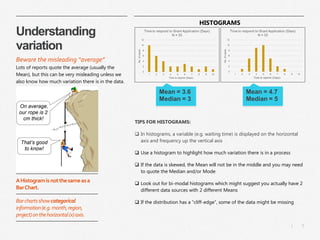
TIPS FOR HISTOGRAMS:
❑ In histograms, a variable (e.g. waiting time) is displayed on the horizontal
axis and frequency up the vertical axis
❑ Use a histogram to highlight how much variation there is in a process
❑ If the data is skewed, the Mean will not be in the middle and you may need
to quote the Median and/or Mode
❑ Look out for bi-modal histograms which might suggest you actually have 2
different data sources with 2 different Means
❑ If the distribution has a “cliff-edge”, some of the data might be missing
Beware the misleading “average”
Lots of reports quote the average (usually the
Mean), but this can be very misleading unless we
also know how much variation there is in the data.
Mean = 4.7
Median = 5
Mean = 3.6
Median = 3
AHistogramisnotthesameasa
BarChart.
Barchartsshowcategorical
information(e.g.month,region,
project)onthehorizontal(x)axis.
HISTOGRAMS
6
|
Common types of
Chart
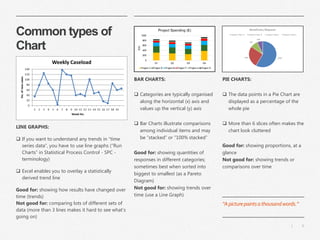
PIE CHARTS:
❑ The data points in a Pie Chart are
displayed as a percentage of the
whole pie
❑ More than 6 slices often makes the
chart look cluttered
Good for: showing proportions, at a
glance
Not good for: showing trends or
comparisons over time
LINE GRAPHS:
❑ If you want to understand any trends in “time
series data”, you have to use line graphs (“Run
Charts” in Statistical Process Control - SPC -
terminology)
❑ Excel enables you to overlay a statistically
derived trend line
Good for: showing how results have changed over
time (trends)
Not good for: comparing lots of different sets of
data (more than 3 lines makes it hard to see what’s
going on)
BAR CHARTS:
❑ Categories are typically organised
along the horizontal (x) axis and
values up the vertical (y) axis
❑ Bar Charts illustrate comparisons
among individual items and may
be “stacked” or “100% stacked”
Good for: showing quantities of
responses in different categories;
sometimes best when sorted into
biggest to smallest (as a Pareto
Diagram)
Not good for: showing trends over
time (use a Line Graph)
“Apicturepaintsathousandwords.”
7
|
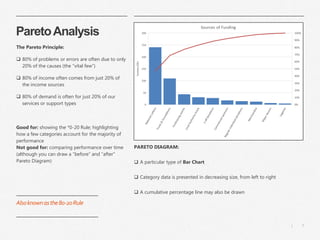
ParetoAnalysis
The Pareto Principle:
❑ 80% of problems or errors are often due to only
20% of the causes (the “vital few”)
❑ 80% of income often comes from just 20% of
the income sources
❑ 80% of demand is often for just 20% of our
services or support types
Good for: showing the *0-20 Rule; highlighting
how a few categories account for the majority of
performance
Not good for: comparing performance over time
(although you can draw a “before” and “after”
Pareto Diagram)
PARETO DIAGRAM:
❑ A particular type of Bar Chart
❑ Category data is presented in decreasing size, from left to right
❑ A cumulative percentage line may also be drawn
Alsoknownasthe80-20Rule
8
|
Identifying Trends &
Improvement
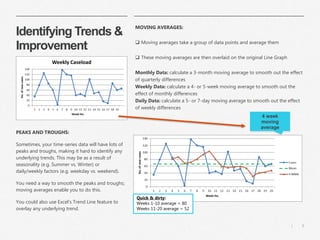
PEAKS AND TROUGHS:
Sometimes, your time-series data will have lots of
peaks and troughs, making it hard to identify any
underlying trends. This may be as a result of
seasonality (e.g. Summer vs. Winter) or
daily/weekly factors (e.g. weekday vs. weekend).
You need a way to smooth the peaks and troughs;
moving averages enable you to do this.
You could also use Excel’s Trend Line feature to
overlay any underlying trend.
MOVING AVERAGES:
❑ Moving averages take a group of data points and average them
❑ These moving averages are then overlaid on the original Line Graph
Monthly Data: calculate a 3-month moving average to smooth out the effect
of quarterly differences
Weekly Data: calculate a 4- or 5-week moving average to smooth out the
effect of monthly differences
Daily Data: calculate a 5- or 7-day moving average to smooth out the effect
of weekly differences
4 week
moving
average
Quick & dirty:
Weeks 1-10 average = 80
Weeks 11-20 average = 52
9
|
ian.seath@improvement-skills.co.uk
07850 728506
@ianjseath
uk.linkedin.com/in/ianjseath
Prepared for Measuring the Good and Coalition for Efficiency by
Ian J Seath
Improvement Skills Consulting Ltd.
www.improvement-skills.co.uk

Making sense of data - Learning Lab 2021

  • 1.
    MAKING SENSE OF DATA A LearningLab forThird Sector organisations Facilitated by: Ian J Seath © Improvement Skills Consulting Ltd. 2021
  • 2.
    2 | Contents “Withoutdatayou’rejustanother personwithanopinion.” DrWEdwardsDeming ❑ Some basicprinciples for displaying data ❑ How to select appropriate types of chart to analyse and present data ❑ Why an “average” could be very misleading ❑ A simple chart to identify priorities and achieve focus ❑ The one chart you need if you want to demonstrate improvement
  • 3.
    3 | Data-rich, information-poor The way wecommunicate is changing. In our time- strapped world, we like information that is quick and easy to consume. Most organisations are overwhelmed by data, some of which gets analysed and turned into reports, but all too often senior and front-line managers simply don’t have the skills to get real insight from the data. Perhaps some people are “scared of maths”, others may not have the time and yet others may not see data analysis and interpretation as part of their role. Plus, too many people think that “numbers speak for themselves”. Add to that the manipulation of data by the media and the political spin put on “official statistics” and it’s no wonder that managing by numbers gets a bad press. Organisations large and small are grappling with ever more complex data to improve their performance. They look to staff at all levels to make sense of the numbers, provide insight and guidance. Paradoxically, traditional education and training often ignores simple tools (like Pareto and Run Charts) to make numbers work harder. Training rarely shows you how to communicate what the numbers mean in a compelling, persuasive way. “AMathematicianisadevicefor turningcoffeeintotheorems.” PaulErdos (HungarianMathematician) AS YOU CAN CLEARLY SEE… OR MAYBE YOU CAN’T? Data – Information – Knowledge - Wisdom Tables Reports Charts Infographics Dashboards Interactive & Scrollable Charts Data Stories & Visualisations
  • 4.
    4 | Charts or Tables? TIPSFOR TABLES: ❑ Round the data to “2 significant digits” – it’s easier to read and most people don’t need absolutely precise numbers ❑ Columns of data are almost always better than rows for making comparisons because the eye can scan up and down more easily ❑ Sorting the biggest numbers to put them at the top of the table is also usually helpful (but not if the data is time-based) ❑ Time-based data should be presented with the oldest at the left and newest at the right One of the main decisions to make about sharing data is whether to use a chart or a table. Here are our guidelines but, remember, sometimes you might need to use both. The eye often finds it easier to scan up and down columns Put the biggest numbers at the top unless your data is time- based
  • 5.
    5 | Understanding variation TIPS FOR HISTOGRAMS: ❑In histograms, a variable (e.g. waiting time) is displayed on the horizontal axis and frequency up the vertical axis ❑ Use a histogram to highlight how much variation there is in a process ❑ If the data is skewed, the Mean will not be in the middle and you may need to quote the Median and/or Mode ❑ Look out for bi-modal histograms which might suggest you actually have 2 different data sources with 2 different Means ❑ If the distribution has a “cliff-edge”, some of the data might be missing Beware the misleading “average” Lots of reports quote the average (usually the Mean), but this can be very misleading unless we also know how much variation there is in the data. Mean = 4.7 Median = 5 Mean = 3.6 Median = 3 AHistogramisnotthesameasa BarChart. Barchartsshowcategorical information(e.g.month,region, project)onthehorizontal(x)axis. HISTOGRAMS
  • 6.
    6 | Common types of Chart PIECHARTS: ❑ The data points in a Pie Chart are displayed as a percentage of the whole pie ❑ More than 6 slices often makes the chart look cluttered Good for: showing proportions, at a glance Not good for: showing trends or comparisons over time LINE GRAPHS: ❑ If you want to understand any trends in “time series data”, you have to use line graphs (“Run Charts” in Statistical Process Control - SPC - terminology) ❑ Excel enables you to overlay a statistically derived trend line Good for: showing how results have changed over time (trends) Not good for: comparing lots of different sets of data (more than 3 lines makes it hard to see what’s going on) BAR CHARTS: ❑ Categories are typically organised along the horizontal (x) axis and values up the vertical (y) axis ❑ Bar Charts illustrate comparisons among individual items and may be “stacked” or “100% stacked” Good for: showing quantities of responses in different categories; sometimes best when sorted into biggest to smallest (as a Pareto Diagram) Not good for: showing trends over time (use a Line Graph) “Apicturepaintsathousandwords.”
  • 7.
    7 | ParetoAnalysis The Pareto Principle: ❑80% of problems or errors are often due to only 20% of the causes (the “vital few”) ❑ 80% of income often comes from just 20% of the income sources ❑ 80% of demand is often for just 20% of our services or support types Good for: showing the *0-20 Rule; highlighting how a few categories account for the majority of performance Not good for: comparing performance over time (although you can draw a “before” and “after” Pareto Diagram) PARETO DIAGRAM: ❑ A particular type of Bar Chart ❑ Category data is presented in decreasing size, from left to right ❑ A cumulative percentage line may also be drawn Alsoknownasthe80-20Rule
  • 8.
    8 | Identifying Trends & Improvement PEAKSAND TROUGHS: Sometimes, your time-series data will have lots of peaks and troughs, making it hard to identify any underlying trends. This may be as a result of seasonality (e.g. Summer vs. Winter) or daily/weekly factors (e.g. weekday vs. weekend). You need a way to smooth the peaks and troughs; moving averages enable you to do this. You could also use Excel’s Trend Line feature to overlay any underlying trend. MOVING AVERAGES: ❑ Moving averages take a group of data points and average them ❑ These moving averages are then overlaid on the original Line Graph Monthly Data: calculate a 3-month moving average to smooth out the effect of quarterly differences Weekly Data: calculate a 4- or 5-week moving average to smooth out the effect of monthly differences Daily Data: calculate a 5- or 7-day moving average to smooth out the effect of weekly differences 4 week moving average Quick & dirty: Weeks 1-10 average = 80 Weeks 11-20 average = 52
  • 9.
    9 | ian.seath@improvement-skills.co.uk 07850 728506 @ianjseath uk.linkedin.com/in/ianjseath Prepared forMeasuring the Good and Coalition for Efficiency by Ian J Seath Improvement Skills Consulting Ltd. www.improvement-skills.co.uk