This document provides information on various methods of diagrammatic and graphical representation of data. It discusses different types of charts and graphs like bar charts, pie charts, scatter plots, histograms and box plots. Examples are given for each type of graph to demonstrate how to plot the graph from given data and interpret the results. Key points covered include how to determine class intervals for histograms, calculate quartiles for box plots, and understand correlations from scatter plots.
GOA INSTITUTE OF
MANAGEMENT
SUBJECT:MANAGERIAL STATISTICS
ASSIGNMENT ON
DIAGRAMMATIC AND GRAPHICAL
REPRESENTATION OF DATA
SUBMITTED TO :- SUBMITTED BY:-
Prof. ROHIT MUTKEKAR RACHNA GUPTA
Roll No. 2020046
PGP1 SECTION-A
SESSION- 2020-22
2.
Diagrammatic and GraphicalRepresentation of
Data
MEANING OF GRAPHICAL REPRESENTATION OF
DATA
A graphical representation is the geometrical image of a set of
data.
It enables to think about a statistical problem in visual terms.
It is an effective and economic device for the presentation,
understanding and interpretation of the collected data.
Helps in comparison of data.
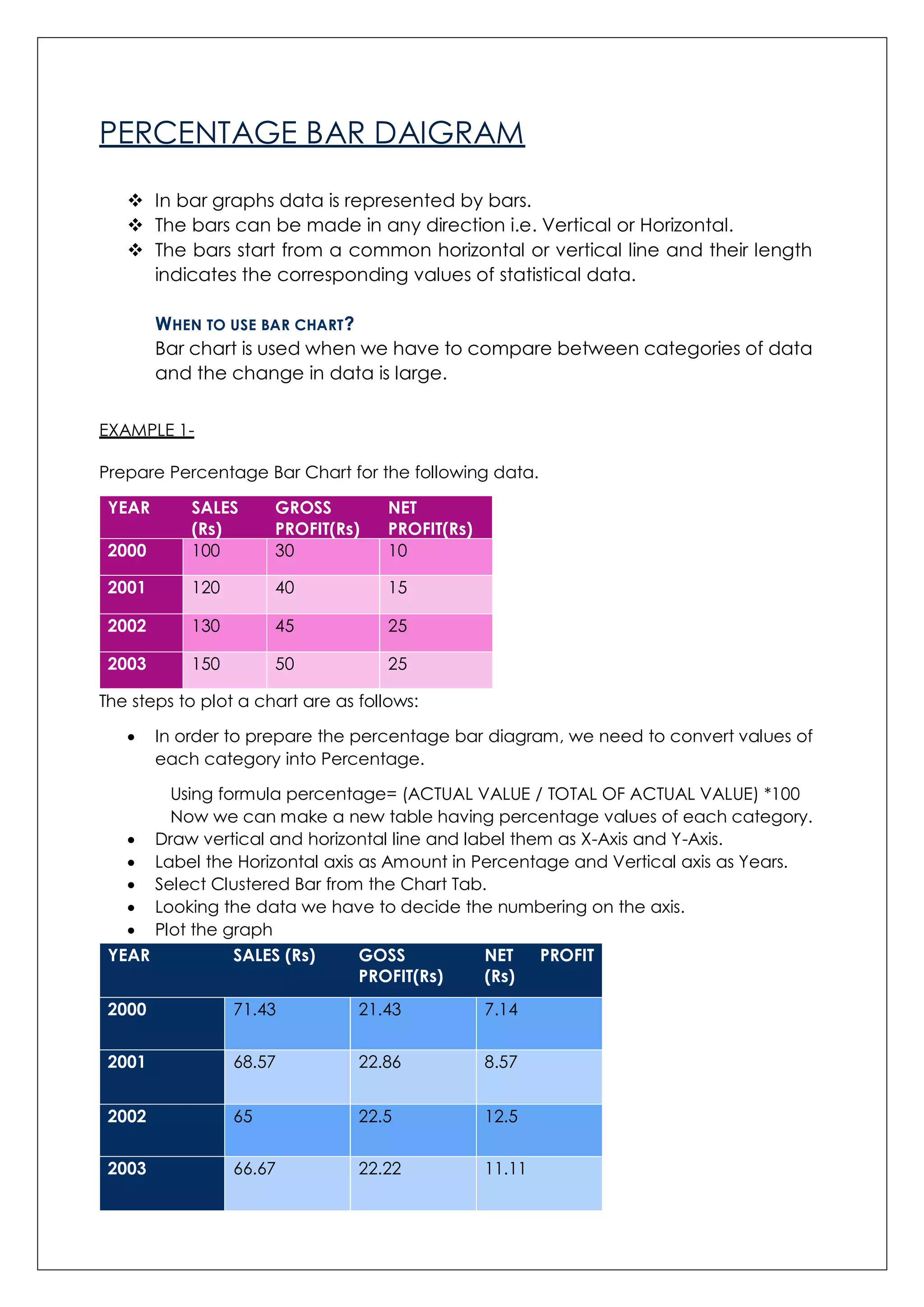
TYPES OF GRAPHICAL REPRESENTATION
•Frequency Distribution
•Bar Chart
•Pie Chart
•Pareto Daigram
Catagorical
Varibles
•Line chart
•Scatter Plot
•Ogives
•Histogram
•Frequency Curve
Numerical
Variables
3.
PERCENTAGE BAR DAIGRAM
In bar graphs data is represented by bars.
The bars can be made in any direction i.e. Vertical or Horizontal.
The bars start from a common horizontal or vertical line and their length
indicates the corresponding values of statistical data.
WHEN TO USE BAR CHART?
Bar chart is used when we have to compare between categories of data
and the change in data is large.
EXAMPLE 1-
Prepare Percentage Bar Chart for the following data.
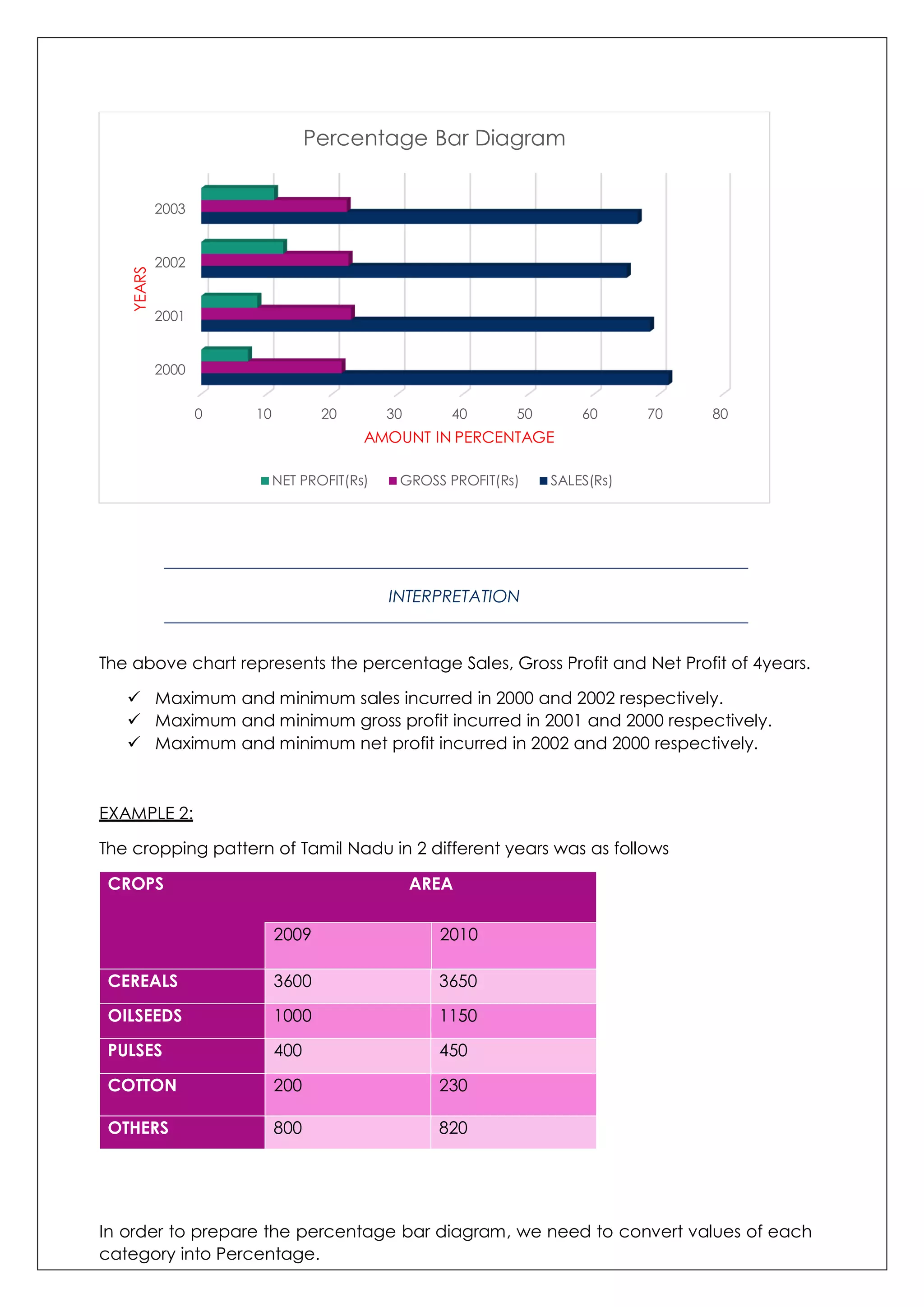
YEAR SALES
(Rs)
GROSS
PROFIT(Rs)
NET
PROFIT(Rs)
2000 100 30 10
2001 120 40 15
2002 130 45 25
2003 150 50 25
The steps to plot a chart are as follows:
In order to prepare the percentage bar diagram, we need to convert values of
each category into Percentage.
Using formula percentage= (ACTUAL VALUE / TOTAL OF ACTUAL VALUE) *100
Now we can make a new table having percentage values of each category.
Draw vertical and horizontal line and label them as X-Axis and Y-Axis.
Label the Horizontal axis as Amount in Percentage and Vertical axis as Years.
Select Clustered Bar from the Chart Tab.
Looking the data we have to decide the numbering on the axis.
Plot the graph
YEAR SALES (Rs) GOSS
PROFIT(Rs)
NET PROFIT
(Rs)
2000 71.43 21.43 7.14
2001 68.57 22.86 8.57
2002 65 22.5 12.5
2003 66.67 22.22 11.11
4.
INTERPRETATION
The above chartrepresents the percentage Sales, Gross Profit and Net Profit of 4years.
Maximum and minimum sales incurred in 2000 and 2002 respectively.
Maximum and minimum gross profit incurred in 2001 and 2000 respectively.
Maximum and minimum net profit incurred in 2002 and 2000 respectively.
EXAMPLE 2:
The cropping pattern of Tamil Nadu in 2 different years was as follows
CROPS AREA
2009 2010
CEREALS 3600 3650
OILSEEDS 1000 1150
PULSES 400 450
COTTON 200 230
OTHERS 800 820
In order to prepare the percentage bar diagram, we need to convert values of each
category into Percentage.
0 10 20 30 40 50 60 70 80
2000
2001
2002
2003
AMOUNT IN PERCENTAGE
YEARS Percentage Bar Diagram
NET PROFIT(Rs) GROSS PROFIT(Rs) SALES(Rs)
5.
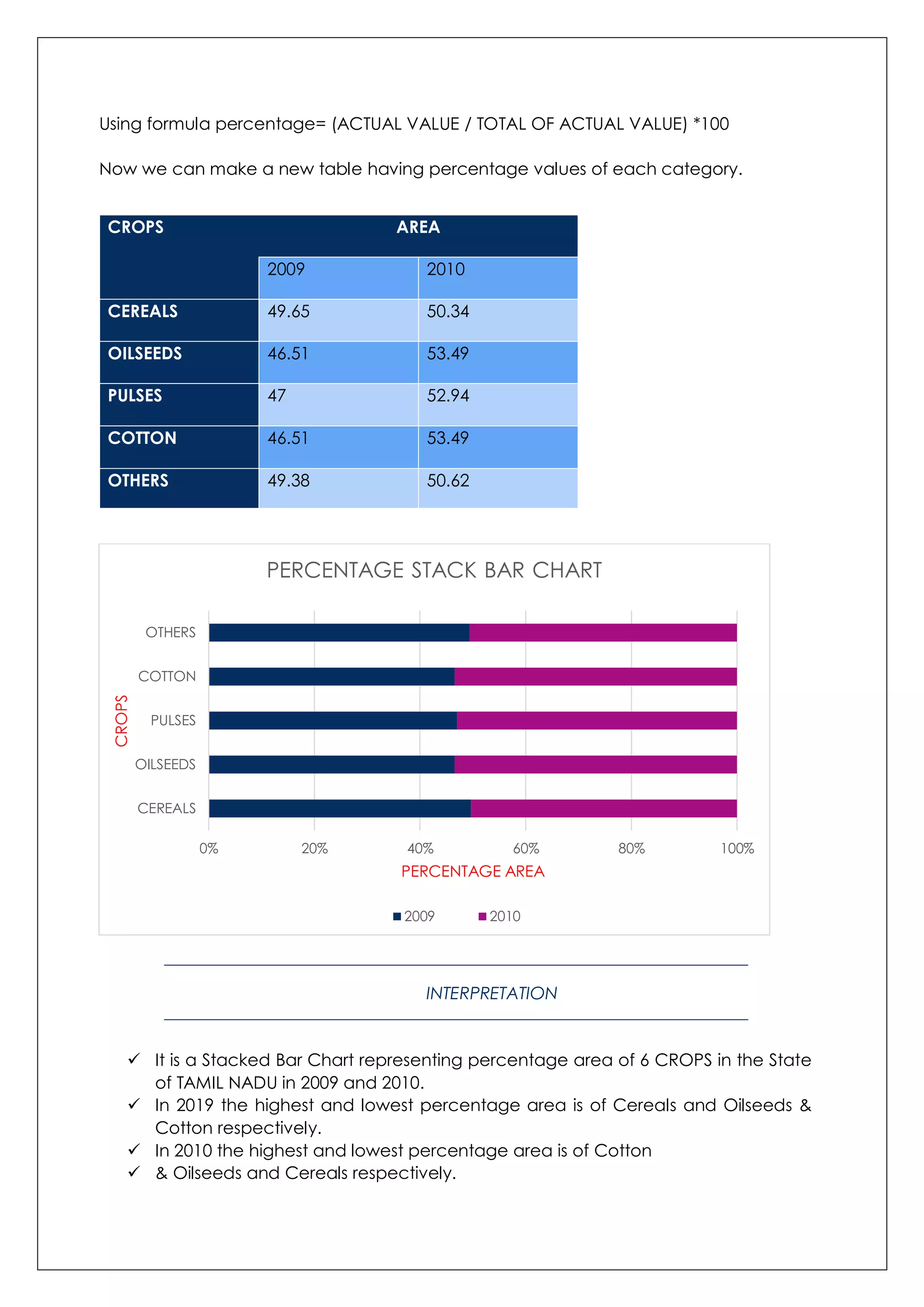
Using formula percentage=(ACTUAL VALUE / TOTAL OF ACTUAL VALUE) *100
Now we can make a new table having percentage values of each category.
CROPS AREA
2009 2010
CEREALS 49.65 50.34
OILSEEDS 46.51 53.49
PULSES 47 52.94
COTTON 46.51 53.49
OTHERS 49.38 50.62
INTERPRETATION
It is a Stacked Bar Chart representing percentage area of 6 CROPS in the State
of TAMIL NADU in 2009 and 2010.
In 2019 the highest and lowest percentage area is of Cereals and Oilseeds &
Cotton respectively.
In 2010 the highest and lowest percentage area is of Cotton
& Oilseeds and Cereals respectively.
0% 20% 40% 60% 80% 100%
CEREALS
OILSEEDS
PULSES
COTTON
OTHERS
PERCENTAGE AREA
CROPS
PERCENTAGE STACK BAR CHART
2009 2010
6.
MULTIPLE BAR CHART
Sometimes there are more than two sets of data to be compared in a bar
chart. In that case, a multiple bar chart can be used.
A multiple bar chart compares as many data sets you want.
EXAMPLE 1:
A farmer takes his produce to the market each weekend. The farmer keeps track
of the amount of produce he sells each day from each vegetable.
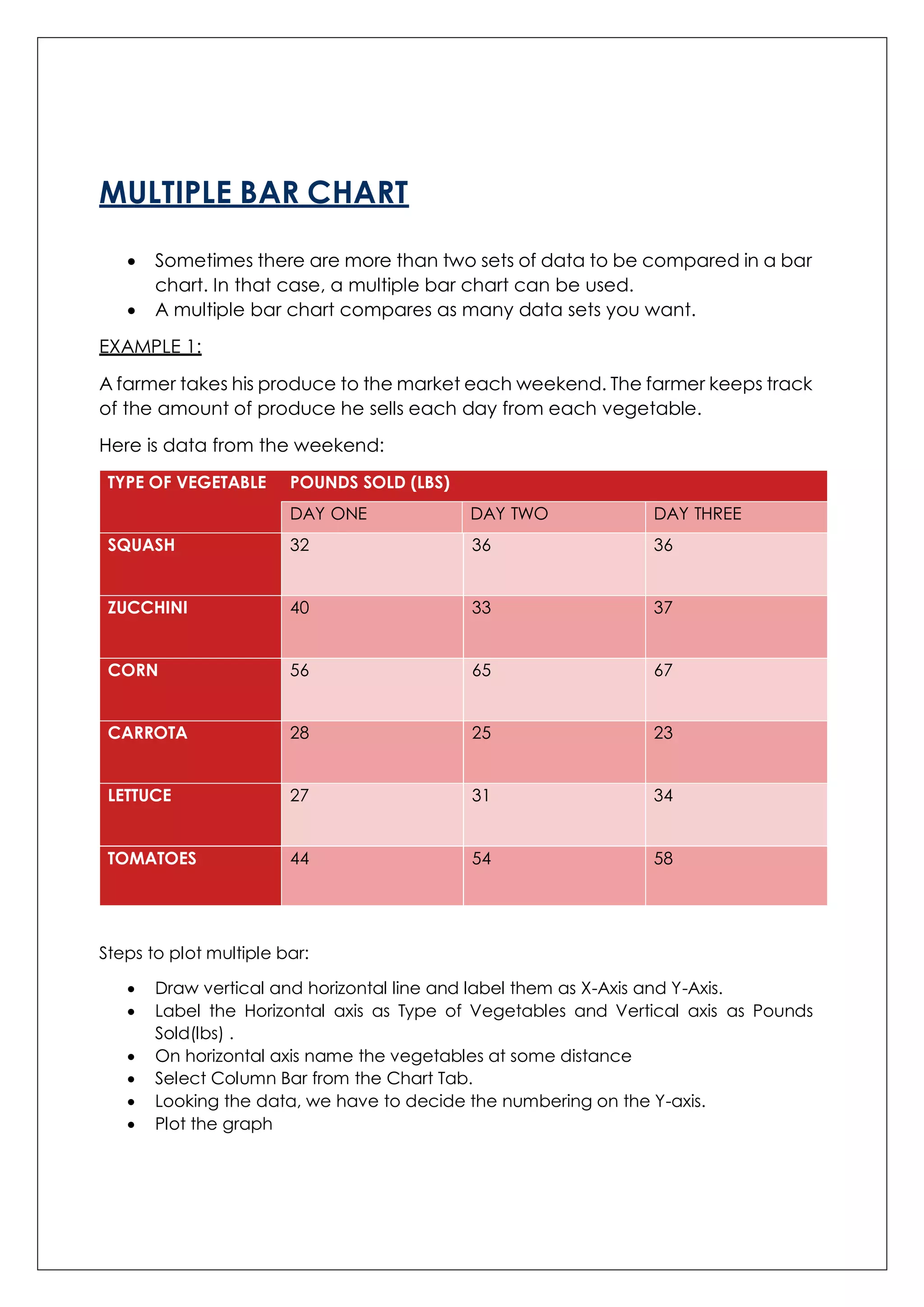
Here is data from the weekend:
TYPE OF VEGETABLE POUNDS SOLD (LBS)
DAY ONE DAY TWO DAY THREE
SQUASH 32 36 36
ZUCCHINI 40 33 37
CORN 56 65 67
CARROTA 28 25 23
LETTUCE 27 31 34
TOMATOES 44 54 58
Steps to plot multiple bar:
Draw vertical and horizontal line and label them as X-Axis and Y-Axis.
Label the Horizontal axis as Type of Vegetables and Vertical axis as Pounds
Sold(lbs) .
On horizontal axis name the vegetables at some distance
Select Column Bar from the Chart Tab.
Looking the data, we have to decide the numbering on the Y-axis.
Plot the graph
7.
INTERPRETATION
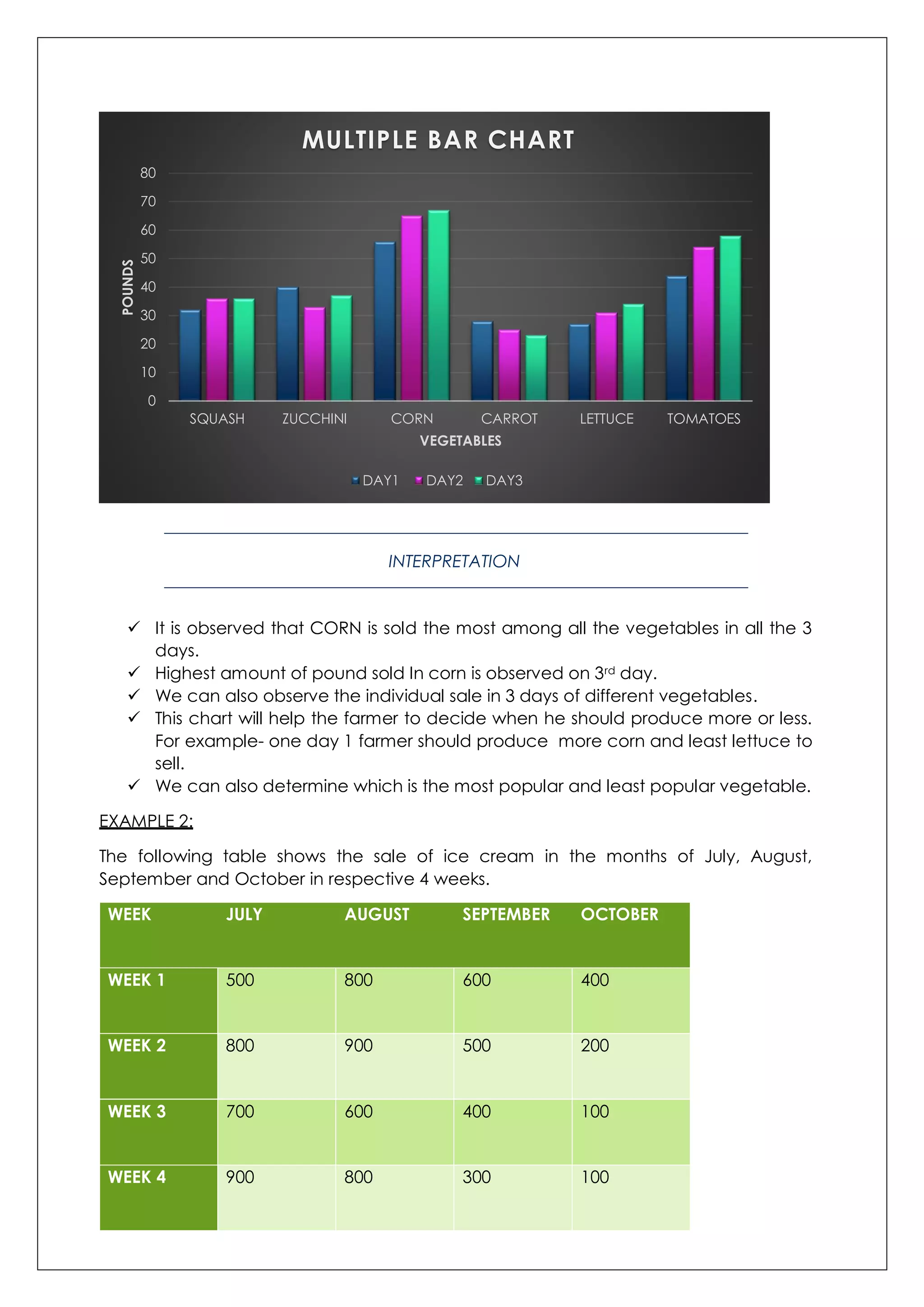
It isobserved that CORN is sold the most among all the vegetables in all the 3
days.
Highest amount of pound sold In corn is observed on 3rd day.
We can also observe the individual sale in 3 days of different vegetables.
This chart will help the farmer to decide when he should produce more or less.
For example- one day 1 farmer should produce more corn and least lettuce to
sell.
We can also determine which is the most popular and least popular vegetable.
EXAMPLE 2:
The following table shows the sale of ice cream in the months of July, August,
September and October in respective 4 weeks.
WEEK JULY AUGUST SEPTEMBER OCTOBER
WEEK 1 500 800 600 400
WEEK 2 800 900 500 200
WEEK 3 700 600 400 100
WEEK 4 900 800 300 100
0
10
20
30
40
50
60
70
80
SQUASH ZUCCHINI CORN CARROT LETTUCE TOMATOES
POUNDS
VEGETABLES
MULTIPLE BAR CHART
DAY1 DAY2 DAY3
8.
INTERPRETATION
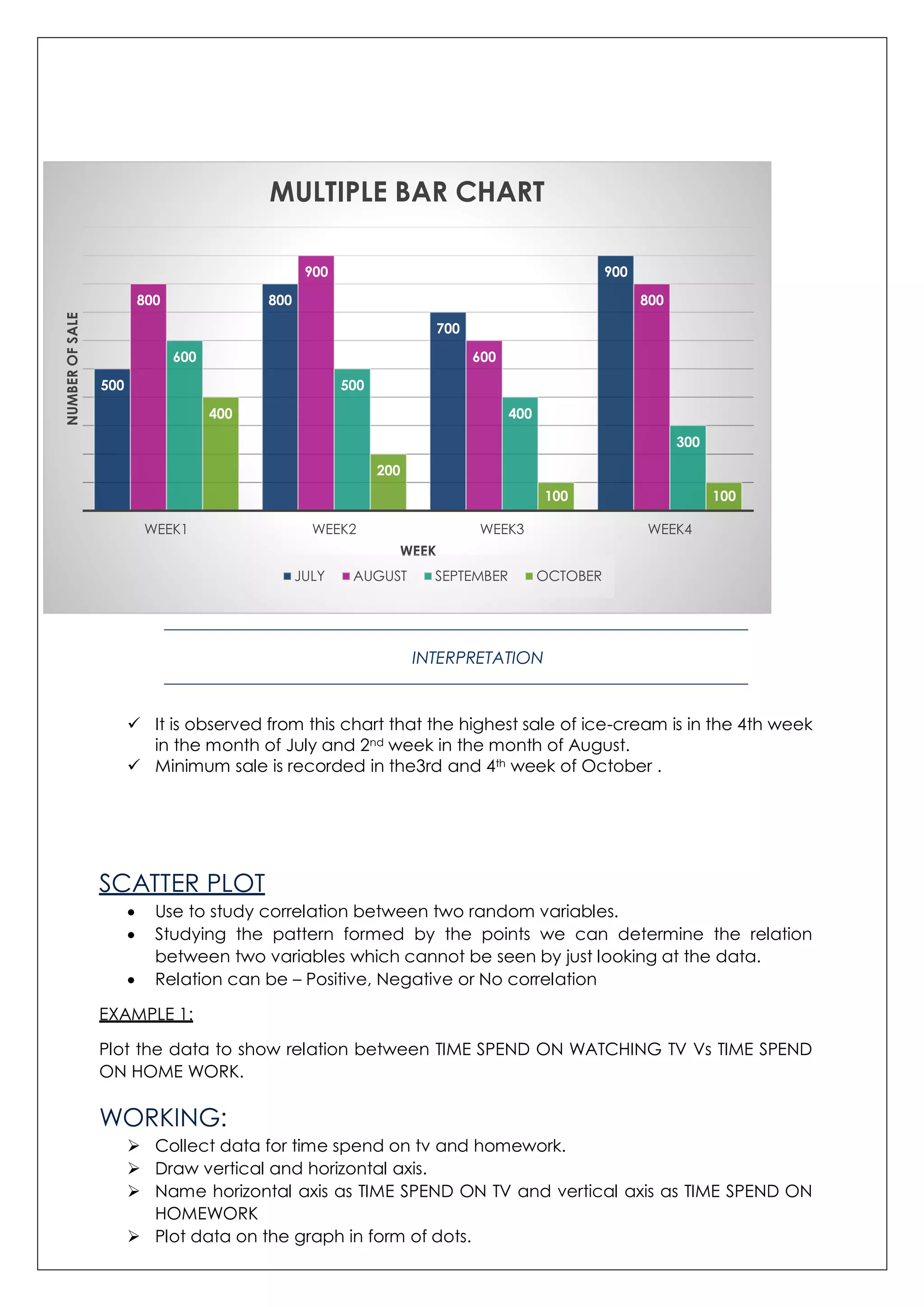
It isobserved from this chart that the highest sale of ice-cream is in the 4th week
in the month of July and 2nd week in the month of August.
Minimum sale is recorded in the3rd and 4th week of October .
SCATTER PLOT
Use to study correlation between two random variables.
Studying the pattern formed by the points we can determine the relation
between two variables which cannot be seen by just looking at the data.
Relation can be – Positive, Negative or No correlation
EXAMPLE 1:
Plot the data to show relation between TIME SPEND ON WATCHING TV Vs TIME SPEND
ON HOME WORK.
WORKING:
Collect data for time spend on tv and homework.
Draw vertical and horizontal axis.
Name horizontal axis as TIME SPEND ON TV and vertical axis as TIME SPEND ON
HOMEWORK
Plot data on the graph in form of dots.
500
800
700
900
800
900
600
800
600
500
400
300
400
200
100 100
WEEK1 WEEK2 WEEK3 WEEK4
NUMBEROFSALE
WEEK
MULTIPLE BAR CHART
JULY AUGUST SEPTEMBER OCTOBER
9.
TV
(MIN)
HOMEWORK
(MIN)
25 200
30 180
50150
120 100
200 45
220 30
INTERPRETATION
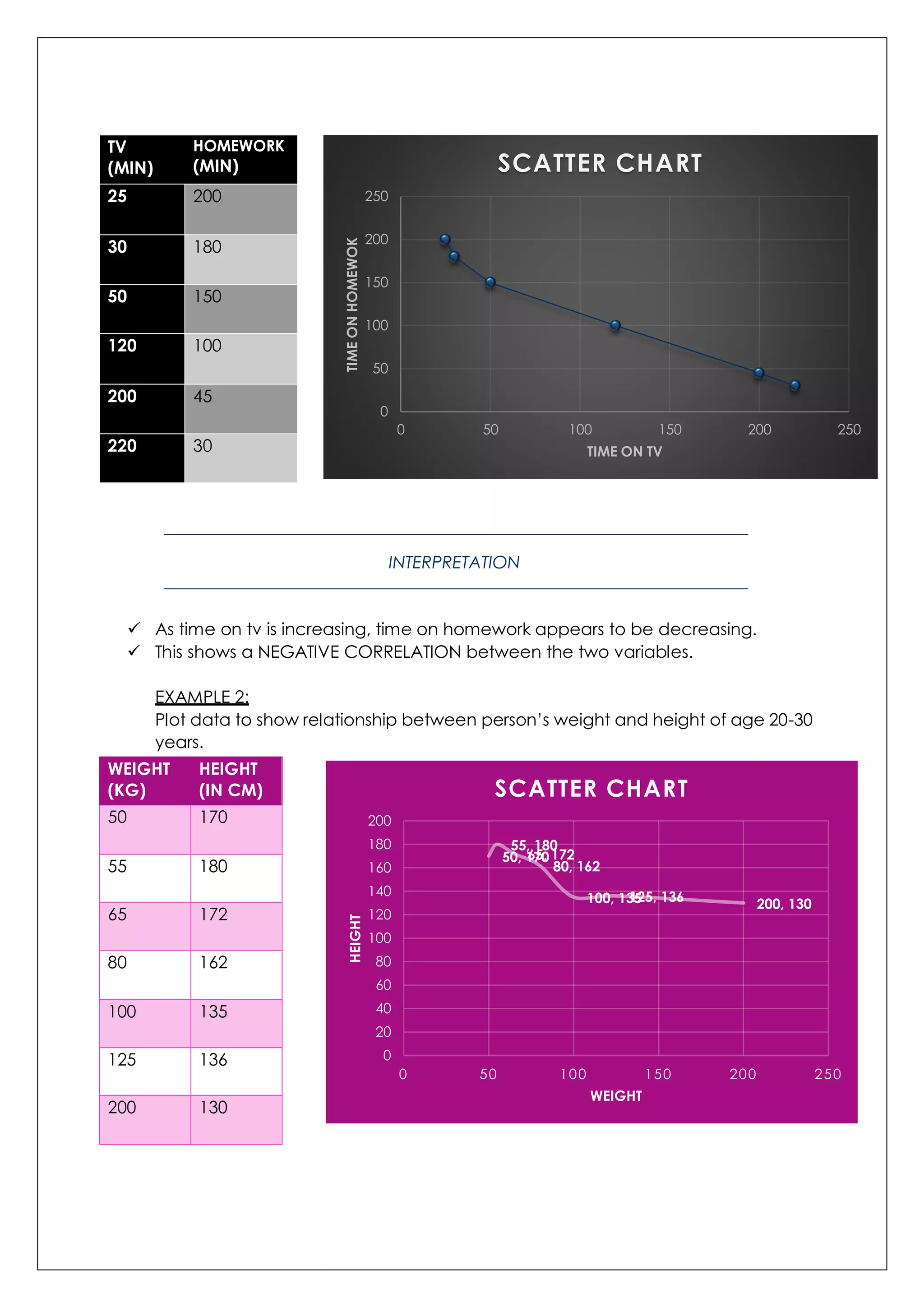
As time on tv is increasing, time on homework appears to be decreasing.
This shows a NEGATIVE CORRELATION between the two variables.
EXAMPLE 2:
Plot data to show relationship between person’s weight and height of age 20-30
years.
WEIGHT
(KG)
HEIGHT
(IN CM)
50 170
55 180
65 172
80 162
100 135
125 136
200 130
0
50
100
150
200
250
0 50 100 150 200 250
TIMEONHOMEWOK
TIME ON TV
SCATTER CHART
50, 170
55, 180
65, 172
80, 162
100, 135125, 136 200, 130
0
20
40
60
80
100
120
140
160
180
200
0 50 100 150 200 250
HEIGHT
WEIGHT
SCATTER CHART
10.
INTERPRETATION
Initially therewas a negative correlation between the two variables but later on
the correlation is constant.
We can conclude that people of weight between 50-80 has height between
170-160 whereas weight more than 100 kg results in less height.
BOX PLOT
A box plot gives a graphic presentation of data using 5 measure:
The median (centre element of the data set)
The first and third quartile (middle values of the first half and second half of the
data set after finding median)
The smallest and the largest values.
It is also called BOX-AND-WISHKER PLOT.
EXAMPLE 1:
Plot the following numbers on Box plot –
22,2,3,4,9,10,2,7,20,8,8,10,1
Steps to plot:
First write the numbers in order – 1,2,2,3,4,7,8,8,9,10,10,20,22
Find the minimum and maximum value.
Minimum value= 1
Maximum value= 22
Find the median- since there are odd number of elements => [(N+1)/2]th
value = 7th value of data array.
Median = 8
1,2,2,3,4,7,8,8,9,10,10,20,22
Find the first quartile.
1,2,2,3,4,7
Q1= [(N+1)/2]th value = 3.5th value
Q1= 2.5
Find the third quartile.
8,9,10,10,20,22
Q3= [(N+1)/2]th value = 3.5th value
Q3= 10
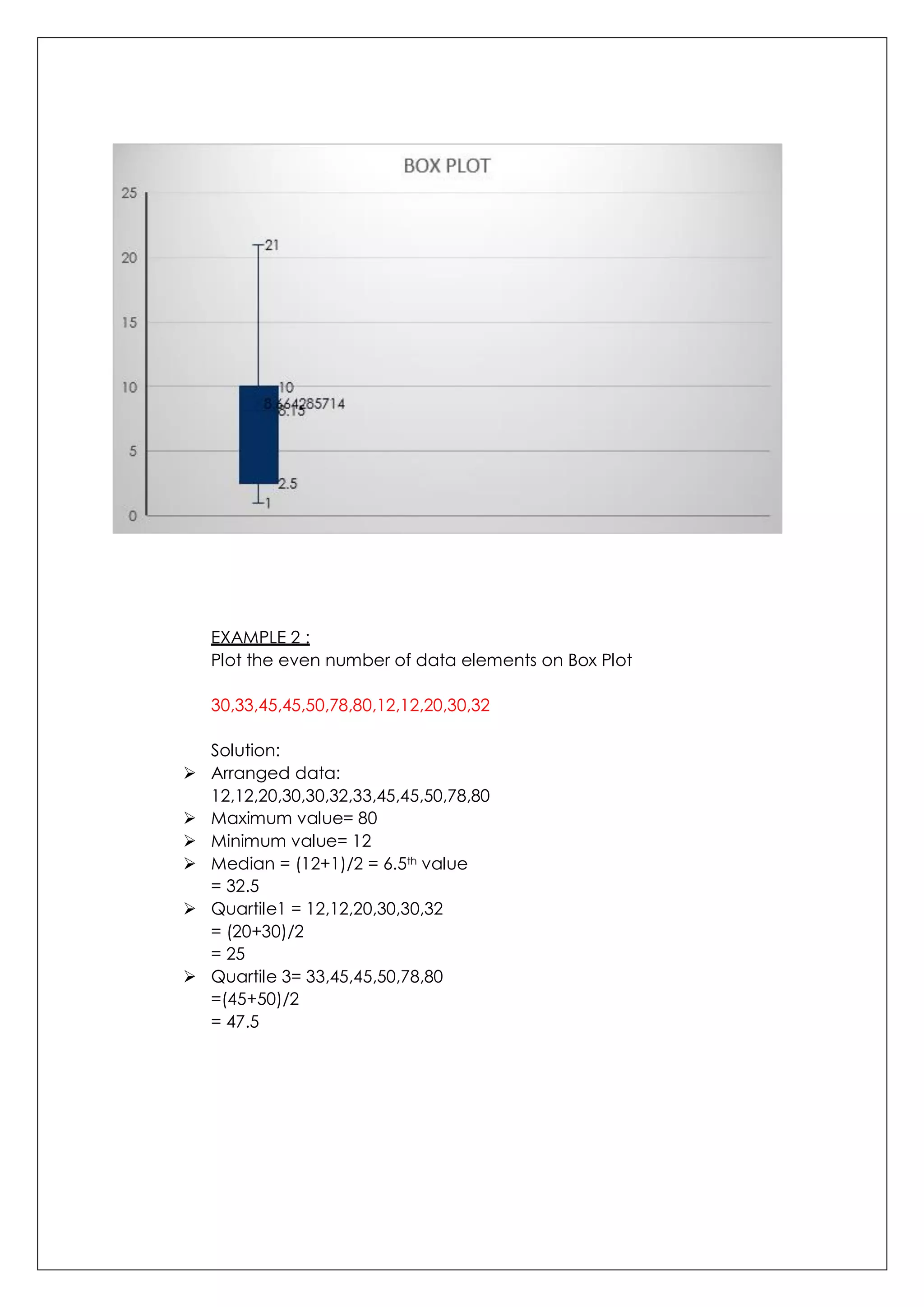
PLOT THE FOLLOWING VALUES IN THIS SEQUENCE ON EXCEL SHEET
MINIMUM VALUE= 1
QUARTILE 1= 2.5
MEDIAN = 8
QUARTILE 3= 10
MAXIMUM VALUE= 22
11.
EXAMPLE 2 :
Plotthe even number of data elements on Box Plot
30,33,45,45,50,78,80,12,12,20,30,32
Solution:
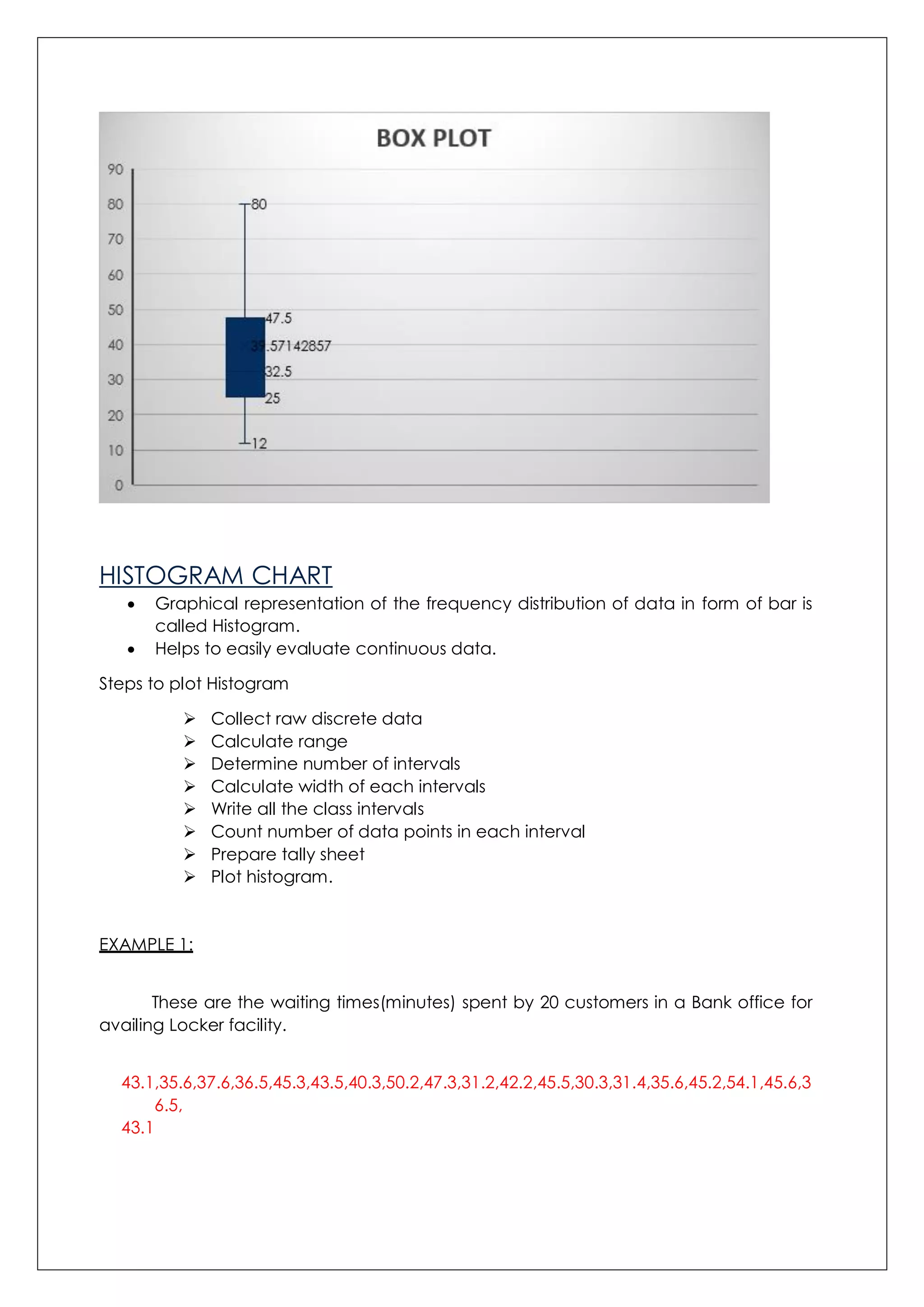
Arranged data:
12,12,20,30,30,32,33,45,45,50,78,80
Maximum value= 80
Minimum value= 12
Median = (12+1)/2 = 6.5th value
= 32.5
Quartile1 = 12,12,20,30,30,32
= (20+30)/2
= 25
Quartile 3= 33,45,45,50,78,80
=(45+50)/2
= 47.5
12.
HISTOGRAM CHART
Graphicalrepresentation of the frequency distribution of data in form of bar is
called Histogram.
Helps to easily evaluate continuous data.
Steps to plot Histogram
Collect raw discrete data
Calculate range
Determine number of intervals
Calculate width of each intervals
Write all the class intervals
Count number of data points in each interval
Prepare tally sheet
Plot histogram.
EXAMPLE 1:
These are the waiting times(minutes) spent by 20 customers in a Bank office for
availing Locker facility.
43.1,35.6,37.6,36.5,45.3,43.5,40.3,50.2,47.3,31.2,42.2,45.5,30.3,31.4,35.6,45.2,54.1,45.6,3
6.5,
43.1
13.
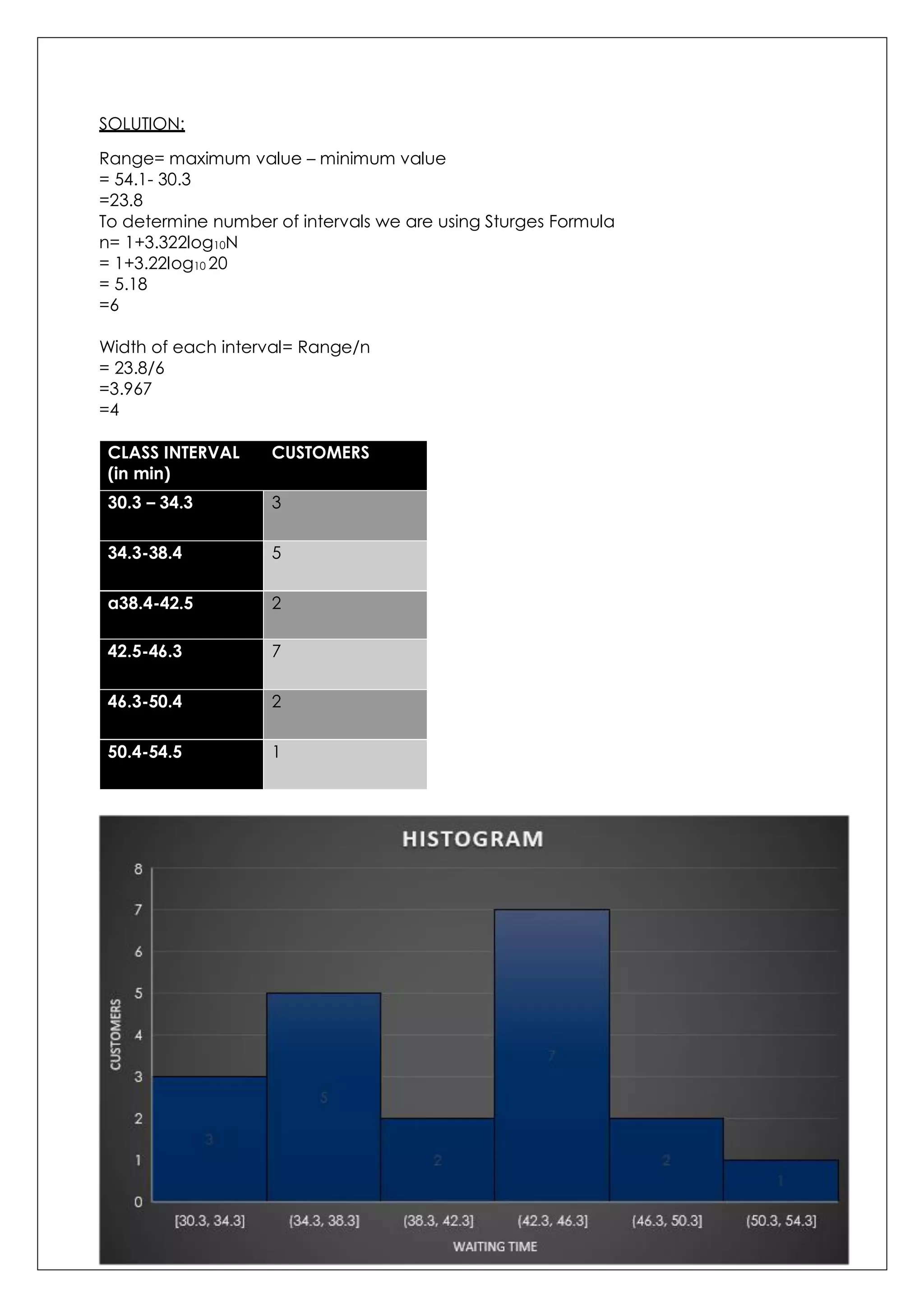
SOLUTION:
Range= maximum value– minimum value
= 54.1- 30.3
=23.8
To determine number of intervals we are using Sturges Formula
n= 1+3.322log10N
= 1+3.22log10 20
= 5.18
=6
Width of each interval= Range/n
= 23.8/6
=3.967
=4
CLASS INTERVAL
(in min)
CUSTOMERS
30.3 – 34.3 3
34.3-38.4 5
a38.4-42.5 2
42.5-46.3 7
46.3-50.4 2
50.4-54.5 1
14.
EXAMPLE 2:
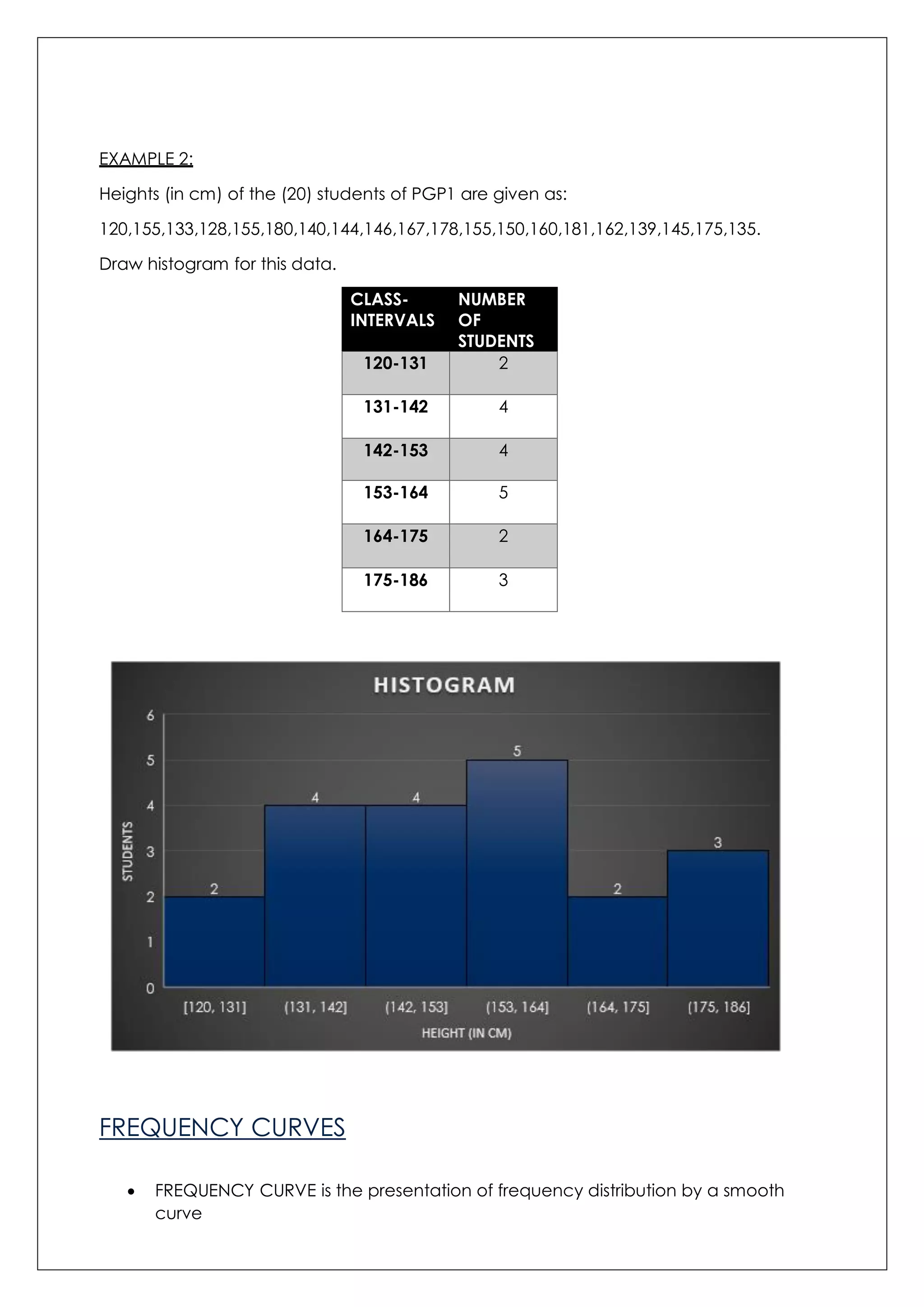
Heights (incm) of the (20) students of PGP1 are given as:
120,155,133,128,155,180,140,144,146,167,178,155,150,160,181,162,139,145,175,135.
Draw histogram for this data.
CLASS-
INTERVALS
NUMBER
OF
STUDENTS
120-131 2
131-142 4
142-153 4
153-164 5
164-175 2
175-186 3
FREQUENCY CURVES
FREQUENCY CURVE is the presentation of frequency distribution by a smooth
curve
15.
The onlydifference between frequency polygon and frequency curve is that,
frequency polygon is made from straight line whereas frequency curve is made
of smooth lines.
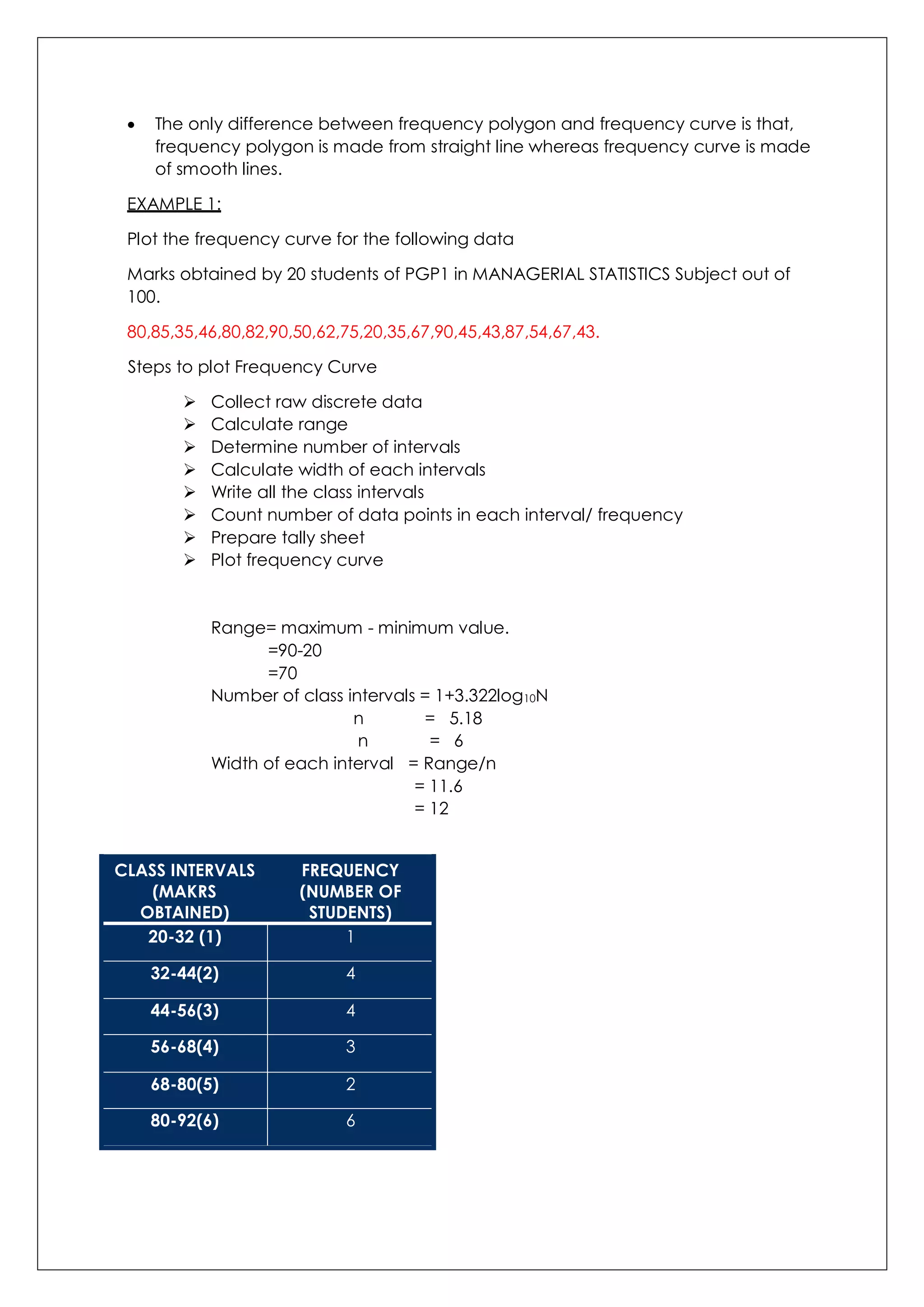
EXAMPLE 1:
Plot the frequency curve for the following data
Marks obtained by 20 students of PGP1 in MANAGERIAL STATISTICS Subject out of
100.
80,85,35,46,80,82,90,50,62,75,20,35,67,90,45,43,87,54,67,43.
Steps to plot Frequency Curve
Collect raw discrete data
Calculate range
Determine number of intervals
Calculate width of each intervals
Write all the class intervals
Count number of data points in each interval/ frequency
Prepare tally sheet
Plot frequency curve
Range= maximum - minimum value.
=90-20
=70
Number of class intervals = 1+3.322log10N
n = 5.18
n = 6
Width of each interval = Range/n
= 11.6
= 12
CLASS INTERVALS
(MAKRS
OBTAINED)
FREQUENCY
(NUMBER OF
STUDENTS)
20-32 (1) 1
32-44(2) 4
44-56(3) 4
56-68(4) 3
68-80(5) 2
80-92(6) 6
16.
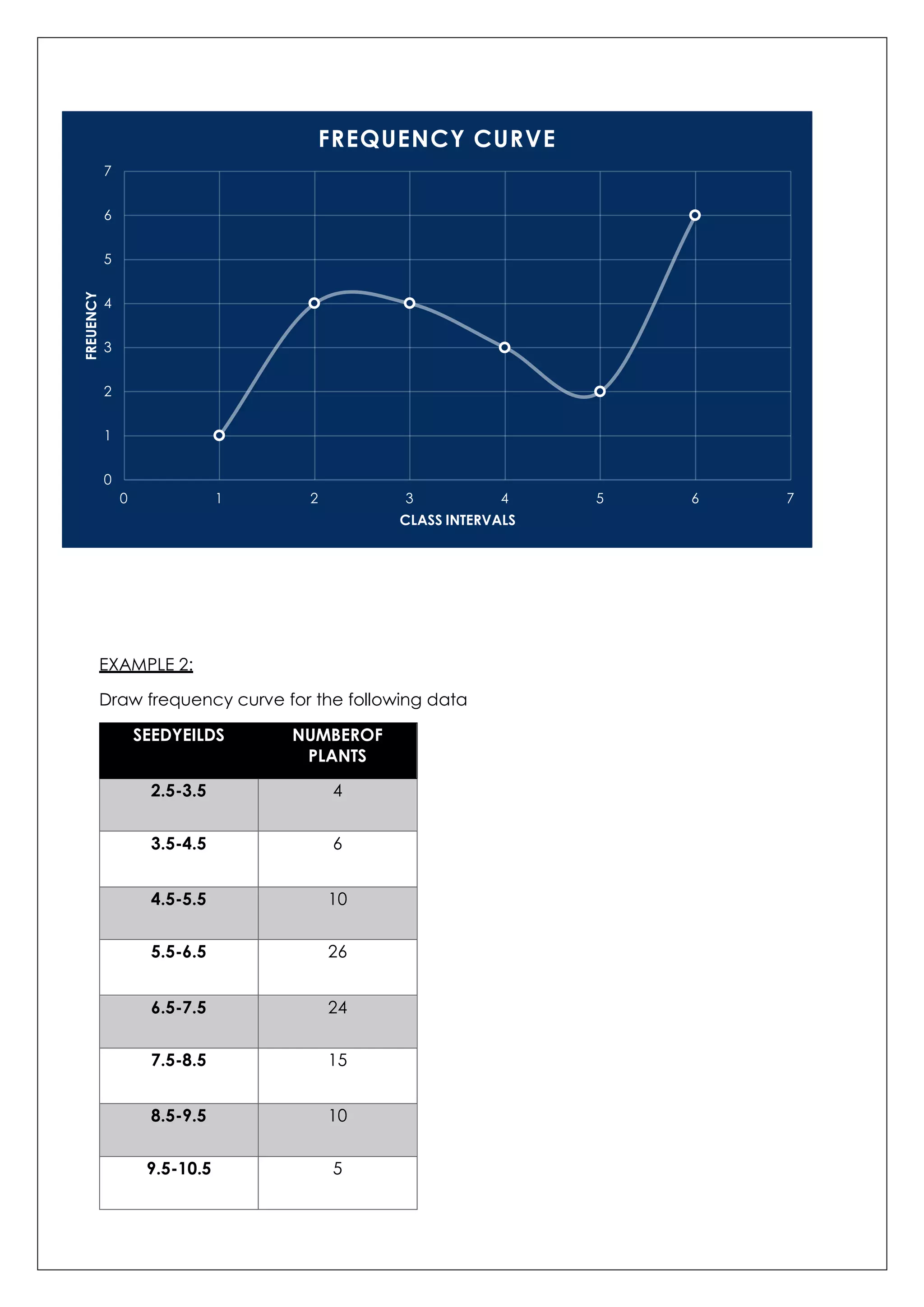
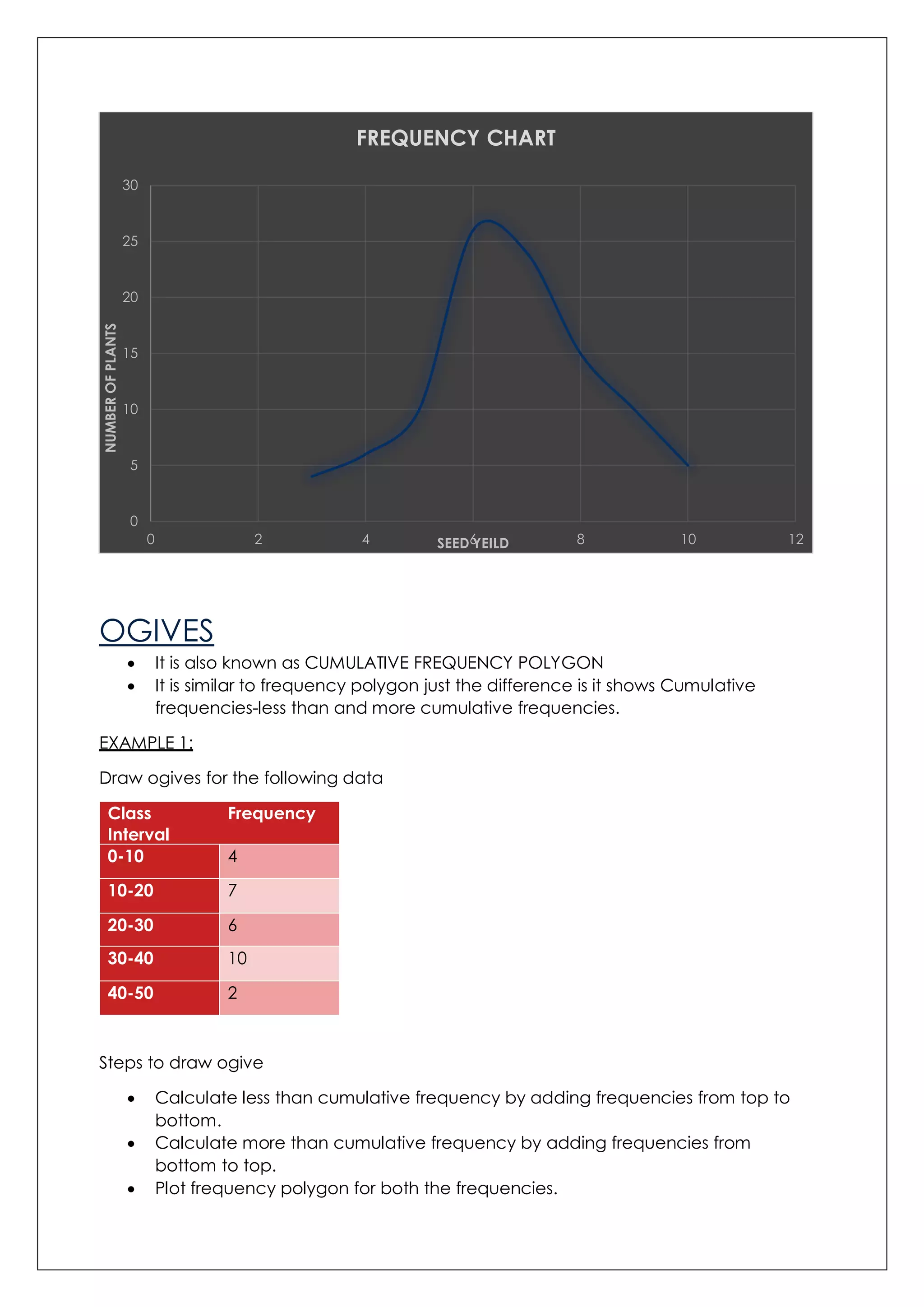
EXAMPLE 2:
Draw frequencycurve for the following data
SEEDYEILDS NUMBEROF
PLANTS
2.5-3.5 4
3.5-4.5 6
4.5-5.5 10
5.5-6.5 26
6.5-7.5 24
7.5-8.5 15
8.5-9.5 10
9.5-10.5 5
0
1
2
3
4
5
6
7
0 1 2 3 4 5 6 7
FREUENCY
CLASS INTERVALS
FREQUENCY CURVE
17.
OGIVES
It isalso known as CUMULATIVE FREQUENCY POLYGON
It is similar to frequency polygon just the difference is it shows Cumulative
frequencies-less than and more cumulative frequencies.
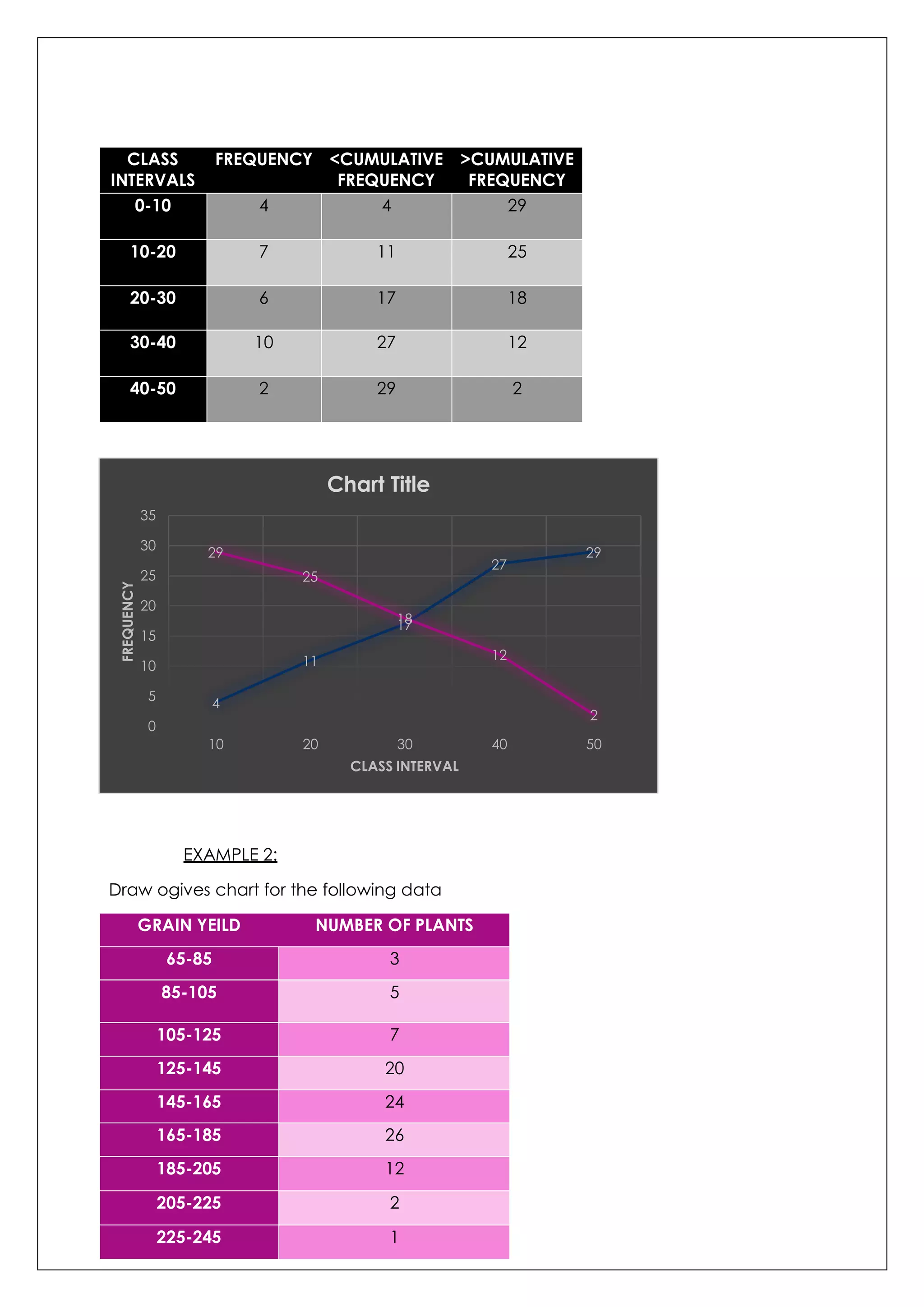
EXAMPLE 1:
Draw ogives for the following data
Class
Interval
Frequency
0-10 4
10-20 7
20-30 6
30-40 10
40-50 2
Steps to draw ogive
Calculate less than cumulative frequency by adding frequencies from top to
bottom.
Calculate more than cumulative frequency by adding frequencies from
bottom to top.
Plot frequency polygon for both the frequencies.
0
5
10
15
20
25
30
0 2 4 6 8 10 12
NUMBEROFPLANTS
SEED YEILD
FREQUENCY CHART
18.
CLASS
INTERVALS
FREQUENCY <CUMULATIVE
FREQUENCY
>CUMULATIVE
FREQUENCY
0-10 44 29
10-20 7 11 25
20-30 6 17 18
30-40 10 27 12
40-50 2 29 2
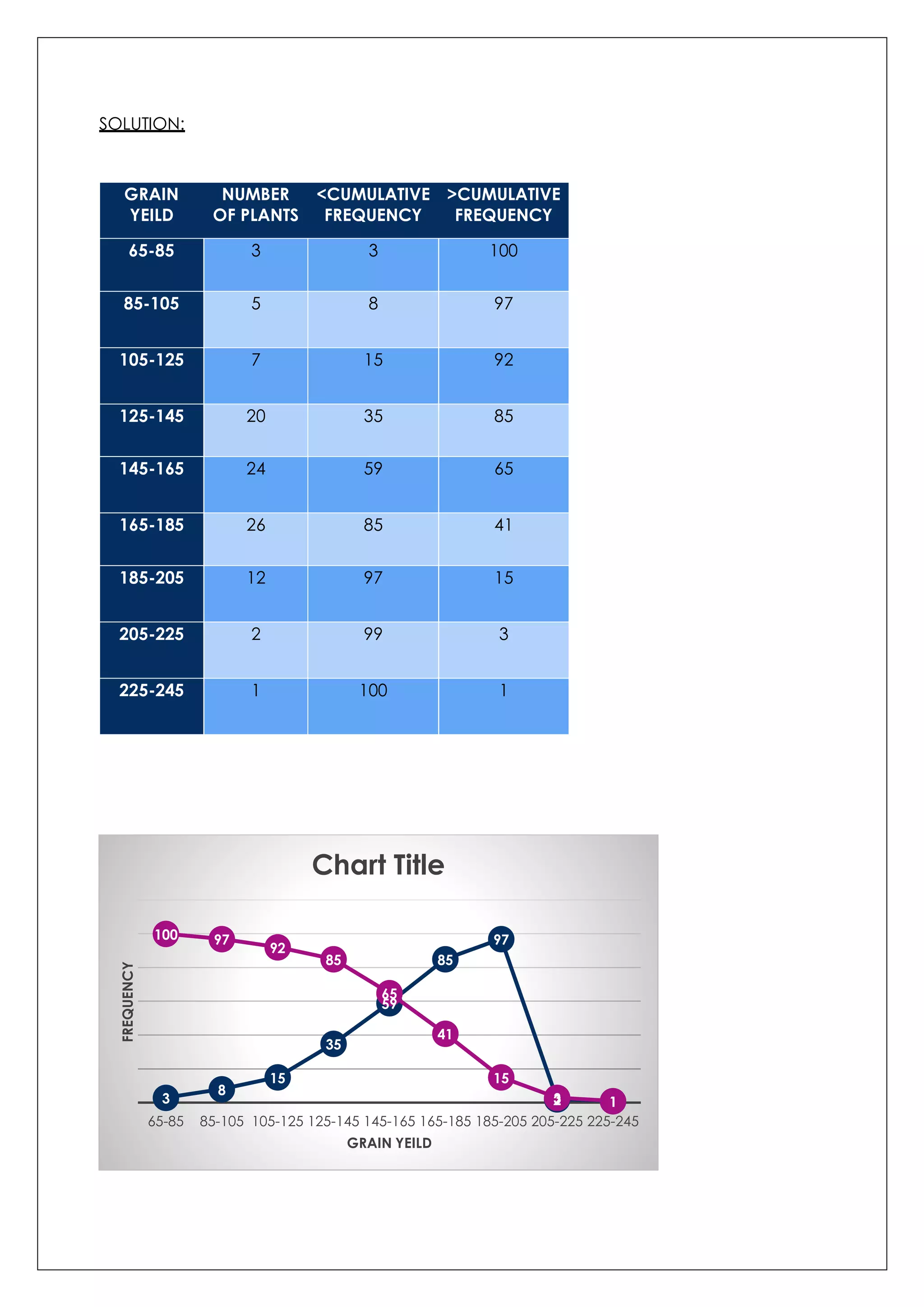
EXAMPLE 2:
Draw ogives chart for the following data
GRAIN YEILD NUMBER OF PLANTS
65-85 3
85-105 5
105-125 7
125-145 20
145-165 24
165-185 26
185-205 12
205-225 2
225-245 1
4
11
17
27
2929
25
18
12
2
0
5
10
15
20
25
30
35
10 20 30 40 50
FREQUENCY
CLASS INTERVAL
Chart Title