THE BEST F R E E TO O L YO U’R E NOT US ING
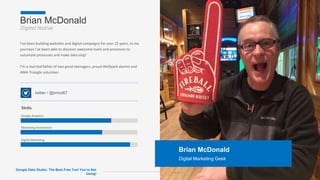
Brian McDonald
Digital Native
Page 2
Brian McDonald
Digital Marketing Geek
I’ve been building websites and digital campaigns for over 15 years. In my
journeys I’ve been able to discover awesome tools and processes to
automate processes and make data sing!
I’m a married father of two great teenagers, proud Wolfpack alumni and
AMA Triangle volunteer.
twitter / @bmcd67
Skills
Google Analytics
Marketing Automation
Digital Marketing
Google Data Studio: The Best Free Tool You’re Not
Using!
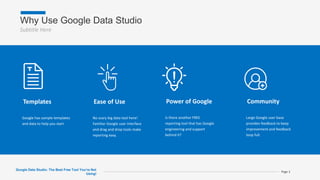
Why Use Google Data Studio
Subtitle Here
Page 3
Templates
Google has sample templates
and data to help you start
Ease of Use
No scary big data tool here!
Familiar Google user interface
and drag and drop tools make
reporting easy.
Power of Google
Is there another FREE
reporting tool that has Google
engineering and support
behind it?
Community
Large Google user base
provides feedback to keep
improvement and feedback
loop full.
Google Data Studio: The Best Free Tool You’re Not
Using!
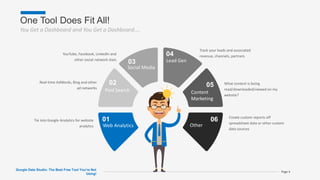
One Tool Does Fit All!
You Get a Dashboard and You Get a Dashboard….
Google Data Studio: The Best Free Tool You’re Not
Using!
Page 4
01
Web Analytics
Tie into Google Analytics for website
analytics
02
Paid Search
Real-time AdWords, Bing and other
ad networks
03
Social Media
YouTube, Facebook, LinkedIn and
other social network stats
04
Lead Gen
Track your leads and associated
revenue, channels, partners
05
Content
Marketing
What content is being
read/downloaded/viewed on my
website?
06
Other
Create custom reports off
spreadsheet data or other custom
data sources
How you can use it
All this and more!
Google Data Studio: The Best Free Tool You’re Not
Using!
Page 5
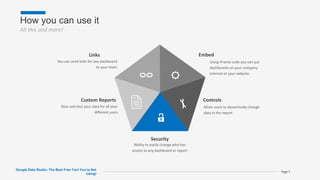
Links
You can send links for any dashboard
to your team
Custom Reports
Slice and dice your data for all your
different users
Security
Ability to easily change who has
access to any dashboard or report
Controls
Allow users to dynamically change
data in the report
Embed
Using iFrame code you can put
dashboards on your company
internet or your website.
Reporting Process
Yes, it’s just that easy!
Google Data Studio: The Best Free Tool You’re Not
Using!
Page 6
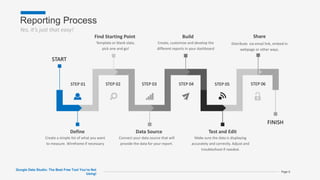
Define
Create a simple list of what you want
to measure. Wireframe if necessary
Data Source
Connect your data source that will
provide the data for your report.
Test and Edit
Make sure the data is displaying
accurately and correctly. Adjust and
troubleshoot if needed.
Build
Create, customize and develop the
different reports in your dashboard
Find Starting Point
Template or blank slate,
pick one and go!
START
FINISH
STEP 01 STEP 02 STEP 03 STEP 04 STEP 05 STEP 06
Share
Distribute via email link, embed in
webpage or other ways.
What do you need to start?
Subtitle Here
Page 7
Google Account
Google Data Studio only requires a Google account that you
have with GMail, YouTube or any other Google property.
Data Access
Access to Google data sources (Analytics, AdWords, YouTube)
or other data source.
Questions to Answer
Reporting is all about answering questions. What are you
trying to learn or discover?
Google Data Studio: The Best Free Tool You’re Not
Using!
Metrics vs. Dimensions
The X and Y of your report
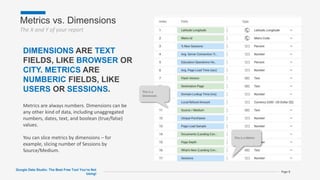
This is a Metric
This is a
Dimension
Google Data Studio: The Best Free Tool You’re Not
Using!
Page 8
DIMENSIONS ARE TEXT
FIELDS, LIKE BROWSER OR
CITY. METRICS ARE
NUMBERIC FIELDS, LIKE
USERS OR SESSIONS.
Metrics are always numbers. Dimensions can be
any other kind of data, including unaggregated
numbers, dates, text, and boolean (true/false)
values.
You can slice metrics by dimensions – for
example, slicing number of Sessions by
Source/Medium.
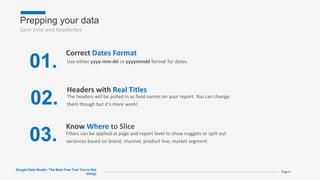
Prepping your data
Save time and headaches
Google Data Studio: The Best Free Tool You’re Not
Using!
Page 9
01.
Correct Dates Format
02.
Headers with Real Titles
03.
Know Where to Slice
Filters can be applied at page and report level to show nuggets or split out
variances based on brand, channel, product line, market segment.
The headers will be pulled in as field names on your report. You can change
them though but it’s more work!
Use either yyyy-mm-dd or yyyymmdd format for dates.
Building a Report
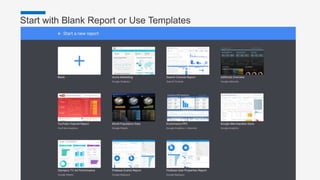
Start with Blank Report or Use Templates
Master Presentation Page 11
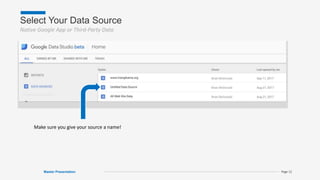
Select Your Data Source
Native Google App or Third-Party Data
Master Presentation Page 12
Make sure you give your source a name!
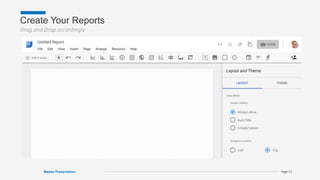
Create Your Reports
Drag and Drop accordingly
Master Presentation Page 13
Segmenting Data
Audience Segments
Google Data Studio: The Best Free Tool You’re Not
Using!
Page 15
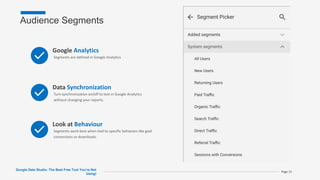
Google Analytics
Segments are defined in Google Analytics
Data Synchronization
Turn synchronization on/off to test in Google Analytics
without changing your reports.
Look at Behaviour
Segments work best when tied to specific behaviors like goal
conversions or downloads.
Filters
Drill down to unique views
Google Data Studio: The Best Free Tool You’re Not
Using!
Page 16
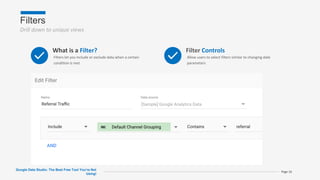
What is a Filter?
Filters let you include or exclude data when a certain
condition is met
Filter Controls
Allow users to select filters similar to changing date
parameters
Sharing Reports
Sharing
Don’t let your reports get lonely
Google Data Studio: The Best Free Tool You’re Not
Using!
Page 18
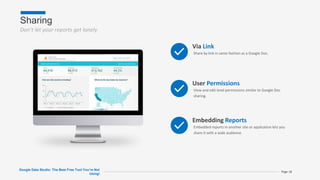
Via Link
Share by link in same fashion as a Google Doc.
User Permissions
View and edit level permissions similar to Google Doc
sharing.
Embedding Reports
Embedded reports in another site or application lets you
share it with a wide audience.
What
else ? Thanks for coming!
@bmcd67

Google Data Studio NC Tech 4 Good

  • 1.
    THE BEST FR E E TO O L YO U’R E NOT US ING
  • 2.
    Brian McDonald Digital Native Page2 Brian McDonald Digital Marketing Geek I’ve been building websites and digital campaigns for over 15 years. In my journeys I’ve been able to discover awesome tools and processes to automate processes and make data sing! I’m a married father of two great teenagers, proud Wolfpack alumni and AMA Triangle volunteer. twitter / @bmcd67 Skills Google Analytics Marketing Automation Digital Marketing Google Data Studio: The Best Free Tool You’re Not Using!
  • 3.
    Why Use GoogleData Studio Subtitle Here Page 3 Templates Google has sample templates and data to help you start Ease of Use No scary big data tool here! Familiar Google user interface and drag and drop tools make reporting easy. Power of Google Is there another FREE reporting tool that has Google engineering and support behind it? Community Large Google user base provides feedback to keep improvement and feedback loop full. Google Data Studio: The Best Free Tool You’re Not Using!
  • 4.
    One Tool DoesFit All! You Get a Dashboard and You Get a Dashboard…. Google Data Studio: The Best Free Tool You’re Not Using! Page 4 01 Web Analytics Tie into Google Analytics for website analytics 02 Paid Search Real-time AdWords, Bing and other ad networks 03 Social Media YouTube, Facebook, LinkedIn and other social network stats 04 Lead Gen Track your leads and associated revenue, channels, partners 05 Content Marketing What content is being read/downloaded/viewed on my website? 06 Other Create custom reports off spreadsheet data or other custom data sources
  • 5.
    How you canuse it All this and more! Google Data Studio: The Best Free Tool You’re Not Using! Page 5 Links You can send links for any dashboard to your team Custom Reports Slice and dice your data for all your different users Security Ability to easily change who has access to any dashboard or report Controls Allow users to dynamically change data in the report Embed Using iFrame code you can put dashboards on your company internet or your website.
  • 6.
    Reporting Process Yes, it’sjust that easy! Google Data Studio: The Best Free Tool You’re Not Using! Page 6 Define Create a simple list of what you want to measure. Wireframe if necessary Data Source Connect your data source that will provide the data for your report. Test and Edit Make sure the data is displaying accurately and correctly. Adjust and troubleshoot if needed. Build Create, customize and develop the different reports in your dashboard Find Starting Point Template or blank slate, pick one and go! START FINISH STEP 01 STEP 02 STEP 03 STEP 04 STEP 05 STEP 06 Share Distribute via email link, embed in webpage or other ways.
  • 7.
    What do youneed to start? Subtitle Here Page 7 Google Account Google Data Studio only requires a Google account that you have with GMail, YouTube or any other Google property. Data Access Access to Google data sources (Analytics, AdWords, YouTube) or other data source. Questions to Answer Reporting is all about answering questions. What are you trying to learn or discover? Google Data Studio: The Best Free Tool You’re Not Using!
  • 8.
    Metrics vs. Dimensions TheX and Y of your report This is a Metric This is a Dimension Google Data Studio: The Best Free Tool You’re Not Using! Page 8 DIMENSIONS ARE TEXT FIELDS, LIKE BROWSER OR CITY. METRICS ARE NUMBERIC FIELDS, LIKE USERS OR SESSIONS. Metrics are always numbers. Dimensions can be any other kind of data, including unaggregated numbers, dates, text, and boolean (true/false) values. You can slice metrics by dimensions – for example, slicing number of Sessions by Source/Medium.
  • 9.
    Prepping your data Savetime and headaches Google Data Studio: The Best Free Tool You’re Not Using! Page 9 01. Correct Dates Format 02. Headers with Real Titles 03. Know Where to Slice Filters can be applied at page and report level to show nuggets or split out variances based on brand, channel, product line, market segment. The headers will be pulled in as field names on your report. You can change them though but it’s more work! Use either yyyy-mm-dd or yyyymmdd format for dates.
  • 10.
  • 11.
    Start with BlankReport or Use Templates Master Presentation Page 11
  • 12.
    Select Your DataSource Native Google App or Third-Party Data Master Presentation Page 12 Make sure you give your source a name!
  • 13.
    Create Your Reports Dragand Drop accordingly Master Presentation Page 13
  • 14.
  • 15.
    Audience Segments Google DataStudio: The Best Free Tool You’re Not Using! Page 15 Google Analytics Segments are defined in Google Analytics Data Synchronization Turn synchronization on/off to test in Google Analytics without changing your reports. Look at Behaviour Segments work best when tied to specific behaviors like goal conversions or downloads.
  • 16.
    Filters Drill down tounique views Google Data Studio: The Best Free Tool You’re Not Using! Page 16 What is a Filter? Filters let you include or exclude data when a certain condition is met Filter Controls Allow users to select filters similar to changing date parameters
  • 17.
  • 18.
    Sharing Don’t let yourreports get lonely Google Data Studio: The Best Free Tool You’re Not Using! Page 18 Via Link Share by link in same fashion as a Google Doc. User Permissions View and edit level permissions similar to Google Doc sharing. Embedding Reports Embedded reports in another site or application lets you share it with a wide audience.
  • 19.
    What else ? Thanksfor coming! @bmcd67

Editor's Notes

  • #2 Just Drag & Drop your image directly over placeholder, if image not fit properly then press Reset button from slides ribbon. For more info follow video tutorial link inside readme file.
  • #17 You can apply filters to charts, groups, pages and reports.
  • #19 No login is required to view a shared report. A Google login is required to edit a shared report. Sharing a report does NOT share direct access to any added data sources. Sharing a report doesn't automatically share any data sources. Data sources must be shared separately.  Other people with whom you share can view or edit the report, even if you don't share its data source(s).  Report editors can use the dimensions and metrics from added data sources to create or edit charts and controls in the report, even if you haven't shared those data sources with them. Embedding a report in another site or application lets you share it with a wide audience.