











Brian B e c o m i n g D a t a D r i v e n w i t h G o o g l e D a t a S t u d i o
Longtime
GeekI’ve been building websites and digital campaigns for over
15 years. In my journeys I’ve been able to discover
awesome tools and processes to automate processes and
make data sing!
I’m a married father of two great teenagers, proud
Wolfpack alumni and AMA Triangle volunteer.
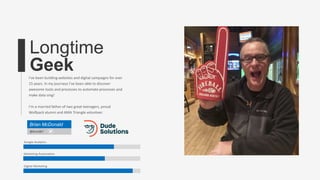
Brian McDonald
@bmcd67
Google Analytics
Marketing Automation
Digital Marketing
8 Traits of Data-Driven
Teams
Check Numbers
Test
Hypothesis to
Get Insights
Don’t Suffer from
Analysis Paralysis
Be Curious and Unbiased
Turn Numbers into
Visualizations
Pick One Attribution
Insist on Agency
Transparency
Do You Have the
Right Team in Place?
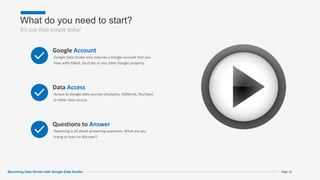
What do you need to start?
It’s just that simple folks!
Page 16
Google Account
Google Data Studio only requires a Google account that you
have with GMail, YouTube or any other Google property.
Data Access
Access to Google data sources (Analytics, AdWords, YouTube)
or other data source.
Questions to Answer
Reporting is all about answering questions. What are you
trying to learn or discover?
Becoming Data Driven with Google Data Studio
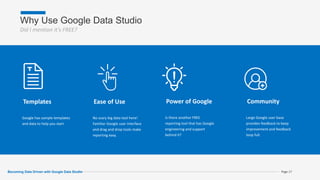
Why Use Google Data Studio
Did I mention it’s FREE?
Page 17
Templates
Google has sample templates
and data to help you start
Ease of Use
No scary big data tool here!
Familiar Google user interface
and drag and drop tools make
reporting easy.
Power of Google
Is there another FREE
reporting tool that has Google
engineering and support
behind it?
Community
Large Google user base
provides feedback to keep
improvement and feedback
loop full.
Becoming Data Driven with Google Data Studio
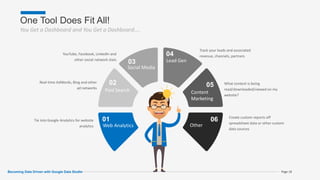
One Tool Does Fit All!
You Get a Dashboard and You Get a Dashboard….
Page 18
01
Web Analytics
Tie into Google Analytics for website
analytics
02
Paid Search
Real-time AdWords, Bing and other
ad networks
03
Social Media
YouTube, Facebook, LinkedIn and
other social network stats
04
Lead Gen
Track your leads and associated
revenue, channels, partners
05
Content
Marketing
What content is being
read/downloaded/viewed on my
website?
06
Other
Create custom reports off
spreadsheet data or other custom
data sources
Becoming Data Driven with Google Data Studio
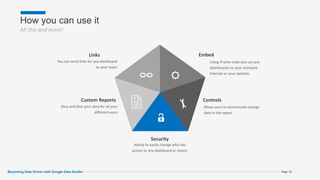
How you can use it
All this and more!
Page 19
Links
You can send links for any dashboard
to your team
Custom Reports
Slice and dice your data for all your
different users
Security
Ability to easily change who has
access to any dashboard or report
Controls
Allow users to dynamically change
data in the report
Embed
Using iFrame code you can put
dashboards on your company
internet or your website.
Becoming Data Driven with Google Data Studio
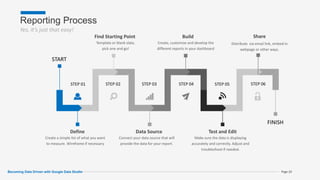
Reporting Process
Yes, it’s just that easy!
Page 20
Define
Create a simple list of what you want
to measure. Wireframe if necessary
Data Source
Connect your data source that will
provide the data for your report.
Test and Edit
Make sure the data is displaying
accurately and correctly. Adjust and
troubleshoot if needed.
Build
Create, customize and develop the
different reports in your dashboard
Find Starting Point
Template or blank slate,
pick one and go!
START
FINISH
STEP 01 STEP 02 STEP 03 STEP 04 STEP 05 STEP 06
Share
Distribute via email link, embed in
webpage or other ways.
Becoming Data Driven with Google Data Studio
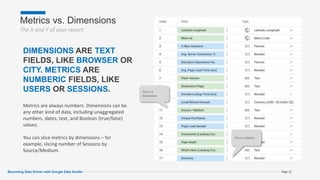
Metrics vs. Dimensions
The X and Y of your report
This is a Metric
This is a
Dimension
Page 21
DIMENSIONS ARE TEXT
FIELDS, LIKE BROWSER OR
CITY. METRICS ARE
NUMBERIC FIELDS, LIKE
USERS OR SESSIONS.
Metrics are always numbers. Dimensions can be
any other kind of data, including unaggregated
numbers, dates, text, and Boolean (true/false)
values.
You can slice metrics by dimensions – for
example, slicing number of Sessions by
Source/Medium.
Becoming Data Driven with Google Data Studio
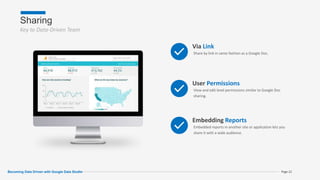
Sharing
Key to Data-Driven Team
Page 22
Via Link
Share by link in same fashion as a Google Doc.
User Permissions
View and edit level permissions similar to Google Doc
sharing.
Embedding Reports
Embedded reports in another site or application lets you
share it with a wide audience.
Becoming Data Driven with Google Data Studio
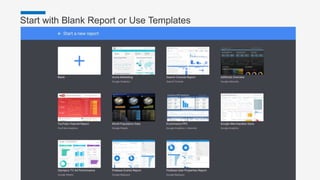
Start with Blank Report or Use Templates
Master Presentation Page 23
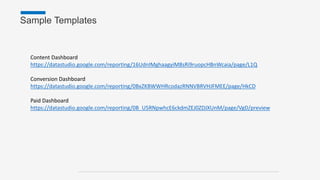
Content Dashboard
https://datastudio.google.com/reporting/16UdnIMghaagyiM8sRi9ruopcHBnWcaia/page/L1Q
Conversion Dashboard
https://datastudio.google.com/reporting/0BxZKBWWHRcodazRNNVBRVHJFMEE/page/HkCD
Paid Dashboard
https://datastudio.google.com/reporting/0B_U5RNpwhcE6ckdmZEJ0ZDJXUnM/page/VgD/preview
Sample Templates
Pregunt
as ?

Data Driven Marketing with Google Data Studio

  • 1.
    Brian B ec o m i n g D a t a D r i v e n w i t h G o o g l e D a t a S t u d i o
  • 2.
    Longtime GeekI’ve been buildingwebsites and digital campaigns for over 15 years. In my journeys I’ve been able to discover awesome tools and processes to automate processes and make data sing! I’m a married father of two great teenagers, proud Wolfpack alumni and AMA Triangle volunteer. Brian McDonald @bmcd67 Google Analytics Marketing Automation Digital Marketing
  • 6.
    8 Traits ofData-Driven Teams
  • 7.
  • 8.
  • 9.
  • 10.
  • 11.
  • 12.
  • 13.
  • 14.
    Do You Havethe Right Team in Place?
  • 16.
    What do youneed to start? It’s just that simple folks! Page 16 Google Account Google Data Studio only requires a Google account that you have with GMail, YouTube or any other Google property. Data Access Access to Google data sources (Analytics, AdWords, YouTube) or other data source. Questions to Answer Reporting is all about answering questions. What are you trying to learn or discover? Becoming Data Driven with Google Data Studio
  • 17.
    Why Use GoogleData Studio Did I mention it’s FREE? Page 17 Templates Google has sample templates and data to help you start Ease of Use No scary big data tool here! Familiar Google user interface and drag and drop tools make reporting easy. Power of Google Is there another FREE reporting tool that has Google engineering and support behind it? Community Large Google user base provides feedback to keep improvement and feedback loop full. Becoming Data Driven with Google Data Studio
  • 18.
    One Tool DoesFit All! You Get a Dashboard and You Get a Dashboard…. Page 18 01 Web Analytics Tie into Google Analytics for website analytics 02 Paid Search Real-time AdWords, Bing and other ad networks 03 Social Media YouTube, Facebook, LinkedIn and other social network stats 04 Lead Gen Track your leads and associated revenue, channels, partners 05 Content Marketing What content is being read/downloaded/viewed on my website? 06 Other Create custom reports off spreadsheet data or other custom data sources Becoming Data Driven with Google Data Studio
  • 19.
    How you canuse it All this and more! Page 19 Links You can send links for any dashboard to your team Custom Reports Slice and dice your data for all your different users Security Ability to easily change who has access to any dashboard or report Controls Allow users to dynamically change data in the report Embed Using iFrame code you can put dashboards on your company internet or your website. Becoming Data Driven with Google Data Studio
  • 20.
    Reporting Process Yes, it’sjust that easy! Page 20 Define Create a simple list of what you want to measure. Wireframe if necessary Data Source Connect your data source that will provide the data for your report. Test and Edit Make sure the data is displaying accurately and correctly. Adjust and troubleshoot if needed. Build Create, customize and develop the different reports in your dashboard Find Starting Point Template or blank slate, pick one and go! START FINISH STEP 01 STEP 02 STEP 03 STEP 04 STEP 05 STEP 06 Share Distribute via email link, embed in webpage or other ways. Becoming Data Driven with Google Data Studio
  • 21.
    Metrics vs. Dimensions TheX and Y of your report This is a Metric This is a Dimension Page 21 DIMENSIONS ARE TEXT FIELDS, LIKE BROWSER OR CITY. METRICS ARE NUMBERIC FIELDS, LIKE USERS OR SESSIONS. Metrics are always numbers. Dimensions can be any other kind of data, including unaggregated numbers, dates, text, and Boolean (true/false) values. You can slice metrics by dimensions – for example, slicing number of Sessions by Source/Medium. Becoming Data Driven with Google Data Studio
  • 22.
    Sharing Key to Data-DrivenTeam Page 22 Via Link Share by link in same fashion as a Google Doc. User Permissions View and edit level permissions similar to Google Doc sharing. Embedding Reports Embedded reports in another site or application lets you share it with a wide audience. Becoming Data Driven with Google Data Studio
  • 23.
    Start with BlankReport or Use Templates Master Presentation Page 23
  • 24.
  • 25.

Editor's Notes

  • #2 Welcome everyone to the Becoming Data Driven with Google Data Studio session.
  • #3 I’m Brian McDonald AMA Member Past High 5 speaker Digital Marketing and Analytics Manager at Dude Solutions, A SaaS Facility Management company in Cary celebrating our 20th year! We are looking to hire some talented marketing and design folks in the next few months so let me know if you’re interested in learning more about The Dude.
  • #4 Why are we here? You’re here to learn about Creating a Data-driven team using Google Data Studio right? So why am I here? I believe there is a gap in our marketing management and being data-driven. And here’s why
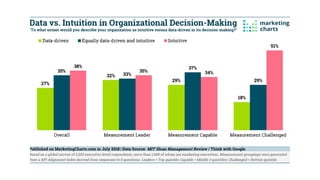
  • #5 This chart shows the extent to which senior executives around the world (half of whom are marketing executives) believe their organizations make decisions based on data or intuition. Even with all this data we’re still going with our intuition based on experience and how difficult it is to measure the using KPIs. So we’re still having to rely on intuition in the face of lack of a clear measurement and metric the majority of the time. Data Driven is only higher when we have clear KPIs.
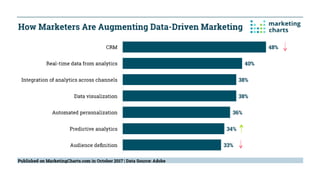
  • #6 How are we using our data in our journey to be data-driven? The ability to gain a whole view of the customer depends in part on the integration of data from different sources. So which sources are being used to augment data-driven marketing? According to survey by Adobe, the top 3 ways marketers are adding value include the use of CRM data, real-time data from analytics, and by integrating analytics across channels. (Adobe/Marketing Charts. How many people say “Our database is junk, terrible, full of dead people”. Well It can be junk if you’re trying to be data driven. Yes we can see how leads mature in Salesforce. But we can’t market to the known unknowns like we can with our website and digital engagement channels in real time. the use of CRM data – along with the use of audience definition (33%) – are both down by almost one-third from last year. So it’s no surprise that CRM and Audience Definition are dropping and Predictive Analytics is rising. Predictive Analytics are being used on the real time data and cross-channel views to drive leads.
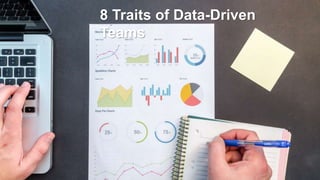
  • #7 Data is everywhere and we have to figure out what do do with it. What it means, how valid is the data? Where did it come from? How accurate is the source? Understanding customer interactions across all touchpoints is the #1 challenge for marketers. (Forrester and DMA) 68% say improving ROI measurability is the most important goal for a data management strategy. (Ascend2) Here are 8 traits of data driven teams that you can use to begin your journey. These are not all exclusive. You may find a trait that works for your team like having a daily standup meeting. It’s about what works for your team. But these 8 traits should apply across the board.
  • #8 Obsess about data management that it becomes part of your daily routine. But not too obsessive. And you don’t have to check all the data every day. Instead break up different data reporting into regular schedules. Short flighted campaigns of less than a month may be checked daily or every other day and then daily as the end of the campaign nears. You want to focus on the end results. For example the approach isn’t to “write a new blog post about data,” it’s “write a new blog post about data that results in 400 clicks to the company website.” Behind every action, there is a number attached to that action which determines performance and informs how they set their priorities.
  • #9 Data Driven teams avoid hacking the data to prove a pre-determined point. With the massive volumes of data collected you can prove almost anything. Instead, approach your data with a hypothesis of what you believe to be true and use data and analytics techniques to either prove or disprove your hunch. For example, mobile users are converting at a lower rate than your desktop visitors. Maybe you change how the mobile user sees the form and test to see if it improves conversion. Here’s another hypothesis: Mobile users will Click2Call at a higher rate than fill out a form. Doing so also avoids ‘analysis paralysis’ and ensures that insights are gathered in a reasonable amount of time.
  • #10 With all this data we can easily get overloaded. Be it the complexity or volume of data or both. Analysis paralysis can be a common side effect of data overload. Have a data champion at your company who understands that data is a compass to steer the direction. Not every data-based decision will result in guaranteed success or failure.
  • #11 Just like any good researcher, you have to have an insatiable curiosity. Personally I have an insatiable appetite for knowledge. I’m a history geek. I love watching documentaries. But I’m also curious about how people act. Why do they make the decisions they do? What factors do they consider to be most important? Not only asking questions but asking the right questions. Removing the bias can be trickier. If you’re trying to show that your campaign was the greatest thing ever you may skew your data points in order to prove your claim. Good or bad, we have to accept the data.
  • #12 Tell the story of your data with visualizations that help people understand your data and its significance. Some people learn by seeing, others listening and others a combination of both. In order to make your data and findings consumable turn the raw numbers into a visualization. Visualizations can be as simple as bar and pie charts. Or a callout scorecard measure. By using visualizations you make it easier for your audience to consume data, understand and share the valuable nuggets.
  • #13 And Stick with It. You will never get ahead if you switch. Which attribution model is the ‘right’ model? But the real question is “what story are you trying to tell?” If marketers wanted to identify the superiority of a particular channel, then focusing on its place in the acquisition process should be a priority. If it was that acquisition happens across many channels, then a more complicated attribution model should be considered. (Multi-Touch) Also, data-driven marketers should consider a channel’s impact across the customer funnel rather than what gets people to the site. Whatever is chosen, though, a single attribution model should be used consistently across campaigns. Changing attribution models makes it difficult to compare data across various marketing activities and confuses stakeholders. A single model also makes the inevitable internal dialogues on the subject much more productive.
  • #14 Picking the right agency is key and you have to insist on data standards upfront. Also don’t be afraid to ask your agency the same questions you would ask your staff. They work for you! A transparent relationship with agencies means that you are not being kept at a distance from campaign data. While there is often pressure to get campaigns out the door quickly, data-driven marketers must be strong and insist on knowing: how audience data is acquired and used, how well each target segment is performing, and what steps are being taken to optimize performance. This is not only to ‘keep an eye’ on agencies, but, as one attendee described, “if there is shared ownership of information, there can be a shared ownership of the outcome, be it positive or negative.”
  • #15 Roles that you need are: Database Manager Strategist Designer/Developer Analyst Agency CMO CEO C-Suite Buy In Sales Leadership
  • #16 Let’s talk aobut how you can use Google Data Studio to become Data Driven
  • #17 Google Data Studio is easy to use, you only need a Google account. If you have a Gmail, YouTube or Blogger account these work as well as any Google property. If you are setting this up for a company, I suggest creating a company account and that way it’s not tied to your personal account. Trust me I have several dead Adwords and Analytics accounts tied to my personal Gmail from non-existent companies. Second do you have access to the data? If you’re reporting on your company’s Google Analytics account do you have access to it? If your admin does not want to grant access tell them you just want reporting permissions only. Third and most important, do you know what you want to measure? What is your Key Performance Indicator? If you can’t answer this question stop now and figure it out.
  • #18 Why should you use Google Data Studio? There are many templates to help get you started and give you ideas. Even if a template is not built for your data set it can give you visual ideas on how to present your data. Ex. World Cup Final Report. It’s easy to use. Google has been successful in deploying tools because they are not hard to use. Let’s see a show of hands on how many people have a free reporting tool with hundreds of top notch engineers working on it? Let’s face it tech support is 90% self-serve. For me it is and if you really want to get ahead in today’s digital age you have to be able to find a path to your solution. Google has a large community of users that can help you when times get tough.
  • #19 This is the What. What can you track and measure with GDS? The answer is anything. First a bit of disclosure. The tool is free when you use Google properties as the source data. So Google Analytics, Google Ads and even Google Drive docs can be your data source. But with a simple API connection service you can connect to other sources like: Bing Ads Social network sites Partner or channel sales platforms If you’re using Google Analytics for website tracking then you can break down what content is converting best on your site. Or what pages have the best engagement? You can also create custom reports for any of these data sources. The templates are just a starting point.
  • #20 Once you build out dashboards and report sharing is easy. Like Google Docs you can create a shareable link for the reports. Or you can assign permissions to an account. Of course Google accounts are required (Gmail, YouTube, any Google property works). Embedding. Much like the ability to embed YouTube videos on a. webpage you can do the same with Google Data Studio. Real time reports can be embedded on a company webpage, intranet or other network. Controls are key on how you view data. Be it a filter, or segment, these tools help you drill down to the data you need. Security is always important. The permissions are easy to configure and change when needed.
  • #21 This the the How. How do you create a dashboard with reports? The way to accomplish a difficult task is to break it down into simple steps. This progression shows the steps you need to take in creating useful reports. The MOST important step is to determine what you are trying to accomplish by defining what you are trying to measure. Next you need to determine what your report will look like. Be it a knock off of a template or a whole new design. Where are you sourcing your data from? Determining this and connecting to the source is key. Now let’s start building. The easy to use drag and drop interface lets you build tables and charts quickly Testing and editing will fine tune your reports. Show them to others and get feedback as well as let the reports sit a day or so. Much like writing a term paper, it gets better with time. Once you’re ready, share em!
  • #22 GTM breaks the data into 2 main areas: Metrics vs. Dimensions. DIMENSIONS ARE TEXT FIELDS, LIKE BROWSER OR CITY. METRICS ARE NUMBERIC FIELDS, LIKE USERS OR SESSIONS. Metrics are always numbers. Dimensions can be any other kind of data, including unaggregated numbers, dates, text, and Boolean (true/false) values. You can slice metrics by dimensions – for example, slicing number of Sessions by Source/Medium.
  • #23 No login is required to view a shared report. A Google login is required to edit a shared report. Sharing a report does NOT share direct access to any added data sources. Sharing a report doesn't automatically share any data sources. Data sources must be shared separately.  Other people with whom you share can view or edit the report, even if you don't share its data source(s).  Report editors can use the dimensions and metrics from added data sources to create or edit charts and controls in the report, even if you haven't shared those data sources with them. Embedding a report in another site or application lets you share it with a wide audience.
  • #24 These are the templates that come with Google Data Studio. More are added everyday. Check out the world cup one.