DATA VISUALIZATION
(or)
WHY I’M LEARNING & LOVING
GOOGLE DATA STUDIO
BEAU M. PEDRAZA
LEAD SEO, FORTHEA INTERACTIVE
MARKETING
@beaupedraza
slideshare.net/beaupedraza
Today’s Agenda
1. Google Data Studio? What Exactly IS This Thing?
2. Google Sheets vs Data Studio
3. Integrations With Your Marketing Stack
4. The Basics
5. Your Data Studio Game Plan
Q: What is Google Data Studio?
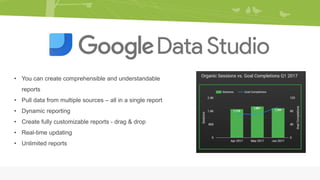
• You can create comprehensible and understandable
reports
• Pull data from multiple sources – all in a single report
• Dynamic reporting
• Create fully customizable reports - drag & drop
• Real-time updating
• Unlimited reports
Q: “But Beau, why not just use
Google Sheets?”
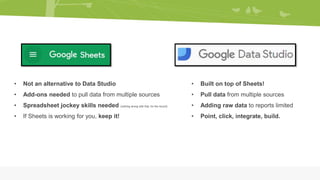
• Built on top of Sheets!
• Pull data from multiple sources
• Adding raw data to reports limited
• Point, click, integrate, build.
• Not an alternative to Data Studio
• Add-ons needed to pull data from multiple sources
• Spreadsheet jockey skills needed (nothing wrong with that, for the record)
• If Sheets is working for you, keep it!
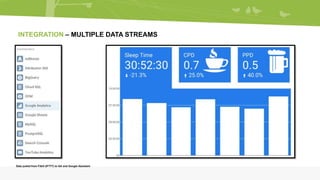
INTEGRATION – MULTIPLE DATA STREAMS
Data pulled from Fitbit (IFTTT) to GA and Google Assistant
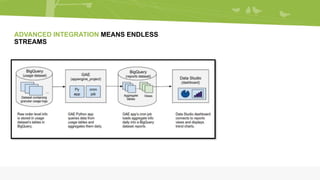
ADVANCED INTEGRATION MEANS ENDLESS
STREAMS
THANK YOU!
;)
Let’s see Data Studio in Action!
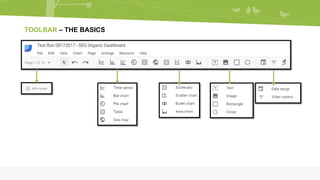
TOOLBAR – THE BASICS
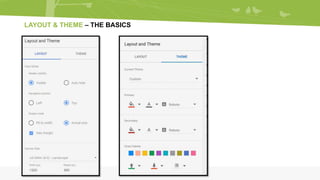
LAYOUT & THEME – THE BASICS
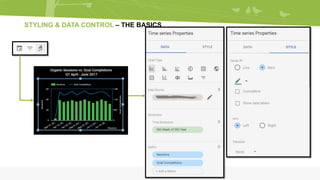
STYLING & DATA CONTROL – THE BASICS
www.forthea.com | info@forthea.com | 2727 Allen Parkway Ste 1200 | Houston, TX 77019

Google Data Studio: Data Viz & Integration Wizardry

  • 1.
    DATA VISUALIZATION (or) WHY I’MLEARNING & LOVING GOOGLE DATA STUDIO
  • 2.
    BEAU M. PEDRAZA LEADSEO, FORTHEA INTERACTIVE MARKETING @beaupedraza slideshare.net/beaupedraza
  • 3.
    Today’s Agenda 1. GoogleData Studio? What Exactly IS This Thing? 2. Google Sheets vs Data Studio 3. Integrations With Your Marketing Stack 4. The Basics 5. Your Data Studio Game Plan
  • 4.
    Q: What isGoogle Data Studio?
  • 5.
    • You cancreate comprehensible and understandable reports • Pull data from multiple sources – all in a single report • Dynamic reporting • Create fully customizable reports - drag & drop • Real-time updating • Unlimited reports
  • 7.
    Q: “But Beau,why not just use Google Sheets?”
  • 8.
    • Built ontop of Sheets! • Pull data from multiple sources • Adding raw data to reports limited • Point, click, integrate, build. • Not an alternative to Data Studio • Add-ons needed to pull data from multiple sources • Spreadsheet jockey skills needed (nothing wrong with that, for the record) • If Sheets is working for you, keep it!
  • 9.
    INTEGRATION – MULTIPLEDATA STREAMS Data pulled from Fitbit (IFTTT) to GA and Google Assistant
  • 10.
  • 11.
  • 12.
    ;) Let’s see DataStudio in Action!
  • 13.
  • 14.
    LAYOUT & THEME– THE BASICS
  • 15.
    STYLING & DATACONTROL – THE BASICS
  • 16.
    www.forthea.com | info@forthea.com| 2727 Allen Parkway Ste 1200 | Houston, TX 77019

Editor's Notes

  • #5 Google Data Studio has the pioneering capability to transform your data and package statistical reports into an attractive and easy to read format that can be effortlessly digested by your clients or your business handling individuals. Heck, you can even use it for your lifestyle needs if you own wearables!
  • #6 Benefits of Data Studio Some of the benefits of using Google Data Studio
  • #9 Google Data Studio cannot be considered as an alternative to Google Sheets. If Sheets are meeting your end goals you don’t really need to switch to Data Studio. However, Data Studio is built on top of Sheets with some extra amazing features.
  • #10 Integration is what makes Data Studio powerful, and it’s surprisingly easy to kick off. Think of integration in terms of your TV these days. I try my best to not get into “marketing analogy mode” but bear with me. I want and need to watch a new HBO series but I have to figure out a way to get that onto my TV. Game of Thrones is the data and the data source here could be a Roku, Apple TV or Chromecast. This still doesn’t let me see Peter Dinklage because I need something to connect these devices to my screen. This is where the types of cable, or data connectors, in this metaphor fit in. Without a connector, the data source can’t reach its destination and without a data source, there’s nothing to bring the data set into your reports. While you may not have access to data sources, you will always have access to every type of data connector available for the potential to connect to these types of data. The full list of connectors that are currently available (as of today) in Data Studio
  • #11 In our current era of big data analytics, being able to report quickly, accurately, easily, and cheaply is an easy to catch unicorn. To provide an integrated platform for building BI dashboards on top of big data, Google Cloud Platform offers the combination of Google BigQuery, a cloud-native data warehouse that helps you analyze petabytes of data quickly, which of course, you can integrate with Data Studio. If it can Go into a database, it can go into Data Studio.
  • #14 This toolbar is divided into 5 sections. 1. Add a page Data Studio lets you add multiple pages to a single report. This allows you to group similar reports on each page or have a long report by creating multiple pages. 2. Selection mode/undo/redo Another great part of Data Studio is the undo and redo buttons. You can easily switch between your last and next modifications.. 3. Types of data visualization These are multiple types of data visualization tools. You can display your data with a pie chart, a graph, a table or geo map. This section contains the tools to display your data in multiple formats. 4. Add a text/image/rectangle/circle To make your reports easy to understand, you can add a title or your company’s logo to the report. 5. Data Controllers There are two ways in which you can control the data settings in your reports. Either by using the data selector or by applying filters.
  • #15 You can set a layout or theme for your overall reports either before you start the process or in the middle of it. You can change the theme background, or  text color for all reports. There are a lot of features you can explore by fiddling with options in the sidebar table.
  • #16 You can also juggle with your data and apply styling. To do this, select a  report and from the sidebar under the data column you can: Change the chart type Select a different data source Add or change a dimension Add or change a metric Choose a default date range Apply filter Add a Google Analytics segment