



Analytics 101:
Harnessing the
power of data
Garrett Mehrguth, MBA
Directive Consulting | CEO
The plan:
AGENDA
‣ Introduction
‣ Overview of Analytic modeling
‣ How to Set Up Analytics
‣ Implementing Event Tracking (I have a code that makes it easy!!)
‣ Reporting with Conversion Tracking and Goal Values
‣ Understanding the Power of Segmentation
2
INTRODUCTION 3
A little about me
‣ I am the CEO and Founder of Directive
Consulting. We do SEO, PPC, and CRO.
‣ I like to play soccer and surf!
‣ In my free-time I also like playing with capital
and learning how to grow money through proper
allocation.
Analytic
Modeling
OHHHH YEAAAAA!!!!
Analytics 101: Harnessing the Power of
Data
Hold everything constant and test one thing.
5Analytic Modeling
What is it and why should I
care?
You can’t test everything at once
6Analytic Modeling
Know what your testing
The Office
How to Set up
Google
analytics
Don’t worry it’s easy!
Analytics 101: Harnessing the Power of
Data
 Go to Google Analytics: http://bit.ly/1a5ZrY2
 Add tracking code to the head of your page
 THAT’S IT!!!
8Setting up Google Analytics
Overview
The Office
 Four Big Sections
 Home
 Reporting
 Customization
 Admin
ASK LOTS OF QUESTIONS
9Setting up Google Analytics
Getting Comfortable
How to Set up
Event
Tracking
We GOT THIS!!
Analytics 101: Harnessing the Power of
Data
11Setting up Event tracking
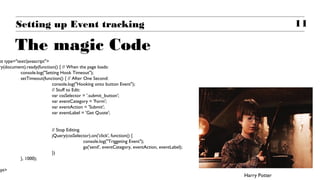
The magic Code
pt type="text/javascript">
ry(document).ready(function() { // When the page loads:
console.log("Setting Hook Timeout");
setTimeout(function() { // After One Second:
console.log("Hooking onto button Event");
// Stuff to Edit:
var cssSelector = '.submit_button';
var eventCategory = 'Form';
var eventAction = 'Submit';
var eventLabel = 'Get Quote';
// Stop Editing.
jQuery(cssSelector).on('click', function() {
console.log("Triggeting Event");
ga('send', eventCategory, eventAction, eventLabel);
})
}, 1000);
ipt>
Harry Potter
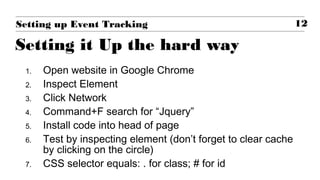
1. Open website in Google Chrome
2. Inspect Element
3. Click Network
4. Command+F search for “Jquery”
5. Install code into head of page
6. Test by inspecting element (don’t forget to clear cache
by clicking on the circle)
7. CSS selector equals: . for class; # for id
12Setting up Event Tracking
Setting it Up the hard way
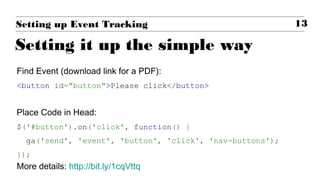
Find Event (download link for a PDF):
<button id="button">Please click</button>
Place Code in Head:
$('#button').on('click', function() {
ga('send', 'event', 'button', 'click', 'nav-buttons');
});
More details: http://bit.ly/1cqVttq
13Setting up Event Tracking
Setting it up the simple way
How to Set up
Goal Tracking
Let’s talk $$$
Analytics 101: Harnessing the Power of
Data
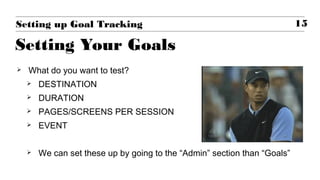
 What do you want to test?
 DESTINATION
 DURATION
 PAGES/SCREENS PER SESSION
 EVENT
 We can set these up by going to the “Admin” section than “Goals”
15Setting up Goal Tracking
Setting Your Goals
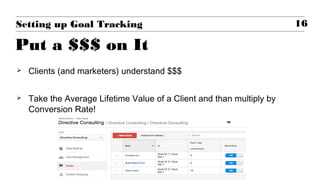
 Clients (and marketers) understand $$$
 Take the Average Lifetime Value of a Client and than multiply by
Conversion Rate!
16Setting up Goal Tracking
Put a $$$ on It
How to Set up
Segmentation
The Little Things Matter
Analytics 101: Harnessing the Power of
Data
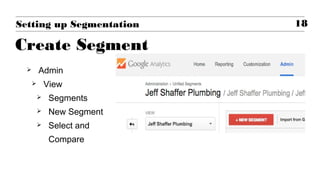
 Admin
 View
 Segments
 New Segment
 Select and
Compare
18Setting up Segmentation
Create Segment
 REPORTING
 Conversions
 Goals
 Overview
 Add Segment
 Filter and Compare
19Setting up Segmentation
Use Filters and compare
Key takeaways
In Closing
 Only test one thing at a time
 Set up your events and goals
 Give them a dollar value
 Segment and compare conversions to
understand your market
20
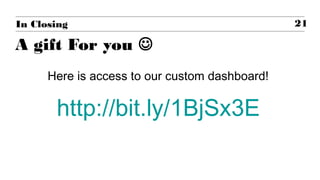
A gift For you 
In Closing
Here is access to our custom dashboard!
http://bit.ly/1BjSx3E
21
22
Q&A
23Analytics 101: Harness the power of data

Google Analytics 101: Harnessing the Power of Data

  • 1.
    Analytics 101: Harnessing the powerof data Garrett Mehrguth, MBA Directive Consulting | CEO
  • 2.
    The plan: AGENDA ‣ Introduction ‣Overview of Analytic modeling ‣ How to Set Up Analytics ‣ Implementing Event Tracking (I have a code that makes it easy!!) ‣ Reporting with Conversion Tracking and Goal Values ‣ Understanding the Power of Segmentation 2
  • 3.
    INTRODUCTION 3 A littleabout me ‣ I am the CEO and Founder of Directive Consulting. We do SEO, PPC, and CRO. ‣ I like to play soccer and surf! ‣ In my free-time I also like playing with capital and learning how to grow money through proper allocation.
  • 4.
  • 5.
    Hold everything constantand test one thing. 5Analytic Modeling What is it and why should I care?
  • 6.
    You can’t testeverything at once 6Analytic Modeling Know what your testing The Office
  • 7.
    How to Setup Google analytics Don’t worry it’s easy! Analytics 101: Harnessing the Power of Data
  • 8.
     Go toGoogle Analytics: http://bit.ly/1a5ZrY2  Add tracking code to the head of your page  THAT’S IT!!! 8Setting up Google Analytics Overview The Office
  • 9.
     Four BigSections  Home  Reporting  Customization  Admin ASK LOTS OF QUESTIONS 9Setting up Google Analytics Getting Comfortable
  • 10.
    How to Setup Event Tracking We GOT THIS!! Analytics 101: Harnessing the Power of Data
  • 11.
    11Setting up Eventtracking The magic Code pt type="text/javascript"> ry(document).ready(function() { // When the page loads: console.log("Setting Hook Timeout"); setTimeout(function() { // After One Second: console.log("Hooking onto button Event"); // Stuff to Edit: var cssSelector = '.submit_button'; var eventCategory = 'Form'; var eventAction = 'Submit'; var eventLabel = 'Get Quote'; // Stop Editing. jQuery(cssSelector).on('click', function() { console.log("Triggeting Event"); ga('send', eventCategory, eventAction, eventLabel); }) }, 1000); ipt> Harry Potter
  • 12.
    1. Open websitein Google Chrome 2. Inspect Element 3. Click Network 4. Command+F search for “Jquery” 5. Install code into head of page 6. Test by inspecting element (don’t forget to clear cache by clicking on the circle) 7. CSS selector equals: . for class; # for id 12Setting up Event Tracking Setting it Up the hard way
  • 13.
    Find Event (downloadlink for a PDF): <button id="button">Please click</button> Place Code in Head: $('#button').on('click', function() { ga('send', 'event', 'button', 'click', 'nav-buttons'); }); More details: http://bit.ly/1cqVttq 13Setting up Event Tracking Setting it up the simple way
  • 14.
    How to Setup Goal Tracking Let’s talk $$$ Analytics 101: Harnessing the Power of Data
  • 15.
     What doyou want to test?  DESTINATION  DURATION  PAGES/SCREENS PER SESSION  EVENT  We can set these up by going to the “Admin” section than “Goals” 15Setting up Goal Tracking Setting Your Goals
  • 16.
     Clients (andmarketers) understand $$$  Take the Average Lifetime Value of a Client and than multiply by Conversion Rate! 16Setting up Goal Tracking Put a $$$ on It
  • 17.
    How to Setup Segmentation The Little Things Matter Analytics 101: Harnessing the Power of Data
  • 18.
     Admin  View Segments  New Segment  Select and Compare 18Setting up Segmentation Create Segment
  • 19.
     REPORTING  Conversions Goals  Overview  Add Segment  Filter and Compare 19Setting up Segmentation Use Filters and compare
  • 20.
    Key takeaways In Closing Only test one thing at a time  Set up your events and goals  Give them a dollar value  Segment and compare conversions to understand your market 20
  • 21.
    A gift Foryou  In Closing Here is access to our custom dashboard! http://bit.ly/1BjSx3E 21
  • 22.
  • 23.