GOOGLE ANALYTICS 101
by Ruth Rosengren
@ruthstp
MWC 2015: Google Analytics 101 @ruthstp
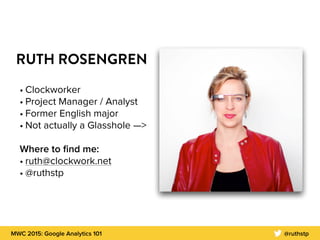
RUTH ROSENGREN
• Clockworker
• Project Manager / Analyst
• Former English major
• Not actually a Glasshole —>
Where to find me:
• ruth@clockwork.net
• @ruthstp
MWC 2015: Google Analytics 101 @ruthstp
YOU’LL BE ABLE TO:
• Create a Measurement Plan
• Generate reports, otherwise known as “How to impress your boss!”
• Implement, or know when to use:
• Classic Google Analytics
• Universal Google Analytics
• Google Tag Manager V1
• Google Tag Manager V2
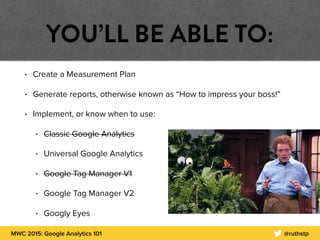
• Googly Eyes
MWC 2015: Google Analytics 101 @ruthstp
WHAT IS GOOGLE ANALYTICS?
What it is:
• a free service offered by Google that tracks information about users to your website
or app
• generates detailed site statistics about site traffic, traffic sources, and measures
conversions
• can track demographics: gender, age, interests
• Update Privacy Policy
• http://www.google.com/settings/ads/onweb/
What it isn’t:
• Perfect. Repeat after me: The trend is your friend.
MWC 2015: Google Analytics 101 @ruthstp
SO, WHO NEEDS TO CARE?
STEP 1:
MEASUREMENT PLANNING
MWC 2015: Google Analytics 101 @ruthstp
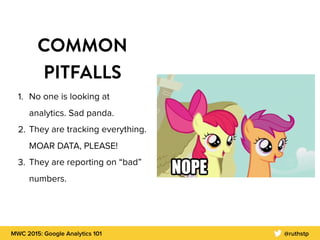
COMMON
PITFALLS
1. No one is looking at
analytics. Sad panda.

2. They are tracking everything.
MOAR DATA, PLEASE!
3. They are reporting on “bad”
numbers.
MWC 2015: Google Analytics 101 @ruthstp
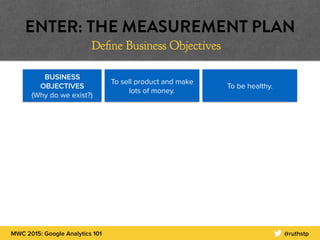
BUSINESS
OBJECTIVES
(Why do we exist?)
To sell product and make
lots of money.
To be healthy.
ENTER: THE MEASUREMENT PLAN
Define Business Objectives
MWC 2015: Google Analytics 101 @ruthstp
ENTER: THE MEASUREMENT PLAN
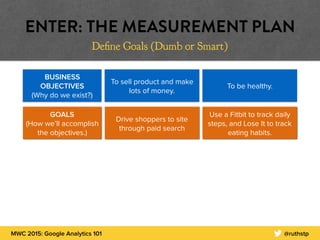
Define Goals (Dumb or Smart)
BUSINESS
OBJECTIVES
(Why do we exist?)
To sell product and make
lots of money.
To be healthy.
GOALS 

(How we’ll accomplish
the objectives.)
Drive shoppers to site
through paid search
Use a Fitbit to track daily
steps, and Lose It to track
eating habits.
MWC 2015: Google Analytics 101 @ruthstp
ENTER: THE MEASUREMENT PLAN
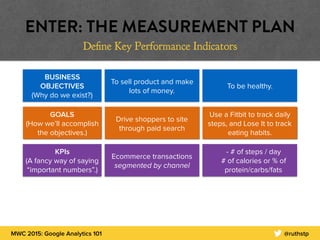
Define Key Performance Indicators
BUSINESS
OBJECTIVES
(Why do we exist?)
To sell product and make
lots of money.
To be healthy.
GOALS 

(How we’ll accomplish
the objectives.)
KPIs 

(A fancy way of saying
“important numbers”.)
Drive shoppers to site
through paid search
Use a Fitbit to track daily
steps, and Lose It to track
eating habits.
Ecommerce transactions
segmented by channel
- # of steps / day
# of calories or % of
protein/carbs/fats
MWC 2015: Google Analytics 101 @ruthstp
ENTER: THE MEASUREMENT PLAN
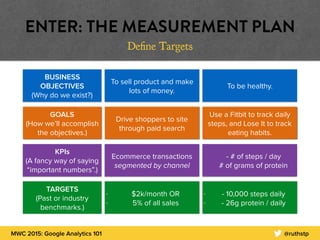
Define Targets
BUSINESS
OBJECTIVES
(Why do we exist?)
To sell product and make
lots of money.
To be healthy.
GOALS 

(How we’ll accomplish
the objectives.)
KPIs 

(A fancy way of saying
“important numbers”.)
TARGETS 

(Past or industry
benchmarks.)
Drive shoppers to site
through paid search
Use a Fitbit to track daily
steps, and Lose It to track
eating habits.
Ecommerce transactions
segmented by channel
- # of steps / day
# of grams of protein
- $2k/month OR
- 5% of all sales
- - 10,000 steps daily
- - 26g protein / daily
STEP 2:
REPORTING
MWC 2015: Google Analytics 101 @ruthstp
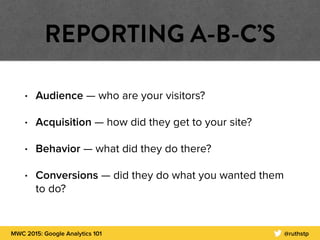
REPORTING A-B-C’S
• Audience — who are your visitors?
• Acquisition — how did they get to your site?
• Behavior — what did they do there?
• Conversions — did they do what you wanted them
to do?
MWC 2015: Google Analytics 101 @ruthstp
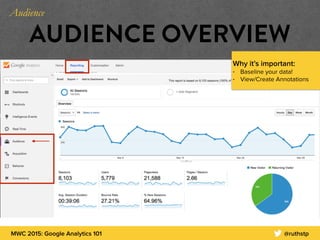
AUDIENCE OVERVIEW
Why it’s important:
• Baseline your data!
• View/Create Annotations
Audience
MWC 2015: Google Analytics 101 @ruthstp
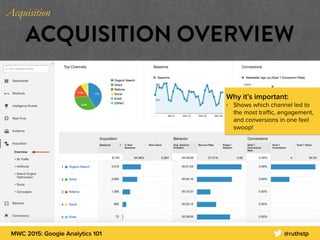
ACQUISITION OVERVIEW
Why it’s important:
• Shows which channel led to
the most traffic, engagement,
and conversions in one feel
swoop!
Acquisition
MWC 2015: Google Analytics 101 @ruthstp
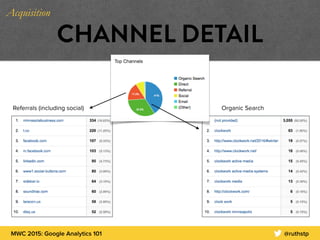
CHANNEL DETAIL
Organic SearchReferrals (including social)
Acquisition
MWC 2015: Google Analytics 101 @ruthstp
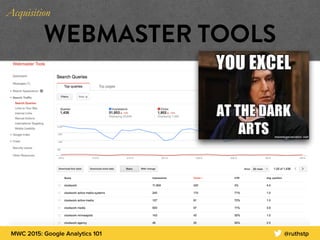
WEBMASTER TOOLS
Acquisition
MWC 2015: Google Analytics 101 @ruthstp
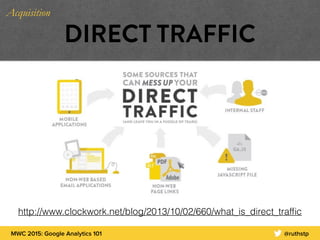
DIRECT TRAFFIC
http://www.clockwork.net/blog/2013/10/02/660/what_is_direct_traffic
Acquisition
MWC 2015: Google Analytics 101 @ruthstp
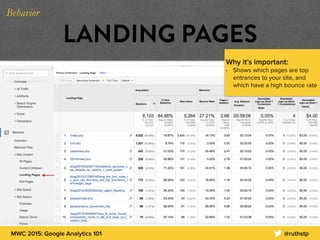
LANDING PAGES
Why it’s important:
• Shows which pages are top
entrances to your site, and
which have a high bounce rate
Behavior
MWC 2015: Google Analytics 101 @ruthstp
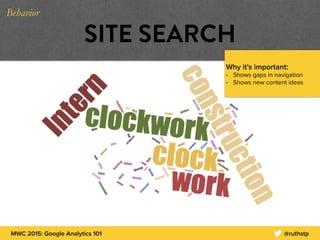
SITE SEARCH
Why it’s important:
• Shows gaps in navigation
• Shows new content ideas
Behavior
MWC 2015: Google Analytics 101 @ruthstp
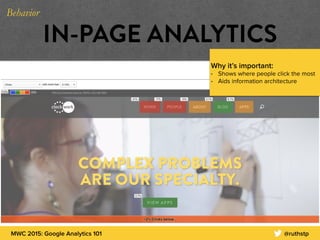
IN-PAGE ANALYTICS
Why it’s important:
• Shows where people click the most
• Aids information architecture
Behavior
MWC 2015: Google Analytics 101 @ruthstp
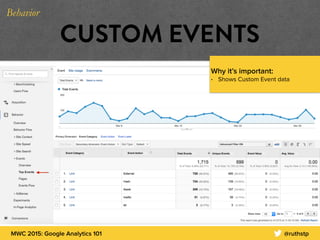
CUSTOM EVENTS
Why it’s important:
• Shows Custom Event data
Behavior
MWC 2015: Google Analytics 101 @ruthstp
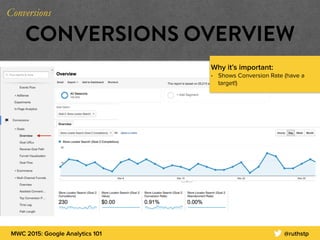
CONVERSIONS OVERVIEW
Why it’s important:
• Shows Conversion Rate (have a
target!)
Conversions
MWC 2015: Google Analytics 101 @ruthstp
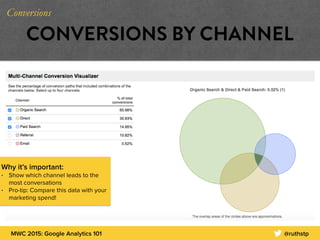
CONVERSIONS BY CHANNEL
Why it’s important:
• Show which channel leads to the
most conversations
• Pro-tip: Compare this data with your
marketing spend!
Conversions
STEP 3:
IMPLEMENTATION
MWC 2015: Google Analytics 101 @ruthstp
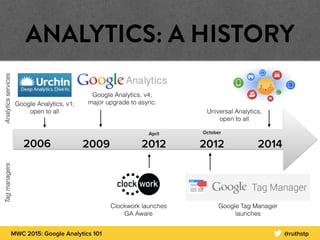
ANALYTICS: A HISTORY
2006 2009
October

2012 2014
Google Analytics, v1;
open to all
Google Analytics, v4;
major upgrade to async.
Google Tag Manager
launches
Universal Analytics,
open to all
Clockwork launches
GA Aware
April
2012
AnalyticsservicesTagmanagers
MWC 2015: Google Analytics 101 @ruthstp
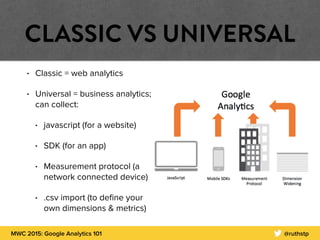
CLASSIC VS UNIVERSAL
• Classic = web analytics
• Universal = business analytics;
can collect:
• javascript (for a website)
• SDK (for an app)
• Measurement protocol (a
network connected device)
• .csv import (to define your
own dimensions & metrics)
MWC 2015: Google Analytics 101 @ruthstp
TAGS & TAG MANAGERS
• What is a tag again?
• A tag is a snippet of code, often used for third-
party tracking, e.g. Universal Analytics, AdWords
• What is a tag manager?
• A tool for managing various tags on your site, e.g.
Google Tag Manager
MWC 2015: Google Analytics 101 @ruthstp
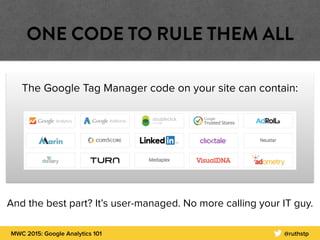
ONE CODE TO RULE THEM ALL
The Google Tag Manager code on your site can contain:
And the best part? It’s user-managed. No more calling your IT guy.
MWC 2015: Google Analytics 101 @ruthstp
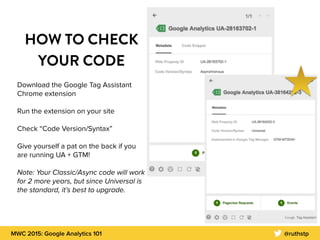
HOW TO CHECK
YOUR CODE
Download the Google Tag Assistant
Chrome extension
Run the extension on your site
Check “Code Version/Syntax”
Give yourself a pat on the back if you
are running UA + GTM!
Note: Your Classic/Async code will work
for 2 more years, but since Universal is
the standard, it’s best to upgrade.
MWC 2015: Google Analytics 101 @ruthstp
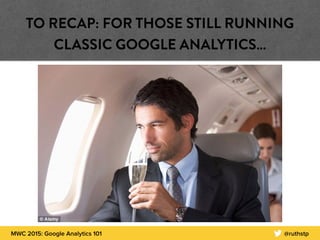
TO RECAP: FOR THOSE STILL RUNNING
CLASSIC GOOGLE ANALYTICS…
WE’RE ALMOST
THERE…
MWC 2015: Google Analytics 101 @ruthstp
SO WHAT?
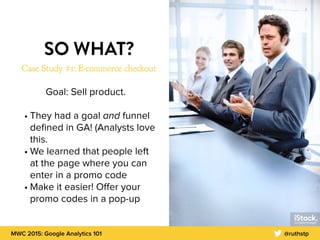
Case Study #1: E-commerce checkout
Goal: Sell product.
• They had a goal and funnel
defined in GA! (Analysts love
this.
• We learned that people left
at the page where you can
enter in a promo code
• Make it easier! Offer your
promo codes in a pop-up
MWC 2015: Google Analytics 101 @ruthstp
SO WHAT, AGAIN?
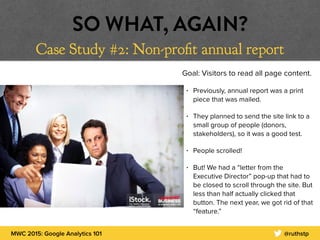
Case Study #2: Non-profit annual report
Goal: Visitors to read all page content.
• Previously, annual report was a print
piece that was mailed.
• They planned to send the site link to a
small group of people (donors,
stakeholders), so it was a good test.
• People scrolled!
• But! We had a “letter from the
Executive Director” pop-up that had to
be closed to scroll through the site. But
less than half actually clicked that
button. The next year, we got rid of that
“feature.”
YOU MADE IT!
MWC 2015: Google Analytics 101 @ruthstp
Level 1: Create a Measurement Plan
Level 2: Save your top GA reports as shortcuts and/or
to your dashboard
Level 3: Review your tracking implementation
Congrats! You are now a GA ninja!
MWC 2015: Google Analytics 101 @ruthstp
THE INTERNET IS HERE TO HELP!
Analytics Training & Certification: http://www.google.com/analytics/learn/index.html
Avinash Kaushik’s blog: http://www.kaushik.net/avinash/
Simo Ahava’s blog: http://www.simoahava.com/category/gtm-tips/
EXCEPT…
THANK YOU
ruth@clockwork.net
@ruthstp

MWC_GA_101

  • 1.
    GOOGLE ANALYTICS 101 byRuth Rosengren @ruthstp
  • 2.
    MWC 2015: GoogleAnalytics 101 @ruthstp RUTH ROSENGREN • Clockworker • Project Manager / Analyst • Former English major • Not actually a Glasshole —> Where to find me: • ruth@clockwork.net • @ruthstp
  • 3.
    MWC 2015: GoogleAnalytics 101 @ruthstp YOU’LL BE ABLE TO: • Create a Measurement Plan • Generate reports, otherwise known as “How to impress your boss!” • Implement, or know when to use: • Classic Google Analytics • Universal Google Analytics • Google Tag Manager V1 • Google Tag Manager V2 • Googly Eyes
  • 4.
    MWC 2015: GoogleAnalytics 101 @ruthstp WHAT IS GOOGLE ANALYTICS? What it is: • a free service offered by Google that tracks information about users to your website or app • generates detailed site statistics about site traffic, traffic sources, and measures conversions • can track demographics: gender, age, interests • Update Privacy Policy • http://www.google.com/settings/ads/onweb/ What it isn’t: • Perfect. Repeat after me: The trend is your friend.
  • 5.
    MWC 2015: GoogleAnalytics 101 @ruthstp SO, WHO NEEDS TO CARE?
  • 6.
  • 7.
    MWC 2015: GoogleAnalytics 101 @ruthstp COMMON PITFALLS 1. No one is looking at analytics. Sad panda. 2. They are tracking everything. MOAR DATA, PLEASE! 3. They are reporting on “bad” numbers.
  • 8.
    MWC 2015: GoogleAnalytics 101 @ruthstp BUSINESS OBJECTIVES (Why do we exist?) To sell product and make lots of money. To be healthy. ENTER: THE MEASUREMENT PLAN Define Business Objectives
  • 9.
    MWC 2015: GoogleAnalytics 101 @ruthstp ENTER: THE MEASUREMENT PLAN Define Goals (Dumb or Smart) BUSINESS OBJECTIVES (Why do we exist?) To sell product and make lots of money. To be healthy. GOALS 
 (How we’ll accomplish the objectives.) Drive shoppers to site through paid search Use a Fitbit to track daily steps, and Lose It to track eating habits.
  • 10.
    MWC 2015: GoogleAnalytics 101 @ruthstp ENTER: THE MEASUREMENT PLAN Define Key Performance Indicators BUSINESS OBJECTIVES (Why do we exist?) To sell product and make lots of money. To be healthy. GOALS 
 (How we’ll accomplish the objectives.) KPIs 
 (A fancy way of saying “important numbers”.) Drive shoppers to site through paid search Use a Fitbit to track daily steps, and Lose It to track eating habits. Ecommerce transactions segmented by channel - # of steps / day # of calories or % of protein/carbs/fats
  • 11.
    MWC 2015: GoogleAnalytics 101 @ruthstp ENTER: THE MEASUREMENT PLAN Define Targets BUSINESS OBJECTIVES (Why do we exist?) To sell product and make lots of money. To be healthy. GOALS 
 (How we’ll accomplish the objectives.) KPIs 
 (A fancy way of saying “important numbers”.) TARGETS 
 (Past or industry benchmarks.) Drive shoppers to site through paid search Use a Fitbit to track daily steps, and Lose It to track eating habits. Ecommerce transactions segmented by channel - # of steps / day # of grams of protein - $2k/month OR - 5% of all sales - - 10,000 steps daily - - 26g protein / daily
  • 12.
  • 13.
    MWC 2015: GoogleAnalytics 101 @ruthstp REPORTING A-B-C’S • Audience — who are your visitors? • Acquisition — how did they get to your site? • Behavior — what did they do there? • Conversions — did they do what you wanted them to do?
  • 14.
    MWC 2015: GoogleAnalytics 101 @ruthstp AUDIENCE OVERVIEW Why it’s important: • Baseline your data! • View/Create Annotations Audience
  • 15.
    MWC 2015: GoogleAnalytics 101 @ruthstp ACQUISITION OVERVIEW Why it’s important: • Shows which channel led to the most traffic, engagement, and conversions in one feel swoop! Acquisition
  • 16.
    MWC 2015: GoogleAnalytics 101 @ruthstp CHANNEL DETAIL Organic SearchReferrals (including social) Acquisition
  • 17.
    MWC 2015: GoogleAnalytics 101 @ruthstp WEBMASTER TOOLS Acquisition
  • 18.
    MWC 2015: GoogleAnalytics 101 @ruthstp DIRECT TRAFFIC http://www.clockwork.net/blog/2013/10/02/660/what_is_direct_traffic Acquisition
  • 19.
    MWC 2015: GoogleAnalytics 101 @ruthstp LANDING PAGES Why it’s important: • Shows which pages are top entrances to your site, and which have a high bounce rate Behavior
  • 20.
    MWC 2015: GoogleAnalytics 101 @ruthstp SITE SEARCH Why it’s important: • Shows gaps in navigation • Shows new content ideas Behavior
  • 21.
    MWC 2015: GoogleAnalytics 101 @ruthstp IN-PAGE ANALYTICS Why it’s important: • Shows where people click the most • Aids information architecture Behavior
  • 22.
    MWC 2015: GoogleAnalytics 101 @ruthstp CUSTOM EVENTS Why it’s important: • Shows Custom Event data Behavior
  • 23.
    MWC 2015: GoogleAnalytics 101 @ruthstp CONVERSIONS OVERVIEW Why it’s important: • Shows Conversion Rate (have a target!) Conversions
  • 24.
    MWC 2015: GoogleAnalytics 101 @ruthstp CONVERSIONS BY CHANNEL Why it’s important: • Show which channel leads to the most conversations • Pro-tip: Compare this data with your marketing spend! Conversions
  • 25.
  • 26.
    MWC 2015: GoogleAnalytics 101 @ruthstp ANALYTICS: A HISTORY 2006 2009 October
 2012 2014 Google Analytics, v1; open to all Google Analytics, v4; major upgrade to async. Google Tag Manager launches Universal Analytics, open to all Clockwork launches GA Aware April 2012 AnalyticsservicesTagmanagers
  • 27.
    MWC 2015: GoogleAnalytics 101 @ruthstp CLASSIC VS UNIVERSAL • Classic = web analytics • Universal = business analytics; can collect: • javascript (for a website) • SDK (for an app) • Measurement protocol (a network connected device) • .csv import (to define your own dimensions & metrics)
  • 28.
    MWC 2015: GoogleAnalytics 101 @ruthstp TAGS & TAG MANAGERS • What is a tag again? • A tag is a snippet of code, often used for third- party tracking, e.g. Universal Analytics, AdWords • What is a tag manager? • A tool for managing various tags on your site, e.g. Google Tag Manager
  • 29.
    MWC 2015: GoogleAnalytics 101 @ruthstp ONE CODE TO RULE THEM ALL The Google Tag Manager code on your site can contain: And the best part? It’s user-managed. No more calling your IT guy.
  • 30.
    MWC 2015: GoogleAnalytics 101 @ruthstp HOW TO CHECK YOUR CODE Download the Google Tag Assistant Chrome extension Run the extension on your site Check “Code Version/Syntax” Give yourself a pat on the back if you are running UA + GTM! Note: Your Classic/Async code will work for 2 more years, but since Universal is the standard, it’s best to upgrade.
  • 31.
    MWC 2015: GoogleAnalytics 101 @ruthstp TO RECAP: FOR THOSE STILL RUNNING CLASSIC GOOGLE ANALYTICS…
  • 32.
  • 33.
    MWC 2015: GoogleAnalytics 101 @ruthstp SO WHAT? Case Study #1: E-commerce checkout Goal: Sell product. • They had a goal and funnel defined in GA! (Analysts love this. • We learned that people left at the page where you can enter in a promo code • Make it easier! Offer your promo codes in a pop-up
  • 34.
    MWC 2015: GoogleAnalytics 101 @ruthstp SO WHAT, AGAIN? Case Study #2: Non-profit annual report Goal: Visitors to read all page content. • Previously, annual report was a print piece that was mailed. • They planned to send the site link to a small group of people (donors, stakeholders), so it was a good test. • People scrolled! • But! We had a “letter from the Executive Director” pop-up that had to be closed to scroll through the site. But less than half actually clicked that button. The next year, we got rid of that “feature.”
  • 35.
  • 36.
    MWC 2015: GoogleAnalytics 101 @ruthstp Level 1: Create a Measurement Plan Level 2: Save your top GA reports as shortcuts and/or to your dashboard Level 3: Review your tracking implementation Congrats! You are now a GA ninja!
  • 37.
    MWC 2015: GoogleAnalytics 101 @ruthstp THE INTERNET IS HERE TO HELP! Analytics Training & Certification: http://www.google.com/analytics/learn/index.html Avinash Kaushik’s blog: http://www.kaushik.net/avinash/ Simo Ahava’s blog: http://www.simoahava.com/category/gtm-tips/ EXCEPT…
  • 38.