
Integration of Google
Maps in Rails
Application
Swati Jadhav
1
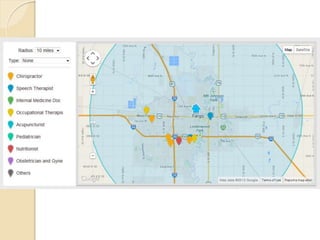
Gmap4rails Gem provides:
Multiple Maps
 Markers with easy customization
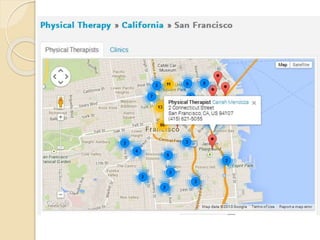
 Clusters
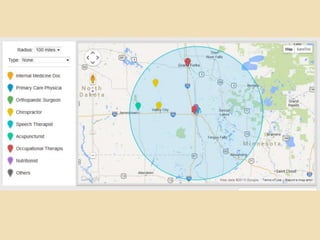
 Circles
 Polygons
 Polylines

What all you need at Model level?
Latitude, Longitude and gmaps4rails_address
 In model:


acts_as_gmappable :process_geocoding => false
def gmaps4rails_address
end


If your model do not have the latitude or
longitude as fields, then you can delegate it or
add instance methods.
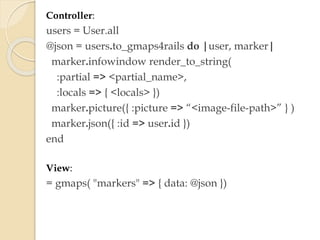
Controller:

users = User.all
@json = users.to_gmaps4rails do |user, marker|
marker.infowindow render_to_string(
:partial => <partial_name>,
:locals => { <locals> })
marker.picture({ :picture => “<image-file-path>” } )
marker.json({ :id => user.id })
end
View:

= gmaps( "markers" => { data: @json })
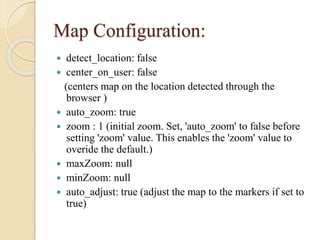
Map Configuration:
detect_location: false
 center_on_user: false
(centers map on the location detected through the
browser )
 auto_zoom: true
 zoom : 1 (initial zoom. Set, 'auto_zoom' to false before
setting 'zoom' value. This enables the 'zoom' value to
overide the default.)
 maxZoom: null
 minZoom: null
 auto_adjust: true (adjust the map to the markers if set to
true)

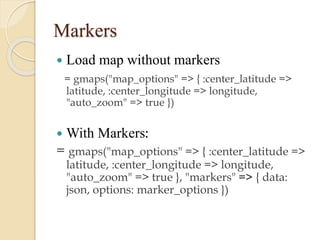
Markers


Load map without markers
= gmaps("map_options" => { :center_latitude =>
latitude, :center_longitude => longitude,
"auto_zoom" => true })



With Markers:

= gmaps("map_options" => { :center_latitude =>
latitude, :center_longitude => longitude,
"auto_zoom" => true }, "markers" => { data:
json, options: marker_options })


Add markers with js using addMarkers()

Example:
var home_pin = [{picture:
"/assets/referral_engine/pins/home.png", width:
32, lat: "#{@practice.latitude}", lng:
"#{@practice.longitude}"}];
Gmaps.map.addMarkers(home_pin)
Cluster


Cluster attributes:

•

do_clustering : to cluster markers, default to false
clusterer_gridSize: the more the quicker but the less
precise, default to 50
clusterer_maxZoom: define at which zoom level
clusterer is disabled, default to 10

•
•

Example:
= gmaps("markers" => { data: json, options:
{clusterer_gridSize: 25, do_clustering: true,
clusterer_maxZoom: 20} })
Circles


Create circle:
attributes to pass: latitude, longitude, radius, stroke-color, fill-opacity

Example:
circle = [{lng: longitude, lat: latitude, radius: radius,
strokeColor: "#00bdce", fillOpacity: 0.15}].to_json
Gmaps.map.circles = JSON.parse(data.circle)
Gmaps.map.create_circles()


Clear existing circles:
Gmaps.map.clear_circles()
callback
Gmaps.map.callback = function(){
google.maps.event.addListenerOnce(Gmaps.map.s
erviceObject, 'idle', function(){
/ set zoom-level
var zoomLevel =
Gmaps.map.serviceObject.getZoom();
if (zoomLevel > 12) {
Gmaps.map.serviceObject.setZoom(12);
}})};
Issues:


Full zoom-out for single pin

•

Solution: on map-load check the zoom-level
and adjust accordingly using setZoom()

Display only latest for multiple locations at
same place
• Solution: create group of such locations and add
while creating info-window for that location
include the info of all those grouped locations

Integration of Google-map in Rails Application

Integration of Google-map in Rails Application

  • 1.
    Integration of Google Mapsin Rails Application Swati Jadhav 1
  • 2.
    Gmap4rails Gem provides: MultipleMaps  Markers with easy customization  Clusters  Circles  Polygons  Polylines 
  • 3.
    What all youneed at Model level? Latitude, Longitude and gmaps4rails_address  In model:  acts_as_gmappable :process_geocoding => false def gmaps4rails_address end  If your model do not have the latitude or longitude as fields, then you can delegate it or add instance methods.
  • 4.
    Controller: users = User.all @json= users.to_gmaps4rails do |user, marker| marker.infowindow render_to_string( :partial => <partial_name>, :locals => { <locals> }) marker.picture({ :picture => “<image-file-path>” } ) marker.json({ :id => user.id }) end View: = gmaps( "markers" => { data: @json })
  • 5.
    Map Configuration: detect_location: false center_on_user: false (centers map on the location detected through the browser )  auto_zoom: true  zoom : 1 (initial zoom. Set, 'auto_zoom' to false before setting 'zoom' value. This enables the 'zoom' value to overide the default.)  maxZoom: null  minZoom: null  auto_adjust: true (adjust the map to the markers if set to true) 
  • 6.
    Markers  Load map withoutmarkers = gmaps("map_options" => { :center_latitude => latitude, :center_longitude => longitude, "auto_zoom" => true })  With Markers: = gmaps("map_options" => { :center_latitude => latitude, :center_longitude => longitude, "auto_zoom" => true }, "markers" => { data: json, options: marker_options })
  • 7.
     Add markers withjs using addMarkers() Example: var home_pin = [{picture: "/assets/referral_engine/pins/home.png", width: 32, lat: "#{@practice.latitude}", lng: "#{@practice.longitude}"}]; Gmaps.map.addMarkers(home_pin)
  • 9.
    Cluster  Cluster attributes: • do_clustering :to cluster markers, default to false clusterer_gridSize: the more the quicker but the less precise, default to 50 clusterer_maxZoom: define at which zoom level clusterer is disabled, default to 10 • • Example: = gmaps("markers" => { data: json, options: {clusterer_gridSize: 25, do_clustering: true, clusterer_maxZoom: 20} })
  • 11.
    Circles  Create circle: attributes topass: latitude, longitude, radius, stroke-color, fill-opacity Example: circle = [{lng: longitude, lat: latitude, radius: radius, strokeColor: "#00bdce", fillOpacity: 0.15}].to_json Gmaps.map.circles = JSON.parse(data.circle) Gmaps.map.create_circles()  Clear existing circles: Gmaps.map.clear_circles()
  • 13.
    callback Gmaps.map.callback = function(){ google.maps.event.addListenerOnce(Gmaps.map.s erviceObject,'idle', function(){ / set zoom-level var zoomLevel = Gmaps.map.serviceObject.getZoom(); if (zoomLevel > 12) { Gmaps.map.serviceObject.setZoom(12); }})};
  • 14.
    Issues:  Full zoom-out forsingle pin • Solution: on map-load check the zoom-level and adjust accordingly using setZoom() Display only latest for multiple locations at same place • Solution: create group of such locations and add while creating info-window for that location include the info of all those grouped locations 