An Intro to MapKit
Rob Caporetto
@rob_caporetto
The Plan
The Plan
What is MapKit?
The Plan
What is MapKit?
Adding MapKit to your iPhone Application
The Plan
What is MapKit?
Adding MapKit to your iPhone Application
Setting the Position
The Plan
What is MapKit?
Adding MapKit to your iPhone Application
Setting the Position
Annotations
The Plan
What is MapKit?
Adding MapKit to your iPhone Application
Setting the Position
Annotations
Geocoding
The Plan
What is MapKit?
Adding MapKit to your iPhone Application
Setting the Position
Annotations
Geocoding
Interacting with Core Location
What is MapKit?
Embed Maps in your App
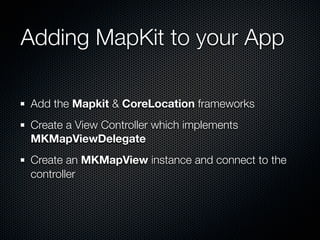
Adding MapKit to your App

Add the Mapkit & CoreLocation frameworks
Create a View Controller which implements
MKMapViewDelegate
Create an MKMapView instance and connect to the
controller
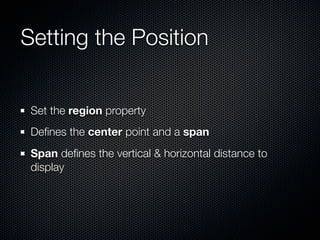
Setting the Position


 Set the region property
 Defines the center point and a span
 Span defines the vertical & horizontal distance to
 display
Setting the Position

- (void)viewDidLoad
{
  MKCoordinateRegion region;
  region.center.latitude = [eventVenue.latitude doubleValue];
  region.center.longitude = [eventVenue.longitude doubleValue];
  region.span.latitudeDelta = 0.0039;
  region.span.longitudeDelta = 0.0034;

    mapView.region = region;
}
Annotations
Annotations


Allow you to add places-of-interest to a Map
Implemented with a Model & a View
Annotation Models


Implement the MKAnnotation protocol
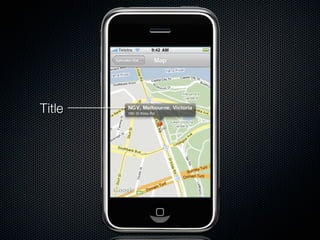
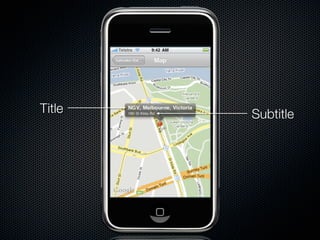
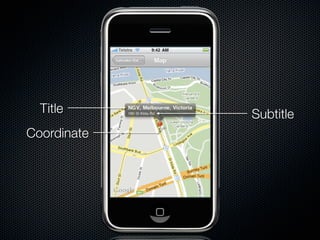
Exposes a Title, Subtitle, and Coordinate
Title
Title   Subtitle
Title      Subtitle
Coordinate
Annotation Views


Use MKAnnotationView
Easiest trick to set the image property
Use MKPinAnnotationView if you want the Pin
Managing Annotation Views


Managed like UITableViewCells
Managing Annotation Views
- (MKAnnotationView *)mapView:(MKMapView *)theMapView
            viewForAnnotation:(id <MKAnnotation>)annotation
{
  MKPinAnnotationView *annotationView =
    (MKPinAnnotationView *)([theMapView
      dequeueReusableAnnotationViewWithIdentifier:@"annotation"]);

    if (annotationView == NULL)
    {
      annotationView = [[[MKPinAnnotationView alloc]
        initWithAnnotation:annotation reuseIdentifier:@"annotation"] autorelease];
      annotationView.canShowCallout = YES;
      annotationView.animatesDrop = YES;
    }

    annotationView.annotation = annotation;
    return annotationView;
}
Geocoding
Geocoding


Convert Landmarks into Longitude/Latitude
and vice-versa
SDK 3.0 Supports Reverse Geocoding only
Reverse Geocoding


Use MKReverseGeocoder
Requires network access (Wifi/3G/EDGE)
Asynchronous lookups
Interacting with Core
Location
Showing the User’s Location


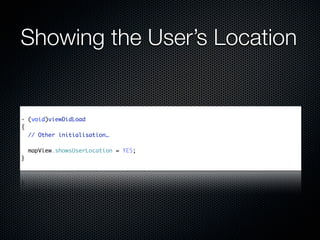
Set the showsUserLocation property on the
MapView instance
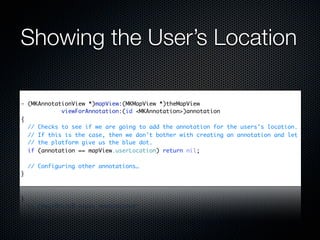
Implement an Annotation
Showing the User’s Location


- (void)viewDidLoad
{
  // Other initialisation…

    mapView.showsUserLocation = YES;
}
Showing the User’s Location

- (MKAnnotationView *)mapView:(MKMapView *)theMapView
            viewForAnnotation:(id <MKAnnotation>)annotation
{
  // Checks to see if we are going to add the annotation for the users's location.
  // If this is the case, then we don't bother with creating an annotation and let
  // the platform give us the blue dot.
  if (annotation == mapView.userLocation) return nil;

    // Configuring other annotations…
}
Resources

WWDC 2009: Sessions 118 & 119
LocateMe Sample Application
PragProg MapKit Screencast:
  http://pragprog.com/screencasts/v-bdmapkit

Introduction to MapKit

  • 1.
    An Intro toMapKit Rob Caporetto @rob_caporetto
  • 2.
  • 3.
  • 4.
    The Plan What isMapKit? Adding MapKit to your iPhone Application
  • 5.
    The Plan What isMapKit? Adding MapKit to your iPhone Application Setting the Position
  • 6.
    The Plan What isMapKit? Adding MapKit to your iPhone Application Setting the Position Annotations
  • 7.
    The Plan What isMapKit? Adding MapKit to your iPhone Application Setting the Position Annotations Geocoding
  • 8.
    The Plan What isMapKit? Adding MapKit to your iPhone Application Setting the Position Annotations Geocoding Interacting with Core Location
  • 9.
  • 10.
    Embed Maps inyour App
  • 12.
  • 13.
    Adding MapKit toyour App Add the Mapkit & CoreLocation frameworks Create a View Controller which implements MKMapViewDelegate Create an MKMapView instance and connect to the controller
  • 14.
    Setting the Position Set the region property Defines the center point and a span Span defines the vertical & horizontal distance to display
  • 15.
    Setting the Position -(void)viewDidLoad { MKCoordinateRegion region; region.center.latitude = [eventVenue.latitude doubleValue]; region.center.longitude = [eventVenue.longitude doubleValue]; region.span.latitudeDelta = 0.0039; region.span.longitudeDelta = 0.0034; mapView.region = region; }
  • 16.
  • 17.
    Annotations Allow you toadd places-of-interest to a Map Implemented with a Model & a View
  • 18.
    Annotation Models Implement theMKAnnotation protocol Exposes a Title, Subtitle, and Coordinate
  • 20.
  • 21.
    Title Subtitle
  • 22.
    Title Subtitle Coordinate
  • 23.
    Annotation Views Use MKAnnotationView Easiesttrick to set the image property Use MKPinAnnotationView if you want the Pin
  • 24.
    Managing Annotation Views Managedlike UITableViewCells
  • 25.
    Managing Annotation Views -(MKAnnotationView *)mapView:(MKMapView *)theMapView viewForAnnotation:(id <MKAnnotation>)annotation { MKPinAnnotationView *annotationView = (MKPinAnnotationView *)([theMapView dequeueReusableAnnotationViewWithIdentifier:@"annotation"]); if (annotationView == NULL) { annotationView = [[[MKPinAnnotationView alloc] initWithAnnotation:annotation reuseIdentifier:@"annotation"] autorelease]; annotationView.canShowCallout = YES; annotationView.animatesDrop = YES; } annotationView.annotation = annotation; return annotationView; }
  • 26.
  • 27.
    Geocoding Convert Landmarks intoLongitude/Latitude and vice-versa SDK 3.0 Supports Reverse Geocoding only
  • 28.
    Reverse Geocoding Use MKReverseGeocoder Requiresnetwork access (Wifi/3G/EDGE) Asynchronous lookups
  • 29.
  • 30.
    Showing the User’sLocation Set the showsUserLocation property on the MapView instance Implement an Annotation
  • 31.
    Showing the User’sLocation - (void)viewDidLoad { // Other initialisation… mapView.showsUserLocation = YES; }
  • 32.
    Showing the User’sLocation - (MKAnnotationView *)mapView:(MKMapView *)theMapView viewForAnnotation:(id <MKAnnotation>)annotation { // Checks to see if we are going to add the annotation for the users's location. // If this is the case, then we don't bother with creating an annotation and let // the platform give us the blue dot. if (annotation == mapView.userLocation) return nil; // Configuring other annotations… }
  • 34.
    Resources WWDC 2009: Sessions118 & 119 LocateMe Sample Application PragProg MapKit Screencast: http://pragprog.com/screencasts/v-bdmapkit

Editor's Notes

  • #2 Introductions!
  • #3 NOT A COMPREHENSIVE PRESENTATION, just a brief introduction to what MK is, and some of the basic things which you can do with it. What MapKit provides (if you didn&amp;#x2019;t catch any of the 3.0 media). What you need to do to support it in your iPhone application Setting the position of the map Adding &amp; Managing Annotations Using Core Location to be able to plot the user&amp;#x2019;s current position on screen as well Other hints &amp; tips
  • #4 NOT A COMPREHENSIVE PRESENTATION, just a brief introduction to what MK is, and some of the basic things which you can do with it. What MapKit provides (if you didn&amp;#x2019;t catch any of the 3.0 media). What you need to do to support it in your iPhone application Setting the position of the map Adding &amp; Managing Annotations Using Core Location to be able to plot the user&amp;#x2019;s current position on screen as well Other hints &amp; tips
  • #5 NOT A COMPREHENSIVE PRESENTATION, just a brief introduction to what MK is, and some of the basic things which you can do with it. What MapKit provides (if you didn&amp;#x2019;t catch any of the 3.0 media). What you need to do to support it in your iPhone application Setting the position of the map Adding &amp; Managing Annotations Using Core Location to be able to plot the user&amp;#x2019;s current position on screen as well Other hints &amp; tips
  • #6 NOT A COMPREHENSIVE PRESENTATION, just a brief introduction to what MK is, and some of the basic things which you can do with it. What MapKit provides (if you didn&amp;#x2019;t catch any of the 3.0 media). What you need to do to support it in your iPhone application Setting the position of the map Adding &amp; Managing Annotations Using Core Location to be able to plot the user&amp;#x2019;s current position on screen as well Other hints &amp; tips
  • #7 NOT A COMPREHENSIVE PRESENTATION, just a brief introduction to what MK is, and some of the basic things which you can do with it. What MapKit provides (if you didn&amp;#x2019;t catch any of the 3.0 media). What you need to do to support it in your iPhone application Setting the position of the map Adding &amp; Managing Annotations Using Core Location to be able to plot the user&amp;#x2019;s current position on screen as well Other hints &amp; tips
  • #8 NOT A COMPREHENSIVE PRESENTATION, just a brief introduction to what MK is, and some of the basic things which you can do with it. What MapKit provides (if you didn&amp;#x2019;t catch any of the 3.0 media). What you need to do to support it in your iPhone application Setting the position of the map Adding &amp; Managing Annotations Using Core Location to be able to plot the user&amp;#x2019;s current position on screen as well Other hints &amp; tips
  • #10 Added in 3.0 Embed Google Maps in your app Full UX of Maps application (panning, scrolling, Views etc). Supports regular, satellite, hybrid maps Handles caching, tile loading, memory warnings, connectivity changes
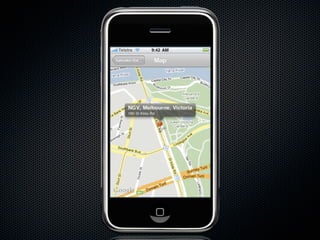
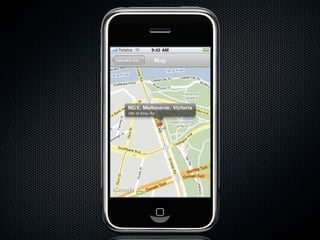
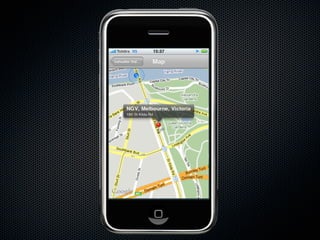
  • #11 This is a general screenshot from my App. Shows mapview with a single annotation &amp; callout Will explain full process later
  • #13 Why CL? MK uses some of the CL types. Also may want to integrate CL into your app (eg. showing user&amp;#x2019;s location on a map)
  • #14 - Region takes an MKCoordinateRegion struct - Centre is the latitude &amp; longitude point which define the location which is centred on screen. - Span defines the zoom level via the lat/long range (in degrees). - Check MKCoordinateSpan in the docs for how it needs to be set (long varies depending on the latitude). - Setting this will have an impact on the zoom level due to all of that - Can adjust the centre position without impacting zoom by setting the centerCoordinate property (takes a CLLocationCoordinate2D type)
  • #15 - Snippet from my App - 1-2 init MKMapView (via code) - 4-8 set the centre to the location (user value), plus the zoom level. (0.5km lat) - 10 sets the region to our generated one
  • #17 - Can have any number of annotations on your map
  • #18 - Coordinate is required (as you need to have a location). - Title &amp; Subtitle are optional (although title is recommended). - T &amp; ST are used as the primary &amp; secondary labels on the default callout