Switching to Git
Using branches and pull requests
What’s the goal?
Ship code that is ready for production often.
•

Build software that we are confident in
shipping

•

Ship code more often to address needs

•

Become better developers through industry
standard practices (with fewer bad habits)
Three kinds of tasks ...
•

Features (Add or change marketable
features)

•

Bugs (Fix issues reported by users and staff)

•

Hotfix (Fix very urgent issue with platform)
But how often has this happened?
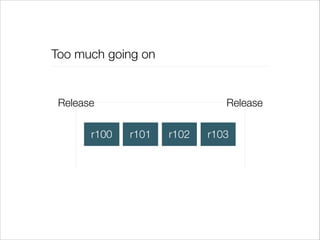
Too much going on

Release
r100

Release
r101

r102

r103
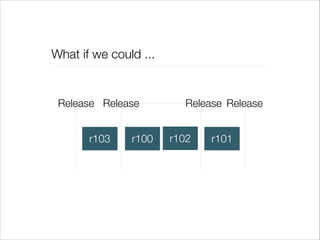
What if we could ...

Release Release
r103

r100

Release Release
r102

r101
You could make this work with subversion
•

Create a branch for each task (feature, bug,
hotfix)

•

Reintegrate / release in whatever order is
needed

•

Slow process and lots of opportunity for
errors.
Turns out, we are not alone in having
this issue ...
... and there’s already a (better/best)
practice
Most Important Slide™
•

Anything in the master branch is deployable

•

To work on something new, create a descriptively named branch off of master
(e.g. feature/new-oauth2-scopes)

•

Commit to that branch locally and regularly push your work to the same
named branch on the server

•

When you need feedback or help, or you think the branch is ready for
merging, open a pull request.

•

After someone else has reviewed and signed off on the feature, you can
merge it into master

•

Once it is merged and pushed to master, you can and should deploy
immediately
Stolen from http://scottchacon.com/2011/08/31/github-flow.html
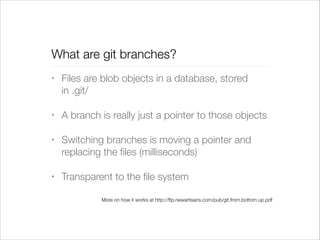
What are git branches?
•

Files are blob objects in a database, stored
in .git/

•

A branch is really just a pointer to those objects

•

Switching branches is moving a pointer and
replacing the files (milliseconds)

•

Transparent to the file system
More on how it works at http://ftp.newartisans.com/pub/git.from.bottom.up.pdf
What is master?
•

The production-ready branch

•

Not the same thing as /trunk, other than it is
what all branches use as a parent

•

Git tags are created on code merged into
master, and those are then deployed to
production servers
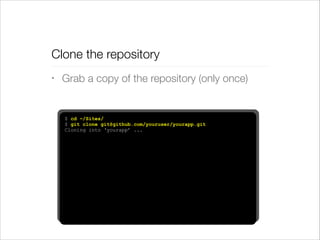
Clone the repository
•

Grab a copy of the repository (only once)

$ cd ~/Sites/
$ git clone git@github.com/youruser/yourapp.git
Cloning into ‘yourapp’ ...
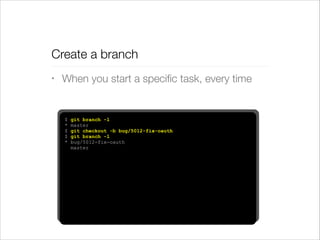
Create a branch
•

When you start a specific task, every time

$
*
$
$
*

git branch -l
master
git checkout -b bug/5012-fix-oauth
git branch -l
bug/5012-fix-oauth
master
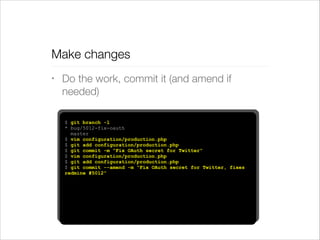
Make changes
•

Do the work, commit it (and amend if
needed)
$ git branch -l
* bug/5012-fix-oauth
master
$ vim configuration/production.php
$ git add configuration/production.php
$ git commit -m “Fix OAuth secret for Twitter”
$ vim configuration/production.php
$ git add configuration/production.php
$ git commit --amend -m “Fix OAuth secret for Twitter, fixes
redmine #5012”
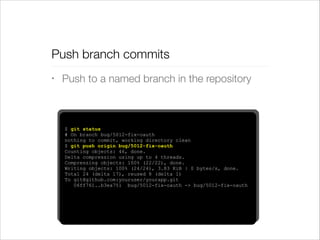
Push branch commits
•

Push to a named branch in the repository

$ git status
# On branch bug/5012-fix-oauth
nothing to commit, working directory clean
$ git push origin bug/5012-fix-oauth
Counting objects: 46, done.
Delta compression using up to 4 threads.
Compressing objects: 100% (22/22), done.
Writing objects: 100% (24/24), 3.83 KiB | 0 bytes/s, done.
Total 24 (delta 17), reused 8 (delta 1)
To git@github.com:youruser/yourapp.git
06ff761..b3ea751 bug/5012-fix-oauth -> bug/5012-fix-oauth
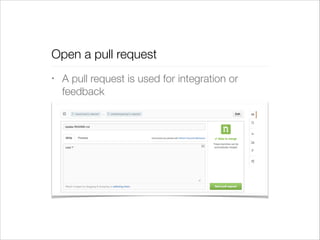
Open a pull request
•

A pull request is used for integration or
feedback
Discuss pull request, merge accepted
•

Each pull request is a candidate for inclusion
in master, or at least a discussion about best
approach

•

Even “good” pull requests might have
multiple revisions

•

False starts happen – branches are “cheap”
Continuous integration testing
•

Pull requests will trigger a Jenkins build job and
add a contextual link to it within Github

•

A “build” is a snapshot of the repository at a
particular commit that is run through a testing
regimen

•

At minimum, committed files are run through
linters and the results are reported back on the
pull request via an API
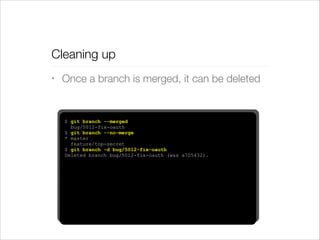
Cleaning up
•

Once a branch is merged, it can be deleted

$ git branch --merged
bug/5012-fix-oauth
$ git branch --no-merge
* master
feature/top-secret
$ git branch -d bug/5012-fix-oauth
Deleted branch bug/5012-fix-oauth (was a705432).
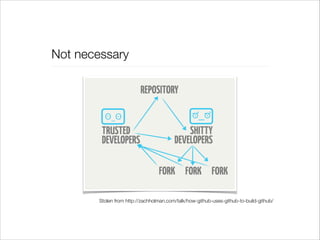
Wait, what about forks?
Not necessary

Stolen from http://zachholman.com/talk/how-github-uses-github-to-build-github/
Pulling upstream changes
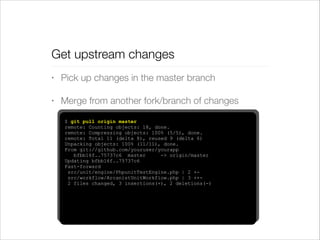
Get upstream changes
•

Pick up changes in the master branch

•

Merge from another fork/branch of changes
$ git pull origin master
remote: Counting objects: 18, done.
remote: Compressing objects: 100% (5/5), done.
remote: Total 11 (delta 8), reused 9 (delta 6)
Unpacking objects: 100% (11/11), done.
From git://github.com/youruser/yourapp
bfbb16f..75737c6 master
-> origin/master
Updating bfbb16f..75737c6
Fast-forward
src/unit/engine/PhpunitTestEngine.php | 2 +src/workflow/ArcanistUnitWorkflow.php | 3 ++2 files changed, 3 insertions(+), 2 deletions(-)
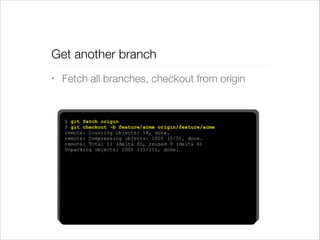
Get another branch
•

Fetch all branches, checkout from origin

$ git fetch origin
$ git checkout -b feature/acme origin/feature/acme
remote: Counting objects: 18, done.
remote: Compressing objects: 100% (5/5), done.
remote: Total 11 (delta 8), reused 9 (delta 6)
Unpacking objects: 100% (11/11), done.
A few tools to make the process easier
github/hub
•

Wrapper that shortens git commands for
GitHub
GitHub for Mac
•

Yes, there is a GUI, but learn to use the CLI
Quick recap
•

We’re switching to git to improve the code
review process and ship better code more often

•

All code changes are done through pull requests
and reviewed by appropriate developers

•

Continuous integration testing framework
through Jenkins works in tandem with pull
requests
That’s it.

Switching to Git

  • 1.
    Switching to Git Usingbranches and pull requests
  • 2.
  • 3.
    Ship code thatis ready for production often. • Build software that we are confident in shipping • Ship code more often to address needs • Become better developers through industry standard practices (with fewer bad habits)
  • 4.
    Three kinds oftasks ... • Features (Add or change marketable features) • Bugs (Fix issues reported by users and staff) • Hotfix (Fix very urgent issue with platform)
  • 5.
    But how oftenhas this happened?
  • 6.
    Too much goingon Release r100 Release r101 r102 r103
  • 7.
    What if wecould ... Release Release r103 r100 Release Release r102 r101
  • 8.
    You could makethis work with subversion • Create a branch for each task (feature, bug, hotfix) • Reintegrate / release in whatever order is needed • Slow process and lots of opportunity for errors.
  • 9.
    Turns out, weare not alone in having this issue ...
  • 10.
    ... and there’salready a (better/best) practice
  • 11.
    Most Important Slide™ • Anythingin the master branch is deployable • To work on something new, create a descriptively named branch off of master (e.g. feature/new-oauth2-scopes) • Commit to that branch locally and regularly push your work to the same named branch on the server • When you need feedback or help, or you think the branch is ready for merging, open a pull request. • After someone else has reviewed and signed off on the feature, you can merge it into master • Once it is merged and pushed to master, you can and should deploy immediately Stolen from http://scottchacon.com/2011/08/31/github-flow.html
  • 12.
    What are gitbranches? • Files are blob objects in a database, stored in .git/ • A branch is really just a pointer to those objects • Switching branches is moving a pointer and replacing the files (milliseconds) • Transparent to the file system More on how it works at http://ftp.newartisans.com/pub/git.from.bottom.up.pdf
  • 13.
    What is master? • Theproduction-ready branch • Not the same thing as /trunk, other than it is what all branches use as a parent • Git tags are created on code merged into master, and those are then deployed to production servers
  • 14.
    Clone the repository • Graba copy of the repository (only once) $ cd ~/Sites/ $ git clone git@github.com/youruser/yourapp.git Cloning into ‘yourapp’ ...
  • 15.
    Create a branch • Whenyou start a specific task, every time $ * $ $ * git branch -l master git checkout -b bug/5012-fix-oauth git branch -l bug/5012-fix-oauth master
  • 16.
    Make changes • Do thework, commit it (and amend if needed) $ git branch -l * bug/5012-fix-oauth master $ vim configuration/production.php $ git add configuration/production.php $ git commit -m “Fix OAuth secret for Twitter” $ vim configuration/production.php $ git add configuration/production.php $ git commit --amend -m “Fix OAuth secret for Twitter, fixes redmine #5012”
  • 17.
    Push branch commits • Pushto a named branch in the repository $ git status # On branch bug/5012-fix-oauth nothing to commit, working directory clean $ git push origin bug/5012-fix-oauth Counting objects: 46, done. Delta compression using up to 4 threads. Compressing objects: 100% (22/22), done. Writing objects: 100% (24/24), 3.83 KiB | 0 bytes/s, done. Total 24 (delta 17), reused 8 (delta 1) To git@github.com:youruser/yourapp.git 06ff761..b3ea751 bug/5012-fix-oauth -> bug/5012-fix-oauth
  • 18.
    Open a pullrequest • A pull request is used for integration or feedback
  • 19.
    Discuss pull request,merge accepted • Each pull request is a candidate for inclusion in master, or at least a discussion about best approach • Even “good” pull requests might have multiple revisions • False starts happen – branches are “cheap”
  • 20.
    Continuous integration testing • Pullrequests will trigger a Jenkins build job and add a contextual link to it within Github • A “build” is a snapshot of the repository at a particular commit that is run through a testing regimen • At minimum, committed files are run through linters and the results are reported back on the pull request via an API
  • 21.
    Cleaning up • Once abranch is merged, it can be deleted $ git branch --merged bug/5012-fix-oauth $ git branch --no-merge * master feature/top-secret $ git branch -d bug/5012-fix-oauth Deleted branch bug/5012-fix-oauth (was a705432).
  • 22.
  • 23.
    Not necessary Stolen fromhttp://zachholman.com/talk/how-github-uses-github-to-build-github/
  • 24.
  • 25.
    Get upstream changes • Pickup changes in the master branch • Merge from another fork/branch of changes $ git pull origin master remote: Counting objects: 18, done. remote: Compressing objects: 100% (5/5), done. remote: Total 11 (delta 8), reused 9 (delta 6) Unpacking objects: 100% (11/11), done. From git://github.com/youruser/yourapp bfbb16f..75737c6 master -> origin/master Updating bfbb16f..75737c6 Fast-forward src/unit/engine/PhpunitTestEngine.php | 2 +src/workflow/ArcanistUnitWorkflow.php | 3 ++2 files changed, 3 insertions(+), 2 deletions(-)
  • 26.
    Get another branch • Fetchall branches, checkout from origin $ git fetch origin $ git checkout -b feature/acme origin/feature/acme remote: Counting objects: 18, done. remote: Compressing objects: 100% (5/5), done. remote: Total 11 (delta 8), reused 9 (delta 6) Unpacking objects: 100% (11/11), done.
  • 27.
    A few toolsto make the process easier
  • 28.
    github/hub • Wrapper that shortensgit commands for GitHub
  • 29.
    GitHub for Mac • Yes,there is a GUI, but learn to use the CLI
  • 30.
    Quick recap • We’re switchingto git to improve the code review process and ship better code more often • All code changes are done through pull requests and reviewed by appropriate developers • Continuous integration testing framework through Jenkins works in tandem with pull requests
  • 31.