40 Square’s GIT Workflow
                    Who Am I?


Lead developer in 40 square software
First Love: 6 years in Java (omfg what was I thinking)
Ex-GF: PHP hobbyist turned full time engineer
Wife: Node.JS, and Javascript in general
Twitter: @roguejs

    This will be a warp speed presentation!
Mercurial vs Git

We used fogbugz + kiln initially
Started off with feature branches
Merging conflicts took forever
REAL REASON: Bad practices
HIDDEN REASON: Fogbugz is expensive...
Other annoyances

No dry runs
Difficult to do code review
No cherry-picking
Bad planning and structure
Branching is expensive?
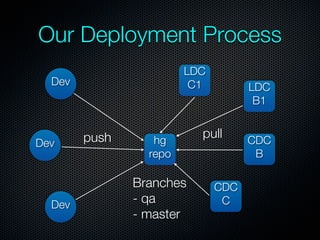
Our Deployment Process
                        LDC
  Dev                    C1         LDC
                                     B1


        push      hg
                          pull      CDC
Dev
                 repo                B

               Branches       CDC
  Dev          - qa            C
               - master
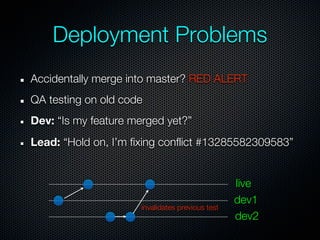
Deployment Problems
Accidentally merge into master? RED ALERT
QA testing on old code
Dev: “Is my feature merged yet?”
Lead: “Hold on, I’m fixing conflict #13285582309583”


                                                  live
                                                  dev1
                      invalidates previous test
                                                  dev2
Why Git?

Because github is sexy
Actually, because it’s cheaper than Kiln


Why not bitbucket?
Because github is sexy, and because I said so
Actually, because github still is cheaper (repo vs users)


Git has more options for branching and merging
Our Goals

Have a staging server that is a clone of live server
Abstract devs from live server
No more “it’s just one line of code, can I push to live
directly?”
Rapid deployment and lesser merge conflicts
Build better practices
Vincent Driessen Model
                                        40 square style


Long Running Branches:
  master - live servers
  staging - last line of defense
  devel - weekly deployments
Distributed blessed repo model
  Blessed repo managed by integrators
  Each dev gets own fork
Forking Model & Policy


Your own fork is your own responsibility
Feel free to force update your own fork
Rebase before sending pull requests
Typical Workflow (dev)

Dev starts work on an issue in Pivotal
Determine what kind of issue:
  P1- branch off from staging
  Bugs & Features - branch off from devel
Pull upstream often and rebase on upstream
Rebase again before sending pull request
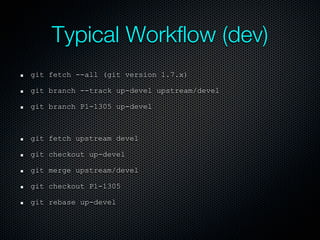
Typical Workflow (dev)
git fetch --all (git version 1.7.x)

git branch --track up-devel upstream/devel

git branch P1-1305 up-devel


git fetch upstream devel

git checkout up-devel

git merge upstream/devel

git checkout P1-1305

git rebase up-devel
Typical Workflow (integrator)

Integrator receives pull request
Create a new branch in blessed repo
Pull update into that branch
Review code
Merge into staging/devel
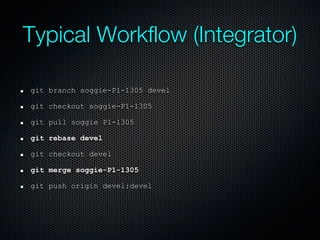
Typical Workflow (Integrator)

git branch soggie-P1-1305 devel

git checkout soggie-P1-1305

git pull soggie P1-1305

git rebase devel

git checkout devel

git merge soggie-P1-1305

git push origin devel:devel
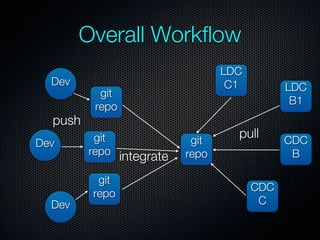
Overall Workflow
                                 LDC
  Dev                             C1         LDC
           git
                                              B1
          repo
  push
          git              git
                                   pull      CDC
Dev
         repo integrate   repo                B

          git
                                       CDC
         repo
  Dev                                   C
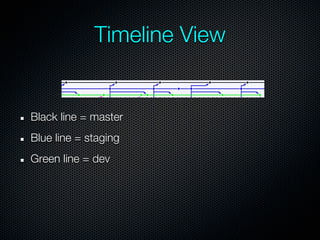
Timeline View


Black line = master
Blue line = staging
Green line = dev
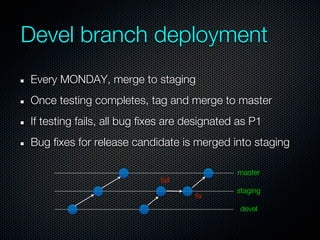
Devel branch deployment
Every MONDAY, merge to staging
Once testing completes, tag and merge to master
If testing fails, all bug fixes are designated as P1
Bug fixes for release candidate is merged into staging

                                              master
                             fail
                                              staging
                                     fix
                                               devel
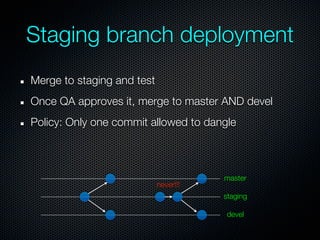
Staging branch deployment
Merge to staging and test
Once QA approves it, merge to master AND devel
Policy: Only one commit allowed to dangle


                                       master
                            never!!!
                                       staging

                                       devel
Policies

Do NOT force update blessed repo
  I will hunt you down, and kill you

Always rebase before sending pull request
If P1, branch off staging. Otherwise, branch off devel
Manage pull requests NOW
No dangling commits on staging
Benefits

Established workflow = peaceful work environment
Predictable integration & deployment
Conflicts = dev responsibility instead of integrator’s
Can dick around with own repo without killing blessed
repo
No more unpredictable testing environment
More Information
A successful branching model
http://nvie.com/posts/a-successful-git-branching-
model/
Git
http://git-scm.com/
Github
http://github.com/
Git video tutorials
http://gitcasts.com/

40 square's git workflow

  • 1.
    40 Square’s GITWorkflow Who Am I? Lead developer in 40 square software First Love: 6 years in Java (omfg what was I thinking) Ex-GF: PHP hobbyist turned full time engineer Wife: Node.JS, and Javascript in general Twitter: @roguejs This will be a warp speed presentation!
  • 2.
    Mercurial vs Git Weused fogbugz + kiln initially Started off with feature branches Merging conflicts took forever REAL REASON: Bad practices HIDDEN REASON: Fogbugz is expensive...
  • 3.
    Other annoyances No dryruns Difficult to do code review No cherry-picking Bad planning and structure Branching is expensive?
  • 4.
    Our Deployment Process LDC Dev C1 LDC B1 push hg pull CDC Dev repo B Branches CDC Dev - qa C - master
  • 5.
    Deployment Problems Accidentally mergeinto master? RED ALERT QA testing on old code Dev: “Is my feature merged yet?” Lead: “Hold on, I’m fixing conflict #13285582309583” live dev1 invalidates previous test dev2
  • 6.
    Why Git? Because githubis sexy Actually, because it’s cheaper than Kiln Why not bitbucket? Because github is sexy, and because I said so Actually, because github still is cheaper (repo vs users) Git has more options for branching and merging
  • 7.
    Our Goals Have astaging server that is a clone of live server Abstract devs from live server No more “it’s just one line of code, can I push to live directly?” Rapid deployment and lesser merge conflicts Build better practices
  • 8.
    Vincent Driessen Model 40 square style Long Running Branches: master - live servers staging - last line of defense devel - weekly deployments Distributed blessed repo model Blessed repo managed by integrators Each dev gets own fork
  • 9.
    Forking Model &Policy Your own fork is your own responsibility Feel free to force update your own fork Rebase before sending pull requests
  • 10.
    Typical Workflow (dev) Devstarts work on an issue in Pivotal Determine what kind of issue: P1- branch off from staging Bugs & Features - branch off from devel Pull upstream often and rebase on upstream Rebase again before sending pull request
  • 11.
    Typical Workflow (dev) gitfetch --all (git version 1.7.x) git branch --track up-devel upstream/devel git branch P1-1305 up-devel git fetch upstream devel git checkout up-devel git merge upstream/devel git checkout P1-1305 git rebase up-devel
  • 12.
    Typical Workflow (integrator) Integratorreceives pull request Create a new branch in blessed repo Pull update into that branch Review code Merge into staging/devel
  • 13.
    Typical Workflow (Integrator) gitbranch soggie-P1-1305 devel git checkout soggie-P1-1305 git pull soggie P1-1305 git rebase devel git checkout devel git merge soggie-P1-1305 git push origin devel:devel
  • 14.
    Overall Workflow LDC Dev C1 LDC git B1 repo push git git pull CDC Dev repo integrate repo B git CDC repo Dev C
  • 15.
    Timeline View Black line= master Blue line = staging Green line = dev
  • 16.
    Devel branch deployment EveryMONDAY, merge to staging Once testing completes, tag and merge to master If testing fails, all bug fixes are designated as P1 Bug fixes for release candidate is merged into staging master fail staging fix devel
  • 17.
    Staging branch deployment Mergeto staging and test Once QA approves it, merge to master AND devel Policy: Only one commit allowed to dangle master never!!! staging devel
  • 18.
    Policies Do NOT forceupdate blessed repo I will hunt you down, and kill you Always rebase before sending pull request If P1, branch off staging. Otherwise, branch off devel Manage pull requests NOW No dangling commits on staging
  • 19.
    Benefits Established workflow =peaceful work environment Predictable integration & deployment Conflicts = dev responsibility instead of integrator’s Can dick around with own repo without killing blessed repo No more unpredictable testing environment
  • 20.
    More Information A successfulbranching model http://nvie.com/posts/a-successful-git-branching- model/ Git http://git-scm.com/ Github http://github.com/ Git video tutorials http://gitcasts.com/