> Source Control
    > What you need to know.


               Davey McGlade - Kainos
> Intro
• Solution Architect ~15 years experience
• In Kainos ~ 4 years
• Focus on:
   •   .NET
   •   Dynamics CRM 2011
   •   SharePoint 2010
   •   Integration technologies
> What is Source Control?
• In essence, a backup repository for your work.

• Two types:
   • Centralised: All code on a central server
   • Distributed: Everyone gets a copy locally

• Definitely not:
   • Google Drive
   • Drop Box
   • C:
   • Email.
> Why?
Recoverability          Don’t lose work

     Communication      Easily see team changes

Versioning              Compare and contrast

     Accountability     Who made the change?

Solve Problems          Find bugs, try new things

     Facilitate Reuse   Avoid writing duplicate code
> Just code?


No
Anything and everything that is used to build the solution:
   – Tools / Installers
   – Solution Build Scripts
   – Database Build scripts
   – Some include Functional Specifications & Design Docs

Aids the transition into support.
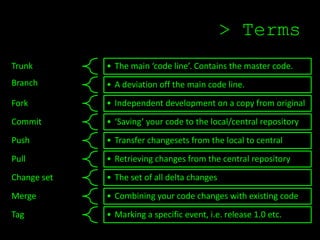
> Terms
Trunk        • The main ‘code line’. Contains the master code.
Branch       • A deviation off the main code line.
Fork         • Independent development on a copy from original
Commit       • ‘Saving’ your code to the local/central repository
Push         • Transfer changesets from the local to central
Pull         • Retrieving changes from the central repository
Change set   • The set of all delta changes
Merge        • Combining your code changes with existing code
Tag          • Marking a specific event, i.e. release 1.0 etc.
> Centralised
• A single ‘master’ copy of your code, held centrally on a server

• Changes are ‘committed’ to this central library.

• Once ‘committed’, other programmers can see the change.

• You can then ‘pull’ this change to your local machine.

• Examples of centralised source control systems
   – CVS, Subversion (or SVN) Team Foundation Server, Visual
     SourceSafe
>     Workflow (Centralised)

1. Access the central server and ‘pull’ down the changes others
   have made

2. Make your changes, and test them

3. Commit (*) your changes to the central server, so other
   programmers can see them.

(*) Work out the merge conflicts (windiff, built in tools etc.)
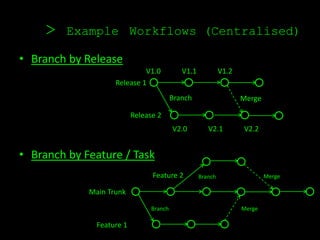
>    Example Workflows (Centralised)

• Branch by Release
                             V1.0            V1.1            V1.2
                    Release 1
                                          Branch                    Merge

                           Release 2
                                          V2.0         V2.1         V2.2


• Branch by Feature / Task
                                 Feature 2          Branch                  Merge

             Main Trunk

                                 Branch                             Merge

               Feature 1
> Distributed
• Each developer ‘clones’ a copy of a repository to their own
  machine. The full history of the project is on their own hard
  drive.

• Two phase commits: You commit first to your local staging
  area, and then push to the repository.

• Central Repository is not mandatory, but you usually have one

• Examples of distributed source control systems
   – Git, Mercurial, Bazaar
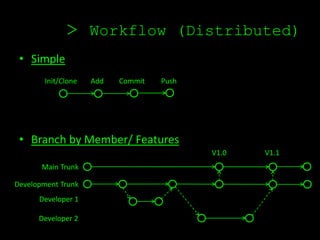
> Workflow (Distributed)
 • Simple
        Init/Clone   Add   Commit   Push


 • Branch by Member/ Features
                                           V1.0   V1.1
       Main Trunk

Development Trunk
      Developer 1

      Developer 2
> Is DVCS ‘better’?
• It’s extremely quick. No network traffic, only local file lookups.

• You remove the risk of poor networks. Centralised checkouts
  typically aren’t atomic. Visual SourceSafe = nightmare.

• You can work locally, without affecting others. You can share work
  amongst a select few, without pushing to the team.

• You can work offline, and merge your changes when you’re online
  again.

• You have built in redundancy as the work is distributed amongst
  team members.
> Git / Github demo


   Demo Time
> Branching & Merging
                                     Antipatterns
Some examples:
• Merge Paranoia—avoiding merging at all cost, usually because of a fear of the
   consequences.

•     Big Bang Merge—deferring branch merging to the end of the development effort
      and attempting to merge all branches simultaneously.

•     Never-Ending Merge—continuous merging activity because there is always more
      to merge.

•     Temporary Branches—branching for changing reasons, so the branch becomes a
      permanent temporary workspace.

•     Development Freeze—stopping all development activities while
      branching, merging, and building new base lines.

Source - http://branchingguidance.codeplex.com/wikipage?title=Branching%20and%20Merging%20Anti-Patterns
> Taking it further
• Continuous Integration, Continuous Delivery
  •   Unit Testing
  •   Code Styling
  •   Performance Monitoring
  •   Broken Build fun


• Feature toggling – Martin Fowler,
       http://martinfowler.com/bliki/FeatureToggle.html
> Tools
• GitHub & Git
   – www.github.com
   – http://git-scm.com/


• TortoiseSVN
   – http://tortoisesvn.net/

• TortoiseGIT
   – http://code.google.com/p/tortoisegit/wiki/Download


• Visual HG
   – http://visualhg.codeplex.com/

• Git & SVN together
   – http://infotexture.net/2010/02/git-to-svn-and-back-again/
> Learning Resources
• Git online interactive course
    – http://try.github.com/levels/1/challenges/1


• Free Git Book
    – http://git-scm.com/book


• Intro to SVN (Pluralsight Trial)
    – http://pluralsight.com/training/Courses/TableOfContents/intro-to-svn


• Mercurial Intro
    – http://hginit.com/


• Git to SVN course
    – http://git.or.cz/course/svn.html
> Contact Details
• Web – daveymcglade.net

• Twitter – @djmcglade

• Slides – Will be up on slideshare / website

Source control - what you need to know

  • 1.
    > Source Control > What you need to know. Davey McGlade - Kainos
  • 2.
    > Intro • SolutionArchitect ~15 years experience • In Kainos ~ 4 years • Focus on: • .NET • Dynamics CRM 2011 • SharePoint 2010 • Integration technologies
  • 3.
    > What isSource Control? • In essence, a backup repository for your work. • Two types: • Centralised: All code on a central server • Distributed: Everyone gets a copy locally • Definitely not: • Google Drive • Drop Box • C: • Email.
  • 4.
    > Why? Recoverability Don’t lose work Communication Easily see team changes Versioning Compare and contrast Accountability Who made the change? Solve Problems Find bugs, try new things Facilitate Reuse Avoid writing duplicate code
  • 5.
    > Just code? No Anythingand everything that is used to build the solution: – Tools / Installers – Solution Build Scripts – Database Build scripts – Some include Functional Specifications & Design Docs Aids the transition into support.
  • 6.
    > Terms Trunk • The main ‘code line’. Contains the master code. Branch • A deviation off the main code line. Fork • Independent development on a copy from original Commit • ‘Saving’ your code to the local/central repository Push • Transfer changesets from the local to central Pull • Retrieving changes from the central repository Change set • The set of all delta changes Merge • Combining your code changes with existing code Tag • Marking a specific event, i.e. release 1.0 etc.
  • 7.
    > Centralised • Asingle ‘master’ copy of your code, held centrally on a server • Changes are ‘committed’ to this central library. • Once ‘committed’, other programmers can see the change. • You can then ‘pull’ this change to your local machine. • Examples of centralised source control systems – CVS, Subversion (or SVN) Team Foundation Server, Visual SourceSafe
  • 8.
    > Workflow (Centralised) 1. Access the central server and ‘pull’ down the changes others have made 2. Make your changes, and test them 3. Commit (*) your changes to the central server, so other programmers can see them. (*) Work out the merge conflicts (windiff, built in tools etc.)
  • 9.
    > Example Workflows (Centralised) • Branch by Release V1.0 V1.1 V1.2 Release 1 Branch Merge Release 2 V2.0 V2.1 V2.2 • Branch by Feature / Task Feature 2 Branch Merge Main Trunk Branch Merge Feature 1
  • 10.
    > Distributed • Eachdeveloper ‘clones’ a copy of a repository to their own machine. The full history of the project is on their own hard drive. • Two phase commits: You commit first to your local staging area, and then push to the repository. • Central Repository is not mandatory, but you usually have one • Examples of distributed source control systems – Git, Mercurial, Bazaar
  • 11.
    > Workflow (Distributed) • Simple Init/Clone Add Commit Push • Branch by Member/ Features V1.0 V1.1 Main Trunk Development Trunk Developer 1 Developer 2
  • 12.
    > Is DVCS‘better’? • It’s extremely quick. No network traffic, only local file lookups. • You remove the risk of poor networks. Centralised checkouts typically aren’t atomic. Visual SourceSafe = nightmare. • You can work locally, without affecting others. You can share work amongst a select few, without pushing to the team. • You can work offline, and merge your changes when you’re online again. • You have built in redundancy as the work is distributed amongst team members.
  • 13.
    > Git /Github demo Demo Time
  • 14.
    > Branching &Merging Antipatterns Some examples: • Merge Paranoia—avoiding merging at all cost, usually because of a fear of the consequences. • Big Bang Merge—deferring branch merging to the end of the development effort and attempting to merge all branches simultaneously. • Never-Ending Merge—continuous merging activity because there is always more to merge. • Temporary Branches—branching for changing reasons, so the branch becomes a permanent temporary workspace. • Development Freeze—stopping all development activities while branching, merging, and building new base lines. Source - http://branchingguidance.codeplex.com/wikipage?title=Branching%20and%20Merging%20Anti-Patterns
  • 15.
    > Taking itfurther • Continuous Integration, Continuous Delivery • Unit Testing • Code Styling • Performance Monitoring • Broken Build fun • Feature toggling – Martin Fowler, http://martinfowler.com/bliki/FeatureToggle.html
  • 16.
    > Tools • GitHub& Git – www.github.com – http://git-scm.com/ • TortoiseSVN – http://tortoisesvn.net/ • TortoiseGIT – http://code.google.com/p/tortoisegit/wiki/Download • Visual HG – http://visualhg.codeplex.com/ • Git & SVN together – http://infotexture.net/2010/02/git-to-svn-and-back-again/
  • 17.
    > Learning Resources •Git online interactive course – http://try.github.com/levels/1/challenges/1 • Free Git Book – http://git-scm.com/book • Intro to SVN (Pluralsight Trial) – http://pluralsight.com/training/Courses/TableOfContents/intro-to-svn • Mercurial Intro – http://hginit.com/ • Git to SVN course – http://git.or.cz/course/svn.html
  • 18.
    > Contact Details •Web – daveymcglade.net • Twitter – @djmcglade • Slides – Will be up on slideshare / website