Distributed Revision Control / Branching & Workflow Model
Hello Git / Git
Flow
Jason Hanson
@jayfour000
Credit & Reference
❖ https://www.atlassian.com/git/tutorials/comparing-
workflows/gitflow-workflow
❖ http://nvie.com/posts/a-successful-git-branching-model/
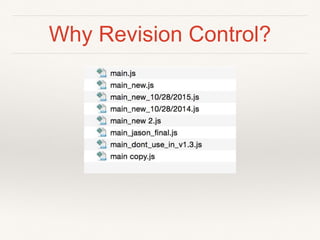
Why Revision Control?
❖ Code is complicated and changes over time
❖ I make mistakes in my code
❖ YOU make mistakes in my code!
❖ Takes longer than one day to write software
❖ Software lives longer than my hard drive
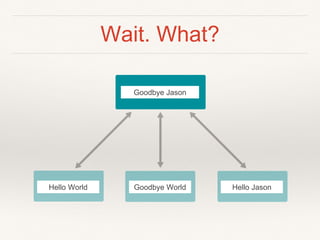
Wait. What?
Hello World Goodbye World Hello Jason
Goodbye Jason
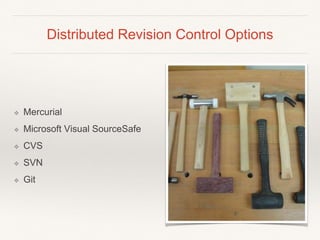
Distributed Revision Control Options
❖ Mercurial
❖ Microsoft Visual SourceSafe
❖ CVS
❖ SVN
❖ Git
Hello Git
❖ Developed by Linus Torvalds for
Linux kernel development in 2005
❖ Every working directory is a full
repository
❖ Unlike CSV, SVN, etc
❖ More power
❖ Useful for 1 person teams too
local vs origin
❖ checkout from origin to local
❖ commit changes to local
❖ push from local to origin
❖ pull from origin to local
Note: Git can be used local only too
branch
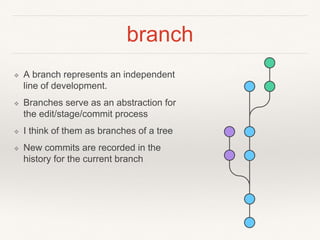
❖ A branch represents an independent
line of development.
❖ Branches serve as an abstraction for
the edit/stage/commit process
❖ I think of them as branches of a tree
❖ New commits are recorded in the
history for the current branch
Tools
❖ Terminal
❖ SourceTree
❖ Git Tower
❖ IntelliJ IDEs (WebStorm,
AppCode, Android Studio,
IDEA)
❖ Others?
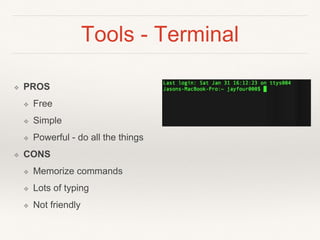
Tools - Terminal
❖ PROS
❖ Free
❖ Simple
❖ Powerful - do all the things
❖ CONS
❖ Memorize commands
❖ Lots of typing
❖ Not friendly
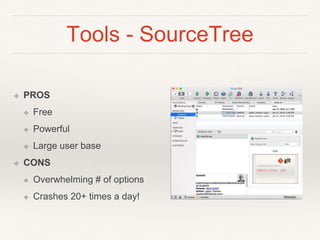
Tools - SourceTree
❖ PROS
❖ Free
❖ Powerful
❖ Large user base
❖ CONS
❖ Overwhelming # of options
❖ Crashes 20+ times a day!
Tools - Git Tower
❖ PROS
❖ Easy to use
❖ Good UX
❖ Does not crash
❖ Cool logo
❖ CONS
❖ Can’t do every command
❖ Cost $60
Tools - Alt Options
❖ Comfort level
❖ What do you use?
Gitflow
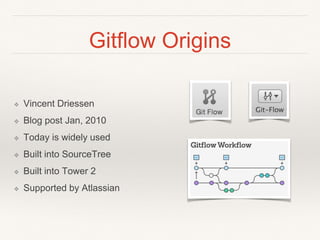
Gitflow Origins
❖ Vincent Driessen
❖ Blog post Jan, 2010
❖ Today is widely used
❖ Built into SourceTree
❖ Built into Tower 2
❖ Supported by Atlassian
Gitflow - Overview
❖ Strict branching model
❖ Suports multiple concurrent
releases
❖ Robust workflow for larger
projects
Gitflow - Workflow
❖ Central repository (origin)
❖ Dev work locally (local) and
push branches to central
repository (origin)
master
master
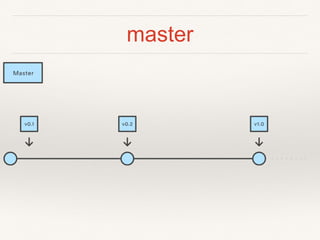
❖ The master branch stores the official release history
❖ Tag created for version number merges
❖ HEAD always reflects a production-ready state
❖ Should be able to promote HEAD of master to
production at any time
develop
develop
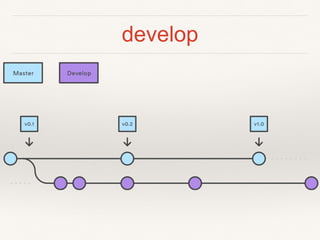
❖ Integration branch for features
❖ QA works off develop
❖ develop is merged into master at certain milestones
feature/*
feature/*
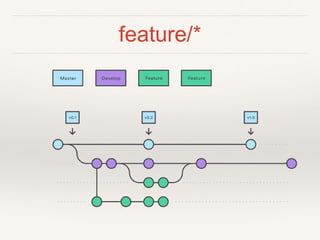
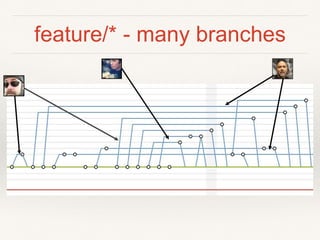
❖ Each new feature should reside in its own branch
❖ feature branches use develop as their parent
branch
❖ When a feature is complete, it gets merged back
into develop
❖ feature branches should never interact directly
with master.
feature/* - many branches
release/*
release/*
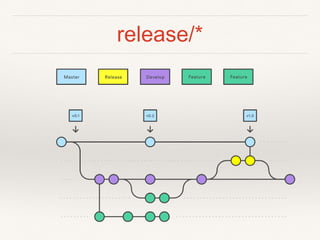
❖ Once develop has acquired enough features for a release,
you fork a release branch off of develop.
❖ No new features can be added after this point—only bug
fixes,
❖ Once it's ready to ship, the release gets merged into
master
❖ tag with a version number.
❖ merge release back into develop, which may have
progressed since the release was created
hotfix/*
hotfix/*
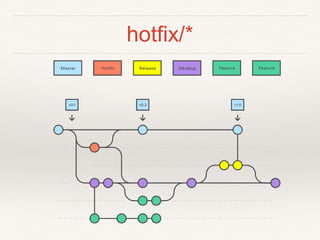
❖ hotfix branches are used to quickly patch production
releases
❖ Only hotfix branch should fork directly off of master
❖ As soon as the fix is complete, it should be merged into both
master and develop
❖ master should be tagged with an updated version number.
❖ Having a dedicated line of development for bug fixes lets
your team address issues without interrupting the rest of the
workflow or waiting for the next release cycle.

HelloGit

  • 1.
    Distributed Revision Control/ Branching & Workflow Model Hello Git / Git Flow Jason Hanson @jayfour000
  • 2.
    Credit & Reference ❖https://www.atlassian.com/git/tutorials/comparing- workflows/gitflow-workflow ❖ http://nvie.com/posts/a-successful-git-branching-model/
  • 3.
  • 4.
    Why Revision Control? ❖Code is complicated and changes over time ❖ I make mistakes in my code ❖ YOU make mistakes in my code! ❖ Takes longer than one day to write software ❖ Software lives longer than my hard drive
  • 5.
    Wait. What? Hello WorldGoodbye World Hello Jason Goodbye Jason
  • 6.
    Distributed Revision ControlOptions ❖ Mercurial ❖ Microsoft Visual SourceSafe ❖ CVS ❖ SVN ❖ Git
  • 7.
    Hello Git ❖ Developedby Linus Torvalds for Linux kernel development in 2005 ❖ Every working directory is a full repository ❖ Unlike CSV, SVN, etc ❖ More power ❖ Useful for 1 person teams too
  • 8.
    local vs origin ❖checkout from origin to local ❖ commit changes to local ❖ push from local to origin ❖ pull from origin to local Note: Git can be used local only too
  • 9.
    branch ❖ A branchrepresents an independent line of development. ❖ Branches serve as an abstraction for the edit/stage/commit process ❖ I think of them as branches of a tree ❖ New commits are recorded in the history for the current branch
  • 10.
    Tools ❖ Terminal ❖ SourceTree ❖Git Tower ❖ IntelliJ IDEs (WebStorm, AppCode, Android Studio, IDEA) ❖ Others?
  • 11.
    Tools - Terminal ❖PROS ❖ Free ❖ Simple ❖ Powerful - do all the things ❖ CONS ❖ Memorize commands ❖ Lots of typing ❖ Not friendly
  • 12.
    Tools - SourceTree ❖PROS ❖ Free ❖ Powerful ❖ Large user base ❖ CONS ❖ Overwhelming # of options ❖ Crashes 20+ times a day!
  • 13.
    Tools - GitTower ❖ PROS ❖ Easy to use ❖ Good UX ❖ Does not crash ❖ Cool logo ❖ CONS ❖ Can’t do every command ❖ Cost $60
  • 14.
    Tools - AltOptions ❖ Comfort level ❖ What do you use?
  • 17.
  • 18.
    Gitflow Origins ❖ VincentDriessen ❖ Blog post Jan, 2010 ❖ Today is widely used ❖ Built into SourceTree ❖ Built into Tower 2 ❖ Supported by Atlassian
  • 19.
    Gitflow - Overview ❖Strict branching model ❖ Suports multiple concurrent releases ❖ Robust workflow for larger projects
  • 20.
    Gitflow - Workflow ❖Central repository (origin) ❖ Dev work locally (local) and push branches to central repository (origin)
  • 21.
  • 22.
    master ❖ The masterbranch stores the official release history ❖ Tag created for version number merges ❖ HEAD always reflects a production-ready state ❖ Should be able to promote HEAD of master to production at any time
  • 23.
  • 24.
    develop ❖ Integration branchfor features ❖ QA works off develop ❖ develop is merged into master at certain milestones
  • 25.
  • 26.
    feature/* ❖ Each newfeature should reside in its own branch ❖ feature branches use develop as their parent branch ❖ When a feature is complete, it gets merged back into develop ❖ feature branches should never interact directly with master.
  • 27.
  • 28.
  • 29.
    release/* ❖ Once develophas acquired enough features for a release, you fork a release branch off of develop. ❖ No new features can be added after this point—only bug fixes, ❖ Once it's ready to ship, the release gets merged into master ❖ tag with a version number. ❖ merge release back into develop, which may have progressed since the release was created
  • 30.
  • 31.
    hotfix/* ❖ hotfix branchesare used to quickly patch production releases ❖ Only hotfix branch should fork directly off of master ❖ As soon as the fix is complete, it should be merged into both master and develop ❖ master should be tagged with an updated version number. ❖ Having a dedicated line of development for bug fixes lets your team address issues without interrupting the rest of the workflow or waiting for the next release cycle.

Editor's Notes

  • #2 Welcome everyone. My name is Jason Hanson and I am going to talk a little bit about git. Feel free to ask questions during the talk. I am going to talk about bit about Git, spend some time on GitFlow and then have an open discussion
  • #7 How many have used source control before? How many have used Git?
  • #12 Git always has on older version
  • #28 Example of what git history might look like