





Git Essentials
By Matthew Barlocker
The Barlocker
● Chief Architect at Lucid Software
Inc
● Used Subversion and Git since
2006
● Graduated with B.S. from BYU in
2008
● Developed software for the
following industries:
– Network Security
– Social Gaming
– Financial
– Productivity
Creating a Repo, Staging, and Committing
(terminal)
Creating, Staging, and Committing
● Git repos can be created anywhere.
● Only the staging area will be committed.
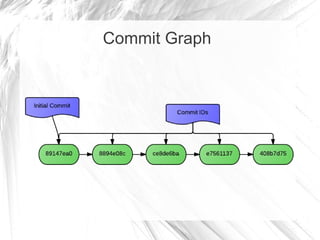
● Every commit is identified by an md5 hash
generated by git.
Commit Graph
Log, Diff, Reset and Revert
(terminal)
Log, Diff and Revert
● Reverting in Subversion is NOT the same as
reverting in Git. Reverting in Git is reversing a
commit.
● `git revert` will keep the bad commit in the
history. `git reset --hard` will not.
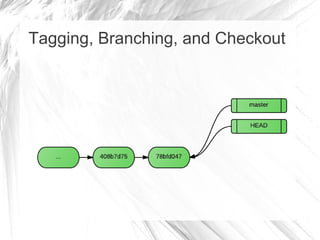
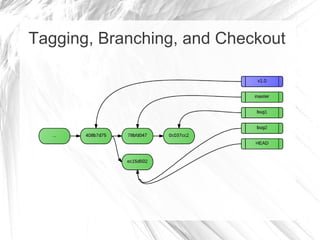
Tagging, Branching, and Checkout
● HEAD is the working directory.
● Everything happens on HEAD – committing,
merging, rebasing, cherry-picking, etc.
● Branching is easy. Use them for everything!
Tagging, Branching, and Checkout
(terminal)
Tagging, Branching, and Checkout
Stash
(terminal)
Merge vs Rebase
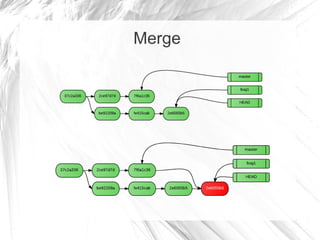
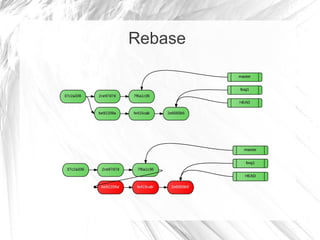
● Merge will create a merge commit.
● Rebase will rewrite history since the last
commit in common.
Merge
Rebase
Merge vs Rebase
● Merge history cannot be reverted!
● Rebasing ruins sharing!
● In a fast-forward, these do the same thing.
Merge & Rebase
(terminal)
Remotes
● Every repository has a full clone of every
commit, tag, and branch.
● “Remotes” are other clones of the same
repository.
● The repository you cloned from is always
called 'origin'.
Remotes & Clone
(terminal)
Fetch, Pull and Push
(terminal)
Fun Commands to Research
● `git cherry-pick`
● `git bisect`
● `git add -i`
● `git merge-base`
● `git rebase -i`
Any Questions?
Lucid Software Inc
● Building the next generation of collaborative web
applications
● VC funded, high growth, profitable
● Graduates from Harvard, MIT, Stanford
● Team has worked at Google, Amazon, Microsoft
https://www.lucidchart.com/jobs

Git essentials