DevOps Condensed
Prepared by: Jeyaram
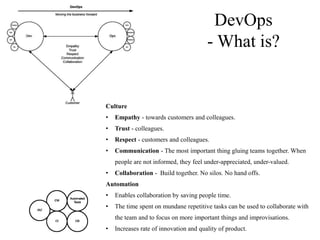
Culture
• Empathy - towards customers and colleagues.
• Trust - colleagues.
• Respect - customers and colleagues.
• Communication - The most important thing gluing teams together. When
people are not informed, they feel under-appreciated, under-valued.
• Collaboration - Build together. No silos. No hand offs.
Automation
• Enables collaboration by saving people time.
• The time spent on mundane repetitive tasks can be used to collaborate with
the team and to focus on more important things and improvisations.
• Increases rate of innovation and quality of product.
DevOps
- What is?
DevOps - What is?
• Dev is not just Developers. Ops is not just Operations. DevOps means all the teams involved in developing
and running the product.
• Can be thought of as an extension of Agile.
• Agile stopped at developing product and DevOps extends it to the whole organization.
• Everyone is involved. Everyone is informed. Nobody left behind. Trust & Respect over micro-
management. Build relationships and connections at work.
• DevOps is not necessarily a role. DevOps to be practiced by the Organization as a whole.
• All teams are in it from the beginning. So no hand-offs/hand-over required.
• Automate appropriately (IAC, CM, Automated Tests, CI, CD)
• Monitor key components
• Have an action plan for managing incidents
CI & CD
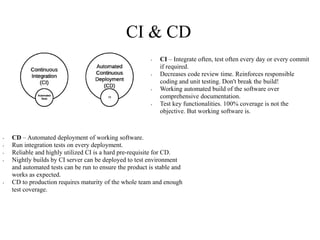
• CI – Integrate often, test often every day or every commit
if required.
• Decreases code review time. Reinforces responsible
coding and unit testing. Don't break the build!
• Working automated build of the software over
comprehensive documentation.
• Test key functionalities. 100% coverage is not the
objective. But working software is.
• CD – Automated deployment of working software.
• Run integration tests on every deployment.
• Reliable and highly utilized CI is a hard pre-requisite for CD.
• Nightly builds by CI server can be deployed to test environment
and automated tests can be run to ensure the product is stable and
works as expected.
• CD to production requires maturity of the whole team and enough
test coverage.
Monitoring
• Why? Ensure service uptime & optimal performance
• Act upon events before customers notice
• Log and monitor everything. Alerts should document the howtos. Centralized logging.
• What to monitor? Infrastructure. Application specific KPIs. User registrations per day. Usage per day. User
behaviour metrics. Slow APIs. Slow pages.
• Build custom dashboards with key metrics
Sample Tools:
• Infra Monitoring Tools: Sensu, Nagios or Zabbix
• Application Performance Monitoring Tools: New Relic / AppDynamics
• Service Status Monitoring Tools: Pingdom, monitis
• Centralized logging: ELK, Splunk, Loggly
• Custom application monitoring / metrics: statsd – graphite
Incident Management
• Why? To restore normal service operation as quickly as possible
• Assign a weekly support person from dev, qa, operations and other teams
• Everyone can support during the day
• Log incidents with all information. Identify impact & severity
• Escalate based on impact & severity
• Add learnings to Knowledgebase. Create unit & integration tests to cover the incident. Add past incidents
to KDB.
• Sample Tools: Jira, ServiceNow
References
• http://devops.com/2015/03/04/devops-is-agile-for-the-rest-of-the-company
• https://theagileadmin.com/what-is-devops
• http://www.softwaretestinghelp.com/devops-and-software-testing

DevOps Condensed

  • 1.
  • 2.
    Culture • Empathy -towards customers and colleagues. • Trust - colleagues. • Respect - customers and colleagues. • Communication - The most important thing gluing teams together. When people are not informed, they feel under-appreciated, under-valued. • Collaboration - Build together. No silos. No hand offs. Automation • Enables collaboration by saving people time. • The time spent on mundane repetitive tasks can be used to collaborate with the team and to focus on more important things and improvisations. • Increases rate of innovation and quality of product. DevOps - What is?
  • 3.
    DevOps - Whatis? • Dev is not just Developers. Ops is not just Operations. DevOps means all the teams involved in developing and running the product. • Can be thought of as an extension of Agile. • Agile stopped at developing product and DevOps extends it to the whole organization. • Everyone is involved. Everyone is informed. Nobody left behind. Trust & Respect over micro- management. Build relationships and connections at work. • DevOps is not necessarily a role. DevOps to be practiced by the Organization as a whole. • All teams are in it from the beginning. So no hand-offs/hand-over required. • Automate appropriately (IAC, CM, Automated Tests, CI, CD) • Monitor key components • Have an action plan for managing incidents
  • 4.
    CI & CD •CI – Integrate often, test often every day or every commit if required. • Decreases code review time. Reinforces responsible coding and unit testing. Don't break the build! • Working automated build of the software over comprehensive documentation. • Test key functionalities. 100% coverage is not the objective. But working software is. • CD – Automated deployment of working software. • Run integration tests on every deployment. • Reliable and highly utilized CI is a hard pre-requisite for CD. • Nightly builds by CI server can be deployed to test environment and automated tests can be run to ensure the product is stable and works as expected. • CD to production requires maturity of the whole team and enough test coverage.
  • 5.
    Monitoring • Why? Ensureservice uptime & optimal performance • Act upon events before customers notice • Log and monitor everything. Alerts should document the howtos. Centralized logging. • What to monitor? Infrastructure. Application specific KPIs. User registrations per day. Usage per day. User behaviour metrics. Slow APIs. Slow pages. • Build custom dashboards with key metrics Sample Tools: • Infra Monitoring Tools: Sensu, Nagios or Zabbix • Application Performance Monitoring Tools: New Relic / AppDynamics • Service Status Monitoring Tools: Pingdom, monitis • Centralized logging: ELK, Splunk, Loggly • Custom application monitoring / metrics: statsd – graphite
  • 6.
    Incident Management • Why?To restore normal service operation as quickly as possible • Assign a weekly support person from dev, qa, operations and other teams • Everyone can support during the day • Log incidents with all information. Identify impact & severity • Escalate based on impact & severity • Add learnings to Knowledgebase. Create unit & integration tests to cover the incident. Add past incidents to KDB. • Sample Tools: Jira, ServiceNow
  • 7.

Editor's Notes