Git Magic:
Versioning Files
  Like a Boss
  Tommy MacWilliam
   tmacwilliam@cs50.net
Today

• setting up like a boss
• basic git like a boss
• using branches like a boss
• reverting changes like a boss
• collaborating like a boss
Git is...
• “Git is distributed version control system
  focused on speed, effectivity and real-world
  usability on large projects”
  •   “distributed development”
  •   “non-linear development”
  •   “efficient handling of large projects”
  •   “cryptographic authentication of history”
Git is...
Git is...


Awesome.
Installing Git

• Windows: http://code.google.com/p/
  msysgit/
• OS X: http://code.google.com/p/git-osx-
  installer/
• Appliance: already installed!
Installing Git

root@appliance(~): git
usage: git [--version] [--exec-path[=<path>]] [--html-path]
       [-p|--paginate|--no-pager] [--no-replace-objects]
       [--bare] [--git-dir=<path>] [--work-tree=<path>]
       [-c name=value] [--help]
       <command> [<args>]
git config --global
user.name
“Tommy MacWilliam”
git config --global
user.email
tmacwilliam@cs50.net
git init
Commits

• snapshots of your project
• what your files look like at a given point
• single event in project history
git status
git add index.php
git add --all
git add --all
git add --all
git commit
Commit Messages

• short message describing what’s different in
  this commit
• add any new features?
• fix some bugs?
• break anything?
Commit Messages
Commit Messages


• http://www.commitlogsfromlastnight.com/
git commit -a -m
  “oh hi, mark!”
git log
5aeebab117b892fa42002146e4c62be676bc4621


b43b0ad1e8108e7ab870d7a54feac93ae8b8600e


461476587780aa9fa5611ea6dc3912c146a91760
Commit   5aeebab117b892fa42002146e4c62be676bc4621
  ID


         b43b0ad1e8108e7ab870d7a54feac93ae8b8600e


         461476587780aa9fa5611ea6dc3912c146a91760


HEAD
git show
git show b43b0
git init
git status
 git add


git commit
   git log
 git show
git init
git status
 git add


git commit
   git log
 git show
Branches
• non-linear development process
 • changes on one branch do not affect
    other branches
• crazy idea? make a branch
• didn’t work? delete the branch
• all done? merge the branch
git branch test
git branch test
git branch test
git checkout test
5aeeb


 b43b0


 46147


master
5aeeb
         git branch test


 b43b0      f862f


 46147      36223


master      test
git merge
5aeeb


 b43b0    f862f


 46147    36223


         git merge
 87aed


master    test
Like a boss.
git branch -D test
Merge vs. Rebase


• git merge: new commit, non-linear history
• git rebase: no new commit, linear history
5aeeb
         git branch test


 b43b0      f862f


 46147      36223


master      test
5aeeb


 b43b0


         git rebase

 46147                f862f   36223


master
Conflicts


• change in one branch can be incompatible
  with another
• git tries to resolve, but sometimes cannot
Conflict Resolution
int main(int argc, char** argv) {
   printf(“you invited all my friends”);
}

int main(int argc, char** argv) {
   printf(“good thinking!”);
}
Conflict Resolution

int main(int argc, char** argv) {
   <<<<<<< HEAD:file.c
   printf(“you invited all my friends”);
   =======
   printf(“good thinking!”);
   >>>>>>> f862f:file.c
}
git checkout
 git branch


 git merge
 git rebase
git checkout
 git branch


 git merge
 git rebase
git commit -m “oops.”
git revert b43b0
5aeeb


b43b0


46147
5aeeb


b43b0


46147


          git revert b43b0
 42bb4
(b43b0)
File-Specific Reverts

• git checkout -- index.php
 • replace with version in index
• git checkout b43b0 index.php
 • replace with version in commit b43b0
git reset --hard b43b0
git reflog
git bisect
Like a boss.
git revert
  git reset


git checkout
  git bisect
git revert
  git reset


git checkout
  git bisect
“distributed development”
ssh-keygen
git push
git@github.com:cs50/project
        master
git remote add origin
git@github.com:cs50/project
git remote add origin
git@github.com:cs50/project
git push origin master
git clone
git@github.com:cs50/project
git pull origin master
git pull --rebase
git init
git add --all
git commit

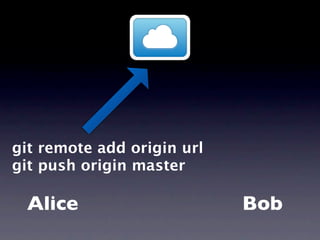
  Alice         Bob
git remote add origin url
git push origin master

 Alice                      Bob
git remote add origin url
git push origin master

 Alice                      Bob
git clone url

Alice          Bob
git clone url

Alice          Bob
git add --all
        git commit

Alice          Bob
git push origin master

Alice                 Bob
git push origin master

Alice                 Bob
git pull origin master

Alice                    Bob
git pull origin master

Alice                    Bob
git branch -a
git checkout -b
   origin/test
scp ~/.ssh/id_rsa.pub
host:~/.ssh/authorized_keys
git init --bare
git remote add live
user@cloud.cs50.net:~/project
git remote add live
user@cloud.cs50.net:~/project
  git push live master
Hooks
•   applypatch-msg      •   post-applypatch

•   commit-msg          •   pre-commit

•   post-commit         •   pre-commit-msg

•   post-receive        •   pre-rebase

•   post-update         •   update
post-receive
#!/bin/sh
GIT_WORK_TREE=/home/tmacwill/public_html 
git checkout -f
chmod -R 644 /home/tmacwill/public_html/
*.html
chmod -R 600 /home/tmacwill/public_html/
*.php
Like a boss.
git clone
git push


git remote
  git pull
git clone
git push


git remote
  git pull
More Resources

• http://progit.org/book/
• http://book.git-scm.com/
• http://gitref.org/
• http://git-scm.com/documentation
git commit -a -m
     “thanks!”

Git Magic: Versioning Files like a Boss

Editor's Notes

  • #2 \n
  • #3 \n
  • #4 \n
  • #5 \n
  • #6 \n
  • #7 \n
  • #8 \n
  • #9 \n
  • #10 mkdir repo\nvim index.php: &lt;?php echo &amp;#x2018;git rocks&amp;#x2019;; ?&gt;\nvim page.php: &lt;?php echo &amp;#x2018;tommy does, too&amp;#x2019;; ?&gt;\ngit init\n
  • #11 \n
  • #12 git status\n
  • #13 \n
  • #14 \n
  • #15 \n
  • #16 \n
  • #17 \n
  • #18 \n
  • #19 \n
  • #20 git add --all\ngit commit\n
  • #21 \n
  • #22 \n
  • #23 vim page2.php: &lt;?php echo &amp;#x2018;woo more commits&amp;#x2019;; ?&gt;\nvim index.php: &lt;?php echo &amp;#x2018;I made a change!&amp;#x2019;; ?&gt;\ngit add --all\ngit commit -m &amp;#x201C;another commit&amp;#x201D;\ngit log\n
  • #24 \n
  • #25 git show\ngit show PREVIOUS COMMIT\n
  • #26 \n
  • #27 \n
  • #28 \n
  • #29 \n
  • #30 \n
  • #31 git branch test\ngit branch\ngit checkout test\ngit branch\nvim crazy.php: &lt;?php echo &amp;#x2018;this is a crazy idea&amp;#x2019;; ?&gt;\ngit add --all\ngit commit -m &amp;#x201C;so crazy up in here&amp;#x201D;\nls\ngit log\ngit checkout master\nls\ngit log\n
  • #32 \n
  • #33 \n
  • #34 git branch\ngit checkout master\nvim index.php: &lt;?php echo &amp;#x2018;this page is boring&amp;#x2019;; ?&gt;\ngit add --all\ngit commit -m &amp;#x201C;third commit on master&amp;#x201D;\ngit merge test\ngit log\n
  • #35 git branch -D test\ngit branch\n
  • #36 \n
  • #37 \n
  • #38 git log --graph\ncd ../rebased\ngit checkout master\ngit rebase test\ngit log --graph\ncd ../repo\n
  • #39 \n
  • #40 \n
  • #41 \n
  • #42 \n
  • #43 \n
  • #44 \n
  • #45 \n
  • #46 ls\ngit log\nvim index.php: &lt;?php echo &amp;#x2018;good idea&amp;#x2019;; ?&gt;\ngit commit -a -m &amp;#x201C;sweet&amp;#x201D;\nvim index.php: &lt;?php echo &amp;#x2018;bad idea&amp;#x2019;; ?&gt;\ngit commit -a -m &amp;#x201C;oops&amp;#x201D;\ngit revert to commit &amp;#x201C;sweet&amp;#x201D;\nCONFLICT!\ngit status\nvim index.php\ngit commit -a -m &amp;#x201C;revert&amp;#x201D;\ngit log\n
  • #47 vim index.php: &lt;?php echo &amp;#x2018;only gonna add this&amp;#x2019;; ?&gt;\ngit add --all\ngit checkout -- index.php\nvim index.php\ngit checkout &lt;commit with &amp;#x201C;sweet&amp;#x201D;&gt; index.php\nvim index.php\n
  • #48 git reset --hard HEAD\n
  • #49 git checkout &lt;commit with &amp;#x201C;another commit&amp;#x201D;&gt;\ngit log\ngit reflog\ngit checkout master\n
  • #50 git bisect good &lt;first commit&gt;\ngit bisect bad HEAD\ngit bisect bad\ngit checkout master\n
  • #51 \n
  • #52 \n
  • #53 \n
  • #54 \n
  • #55 \n
  • #56 \n
  • #57 \n
  • #58 git remote add origin git@github.com:tmac721/seminar.git\ngit remote\ngit remote show origin\ngit push origin master\n
  • #59 cd ../\ngit clone git@github.com:tmac721/seminar.git\ncd test\nls\ngit log\n
  • #60 \n
  • #61 \n
  • #62 \n
  • #63 \n
  • #64 \n
  • #65 \n
  • #66 \n
  • #67 \n
  • #68 \n
  • #69 \n
  • #70 \n
  • #71 \n
  • #72 \n
  • #73 \n
  • #74 \n
  • #75 \n
  • #76 \n
  • #77 \n
  • #78 \n
  • #79 ssh cloud\nmkdir repo\ncd repo\ngit init --bare\ncd hooks\nvim post-receive: copy this\nchmod a+x post-receive\ngit remote add origin ssh://tmacwill@cloud.cs50.net/home/tmacwill/repo\ngit push origin master\n\n
  • #80 \n
  • #81 \n
  • #82 \n
  • #83 \n