Git: Basic to Advanced
Yodalee <lc85301@gmail.com>
Before start
某:小弟我想知道merge, cherry什麼的, rebase還有reflog
某:可以的話 stash 順便
某:log --graph介紹一下
某:我只會commit嗚嗚
某:remote的概念可以介紹一下呀
某:我不會交女朋友呀(炸
(╯-_-)╯ ~╩╩ , man git-XXX (無誤)
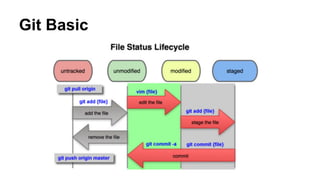
Git: Basic
git init
git add
git commit
Extend Reading Material:
http://johnjohnlys.blogspot.tw/2012/08/git-part-1.html
Git Basic
Git: Reference
➔ git branch
➔ git tag
➔ HEAD, ORIG_HEAD, FETCH_HEAD
Notice:
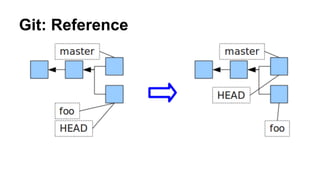
1. Each reference points to a commit (Hash)
2. Low cost to move a reference (FF)
Git: Reference
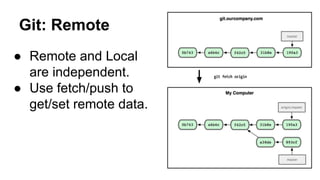
Git: Remote
● Remote and Local
are independent.
● Use fetch/push to
get/set remote data.
Git rebase
Cut down a branch, connect to other
Steps:
1. Checkout the new-base
2. Re-apply commits
3. Stop if conflict
Git rebase -i
Interactive Rebase, you can:
● Change content(edit)
● Change message(reword)
● Change order
● Combine/Split commit(squash, reset)
● Run command(exec)
Extend Reading Material:
http://blog.yorkxin.org/posts/2011/07/29/git-rebase/
Git rebase
!rebase 有機會竄改歷史!
在已經merge 的branch 上rebase 會怎麼樣?
➔ = = 建議千萬別這樣做..上次有人這樣 結果把分枝弄得一團亂..
➔ 樓上..然後呢@@
➔ 就把分枝弄得一團亂 很不方便..
git stash
● Temporary store the changes you made.
● Useful with rebase
Basic usage: stash <push, pop, list>
Extend Reading Material:
http://yodalee.blogspot.tw/2013/12/git-stash.html
git format-patch, am
● git format-patch <Ref>
○ generate patches
● git am <path-to-patch>
○ Apply patches
git bisect
Find the commit that changes somthing, steps:
1. bisect start
2. Set “bisect bad”, “bisect good”
3. Keep testing; set bad or good
4. Find the commit
Extend Reading Material:
http://yodalee.blogspot.tw/2014/08/git-bisect.html
git cherry-pick
Pick out the change in some commit.
● -n, --no-commit: allow you edit, commit
manually
Not very useful, actually.
Git inside
ls * in .git:
● Object/: Data
● Refs/: Reference
● Logs/: Change to Reference
● other files
Extend Reading Material:
http://git-scm.com/docs/gitrepository-layout
Git reflog
● View the list of HEAD movement. record the
Hash and action
● Log when you move reference by
<commit, rebase, reset, checkout>
If you get the Hash, you can recover it.
Git fsck
● Fsck check repository integrity, find dangling
commits.
● Even reflog is deleted or not record, ex:
git branch -D some-branch
rm -Rf .git/logs/
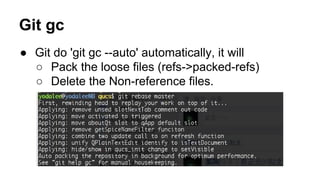
Git gc
● Git do 'git gc --auto' automatically, it will
○ Pack the loose files (refs->packed-refs)
○ Delete the Non-reference files.
Git filter-branch
Filter out some commits, and do some change.
ex. git filter-branch --msg-filter “echo XD” branch
--Change all commit message into “XD”
ex. git filter-branch --index-filter “rm xxx” branch
--Delete file from git repository
Extend Reading Material:
http://yodalee.blogspot.tw/2014/06/git-gc.html
Git filter-branch
!filter-branch 就是要更動歷史!
在已經merge 的branch 上filter-branch會怎麼
樣?
➔ = = 建議千萬別這樣做..上次有人這樣 結果把分枝弄得一團亂..
➔ 樓上..然後呢@@
➔ 就把分枝弄得一團亂 很不方便..
Git useful tool
Linux: gitk, gitg
https://wiki.gnome.org/Apps/Gitg/
MacOS:
http://gitx.frim.nl/
Windows: X! I don’t know
The End
● Git is POWERFUL. With basic skills, it can
fulfill daily requirement.
● Hope everyone can become Git Master

Git: basic to advanced

  • 1.
    Git: Basic toAdvanced Yodalee <lc85301@gmail.com>
  • 2.
    Before start 某:小弟我想知道merge, cherry什麼的,rebase還有reflog 某:可以的話 stash 順便 某:log --graph介紹一下 某:我只會commit嗚嗚 某:remote的概念可以介紹一下呀 某:我不會交女朋友呀(炸 (╯-_-)╯ ~╩╩ , man git-XXX (無誤)
  • 3.
    Git: Basic git init gitadd git commit Extend Reading Material: http://johnjohnlys.blogspot.tw/2012/08/git-part-1.html
  • 4.
  • 5.
    Git: Reference ➔ gitbranch ➔ git tag ➔ HEAD, ORIG_HEAD, FETCH_HEAD Notice: 1. Each reference points to a commit (Hash) 2. Low cost to move a reference (FF)
  • 6.
  • 7.
    Git: Remote ● Remoteand Local are independent. ● Use fetch/push to get/set remote data.
  • 8.
    Git rebase Cut downa branch, connect to other Steps: 1. Checkout the new-base 2. Re-apply commits 3. Stop if conflict
  • 9.
    Git rebase -i InteractiveRebase, you can: ● Change content(edit) ● Change message(reword) ● Change order ● Combine/Split commit(squash, reset) ● Run command(exec) Extend Reading Material: http://blog.yorkxin.org/posts/2011/07/29/git-rebase/
  • 10.
    Git rebase !rebase 有機會竄改歷史! 在已經merge的branch 上rebase 會怎麼樣? ➔ = = 建議千萬別這樣做..上次有人這樣 結果把分枝弄得一團亂.. ➔ 樓上..然後呢@@ ➔ 就把分枝弄得一團亂 很不方便..
  • 11.
    git stash ● Temporarystore the changes you made. ● Useful with rebase Basic usage: stash <push, pop, list> Extend Reading Material: http://yodalee.blogspot.tw/2013/12/git-stash.html
  • 12.
    git format-patch, am ●git format-patch <Ref> ○ generate patches ● git am <path-to-patch> ○ Apply patches
  • 13.
    git bisect Find thecommit that changes somthing, steps: 1. bisect start 2. Set “bisect bad”, “bisect good” 3. Keep testing; set bad or good 4. Find the commit Extend Reading Material: http://yodalee.blogspot.tw/2014/08/git-bisect.html
  • 14.
    git cherry-pick Pick outthe change in some commit. ● -n, --no-commit: allow you edit, commit manually Not very useful, actually.
  • 15.
    Git inside ls *in .git: ● Object/: Data ● Refs/: Reference ● Logs/: Change to Reference ● other files Extend Reading Material: http://git-scm.com/docs/gitrepository-layout
  • 16.
    Git reflog ● Viewthe list of HEAD movement. record the Hash and action ● Log when you move reference by <commit, rebase, reset, checkout> If you get the Hash, you can recover it.
  • 17.
    Git fsck ● Fsckcheck repository integrity, find dangling commits. ● Even reflog is deleted or not record, ex: git branch -D some-branch rm -Rf .git/logs/
  • 18.
    Git gc ● Gitdo 'git gc --auto' automatically, it will ○ Pack the loose files (refs->packed-refs) ○ Delete the Non-reference files.
  • 19.
    Git filter-branch Filter outsome commits, and do some change. ex. git filter-branch --msg-filter “echo XD” branch --Change all commit message into “XD” ex. git filter-branch --index-filter “rm xxx” branch --Delete file from git repository Extend Reading Material: http://yodalee.blogspot.tw/2014/06/git-gc.html
  • 20.
    Git filter-branch !filter-branch 就是要更動歷史! 在已經merge的branch 上filter-branch會怎麼 樣? ➔ = = 建議千萬別這樣做..上次有人這樣 結果把分枝弄得一團亂.. ➔ 樓上..然後呢@@ ➔ 就把分枝弄得一團亂 很不方便..
  • 21.
    Git useful tool Linux:gitk, gitg https://wiki.gnome.org/Apps/Gitg/ MacOS: http://gitx.frim.nl/ Windows: X! I don’t know
  • 22.
    The End ● Gitis POWERFUL. With basic skills, it can fulfill daily requirement. ● Hope everyone can become Git Master