AWS Distilled
Prepared by: Jeyaram
Objective
• Introduce core concepts of AWS through a sample standard web
architecture
What is AWS?
• Amazon Web Services
• Why is it called Web Services?
• Is it SOAP or REST? Both are supported. Provides services via a Web
based API.
• Provides services ranging from an object store (S3) to a peta-byte
scale Datawarehouse (Redshift).
Why and how Amazon launched AWS?
• Amazon started as an online bookstore and transformed into everything store
• It had lots of infrastructure resources to support its web-scale application called
Amazon.com
• Infrastructure at Amazon was already provided as a service to development teams
• Amazon had excess capacity and Bezos realized other companies have the same problem
as well. Another new market to provide services for.
• So Amazon engineers proposed to externalize this technology to help any developer to
use excess capacity of Amazon, to start with. https://www.quora.com/How-and-why-did-
Amazon-get-into-the-cloud-computing-business
• Year 2006. First service to launch was S3 followed by EC2. Amazon burned through the
excess capacity by the end of 2006. So AWS started using separate infrastructure for
AWS. Not using excess capacity from Amazon. http://www.stackdriver.com/happy-8th-
birthday-aws-s3
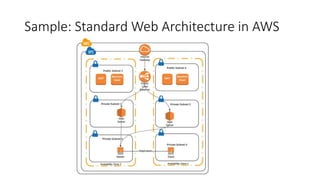
Sample: Standard Web Architecture in AWS
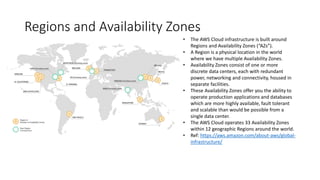
Regions and Availability Zones
• The AWS Cloud infrastructure is built around
Regions and Availability Zones (“AZs”).
• A Region is a physical location in the world
where we have multiple Availability Zones.
• Availability Zones consist of one or more
discrete data centers, each with redundant
power, networking and connectivity, housed in
separate facilities.
• These Availability Zones offer you the ability to
operate production applications and databases
which are more highly available, fault tolerant
and scalable than would be possible from a
single data center.
• The AWS Cloud operates 33 Availability Zones
within 12 geographic Regions around the world.
• Ref: https://aws.amazon.com/about-aws/global-
infrastructure/
VPC
• Virtual Private Cloud
• Isolated network in the public cloud
• Network can be divided into Public & Private Subnets
• Secure access to resources
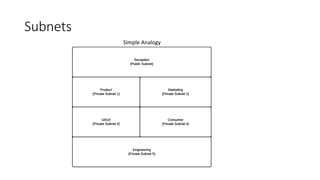
Subnets
Simple Analogy
Elastic Load Balancer
• Balances load between servers. We use ELB to load balance between
our Core API
• Enables creating Highly Available & Fault-tolerant architectures
• Muti-AZ by design
• Autoscales based on load
• Addressed through a DNS name. Does not have an IP address
• ELBs cannot be whitelisted by firewalls requiring IP address. One way
of handling this is to use a proxy in front of the ELB with a Public IP
Address
EC2 (Elastic Compute Cloud)
• EC2 are Virtual Machines on Cloud
• Eliminates your need to invest in hardware up front, so you can
develop and deploy applications faster
• Scalable computing capacity
• Launch as many or as few virtual servers as you need in minutes
EBS - Elastic Block Storage
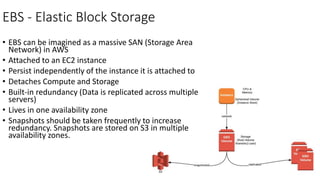
• EBS can be imagined as a massive SAN (Storage Area
Network) in AWS
• Attached to an EC2 instance
• Persist independently of the instance it is attached to
• Detaches Compute and Storage
• Built-in redundancy (Data is replicated across multiple
servers)
• Lives in one availability zone
• Snapshots should be taken frequently to increase
redundancy. Snapshots are stored on S3 in multiple
availability zones.
Infrastructure as a Service
• AWS is IaaS
• Pay on a per-use basis, typically by the hour
• This pay-as-you-go model eliminates the capital expense of deploying
in-house hardware and software.
• Azure, Google Compute Engine, etc..
Platform as a Service
• Elastic Beanstalk is PaaS
• PaaS allows customers to run applications without the complexity of
building and maintaining the infrastructure
• Built on top of IaaS
• Google App Engine, Heroku, Pivotal Web Service, etc..
AWS Managed Services
• Built on top of the core services like EC2, S3, EBS
• Relation Database Service (RDS – MySQL, Postgres, Oracle, etc…)
• Elasticache (Managed Memcache & Redis)
• SQS (Managed Message Queue)
• EMR (Managed Hadoop)
• Cloudsearch (Managed indexing & search service)
Infrastructure as Code (IaC)
• Programmable infrastructure
• Writing code to manage configurations and automate provisioning of
infrastructure in addition to deployments
• Ansbile, CloudFormation
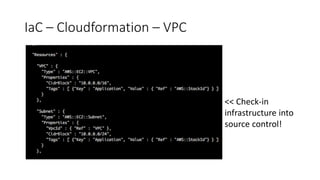
IaC – Cloudformation – VPC
<< Check-in
infrastructure into
source control!
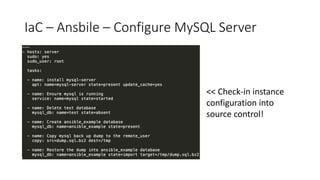
IaC – Ansbile – Configure MySQL Server
<< Check-in instance
configuration into
source control!

AWS Distilled

  • 1.
  • 2.
    Objective • Introduce coreconcepts of AWS through a sample standard web architecture
  • 3.
    What is AWS? •Amazon Web Services • Why is it called Web Services? • Is it SOAP or REST? Both are supported. Provides services via a Web based API. • Provides services ranging from an object store (S3) to a peta-byte scale Datawarehouse (Redshift).
  • 4.
    Why and howAmazon launched AWS? • Amazon started as an online bookstore and transformed into everything store • It had lots of infrastructure resources to support its web-scale application called Amazon.com • Infrastructure at Amazon was already provided as a service to development teams • Amazon had excess capacity and Bezos realized other companies have the same problem as well. Another new market to provide services for. • So Amazon engineers proposed to externalize this technology to help any developer to use excess capacity of Amazon, to start with. https://www.quora.com/How-and-why-did- Amazon-get-into-the-cloud-computing-business • Year 2006. First service to launch was S3 followed by EC2. Amazon burned through the excess capacity by the end of 2006. So AWS started using separate infrastructure for AWS. Not using excess capacity from Amazon. http://www.stackdriver.com/happy-8th- birthday-aws-s3
  • 5.
    Sample: Standard WebArchitecture in AWS
  • 6.
    Regions and AvailabilityZones • The AWS Cloud infrastructure is built around Regions and Availability Zones (“AZs”). • A Region is a physical location in the world where we have multiple Availability Zones. • Availability Zones consist of one or more discrete data centers, each with redundant power, networking and connectivity, housed in separate facilities. • These Availability Zones offer you the ability to operate production applications and databases which are more highly available, fault tolerant and scalable than would be possible from a single data center. • The AWS Cloud operates 33 Availability Zones within 12 geographic Regions around the world. • Ref: https://aws.amazon.com/about-aws/global- infrastructure/
  • 7.
    VPC • Virtual PrivateCloud • Isolated network in the public cloud • Network can be divided into Public & Private Subnets • Secure access to resources
  • 8.
  • 9.
    Elastic Load Balancer •Balances load between servers. We use ELB to load balance between our Core API • Enables creating Highly Available & Fault-tolerant architectures • Muti-AZ by design • Autoscales based on load • Addressed through a DNS name. Does not have an IP address • ELBs cannot be whitelisted by firewalls requiring IP address. One way of handling this is to use a proxy in front of the ELB with a Public IP Address
  • 10.
    EC2 (Elastic ComputeCloud) • EC2 are Virtual Machines on Cloud • Eliminates your need to invest in hardware up front, so you can develop and deploy applications faster • Scalable computing capacity • Launch as many or as few virtual servers as you need in minutes
  • 11.
    EBS - ElasticBlock Storage • EBS can be imagined as a massive SAN (Storage Area Network) in AWS • Attached to an EC2 instance • Persist independently of the instance it is attached to • Detaches Compute and Storage • Built-in redundancy (Data is replicated across multiple servers) • Lives in one availability zone • Snapshots should be taken frequently to increase redundancy. Snapshots are stored on S3 in multiple availability zones.
  • 12.
    Infrastructure as aService • AWS is IaaS • Pay on a per-use basis, typically by the hour • This pay-as-you-go model eliminates the capital expense of deploying in-house hardware and software. • Azure, Google Compute Engine, etc..
  • 13.
    Platform as aService • Elastic Beanstalk is PaaS • PaaS allows customers to run applications without the complexity of building and maintaining the infrastructure • Built on top of IaaS • Google App Engine, Heroku, Pivotal Web Service, etc..
  • 14.
    AWS Managed Services •Built on top of the core services like EC2, S3, EBS • Relation Database Service (RDS – MySQL, Postgres, Oracle, etc…) • Elasticache (Managed Memcache & Redis) • SQS (Managed Message Queue) • EMR (Managed Hadoop) • Cloudsearch (Managed indexing & search service)
  • 15.
    Infrastructure as Code(IaC) • Programmable infrastructure • Writing code to manage configurations and automate provisioning of infrastructure in addition to deployments • Ansbile, CloudFormation
  • 16.
    IaC – Cloudformation– VPC << Check-in infrastructure into source control!
  • 17.
    IaC – Ansbile– Configure MySQL Server << Check-in instance configuration into source control!