Improving your
workflow with GIT
GIT basics
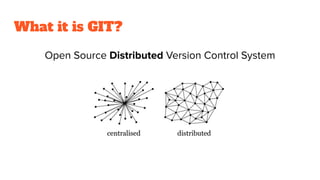
What it is GIT?
Open Source
Distributed
Version Control System
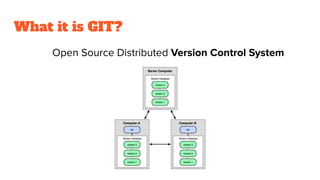
What it is GIT?
Open Source Distributed Version Control System
What it is GIT?
Open Source Distributed Version Control System
What it is GIT?
Open Source Distributed Version Control System
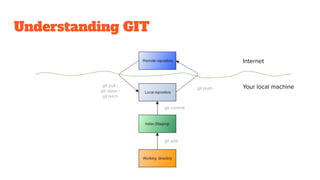
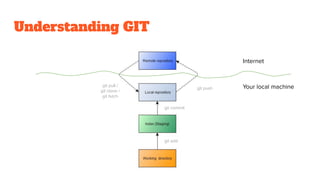
Understanding GIT
Internet
Your local machinegit push
git pull /
git clone /
git fetch
git add
git commit
Don’t be afraid of the GIT
command line
GIT commands
Know what you are doing
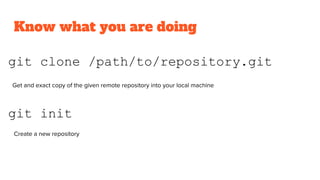
git init
git clone /path/to/repository.git
Get and exact copy of the given remote repository into your local machine
Create a new repository
Know what you are doing
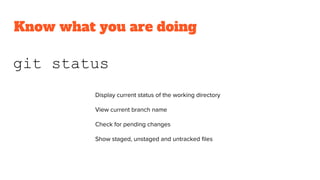
git status
Display current status of the working directory
View current branch name
Check for pending changes
Show staged, unstaged and untracked files
Know what you are doing
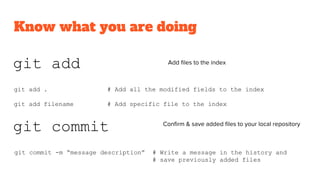
git add Add files to the index
git add . # Add all the modified fields to the index
git add filename # Add specific file to the index
git commit Confirm & save added files to your local repository
git commit -m “message description” # Write a message in the history and
# save previously added files
Understanding GIT
Internet
Your local machinegit push
git pull /
git clone /
git fetch
git add
git commit
Know what you are doing
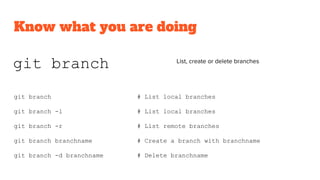
git branch List, create or delete branches
git branch # List local branches
git branch -l # List local branches
git branch -r # List remote branches
git branch branchname # Create a branch with branchname
git branch -d branchname # Delete branchname
Know what you are doing
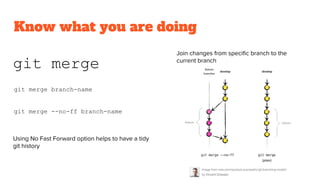
git merge
Join changes from specific branch to the
current branch
git merge branch-name
git merge --no-ff branch-name
Using No Fast Forward option helps to have a tidy
git history
Know what you are doing
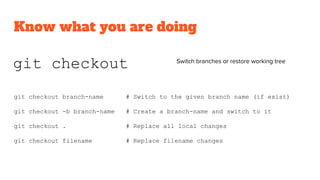
git checkout Switch branches or restore working tree
git checkout branch-name # Switch to the given branch name (if exist)
git checkout -b branch-name # Create a branch-name and switch to it
git checkout . # Replace all local changes
git checkout filename # Replace filename changes
Know what you are doing
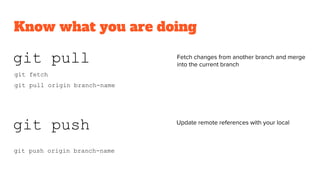
git push Update remote references with your local
git push origin branch-name
git pull Fetch changes from another branch and merge
into the current branch
git pull origin branch-name
git fetch
Know what you are doing
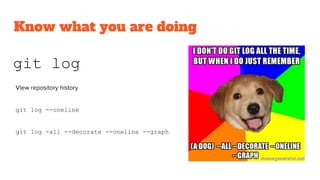
git log
View repository history
git log --oneline
git log -all --decorate --oneline --graph
Know what you are doing
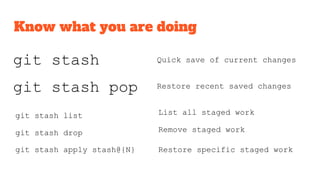
git stash
git stash pop
git stash drop
git stash list
git stash apply stash@{N}
Quick save of current changes
Restore recent saved changes
List all staged work
Remove staged work
Restore specific staged work
Git GUIs
Your IDE
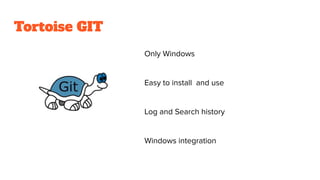
Tortoise GIT
Only Windows
Easy to install and use
Log and Search history
Windows integration
Sourcetree
Windows and Mac
Easy to install and use
Built-in code editor
Bitbucket & Jira integration
Git Kraken
Windows, Mac, Linux
Visual history
Merge conflicts
Built-in code editor
Growing community
Integrations with GitLab, GitHub, Bitbucket
Others
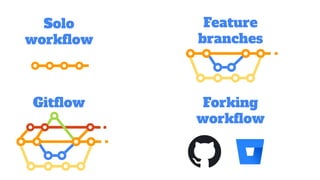
GIT
workflows
Feature
branches
Solo
workflow
Gitflow Forking
workflow
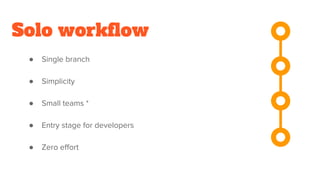
Solo workflow
● Single branch
● Simplicity
● Small teams *
● Entry stage for developers
● Zero effort
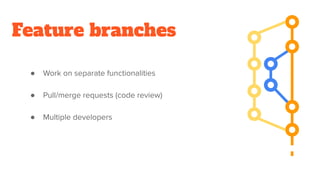
Feature branches
● Work on separate functionalities
● Pull/merge requests (code review)
● Multiple developers
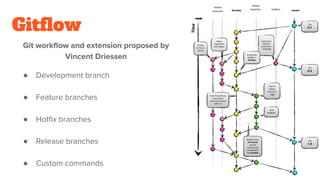
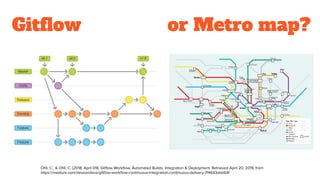
Gitflow
Git workflow and extension proposed by
Vincent Driessen
● Development branch
● Feature branches
● Hotfix branches
● Release branches
● Custom commands
Gitflow
Ofili, C., & Ofili, C. (2018, April 09). Gitflow Workflow, Automated Builds, Integration & Deployment. Retrieved April 20, 2019, from
https://medium.com/devsondevs/gitflow-workflow-continuous-integration-continuous-delivery-7f4643abb64f
or Metro map?
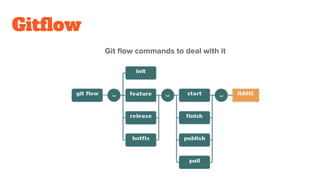
Gitflow
Git flow commands to deal with it
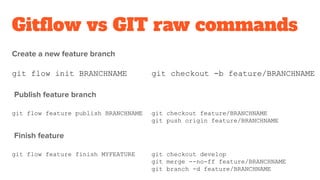
Gitflow vs GIT raw commands
Create a new feature branch
git flow init BRANCHNAME git checkout -b feature/BRANCHNAME
Publish feature branch
git flow feature publish BRANCHNAME git checkout feature/BRANCHNAME
git push origin feature/BRANCHNAME
Finish feature
git flow feature finish MYFEATURE git checkout develop
git merge --no-ff feature/BRANCHNAME
git branch -d feature/BRANCHNAME
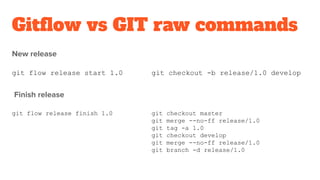
Gitflow vs GIT raw commands
New release
git flow release start 1.0 git checkout -b release/1.0 develop
Finish release
git flow release finish 1.0 git checkout master
git merge --no-ff release/1.0
git tag -a 1.0
git checkout develop
git merge --no-ff release/1.0
git branch -d release/1.0
Forking workflow
● Server side repository for each developer
● Public repositories
● Only maintainer can accept changes
● Pull/merge requests (code review)
YOUR GIT
WORKFLOW
create & adapt
to your needs
GitLab. (2018). Retrieved from https://about.gitlab.com/images/press/git-cheat-sheet.pdf
Git. (n.d.). Git. Retrieved from https://git-scm.com/
References & Takeaways
Dudler, R. (2012, January 11). Git cheat sheet. Retrieved from https://rogerdudler.github.io/git-guide/files/git_cheat_sheet.pdf
Marklodato.github.io. (2019). A Visual Git Reference. [online] Available at: https://marklodato.github.io/visual-git-guide/index-en.html
[Accessed 10 Mar. 2019].
Cottle, P. (2019). Learn Git Branching. [online] Learngitbranching.js.org. Available at: https://learngitbranching.js.org/ [Accessed 09 Mar.
2019].
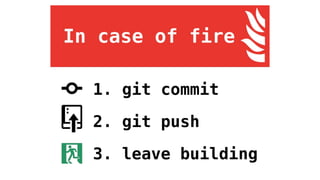
Roa, H. (2017, August 23). hendrixroa/in-case-of-fire. Retrieved from https://github.com/hendrixroa/in-case-of-fire
Wehner, J. (2019). How to undo (almost) anything with Git - The GitHub Blog. [online] The GitHub Blog. Available at:
https://github.blog/2015-06-08-how-to-undo-almost-anything-with-git/ [Accessed 15 Mar. 2019].
Driessen, V. (2010, January 05). A successful Git branching model. Retrieved March 20, 2019, from
https://nvie.com/posts/a-successful-git-branching-model/

Improving your workflow with git

  • 1.
  • 2.
  • 3.
    What it isGIT? Open Source Distributed Version Control System
  • 4.
    What it isGIT? Open Source Distributed Version Control System
  • 5.
    What it isGIT? Open Source Distributed Version Control System
  • 6.
    What it isGIT? Open Source Distributed Version Control System
  • 7.
    Understanding GIT Internet Your localmachinegit push git pull / git clone / git fetch git add git commit
  • 8.
    Don’t be afraidof the GIT command line GIT commands
  • 9.
    Know what youare doing git init git clone /path/to/repository.git Get and exact copy of the given remote repository into your local machine Create a new repository
  • 10.
    Know what youare doing git status Display current status of the working directory View current branch name Check for pending changes Show staged, unstaged and untracked files
  • 11.
    Know what youare doing git add Add files to the index git add . # Add all the modified fields to the index git add filename # Add specific file to the index git commit Confirm & save added files to your local repository git commit -m “message description” # Write a message in the history and # save previously added files
  • 12.
    Understanding GIT Internet Your localmachinegit push git pull / git clone / git fetch git add git commit
  • 13.
    Know what youare doing git branch List, create or delete branches git branch # List local branches git branch -l # List local branches git branch -r # List remote branches git branch branchname # Create a branch with branchname git branch -d branchname # Delete branchname
  • 14.
    Know what youare doing git merge Join changes from specific branch to the current branch git merge branch-name git merge --no-ff branch-name Using No Fast Forward option helps to have a tidy git history
  • 15.
    Know what youare doing git checkout Switch branches or restore working tree git checkout branch-name # Switch to the given branch name (if exist) git checkout -b branch-name # Create a branch-name and switch to it git checkout . # Replace all local changes git checkout filename # Replace filename changes
  • 16.
    Know what youare doing git push Update remote references with your local git push origin branch-name git pull Fetch changes from another branch and merge into the current branch git pull origin branch-name git fetch
  • 17.
    Know what youare doing git log View repository history git log --oneline git log -all --decorate --oneline --graph
  • 18.
    Know what youare doing git stash git stash pop git stash drop git stash list git stash apply stash@{N} Quick save of current changes Restore recent saved changes List all staged work Remove staged work Restore specific staged work
  • 19.
  • 20.
  • 21.
    Tortoise GIT Only Windows Easyto install and use Log and Search history Windows integration
  • 22.
    Sourcetree Windows and Mac Easyto install and use Built-in code editor Bitbucket & Jira integration
  • 23.
    Git Kraken Windows, Mac,Linux Visual history Merge conflicts Built-in code editor Growing community Integrations with GitLab, GitHub, Bitbucket
  • 24.
  • 25.
  • 26.
  • 27.
    Solo workflow ● Singlebranch ● Simplicity ● Small teams * ● Entry stage for developers ● Zero effort
  • 28.
    Feature branches ● Workon separate functionalities ● Pull/merge requests (code review) ● Multiple developers
  • 29.
    Gitflow Git workflow andextension proposed by Vincent Driessen ● Development branch ● Feature branches ● Hotfix branches ● Release branches ● Custom commands
  • 30.
    Gitflow Ofili, C., &Ofili, C. (2018, April 09). Gitflow Workflow, Automated Builds, Integration & Deployment. Retrieved April 20, 2019, from https://medium.com/devsondevs/gitflow-workflow-continuous-integration-continuous-delivery-7f4643abb64f or Metro map?
  • 31.
  • 32.
    Gitflow vs GITraw commands Create a new feature branch git flow init BRANCHNAME git checkout -b feature/BRANCHNAME Publish feature branch git flow feature publish BRANCHNAME git checkout feature/BRANCHNAME git push origin feature/BRANCHNAME Finish feature git flow feature finish MYFEATURE git checkout develop git merge --no-ff feature/BRANCHNAME git branch -d feature/BRANCHNAME
  • 33.
    Gitflow vs GITraw commands New release git flow release start 1.0 git checkout -b release/1.0 develop Finish release git flow release finish 1.0 git checkout master git merge --no-ff release/1.0 git tag -a 1.0 git checkout develop git merge --no-ff release/1.0 git branch -d release/1.0
  • 34.
    Forking workflow ● Serverside repository for each developer ● Public repositories ● Only maintainer can accept changes ● Pull/merge requests (code review)
  • 35.
    YOUR GIT WORKFLOW create &adapt to your needs
  • 37.
    GitLab. (2018). Retrievedfrom https://about.gitlab.com/images/press/git-cheat-sheet.pdf Git. (n.d.). Git. Retrieved from https://git-scm.com/ References & Takeaways Dudler, R. (2012, January 11). Git cheat sheet. Retrieved from https://rogerdudler.github.io/git-guide/files/git_cheat_sheet.pdf Marklodato.github.io. (2019). A Visual Git Reference. [online] Available at: https://marklodato.github.io/visual-git-guide/index-en.html [Accessed 10 Mar. 2019]. Cottle, P. (2019). Learn Git Branching. [online] Learngitbranching.js.org. Available at: https://learngitbranching.js.org/ [Accessed 09 Mar. 2019]. Roa, H. (2017, August 23). hendrixroa/in-case-of-fire. Retrieved from https://github.com/hendrixroa/in-case-of-fire Wehner, J. (2019). How to undo (almost) anything with Git - The GitHub Blog. [online] The GitHub Blog. Available at: https://github.blog/2015-06-08-how-to-undo-almost-anything-with-git/ [Accessed 15 Mar. 2019]. Driessen, V. (2010, January 05). A successful Git branching model. Retrieved March 20, 2019, from https://nvie.com/posts/a-successful-git-branching-model/