Getting Started with
Business Continuity
Stephen Cobb, CISSP
Security Researcher, ESET NA
What’s on the agenda?
• How can your organization
survive disruptive incidents?
– Everything from natural
disasters to hacking attacks
• You need a business continuity
plan
What’s the problem?
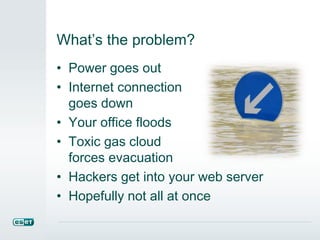
• Power goes out
• Internet connection
goes down
• Your office floods
• Toxic gas cloud
forces evacuation
• Hackers get into your web server
• Hopefully not all at once
Business Continuity Management
• Your organization needs the ability:
– “to continue to deliver its products and
services at acceptable predefined
levels after disruptive incidents have
occurred”
• This is BCM, as defined by ISO 22301
Not all organizations survive
• Some go out of business IF they are hit
with a disaster for which they have not
adequately prepared
• Often cited statistic: 1 in 4 fail
• Fortunately, the path to proper disaster
preparedness is well-documented (see
Attachments)
Question #1
Does your organization have a
business continuity plan?
 Yes
 No
 I’m not sure
 I don’t work for an organization
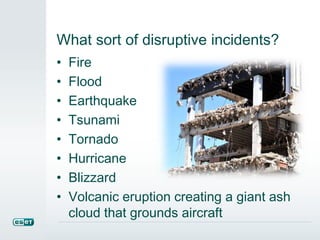
What sort of disruptive incidents?
• Fire
• Flood
• Earthquake
• Tsunami
• Tornado
• Hurricane
• Blizzard
• Volcanic eruption creating a giant ash
cloud that grounds aircraft
Incidents and accidents
• Technical
– Unscheduled IT outage
– Communications outage
– Malware infection
• Human
– Scandal, fraud and terrorism
– Transportation accidents
– Social media storm
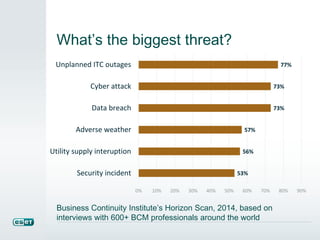
What’s the biggest threat?
53%
56%
57%
73%
73%
77%
0% 10% 20% 30% 40% 50% 60% 70% 80% 90%
Security incident
Utility supply interuption
Adverse weather
Data breach
Cyber attack
Unplanned ITC outages
Business Continuity Institute’s Horizon Scan, 2014, based on
interviews with 600+ BCM professionals around the world
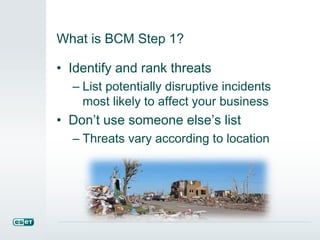
What is BCM Step 1?
• Identify and rank threats
– List potentially disruptive incidents
most likely to affect your business
• Don’t use someone else’s list
– Threats vary according to location
Practical strategy
• Brainstorm with representatives from
all departments
• Generate company and location
specific list of disaster scenarios
– Ranked by probability of occurrence
and potential for negative impact
– Consider regional variations, some
threats location-specific
BCM Step 2: Business Impact Analysis
• Which business functions are most
critical to its survival?
• Requires knowledge, or discovery, of
all parts of the organization
• Multi-department team effort
• There are templates for this
Practical technique: BIA
• Detail the functions, processes,
personnel, places and systems that are
critical to the functioning of your
organization
• BCM project leader interviews
employees in each department
• Resulting table lists functions and key
person(s) and alternate(s)
Practical technique: BIA
• Determine number of
Survival Days for each
function
• How long before lack of
that function causes
serious impact?
• Rank the impact of that
function not being
available
The Miora technique
• Use an Impact scale of 1 to 4
• Where 1 = critical operational impact or
fiscal loss, and 4 = no short tern
impacts
• Multiply Impact x Survival Days
• Reveals criticality of functions
• Most critical? Functions where Impact
= 1 and Survival Days = 1
Question #2
When was the last time your
organization tested its
disaster/recovery/continuity plan?
 2014
 2013
 Before 2013
 We don’t have a plan
 I don’t work for an organization
BCM Step 3
• The Response and Recovery Plan
• Catalog key data about the assets
required to restore critical functions
– IT systems, facilities, personnel,
suppliers, partners, customers, law
enforcement, emergency services
• Plan must cover HR, IT, PR, asset
management, accounting, facilities
Practical technique: The Plan
• Record asset serial numbers, licensing
agreements, leases, warranties,
contact details
• Determine “who to call” for each
category of incident
• Create a calling tree so the right calls
get made, in the right order
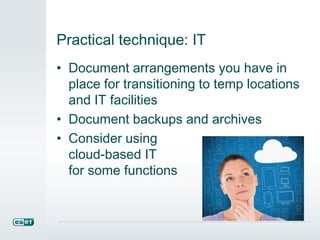
Practical technique: IT
• Document arrangements you have in
place for transitioning to temp locations
and IT facilities
• Document backups and archives
• Consider using
cloud-based IT
for some functions
Practical technique: PR controls
• You need a “who can say what” list to
control interaction with the media
during an incident
• Train all employees on this
• Consider a “CEO-only” rule
• Don’t overlook social media
Practical technique: People
• Document an “all-hands” notification
process
• Design and document customer
advisory criteria and procedures
Practical technique: Steps
• Steps to recover key operations should
be laid out in a sequence that accounts
for functional inter-dependencies.
• Get plan approved
• Train managers and their reports on
the plan details relevant to each
location and department
BCM Step 4: Test and Refine
• Experts recommend testing your plan
at least once a year
• Use exercises, walk-throughs,
simulations
• With testing you get the most out of
your investment in creating the plan
Practical strategy
• Testing enables you to find gaps and
account for changes in the business
and threats over time
• Tests can also impress management
Yes, BCM is hard work
• But what’s the alternative?
• Ignore at your peril
• Too daunting to undertake on a
company-wide basis?
• Begin with a few departments, or one
office if you have several
• Everything you learn in the process
can then be applied more broadly
There is some help for SMBs
• OFB-EZ: Disaster Protection and
Recovery Planning Toolkit for the Small
to Mid-Sized Business
– disastersafety.org/open-for-business
• Very helpful, and free
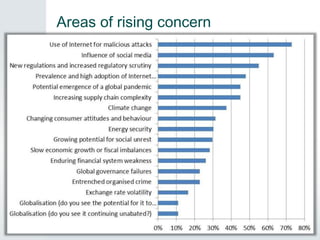
What threats are on the rise?
• Emerging trends or uncertainties “on
the radar” in terms of business
continuity implications:
– Malicious Internet attacks (73%)
– Influence of social media (63%)
– New regulations and increased
regulatory scrutiny (55%)
• 2014 BCI Horizon Scan
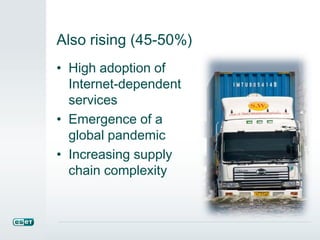
Also rising (45-50%)
• High adoption of
Internet-dependent
services
• Emergence of a
global pandemic
• Increasing supply
chain complexity
Areas of rising concern
BCM Resources
• We Live Security article
• Resource list with links
• eset.com/bcm
• Attachments
• Consider:
– BCI membership
• Subscribe:
– Disaster Recovery Journal
Thank you!
• stephen.cobb@eset.com
• www.eset.com
• WeLiveSecurity.com
• eset.com/bcm
Polling Question: I would like access
to the following:
 Request access to the Passmark
Competitive Analysis Report
 Request a custom business trial
 Subscribe to ESET’s global threat
report
 All of the above
 None of the above
Q&A Discussion
Getting Started with Business Continuity

Getting Started with Business Continuity

  • 1.
    Getting Started with BusinessContinuity Stephen Cobb, CISSP Security Researcher, ESET NA
  • 2.
    What’s on theagenda? • How can your organization survive disruptive incidents? – Everything from natural disasters to hacking attacks • You need a business continuity plan
  • 3.
    What’s the problem? •Power goes out • Internet connection goes down • Your office floods • Toxic gas cloud forces evacuation • Hackers get into your web server • Hopefully not all at once
  • 4.
    Business Continuity Management •Your organization needs the ability: – “to continue to deliver its products and services at acceptable predefined levels after disruptive incidents have occurred” • This is BCM, as defined by ISO 22301
  • 5.
    Not all organizationssurvive • Some go out of business IF they are hit with a disaster for which they have not adequately prepared • Often cited statistic: 1 in 4 fail • Fortunately, the path to proper disaster preparedness is well-documented (see Attachments)
  • 6.
    Question #1 Does yourorganization have a business continuity plan?  Yes  No  I’m not sure  I don’t work for an organization
  • 7.
    What sort ofdisruptive incidents? • Fire • Flood • Earthquake • Tsunami • Tornado • Hurricane • Blizzard • Volcanic eruption creating a giant ash cloud that grounds aircraft
  • 8.
    Incidents and accidents •Technical – Unscheduled IT outage – Communications outage – Malware infection • Human – Scandal, fraud and terrorism – Transportation accidents – Social media storm
  • 9.
    What’s the biggestthreat? 53% 56% 57% 73% 73% 77% 0% 10% 20% 30% 40% 50% 60% 70% 80% 90% Security incident Utility supply interuption Adverse weather Data breach Cyber attack Unplanned ITC outages Business Continuity Institute’s Horizon Scan, 2014, based on interviews with 600+ BCM professionals around the world
  • 10.
    What is BCMStep 1? • Identify and rank threats – List potentially disruptive incidents most likely to affect your business • Don’t use someone else’s list – Threats vary according to location
  • 11.
    Practical strategy • Brainstormwith representatives from all departments • Generate company and location specific list of disaster scenarios – Ranked by probability of occurrence and potential for negative impact – Consider regional variations, some threats location-specific
  • 12.
    BCM Step 2:Business Impact Analysis • Which business functions are most critical to its survival? • Requires knowledge, or discovery, of all parts of the organization • Multi-department team effort • There are templates for this
  • 13.
    Practical technique: BIA •Detail the functions, processes, personnel, places and systems that are critical to the functioning of your organization • BCM project leader interviews employees in each department • Resulting table lists functions and key person(s) and alternate(s)
  • 14.
    Practical technique: BIA •Determine number of Survival Days for each function • How long before lack of that function causes serious impact? • Rank the impact of that function not being available
  • 15.
    The Miora technique •Use an Impact scale of 1 to 4 • Where 1 = critical operational impact or fiscal loss, and 4 = no short tern impacts • Multiply Impact x Survival Days • Reveals criticality of functions • Most critical? Functions where Impact = 1 and Survival Days = 1
  • 16.
    Question #2 When wasthe last time your organization tested its disaster/recovery/continuity plan?  2014  2013  Before 2013  We don’t have a plan  I don’t work for an organization
  • 17.
    BCM Step 3 •The Response and Recovery Plan • Catalog key data about the assets required to restore critical functions – IT systems, facilities, personnel, suppliers, partners, customers, law enforcement, emergency services • Plan must cover HR, IT, PR, asset management, accounting, facilities
  • 18.
    Practical technique: ThePlan • Record asset serial numbers, licensing agreements, leases, warranties, contact details • Determine “who to call” for each category of incident • Create a calling tree so the right calls get made, in the right order
  • 19.
    Practical technique: IT •Document arrangements you have in place for transitioning to temp locations and IT facilities • Document backups and archives • Consider using cloud-based IT for some functions
  • 20.
    Practical technique: PRcontrols • You need a “who can say what” list to control interaction with the media during an incident • Train all employees on this • Consider a “CEO-only” rule • Don’t overlook social media
  • 21.
    Practical technique: People •Document an “all-hands” notification process • Design and document customer advisory criteria and procedures
  • 22.
    Practical technique: Steps •Steps to recover key operations should be laid out in a sequence that accounts for functional inter-dependencies. • Get plan approved • Train managers and their reports on the plan details relevant to each location and department
  • 23.
    BCM Step 4:Test and Refine • Experts recommend testing your plan at least once a year • Use exercises, walk-throughs, simulations • With testing you get the most out of your investment in creating the plan
  • 24.
    Practical strategy • Testingenables you to find gaps and account for changes in the business and threats over time • Tests can also impress management
  • 25.
    Yes, BCM ishard work • But what’s the alternative? • Ignore at your peril • Too daunting to undertake on a company-wide basis? • Begin with a few departments, or one office if you have several • Everything you learn in the process can then be applied more broadly
  • 26.
    There is somehelp for SMBs • OFB-EZ: Disaster Protection and Recovery Planning Toolkit for the Small to Mid-Sized Business – disastersafety.org/open-for-business • Very helpful, and free
  • 27.
    What threats areon the rise? • Emerging trends or uncertainties “on the radar” in terms of business continuity implications: – Malicious Internet attacks (73%) – Influence of social media (63%) – New regulations and increased regulatory scrutiny (55%) • 2014 BCI Horizon Scan
  • 28.
    Also rising (45-50%) •High adoption of Internet-dependent services • Emergence of a global pandemic • Increasing supply chain complexity
  • 29.
  • 30.
    BCM Resources • WeLive Security article • Resource list with links • eset.com/bcm • Attachments • Consider: – BCI membership • Subscribe: – Disaster Recovery Journal
  • 31.
    Thank you! • stephen.cobb@eset.com •www.eset.com • WeLiveSecurity.com • eset.com/bcm
  • 32.
    Polling Question: Iwould like access to the following:  Request access to the Passmark Competitive Analysis Report  Request a custom business trial  Subscribe to ESET’s global threat report  All of the above  None of the above
  • 33.