Business Continuity Planning
Presented by
Bill Lisse, CISSP, CISA, CGEIT, GPCI, GHSC, Security+ SME
Manager, Technology & Risk Management
Jack Lohbeck, CPA
Director, Business Consulting
Increasing Competition & Risks
• Businesses are constantly at risk for
interruptions to their operations, any of
which can have devastating consequences
• Gartner reports that two out of five
organizations that experience a disaster go
out of business within five years
• A speedy recovery from interruption is
imperative to staying solvent as a business
Business Continuity
• “The process of developing advance
arrangements and procedures that
enable an organization to respond
to an event in such a manner that
critical business functions continue
with planned levels of interruption
or essential change.”
Disaster Recovery Institute International’s Glossary of
Industry Terms
Planning for Disruptions
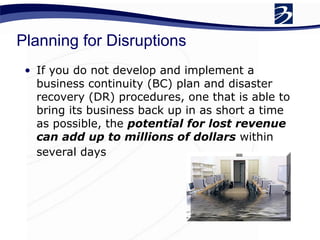
• If you do not develop and implement a
business continuity (BC) plan and disaster
recovery (DR) procedures, one that is able to
bring its business back up in as short a time
as possible, the potential for lost revenue
can add up to millions of dollars within
several days
Common Roadblocks
• Over confidence - “It can’t happen to me”
• Over extension - don’t feel you have the
time, personnel or other resources to
devote to comprehensive contingency
planning
• Over reaching - reaching too far and wide;
makes the process overwhelming and seem
impossible
• Over planning - several contingency plans
for specific situations or departments which
become uncoordinated
Business Continuity Management (BCM)
• BCM is a process that applies to any
business, small or large, that helps to
manage the risks that threaten its survival
• The objective is to identify the hazards that
may affect critical functions or activities
and to ensure that these can be reduced or
responded to in an effective way
Reasons for BCP
• Loss or Injury to Personnel
• Compliance
• Loss of Revenue
• Damage to Critical Resources
• Loss of Customers
• Reputation Damage
• Civil and Criminal Liabilities
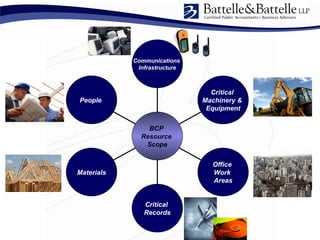
People
Materials
Critical
Records
Office
Work
Areas
Critical
Machinery &
Equipment
Communications
Infrastructure
BCP
Resource
Scope
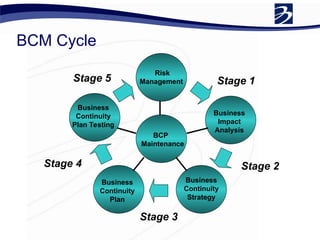
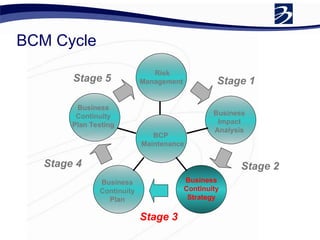
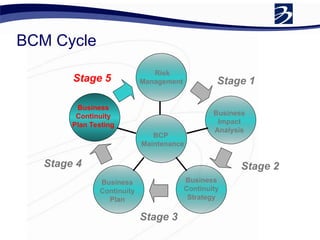
BCM Cycle
Risk
Management
Business
Impact
Analysis
Business
Continuity
Strategy
Business
Continuity
Plan
Business
Continuity
Plan Testing
BCP
Maintenance
Stage 1
Stage 2
Stage 3
Stage 4
Stage 5
Business Continuity Management
• Risk Management
• Business impact analysis (BIA)
• Classification of operations and criticality
analysis
• Document the BC plan and DR procedures
• Training & Awareness
• Testing
• Ongoing Monitoring & Plan Maintenance
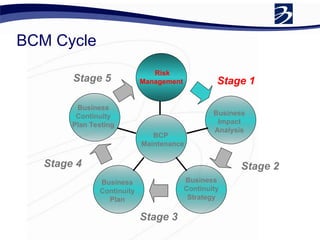
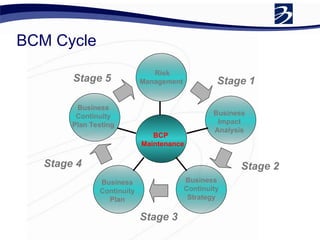
BCM Cycle
Risk
Management
Business
Impact
Analysis
Business
Continuity
Strategy
Business
Continuity
Plan
Business
Continuity
Plan Testing
BCP
Maintenance
Stage 1
Stage 2
Stage 3
Stage 4
Stage 5
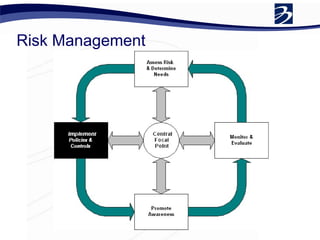
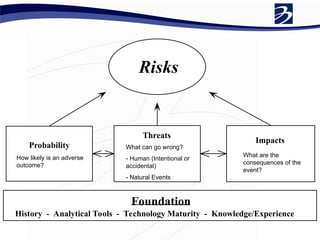
Risk Management
Probability
Threats
Impacts
Foundation
History - Analytical Tools - Technology Maturity - Knowledge/Experience
Risks
How likely is an adverse
outcome?
What can go wrong?
- Human (Intentional or
accidental)
- Natural Events
What are the
consequences of the
event?
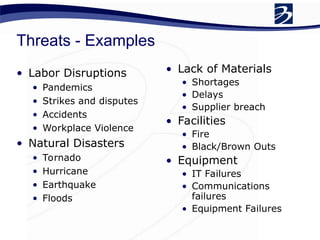
Threats - Examples
• Labor Disruptions
• Pandemics
• Strikes and disputes
• Accidents
• Workplace Violence
• Natural Disasters
• Tornado
• Hurricane
• Earthquake
• Floods
• Lack of Materials
• Shortages
• Delays
• Supplier breach
• Facilities
• Fire
• Black/Brown Outs
• Equipment
• IT Failures
• Communications
failures
• Equipment Failures
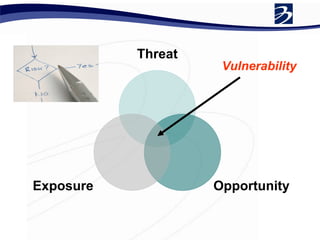
Threat
Opportunity
Exposure
Vulnerability
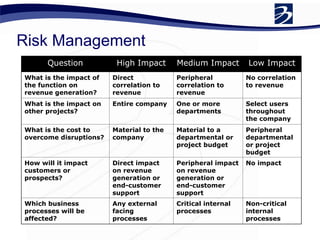
Risk Management
Question High Impact Medium Impact Low Impact
What is the impact of
the function on
revenue generation?
Direct
correlation to
revenue
Peripheral
correlation to
revenue
No correlation
to revenue
What is the impact on
other projects?
Entire company One or more
departments
Select users
throughout
the company
What is the cost to
overcome disruptions?
Material to the
company
Material to a
departmental or
project budget
Peripheral
departmental
or project
budget
How will it impact
customers or
prospects?
Direct impact
on revenue
generation or
end-customer
support
Peripheral impact
on revenue
generation or
end-customer
support
No impact
Which business
processes will be
affected?
Any external
facing
processes
Critical internal
processes
Non-critical
internal
processes
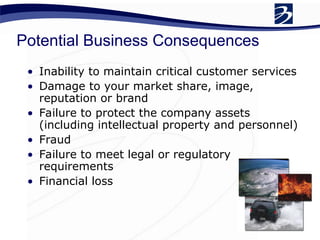
Potential Business Consequences
• Inability to maintain critical customer services
• Damage to your market share, image,
reputation or brand
• Failure to protect the company assets
(including intellectual property and personnel)
• Fraud
• Failure to meet legal or regulatory
requirements
• Financial loss
Risk Management
• Risk Responses
•Mitigate
•Accept
•Avoid
•Transfer
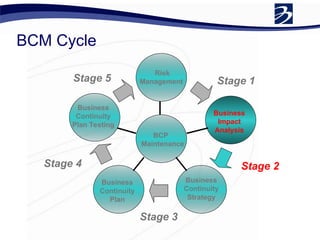
BCM Cycle
Risk
Management
Business
Impact
Analysis
Business
Continuity
Strategy
Business
Continuity
Plan
Business
Continuity
Plan Testing
BCP
Maintenance
Stage 1
Stage 2
Stage 3
Stage 4
Stage 5
Business Impact Assessment
• The BIA is the most critical process in
the development of a DR strategy
• provides the business requirements used
to develop the plan (focus resources)
• Typical Areas
• Identify critical business processes
• Determine the disruptions & probability
• Impact of disruptions on business
• Determine Loss Exposures
Business Impact Analysis
• A Business Impact Analysis
Helps Organizations:
• Identify and prioritize risks
• Identify requirements
• Identify the extent of financial impact
• Identify the extent of operational
impact
The process of analyzing all core business functions and
establishing an optimized timetable for recovery.
Provides baseline for:
 Justification for costs associated with recovery
 Developing recovery strategies
 Developing Support Level Agreements
 Maps data flow
 Identify maximum tolerance for downtime
 Identify interdependencies
 Determine the recovery priorities of the organization
Business Impact Analysis
End-User Questionnaire Highlights:
 Department Overview
 Workflow Interdependencies
 Computer Resources
 Application Impact Analysis
Business Impact Analysis
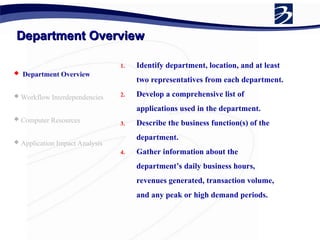
Department Overview
Department Overview
 Department Overview
 Workflow Interdependencies
 Computer Resources
 Application Impact Analysis
1. Identify department, location, and at least
two representatives from each department.
2. Develop a comprehensive list of
applications used in the department.
3. Describe the business function(s) of the
department.
4. Gather information about the
department’s daily business hours,
revenues generated, transaction volume,
and any peak or high demand periods.
Workflow Interdependencies
 Department Overview
 Workflow Interdependencies
 Computer Resources
 Application Impact Analysis
1. Identify the departments and organizations
that send work to the department.
2. Determine what routes or channels of
communication are used to send that
incoming work and estimate the percentage
that comes via each route or channel.
3. Gather the same information in #1 and #2
for work sent by the department.
Computer Resources
Computer Resources
 Department Overview
 Workflow Interdependencies
 Computer Resources
 Application Impact Analysis
1. Gather information on the computing
equipment in the department and how it is
used.
2. Begin exploring the reliance that the
department has on the computing
equipment, e.g., What data entry backlog
would there be if it was unavailable for one
day?
Application Impact Analysis
 Department Overview
 Workflow Interdependencies
 Computer Resources
 Application Impact Analysis
1. Basic description of each application,
including what it does, what business
functions it supports, if it handles PHI, and
who the department contacts are for the
application.
2. Estimate the level of departmental business
interruption associated with the
application being unavailable through
various time thresholds.
3. Estimate the associated data entry backlog
that would result and how many staff
hours it would take to eliminate the
backlog.
Application Impact Analysis
 Department Overview
 Workflow Interdependencies
 Computer Resources
 Application Impact Analysis
4. Evaluate the downtime procedures
associated with the application, asking
questions like have the procedures been
used before?, how did they work, and how
long can the department function using
them?
5. Evaluate any regulatory, legal, financial,
customer service, and public image
problems that could arise as a direct or
indirect result of the application being
unavailable through various time
thresholds.
BCM Cycle
Risk
Management
Business
Impact
Analysis
Business
Continuity
Strategy
Business
Continuity
Plan
Business
Continuity
Plan Testing
BCP
Maintenance
Stage 1
Stage 2
Stage 3
Stage 4
Stage 5
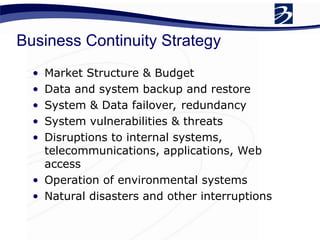
Business Continuity Strategy
• Market Structure & Budget
• Data and system backup and restore
• System & Data failover, redundancy
• System vulnerabilities & threats
• Disruptions to internal systems,
telecommunications, applications, Web
access
• Operation of environmental systems
• Natural disasters and other interruptions
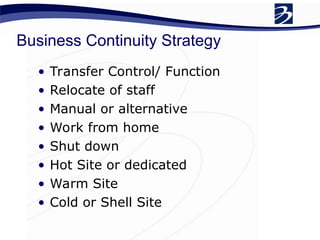
Business Continuity Strategy
• Transfer Control/ Function
• Relocate of staff
• Manual or alternative
• Work from home
• Shut down
• Hot Site or dedicated
• Warm Site
• Cold or Shell Site
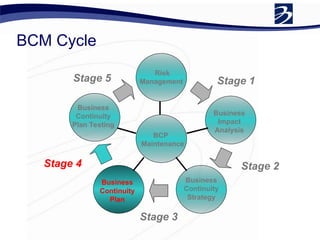
BCM Cycle
Risk
Management
Business
Impact
Analysis
Business
Continuity
Strategy
Business
Continuity
Plan
Business
Continuity
Plan Testing
BCP
Maintenance
Stage 1
Stage 2
Stage 3
Stage 4
Stage 5
Business Continuity Plan
• Considerable effort and time are
necessary to develop the initial BCP
• Effective documentation and procedures
are extremely important in a BCP
• Well-written plans reduce the time
required to read and understand the
procedures
• Result in a better chance of success if the plan
has to be used.
• Significantly reduce maintenance time and
effort.
Business Continuity Plan
• An overarching plan of the company to be
able to recover from a disaster and to
resume normal business processes in as
little time as possible
• The BCP is made up of many “sub-plans”:
• Emergency Response Plan
• Disaster Recovery Plan
• Public Affairs Plan
• Occupant Emergency Plans
Business Continuity Plan
• Within a BCP, you have some key
components:
• Assessment: A way to identify threats (BIA -
more on this later)
• Evaluation: The likelihood and impact of each
threat
• Preparation: For contingent operations
• Mitigation: The reduction or elimination of risks
• Response: The response to minimize the
impact of an emergency
• Recovery: The return to normalcy
Business Continuity Plan
• A document stating
• Who and What (systems, Equipment, records
and facilities) are required
• When they are required
• Where to operate your business for an
indefinite period
• A standard format for the procedures
should be used for consistency,
conformity, and maintenance
• Standardization is especially important if
several people write the procedures
Business Continuity Plan
• Two basic formats are used to write
the plan: background information
and instructional information.
• Background information should be
written using indicative sentences
• Instructions should use an imperative
style (issue directions)
Business Continuity Plan
• Helpful tips in writing the BCP:
• Be specific. Write the plan with the assumption it may be
implemented by personnel unfamiliar with the function and
operation.
• Use short, direct sentences, and keep it simple. Long sentences
can overwhelm or confuse the reader.
• Use short paragraphs. Long paragraphs can be detrimental to
reader comprehension.
• Use active voice verbs in present tense. Passive voice sentences
can be lengthy and may be misinterpreted.
• Use descriptive verbs. Non-descriptive verbs such as “make”
and “take” can cause procedures to be wordy.
• Avoid jargon.
• Use position titles (rather than personal names of individuals) to
reduce maintenance and revision requirements.
• Develop uniformity in procedures to simplify the training
process and minimize exceptions to conditions and actions.
• Identify events that can occur in parallel, and events that must
occur sequentially.
BCM Cycle
Risk
Management
Business
Impact
Analysis
Business
Continuity
Strategy
Business
Continuity
Plan
Business
Continuity
Plan Testing
BCP
Maintenance
Stage 1
Stage 2
Stage 3
Stage 4
Stage 5
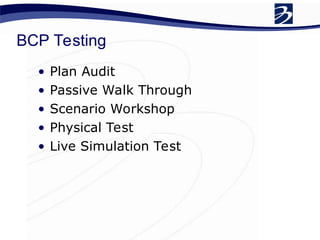
BCP Testing
• Plan Audit
• Passive Walk Through
• Scenario Workshop
• Physical Test
• Live Simulation Test
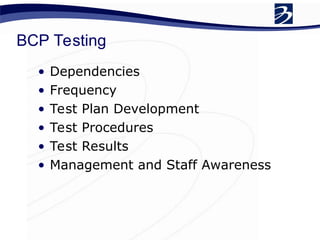
BCP Testing
• Dependencies
• Frequency
• Test Plan Development
• Test Procedures
• Test Results
• Management and Staff Awareness
BCM Cycle
Risk
Management
Business
Impact
Analysis
Business
Continuity
Strategy
Business
Continuity
Plan
Business
Continuity
Plan Testing
BCP
Maintenance
Stage 1
Stage 2
Stage 3
Stage 4
Stage 5
BCP Maintenance
• It is important that the plan be
continually maintained and updated.
Business continuity plans should
include specific maintenance
responsibilities and procedures. The
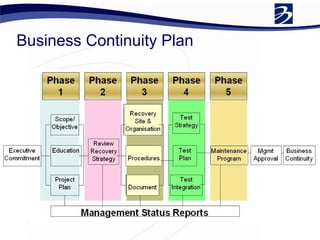
major considerations in this process
include:
• Maintenance frequency
• Change factors
• Maintenance responsibilities
• Distribution considerations
BCP Maintenance
• The recovery procedures for each team
should be updated at minimum on a
yearly basis and should also be updated
following major organizational changes
• Telephone lists and other inventories
should be updated at least quarterly
• The plan should also be reviewed and
updated when there are major changes in
technology
• A plan maintenance form can be used to
record and control all maintenance
changes, additions or modifications to the
plan
BCP Maintenance
• It is important to recognize factors that
may change the business continuity plan:
• Procedural changes
• Organizational structure changes
• Personnel changes/turnover
• Physical changes (e.g., facilities)
• Technology changes
• Recovery requirements changes
testing issues
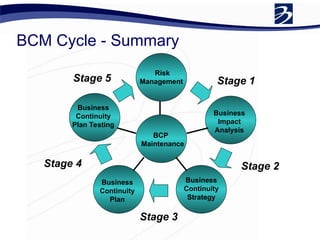
BCM Cycle - Summary
Risk
Management
Business
Impact
Analysis
Business
Continuity
Strategy
Business
Continuity
Plan
Business
Continuity
Plan Testing
BCP
Maintenance
Stage 1
Stage 2
Stage 3
Stage 4
Stage 5
Keys to Success
• Link Business and IT Processes
• Develop a comprehensive DR plan based
on realistic threats
• Keep DR procedures current
• Test the DR plan – don’t view as an
exam; it is quality improvement exercise
• BC goals should be realistic
• Clearly define DR roles, responsibilities
and ownership
• Have a clear data backup strategy
• Communicate!
Resources
• Disaster Response Institute International (DRII) –
http://www.drii.org
• Business Continuity Institute (BCI) - http://
www.thebci.org/
• Disaster Response Journal – http://www.drj.com
• NFPA 1600 Standard on Disaster/Emergency
Management and Business Continuity Programs
http://www.nfpa.org/assets/files/PDF/NFPA1600.pdf
• Continuity Central http://
www.continuitycentral.com/info.htm
• Federal Financial Institutions Examination Council
Business Continuity Handbook
http://www.ffiec.gov/ffiecinfobase/booklets/bcp/bus
_continuity_plan.pdf
Conclusion
• Don’t wait till a disaster occurs
• Even with a small budget, prudent
steps can be taken
• ensuring good backups
• establishing roles and responsibilities
• effective planning
• new technologies may also be leveraged
to make recovery more affordable
Questions?
• Bill Lisse - (937) 853-1490
• Email - wlisse@battellecpas.com
• Jack Lohbeck - (937) 853-1423
• Email – jlohbeck@battellecpas.com

businesscontinuityworkshop-final-090525141447-phpapp01 (1).ppt

  • 1.
    Business Continuity Planning Presentedby Bill Lisse, CISSP, CISA, CGEIT, GPCI, GHSC, Security+ SME Manager, Technology & Risk Management Jack Lohbeck, CPA Director, Business Consulting
  • 2.
    Increasing Competition &Risks • Businesses are constantly at risk for interruptions to their operations, any of which can have devastating consequences • Gartner reports that two out of five organizations that experience a disaster go out of business within five years • A speedy recovery from interruption is imperative to staying solvent as a business
  • 3.
    Business Continuity • “Theprocess of developing advance arrangements and procedures that enable an organization to respond to an event in such a manner that critical business functions continue with planned levels of interruption or essential change.” Disaster Recovery Institute International’s Glossary of Industry Terms
  • 4.
    Planning for Disruptions •If you do not develop and implement a business continuity (BC) plan and disaster recovery (DR) procedures, one that is able to bring its business back up in as short a time as possible, the potential for lost revenue can add up to millions of dollars within several days
  • 5.
    Common Roadblocks • Overconfidence - “It can’t happen to me” • Over extension - don’t feel you have the time, personnel or other resources to devote to comprehensive contingency planning • Over reaching - reaching too far and wide; makes the process overwhelming and seem impossible • Over planning - several contingency plans for specific situations or departments which become uncoordinated
  • 6.
    Business Continuity Management(BCM) • BCM is a process that applies to any business, small or large, that helps to manage the risks that threaten its survival • The objective is to identify the hazards that may affect critical functions or activities and to ensure that these can be reduced or responded to in an effective way
  • 7.
    Reasons for BCP •Loss or Injury to Personnel • Compliance • Loss of Revenue • Damage to Critical Resources • Loss of Customers • Reputation Damage • Civil and Criminal Liabilities
  • 8.
  • 9.
  • 10.
    Business Continuity Management •Risk Management • Business impact analysis (BIA) • Classification of operations and criticality analysis • Document the BC plan and DR procedures • Training & Awareness • Testing • Ongoing Monitoring & Plan Maintenance
  • 11.
  • 12.
  • 13.
    Probability Threats Impacts Foundation History - AnalyticalTools - Technology Maturity - Knowledge/Experience Risks How likely is an adverse outcome? What can go wrong? - Human (Intentional or accidental) - Natural Events What are the consequences of the event?
  • 14.
    Threats - Examples •Labor Disruptions • Pandemics • Strikes and disputes • Accidents • Workplace Violence • Natural Disasters • Tornado • Hurricane • Earthquake • Floods • Lack of Materials • Shortages • Delays • Supplier breach • Facilities • Fire • Black/Brown Outs • Equipment • IT Failures • Communications failures • Equipment Failures
  • 15.
  • 16.
    Risk Management Question HighImpact Medium Impact Low Impact What is the impact of the function on revenue generation? Direct correlation to revenue Peripheral correlation to revenue No correlation to revenue What is the impact on other projects? Entire company One or more departments Select users throughout the company What is the cost to overcome disruptions? Material to the company Material to a departmental or project budget Peripheral departmental or project budget How will it impact customers or prospects? Direct impact on revenue generation or end-customer support Peripheral impact on revenue generation or end-customer support No impact Which business processes will be affected? Any external facing processes Critical internal processes Non-critical internal processes
  • 17.
    Potential Business Consequences •Inability to maintain critical customer services • Damage to your market share, image, reputation or brand • Failure to protect the company assets (including intellectual property and personnel) • Fraud • Failure to meet legal or regulatory requirements • Financial loss
  • 18.
    Risk Management • RiskResponses •Mitigate •Accept •Avoid •Transfer
  • 19.
  • 20.
    Business Impact Assessment •The BIA is the most critical process in the development of a DR strategy • provides the business requirements used to develop the plan (focus resources) • Typical Areas • Identify critical business processes • Determine the disruptions & probability • Impact of disruptions on business • Determine Loss Exposures
  • 21.
    Business Impact Analysis •A Business Impact Analysis Helps Organizations: • Identify and prioritize risks • Identify requirements • Identify the extent of financial impact • Identify the extent of operational impact
  • 22.
    The process ofanalyzing all core business functions and establishing an optimized timetable for recovery. Provides baseline for:  Justification for costs associated with recovery  Developing recovery strategies  Developing Support Level Agreements  Maps data flow  Identify maximum tolerance for downtime  Identify interdependencies  Determine the recovery priorities of the organization Business Impact Analysis
  • 23.
    End-User Questionnaire Highlights: Department Overview  Workflow Interdependencies  Computer Resources  Application Impact Analysis Business Impact Analysis
  • 24.
    Department Overview Department Overview Department Overview  Workflow Interdependencies  Computer Resources  Application Impact Analysis 1. Identify department, location, and at least two representatives from each department. 2. Develop a comprehensive list of applications used in the department. 3. Describe the business function(s) of the department. 4. Gather information about the department’s daily business hours, revenues generated, transaction volume, and any peak or high demand periods.
  • 25.
    Workflow Interdependencies Workflow Interdependencies Department Overview  Workflow Interdependencies  Computer Resources  Application Impact Analysis 1. Identify the departments and organizations that send work to the department. 2. Determine what routes or channels of communication are used to send that incoming work and estimate the percentage that comes via each route or channel. 3. Gather the same information in #1 and #2 for work sent by the department.
  • 26.
    Computer Resources Computer Resources Department Overview  Workflow Interdependencies  Computer Resources  Application Impact Analysis 1. Gather information on the computing equipment in the department and how it is used. 2. Begin exploring the reliance that the department has on the computing equipment, e.g., What data entry backlog would there be if it was unavailable for one day?
  • 27.
    Application Impact Analysis ApplicationImpact Analysis  Department Overview  Workflow Interdependencies  Computer Resources  Application Impact Analysis 1. Basic description of each application, including what it does, what business functions it supports, if it handles PHI, and who the department contacts are for the application. 2. Estimate the level of departmental business interruption associated with the application being unavailable through various time thresholds. 3. Estimate the associated data entry backlog that would result and how many staff hours it would take to eliminate the backlog.
  • 28.
    Application Impact Analysis ApplicationImpact Analysis  Department Overview  Workflow Interdependencies  Computer Resources  Application Impact Analysis 4. Evaluate the downtime procedures associated with the application, asking questions like have the procedures been used before?, how did they work, and how long can the department function using them? 5. Evaluate any regulatory, legal, financial, customer service, and public image problems that could arise as a direct or indirect result of the application being unavailable through various time thresholds.
  • 29.
  • 30.
    Business Continuity Strategy •Market Structure & Budget • Data and system backup and restore • System & Data failover, redundancy • System vulnerabilities & threats • Disruptions to internal systems, telecommunications, applications, Web access • Operation of environmental systems • Natural disasters and other interruptions
  • 31.
    Business Continuity Strategy •Transfer Control/ Function • Relocate of staff • Manual or alternative • Work from home • Shut down • Hot Site or dedicated • Warm Site • Cold or Shell Site
  • 32.
  • 33.
    Business Continuity Plan •Considerable effort and time are necessary to develop the initial BCP • Effective documentation and procedures are extremely important in a BCP • Well-written plans reduce the time required to read and understand the procedures • Result in a better chance of success if the plan has to be used. • Significantly reduce maintenance time and effort.
  • 34.
    Business Continuity Plan •An overarching plan of the company to be able to recover from a disaster and to resume normal business processes in as little time as possible • The BCP is made up of many “sub-plans”: • Emergency Response Plan • Disaster Recovery Plan • Public Affairs Plan • Occupant Emergency Plans
  • 35.
    Business Continuity Plan •Within a BCP, you have some key components: • Assessment: A way to identify threats (BIA - more on this later) • Evaluation: The likelihood and impact of each threat • Preparation: For contingent operations • Mitigation: The reduction or elimination of risks • Response: The response to minimize the impact of an emergency • Recovery: The return to normalcy
  • 36.
  • 37.
    Business Continuity Plan •A document stating • Who and What (systems, Equipment, records and facilities) are required • When they are required • Where to operate your business for an indefinite period • A standard format for the procedures should be used for consistency, conformity, and maintenance • Standardization is especially important if several people write the procedures
  • 38.
    Business Continuity Plan •Two basic formats are used to write the plan: background information and instructional information. • Background information should be written using indicative sentences • Instructions should use an imperative style (issue directions)
  • 39.
    Business Continuity Plan •Helpful tips in writing the BCP: • Be specific. Write the plan with the assumption it may be implemented by personnel unfamiliar with the function and operation. • Use short, direct sentences, and keep it simple. Long sentences can overwhelm or confuse the reader. • Use short paragraphs. Long paragraphs can be detrimental to reader comprehension. • Use active voice verbs in present tense. Passive voice sentences can be lengthy and may be misinterpreted. • Use descriptive verbs. Non-descriptive verbs such as “make” and “take” can cause procedures to be wordy. • Avoid jargon. • Use position titles (rather than personal names of individuals) to reduce maintenance and revision requirements. • Develop uniformity in procedures to simplify the training process and minimize exceptions to conditions and actions. • Identify events that can occur in parallel, and events that must occur sequentially.
  • 40.
  • 41.
    BCP Testing • PlanAudit • Passive Walk Through • Scenario Workshop • Physical Test • Live Simulation Test
  • 42.
    BCP Testing • Dependencies •Frequency • Test Plan Development • Test Procedures • Test Results • Management and Staff Awareness
  • 43.
  • 44.
    BCP Maintenance • Itis important that the plan be continually maintained and updated. Business continuity plans should include specific maintenance responsibilities and procedures. The major considerations in this process include: • Maintenance frequency • Change factors • Maintenance responsibilities • Distribution considerations
  • 45.
    BCP Maintenance • Therecovery procedures for each team should be updated at minimum on a yearly basis and should also be updated following major organizational changes • Telephone lists and other inventories should be updated at least quarterly • The plan should also be reviewed and updated when there are major changes in technology • A plan maintenance form can be used to record and control all maintenance changes, additions or modifications to the plan
  • 46.
    BCP Maintenance • Itis important to recognize factors that may change the business continuity plan: • Procedural changes • Organizational structure changes • Personnel changes/turnover • Physical changes (e.g., facilities) • Technology changes • Recovery requirements changes testing issues
  • 47.
    BCM Cycle -Summary Risk Management Business Impact Analysis Business Continuity Strategy Business Continuity Plan Business Continuity Plan Testing BCP Maintenance Stage 1 Stage 2 Stage 3 Stage 4 Stage 5
  • 48.
    Keys to Success •Link Business and IT Processes • Develop a comprehensive DR plan based on realistic threats • Keep DR procedures current • Test the DR plan – don’t view as an exam; it is quality improvement exercise • BC goals should be realistic • Clearly define DR roles, responsibilities and ownership • Have a clear data backup strategy • Communicate!
  • 49.
    Resources • Disaster ResponseInstitute International (DRII) – http://www.drii.org • Business Continuity Institute (BCI) - http:// www.thebci.org/ • Disaster Response Journal – http://www.drj.com • NFPA 1600 Standard on Disaster/Emergency Management and Business Continuity Programs http://www.nfpa.org/assets/files/PDF/NFPA1600.pdf • Continuity Central http:// www.continuitycentral.com/info.htm • Federal Financial Institutions Examination Council Business Continuity Handbook http://www.ffiec.gov/ffiecinfobase/booklets/bcp/bus _continuity_plan.pdf
  • 50.
    Conclusion • Don’t waittill a disaster occurs • Even with a small budget, prudent steps can be taken • ensuring good backups • establishing roles and responsibilities • effective planning • new technologies may also be leveraged to make recovery more affordable
  • 51.
    Questions? • Bill Lisse- (937) 853-1490 • Email - wlisse@battellecpas.com • Jack Lohbeck - (937) 853-1423 • Email – jlohbeck@battellecpas.com

Editor's Notes

  • #22 The BIA will be your most time-consuming part of the disaster recovery planning process. Once completed, it provides you with a baseline for Justification for costs associated with recovery. Developing recovery strategies. Developing Support Level Agreements Once you’ve identified all your core business process to need to analyze and prioritize them… Let’s look at specifically what you should be thinking about at…
  • #24 Prevention - UPS & Generator, system backups and off-site storage, Pre-action sprinkler system, water detection system, Fire system, Cross-trained personnel
  • #25 Prevention - UPS & Generator, system backups and off-site storage, Pre-action sprinkler system, water detection system, Fire system, Cross-trained personnel
  • #26 Prevention - UPS & Generator, system backups and off-site storage, Pre-action sprinkler system, water detection system, Fire system, Cross-trained personnel
  • #27 Prevention - UPS & Generator, system backups and off-site storage, Pre-action sprinkler system, water detection system, Fire system, Cross-trained personnel
  • #28 Prevention - UPS & Generator, system backups and off-site storage, Pre-action sprinkler system, water detection system, Fire system, Cross-trained personnel
  • #41 Plan Audit Business Continuity International will comment on the overall effectiveness of the plans and may suggest adjustment are made to the plans before any further test phases are commenced. Passive Walk Through This Phase will increase the awareness for all  participants concerning  their roles. Test Modules will be used to ensure a constant and structured approach. Scenario Workshop A Test Scenario is compiled based upon realistic circumstances to your industry / location and potential threats especially if you are an "icon" company. The participants will be asked to invoke the plans and to perform their individual roles in order to recover from the scenario. Physical Test As a result of the Scenario Workshop, the Physical Test will involve the actual attendees at the recovery site. and are in order. Live Simulation Test As a result of the preceding phases, a live Simulation Test is the ultimate proof of the effectiveness of the plans. The Live Simulation Test should only be attempted when a high degree of confidence has been generated by the successful completion of the previous phases and consensus to the Live Test. A Recovery Test Status Report will be produced at the end of each phase of the test with recommendations for improvement in the short, medium and long term provided with an ongoing maintenance program.
  • #42 The Testing Process This is the process to be followed when your organization's Business Continuity Plan (BCP) is tested, in order to assess its viability, and to ensure your staff are fully conversant with the proposals. Dependencies Prior to testing the plan, two previous milestones should have been completed:- Assessing the Risk and Likely Impact Developing the Plan Frequency of Testing How often, and to what extent, you test your BCP is determined by the nature of the potential changes to systems, personnel, business processes, location, services and infrastructure; plus any legislative or contractual issues. Re-test the BCP whenever material changes have been made to its contents or to the organization's business operations. Testing in Authentic Conditions Where the BCP Testing does not reproduce authentic conditions, the value of such testing is limited. Test Plan Develop a plan to test the BCP. Consider a range of planning activities, including start, stop, objectives, coordination, documentation of results, observers etc. Resource Requirements Resource the Test Plan with the same persons who would be likely to deal with a live situation. Test the plan by making certain key staff ‘unavailable’, simulating where practical the potential absence of personnel in a live situation. Documented Test Procedures Ensure that the BCP is tested using the documented procedures, thereby testing the adequacy of the instructions. Test Results Having concluded the BCP Test, the results must be analyzed. A failure to undertake this task will likely detract from the value of the test. Learn from the results! The problems arising should be documented and addressed subsequently. You should have a formal mechanism for ensuring that this takes place. Management and Staff Awareness You must ensure that knowledge of the BCP is disseminated throughout the organization.