Vicky Ames
15 OCT 2015
 Process overview
 Important concepts
 Wrap Up
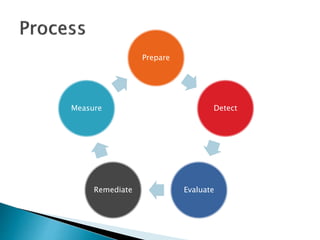
The 5 Steps of Effective
Vulnerability Management
Prepare
Detect
EvaluateRemediate
Measure
 Policy
◦ Authorization to conduct activities
 Procedures
◦ Document what will be done and by whom
 Partnership
◦ Server/application teams do work
◦ Business/application owner must approve
 Information
◦ Subscribe to vulnerability notifications
 Asset Inventory
◦ Can’t fix what you don’t know about
 Secure Configurations
◦ Systems come preconfigured for the convenience of
the vendor
◦ Settings run counter to security
◦ Implement secure settings before deployment
 Host based security software
 Know your compliance requirements
◦ SOX
◦ HIPAA
◦ FDA
◦ FISMA
 Establish an implementation strategy
 Scanners
◦ Check systems to identify vulnerabilities
◦ Some now provide exploitation capabilities
 Use wisely
◦ Provide reports – most important IMHO
 Commercial and Free
 Multi-Function
 Web Application
 Database
 3rd party manual assessments
 Vendors provide risk scores
◦ This is guidance
 Establish evaluation criteria for your environment
◦ Every environment is unique
◦ You and the other IT folks know it best
 So ask them to help develop criteria
◦ Sample Environmental Criteria
 Accessible from Internet
 Host protections
 Secure configuration
 AV/Malware protection
 Access restricted
 Vendors provide remediation steps
◦ This is guidance
 Determine the best solution for your environment
◦ Every environment is unique
◦ You and the other IT folks know it best
 So ask them to help develop criteria
◦ Sample Remediation Activities
 Apply patch
 Turn off service
 Change setting
 Add host based protection software
 Remove default account or password
 Establish maintenance windows
◦ Routine outages are more acceptable than random
ones
 Do rolling fix implementation
◦ Do development/test environment first
◦ Test
◦ Do other non-production environment second
◦ Test
◦ Do production last
◦ Test
 Establish metrics
◦ Shows what success is
◦ Establishes a goal to work towards
 Trust but verify
◦ Rescan with same tool(s)
 Report below and above
◦ Provide reports to teams doing the work
 Track their progress
 Identify and address technical issues
◦ Provide reports to leadership
 Track how well the program is doing
A Deeper Dive Into a Few
Things
 Must have for any security program
◦ Provides authority to do work
◦ Establishes the requirement for assistance from
other teams
◦ Establishes the IT security requirements for the
whole company (CEO to Users)
 Elements of good policy
◦ Clear high level requirements (“thou shalt”)
◦ Establish high level responsibilities for security
◦ Establish consequences for non-compliance
◦ Signed by CIO
◦ Supported by Executives
 Establish how each element of the policy will
be implemented
 Outline of the activities that will be done to
comply with the policy
 High level – not work instructions
 Establish who is responsible for specific
activities
 Security Patches are released at (mostly)
regular intervals from vendors
◦ Microsoft – Monthly
◦ Oracle – Quarterly
◦ Cisco – Whenever
 Inventory should identify major vendors
 Create a plan
 Discuss with other players
 Get CIO approval
 Communicate to the business
 Select good tools to apply patches and to
verify patch application
 Nothing is infallible
 Commercial tools superior to free
◦ Provide comprehensive and timely updates
◦ Easier to use
◦ Reporting is better
 All do some things better than others
 Variance in reporting
 Patch supercedence issue
 Occasional false positive
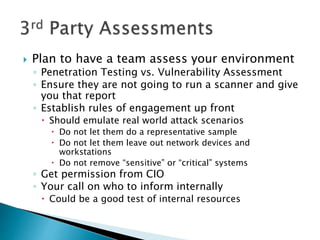
 Plan to have a team assess your environment
◦ Penetration Testing vs. Vulnerability Assessment
◦ Ensure they are not going to run a scanner and give
you that report
◦ Establish rules of engagement up front
 Should emulate real world attack scenarios
 Do not let them do a representative sample
 Do not let them leave out network devices and
workstations
 Do not remove “sensitive” or “critical” systems
◦ Get permission from CIO
◦ Your call on who to inform internally
 Could be a good test of internal resources
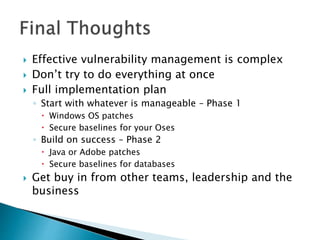
Final thoughts
 Effective vulnerability management is complex
 Don’t try to do everything at once
 Full implementation plan
◦ Start with whatever is manageable – Phase 1
 Windows OS patches
 Secure baselines for your Oses
◦ Build on success – Phase 2
 Java or Adobe patches
 Secure baselines for databases
 Get buy in from other teams, leadership and the
business
 Vicky Ames
 amesv@ebsi.com
Links
 Vulnerability Notifications
◦ SANS @RISK https://www.sans.org/newsletters/at-risk
◦ Microsoft Security Bulletin
https://technet.microsoft.com/en-
us/security/bulletin/dn602597.aspx
 Free Network Scanners
◦ http://www.networkworld.com/article/2176429/securi
ty/security-6-free-network-vulnerability-
scanners.html
 Free Database Scanners
◦ http://www.securitywizardry.com/index.php/products
/scanning-products/database-scanners.html
 Free Web Application Scanners
◦ http://resources.infosecinstitute.com/14-popular-
web-application-vulnerability-scanners/
 Free Vulnerability Assessment Tools
◦ Kali Linux https://www.kali.org/
 Free Security Policy Resources
◦ http://www.sans.org/security-resources/policies
◦ https://www.dmoz.org/Computers/Security/Policy/Sa
mple_Policies/
◦ http://www.maricopa.gov/technology/security/templat
es.aspx
 Free Secure Baselines
◦ Center for Internet Security (CIS)
https://benchmarks.cisecurity.org/
 Free Web Application Security Information
◦ OWASP https://www.owasp.org/index.php/Main_Page

Effective Vulnerability Management

  • 1.
  • 2.
     Process overview Important concepts  Wrap Up
  • 3.
    The 5 Stepsof Effective Vulnerability Management
  • 4.
  • 5.
     Policy ◦ Authorizationto conduct activities  Procedures ◦ Document what will be done and by whom  Partnership ◦ Server/application teams do work ◦ Business/application owner must approve  Information ◦ Subscribe to vulnerability notifications  Asset Inventory ◦ Can’t fix what you don’t know about
  • 6.
     Secure Configurations ◦Systems come preconfigured for the convenience of the vendor ◦ Settings run counter to security ◦ Implement secure settings before deployment  Host based security software  Know your compliance requirements ◦ SOX ◦ HIPAA ◦ FDA ◦ FISMA  Establish an implementation strategy
  • 7.
     Scanners ◦ Checksystems to identify vulnerabilities ◦ Some now provide exploitation capabilities  Use wisely ◦ Provide reports – most important IMHO  Commercial and Free  Multi-Function  Web Application  Database  3rd party manual assessments
  • 8.
     Vendors providerisk scores ◦ This is guidance  Establish evaluation criteria for your environment ◦ Every environment is unique ◦ You and the other IT folks know it best  So ask them to help develop criteria ◦ Sample Environmental Criteria  Accessible from Internet  Host protections  Secure configuration  AV/Malware protection  Access restricted
  • 9.
     Vendors provideremediation steps ◦ This is guidance  Determine the best solution for your environment ◦ Every environment is unique ◦ You and the other IT folks know it best  So ask them to help develop criteria ◦ Sample Remediation Activities  Apply patch  Turn off service  Change setting  Add host based protection software  Remove default account or password
  • 10.
     Establish maintenancewindows ◦ Routine outages are more acceptable than random ones  Do rolling fix implementation ◦ Do development/test environment first ◦ Test ◦ Do other non-production environment second ◦ Test ◦ Do production last ◦ Test
  • 11.
     Establish metrics ◦Shows what success is ◦ Establishes a goal to work towards  Trust but verify ◦ Rescan with same tool(s)  Report below and above ◦ Provide reports to teams doing the work  Track their progress  Identify and address technical issues ◦ Provide reports to leadership  Track how well the program is doing
  • 12.
    A Deeper DiveInto a Few Things
  • 13.
     Must havefor any security program ◦ Provides authority to do work ◦ Establishes the requirement for assistance from other teams ◦ Establishes the IT security requirements for the whole company (CEO to Users)  Elements of good policy ◦ Clear high level requirements (“thou shalt”) ◦ Establish high level responsibilities for security ◦ Establish consequences for non-compliance ◦ Signed by CIO ◦ Supported by Executives
  • 14.
     Establish howeach element of the policy will be implemented  Outline of the activities that will be done to comply with the policy  High level – not work instructions  Establish who is responsible for specific activities
  • 15.
     Security Patchesare released at (mostly) regular intervals from vendors ◦ Microsoft – Monthly ◦ Oracle – Quarterly ◦ Cisco – Whenever  Inventory should identify major vendors  Create a plan  Discuss with other players  Get CIO approval  Communicate to the business  Select good tools to apply patches and to verify patch application
  • 16.
     Nothing isinfallible  Commercial tools superior to free ◦ Provide comprehensive and timely updates ◦ Easier to use ◦ Reporting is better  All do some things better than others  Variance in reporting  Patch supercedence issue  Occasional false positive
  • 17.
     Plan tohave a team assess your environment ◦ Penetration Testing vs. Vulnerability Assessment ◦ Ensure they are not going to run a scanner and give you that report ◦ Establish rules of engagement up front  Should emulate real world attack scenarios  Do not let them do a representative sample  Do not let them leave out network devices and workstations  Do not remove “sensitive” or “critical” systems ◦ Get permission from CIO ◦ Your call on who to inform internally  Could be a good test of internal resources
  • 18.
  • 19.
     Effective vulnerabilitymanagement is complex  Don’t try to do everything at once  Full implementation plan ◦ Start with whatever is manageable – Phase 1  Windows OS patches  Secure baselines for your Oses ◦ Build on success – Phase 2  Java or Adobe patches  Secure baselines for databases  Get buy in from other teams, leadership and the business
  • 20.
     Vicky Ames amesv@ebsi.com
  • 21.
  • 22.
     Vulnerability Notifications ◦SANS @RISK https://www.sans.org/newsletters/at-risk ◦ Microsoft Security Bulletin https://technet.microsoft.com/en- us/security/bulletin/dn602597.aspx  Free Network Scanners ◦ http://www.networkworld.com/article/2176429/securi ty/security-6-free-network-vulnerability- scanners.html  Free Database Scanners ◦ http://www.securitywizardry.com/index.php/products /scanning-products/database-scanners.html
  • 23.
     Free WebApplication Scanners ◦ http://resources.infosecinstitute.com/14-popular- web-application-vulnerability-scanners/  Free Vulnerability Assessment Tools ◦ Kali Linux https://www.kali.org/  Free Security Policy Resources ◦ http://www.sans.org/security-resources/policies ◦ https://www.dmoz.org/Computers/Security/Policy/Sa mple_Policies/ ◦ http://www.maricopa.gov/technology/security/templat es.aspx
  • 24.
     Free SecureBaselines ◦ Center for Internet Security (CIS) https://benchmarks.cisecurity.org/  Free Web Application Security Information ◦ OWASP https://www.owasp.org/index.php/Main_Page