FlumeBase Study

      Nov. 29, 2011
        Willis Gong
Big Data Engineering Team
       Hanborq Inc.
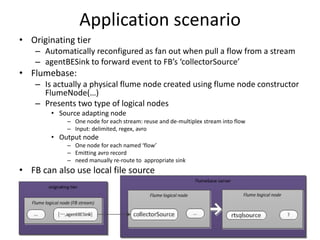
Application scenario
• Originating tier
    – Automatically reconfigured as fan out when pull a flow from a stream
    – agentBESink to forward event to FB’s ‘collectorSource’
• Flumebase:
    – Is actually a physical flume node created using flume node constructor
      FlumeNode(…)
    – Presents two type of logical nodes
        • Source adapting node
            – One node for each stream: reuse and de-multiplex stream into flow
            – Input: delimited, regex, avro
        • Output node
            – One node for each named ‘flow’
            – Emitting avro record
            – need manually re-route to appropriate sink
• FB can also use local file source
Flumebase Server
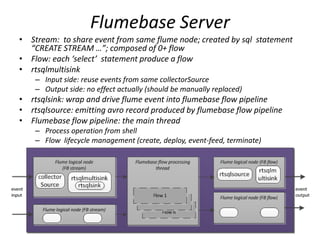
• Stream: to share event from same flume node; created by sql statement
  “CREATE STREAM …”; composed of 0+ flow
• Flow: each ‘select’ statement produce a flow
• rtsqlmultisink
    – Input side: reuse events from same collectorSource
    – Output side: no effect actually (should be manually replaced)
• rtsqlsink: wrap and drive flume event into flumebase flow pipeline
• rtsqlsource: emitting avro record produced by flumebase flow pipeline
• Flumebase flow pipeline: the main thread
    – Process operation from shell
    – Flow lifecycle management (create, deploy, event-feed, terminate)
Flumebase flow pipeline
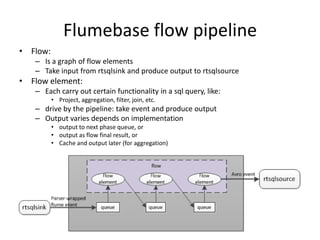
• Flow:
   – Is a graph of flow elements
   – Take input from rtsqlsink and produce output to rtsqlsource
• Flow element:
   – Each carry out certain functionality in a sql query, like:
          • Project, aggregation, filter, join, etc.
   – drive by the pipeline: take event and produce output
   – Output varies depends on implementation
          • output to next phase queue, or
          • output as flow final result, or
          • Cache and output later (for aggregation)
The aggregation flow element
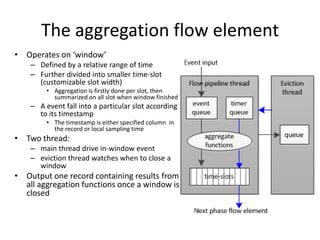
• Operates on ‘window’
    – Defined by a relative range of time
    – Further divided into smaller time-slot
      (customizable slot width)
         • Aggregation is firstly done per slot, then
           summarized on all slot when window finished
    – A event fall into a particular slot according
      to its timestamp
         • The timestamp is either specified column in
           the record or local sampling time
• Two thread:
    – main thread drive in-window event
    – eviction thread watches when to close a
      window
• Output one record containing results from
  all aggregation functions once a window is
  closed
Features
• Compared with ordinary sql
  – No primary index
     • Do not identify if record is duplicated
  – The window concept
• Compared with ordinary flume node
  – Flumebase logical nodes are with particular
    source & sink – rtsqlxxx
  – Flumebase logical node cannot be initiated by
    flume master – FB shell instead
Features
• SQL
  – CREATE STREAM stream_name (col_name data_type [, ...])
    FROM [LOCAL] {FILE | NODE | SOURCE} input_spec
    [EVENT FORMAT format_spec
    [PROPERTIES (key = val, …)]]
  – SELECT select_expr, select_expr ... FROM stream_reference
    [ JOIN stream_reference ON join_expr OVER range_expr, JOIN ... ]
    [ WHERE where_condition ]
    [ GROUP BY column_list ] [ OVER range_expr ] [ HAVING
    having_condition ]
    [ WINDOW window_name AS ( range_expr ), WINDOW ... ]
Possible issues
• Aggregation
    – Currently FB window is not timeline aligned
        • may need to be aligned with seconds or minutes or hours
    – FB do not to support distinct
• Deployment
    – Currently usage: flume deploy  FB start up  FB shell create stream / flow
       manually re-route FB output logic node
        • manually change sink for rtsqlsource
    – Better if FB stream / flow auto created by configuration from flume – better
      integration with flume
• Code maturity is in doubt
    – Seems to based on flume-0.9.3
    – Not work directly on cdhu1 & 2
    – According to github: few activities
        • No update within about half year
        • Very few issues and discussion; issues unresolved
        • One contributors – the author

FlumeBase Study

  • 1.
    FlumeBase Study Nov. 29, 2011 Willis Gong Big Data Engineering Team Hanborq Inc.
  • 2.
    Application scenario • Originatingtier – Automatically reconfigured as fan out when pull a flow from a stream – agentBESink to forward event to FB’s ‘collectorSource’ • Flumebase: – Is actually a physical flume node created using flume node constructor FlumeNode(…) – Presents two type of logical nodes • Source adapting node – One node for each stream: reuse and de-multiplex stream into flow – Input: delimited, regex, avro • Output node – One node for each named ‘flow’ – Emitting avro record – need manually re-route to appropriate sink • FB can also use local file source
  • 3.
    Flumebase Server • Stream:to share event from same flume node; created by sql statement “CREATE STREAM …”; composed of 0+ flow • Flow: each ‘select’ statement produce a flow • rtsqlmultisink – Input side: reuse events from same collectorSource – Output side: no effect actually (should be manually replaced) • rtsqlsink: wrap and drive flume event into flumebase flow pipeline • rtsqlsource: emitting avro record produced by flumebase flow pipeline • Flumebase flow pipeline: the main thread – Process operation from shell – Flow lifecycle management (create, deploy, event-feed, terminate)
  • 4.
    Flumebase flow pipeline •Flow: – Is a graph of flow elements – Take input from rtsqlsink and produce output to rtsqlsource • Flow element: – Each carry out certain functionality in a sql query, like: • Project, aggregation, filter, join, etc. – drive by the pipeline: take event and produce output – Output varies depends on implementation • output to next phase queue, or • output as flow final result, or • Cache and output later (for aggregation)
  • 5.
    The aggregation flowelement • Operates on ‘window’ – Defined by a relative range of time – Further divided into smaller time-slot (customizable slot width) • Aggregation is firstly done per slot, then summarized on all slot when window finished – A event fall into a particular slot according to its timestamp • The timestamp is either specified column in the record or local sampling time • Two thread: – main thread drive in-window event – eviction thread watches when to close a window • Output one record containing results from all aggregation functions once a window is closed
  • 6.
    Features • Compared withordinary sql – No primary index • Do not identify if record is duplicated – The window concept • Compared with ordinary flume node – Flumebase logical nodes are with particular source & sink – rtsqlxxx – Flumebase logical node cannot be initiated by flume master – FB shell instead
  • 7.
    Features • SQL – CREATE STREAM stream_name (col_name data_type [, ...]) FROM [LOCAL] {FILE | NODE | SOURCE} input_spec [EVENT FORMAT format_spec [PROPERTIES (key = val, …)]] – SELECT select_expr, select_expr ... FROM stream_reference [ JOIN stream_reference ON join_expr OVER range_expr, JOIN ... ] [ WHERE where_condition ] [ GROUP BY column_list ] [ OVER range_expr ] [ HAVING having_condition ] [ WINDOW window_name AS ( range_expr ), WINDOW ... ]
  • 8.
    Possible issues • Aggregation – Currently FB window is not timeline aligned • may need to be aligned with seconds or minutes or hours – FB do not to support distinct • Deployment – Currently usage: flume deploy  FB start up  FB shell create stream / flow  manually re-route FB output logic node • manually change sink for rtsqlsource – Better if FB stream / flow auto created by configuration from flume – better integration with flume • Code maturity is in doubt – Seems to based on flume-0.9.3 – Not work directly on cdhu1 & 2 – According to github: few activities • No update within about half year • Very few issues and discussion; issues unresolved • One contributors – the author