-Jayesh Sukdeo Patil
Apache FLUME
• Flume is a distributed, reliable, and available service
for efficiently collecting, aggregating, and moving
large amounts of log data.
• It has a simple and flexible architecture based on
streaming data flows.
• It is robust and fault tolerant with tunable reliability
mechanisms and many failover and recovery
mechanisms.
• It uses a simple extensible data model that allows
for online analytic application.
Features of Flume
• Flume ingests log data from multiple web servers into a centralized store (HDFS, HBase)
efficiently.
• Using Flume, we can get the data from multiple servers immediately into Hadoop.
• Along with the log files, Flume is also used to import huge volumes of event data produced by
social networking sites like Facebook and Twitter, and e-commerce websites like Amazon and
Flipkart.
• Flume supports a large set of sources and destinations types.
• Flume supports multi-hop flows, fan-in fan-out flows, contextual routing, etc.
• Flume can be scaled horizontally.
Applications of Flume
• Assume an e-commerce web application wants to analyze the customer
behavior from a particular region. To do so, they would need to move the
available log data in to Hadoop for analysis. Here, Apache Flume comes to
our rescue.
• Flume is used to move the log data generated by application servers into
HDFS at a higher speed.
Advantages of
Flume
• Using Apache Flume we can store the data in to any of
the centralized stores (HBase, HDFS).
• When the rate of incoming data exceeds the rate at
which data can be written to the destination, Flume acts
as a mediator between data producers and the
centralized stores and provides a steady flow of data
between them.
• Flume provides the feature of contextual routing.
• The transactions in Flume are channel-based where two
transactions (one sender and one receiver) are
maintained for each message. It guarantees reliable
message delivery.
• Flume is reliable, fault tolerant, scalable, manageable,
and customizable.
Apache Flume -
Architecture
• data generators (such as
Facebook, Twitter) generate
data which gets collected by
individual
Flume agents running on them.
Thereafter, a data
collector (which is also an
agent) collects the data from
the agents which is aggregated
and pushed into a centralized
store such as HDFS or HBase.
Flume Event
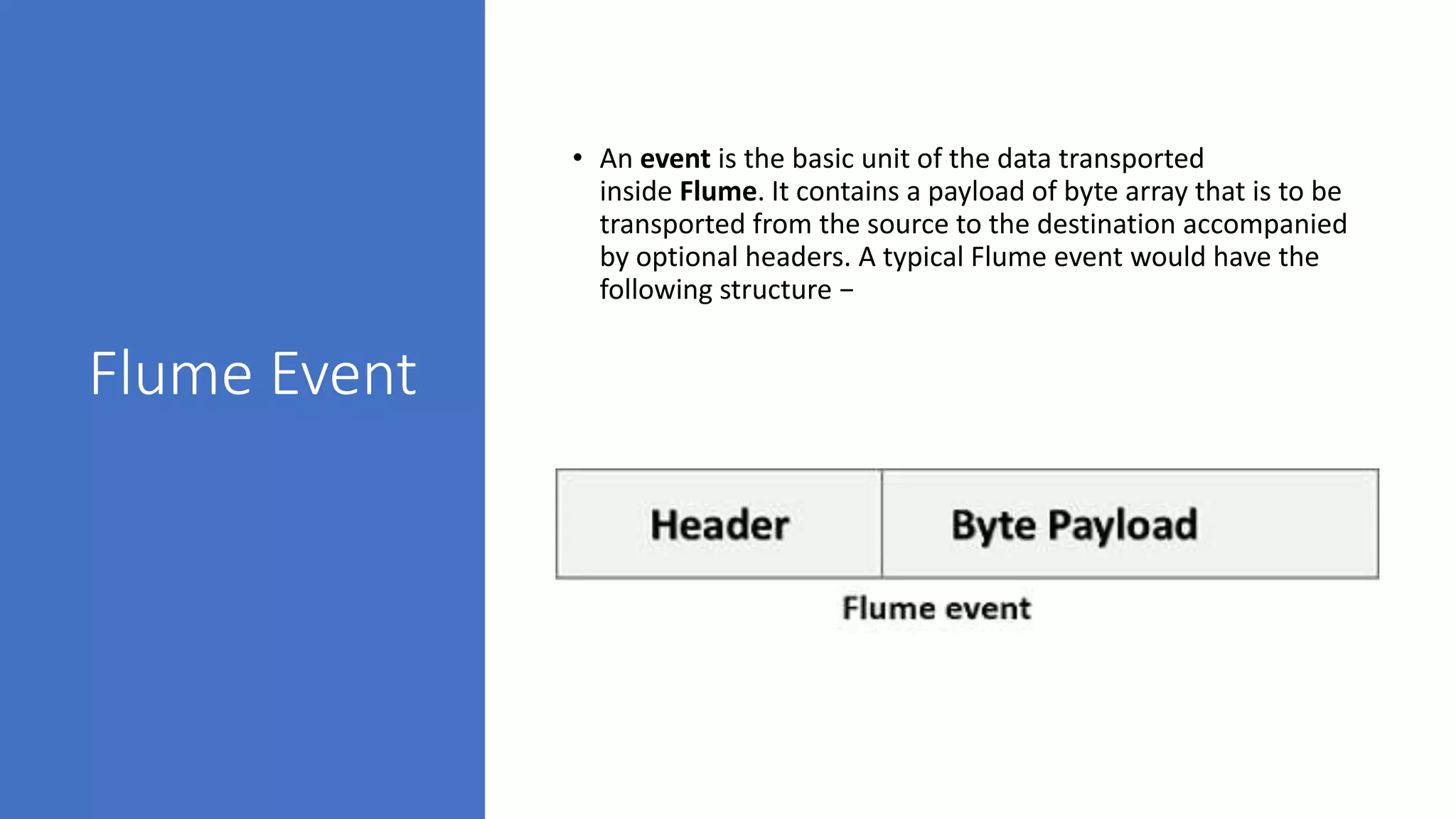
• An event is the basic unit of the data transported
inside Flume. It contains a payload of byte array that is to be
transported from the source to the destination accompanied
by optional headers. A typical Flume event would have the
following structure −
Flume Agent
• An agent is an independent daemon
process (JVM) in Flume. It receives the
data (events) from clients or other
agents and forwards it to its next
destination (sink or agent). Flume may
have more than one agent. Following
diagram represents a Flume Agent
• As shown in the diagram a Flume Agent
contains three main components
namely, source, channel, and sink.
Source
• A source is the component of an Agent which
receives data from the data generators and
transfers it to one or more channels in the form
of Flume events.
• Apache Flume supports several types of sources
and each source receives events from a specified
data generator.
• Example − Avro source, Thrift source, twitter 1%
source etc.
Channel
• A channel is a transient store which receives the
events from the source and buffers them till they
are consumed by sinks. It acts as a bridge
between the sources and the sinks.
• These channels are fully transactional and they
can work with any number of sources and sinks.
• Example − JDBC channel, File system channel,
Memory channel, etc.
Sink
• A sink stores the data into centralized stores like
HBase and HDFS. It consumes the data (events)
from the channels and delivers it to the
destination. The destination of the sink might be
another agent or the central stores.
• Example − HDFS sink
• Note − A flume agent can have multiple sources,
sinks and channels. We have listed all the
supported sources, sinks, channels in the Flume
configuration chapter of this tutorial.
Additional
Components
of Flume
Agent
• Interceptors
• Interceptors are used to alter/inspect flume events which are
transferred between source and channel.
• Channel Selectors
• These are used to determine which channel is to be opted to transfer
the data in case of multiple channels. There are two types of channel
selectors −
• Default channel selectors − These are also known as replicating
channel selectors they replicates all the events in each channel.
• Multiplexing channel selectors − These decides the channel to send
an event based on the address in the header of that event.
• Sink Processors
• These are used to invoke a particular sink from the selected group of
sinks. These are used to create failover paths for your sinks or load
balance events across multiple sinks from a channel.
Apache Flume - Data
Flow
• Flume is a framework which is used to move log data
into HDFS. Generally events and log data are
generated by the log servers and these servers have
Flume agents running on them. These agents receive
the data from the data generators.
• The data in these agents will be collected by an
intermediate node known as Collector. Just like
agents, there can be multiple collectors in Flume.
• Finally, the data from all these collectors will be
aggregated and pushed to a centralized store such as
HBase or HDFS. The following diagram explains the
data flow in Flume.
• Multi-hop Flow
• Within Flume, there can be multiple agents and before reaching the final destination, an event may travel
through more than one agent. This is known as multi-hop flow.
• Fan-out Flow
• The dataflow from one source to multiple channels is known as fan-out flow. It is of two types −
• Replicating − The data flow where the data will be replicated in all the configured channels.
• Multiplexing − The data flow where the data will be sent to a selected channel which is mentioned in the
header of the event.
• Fan-in Flow
• The data flow in which the data will be transferred from many sources to one channel is known as fan-in
flow.
• Failure Handling
• In Flume, for each event, two transactions take place: one at the sender
and one at the receiver. The sender sends events to the receiver. Soon
after receiving the data, the receiver commits its own transaction and
sends a “received” signal to the sender. After receiving the signal, the
sender commits its transaction. (Sender will not commit its transaction till
it receives a signal from the receiver.)
Installing Flume
• First of all, download the latest version of Apache Flume software from the
website https://flume.apache.org/.
• Step 1
• Open the website. Click on the download link on the left-hand side of the home page. It will take you to
the download page of Apache Flume.
• Step 2
• In the Download page, you can see the links for binary and source files of Apache Flume. Click on the
link apache-flume-1.6.0-bin.tar.gz
• You will be redirected to a list of mirrors where you can start your download by clicking any of these
mirrors. In the same way, you can download the source code of Apache Flume by clicking on apache-
flume-1.6.0-src.tar.gz.
• Step 3
• Create a directory with the name Flume in the same directory where the installation directories
of Hadoop, HBase, and other software were installed (if you have already installed any) as shown below.
• $ mkdir Flume
• Step 4
• Extract the downloaded tar files as shown below.
• $ cd Downloads/
• $ tar zxvf apache-flume-1.6.0-bin.tar.gz
• $ tar zxvf apache-flume-1.6.0-src.tar.gz
• Step 5
• Move the content of apache-flume-1.6.0-bin.tar file to the Flume directory
created earlier as shown below. (Assume we have created the Flume
directory in the local user named Hadoop.)
• $ mv apache-flume-1.6.0-bin.tar/* /home/Hadoop/Flume/
• Verifying the Installation
• Verify the installation of
Apache Flume by browsing
through the bin folder and
typing the following
command.
• $ ./flume-ng
References
• https://www.tutorialspoint.com/apache_flume/apache_flume_enviro
nment.htm
• https://data-flair.training/blogs/apache-flume-installation-tutorial/
• https://www.youtube.com/watch?v=fUesPFJ6FfE - Flume practical
• https://www.youtube.com/watch?v=lYozBLrFmgs -Flume practical
• https://www.youtube.com/watch?v=wzYdQMrY-Pg

Flume DS -JSP.pptx

  • 1.
  • 2.
    Apache FLUME • Flumeis a distributed, reliable, and available service for efficiently collecting, aggregating, and moving large amounts of log data. • It has a simple and flexible architecture based on streaming data flows. • It is robust and fault tolerant with tunable reliability mechanisms and many failover and recovery mechanisms. • It uses a simple extensible data model that allows for online analytic application.
  • 4.
    Features of Flume •Flume ingests log data from multiple web servers into a centralized store (HDFS, HBase) efficiently. • Using Flume, we can get the data from multiple servers immediately into Hadoop. • Along with the log files, Flume is also used to import huge volumes of event data produced by social networking sites like Facebook and Twitter, and e-commerce websites like Amazon and Flipkart. • Flume supports a large set of sources and destinations types. • Flume supports multi-hop flows, fan-in fan-out flows, contextual routing, etc. • Flume can be scaled horizontally.
  • 5.
    Applications of Flume •Assume an e-commerce web application wants to analyze the customer behavior from a particular region. To do so, they would need to move the available log data in to Hadoop for analysis. Here, Apache Flume comes to our rescue. • Flume is used to move the log data generated by application servers into HDFS at a higher speed.
  • 6.
    Advantages of Flume • UsingApache Flume we can store the data in to any of the centralized stores (HBase, HDFS). • When the rate of incoming data exceeds the rate at which data can be written to the destination, Flume acts as a mediator between data producers and the centralized stores and provides a steady flow of data between them. • Flume provides the feature of contextual routing. • The transactions in Flume are channel-based where two transactions (one sender and one receiver) are maintained for each message. It guarantees reliable message delivery. • Flume is reliable, fault tolerant, scalable, manageable, and customizable.
  • 7.
    Apache Flume - Architecture •data generators (such as Facebook, Twitter) generate data which gets collected by individual Flume agents running on them. Thereafter, a data collector (which is also an agent) collects the data from the agents which is aggregated and pushed into a centralized store such as HDFS or HBase.
  • 8.
    Flume Event • Anevent is the basic unit of the data transported inside Flume. It contains a payload of byte array that is to be transported from the source to the destination accompanied by optional headers. A typical Flume event would have the following structure −
  • 9.
    Flume Agent • Anagent is an independent daemon process (JVM) in Flume. It receives the data (events) from clients or other agents and forwards it to its next destination (sink or agent). Flume may have more than one agent. Following diagram represents a Flume Agent • As shown in the diagram a Flume Agent contains three main components namely, source, channel, and sink.
  • 10.
    Source • A sourceis the component of an Agent which receives data from the data generators and transfers it to one or more channels in the form of Flume events. • Apache Flume supports several types of sources and each source receives events from a specified data generator. • Example − Avro source, Thrift source, twitter 1% source etc.
  • 11.
    Channel • A channelis a transient store which receives the events from the source and buffers them till they are consumed by sinks. It acts as a bridge between the sources and the sinks. • These channels are fully transactional and they can work with any number of sources and sinks. • Example − JDBC channel, File system channel, Memory channel, etc.
  • 12.
    Sink • A sinkstores the data into centralized stores like HBase and HDFS. It consumes the data (events) from the channels and delivers it to the destination. The destination of the sink might be another agent or the central stores. • Example − HDFS sink • Note − A flume agent can have multiple sources, sinks and channels. We have listed all the supported sources, sinks, channels in the Flume configuration chapter of this tutorial.
  • 13.
    Additional Components of Flume Agent • Interceptors •Interceptors are used to alter/inspect flume events which are transferred between source and channel. • Channel Selectors • These are used to determine which channel is to be opted to transfer the data in case of multiple channels. There are two types of channel selectors − • Default channel selectors − These are also known as replicating channel selectors they replicates all the events in each channel. • Multiplexing channel selectors − These decides the channel to send an event based on the address in the header of that event. • Sink Processors • These are used to invoke a particular sink from the selected group of sinks. These are used to create failover paths for your sinks or load balance events across multiple sinks from a channel.
  • 14.
    Apache Flume -Data Flow • Flume is a framework which is used to move log data into HDFS. Generally events and log data are generated by the log servers and these servers have Flume agents running on them. These agents receive the data from the data generators. • The data in these agents will be collected by an intermediate node known as Collector. Just like agents, there can be multiple collectors in Flume. • Finally, the data from all these collectors will be aggregated and pushed to a centralized store such as HBase or HDFS. The following diagram explains the data flow in Flume.
  • 15.
    • Multi-hop Flow •Within Flume, there can be multiple agents and before reaching the final destination, an event may travel through more than one agent. This is known as multi-hop flow. • Fan-out Flow • The dataflow from one source to multiple channels is known as fan-out flow. It is of two types − • Replicating − The data flow where the data will be replicated in all the configured channels. • Multiplexing − The data flow where the data will be sent to a selected channel which is mentioned in the header of the event. • Fan-in Flow • The data flow in which the data will be transferred from many sources to one channel is known as fan-in flow.
  • 16.
    • Failure Handling •In Flume, for each event, two transactions take place: one at the sender and one at the receiver. The sender sends events to the receiver. Soon after receiving the data, the receiver commits its own transaction and sends a “received” signal to the sender. After receiving the signal, the sender commits its transaction. (Sender will not commit its transaction till it receives a signal from the receiver.)
  • 17.
    Installing Flume • Firstof all, download the latest version of Apache Flume software from the website https://flume.apache.org/. • Step 1 • Open the website. Click on the download link on the left-hand side of the home page. It will take you to the download page of Apache Flume. • Step 2 • In the Download page, you can see the links for binary and source files of Apache Flume. Click on the link apache-flume-1.6.0-bin.tar.gz • You will be redirected to a list of mirrors where you can start your download by clicking any of these mirrors. In the same way, you can download the source code of Apache Flume by clicking on apache- flume-1.6.0-src.tar.gz.
  • 18.
    • Step 3 •Create a directory with the name Flume in the same directory where the installation directories of Hadoop, HBase, and other software were installed (if you have already installed any) as shown below. • $ mkdir Flume • Step 4 • Extract the downloaded tar files as shown below. • $ cd Downloads/ • $ tar zxvf apache-flume-1.6.0-bin.tar.gz • $ tar zxvf apache-flume-1.6.0-src.tar.gz
  • 19.
    • Step 5 •Move the content of apache-flume-1.6.0-bin.tar file to the Flume directory created earlier as shown below. (Assume we have created the Flume directory in the local user named Hadoop.) • $ mv apache-flume-1.6.0-bin.tar/* /home/Hadoop/Flume/
  • 22.
    • Verifying theInstallation • Verify the installation of Apache Flume by browsing through the bin folder and typing the following command. • $ ./flume-ng
  • 23.
    References • https://www.tutorialspoint.com/apache_flume/apache_flume_enviro nment.htm • https://data-flair.training/blogs/apache-flume-installation-tutorial/ •https://www.youtube.com/watch?v=fUesPFJ6FfE - Flume practical • https://www.youtube.com/watch?v=lYozBLrFmgs -Flume practical • https://www.youtube.com/watch?v=wzYdQMrY-Pg