
1
Streaming data into HBase using
Flume
Hari Shreedharan | Software Engineer, Cloudera
Apache Flume Fundamentals
• Scalable collection, aggregation of event data (i.e.
logs)
• The simplest “unit” of data – “Event”
• Event = {Map<String, String>, byte[] body}
• Dynamic, contextual event routing
• Low latency, high throughput
• Declarative configuration
• Productive out of the box, yet powerfully extensible
• Open source software
2
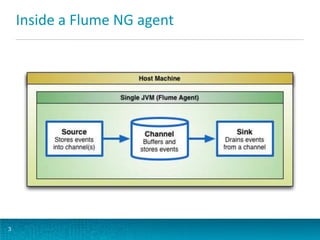
Inside a Flume NG agent
3
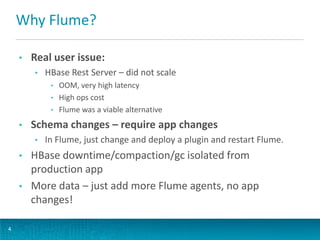
Why Flume?
4
• Real user issue:
• HBase Rest Server – did not scale
• OOM, very high latency
• High ops cost
• Flume was a viable alternative
• Schema changes – require app changes
• In Flume, just change and deploy a plugin and restart Flume.
• HBase downtime/compaction/gc isolated from
production app
• More data – just add more Flume agents, no app
changes!
Topology: Connecting agents together
5
[Client]+  Agent [ Agent]*  Destination
HBase
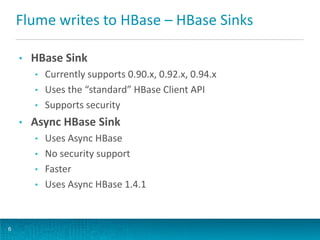
Flume writes to HBase – HBase Sinks
6
• HBase Sink
• Currently supports 0.90.x, 0.92.x, 0.94.x
• Uses the “standard” HBase Client API
• Supports security
• Async HBase Sink
• Uses Async HBase
• No security support
• Faster
• Uses Async HBase 1.4.1
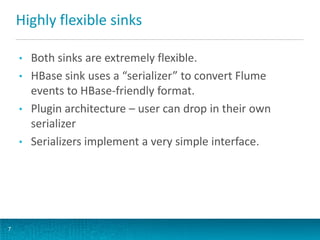
Highly flexible sinks
7
• Both sinks are extremely flexible.
• HBase sink uses a “serializer” to convert Flume
events to HBase-friendly format.
• Plugin architecture – user can drop in their own
serializer
• Serializers implement a very simple interface.
Serializers
8
public interface HbaseEventSerializer {
void initialize(Event event, byte[]
columnFamily);
public List<Row> getActions();
public List<Increment> getIncrements();
public void close();
}
HBase Cluster performance
9
• HBase cluster itself scaled really well
• No one I know of has hit scaling issues writing from
Flume
• Sometimes read performance was affected
• Primarily due to row locks held by writes/increments
• Increments made this situation more problematic
• When Flume was writing to the same rows as being read,
the read latency could be visibly high.
• Pre-spilt tables, and uniform distribution of data also
helped.
Issues we faced – why two sinks?
10
• Wrote the HBase Sink first using HBase client API
• HBase Client API great at conserving resources
• Several static maps hidden away in the API meant we
could not open as many connections as wanted from
the same JVM
• Region Servers and Flume Agents were sitting idle
while data was being sent over the wire!
• More threads didn’t seem to help much.
Async HBase to the rescue!
11
• Async HBase – an easy way out
• Maintained thread pools – callbacks based
• Helped us get the full power of HBase
• Scaled really well – allowing good HBase cluster
utilization
• Never seen a user complaining about Async HBase
Sink performance!
What happens now?
12
• HBase 0.95+ no longer wire compatible with Async
HBase
• Hoping to see Async HBase support HBase 0.95+
(and willing to contribute!)
• Hoping to see an HBase API which supports a “use all
my resources” mode (and willing to contribute!)
Read and contribute!
13
• Apache Flume: http://flume.apache.org/
• https://blogs.apache.org/flume/entry/flume_ng_arc
hitecture
• https://blogs.apache.org/flume/entry/streaming_dat
a_into_apache_hbase
• https://blogs.apache.org/flume/entry/flume_perfor
mance_tuning_part_1
Read and contribute!
14
• Apache Flume: http://flume.apache.org/
• https://blogs.apache.org/flume/entry/flume_ng_arc
hitecture
• https://blogs.apache.org/flume/entry/streaming_dat
a_into_apache_hbase
• https://blogs.apache.org/flume/entry/flume_perfor
mance_tuning_part_1
Click to edit Master title style
15
Hari Shreedharan, Software Engineer, Cloudera @harisr1234
Thank you!

HBaseCon 2013: Streaming Data into Apache HBase using Apache Flume: Experience with High Speed Writes

  • 1.
    1 Streaming data intoHBase using Flume Hari Shreedharan | Software Engineer, Cloudera
  • 2.
    Apache Flume Fundamentals •Scalable collection, aggregation of event data (i.e. logs) • The simplest “unit” of data – “Event” • Event = {Map<String, String>, byte[] body} • Dynamic, contextual event routing • Low latency, high throughput • Declarative configuration • Productive out of the box, yet powerfully extensible • Open source software 2
  • 3.
    Inside a FlumeNG agent 3
  • 4.
    Why Flume? 4 • Realuser issue: • HBase Rest Server – did not scale • OOM, very high latency • High ops cost • Flume was a viable alternative • Schema changes – require app changes • In Flume, just change and deploy a plugin and restart Flume. • HBase downtime/compaction/gc isolated from production app • More data – just add more Flume agents, no app changes!
  • 5.
    Topology: Connecting agentstogether 5 [Client]+  Agent [ Agent]*  Destination HBase
  • 6.
    Flume writes toHBase – HBase Sinks 6 • HBase Sink • Currently supports 0.90.x, 0.92.x, 0.94.x • Uses the “standard” HBase Client API • Supports security • Async HBase Sink • Uses Async HBase • No security support • Faster • Uses Async HBase 1.4.1
  • 7.
    Highly flexible sinks 7 •Both sinks are extremely flexible. • HBase sink uses a “serializer” to convert Flume events to HBase-friendly format. • Plugin architecture – user can drop in their own serializer • Serializers implement a very simple interface.
  • 8.
    Serializers 8 public interface HbaseEventSerializer{ void initialize(Event event, byte[] columnFamily); public List<Row> getActions(); public List<Increment> getIncrements(); public void close(); }
  • 9.
    HBase Cluster performance 9 •HBase cluster itself scaled really well • No one I know of has hit scaling issues writing from Flume • Sometimes read performance was affected • Primarily due to row locks held by writes/increments • Increments made this situation more problematic • When Flume was writing to the same rows as being read, the read latency could be visibly high. • Pre-spilt tables, and uniform distribution of data also helped.
  • 10.
    Issues we faced– why two sinks? 10 • Wrote the HBase Sink first using HBase client API • HBase Client API great at conserving resources • Several static maps hidden away in the API meant we could not open as many connections as wanted from the same JVM • Region Servers and Flume Agents were sitting idle while data was being sent over the wire! • More threads didn’t seem to help much.
  • 11.
    Async HBase tothe rescue! 11 • Async HBase – an easy way out • Maintained thread pools – callbacks based • Helped us get the full power of HBase • Scaled really well – allowing good HBase cluster utilization • Never seen a user complaining about Async HBase Sink performance!
  • 12.
    What happens now? 12 •HBase 0.95+ no longer wire compatible with Async HBase • Hoping to see Async HBase support HBase 0.95+ (and willing to contribute!) • Hoping to see an HBase API which supports a “use all my resources” mode (and willing to contribute!)
  • 13.
    Read and contribute! 13 •Apache Flume: http://flume.apache.org/ • https://blogs.apache.org/flume/entry/flume_ng_arc hitecture • https://blogs.apache.org/flume/entry/streaming_dat a_into_apache_hbase • https://blogs.apache.org/flume/entry/flume_perfor mance_tuning_part_1
  • 14.
    Read and contribute! 14 •Apache Flume: http://flume.apache.org/ • https://blogs.apache.org/flume/entry/flume_ng_arc hitecture • https://blogs.apache.org/flume/entry/streaming_dat a_into_apache_hbase • https://blogs.apache.org/flume/entry/flume_perfor mance_tuning_part_1
  • 15.
    Click to editMaster title style 15
  • 16.
    Hari Shreedharan, SoftwareEngineer, Cloudera @harisr1234 Thank you!