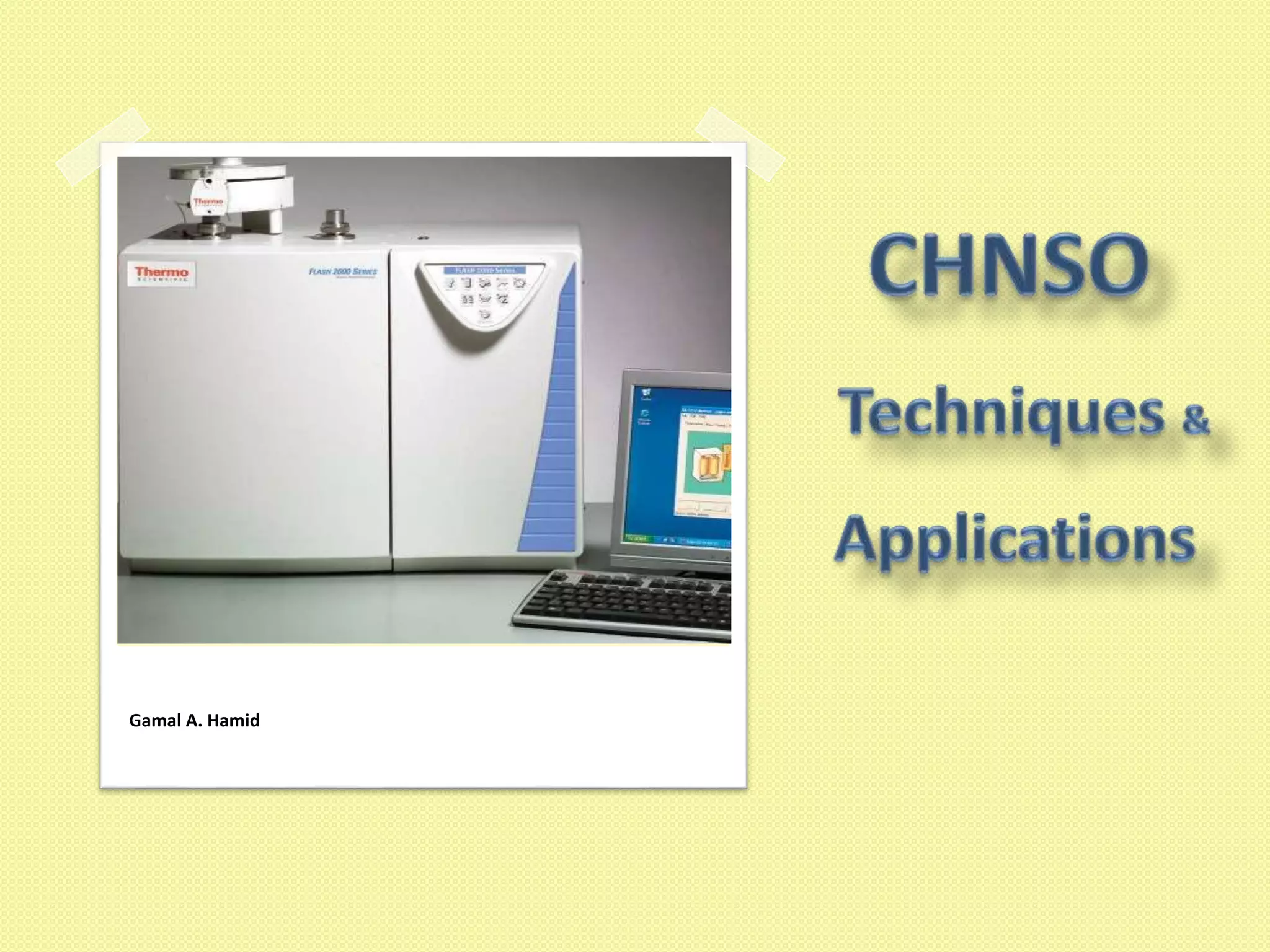
Gamal A. Hamid
2
Thanks
To everyone who has helped us with support, new
books, hard / soft ware And over the internet
Special thanks for Thermo
http://www.thermofisher.com
3
Contents
 Basic Theory
 Instrument Hardware
 Sample preparation
 Software
 Calibration
 Cookbook
 Analysis
 Accessories
 Consumables
 Applications
5
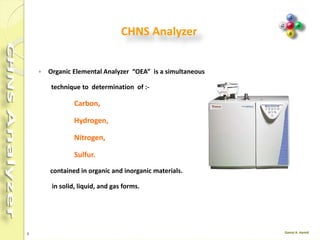
CHNS Analyzer
 Organic Elemental Analyzer “OEA” is a simultaneous
technique to determination of :-
Carbon,
Hydrogen,
Nitrogen,
Sulfur.
contained in organic and inorganic materials.
in solid, liquid, and gas forms.
6
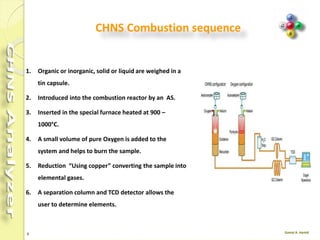
CHNS Combustion sequence
1. Organic or inorganic, solid or liquid are weighed in a
tin capsule.
2. Introduced into the combustion reactor by an AS.
3. Inserted in the special furnace heated at 900 –
1000°C.
4. A small volume of pure Oxygen is added to the
system and helps to burn the sample.
5. Reduction “Using copper” converting the sample into
elemental gases.
6. A separation column and TCD detector allows the
user to determine elements.
8
Instruments configuration
The molecular design of the FLASH 2000 Series means that laboratories can
easily change the configuration to any other, according to their needs and
application fields.
 CHN
 CHNS
 NC ORG
 NCS
 NC soil
 N lube
 N org
 N protein
 Oxygen
 Sulphur
9
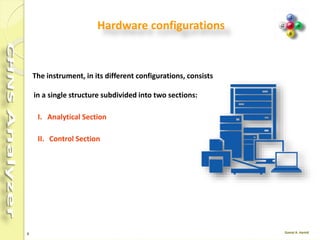
Hardware configurations
The instrument, in its different configurations, consists
in a single structure subdivided into two sections:
I. Analytical Section
II. Control Section
10
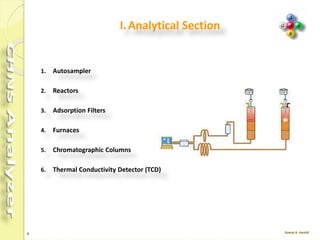
I.Analytical Section
1. Autosampler
2. Reactors
3. Adsorption Filters
4. Furnaces
5. Chromatographic Columns
6. Thermal Conductivity Detector (TCD)
11
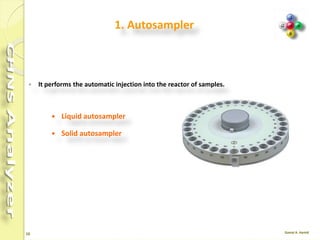
1. Autosampler
 It performs the automatic injection into the reactor of samples.
 Liquid autosampler
 Solid autosampler
12
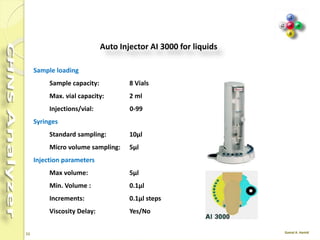
Auto Injector AI 3000Sample loading
Sample capacity: 8 Vials
Max. vial capacity: 2 ml
Injections/vial: 0-99
Syringes
Standard sampling: 10µl
Micro volume sampling: 5µl
Injection parameters
Max volume: 5µl
Min. Volume : 0.1µl
Increments: 0.1µl steps
Viscosity Delay: Yes/No
13
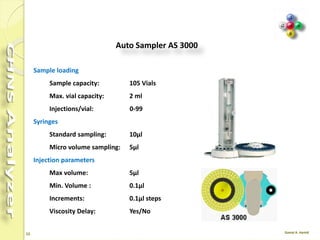
Auto Sampler AS 3000
Sample loading
Sample capacity: 105 Vials
Max. vial capacity: 2 ml
Injections/vial: 0-99
Syringes
Standard sampling: 10µl
Micro volume sampling: 5µl
Injection parameters
Max volume: 5µl
Min. Volume : 0.1µl
Increments: 0.1µl steps
Viscosity Delay: Yes/No
14
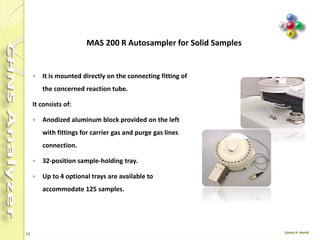
 It is mounted directly on the connecting fitting of
the concerned reaction tube.
It consists of:
 Anodized aluminum block provided on the left
with fittings for carrier gas and purge gas lines
connection.
 32-position sample-holding tray.
 Up to 4 optional trays are available to
accommodate 125 samples.
MAS 200 R Autosampler for Solid Samples
15
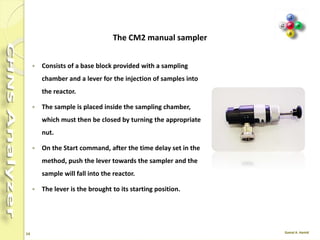
 Consists of a base block provided with a sampling
chamber and a lever for the injection of samples into
the reactor.
 The sample is placed inside the sampling chamber,
which must then be closed by turning the appropriate
nut.
 On the Start command, after the time delay set in the
method, push the lever towards the sampler and the
sample will fall into the reactor.
 The lever is the brought to its starting position.
The CM2 manual sampler
16
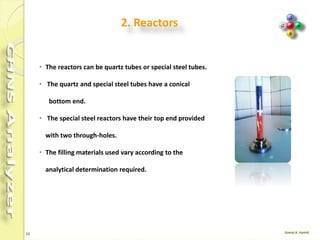
2. Reactors
• The reactors can be quartz tubes or special steel
tubes.
• The quartz and special steel tubes have a conical
bottom end.
• The special steel reactors have their top end provided
with two through-holes.
• The filling materials used vary according to the
analytical determination required.
17
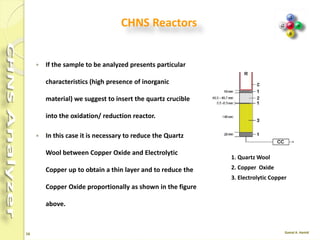
 If the sample to be analyzed presents particular
characteristics (high presence of inorganic
material) we suggest to insert the quartz crucible
into the oxidation/ reduction reactor.
 In this case it is necessary to reduce the Quartz
Wool between Copper Oxide and Electrolytic
Copper up to obtain a thin layer and to reduce the
Copper Oxide proportionally as shown in the figure
above.
CHNS Reactors
1. Quartz Wool
2. Copper Oxide
3. Electrolytic Copper
18
Reactor Cleaning
 After 200-300 samples have been measured
(depending on application and sample size) the
reactor should be cleaned and the ash of the
samples be removed.
 After approximately 70-100 samples have been
measured (depending on material and sample
amount) the graphite crucible should be cleaned.
19
Reactor Cleaning
 Turn the furnace Off.
 Set the Oven temperature to 50°C.
 After reaching the temperatures turn the purge and carrier gas (He) Off.
 Remove the autosampler.
 Remove the front cover and the protection plate of the furnaces compartment.
 Unscrew the bottom reactor connection, then pull out the reactor carefully.
 Take out the glassy carbon tube.
 Remove the crucible, silver wool and quartz wool; empty the granules in a separate
bowl.
 Clean the inside of the glassy carbon tube with a bottle brush.
20
Continue …
 Clean the outside of the glassy carbon tube carefully with fine-grained sand
paper or wait a few hours until deposits fall off.
 Replace quartz wool and silver wool in the glassy carbon tube with new one.
 Clean the granules with a tissue or a sieve until they are shiny again.
 Remove all granules that are not shiny anymore or show porous surface.
 Clean the outside of the crucible with a tissue, and remove the molten silver
inside.
 Alternatively, heat the crucible upside down in a furnace to 1000 °C so that the
silver melts and flows out, or replace the crucible with a new one.
 Blow out the dust from the ceramic tube.
21
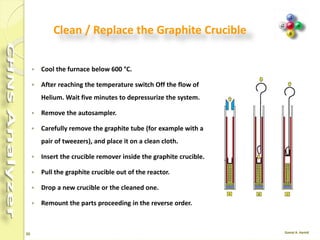
Clean / Replace the Graphite Crucible
 Cool the furnace .
 After reaching the temperature switch Off the flow of
Helium. Wait five minutes to depressurize the system.
 Remove the autosampler.
 Carefully remove the graphite tube (for example with a
pair of tweezers), and place it on a clean cloth.
 Insert the crucible remover inside the graphite crucible.
 Pull the graphite crucible out of the reactor.
 Drop a new crucible or the cleaned one.
 Remount the parts proceeding in the reverse order.
22
Refill Reactor
 Starting from the reactor bottom (conical end),
introduce a sufficient amount of quartz wool.
 Plug with your finger the mouth of the reactor conical end.
Gently press the quartz wool using the rod provided.
 Pour sequentially the required filling materials into the reactor
ensuring that each layer has the indicated size.
 Put the other components and at each step gently press the
quartz wool using the rod provided.
23
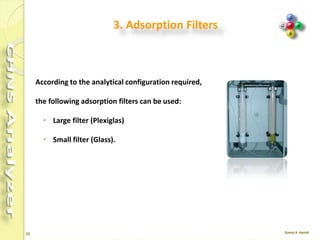
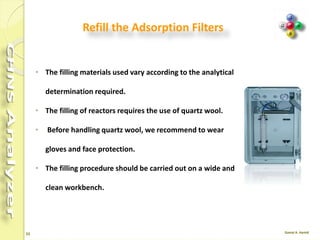
3. Adsorption Filters
According to the analytical configuration required,
the following adsorption filters can be used:
• Large filter (Plexiglas)
• Small filter (Glass).
24
Refill the Adsorption Filters
• The filling materials used vary according to the analytical
determination required.
• The filling of reactors requires the use of quartz wool.
• Before handling quartz wool, we recommend to wear
gloves and face protection.
• The filling procedure should be carried out on a wide and
clean workbench.
25
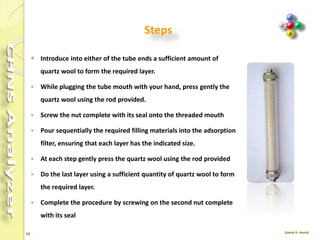
Steps
 Introduce into either of the tube ends a sufficient amount of
quartz wool to form the required layer.
 While plugging the tube mouth with your hand, press gently the
quartz wool using the rod provided.
 Screw the nut complete with its seal onto the threaded mouth
 Pour sequentially the required filling materials into the adsorption
filter, ensuring that each layer has the indicated size.
 At each step gently press the quartz wool using the rod provided
 Do the last layer using a sufficient quantity of quartz wool to form
the required layer.
 Complete the procedure by screwing on the second nut complete
with its seal
26
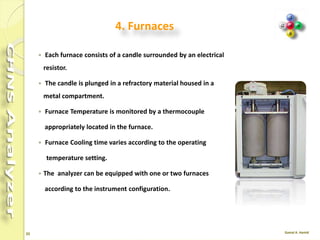
4. Furnaces
 Each furnace consists of a candle surrounded by an
electrical resistor.
 The candle is plunged in a refractory material housed in a
metal compartment.
 Furnace Temperature is monitored by a thermocouple
appropriately located in the furnace.
 Furnace Cooling time varies according to the operating
temperature setting.
 The analyzer can be equipped with one or two furnaces
according to the instrument configuration.
27
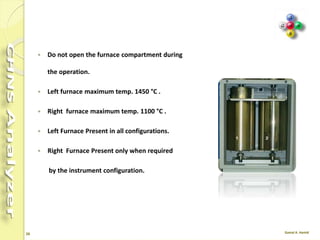
 Do not open the furnace compartment during
the operation.
 Left furnace maximum temp. 1450 °C .
 Right furnace maximum temp. 1100 °C .
 Left Furnace Present in all configurations.
 Right Furnace Present only when required
by the instrument configuration.
28
Notes
 As the life time of the furnace heater is limited, do
not heat it to higher temperatures than necessary.
 If you do not want to perform any analysis for
about one day (e.g. over night), cool down the
furnace to 400 °C .
 If you do not want to perform any analysis for
more than one week, cool down both furnace and
column to ambient temperature.
29
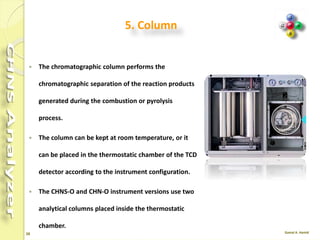
5. Column
 The chromatographic column performs the
chromatographic separation of the reaction products
generated during the combustion or pyrolysis
process.
 The column can be kept at room temperature, or it
can be placed in the thermostatic chamber of the TCD
detector according to the instrument configuration.
 The CHNS-O and CHN-O instrument versions use two
analytical columns placed inside the thermostatic
chamber.
30
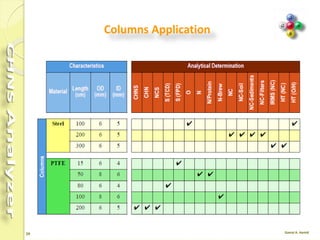
Columns Application
31
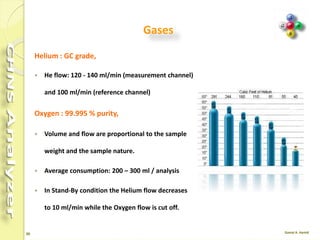
Gases
Helium : GC grade,
 He flow: 120 - 140 ml/min (measurement channel)
and 100 ml/min (reference channel)
Oxygen : 99.995 % purity,
 Volume and flow are proportional to the sample
weight and the sample nature.
 Average consumption: 200 – 300 ml / analysis
 In Stand-By condition the Helium flow decreases
to 10 ml/min while the Oxygen flow is cut off.
32
The carrier gas
An inert gas, which is used to sweep a mixture to be
separated through a gas chromatograph , (helium).
 Push the sample through the chromatograph column
 Clean out the chromatograph column after sample
analysis
33
Carrier gas
 Ultra-pure and research-grade gases of up to 99.9999%
(Grade 6.0) purity.
 the carrier gas system often contains a molecular sieve to
remove water or other impurities.
 Linear Velocity (u) Is the speed at which the carrier gas or
mobile phase travels through the column.
 The linear velocity is generally expressed in cm/s
 The linear velocity is independent of the column diameter
while the flow rate is dependent on the column diameter.
34
6. Thermal Conductivity Detector
 Located in a thermostatic chamber, This chamber also
accommodates the analytical column.
 The detector essentially consists of a stainless steel block
provided with two pairs of filaments (generally of
tungsten/rhenium) having the same electrical resistance.
 The detector is housed in a thermally insulated metal block
(detector oven) and maintained at constant temperature.
 The two pairs of filaments are electrically connected according
to a Wheatstone bridge circuit powered at constant voltage.
35
TCD
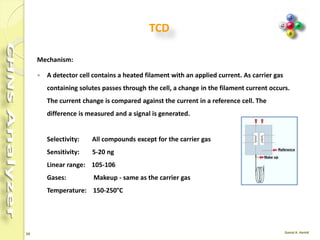
Mechanism:
 A detector cell contains a heated filament with an applied current. As carrier gas
containing solutes passes through the cell, a change in the filament current occurs.
The current change is compared against the current in a reference cell.
 The difference is measured and a signal is generated.
Selectivity: All compounds except for the carrier gas
Sensitivity: 5-20 ng
Linear range: 105 - 106
Gases: Makeup - same as the carrier gas
Temperature: 150-250°C
36
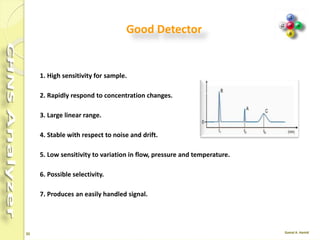
Good Detector
1. High sensitivity for sample.
2. Rapidly respond to concentration changes.
3. Large linear range.
4. Stable with respect to noise and drift.
5. Low sensitivity to variation in flow, pressure and temperature.
6. Possible selectivity.
7. Produces an easily handled signal.
37
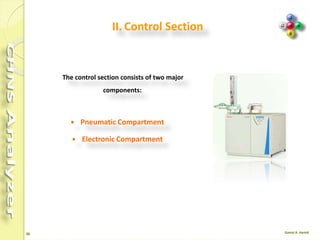
II. Control Section
The control section consists of two major
components:
 Pneumatic Compartment
 Electronic Compartment
38
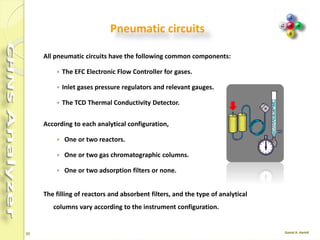
Pneumatic circuits
All pneumatic circuits have the following common components:
 The EFC Electronic Flow Controller for gases.
 Inlet gases pressure regulators and relevant gauges.
 The TCD Thermal Conductivity Detector.
According to each analytical configuration,
 One or two reactors.
 One or two gas chromatographic columns.
 One or two adsorption filters or none.
The filling of reactors and absorbent filters, and the type of analytical
columns vary according to the instrument configuration.
39
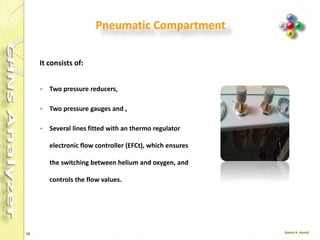
Pneumatic Compartment
It consists of:
 Two pressure reducers,
 Two pressure gauges and ,
 Several lines fitted with an thermo regulator
electronic flow controller (EFCt), which ensures
the switching between helium and oxygen, and
controls the flow values.
40
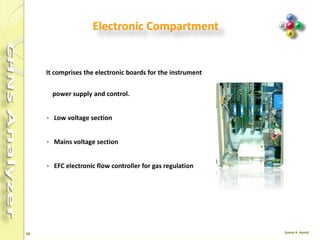
Electronic Compartment
It comprises the electronic boards for the instrument
 power supply and control.
 Low voltage section
 Mains voltage section
 EFC electronic flow controller for gas regulation
41
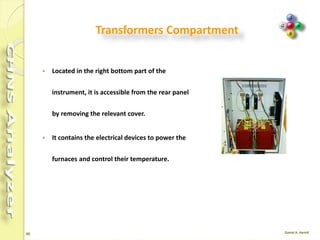
Transformers Compartment
 Located in the right bottom part of the
instrument, it is accessible from the rear panel
by removing the relevant cover.
 It contains the electrical devices to power the
furnaces and control their temperature.
42
The areas and items to check include:
1. Gases - pressures, carrier gas average linear velocity,
and flow .
2. Temperatures - column, AS, detector .
3. System parameters - purge activation times,
detector attenuation and range.
4. Gas lines and traps - cleanliness, leaks, expiration.
5. Sample integrity - concentration, degradation,
solvent, storage.
6. Data system - settings and connections.
Simple Checks
44
Homogenizing the Sample
Before the analysis the sample must be properly homogenized.
 Soils, Sediments and Minerals
A homogenizing sample amounts of a few hundreds of grams is followed by finer
homogenizing on a few dozens of grams, until optimum granulometry (100-200
μm) is reached.
The resulting sample is dried in an oven
 Carbons
The technique of carbons is the same as that used for the preparation of soils, but
the sample drying in an oven for one hour at 105°C, left in the air for the same
time to let them acquire again their natural moisture and then stored in airtight
containers. Finally they are put into driers.
45
Vegetal
 To prepare samples of vegetal products, two types of mills are normally used:
Blade mills to homogenize cereals, leaves, forage and wood. In these mills,
devices with 1 mm mesh sieves are used for N/Protein determination.
 Ball mills to homogenize samples of fruit and vegetables after lyophilization.
 These mills use devices for finer granulometry.
 The sample amount to be analyzed depends on the type of determination and on
the homogenizing degree.
 Metals, Plastic, and liquid are mostly homogenous.
46
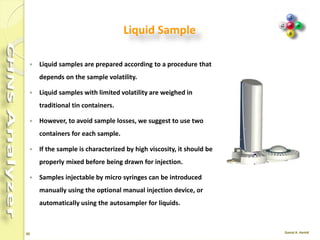
Liquid Sample
 Liquid samples are prepared according to a procedure that
depends on the sample volatility.
 Liquid samples with limited volatility are weighed in
traditional tin containers.
 However, to avoid sample losses, we suggest to use two
containers for each sample.
 If the sample is characterized by high viscosity, it should be
properly mixed before being drawn for injection.
 Samples injectable by micro syringes can be introduced
manually using the optional manual injection device, or
automatically using the autosampler for liquids.
47
Important Notes
 In soils, sulfur is often present as ion sulfate, and therefore it is necessary to add5-
10 mg of vanadium pentoxide (V2O5) every 10-20 mg of soil to ensure complete
conversion of inorganic sulfur into sulfur dioxide.
 Plants are rich in Nitrogen, Carbon and Hydrogen, but relatively poor in Sulfur.
Therefore, after the first analysis, check that the peak of sulfur dioxide is correctly
integrated.
 In soils and sediments The Nitrogen content in such samples is generally very low
(0.1%). Set a very high sensitivity of integration and use Oxygen of maximum
purity grade.
 Generally : For samples rich in sulfur, samples of 2-5 mg are prepared. For
samples with sulfur traces, samples of 10-20 mg are prepared.
48
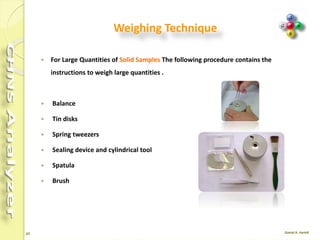
Weighing Technique
 For Large Quantities of Solid Samples The following procedure contains the
instructions to weigh large quantities .
 Balance
 Tin disks
 Spring tweezers
 Sealing device and cylindrical tool
 Spatula
 Brush
49
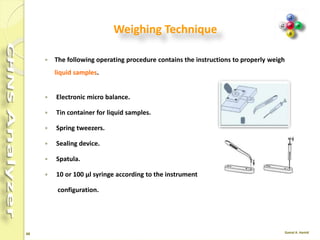
Weighing Technique
 The following operating procedure contains the instructions to properly weigh
liquid samples.
 Electronic micro balance.
 Tin container for liquid samples.
 Spring tweezers.
 Sealing device.
 Spatula.
 10 or 100 μl syringe according to the instrument
configuration.
51
Eager Xperience software
 The most comprehensive software dedicated to OEA.
 The dedicated software controls the operation, data acquisition and data
evaluation capabilities of the FLASH 2000 Series enabling quick reference to
method parameters and instrument status readout.
 Users can configure this flexible platform to gain access to either all available
features or alternatively to a customized and simplified user interface
incorporating pre-set methods.
 Eager Xperience is the most advanced, complete and flexible dedicated software
for OEA applications.
52
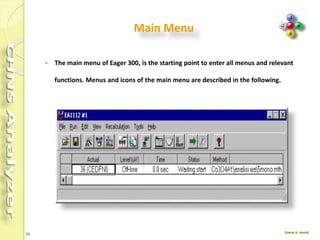
Main Menu
 The main menu of Eager 300, is the starting point to enter all menus and relevant
functions. Menus and icons of the main menu are described in the following.
53
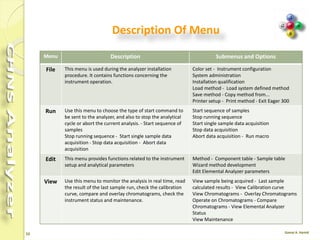
Description Of Menu
Menu Description Submenus and Options
File This menu is used during the analyzer installation
procedure. It contains functions concerning the
instrument operation.
Color set - Instrument configuration
System administration
Installation qualification
Load method - Load system defined method
Save method - Copy method from...
Printer setup - Print method - Exit Eager 300
Run Use this menu to choose the type of start
command to be sent to the analyzer, and also to
stop the analytical cycle or abort the current
analysis. - Start sequence of samples
Stop running sequence - Start single sample data
acquisition - Stop data acquisition - Abort data
acquisition
Start sequence of samples
Stop running sequence
Start single sample data acquisition
Stop data acquisition
Abort data acquisition - Run macro
Edit This menu provides functions related to the
instrument setup and analytical parameters
Method - Component table - Sample table
Wizard method development
Edit Elemental Analyzer parameters
View Use this menu to monitor the analysis in real time,
read the result of the last sample run, check the
calibration curve, compare and overlay
chromatograms, check the instrument status and
maintenance.
View sample being acquired - Last sample
calculated results - View Calibration curve
View Chromatograms - Overlay
Chromatograms
Operate on Chromatograms - Compare
Chromatograms - View Elemental Analyzer
Status
View Maintenance
54
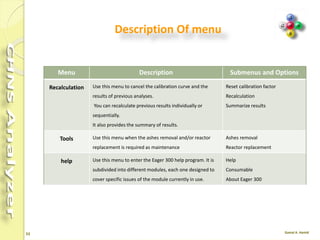
Description Of menu
Menu Description Submenus and
Options
Recalculation Use this menu to cancel the calibration curve and the
results of previous analyses.
You can recalculate previous results individually or
sequentially.
It also provides the summary of results.
Reset calibration factor
Recalculation
Summarize results
Tools Use this menu when the ashes removal and/or
reactor replacement is required as maintenance
Ashes removal
Reactor replacement
help Use this menu to enter the Eager 300 help program.
It is subdivided into different modules, each one
designed to cover specific issues of the module
currently in use.
Help
Consumable
About Eager 300
55
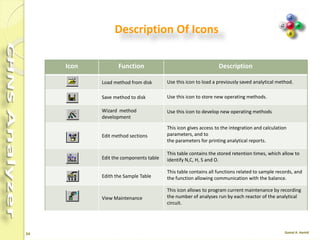
Description Of Icons
Icon Function Description
Load method from disk
Use this icon to load a previously saved analytical
method.
Save method to disk Use this icon to store new operating methods.
Wizard method
development
Use this icon to develop new operating methods
Edit method sections
This icon gives access to the integration and calculation
parameters, and to
the parameters for printing analytical reports.
Edit the components
table
This table contains the stored retention times, which allow
to identify N,C, H, S and O.
Edith the Sample Table
This table contains all functions related to sample records,
and the function allowing communication with the balance.
View Maintenance
This icon allows to program current maintenance by
recording the number of analyses run by each reactor of
the analytical circuit.
56
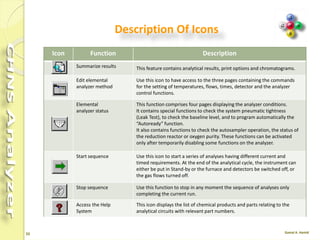
Description Of Icons
Icon Function Description
Summarize results This feature contains analytical results, print options and
chromatograms.
Edit elemental
analyzer method
Use this icon to have access to the three pages containing the
commands
for the setting of temperatures, flows, times, detector and the analyzer
control functions.
Elemental
analyzer status
This function comprises four pages displaying the analyzer conditions.
It contains special functions to check the system pneumatic tightness
(Leak Test), to check the baseline level, and to program automatically
the
“Autoready” function.
It also contains functions to check the autosampler operation, the
status of
the reduction reactor or oxygen purity. These functions can be
activated
only after temporarily disabling some functions on the analyzer.
Start sequence Use this icon to start a series of analyses having different current and
timed requirements. At the end of the analytical cycle, the instrument
can
either be put in Stand-by or the furnace and detectors be switched off,
or
the gas flows turned off.
Stop sequence Use this function to stop in any moment the sequence of analyses only
completing the current run.
57
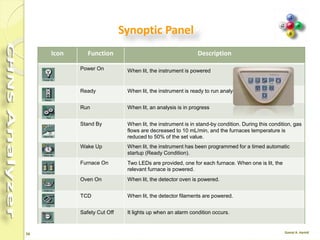
Synoptic Panel
Icon Function Description
Power On When lit, the instrument is powered
Ready When lit, the instrument is ready to run analyses.
Run When lit, an analysis is in progress
Stand By When lit, the instrument is in stand-by condition. During this condition, gas
flows are decreased to 10 mL/min, and the furnaces temperature is
reduced to 50% of the set value.
Wake Up When lit, the instrument has been programmed for a timed automatic
startup (Ready Condition).
Furnace On Two LEDs are provided, one for each furnace. When one is lit, the
relevant furnace is powered.
Oven On When lit, the detector oven is powered.
TCD When lit, the detector filaments are powered.
Safety Cut Off It lights up when an alarm condition occurs.
59
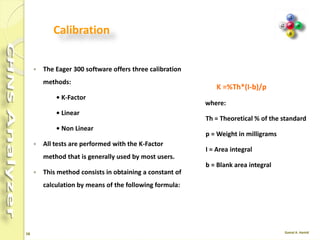
Calibration
 The Eager 300 software offers three calibration
methods:
o K-Factor
o Linear
o Non Linear
 All tests are performed with the K-Factor
method that is generally used by most users.
 This method consists in obtaining a constant of
calculation by means of the following formula:
K =%Th*(I-b)/p
where:
Th = Theoretical % of the standard
p = Weight in milligrams
I = Area integral
b = Blank area integral
60
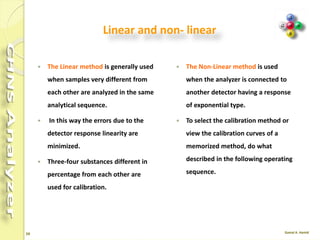
Linear and non- linear
 The Linear method is generally used
when samples very different from
each other are analyzed in the same
analytical sequence.
 In this way the errors due to the
detector response linearity are
minimized.
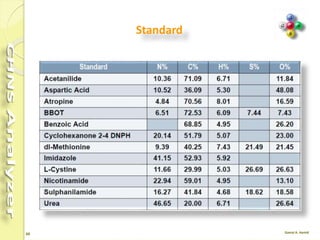
 Three-four substances different in
percentage from each other are
used for calibration.
 The Non-Linear method is used
when the analyzer is connected to
another detector having a response
of exponential type.
 To select the calibration method or
view the calibration curves of a
memorized method, do what
described in the following operating
sequence.
61
Standard
62
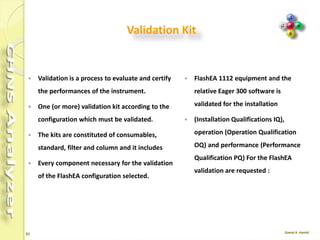
Validation Kit
 Validation is a process to evaluate and certify
the performances of the instrument.
 One (or more) validation kit according to the
configuration which must be validated.
 The kits are constituted of consumables,
standard, filter and column and it includes
 Every component necessary for the validation
of the FlashEA configuration selected.
 FlashEA 1112 equipment and the
relative Eager 300 software is
validated for the installation
 (Installation Qualifications IQ),
operation (Operation Qualification
OQ) and performance (Performance
Qualification PQ) For the FlashEA
validation are requested :
64
Cookbook
 The OEA Cookbook is a compendium of sample
analyses, with information on operating
conditions, instrument configuration and tips on
sample preparation, to be used as a reference for
your samples.
 Indications and guidelines on instrument settings
are all included to help you optimize and enhance
your analyzer's results.
 Included type of standard, sample weighing range,
number of runs performed, and results in
percentage ppm, as well as the Relative Standard
Deviation (RSD %),
65
Example No. 1 from Cookbook
Pressure (kPa)
 He 250
 Oxygen 300
Flow (mL/min)
 He meas. 140
 He ref. 100
 Oxygen 250
Temperature (°C)
 Left 950
 Right 0
 Oven 65
 Cycle (Run Time) 720 s
 Oxygen Injection time 5 s
 Sample delay time 12 s
Analytical conditions for CHNS
66
Sample for CHNS
Sample N % RSD % C % RSD % H % RSD % S % RSD %
A
0.454
0.462
1.235
79.597
79.676
0.0701
6.945
6.937
0.0815
1.435
1.454
0.930
B
0.436
0.427
1.475
82.672
82.781
0.0932
7.137
7.137
0
1.666
0.668
0.0848
CHNS determination Tires as an example
Standard weight: 2 - 3 mg
Sample weight: 2 – 3 mg
BBOT: 2,5-Bis (5-tert-butyl-benzoxazol-2-yl) thiophene
Notes: Standard and samples were analyzed with the addition of about 10 mg of Vanadium
Pentoxide
Samples were cut into small pieces.
67
Example No. 2 from Cookbook
Pressure (kPa)
 He 250
 Oxygen 300
Flow (mL/min)
 He meas. 140
 He ref. 100
 Oxygen 250
Temperature (°C)
 Left 950
 Right 0
 Oven 65
 Cycle (Run Time) 480 s
 Oxygen Injection time 5 s
 Sample delay time 12 s
Analytical conditions for CHN
68
Sample conditions for CHN
Sample N % C % H %
A
14.384 2.903 16.051
14.357 2.977 15.982
B
9.503 1.976 17.647
9.591 1.661 17.726
C
5.087 31.601 4.445
5.065 31.512 4.163
D
5.386 36.962 6.392
5.268 36.856 6.608
Standard: BBOT* 6.51 %N, 72.53 %C, 6.09 %H
Standard weight: 2 - 3 mg
Sample weight: 1 - 1.5 mg
BBOT: 2,5-Bis (5-tert-butyl-benzoxazol-2-yl) thiophene
CHN determination SUGARS as an example
69
For more information
For more information, to provide your
valuable feedback, or for copies of
Application Notes, please contact:
oeacookbook@thermofisher.com
71
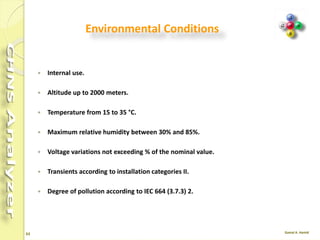
Environmental Conditions
 Internal use.
 Altitude up to 2000 meters.
 Temperature from 15 to 35 °C.
 Maximum relative humidity between 30% and 85%.
 Voltage variations not exceeding of the nominal value.
 Transients according to installation categories II.
 Degree of pollution according to IEC 664 (3.7.3) 2.
72
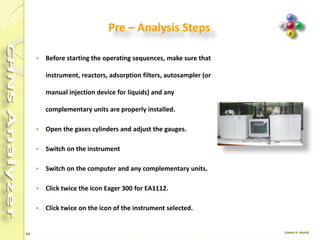
 Before starting the operating sequences, make sure that
instrument, reactors, adsorption filters, autosampler (or
manual injection device for liquids) and any
complementary units are properly installed.
 Open the gases cylinders and adjust the gauges.
 Switch on the instrument
 Switch on the computer and any complementary units.
 Click twice the icon Eager 300 for EA1112.
 Click twice on the icon of the instrument selected.
Pre – Analysis Steps
73
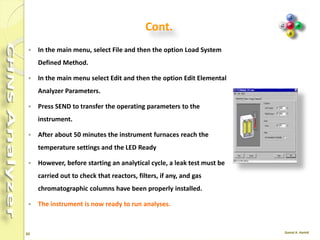
 In the main menu, select File and then the option Load System
Defined Method.
 In the main menu select Edit and then the option Edit Elemental
Analyzer Parameters.
 Press SEND to transfer the operating parameters to the
instrument.
 After about 50 minutes the instrument furnaces reach the
temperature settings and the LED Ready
 However, before starting an analytical cycle, a leak test must be
carried out to check that reactors, filters, if any, and gas
chromatographic columns have been properly installed.
 The instrument is now ready to run analyses.
Cont.
74
Sequence of analysis
 During pre-analysis, the solenoid valve EV1 shuts off the Oxygen flow, where as
the solenoid valve EV2 allows Helium to flow in the circuit.
 When Start Analysis is pressed, the valve EV1 opens, whereas the valve EV2
switches to allow Oxygen to flow in as far as the combustion reactor R1 for a
preset time.
 After a few seconds the sample in a tin container which placed in the
autosampler, is dropped into the combustion reactor.
 Tin, coming in contact with an extremely oxidizing environment, triggers a strong
exothermic reaction temp. rises approx. 1800 °C .
75
Cont.
 At the end of the time set for Oxygen introduction, the valves EV1 and EV2 return
to their original position restoring the Helium flow.
 The combustion products are conveyed across the reactor R1 where oxidation is
completed.
 Nitrogen oxides and sulfur trioxide, possibly formed, are reduced to elemental
nitrogen and sulfur dioxide, and the Oxygen excess is retained.
 Then the gas mixture (N2, CO2, H2O e SO2) flows into the chromatographic
column CC1 where separation takes place.
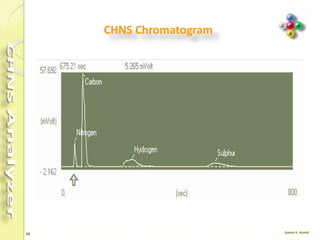
 The eluted gases are sent to the thermal conductivity detector TCD that generates
electrical signals, which, properly processed by the Eager 300 software, provide
the percentages of Nitrogen, Carbon, Hydrogen and Sulfur contained in the
sample.
76
CHNS Chromatogram
77
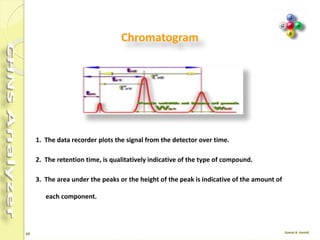
1. The data recorder plots the signal from the detector over time.
2. The retention time, is qualitatively indicative of the type of compound.
3. The area under the peaks or the height of the peak is indicative of the amount of
each component.
Chromatogram
78
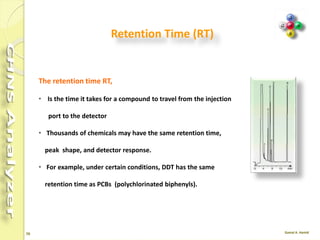
The retention time RT,
• Is the time it takes for a compound to travel from the
injection port to the detector
• Thousands of chemicals may have the same retention
time, peak shape, and detector response.
• For example, under certain conditions, DDT has the
same retention time as PCBs (polychlorinated
biphenyls).
Retention Time (RT)
79
Retention Time Shifts
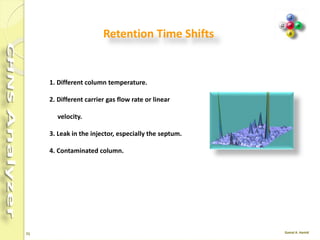
1. Different column temperature.
2. Different carrier gas flow rate or
linear velocity.
3. Leak in the injector, especially the
septum.
4. Contaminated column.
81
Balance
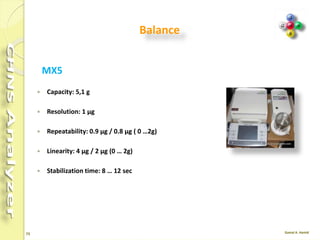
MX5
 Capacity: 5,1 g
 Resolution: 1 µg
 Repeatability: 0.9 µg / 0.8 µg ( 0 …2g)
 Linearity: 4 µg / 2 µg (0 … 2g)
 Stabilization time: 8 … 12 sec
83
Consumables & S. Parts for CHNS
No. Items Quant.
1 Bottom O-Ring for 18 mm OD Quartz Reactor (Set of 5) 1
2 Top O-Ring for 18 mm OD Quartz Reactor (Set of 5) 1
3 Quartz Wool 5 g
4 Copper Oxide 50 g
5 Electrolytic Copper 70 g
6 Vanadium Pentoxide 1 g
7 Empty Quartz Reactor Tube 18 mm OD (Set of 2) 1
8 Prepacked Quartz Reactor for CHNS/NCS/S 1
84
Consumables & S. Parts for CHNS
No. Items Quant.
9 Packed Column CHNS/NCS (PTFE; 2 m; 6x5 mm) 1
10 Tin Containers 100
11 Forceps 1
12 Spatula 1
13 BBOT STD 2 g
14 Sulphanilamide STD 2 g
15 L- Cystine STD 2 g
16 Quartz Crucible 2 g
87
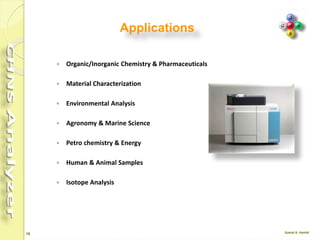
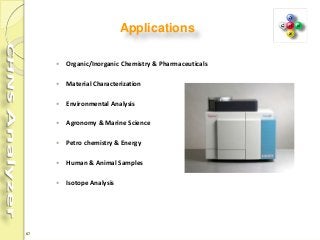
Applications
 Organic/Inorganic Chemistry & Pharmaceuticals
 Material Characterization
 Environmental Analysis
 Agronomy & Marine Science
 Petro chemistry & Energy
 Human & Animal Samples
 Isotope Analysis
88
Organic/Inorganic Chemistry & Pharma.
 Pharmaceuticals Products
 Organo-metallic compounds
 Polymers
 Plastic
 Synthetic rubbers
 Fibers
 Explosives
 Catalysts
 Textiles
 Pesticides
 Detergents
 Fluorine-compounds
89
MATERIAL CHARACTERIZATION
 Glue/Resins
 Papers
 Rubbers
 Cement
 Ceramics
 Carbon/Glass Fibers
 Tires
 Pigments & Dyes
 Refractory materials
 Building materials
 Inorganic materials
 Metals
 Textile fibers
 Wood powders
90
ENVIRONMENTAL ANALYSIS
 Soils, sediments, and rocks
 Composts
 Wastes
 Sewage/sludge
 Pesticides
 Water solution
 Waste Water
 Particulates in Air by Filters
 Particulates in Water by Filters
91
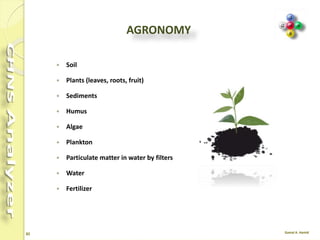
AGRONOMY
 Soil
 Plants (leaves, roots, fruit)
 Sediments
 Humus
 Algae
 Plankton
 Particulate matter in water by filters
 Water
 Fertilizer
92
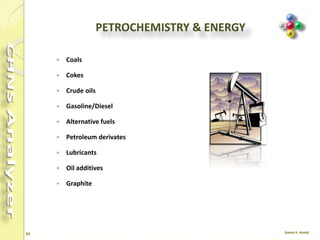
PETROCHEMISTRY & ENERGY
 Coals
 Cokes
 Crude oils
 Gasoline/Diesel
 Alternative fuels
 Petroleum derivates
 Lubricants
 Oil additives
 Graphite
93
HUMAN & ANIMAL SAMPLES
 Blood
 Hairs
 Nails
 Serum
 Urine
94
ISOTOPE ANALYSIS
 Soil and plant
 Research
 Forensic
 Bio Oceanography
 Food and goods
 Control
Flash EA 1112 , Organic Elemental Analyzer

Flash EA 1112 , Organic Elemental Analyzer

  • 1.
  • 2.
    2 Thanks To everyone whohas helped us with support, new books, hard / soft ware And over the internet Special thanks for Thermo http://www.thermofisher.com
  • 3.
    3 Contents  Basic Theory Instrument Hardware  Sample preparation  Software  Calibration  Cookbook  Analysis  Accessories  Consumables  Applications
  • 5.
    5 CHNS Analyzer  OrganicElemental Analyzer “OEA” is a simultaneous technique to determination of :- Carbon, Hydrogen, Nitrogen, Sulfur. contained in organic and inorganic materials. in solid, liquid, and gas forms.
  • 6.
    6 CHNS Combustion sequence 1.Organic or inorganic, solid or liquid are weighed in a tin capsule. 2. Introduced into the combustion reactor by an AS. 3. Inserted in the special furnace heated at 900 – 1000°C. 4. A small volume of pure Oxygen is added to the system and helps to burn the sample. 5. Reduction “Using copper” converting the sample into elemental gases. 6. A separation column and TCD detector allows the user to determine elements.
  • 8.
    8 Instruments configuration The moleculardesign of the FLASH 2000 Series means that laboratories can easily change the configuration to any other, according to their needs and application fields.  CHN  CHNS  NC ORG  NCS  NC soil  N lube  N org  N protein  Oxygen  Sulphur
  • 9.
    9 Hardware configurations The instrument,in its different configurations, consists in a single structure subdivided into two sections: I. Analytical Section II. Control Section
  • 10.
    10 I.Analytical Section 1. Autosampler 2.Reactors 3. Adsorption Filters 4. Furnaces 5. Chromatographic Columns 6. Thermal Conductivity Detector (TCD)
  • 11.
    11 1. Autosampler  Itperforms the automatic injection into the reactor of samples.  Liquid autosampler  Solid autosampler
  • 12.
    12 Auto Injector AI3000Sample loading Sample capacity: 8 Vials Max. vial capacity: 2 ml Injections/vial: 0-99 Syringes Standard sampling: 10µl Micro volume sampling: 5µl Injection parameters Max volume: 5µl Min. Volume : 0.1µl Increments: 0.1µl steps Viscosity Delay: Yes/No
  • 13.
    13 Auto Sampler AS3000 Sample loading Sample capacity: 105 Vials Max. vial capacity: 2 ml Injections/vial: 0-99 Syringes Standard sampling: 10µl Micro volume sampling: 5µl Injection parameters Max volume: 5µl Min. Volume : 0.1µl Increments: 0.1µl steps Viscosity Delay: Yes/No
  • 14.
    14  It ismounted directly on the connecting fitting of the concerned reaction tube. It consists of:  Anodized aluminum block provided on the left with fittings for carrier gas and purge gas lines connection.  32-position sample-holding tray.  Up to 4 optional trays are available to accommodate 125 samples. MAS 200 R Autosampler for Solid Samples
  • 15.
    15  Consists ofa base block provided with a sampling chamber and a lever for the injection of samples into the reactor.  The sample is placed inside the sampling chamber, which must then be closed by turning the appropriate nut.  On the Start command, after the time delay set in the method, push the lever towards the sampler and the sample will fall into the reactor.  The lever is the brought to its starting position. The CM2 manual sampler
  • 16.
    16 2. Reactors • Thereactors can be quartz tubes or special steel tubes. • The quartz and special steel tubes have a conical bottom end. • The special steel reactors have their top end provided with two through-holes. • The filling materials used vary according to the analytical determination required.
  • 17.
    17  If thesample to be analyzed presents particular characteristics (high presence of inorganic material) we suggest to insert the quartz crucible into the oxidation/ reduction reactor.  In this case it is necessary to reduce the Quartz Wool between Copper Oxide and Electrolytic Copper up to obtain a thin layer and to reduce the Copper Oxide proportionally as shown in the figure above. CHNS Reactors 1. Quartz Wool 2. Copper Oxide 3. Electrolytic Copper
  • 18.
    18 Reactor Cleaning  After200-300 samples have been measured (depending on application and sample size) the reactor should be cleaned and the ash of the samples be removed.  After approximately 70-100 samples have been measured (depending on material and sample amount) the graphite crucible should be cleaned.
  • 19.
    19 Reactor Cleaning  Turnthe furnace Off.  Set the Oven temperature to 50°C.  After reaching the temperatures turn the purge and carrier gas (He) Off.  Remove the autosampler.  Remove the front cover and the protection plate of the furnaces compartment.  Unscrew the bottom reactor connection, then pull out the reactor carefully.  Take out the glassy carbon tube.  Remove the crucible, silver wool and quartz wool; empty the granules in a separate bowl.  Clean the inside of the glassy carbon tube with a bottle brush.
  • 20.
    20 Continue …  Cleanthe outside of the glassy carbon tube carefully with fine-grained sand paper or wait a few hours until deposits fall off.  Replace quartz wool and silver wool in the glassy carbon tube with new one.  Clean the granules with a tissue or a sieve until they are shiny again.  Remove all granules that are not shiny anymore or show porous surface.  Clean the outside of the crucible with a tissue, and remove the molten silver inside.  Alternatively, heat the crucible upside down in a furnace to 1000 °C so that the silver melts and flows out, or replace the crucible with a new one.  Blow out the dust from the ceramic tube.
  • 21.
    21 Clean / Replacethe Graphite Crucible  Cool the furnace .  After reaching the temperature switch Off the flow of Helium. Wait five minutes to depressurize the system.  Remove the autosampler.  Carefully remove the graphite tube (for example with a pair of tweezers), and place it on a clean cloth.  Insert the crucible remover inside the graphite crucible.  Pull the graphite crucible out of the reactor.  Drop a new crucible or the cleaned one.  Remount the parts proceeding in the reverse order.
  • 22.
    22 Refill Reactor  Startingfrom the reactor bottom (conical end), introduce a sufficient amount of quartz wool.  Plug with your finger the mouth of the reactor conical end. Gently press the quartz wool using the rod provided.  Pour sequentially the required filling materials into the reactor ensuring that each layer has the indicated size.  Put the other components and at each step gently press the quartz wool using the rod provided.
  • 23.
    23 3. Adsorption Filters Accordingto the analytical configuration required, the following adsorption filters can be used: • Large filter (Plexiglas) • Small filter (Glass).
  • 24.
    24 Refill the AdsorptionFilters • The filling materials used vary according to the analytical determination required. • The filling of reactors requires the use of quartz wool. • Before handling quartz wool, we recommend to wear gloves and face protection. • The filling procedure should be carried out on a wide and clean workbench.
  • 25.
    25 Steps  Introduce intoeither of the tube ends a sufficient amount of quartz wool to form the required layer.  While plugging the tube mouth with your hand, press gently the quartz wool using the rod provided.  Screw the nut complete with its seal onto the threaded mouth  Pour sequentially the required filling materials into the adsorption filter, ensuring that each layer has the indicated size.  At each step gently press the quartz wool using the rod provided  Do the last layer using a sufficient quantity of quartz wool to form the required layer.  Complete the procedure by screwing on the second nut complete with its seal
  • 26.
    26 4. Furnaces  Eachfurnace consists of a candle surrounded by an electrical resistor.  The candle is plunged in a refractory material housed in a metal compartment.  Furnace Temperature is monitored by a thermocouple appropriately located in the furnace.  Furnace Cooling time varies according to the operating temperature setting.  The analyzer can be equipped with one or two furnaces according to the instrument configuration.
  • 27.
    27  Do notopen the furnace compartment during the operation.  Left furnace maximum temp. 1450 °C .  Right furnace maximum temp. 1100 °C .  Left Furnace Present in all configurations.  Right Furnace Present only when required by the instrument configuration.
  • 28.
    28 Notes  As thelife time of the furnace heater is limited, do not heat it to higher temperatures than necessary.  If you do not want to perform any analysis for about one day (e.g. over night), cool down the furnace to 400 °C .  If you do not want to perform any analysis for more than one week, cool down both furnace and column to ambient temperature.
  • 29.
    29 5. Column  Thechromatographic column performs the chromatographic separation of the reaction products generated during the combustion or pyrolysis process.  The column can be kept at room temperature, or it can be placed in the thermostatic chamber of the TCD detector according to the instrument configuration.  The CHNS-O and CHN-O instrument versions use two analytical columns placed inside the thermostatic chamber.
  • 30.
  • 31.
    31 Gases Helium : GCgrade,  He flow: 120 - 140 ml/min (measurement channel) and 100 ml/min (reference channel) Oxygen : 99.995 % purity,  Volume and flow are proportional to the sample weight and the sample nature.  Average consumption: 200 – 300 ml / analysis  In Stand-By condition the Helium flow decreases to 10 ml/min while the Oxygen flow is cut off.
  • 32.
    32 The carrier gas Aninert gas, which is used to sweep a mixture to be separated through a gas chromatograph , (helium).  Push the sample through the chromatograph column  Clean out the chromatograph column after sample analysis
  • 33.
    33 Carrier gas  Ultra-pureand research-grade gases of up to 99.9999% (Grade 6.0) purity.  the carrier gas system often contains a molecular sieve to remove water or other impurities.  Linear Velocity (u) Is the speed at which the carrier gas or mobile phase travels through the column.  The linear velocity is generally expressed in cm/s  The linear velocity is independent of the column diameter while the flow rate is dependent on the column diameter.
  • 34.
    34 6. Thermal ConductivityDetector  Located in a thermostatic chamber, This chamber also accommodates the analytical column.  The detector essentially consists of a stainless steel block provided with two pairs of filaments (generally of tungsten/rhenium) having the same electrical resistance.  The detector is housed in a thermally insulated metal block (detector oven) and maintained at constant temperature.  The two pairs of filaments are electrically connected according to a Wheatstone bridge circuit powered at constant voltage.
  • 35.
    35 TCD Mechanism:  A detectorcell contains a heated filament with an applied current. As carrier gas containing solutes passes through the cell, a change in the filament current occurs. The current change is compared against the current in a reference cell.  The difference is measured and a signal is generated. Selectivity: All compounds except for the carrier gas Sensitivity: 5-20 ng Linear range: 105 - 106 Gases: Makeup - same as the carrier gas Temperature: 150-250°C
  • 36.
    36 Good Detector 1. Highsensitivity for sample. 2. Rapidly respond to concentration changes. 3. Large linear range. 4. Stable with respect to noise and drift. 5. Low sensitivity to variation in flow, pressure and temperature. 6. Possible selectivity. 7. Produces an easily handled signal.
  • 37.
    37 II. Control Section Thecontrol section consists of two major components:  Pneumatic Compartment  Electronic Compartment
  • 38.
    38 Pneumatic circuits All pneumaticcircuits have the following common components:  The EFC Electronic Flow Controller for gases.  Inlet gases pressure regulators and relevant gauges.  The TCD Thermal Conductivity Detector. According to each analytical configuration,  One or two reactors.  One or two gas chromatographic columns.  One or two adsorption filters or none. The filling of reactors and absorbent filters, and the type of analytical columns vary according to the instrument configuration.
  • 39.
    39 Pneumatic Compartment It consistsof:  Two pressure reducers,  Two pressure gauges and ,  Several lines fitted with an thermo regulator electronic flow controller (EFCt), which ensures the switching between helium and oxygen, and controls the flow values.
  • 40.
    40 Electronic Compartment It comprisesthe electronic boards for the instrument  power supply and control.  Low voltage section  Mains voltage section  EFC electronic flow controller for gas regulation
  • 41.
    41 Transformers Compartment  Locatedin the right bottom part of the instrument, it is accessible from the rear panel by removing the relevant cover.  It contains the electrical devices to power the furnaces and control their temperature.
  • 42.
    42 The areas anditems to check include: 1. Gases - pressures, carrier gas average linear velocity, and flow . 2. Temperatures - column, AS, detector . 3. System parameters - purge activation times, detector attenuation and range. 4. Gas lines and traps - cleanliness, leaks, expiration. 5. Sample integrity - concentration, degradation, solvent, storage. 6. Data system - settings and connections. Simple Checks
  • 44.
    44 Homogenizing the Sample Beforethe analysis the sample must be properly homogenized.  Soils, Sediments and Minerals A homogenizing sample amounts of a few hundreds of grams is followed by finer homogenizing on a few dozens of grams, until optimum granulometry (100-200 μm) is reached. The resulting sample is dried in an oven  Carbons The technique of carbons is the same as that used for the preparation of soils, but the sample drying in an oven for one hour at 105°C, left in the air for the same time to let them acquire again their natural moisture and then stored in airtight containers. Finally they are put into driers.
  • 45.
    45 Vegetal  To preparesamples of vegetal products, two types of mills are normally used: Blade mills to homogenize cereals, leaves, forage and wood. In these mills, devices with 1 mm mesh sieves are used for N/Protein determination.  Ball mills to homogenize samples of fruit and vegetables after lyophilization.  These mills use devices for finer granulometry.  The sample amount to be analyzed depends on the type of determination and on the homogenizing degree.  Metals, Plastic, and liquid are mostly homogenous.
  • 46.
    46 Liquid Sample  Liquidsamples are prepared according to a procedure that depends on the sample volatility.  Liquid samples with limited volatility are weighed in traditional tin containers.  However, to avoid sample losses, we suggest to use two containers for each sample.  If the sample is characterized by high viscosity, it should be properly mixed before being drawn for injection.  Samples injectable by micro syringes can be introduced manually using the optional manual injection device, or automatically using the autosampler for liquids.
  • 47.
    47 Important Notes  Insoils, sulfur is often present as ion sulfate, and therefore it is necessary to add5- 10 mg of vanadium pentoxide (V2O5) every 10-20 mg of soil to ensure complete conversion of inorganic sulfur into sulfur dioxide.  Plants are rich in Nitrogen, Carbon and Hydrogen, but relatively poor in Sulfur. Therefore, after the first analysis, check that the peak of sulfur dioxide is correctly integrated.  In soils and sediments The Nitrogen content in such samples is generally very low (0.1%). Set a very high sensitivity of integration and use Oxygen of maximum purity grade.  Generally : For samples rich in sulfur, samples of 2-5 mg are prepared. For samples with sulfur traces, samples of 10-20 mg are prepared.
  • 48.
    48 Weighing Technique  ForLarge Quantities of Solid Samples The following procedure contains the instructions to weigh large quantities .  Balance  Tin disks  Spring tweezers  Sealing device and cylindrical tool  Spatula  Brush
  • 49.
    49 Weighing Technique  Thefollowing operating procedure contains the instructions to properly weigh liquid samples.  Electronic micro balance.  Tin container for liquid samples.  Spring tweezers.  Sealing device.  Spatula.  10 or 100 μl syringe according to the instrument configuration.
  • 51.
    51 Eager Xperience software The most comprehensive software dedicated to OEA.  The dedicated software controls the operation, data acquisition and data evaluation capabilities of the FLASH 2000 Series enabling quick reference to method parameters and instrument status readout.  Users can configure this flexible platform to gain access to either all available features or alternatively to a customized and simplified user interface incorporating pre-set methods.  Eager Xperience is the most advanced, complete and flexible dedicated software for OEA applications.
  • 52.
    52 Main Menu  Themain menu of Eager 300, is the starting point to enter all menus and relevant functions. Menus and icons of the main menu are described in the following.
  • 53.
    53 Description Of Menu MenuDescription Submenus and Options File This menu is used during the analyzer installation procedure. It contains functions concerning the instrument operation. Color set - Instrument configuration System administration Installation qualification Load method - Load system defined method Save method - Copy method from... Printer setup - Print method - Exit Eager 300 Run Use this menu to choose the type of start command to be sent to the analyzer, and also to stop the analytical cycle or abort the current analysis. - Start sequence of samples Stop running sequence - Start single sample data acquisition - Stop data acquisition - Abort data acquisition Start sequence of samples Stop running sequence Start single sample data acquisition Stop data acquisition Abort data acquisition - Run macro Edit This menu provides functions related to the instrument setup and analytical parameters Method - Component table - Sample table Wizard method development Edit Elemental Analyzer parameters View Use this menu to monitor the analysis in real time, read the result of the last sample run, check the calibration curve, compare and overlay chromatograms, check the instrument status and maintenance. View sample being acquired - Last sample calculated results - View Calibration curve View Chromatograms - Overlay Chromatograms Operate on Chromatograms - Compare Chromatograms - View Elemental Analyzer Status View Maintenance
  • 54.
    54 Description Of menu MenuDescription Submenus and Options Recalculation Use this menu to cancel the calibration curve and the results of previous analyses. You can recalculate previous results individually or sequentially. It also provides the summary of results. Reset calibration factor Recalculation Summarize results Tools Use this menu when the ashes removal and/or reactor replacement is required as maintenance Ashes removal Reactor replacement help Use this menu to enter the Eager 300 help program. It is subdivided into different modules, each one designed to cover specific issues of the module currently in use. Help Consumable About Eager 300
  • 55.
    55 Description Of Icons IconFunction Description Load method from disk Use this icon to load a previously saved analytical method. Save method to disk Use this icon to store new operating methods. Wizard method development Use this icon to develop new operating methods Edit method sections This icon gives access to the integration and calculation parameters, and to the parameters for printing analytical reports. Edit the components table This table contains the stored retention times, which allow to identify N,C, H, S and O. Edith the Sample Table This table contains all functions related to sample records, and the function allowing communication with the balance. View Maintenance This icon allows to program current maintenance by recording the number of analyses run by each reactor of the analytical circuit.
  • 56.
    56 Description Of Icons IconFunction Description Summarize results This feature contains analytical results, print options and chromatograms. Edit elemental analyzer method Use this icon to have access to the three pages containing the commands for the setting of temperatures, flows, times, detector and the analyzer control functions. Elemental analyzer status This function comprises four pages displaying the analyzer conditions. It contains special functions to check the system pneumatic tightness (Leak Test), to check the baseline level, and to program automatically the “Autoready” function. It also contains functions to check the autosampler operation, the status of the reduction reactor or oxygen purity. These functions can be activated only after temporarily disabling some functions on the analyzer. Start sequence Use this icon to start a series of analyses having different current and timed requirements. At the end of the analytical cycle, the instrument can either be put in Stand-by or the furnace and detectors be switched off, or the gas flows turned off. Stop sequence Use this function to stop in any moment the sequence of analyses only completing the current run.
  • 57.
    57 Synoptic Panel Icon FunctionDescription Power On When lit, the instrument is powered Ready When lit, the instrument is ready to run analyses. Run When lit, an analysis is in progress Stand By When lit, the instrument is in stand-by condition. During this condition, gas flows are decreased to 10 mL/min, and the furnaces temperature is reduced to 50% of the set value. Wake Up When lit, the instrument has been programmed for a timed automatic startup (Ready Condition). Furnace On Two LEDs are provided, one for each furnace. When one is lit, the relevant furnace is powered. Oven On When lit, the detector oven is powered. TCD When lit, the detector filaments are powered. Safety Cut Off It lights up when an alarm condition occurs.
  • 59.
    59 Calibration  The Eager300 software offers three calibration methods: o K-Factor o Linear o Non Linear  All tests are performed with the K-Factor method that is generally used by most users.  This method consists in obtaining a constant of calculation by means of the following formula: K =%Th*(I-b)/p where: Th = Theoretical % of the standard p = Weight in milligrams I = Area integral b = Blank area integral
  • 60.
    60 Linear and non-linear  The Linear method is generally used when samples very different from each other are analyzed in the same analytical sequence.  In this way the errors due to the detector response linearity are minimized.  Three-four substances different in percentage from each other are used for calibration.  The Non-Linear method is used when the analyzer is connected to another detector having a response of exponential type.  To select the calibration method or view the calibration curves of a memorized method, do what described in the following operating sequence.
  • 61.
  • 62.
    62 Validation Kit  Validationis a process to evaluate and certify the performances of the instrument.  One (or more) validation kit according to the configuration which must be validated.  The kits are constituted of consumables, standard, filter and column and it includes  Every component necessary for the validation of the FlashEA configuration selected.  FlashEA 1112 equipment and the relative Eager 300 software is validated for the installation  (Installation Qualifications IQ), operation (Operation Qualification OQ) and performance (Performance Qualification PQ) For the FlashEA validation are requested :
  • 64.
    64 Cookbook  The OEACookbook is a compendium of sample analyses, with information on operating conditions, instrument configuration and tips on sample preparation, to be used as a reference for your samples.  Indications and guidelines on instrument settings are all included to help you optimize and enhance your analyzer's results.  Included type of standard, sample weighing range, number of runs performed, and results in percentage ppm, as well as the Relative Standard Deviation (RSD %),
  • 65.
    65 Example No. 1from Cookbook Pressure (kPa)  He 250  Oxygen 300 Flow (mL/min)  He meas. 140  He ref. 100  Oxygen 250 Temperature (°C)  Left 950  Right 0  Oven 65  Cycle (Run Time) 720 s  Oxygen Injection time 5 s  Sample delay time 12 s Analytical conditions for CHNS
  • 66.
    66 Sample for CHNS SampleN % RSD % C % RSD % H % RSD % S % RSD % A 0.454 0.462 1.235 79.597 79.676 0.0701 6.945 6.937 0.0815 1.435 1.454 0.930 B 0.436 0.427 1.475 82.672 82.781 0.0932 7.137 7.137 0 1.666 0.668 0.0848 CHNS determination Tires as an example Standard weight: 2 - 3 mg Sample weight: 2 – 3 mg BBOT: 2,5-Bis (5-tert-butyl-benzoxazol-2-yl) thiophene Notes: Standard and samples were analyzed with the addition of about 10 mg of Vanadium Pentoxide Samples were cut into small pieces.
  • 67.
    67 Example No. 2from Cookbook Pressure (kPa)  He 250  Oxygen 300 Flow (mL/min)  He meas. 140  He ref. 100  Oxygen 250 Temperature (°C)  Left 950  Right 0  Oven 65  Cycle (Run Time) 480 s  Oxygen Injection time 5 s  Sample delay time 12 s Analytical conditions for CHN
  • 68.
    68 Sample conditions forCHN Sample N % C % H % A 14.384 2.903 16.051 14.357 2.977 15.982 B 9.503 1.976 17.647 9.591 1.661 17.726 C 5.087 31.601 4.445 5.065 31.512 4.163 D 5.386 36.962 6.392 5.268 36.856 6.608 Standard: BBOT* 6.51 %N, 72.53 %C, 6.09 %H Standard weight: 2 - 3 mg Sample weight: 1 - 1.5 mg BBOT: 2,5-Bis (5-tert-butyl-benzoxazol-2-yl) thiophene CHN determination SUGARS as an example
  • 69.
    69 For more information Formore information, to provide your valuable feedback, or for copies of Application Notes, please contact: oeacookbook@thermofisher.com
  • 71.
    71 Environmental Conditions  Internaluse.  Altitude up to 2000 meters.  Temperature from 15 to 35 °C.  Maximum relative humidity between 30% and 85%.  Voltage variations not exceeding of the nominal value.  Transients according to installation categories II.  Degree of pollution according to IEC 664 (3.7.3) 2.
  • 72.
    72  Before startingthe operating sequences, make sure that instrument, reactors, adsorption filters, autosampler (or manual injection device for liquids) and any complementary units are properly installed.  Open the gases cylinders and adjust the gauges.  Switch on the instrument  Switch on the computer and any complementary units.  Click twice the icon Eager 300 for EA1112.  Click twice on the icon of the instrument selected. Pre – Analysis Steps
  • 73.
    73  In themain menu, select File and then the option Load System Defined Method.  In the main menu select Edit and then the option Edit Elemental Analyzer Parameters.  Press SEND to transfer the operating parameters to the instrument.  After about 50 minutes the instrument furnaces reach the temperature settings and the LED Ready  However, before starting an analytical cycle, a leak test must be carried out to check that reactors, filters, if any, and gas chromatographic columns have been properly installed.  The instrument is now ready to run analyses. Cont.
  • 74.
    74 Sequence of analysis During pre-analysis, the solenoid valve EV1 shuts off the Oxygen flow, where as the solenoid valve EV2 allows Helium to flow in the circuit.  When Start Analysis is pressed, the valve EV1 opens, whereas the valve EV2 switches to allow Oxygen to flow in as far as the combustion reactor R1 for a preset time.  After a few seconds the sample in a tin container which placed in the autosampler, is dropped into the combustion reactor.  Tin, coming in contact with an extremely oxidizing environment, triggers a strong exothermic reaction temp. rises approx. 1800 °C .
  • 75.
    75 Cont.  At theend of the time set for Oxygen introduction, the valves EV1 and EV2 return to their original position restoring the Helium flow.  The combustion products are conveyed across the reactor R1 where oxidation is completed.  Nitrogen oxides and sulfur trioxide, possibly formed, are reduced to elemental nitrogen and sulfur dioxide, and the Oxygen excess is retained.  Then the gas mixture (N2, CO2, H2O e SO2) flows into the chromatographic column CC1 where separation takes place.  The eluted gases are sent to the thermal conductivity detector TCD that generates electrical signals, which, properly processed by the Eager 300 software, provide the percentages of Nitrogen, Carbon, Hydrogen and Sulfur contained in the sample.
  • 76.
  • 77.
    77 1. The datarecorder plots the signal from the detector over time. 2. The retention time, is qualitatively indicative of the type of compound. 3. The area under the peaks or the height of the peak is indicative of the amount of each component. Chromatogram
  • 78.
    78 The retention timeRT, • Is the time it takes for a compound to travel from the injection port to the detector • Thousands of chemicals may have the same retention time, peak shape, and detector response. • For example, under certain conditions, DDT has the same retention time as PCBs (polychlorinated biphenyls). Retention Time (RT)
  • 79.
    79 Retention Time Shifts 1.Different column temperature. 2. Different carrier gas flow rate or linear velocity. 3. Leak in the injector, especially the septum. 4. Contaminated column.
  • 81.
    81 Balance MX5  Capacity: 5,1g  Resolution: 1 µg  Repeatability: 0.9 µg / 0.8 µg ( 0 …2g)  Linearity: 4 µg / 2 µg (0 … 2g)  Stabilization time: 8 … 12 sec
  • 83.
    83 Consumables & S.Parts for CHNS No. Items Quant. 1 Bottom O-Ring for 18 mm OD Quartz Reactor (Set of 5) 1 2 Top O-Ring for 18 mm OD Quartz Reactor (Set of 5) 1 3 Quartz Wool 5 g 4 Copper Oxide 50 g 5 Electrolytic Copper 70 g 6 Vanadium Pentoxide 1 g 7 Empty Quartz Reactor Tube 18 mm OD (Set of 2) 1 8 Prepacked Quartz Reactor for CHNS/NCS/S 1
  • 84.
    84 Consumables & S.Parts for CHNS No. Items Quant. 9 Packed Column CHNS/NCS (PTFE; 2 m; 6x5 mm) 1 10 Tin Containers 100 11 Forceps 1 12 Spatula 1 13 BBOT STD 2 g 14 Sulphanilamide STD 2 g 15 L- Cystine STD 2 g 16 Quartz Crucible 2 g
  • 87.
    87 Applications  Organic/Inorganic Chemistry& Pharmaceuticals  Material Characterization  Environmental Analysis  Agronomy & Marine Science  Petro chemistry & Energy  Human & Animal Samples  Isotope Analysis
  • 88.
    88 Organic/Inorganic Chemistry &Pharma.  Pharmaceuticals Products  Organo-metallic compounds  Polymers  Plastic  Synthetic rubbers  Fibers  Explosives  Catalysts  Textiles  Pesticides  Detergents  Fluorine-compounds
  • 89.
    89 MATERIAL CHARACTERIZATION  Glue/Resins Papers  Rubbers  Cement  Ceramics  Carbon/Glass Fibers  Tires  Pigments & Dyes  Refractory materials  Building materials  Inorganic materials  Metals  Textile fibers  Wood powders
  • 90.
    90 ENVIRONMENTAL ANALYSIS  Soils,sediments, and rocks  Composts  Wastes  Sewage/sludge  Pesticides  Water solution  Waste Water  Particulates in Air by Filters  Particulates in Water by Filters
  • 91.
    91 AGRONOMY  Soil  Plants(leaves, roots, fruit)  Sediments  Humus  Algae  Plankton  Particulate matter in water by filters  Water  Fertilizer
  • 92.
    92 PETROCHEMISTRY & ENERGY Coals  Cokes  Crude oils  Gasoline/Diesel  Alternative fuels  Petroleum derivates  Lubricants  Oil additives  Graphite
  • 93.
    93 HUMAN & ANIMALSAMPLES  Blood  Hairs  Nails  Serum  Urine
  • 94.
    94 ISOTOPE ANALYSIS  Soiland plant  Research  Forensic  Bio Oceanography  Food and goods  Control