FLAGS
REGISTER
WHAT IS FLAGS REGISTER?
• Special registers. Because these are designed for
specific purposes and are distinct/different from
general purpose registers.
• Size and meaning of flag bits in flags register is
architecture dependent.
• Each bit represents a specific condition or state of
the processor.
• Determines the current state of processor .
• Depending upon the value of result after any
arithmetic and logical operation the flag bits become
set(1) or reset(0).
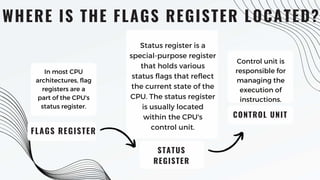
WHERE IS THE FLAGS REGISTER LOCATED?
FLAGS REGISTER
STATUS
REGISTER
Status register is a
special-purpose register
that holds various
status flags that reflect
the current state of the
CPU. The status register
is usually located
within the CPU's
control unit.
CONTROL UNIT
Control unit is
responsible for
managing the
execution of
instructions.
In most CPU
architectures, flag
registers are a
part of the CPU's
status register.
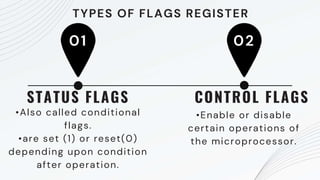
•Also called conditional
flags.
•are set (1) or reset(0)
depending upon condition
after operation.
01
STATUS FLAGS
02
•Enable or disable
certain operations of
the microprocessor.
CONTROL FLAGS
TYPES OF FLAGS REGISTER
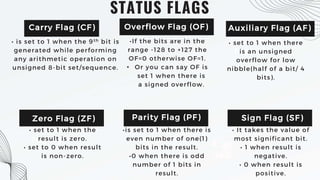
1. Carry
Flag(CF)
STATUS FLAGS
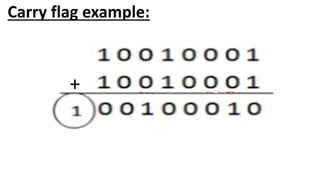
• is set to 1 when the 9th bit is
generated while performing
any arithmetic operation on
unsigned 8-bit set/sequence.
•If the bits are in the
range -128 to +127 the
OF=0 otherwise OF=1.
• Or you can say OF is
set 1 when there is
a signed overflow.
3. Auxiliary
Flag(AF)
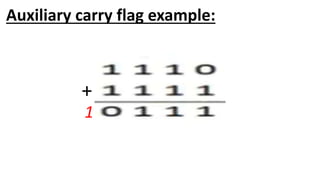
• set to 1 when there
is an unsigned
overflow for low
nibble(half of a bit/ 4
bits).
5. Zero
Flag(ZF)
• set to 1 when the
result is zero.
• set to 0 when result
is non-zero.
4. Parity
Flag(PF)
•is set to 1 when there is
even number of one(1)
bits in the result.
•0 when there is odd
number of 1 bits in
result.
6. Sign
Flag(SF)
• It takes the value of
most significant bit.
• 1 when result is
negative.
• 0 when result is
positive.
Carry Flag (CF) Overflow Flag (OF) Auxiliary Flag (AF)
Zero Flag (ZF) Parity Flag (PF) Sign Flag (SF)
+
Carry flag example:
+
1
Auxiliary carry flag example:
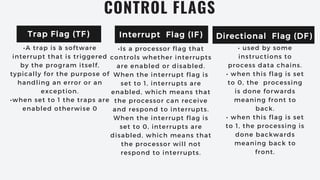
•Is a processor flag that
controls whether interrupts
are enabled or disabled.
When the interrupt flag is
set to 1, interrupts are
enabled, which means that
the processor can receive
and respond to interrupts.
When the interrupt flag is
set to 0, interrupts are
disabled, which means that
the processor will not
respond to interrupts.
CONTROL FLAGS
• • used by some
instructions to
process data chains.
• when this flag is set
to 0, the processing
is done forwards
meaning front to
back.
• when this flag is set
to 1, the processing is
done backwards
meaning back to
front.
Trap Flag (TF) Interrupt Flag (IF) Directional Flag (DF)
•A trap is a software
interrupt that is triggered
by the program itself,
typically for the purpose of
handling an error or an
exception.
•when set to 1 the traps are
enabled otherwise 0

Flags register in central processing unit

  • 1.
  • 2.
    WHAT IS FLAGSREGISTER? • Special registers. Because these are designed for specific purposes and are distinct/different from general purpose registers. • Size and meaning of flag bits in flags register is architecture dependent. • Each bit represents a specific condition or state of the processor. • Determines the current state of processor . • Depending upon the value of result after any arithmetic and logical operation the flag bits become set(1) or reset(0).
  • 3.
    WHERE IS THEFLAGS REGISTER LOCATED? FLAGS REGISTER STATUS REGISTER Status register is a special-purpose register that holds various status flags that reflect the current state of the CPU. The status register is usually located within the CPU's control unit. CONTROL UNIT Control unit is responsible for managing the execution of instructions. In most CPU architectures, flag registers are a part of the CPU's status register.
  • 4.
    •Also called conditional flags. •areset (1) or reset(0) depending upon condition after operation. 01 STATUS FLAGS 02 •Enable or disable certain operations of the microprocessor. CONTROL FLAGS TYPES OF FLAGS REGISTER
  • 5.
    1. Carry Flag(CF) STATUS FLAGS •is set to 1 when the 9th bit is generated while performing any arithmetic operation on unsigned 8-bit set/sequence. •If the bits are in the range -128 to +127 the OF=0 otherwise OF=1. • Or you can say OF is set 1 when there is a signed overflow. 3. Auxiliary Flag(AF) • set to 1 when there is an unsigned overflow for low nibble(half of a bit/ 4 bits). 5. Zero Flag(ZF) • set to 1 when the result is zero. • set to 0 when result is non-zero. 4. Parity Flag(PF) •is set to 1 when there is even number of one(1) bits in the result. •0 when there is odd number of 1 bits in result. 6. Sign Flag(SF) • It takes the value of most significant bit. • 1 when result is negative. • 0 when result is positive. Carry Flag (CF) Overflow Flag (OF) Auxiliary Flag (AF) Zero Flag (ZF) Parity Flag (PF) Sign Flag (SF)
  • 6.
  • 7.
  • 8.
    •Is a processorflag that controls whether interrupts are enabled or disabled. When the interrupt flag is set to 1, interrupts are enabled, which means that the processor can receive and respond to interrupts. When the interrupt flag is set to 0, interrupts are disabled, which means that the processor will not respond to interrupts. CONTROL FLAGS • • used by some instructions to process data chains. • when this flag is set to 0, the processing is done forwards meaning front to back. • when this flag is set to 1, the processing is done backwards meaning back to front. Trap Flag (TF) Interrupt Flag (IF) Directional Flag (DF) •A trap is a software interrupt that is triggered by the program itself, typically for the purpose of handling an error or an exception. •when set to 1 the traps are enabled otherwise 0