Gaurav Mishra
<gmishx@gmail.com>
Linux - 3
Firewall and IPtables
Unrestricted
2/24/2018
Gaurav Mishra <gmishx@gmail.com>
Firewalls
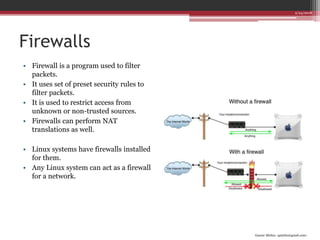
• Firewall is a program used to filter
packets.
• It uses set of preset security rules to
filter packets.
• It is used to restrict access from
unknown or non-trusted sources.
• Firewalls can perform NAT
translations as well.
• Linux systems have firewalls installed
for them.
• Any Linux system can act as a firewall
for a network.
2/24/2018
Gaurav Mishra <gmishx@gmail.com>
IPtables
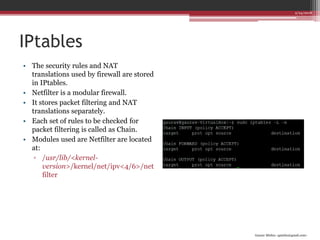
• The security rules and NAT
translations used by firewall are stored
in IPtables.
• Netfilter is a modular firewall.
• It stores packet filtering and NAT
translations separately.
• Each set of rules to be checked for
packet filtering is called as Chain.
• Modules used are Netfilter are located
at:
▫ /usr/lib/<kernel-
version>/kernel/net/ipv<4/6>/net
filter
2/24/2018
Gaurav Mishra <gmishx@gmail.com>
Packet filtering
• Each rule in a chain contains following
parts:
▫ Protocol (-p)
 TCP, UDP, ICMP or ALL
▫ Source address (-s)
 ip address[/mask][port[:port]]
▫ Destination address (-d)
 ip address[/mask][port[:port]]
▫ Network interface (-i)
 name[+]
▫ Target (-j)
 ACCEPT, DROP, REJECT, QUEUE,
RETURN
▫ State (-m)
 NEW, ESTABLISHED, RELATED,
INVALID, RELATED+REPLY
2/24/2018
Gaurav Mishra <gmishx@gmail.com>
Packet filtering
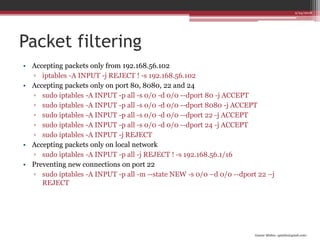
• Accepting packets only from 192.168.56.102
▫ iptables -A INPUT -j REJECT ! -s 192.168.56.102
• Accepting packets only on port 80, 8080, 22 and 24
▫ sudo iptables -A INPUT -p all -s 0/0 -d 0/0 --dport 80 -j ACCEPT
▫ sudo iptables -A INPUT -p all -s 0/0 -d 0/0 --dport 8080 -j ACCEPT
▫ sudo iptables -A INPUT -p all -s 0/0 -d 0/0 --dport 22 -j ACCEPT
▫ sudo iptables -A INPUT -p all -s 0/0 -d 0/0 --dport 24 -j ACCEPT
▫ sudo iptables -A INPUT -j REJECT
• Accepting packets only on local network
▫ sudo iptables -A INPUT -p all -j REJECT ! -s 192.168.56.1/16
• Preventing new connections on port 22
▫ sudo iptables -A INPUT -p all -m --state NEW -s 0/0 –d 0/0 --dport 22 –j
REJECT
2/24/2018
Gaurav Mishra <gmishx@gmail.com>
NAT operations
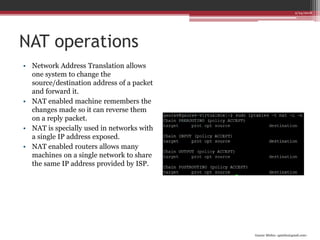
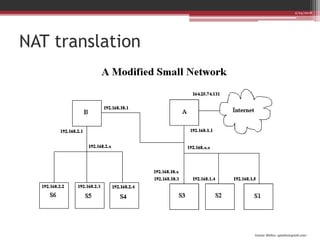
• Network Address Translation allows
one system to change the
source/destination address of a packet
and forward it.
• NAT enabled machine remembers the
changes made so it can reverse them
on a reply packet.
• NAT is specially used in networks with
a single IP address exposed.
• NAT enabled routers allows many
machines on a single network to share
the same IP address provided by ISP.
2/24/2018
Gaurav Mishra <gmishx@gmail.com>
NAT translation
2/24/2018
Gaurav Mishra <gmishx@gmail.com>
NAT targets
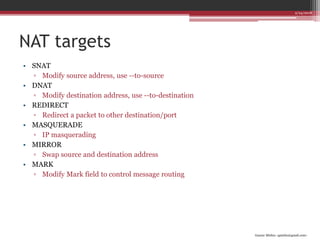
• SNAT
▫ Modify source address, use --to-source
• DNAT
▫ Modify destination address, use --to-destination
• REDIRECT
▫ Redirect a packet to other destination/port
• MASQUERADE
▫ IP masquerading
• MIRROR
▫ Swap source and destination address
• MARK
▫ Modify Mark field to control message routing
2/24/2018
Gaurav Mishra <gmishx@gmail.com>
NAT chains
• NAT can be divided into two types: Destination NAT and Source NAT
• NAT have following chains:
▫ PREROUTING
 Corresponds to DNAT, arriving packets
▫ POSTROUTING
 Corresponds to SNAT, leaving packets
▫ OUTPUT
 Locally generated packets
• Changing source of packets leaving the system
▫ sudo iptables -t nat -A POSTROUTING -o eth0 -j SNAT --to-source
192.168.56.101
• Changing destination of packets entering the system
▫ sudo iptables -t nat -A PREROUTING -i eth0 -j DNAT --to-destination
192.168.56.103
2/24/2018

Firewall and IPtables

  • 1.
    Gaurav Mishra <gmishx@gmail.com> Linux -3 Firewall and IPtables Unrestricted 2/24/2018
  • 2.
    Gaurav Mishra <gmishx@gmail.com> Firewalls •Firewall is a program used to filter packets. • It uses set of preset security rules to filter packets. • It is used to restrict access from unknown or non-trusted sources. • Firewalls can perform NAT translations as well. • Linux systems have firewalls installed for them. • Any Linux system can act as a firewall for a network. 2/24/2018
  • 3.
    Gaurav Mishra <gmishx@gmail.com> IPtables •The security rules and NAT translations used by firewall are stored in IPtables. • Netfilter is a modular firewall. • It stores packet filtering and NAT translations separately. • Each set of rules to be checked for packet filtering is called as Chain. • Modules used are Netfilter are located at: ▫ /usr/lib/<kernel- version>/kernel/net/ipv<4/6>/net filter 2/24/2018
  • 4.
    Gaurav Mishra <gmishx@gmail.com> Packetfiltering • Each rule in a chain contains following parts: ▫ Protocol (-p)  TCP, UDP, ICMP or ALL ▫ Source address (-s)  ip address[/mask][port[:port]] ▫ Destination address (-d)  ip address[/mask][port[:port]] ▫ Network interface (-i)  name[+] ▫ Target (-j)  ACCEPT, DROP, REJECT, QUEUE, RETURN ▫ State (-m)  NEW, ESTABLISHED, RELATED, INVALID, RELATED+REPLY 2/24/2018
  • 5.
    Gaurav Mishra <gmishx@gmail.com> Packetfiltering • Accepting packets only from 192.168.56.102 ▫ iptables -A INPUT -j REJECT ! -s 192.168.56.102 • Accepting packets only on port 80, 8080, 22 and 24 ▫ sudo iptables -A INPUT -p all -s 0/0 -d 0/0 --dport 80 -j ACCEPT ▫ sudo iptables -A INPUT -p all -s 0/0 -d 0/0 --dport 8080 -j ACCEPT ▫ sudo iptables -A INPUT -p all -s 0/0 -d 0/0 --dport 22 -j ACCEPT ▫ sudo iptables -A INPUT -p all -s 0/0 -d 0/0 --dport 24 -j ACCEPT ▫ sudo iptables -A INPUT -j REJECT • Accepting packets only on local network ▫ sudo iptables -A INPUT -p all -j REJECT ! -s 192.168.56.1/16 • Preventing new connections on port 22 ▫ sudo iptables -A INPUT -p all -m --state NEW -s 0/0 –d 0/0 --dport 22 –j REJECT 2/24/2018
  • 6.
    Gaurav Mishra <gmishx@gmail.com> NAToperations • Network Address Translation allows one system to change the source/destination address of a packet and forward it. • NAT enabled machine remembers the changes made so it can reverse them on a reply packet. • NAT is specially used in networks with a single IP address exposed. • NAT enabled routers allows many machines on a single network to share the same IP address provided by ISP. 2/24/2018
  • 7.
  • 8.
    Gaurav Mishra <gmishx@gmail.com> NATtargets • SNAT ▫ Modify source address, use --to-source • DNAT ▫ Modify destination address, use --to-destination • REDIRECT ▫ Redirect a packet to other destination/port • MASQUERADE ▫ IP masquerading • MIRROR ▫ Swap source and destination address • MARK ▫ Modify Mark field to control message routing 2/24/2018
  • 9.
    Gaurav Mishra <gmishx@gmail.com> NATchains • NAT can be divided into two types: Destination NAT and Source NAT • NAT have following chains: ▫ PREROUTING  Corresponds to DNAT, arriving packets ▫ POSTROUTING  Corresponds to SNAT, leaving packets ▫ OUTPUT  Locally generated packets • Changing source of packets leaving the system ▫ sudo iptables -t nat -A POSTROUTING -o eth0 -j SNAT --to-source 192.168.56.101 • Changing destination of packets entering the system ▫ sudo iptables -t nat -A PREROUTING -i eth0 -j DNAT --to-destination 192.168.56.103 2/24/2018