Chapter 3
Exploring Network
Technologies and Tools
CompTIA Security+
Get Certified Get Ahead
1
Introduction
• Reviewing basic networking
concepts
• Understanding basic network
devices
• Implementing a secure network
Attack
Introduction
• Sniffing attack
• DoS and DDoS
• Poisoning attack
Basic
Networking
Protocols
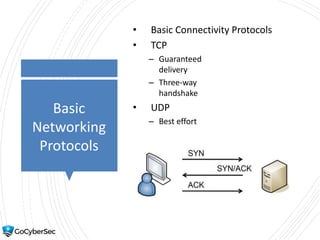
• Basic Connectivity Protocols
• TCP
– Guaranteed
delivery
– Three-way
handshake
• UDP
– Best effort
Basic
Networking
Protocols
• Reviewing Basic Connectivity
Protocols
– IPv4 and IPv6
– ICMP
• Commonly blocked at
firewalls
• If ping fails, ICMP may be
blocked
– ARP
• Resolves MAC addresses for
IPv4
– NDP
• Resolves MAC addresses for
IPv6 (and more)
Protocols
and Use
Cases
• Transport voice and video over
network
– RTP & SRTP
• Transfer files over a network
– FTP
– TFTP
– SSH
– SSL
– TLS
– IPsec
– SFTP
– FTPS
Reviewing
Application
Protocols
• HTTP – Port 80
• HTTPS – Port 443
• FTP – Ports 20 and 21
• SFTP – Port 22 (uses SSH)
• FTPS – Port varies
• Sometimes uses 989 and 990
• TFTP – UDP port 69
Reviewing
Encryption
Protocols
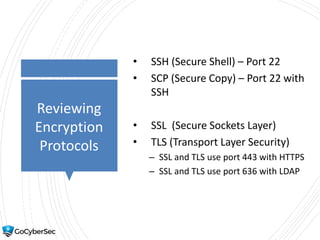
• SSH (Secure Shell) – Port 22
• SCP (Secure Copy) – Port 22 with
SSH
• SSL (Secure Sockets Layer)
• TLS (Transport Layer Security)
– SSL and TLS use port 443 with HTTPS
– SSL and TLS use port 636 with LDAP
Reviewing
Encryption
Protocols
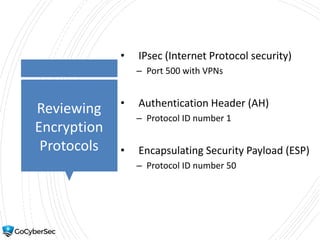
• IPsec (Internet Protocol security)
– Port 500 with VPNs
• Authentication Header (AH)
– Protocol ID number 1
• Encapsulating Security Payload (ESP)
– Protocol ID number 50
Protocols
and Use
Cases
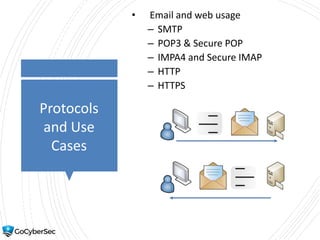
• Email and web usage
– SMTP
– POP3 & Secure POP
– IMPA4 and Secure IMAP
– HTTP
– HTTPS
Protocols
and Use
Cases
• Directory services
– LDAP – 389
• Port 636 when encrypted with SSL
or TLS
• Kerberos – Port 88
• Group Policy
Protocols
and Use
Cases
• Remote access
– SSH
– Netcat
– RDP
• Time synchronization
– NTP
– SNTP
Network
Address
Allocation
• IPv4 – 32 bits (192.168.1.5 )
• Private IP Addresses
– 10.x.y.z.
10.0.0.0 through 10.255.255.255
– 172.16.y.z–172.31.y.z.
172.16.0.0 through 172.31.255.255
– 192.168.y.z.
192.168.0.0 through 192.168.255.255
Network
Address
Allocation
• IPv6 – 128 bits
– fe80:0000:0000:0000:02d4:3ff7:003f:de62
• Zero compression
– Omit leading zeroes: fe80:0:0:0:2d4:3ff7:3f:de62
– Zero compression: fe80::02d4:3ff7:003f:de62
– Both rules: fe80::2d4:3ff7:3f:de62
• IPsec built into IPv6
Understanding
DNS
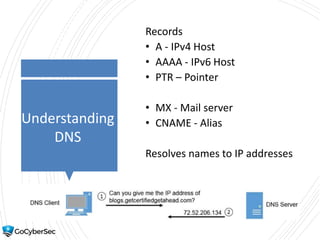
Records
• A - IPv4 Host
• AAAA - IPv6 Host
• PTR – Pointer
• MX - Mail server
• CNAME - Alias
Resolves names to IP addresses
Understanding
DNS
• Queries to DNS server use UDP
port 53
• Zone transfers between servers
use
TCP port 53
• DNSSEC
• DNS poisoning
Protocols and
Use Cases
• Commands
• Nslookup
• Dig
• Subscription services
Understanding
and Identifying
Ports
• IP address used to locate hosts
• Port used to direct traffic to correct
protocol/service or application
• Server ports
• Client ports
• Blocking ports blocks protocol
traffic
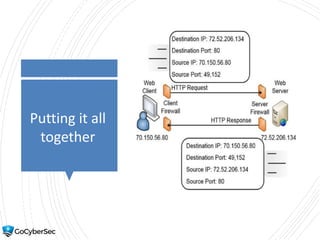
Putting it all
together
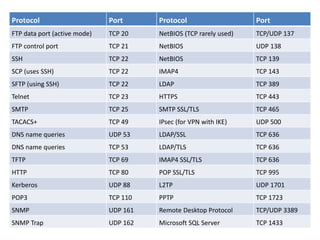
Protocol Port Protocol Port
FTP data port (active mode) TCP 20 NetBIOS (TCP rarely used) TCP/UDP 137
FTP control port TCP 21 NetBIOS UDP 138
SSH TCP 22 NetBIOS TCP 139
SCP (uses SSH) TCP 22 IMAP4 TCP 143
SFTP (using SSH) TCP 22 LDAP TCP 389
Telnet TCP 23 HTTPS TCP 443
SMTP TCP 25 SMTP SSL/TLS TCP 465
TACACS+ TCP 49 IPsec (for VPN with IKE) UDP 500
DNS name queries UDP 53 LDAP/SSL TCP 636
DNS name queries TCP 53 LDAP/TLS TCP 636
TFTP TCP 69 IMAP4 SSL/TLS TCP 636
HTTP TCP 80 POP SSL/TLS TCP 995
Kerberos UDP 88 L2TP UDP 1701
POP3 TCP 110 PPTP TCP 1723
SNMP UDP 161 Remote Desktop Protocol TCP/UDP 3389
SNMP Trap UDP 162 Microsoft SQL Server TCP 1433
Understandi
ng Basic
Network
Devices
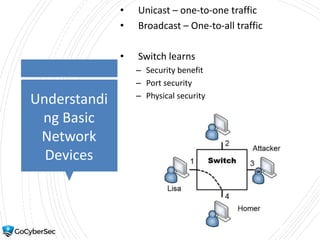
• Unicast – one-to-one traffic
• Broadcast – One-to-all traffic
• Switch learns
– Security benefit
– Port security
– Physical security
Switches
• Switching Loop
– Caused if two ports connected together
– STP and RSTP protect against switching loops
• Port security
– Disable unused ports
– MAC address filtering
Flood Attack
Flood Guard
• Flood attack on switch
– Overloads a switch with different MAC
addresses for a single port
– Runs out of memory – operates in fail-open
state
• Flood guard
– Might limit memory used for a port
– Typically sends an SNMP trap
– Might limit number of MAC addresses for a port
Access
Control Lists
(ACLs)
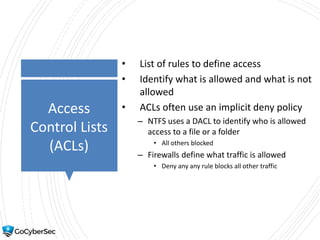
• List of rules to define access
• Identify what is allowed and what is not
allowed
• ACLs often use an implicit deny policy
– NTFS uses a DACL to identify who is allowed
access to a file or a folder
• All others blocked
– Firewalls define what traffic is allowed
• Deny any any rule blocks all other traffic
Routers
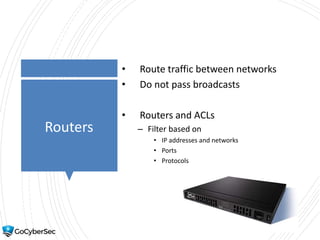
• Route traffic between networks
• Do not pass broadcasts
• Routers and ACLs
– Filter based on
• IP addresses and networks
• Ports
• Protocols
Routers
• Implicit deny
– Last rule in ACL
• Antispoofing
– Allow or block IP addresses
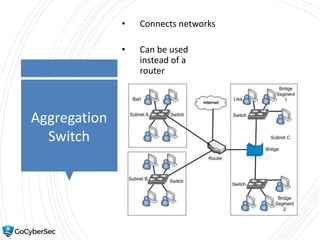
Bridge
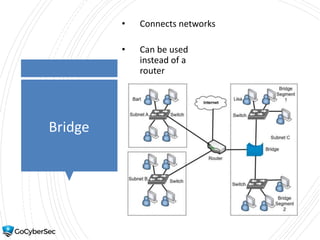
• Connects networks
• Can be used
instead of a
router
Aggregation
Switch
• Connects networks
• Can be used
instead of a
router
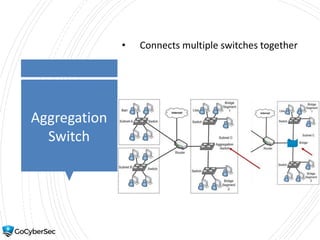
Aggregation
Switch
• Connects multiple switches together
Firewalls
• Host-based vs network-based firewall
• Firewall rules
• Last rule
– deny any any
• Linux
– iptables
– ipv6tables
– arptables
Firewalls
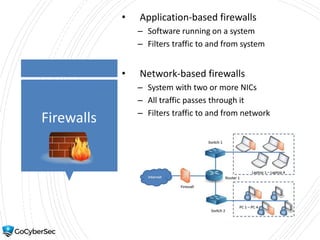
• Application-based firewalls
– Software running on a system
– Filters traffic to and from system
• Network-based firewalls
– System with two or more NICs
– All traffic passes through it
– Filters traffic to and from network
Firewalls
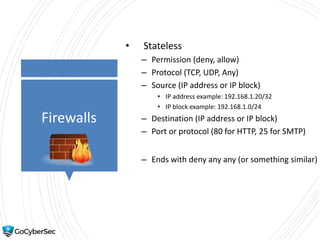
• Stateless
– Permission (deny, allow)
– Protocol (TCP, UDP, Any)
– Source (IP address or IP block)
• IP address example: 192.168.1.20/32
• IP block example: 192.168.1.0/24
– Destination (IP address or IP block)
– Port or protocol (80 for HTTP, 25 for SMTP)
– Ends with deny any any (or something similar)
Firewalls
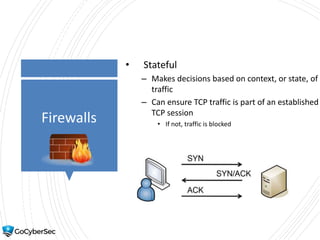
• Stateful
– Makes decisions based on context, or state, of
traffic
– Can ensure TCP traffic is part of an established
TCP session
• If not, traffic is blocked
Firewalls
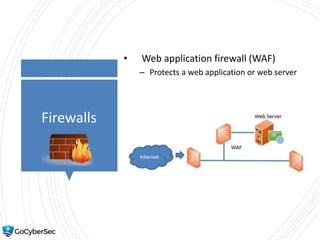
• Web application firewall (WAF)
– Protects a web application or web server
Firewall Rule
Example
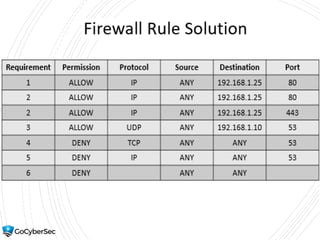
• Allow all HTTP traffic to a web server with
an IP of 192.168.1.25
• Allow all HTTP and HTTPS traffic to a web
server with an IP of 192.168.1.25
• Allow DNS queries from any source to a
computer with an IP of 192.168.1.10
• Block DNS zone transfer traffic from any
source to any destination
• Block all DNS traffic from any source to
any destination
• Implement implicit deny
Firewall Rule
Solution
Zones and
Topologies
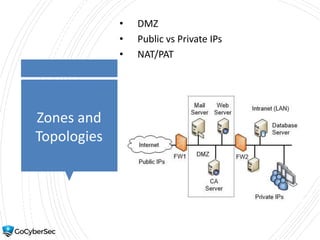
• DMZ
• Public vs Private IPs
• NAT/PAT
Network
Separation
• Physical isolation and airgaps
• Logical separation and segmentation
– Typically done with routers and firewalls
• VLAN (created with a switch)
– Logically group computers
– Logically separate/segment computers
Proxies
(Proxy
Servers)
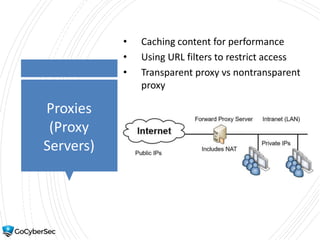
• Caching content for performance
• Using URL filters to restrict access
• Transparent proxy vs nontransparent
proxy
Proxies
(Proxy
Servers)
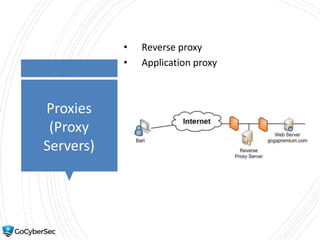
• Reverse proxy
• Application proxy
Unified
Threat
Management
• Combines multiple security controls
• Reduces administrative workload
• Web security gateways
• UTM security appliances
– Firewall, antivirus protection, anti-spam
protection, URL filtering, and content filtering
Gateways
• Media gateway
– Converts traffic transmitted between different
networks
• Mail gateways
– Examines all incoming and outgoing email
– Filters spam
– Typically includes DLP
Routing &
Switching
Use Cases
• Switches
– Prevent switching loops.
• STP or RSTP on switches.
– Block flood attacks
• Flood guards block
– Prevent unauthorized users from connecting to
unused ports.
• Port security methods
– Provide increased segmentation of user
computers
– VLANs
Routing &
Switching
Use Cases
• Routers
– Prevent IP address spoofing.
• Antispoofing methods
• Provide secure management of routers
– Use SNMPv3
Chapter 3
Summary
• Reviewing basic networking concepts
• Understanding basic network devices
• Implementing a secure network
• Labs

501 ch 3 network technologies tools

  • 1.
    Chapter 3 Exploring Network Technologiesand Tools CompTIA Security+ Get Certified Get Ahead 1
  • 2.
    Introduction • Reviewing basicnetworking concepts • Understanding basic network devices • Implementing a secure network
  • 3.
    Attack Introduction • Sniffing attack •DoS and DDoS • Poisoning attack
  • 4.
    Basic Networking Protocols • Basic ConnectivityProtocols • TCP – Guaranteed delivery – Three-way handshake • UDP – Best effort
  • 5.
    Basic Networking Protocols • Reviewing BasicConnectivity Protocols – IPv4 and IPv6 – ICMP • Commonly blocked at firewalls • If ping fails, ICMP may be blocked – ARP • Resolves MAC addresses for IPv4 – NDP • Resolves MAC addresses for IPv6 (and more)
  • 6.
    Protocols and Use Cases • Transportvoice and video over network – RTP & SRTP • Transfer files over a network – FTP – TFTP – SSH – SSL – TLS – IPsec – SFTP – FTPS
  • 7.
    Reviewing Application Protocols • HTTP –Port 80 • HTTPS – Port 443 • FTP – Ports 20 and 21 • SFTP – Port 22 (uses SSH) • FTPS – Port varies • Sometimes uses 989 and 990 • TFTP – UDP port 69
  • 8.
    Reviewing Encryption Protocols • SSH (SecureShell) – Port 22 • SCP (Secure Copy) – Port 22 with SSH • SSL (Secure Sockets Layer) • TLS (Transport Layer Security) – SSL and TLS use port 443 with HTTPS – SSL and TLS use port 636 with LDAP
  • 9.
    Reviewing Encryption Protocols • IPsec (InternetProtocol security) – Port 500 with VPNs • Authentication Header (AH) – Protocol ID number 1 • Encapsulating Security Payload (ESP) – Protocol ID number 50
  • 10.
    Protocols and Use Cases • Emailand web usage – SMTP – POP3 & Secure POP – IMPA4 and Secure IMAP – HTTP – HTTPS
  • 11.
    Protocols and Use Cases • Directoryservices – LDAP – 389 • Port 636 when encrypted with SSL or TLS • Kerberos – Port 88 • Group Policy
  • 12.
    Protocols and Use Cases • Remoteaccess – SSH – Netcat – RDP • Time synchronization – NTP – SNTP
  • 13.
    Network Address Allocation • IPv4 –32 bits (192.168.1.5 ) • Private IP Addresses – 10.x.y.z. 10.0.0.0 through 10.255.255.255 – 172.16.y.z–172.31.y.z. 172.16.0.0 through 172.31.255.255 – 192.168.y.z. 192.168.0.0 through 192.168.255.255
  • 14.
    Network Address Allocation • IPv6 –128 bits – fe80:0000:0000:0000:02d4:3ff7:003f:de62 • Zero compression – Omit leading zeroes: fe80:0:0:0:2d4:3ff7:3f:de62 – Zero compression: fe80::02d4:3ff7:003f:de62 – Both rules: fe80::2d4:3ff7:3f:de62 • IPsec built into IPv6
  • 15.
    Understanding DNS Records • A -IPv4 Host • AAAA - IPv6 Host • PTR – Pointer • MX - Mail server • CNAME - Alias Resolves names to IP addresses
  • 16.
    Understanding DNS • Queries toDNS server use UDP port 53 • Zone transfers between servers use TCP port 53 • DNSSEC • DNS poisoning
  • 17.
    Protocols and Use Cases •Commands • Nslookup • Dig • Subscription services
  • 18.
    Understanding and Identifying Ports • IPaddress used to locate hosts • Port used to direct traffic to correct protocol/service or application • Server ports • Client ports • Blocking ports blocks protocol traffic
  • 19.
  • 20.
    Protocol Port ProtocolPort FTP data port (active mode) TCP 20 NetBIOS (TCP rarely used) TCP/UDP 137 FTP control port TCP 21 NetBIOS UDP 138 SSH TCP 22 NetBIOS TCP 139 SCP (uses SSH) TCP 22 IMAP4 TCP 143 SFTP (using SSH) TCP 22 LDAP TCP 389 Telnet TCP 23 HTTPS TCP 443 SMTP TCP 25 SMTP SSL/TLS TCP 465 TACACS+ TCP 49 IPsec (for VPN with IKE) UDP 500 DNS name queries UDP 53 LDAP/SSL TCP 636 DNS name queries TCP 53 LDAP/TLS TCP 636 TFTP TCP 69 IMAP4 SSL/TLS TCP 636 HTTP TCP 80 POP SSL/TLS TCP 995 Kerberos UDP 88 L2TP UDP 1701 POP3 TCP 110 PPTP TCP 1723 SNMP UDP 161 Remote Desktop Protocol TCP/UDP 3389 SNMP Trap UDP 162 Microsoft SQL Server TCP 1433
  • 21.
    Understandi ng Basic Network Devices • Unicast– one-to-one traffic • Broadcast – One-to-all traffic • Switch learns – Security benefit – Port security – Physical security
  • 22.
    Switches • Switching Loop –Caused if two ports connected together – STP and RSTP protect against switching loops • Port security – Disable unused ports – MAC address filtering
  • 23.
    Flood Attack Flood Guard •Flood attack on switch – Overloads a switch with different MAC addresses for a single port – Runs out of memory – operates in fail-open state • Flood guard – Might limit memory used for a port – Typically sends an SNMP trap – Might limit number of MAC addresses for a port
  • 24.
    Access Control Lists (ACLs) • Listof rules to define access • Identify what is allowed and what is not allowed • ACLs often use an implicit deny policy – NTFS uses a DACL to identify who is allowed access to a file or a folder • All others blocked – Firewalls define what traffic is allowed • Deny any any rule blocks all other traffic
  • 25.
    Routers • Route trafficbetween networks • Do not pass broadcasts • Routers and ACLs – Filter based on • IP addresses and networks • Ports • Protocols
  • 26.
    Routers • Implicit deny –Last rule in ACL • Antispoofing – Allow or block IP addresses
  • 27.
    Bridge • Connects networks •Can be used instead of a router
  • 28.
    Aggregation Switch • Connects networks •Can be used instead of a router
  • 29.
  • 30.
    Firewalls • Host-based vsnetwork-based firewall • Firewall rules • Last rule – deny any any • Linux – iptables – ipv6tables – arptables
  • 31.
    Firewalls • Application-based firewalls –Software running on a system – Filters traffic to and from system • Network-based firewalls – System with two or more NICs – All traffic passes through it – Filters traffic to and from network
  • 32.
    Firewalls • Stateless – Permission(deny, allow) – Protocol (TCP, UDP, Any) – Source (IP address or IP block) • IP address example: 192.168.1.20/32 • IP block example: 192.168.1.0/24 – Destination (IP address or IP block) – Port or protocol (80 for HTTP, 25 for SMTP) – Ends with deny any any (or something similar)
  • 33.
    Firewalls • Stateful – Makesdecisions based on context, or state, of traffic – Can ensure TCP traffic is part of an established TCP session • If not, traffic is blocked
  • 34.
    Firewalls • Web applicationfirewall (WAF) – Protects a web application or web server
  • 35.
    Firewall Rule Example • Allowall HTTP traffic to a web server with an IP of 192.168.1.25 • Allow all HTTP and HTTPS traffic to a web server with an IP of 192.168.1.25 • Allow DNS queries from any source to a computer with an IP of 192.168.1.10 • Block DNS zone transfer traffic from any source to any destination • Block all DNS traffic from any source to any destination • Implement implicit deny
  • 36.
  • 37.
    Zones and Topologies • DMZ •Public vs Private IPs • NAT/PAT
  • 38.
    Network Separation • Physical isolationand airgaps • Logical separation and segmentation – Typically done with routers and firewalls • VLAN (created with a switch) – Logically group computers – Logically separate/segment computers
  • 39.
    Proxies (Proxy Servers) • Caching contentfor performance • Using URL filters to restrict access • Transparent proxy vs nontransparent proxy
  • 40.
  • 41.
    Unified Threat Management • Combines multiplesecurity controls • Reduces administrative workload • Web security gateways • UTM security appliances – Firewall, antivirus protection, anti-spam protection, URL filtering, and content filtering
  • 42.
    Gateways • Media gateway –Converts traffic transmitted between different networks • Mail gateways – Examines all incoming and outgoing email – Filters spam – Typically includes DLP
  • 43.
    Routing & Switching Use Cases •Switches – Prevent switching loops. • STP or RSTP on switches. – Block flood attacks • Flood guards block – Prevent unauthorized users from connecting to unused ports. • Port security methods – Provide increased segmentation of user computers – VLANs
  • 44.
    Routing & Switching Use Cases •Routers – Prevent IP address spoofing. • Antispoofing methods • Provide secure management of routers – Use SNMPv3
  • 45.
    Chapter 3 Summary • Reviewingbasic networking concepts • Understanding basic network devices • Implementing a secure network • Labs

Editor's Notes

  • #21 SY0-501 exam deemphasizes ports. This table may not be relevant anymore so it isn’t updated from 401 exam. However, it can be used if desired.