Introduction to Networks v5.1
Chapter 5: Ethernet
Jupriyadi
Juli 2020
© 2013 Cisco and/or its affiliates. All rights reserved. Cisco Public 2
5.0 Introduction
5.1 Ethernet Protocol
5.2 LAN Switches
5.3 Address Resolution Protocol
5.4 Summary
© 2013 Cisco and/or its affiliates. All rights reserved. Cisco Public 3
Upon completion of this section, you should be able to:
• Explain how the Ethernet sublayers are related to the frame fields.
• Describe the Ethernet MAC address.
Cisco Public© 2013 Cisco and/or its affiliates. All rights reserved. 4
© 2013 Cisco and/or its affiliates. All rights reserved. Cisco Public 5
© 2013 Cisco and/or its affiliates. All rights reserved. Cisco Public 6
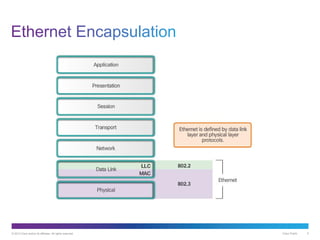
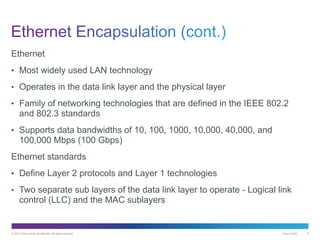
Ethernet
• Most widely used LAN technology
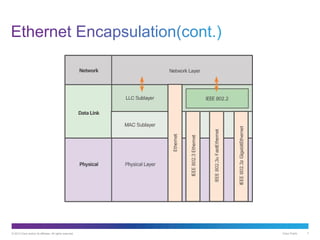
• Operates in the data link layer and the physical layer
• Family of networking technologies that are defined in the IEEE 802.2
and 802.3 standards
• Supports data bandwidths of 10, 100, 1000, 10,000, 40,000, and
100,000 Mbps (100 Gbps)
Ethernet standards
• Define Layer 2 protocols and Layer 1 technologies
• Two separate sub layers of the data link layer to operate - Logical link
control (LLC) and the MAC sublayers
© 2013 Cisco and/or its affiliates. All rights reserved. Cisco Public 7
© 2013 Cisco and/or its affiliates. All rights reserved. Cisco Public 8
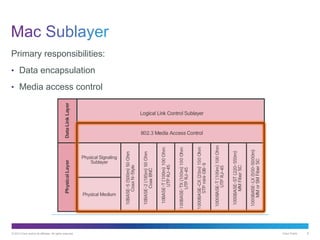
Primary responsibilities:
• Data encapsulation
• Media access control
© 2013 Cisco and/or its affiliates. All rights reserved. Cisco Public 9
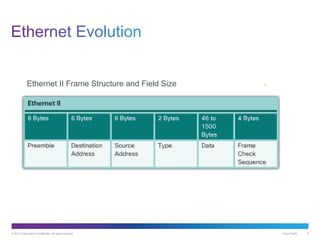
Ethernet II Frame Structure and Field Size
© 2013 Cisco and/or its affiliates. All rights reserved. Cisco Public 10
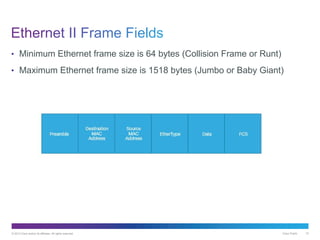
• Minimum Ethernet frame size is 64 bytes (Collision Frame or Runt)
• Maximum Ethernet frame size is 1518 bytes (Jumbo or Baby Giant)
Cisco Public© 2013 Cisco and/or its affiliates. All rights reserved. 11
© 2013 Cisco and/or its affiliates. All rights reserved. Cisco Public 12
© 2013 Cisco and/or its affiliates. All rights reserved. Cisco Public 13
© 2013 Cisco and/or its affiliates. All rights reserved. Cisco Public 14
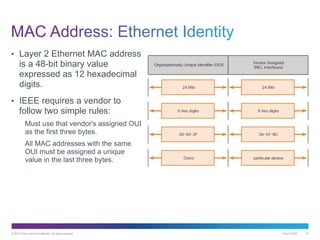
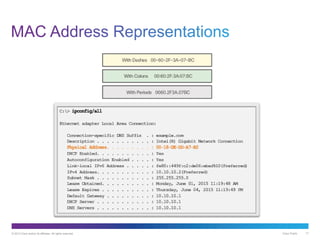
• Layer 2 Ethernet MAC address
is a 48-bit binary value
expressed as 12 hexadecimal
digits.
• IEEE requires a vendor to
follow two simple rules:
Must use that vendor's assigned OUI
as the first three bytes.
All MAC addresses with the same
OUI must be assigned a unique
value in the last three bytes.
© 2013 Cisco and/or its affiliates. All rights reserved. Cisco Public 15
© 2013 Cisco and/or its affiliates. All rights reserved. Cisco Public 16
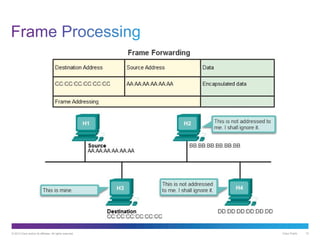
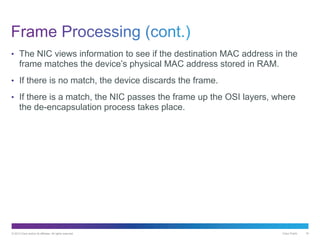
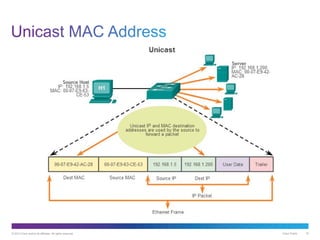
• The NIC views information to see if the destination MAC address in the
frame matches the device’s physical MAC address stored in RAM.
• If there is no match, the device discards the frame.
• If there is a match, the NIC passes the frame up the OSI layers, where
the de-encapsulation process takes place.
© 2013 Cisco and/or its affiliates. All rights reserved. Cisco Public 17
© 2013 Cisco and/or its affiliates. All rights reserved. Cisco Public 18
© 2013 Cisco and/or its affiliates. All rights reserved. Cisco Public 19
© 2013 Cisco and/or its affiliates. All rights reserved. Cisco Public 20
© 2013 Cisco and/or its affiliates. All rights reserved. Cisco Public 21
Upon completion of this section, you should be able to:
• Explain how a switch operates.
• Explain how a switch builds its MAC address table and forwards frames.
• Describe switch forwarding methods.
• Describe the types of port settings available for Layer 2 switches.
Cisco Public© 2013 Cisco and/or its affiliates. All rights reserved. 22
© 2013 Cisco and/or its affiliates. All rights reserved. Cisco Public 23
• An Ethernet Switch is a Layer 2 device.
• It uses MAC addresses to make forwarding decisions.
• The MAC address table is sometimes referred to as a content
addressable memory (CAM) table.
© 2013 Cisco and/or its affiliates. All rights reserved. Cisco Public 24
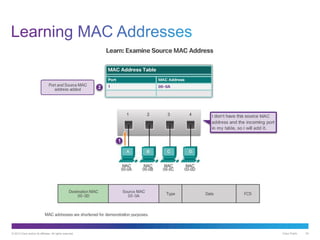
© 2013 Cisco and/or its affiliates. All rights reserved. Cisco Public 25
© 2013 Cisco and/or its affiliates. All rights reserved. Cisco Public 26
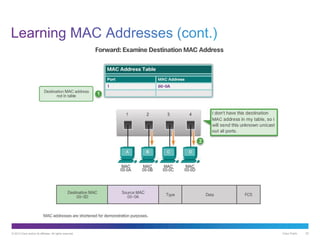
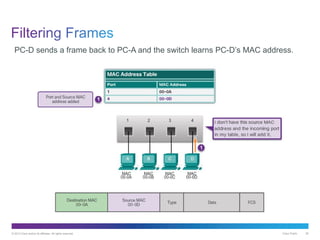
PC-D sends a frame back to PC-A and the switch learns PC-D’s MAC address.
© 2013 Cisco and/or its affiliates. All rights reserved. Cisco Public 27
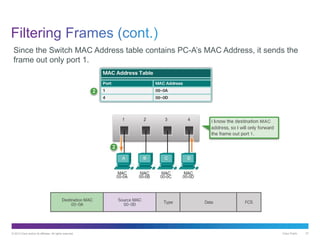
Since the Switch MAC Address table contains PC-A’s MAC Address, it sends the
frame out only port 1.
© 2013 Cisco and/or its affiliates. All rights reserved. Cisco Public 28
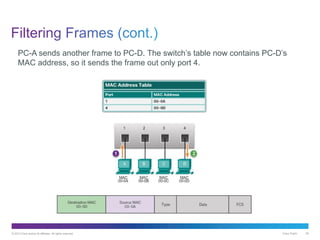
PC-A sends another frame to PC-D. The switch’s table now contains PC-D’s
MAC address, so it sends the frame out only port 4.
© 2013 Cisco and/or its affiliates. All rights reserved. Cisco Public 29
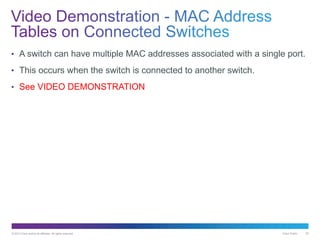
• A switch can have multiple MAC addresses associated with a single port.
• This occurs when the switch is connected to another switch.
• See VIDEO DEMONSTRATION
© 2013 Cisco and/or its affiliates. All rights reserved. Cisco Public 30
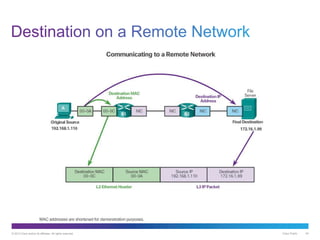
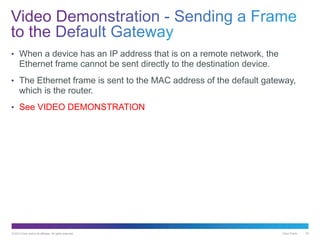
• When a device has an IP address that is on a remote network, the
Ethernet frame cannot be sent directly to the destination device.
• The Ethernet frame is sent to the MAC address of the default gateway,
which is the router.
• See VIDEO DEMONSTRATION
Cisco Public© 2013 Cisco and/or its affiliates. All rights reserved. 31
© 2013 Cisco and/or its affiliates. All rights reserved. Cisco Public 32
© 2013 Cisco and/or its affiliates. All rights reserved. Cisco Public 33
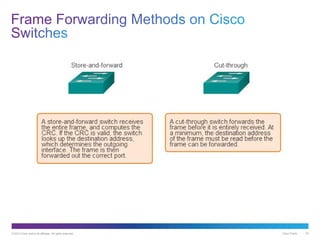
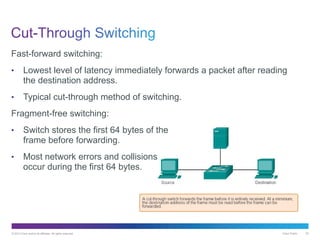
Fast-forward switching:
• Lowest level of latency immediately forwards a packet after reading
the destination address.
• Typical cut-through method of switching.
Fragment-free switching:
• Switch stores the first 64 bytes of the
frame before forwarding.
• Most network errors and collisions
occur during the first 64 bytes.
© 2013 Cisco and/or its affiliates. All rights reserved. Cisco Public 34
Cisco Public© 2013 Cisco and/or its affiliates. All rights reserved. 35
© 2013 Cisco and/or its affiliates. All rights reserved. Cisco Public 36
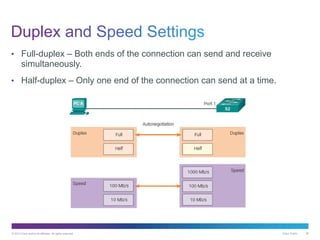
• Full-duplex – Both ends of the connection can send and receive
simultaneously.
• Half-duplex – Only one end of the connection can send at a time.
© 2013 Cisco and/or its affiliates. All rights reserved. Cisco Public 37
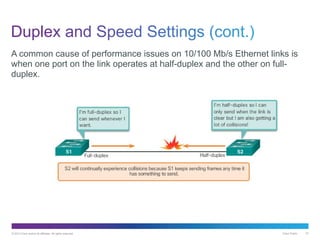
A common cause of performance issues on 10/100 Mb/s Ethernet links is
when one port on the link operates at half-duplex and the other on full-
duplex.
© 2013 Cisco and/or its affiliates. All rights reserved. Cisco Public 38
© 2013 Cisco and/or its affiliates. All rights reserved. Cisco Public 39
Upon completion of this section, you should be able to:
• Compare the roles of the MAC address and the IP address.
• Describe the purpose of ARP.
• Explain how ARP requests impact network and host performance.
Cisco Public© 2013 Cisco and/or its affiliates. All rights reserved. 40
© 2013 Cisco and/or its affiliates. All rights reserved. Cisco Public 41
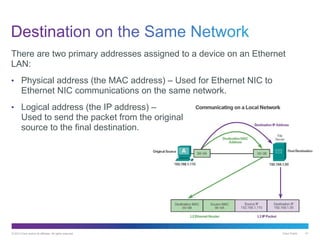
There are two primary addresses assigned to a device on an Ethernet
LAN:
• Physical address (the MAC address) – Used for Ethernet NIC to
Ethernet NIC communications on the same network.
• Logical address (the IP address) –
Used to send the packet from the original
source to the final destination.
© 2013 Cisco and/or its affiliates. All rights reserved. Cisco Public 42
Cisco Public© 2013 Cisco and/or its affiliates. All rights reserved. 43
© 2013 Cisco and/or its affiliates. All rights reserved. Cisco Public 44
© 2013 Cisco and/or its affiliates. All rights reserved. Cisco Public 45
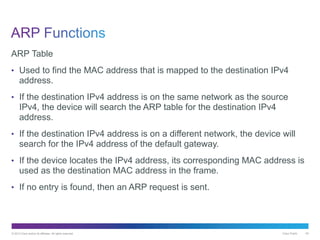
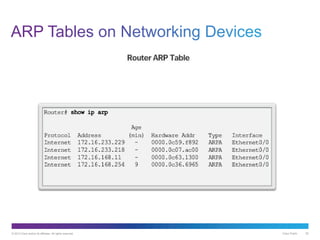
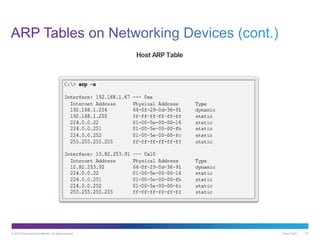
ARP Table
• Used to find the MAC address that is mapped to the destination IPv4
address.
• If the destination IPv4 address is on the same network as the source
IPv4, the device will search the ARP table for the destination IPv4
address.
• If the destination IPv4 address is on a different network, the device will
search for the IPv4 address of the default gateway.
• If the device locates the IPv4 address, its corresponding MAC address is
used as the destination MAC address in the frame.
• If no entry is found, then an ARP request is sent.
© 2013 Cisco and/or its affiliates. All rights reserved. Cisco Public 46
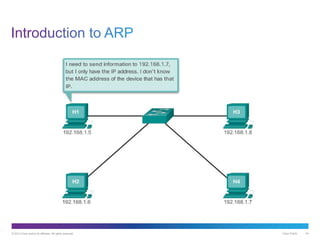
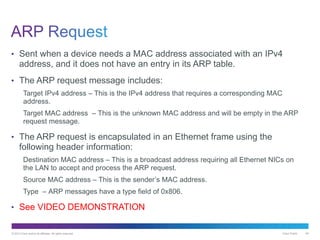
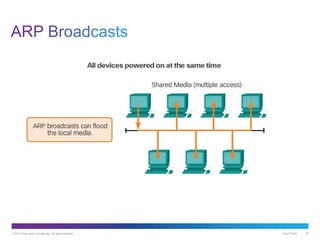
• Sent when a device needs a MAC address associated with an IPv4
address, and it does not have an entry in its ARP table.
• The ARP request message includes:
Target IPv4 address – This is the IPv4 address that requires a corresponding MAC
address.
Target MAC address – This is the unknown MAC address and will be empty in the ARP
request message.
• The ARP request is encapsulated in an Ethernet frame using the
following header information:
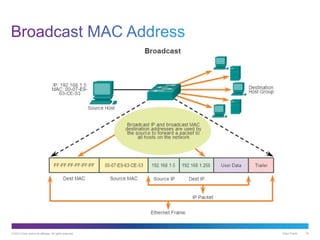
Destination MAC address – This is a broadcast address requiring all Ethernet NICs on
the LAN to accept and process the ARP request.
Source MAC address – This is the sender’s MAC address.
Type – ARP messages have a type field of 0x806.
• See VIDEO DEMONSTRATION
© 2013 Cisco and/or its affiliates. All rights reserved. Cisco Public 47
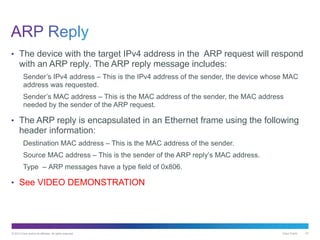
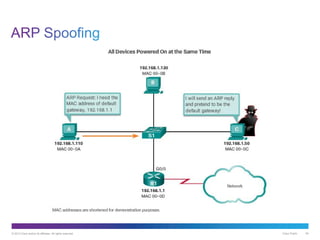
• The device with the target IPv4 address in the ARP request will respond
with an ARP reply. The ARP reply message includes:
Sender’s IPv4 address – This is the IPv4 address of the sender, the device whose MAC
address was requested.
Sender’s MAC address – This is the MAC address of the sender, the MAC address
needed by the sender of the ARP request.
• The ARP reply is encapsulated in an Ethernet frame using the following
header information:
Destination MAC address – This is the MAC address of the sender.
Source MAC address – This is the sender of the ARP reply’s MAC address.
Type – ARP messages have a type field of 0x806.
• See VIDEO DEMONSTRATION
© 2013 Cisco and/or its affiliates. All rights reserved. Cisco Public 48
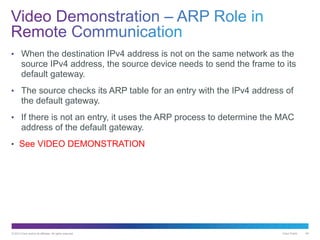
• When the destination IPv4 address is not on the same network as the
source IPv4 address, the source device needs to send the frame to its
default gateway.
• The source checks its ARP table for an entry with the IPv4 address of
the default gateway.
• If there is not an entry, it uses the ARP process to determine the MAC
address of the default gateway.
• See VIDEO DEMONSTRATION
© 2013 Cisco and/or its affiliates. All rights reserved. Cisco Public 49
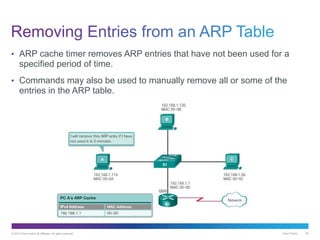
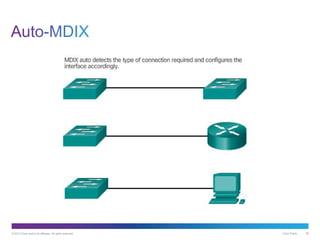
• ARP cache timer removes ARP entries that have not been used for a
specified period of time.
• Commands may also be used to manually remove all or some of the
entries in the ARP table.
© 2013 Cisco and/or its affiliates. All rights reserved. Cisco Public 50
© 2013 Cisco and/or its affiliates. All rights reserved. Cisco Public 51
Cisco Public© 2013 Cisco and/or its affiliates. All rights reserved. 52
© 2013 Cisco and/or its affiliates. All rights reserved. Cisco Public 53
© 2013 Cisco and/or its affiliates. All rights reserved. Cisco Public 54
© 2013 Cisco and/or its affiliates. All rights reserved. Cisco Public 55
Chapter Objectives:
• Explain the operation of Ethernet.
• Explain how a switch operates.
• Explain how the address resolution protocol enables communication on
a network.
Thank you.

It nv51 instructor_ppt_ch5

  • 1.
    Introduction to Networksv5.1 Chapter 5: Ethernet Jupriyadi Juli 2020
  • 2.
    © 2013 Ciscoand/or its affiliates. All rights reserved. Cisco Public 2 5.0 Introduction 5.1 Ethernet Protocol 5.2 LAN Switches 5.3 Address Resolution Protocol 5.4 Summary
  • 3.
    © 2013 Ciscoand/or its affiliates. All rights reserved. Cisco Public 3 Upon completion of this section, you should be able to: • Explain how the Ethernet sublayers are related to the frame fields. • Describe the Ethernet MAC address.
  • 4.
    Cisco Public© 2013Cisco and/or its affiliates. All rights reserved. 4
  • 5.
    © 2013 Ciscoand/or its affiliates. All rights reserved. Cisco Public 5
  • 6.
    © 2013 Ciscoand/or its affiliates. All rights reserved. Cisco Public 6 Ethernet • Most widely used LAN technology • Operates in the data link layer and the physical layer • Family of networking technologies that are defined in the IEEE 802.2 and 802.3 standards • Supports data bandwidths of 10, 100, 1000, 10,000, 40,000, and 100,000 Mbps (100 Gbps) Ethernet standards • Define Layer 2 protocols and Layer 1 technologies • Two separate sub layers of the data link layer to operate - Logical link control (LLC) and the MAC sublayers
  • 7.
    © 2013 Ciscoand/or its affiliates. All rights reserved. Cisco Public 7
  • 8.
    © 2013 Ciscoand/or its affiliates. All rights reserved. Cisco Public 8 Primary responsibilities: • Data encapsulation • Media access control
  • 9.
    © 2013 Ciscoand/or its affiliates. All rights reserved. Cisco Public 9 Ethernet II Frame Structure and Field Size
  • 10.
    © 2013 Ciscoand/or its affiliates. All rights reserved. Cisco Public 10 • Minimum Ethernet frame size is 64 bytes (Collision Frame or Runt) • Maximum Ethernet frame size is 1518 bytes (Jumbo or Baby Giant)
  • 11.
    Cisco Public© 2013Cisco and/or its affiliates. All rights reserved. 11
  • 12.
    © 2013 Ciscoand/or its affiliates. All rights reserved. Cisco Public 12
  • 13.
    © 2013 Ciscoand/or its affiliates. All rights reserved. Cisco Public 13
  • 14.
    © 2013 Ciscoand/or its affiliates. All rights reserved. Cisco Public 14 • Layer 2 Ethernet MAC address is a 48-bit binary value expressed as 12 hexadecimal digits. • IEEE requires a vendor to follow two simple rules: Must use that vendor's assigned OUI as the first three bytes. All MAC addresses with the same OUI must be assigned a unique value in the last three bytes.
  • 15.
    © 2013 Ciscoand/or its affiliates. All rights reserved. Cisco Public 15
  • 16.
    © 2013 Ciscoand/or its affiliates. All rights reserved. Cisco Public 16 • The NIC views information to see if the destination MAC address in the frame matches the device’s physical MAC address stored in RAM. • If there is no match, the device discards the frame. • If there is a match, the NIC passes the frame up the OSI layers, where the de-encapsulation process takes place.
  • 17.
    © 2013 Ciscoand/or its affiliates. All rights reserved. Cisco Public 17
  • 18.
    © 2013 Ciscoand/or its affiliates. All rights reserved. Cisco Public 18
  • 19.
    © 2013 Ciscoand/or its affiliates. All rights reserved. Cisco Public 19
  • 20.
    © 2013 Ciscoand/or its affiliates. All rights reserved. Cisco Public 20
  • 21.
    © 2013 Ciscoand/or its affiliates. All rights reserved. Cisco Public 21 Upon completion of this section, you should be able to: • Explain how a switch operates. • Explain how a switch builds its MAC address table and forwards frames. • Describe switch forwarding methods. • Describe the types of port settings available for Layer 2 switches.
  • 22.
    Cisco Public© 2013Cisco and/or its affiliates. All rights reserved. 22
  • 23.
    © 2013 Ciscoand/or its affiliates. All rights reserved. Cisco Public 23 • An Ethernet Switch is a Layer 2 device. • It uses MAC addresses to make forwarding decisions. • The MAC address table is sometimes referred to as a content addressable memory (CAM) table.
  • 24.
    © 2013 Ciscoand/or its affiliates. All rights reserved. Cisco Public 24
  • 25.
    © 2013 Ciscoand/or its affiliates. All rights reserved. Cisco Public 25
  • 26.
    © 2013 Ciscoand/or its affiliates. All rights reserved. Cisco Public 26 PC-D sends a frame back to PC-A and the switch learns PC-D’s MAC address.
  • 27.
    © 2013 Ciscoand/or its affiliates. All rights reserved. Cisco Public 27 Since the Switch MAC Address table contains PC-A’s MAC Address, it sends the frame out only port 1.
  • 28.
    © 2013 Ciscoand/or its affiliates. All rights reserved. Cisco Public 28 PC-A sends another frame to PC-D. The switch’s table now contains PC-D’s MAC address, so it sends the frame out only port 4.
  • 29.
    © 2013 Ciscoand/or its affiliates. All rights reserved. Cisco Public 29 • A switch can have multiple MAC addresses associated with a single port. • This occurs when the switch is connected to another switch. • See VIDEO DEMONSTRATION
  • 30.
    © 2013 Ciscoand/or its affiliates. All rights reserved. Cisco Public 30 • When a device has an IP address that is on a remote network, the Ethernet frame cannot be sent directly to the destination device. • The Ethernet frame is sent to the MAC address of the default gateway, which is the router. • See VIDEO DEMONSTRATION
  • 31.
    Cisco Public© 2013Cisco and/or its affiliates. All rights reserved. 31
  • 32.
    © 2013 Ciscoand/or its affiliates. All rights reserved. Cisco Public 32
  • 33.
    © 2013 Ciscoand/or its affiliates. All rights reserved. Cisco Public 33 Fast-forward switching: • Lowest level of latency immediately forwards a packet after reading the destination address. • Typical cut-through method of switching. Fragment-free switching: • Switch stores the first 64 bytes of the frame before forwarding. • Most network errors and collisions occur during the first 64 bytes.
  • 34.
    © 2013 Ciscoand/or its affiliates. All rights reserved. Cisco Public 34
  • 35.
    Cisco Public© 2013Cisco and/or its affiliates. All rights reserved. 35
  • 36.
    © 2013 Ciscoand/or its affiliates. All rights reserved. Cisco Public 36 • Full-duplex – Both ends of the connection can send and receive simultaneously. • Half-duplex – Only one end of the connection can send at a time.
  • 37.
    © 2013 Ciscoand/or its affiliates. All rights reserved. Cisco Public 37 A common cause of performance issues on 10/100 Mb/s Ethernet links is when one port on the link operates at half-duplex and the other on full- duplex.
  • 38.
    © 2013 Ciscoand/or its affiliates. All rights reserved. Cisco Public 38
  • 39.
    © 2013 Ciscoand/or its affiliates. All rights reserved. Cisco Public 39 Upon completion of this section, you should be able to: • Compare the roles of the MAC address and the IP address. • Describe the purpose of ARP. • Explain how ARP requests impact network and host performance.
  • 40.
    Cisco Public© 2013Cisco and/or its affiliates. All rights reserved. 40
  • 41.
    © 2013 Ciscoand/or its affiliates. All rights reserved. Cisco Public 41 There are two primary addresses assigned to a device on an Ethernet LAN: • Physical address (the MAC address) – Used for Ethernet NIC to Ethernet NIC communications on the same network. • Logical address (the IP address) – Used to send the packet from the original source to the final destination.
  • 42.
    © 2013 Ciscoand/or its affiliates. All rights reserved. Cisco Public 42
  • 43.
    Cisco Public© 2013Cisco and/or its affiliates. All rights reserved. 43
  • 44.
    © 2013 Ciscoand/or its affiliates. All rights reserved. Cisco Public 44
  • 45.
    © 2013 Ciscoand/or its affiliates. All rights reserved. Cisco Public 45 ARP Table • Used to find the MAC address that is mapped to the destination IPv4 address. • If the destination IPv4 address is on the same network as the source IPv4, the device will search the ARP table for the destination IPv4 address. • If the destination IPv4 address is on a different network, the device will search for the IPv4 address of the default gateway. • If the device locates the IPv4 address, its corresponding MAC address is used as the destination MAC address in the frame. • If no entry is found, then an ARP request is sent.
  • 46.
    © 2013 Ciscoand/or its affiliates. All rights reserved. Cisco Public 46 • Sent when a device needs a MAC address associated with an IPv4 address, and it does not have an entry in its ARP table. • The ARP request message includes: Target IPv4 address – This is the IPv4 address that requires a corresponding MAC address. Target MAC address – This is the unknown MAC address and will be empty in the ARP request message. • The ARP request is encapsulated in an Ethernet frame using the following header information: Destination MAC address – This is a broadcast address requiring all Ethernet NICs on the LAN to accept and process the ARP request. Source MAC address – This is the sender’s MAC address. Type – ARP messages have a type field of 0x806. • See VIDEO DEMONSTRATION
  • 47.
    © 2013 Ciscoand/or its affiliates. All rights reserved. Cisco Public 47 • The device with the target IPv4 address in the ARP request will respond with an ARP reply. The ARP reply message includes: Sender’s IPv4 address – This is the IPv4 address of the sender, the device whose MAC address was requested. Sender’s MAC address – This is the MAC address of the sender, the MAC address needed by the sender of the ARP request. • The ARP reply is encapsulated in an Ethernet frame using the following header information: Destination MAC address – This is the MAC address of the sender. Source MAC address – This is the sender of the ARP reply’s MAC address. Type – ARP messages have a type field of 0x806. • See VIDEO DEMONSTRATION
  • 48.
    © 2013 Ciscoand/or its affiliates. All rights reserved. Cisco Public 48 • When the destination IPv4 address is not on the same network as the source IPv4 address, the source device needs to send the frame to its default gateway. • The source checks its ARP table for an entry with the IPv4 address of the default gateway. • If there is not an entry, it uses the ARP process to determine the MAC address of the default gateway. • See VIDEO DEMONSTRATION
  • 49.
    © 2013 Ciscoand/or its affiliates. All rights reserved. Cisco Public 49 • ARP cache timer removes ARP entries that have not been used for a specified period of time. • Commands may also be used to manually remove all or some of the entries in the ARP table.

  • 50.
    © 2013 Ciscoand/or its affiliates. All rights reserved. Cisco Public 50
  • 51.
    © 2013 Ciscoand/or its affiliates. All rights reserved. Cisco Public 51
  • 52.
    Cisco Public© 2013Cisco and/or its affiliates. All rights reserved. 52
  • 53.
    © 2013 Ciscoand/or its affiliates. All rights reserved. Cisco Public 53
  • 54.
    © 2013 Ciscoand/or its affiliates. All rights reserved. Cisco Public 54
  • 55.
    © 2013 Ciscoand/or its affiliates. All rights reserved. Cisco Public 55 Chapter Objectives: • Explain the operation of Ethernet. • Explain how a switch operates. • Explain how the address resolution protocol enables communication on a network.
  • 56.