Static Routing

Routing Protocols and Concepts – Lecture 7a

ITE I Chapter 6

© 2006 Cisco Systems, Inc. All rights reserved.

Cisco Public

1
Objectives


Define the general role a router plays in networks.



Describe the directly connected networks, different
router interfaces



Examine directly connected networks in the routing
table and use the CDP protocol



Describe static routes with exit interfaces



Describe summary and default route



Examine how packets get forwarded when using
static routes



Identify how to manage and troubleshoot static routes

ITE 1 Chapter 6

© 2006 Cisco Systems, Inc. All rights reserved.

Cisco Public

2
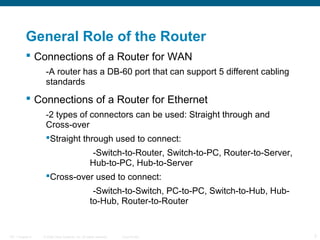
General Role of the Router
 Connections of a Router for WAN
-A router has a DB-60 port that can support 5 different cabling
standards

 Connections of a Router for Ethernet
-2 types of connectors can be used: Straight through and

Cross-over
Straight through used to connect:
-Switch-to-Router, Switch-to-PC, Router-to-Server,
Hub-to-PC, Hub-to-Server
Cross-over used to connect:
-Switch-to-Switch, PC-to-PC, Switch-to-Hub, Hubto-Hub, Router-to-Router

ITE 1 Chapter 6

© 2006 Cisco Systems, Inc. All rights reserved.

Cisco Public

3
Interfaces
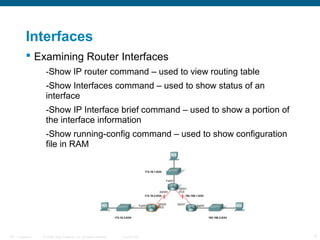
 Examining Router Interfaces
-Show IP router command – used to view routing table

-Show Interfaces command – used to show status of an
interface
-Show IP Interface brief command – used to show a portion of
the interface information
-Show running-config command – used to show configuration
file in RAM

ITE 1 Chapter 6

© 2006 Cisco Systems, Inc. All rights reserved.

Cisco Public

4
Interfaces
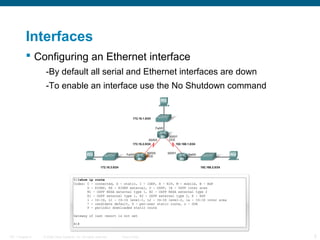
 Configuring an Ethernet interface
-By default all serial and Ethernet interfaces are down
-To enable an interface use the No Shutdown command

ITE 1 Chapter 6

© 2006 Cisco Systems, Inc. All rights reserved.

Cisco Public

5
Interfaces
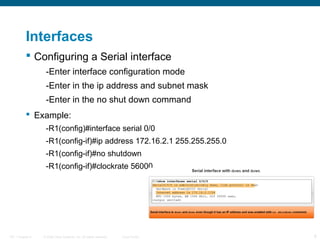
 Configuring a Serial interface
-Enter interface configuration mode
-Enter in the ip address and subnet mask
-Enter in the no shut down command
 Example:
-R1(config)#interface serial 0/0
-R1(config-if)#ip address 172.16.2.1 255.255.255.0
-R1(config-if)#no shutdown
-R1(config-if)#clockrate 56000

ITE 1 Chapter 6

© 2006 Cisco Systems, Inc. All rights reserved.

Cisco Public

6
Routing Table and CDP Protocol
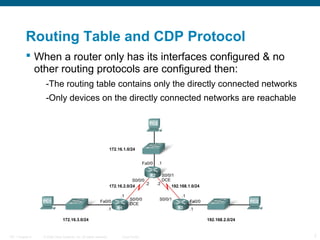
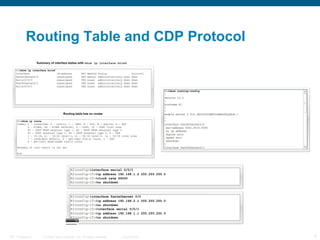
 When a router only has its interfaces configured & no
other routing protocols are configured then:
-The routing table contains only the directly connected networks
-Only devices on the directly connected networks are reachable

ITE 1 Chapter 6

© 2006 Cisco Systems, Inc. All rights reserved.

Cisco Public

7
Routing Table and CDP Protocol

ITE 1 Chapter 6

© 2006 Cisco Systems, Inc. All rights reserved.

Cisco Public

8
Routing Table and CDP Protocol
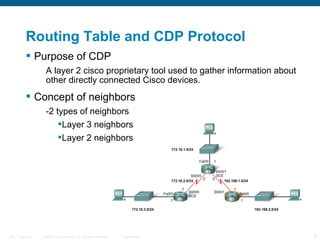
 Purpose of CDP
A layer 2 cisco proprietary tool used to gather information about
other directly connected Cisco devices.

 Concept of neighbors
-2 types of neighbors
Layer 3 neighbors
Layer 2 neighbors

ITE 1 Chapter 6

© 2006 Cisco Systems, Inc. All rights reserved.

Cisco Public

9
Routing Table and CDP Protocol
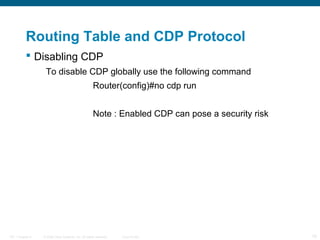
 Disabling CDP
To disable CDP globally use the following command
Router(config)#no cdp run
Note : Enabled CDP can pose a security risk

ITE 1 Chapter 6

© 2006 Cisco Systems, Inc. All rights reserved.

Cisco Public

10
Static Routes with Exit Interfaces
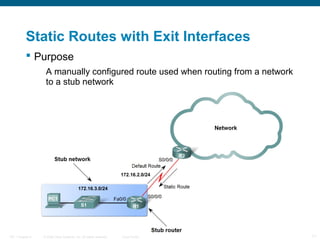
 Purpose
A manually configured route used when routing from a network
to a stub network

ITE 1 Chapter 6

© 2006 Cisco Systems, Inc. All rights reserved.

Cisco Public

11
Static Routes with Exit Interfaces
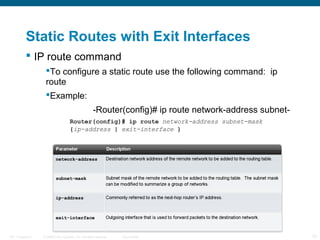
 IP route command
To configure a static route use the following command: ip
route
Example:
-Router(config)# ip route network-address subnetmask {ip-address | exit-interface }

ITE 1 Chapter 6

© 2006 Cisco Systems, Inc. All rights reserved.

Cisco Public

12
Static Routes with Exit Interfaces
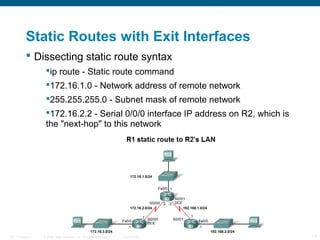
 Dissecting static route syntax
ip route - Static route command
172.16.1.0 - Network address of remote network
255.255.255.0 - Subnet mask of remote network
172.16.2.2 - Serial 0/0/0 interface IP address on R2, which is
the "next-hop" to this network

ITE 1 Chapter 6

© 2006 Cisco Systems, Inc. All rights reserved.

Cisco Public

13
Static Routes with Exit Interfaces
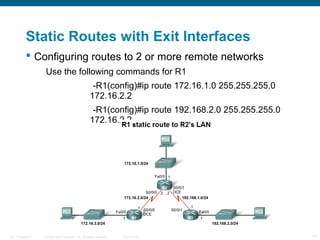
 Configuring routes to 2 or more remote networks
Use the following commands for R1
-R1(config)#ip route 172.16.1.0 255.255.255.0
172.16.2.2
-R1(config)#ip route 192.168.2.0 255.255.255.0
172.16.2.2

ITE 1 Chapter 6

© 2006 Cisco Systems, Inc. All rights reserved.

Cisco Public

14
Static Routes with Exit Interfaces
 Zinin’s 3 routing principles
Principle 1: "Every router makes its decision alone, based on
the information it has in its own routing table.“
Principle 2: "The fact that one router has certain information in
its routing table does not mean that other routers have the
same information.“
Principle 3: "Routing information about a path from one
network to another does not provide routing information about
the reverse, or return path."

ITE 1 Chapter 6

© 2006 Cisco Systems, Inc. All rights reserved.

Cisco Public

15
Static Routes with Exit Interfaces


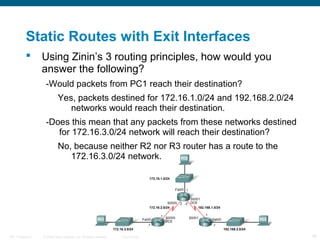
Using Zinin’s 3 routing principles, how would you
answer the following?
-Would packets from PC1 reach their destination?
Yes, packets destined for 172.16.1.0/24 and 192.168.2.0/24
networks would reach their destination.
-Does this mean that any packets from these networks destined
for 172.16.3.0/24 network will reach their destination?
No, because neither R2 nor R3 router has a route to the
172.16.3.0/24 network.

ITE 1 Chapter 6

© 2006 Cisco Systems, Inc. All rights reserved.

Cisco Public

16
Static Routes with Exit Interfaces
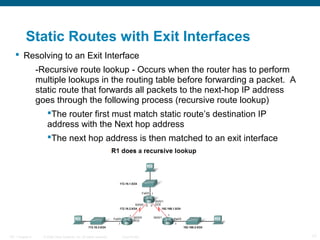
 Resolving to an Exit Interface
-Recursive route lookup - Occurs when the router has to perform
multiple lookups in the routing table before forwarding a packet. A
static route that forwards all packets to the next-hop IP address
goes through the following process (recursive route lookup)
The router first must match static route’s destination IP
address with the Next hop address
The next hop address is then matched to an exit interface

ITE 1 Chapter 6

© 2006 Cisco Systems, Inc. All rights reserved.

Cisco Public

17
Static Routes with Exit Interfaces
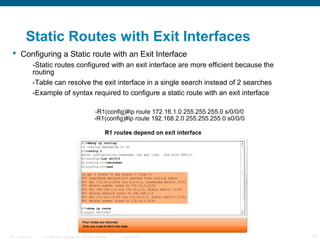
 Configuring a Static route with an Exit Interface
-Static routes configured with an exit interface are more efficient because the
routing
-Table can resolve the exit interface in a single search instead of 2 searches
-Example of syntax required to configure a static route with an exit interface
-R1(config)#ip route 172.16.1.0 255.255.255.0 s/0/0/0
-R1(config)#ip route 192.168.2.0 255.255.255.0 s0/0/0

ITE 1 Chapter 6

© 2006 Cisco Systems, Inc. All rights reserved.

Cisco Public

18
Static Routes with Exit Interfaces –
graphic2.5.3.1
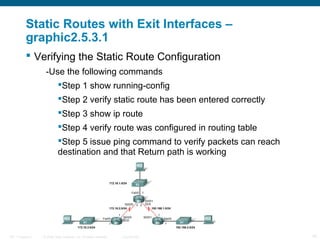
 Verifying the Static Route Configuration
-Use the following commands
Step 1 show running-config
Step 2 verify static route has been entered correctly
Step 3 show ip route
Step 4 verify route was configured in routing table
Step 5 issue ping command to verify packets can reach
destination and that Return path is working

ITE 1 Chapter 6

© 2006 Cisco Systems, Inc. All rights reserved.

Cisco Public

19
Summary and Default Route
 Summarizing routes reduces the size of the routing
table.
 Route summarization is the process of combining a
number of static routes into a single static route.

ITE 1 Chapter 6

© 2006 Cisco Systems, Inc. All rights reserved.

Cisco Public

20
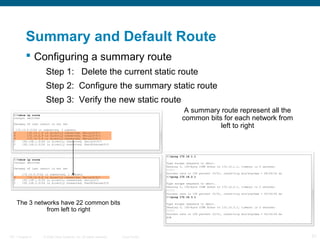
Summary and Default Route
 Configuring a summary route
Step 1: Delete the current static route
Step 2: Configure the summary static route
Step 3: Verify the new static route
A summary route represent all the
common bits for each network from
left to right

The 3 networks have 22 common bits
from left to right

ITE 1 Chapter 6

© 2006 Cisco Systems, Inc. All rights reserved.

Cisco Public

21
Summary and Default Route
 Default Static Route
This is a route that will match all packets. Stub routers that
have a number of static routes all exiting the same interface are
good candidates for a default route.
-Like route summarization this will help reduce the
size of the routing table

 Configuring a default static route
Similar to configuring a static route. Except that destination IP
address and subnet mask are all zeros
Example:
-Router(config)#ip route 0.0.0.0 0.0.0.0 [exitinterface | ip-address ]

ITE 1 Chapter 6

© 2006 Cisco Systems, Inc. All rights reserved.

Cisco Public

22
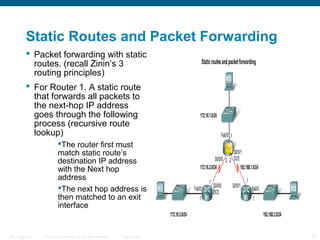
Static Routes and Packet Forwarding
 Packet forwarding with static
routes. (recall Zinin’s 3
routing principles)
 For Router 1. A static route
that forwards all packets to
the next-hop IP address
goes through the following
process (recursive route
lookup)
The router first must
match static route’s
destination IP address
with the Next hop
address
The next hop address is
then matched to an exit
interface

ITE 1 Chapter 6

© 2006 Cisco Systems, Inc. All rights reserved.

Cisco Public

23
Static Routes and Packet Forwarding
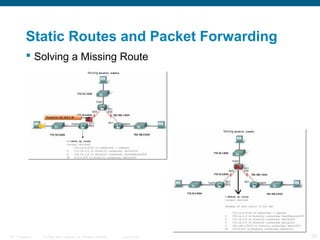
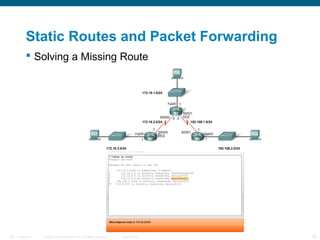
 Troubleshooting a Missing Route
 Tools that can be used to isolate routing problems
include:
-Ping– tests end to end connectivity
-Traceroute– used to discover all of the hops (routers) along the
path between 2 points
-Show IP route– used to display routing table & ascertain
forwarding process
-Show ip interface brief- used to show status of router interfaces
-Show cdp neighbors detail– used to gather configuration
information about directly connected neighbors

ITE 1 Chapter 6

© 2006 Cisco Systems, Inc. All rights reserved.

Cisco Public

24
Static Routes and Packet Forwarding
 Solving a Missing Route

ITE 1 Chapter 6

© 2006 Cisco Systems, Inc. All rights reserved.

Cisco Public

25
Static Routes and Packet Forwarding
 Solving a Missing Route

ITE 1 Chapter 6

© 2006 Cisco Systems, Inc. All rights reserved.

Cisco Public

26
Summary
 Routers
-Operate at layer 3
-Functions include best path selection & forwarding packets
 Connecting Networks
WANs
Serial cables are connected to router serial ports.
In the lab environment clock rates must be configured
for DCE
LANs
Straight through cables or cross over cables are used
to connect to fastethernet port. (The type of cable used
depends on what devices are being connected)
 Cisco Discovery Protocol
A layer 2 proprietary protocol
Used to discover information about directly connected Cisco
devices
ITE 1 Chapter 6

© 2006 Cisco Systems, Inc. All rights reserved.

Cisco Public

27
Summary
 Static Routes
-This is a manually configured path that specifies how the router
will get to a certain point using a certain path.
 Summary static routes
-This is several static routes that have been condensed into a
single static route.
 Default route
-It is the route packets use if there is no other possible match
for their destination in the routing table.
 Forwarding of packets when static route are used
-Zinin’s 3 routing principles describe how packets are forwarded
 Troubleshooting static routes may require some of the following
commands:
-Ping
-Traceroute
-Show IP route
-Show ip interface brief
-Show cdp neighbors detail

ITE 1 Chapter 6

© 2006 Cisco Systems, Inc. All rights reserved.

Cisco Public

28

Static Routing

  • 1.
    Static Routing Routing Protocolsand Concepts – Lecture 7a ITE I Chapter 6 © 2006 Cisco Systems, Inc. All rights reserved. Cisco Public 1
  • 2.
    Objectives  Define the generalrole a router plays in networks.  Describe the directly connected networks, different router interfaces  Examine directly connected networks in the routing table and use the CDP protocol  Describe static routes with exit interfaces  Describe summary and default route  Examine how packets get forwarded when using static routes  Identify how to manage and troubleshoot static routes ITE 1 Chapter 6 © 2006 Cisco Systems, Inc. All rights reserved. Cisco Public 2
  • 3.
    General Role ofthe Router  Connections of a Router for WAN -A router has a DB-60 port that can support 5 different cabling standards  Connections of a Router for Ethernet -2 types of connectors can be used: Straight through and Cross-over Straight through used to connect: -Switch-to-Router, Switch-to-PC, Router-to-Server, Hub-to-PC, Hub-to-Server Cross-over used to connect: -Switch-to-Switch, PC-to-PC, Switch-to-Hub, Hubto-Hub, Router-to-Router ITE 1 Chapter 6 © 2006 Cisco Systems, Inc. All rights reserved. Cisco Public 3
  • 4.
    Interfaces  Examining RouterInterfaces -Show IP router command – used to view routing table -Show Interfaces command – used to show status of an interface -Show IP Interface brief command – used to show a portion of the interface information -Show running-config command – used to show configuration file in RAM ITE 1 Chapter 6 © 2006 Cisco Systems, Inc. All rights reserved. Cisco Public 4
  • 5.
    Interfaces  Configuring anEthernet interface -By default all serial and Ethernet interfaces are down -To enable an interface use the No Shutdown command ITE 1 Chapter 6 © 2006 Cisco Systems, Inc. All rights reserved. Cisco Public 5
  • 6.
    Interfaces  Configuring aSerial interface -Enter interface configuration mode -Enter in the ip address and subnet mask -Enter in the no shut down command  Example: -R1(config)#interface serial 0/0 -R1(config-if)#ip address 172.16.2.1 255.255.255.0 -R1(config-if)#no shutdown -R1(config-if)#clockrate 56000 ITE 1 Chapter 6 © 2006 Cisco Systems, Inc. All rights reserved. Cisco Public 6
  • 7.
    Routing Table andCDP Protocol  When a router only has its interfaces configured & no other routing protocols are configured then: -The routing table contains only the directly connected networks -Only devices on the directly connected networks are reachable ITE 1 Chapter 6 © 2006 Cisco Systems, Inc. All rights reserved. Cisco Public 7
  • 8.
    Routing Table andCDP Protocol ITE 1 Chapter 6 © 2006 Cisco Systems, Inc. All rights reserved. Cisco Public 8
  • 9.
    Routing Table andCDP Protocol  Purpose of CDP A layer 2 cisco proprietary tool used to gather information about other directly connected Cisco devices.  Concept of neighbors -2 types of neighbors Layer 3 neighbors Layer 2 neighbors ITE 1 Chapter 6 © 2006 Cisco Systems, Inc. All rights reserved. Cisco Public 9
  • 10.
    Routing Table andCDP Protocol  Disabling CDP To disable CDP globally use the following command Router(config)#no cdp run Note : Enabled CDP can pose a security risk ITE 1 Chapter 6 © 2006 Cisco Systems, Inc. All rights reserved. Cisco Public 10
  • 11.
    Static Routes withExit Interfaces  Purpose A manually configured route used when routing from a network to a stub network ITE 1 Chapter 6 © 2006 Cisco Systems, Inc. All rights reserved. Cisco Public 11
  • 12.
    Static Routes withExit Interfaces  IP route command To configure a static route use the following command: ip route Example: -Router(config)# ip route network-address subnetmask {ip-address | exit-interface } ITE 1 Chapter 6 © 2006 Cisco Systems, Inc. All rights reserved. Cisco Public 12
  • 13.
    Static Routes withExit Interfaces  Dissecting static route syntax ip route - Static route command 172.16.1.0 - Network address of remote network 255.255.255.0 - Subnet mask of remote network 172.16.2.2 - Serial 0/0/0 interface IP address on R2, which is the "next-hop" to this network ITE 1 Chapter 6 © 2006 Cisco Systems, Inc. All rights reserved. Cisco Public 13
  • 14.
    Static Routes withExit Interfaces  Configuring routes to 2 or more remote networks Use the following commands for R1 -R1(config)#ip route 172.16.1.0 255.255.255.0 172.16.2.2 -R1(config)#ip route 192.168.2.0 255.255.255.0 172.16.2.2 ITE 1 Chapter 6 © 2006 Cisco Systems, Inc. All rights reserved. Cisco Public 14
  • 15.
    Static Routes withExit Interfaces  Zinin’s 3 routing principles Principle 1: "Every router makes its decision alone, based on the information it has in its own routing table.“ Principle 2: "The fact that one router has certain information in its routing table does not mean that other routers have the same information.“ Principle 3: "Routing information about a path from one network to another does not provide routing information about the reverse, or return path." ITE 1 Chapter 6 © 2006 Cisco Systems, Inc. All rights reserved. Cisco Public 15
  • 16.
    Static Routes withExit Interfaces  Using Zinin’s 3 routing principles, how would you answer the following? -Would packets from PC1 reach their destination? Yes, packets destined for 172.16.1.0/24 and 192.168.2.0/24 networks would reach their destination. -Does this mean that any packets from these networks destined for 172.16.3.0/24 network will reach their destination? No, because neither R2 nor R3 router has a route to the 172.16.3.0/24 network. ITE 1 Chapter 6 © 2006 Cisco Systems, Inc. All rights reserved. Cisco Public 16
  • 17.
    Static Routes withExit Interfaces  Resolving to an Exit Interface -Recursive route lookup - Occurs when the router has to perform multiple lookups in the routing table before forwarding a packet. A static route that forwards all packets to the next-hop IP address goes through the following process (recursive route lookup) The router first must match static route’s destination IP address with the Next hop address The next hop address is then matched to an exit interface ITE 1 Chapter 6 © 2006 Cisco Systems, Inc. All rights reserved. Cisco Public 17
  • 18.
    Static Routes withExit Interfaces  Configuring a Static route with an Exit Interface -Static routes configured with an exit interface are more efficient because the routing -Table can resolve the exit interface in a single search instead of 2 searches -Example of syntax required to configure a static route with an exit interface -R1(config)#ip route 172.16.1.0 255.255.255.0 s/0/0/0 -R1(config)#ip route 192.168.2.0 255.255.255.0 s0/0/0 ITE 1 Chapter 6 © 2006 Cisco Systems, Inc. All rights reserved. Cisco Public 18
  • 19.
    Static Routes withExit Interfaces – graphic2.5.3.1  Verifying the Static Route Configuration -Use the following commands Step 1 show running-config Step 2 verify static route has been entered correctly Step 3 show ip route Step 4 verify route was configured in routing table Step 5 issue ping command to verify packets can reach destination and that Return path is working ITE 1 Chapter 6 © 2006 Cisco Systems, Inc. All rights reserved. Cisco Public 19
  • 20.
    Summary and DefaultRoute  Summarizing routes reduces the size of the routing table.  Route summarization is the process of combining a number of static routes into a single static route. ITE 1 Chapter 6 © 2006 Cisco Systems, Inc. All rights reserved. Cisco Public 20
  • 21.
    Summary and DefaultRoute  Configuring a summary route Step 1: Delete the current static route Step 2: Configure the summary static route Step 3: Verify the new static route A summary route represent all the common bits for each network from left to right The 3 networks have 22 common bits from left to right ITE 1 Chapter 6 © 2006 Cisco Systems, Inc. All rights reserved. Cisco Public 21
  • 22.
    Summary and DefaultRoute  Default Static Route This is a route that will match all packets. Stub routers that have a number of static routes all exiting the same interface are good candidates for a default route. -Like route summarization this will help reduce the size of the routing table  Configuring a default static route Similar to configuring a static route. Except that destination IP address and subnet mask are all zeros Example: -Router(config)#ip route 0.0.0.0 0.0.0.0 [exitinterface | ip-address ] ITE 1 Chapter 6 © 2006 Cisco Systems, Inc. All rights reserved. Cisco Public 22
  • 23.
    Static Routes andPacket Forwarding  Packet forwarding with static routes. (recall Zinin’s 3 routing principles)  For Router 1. A static route that forwards all packets to the next-hop IP address goes through the following process (recursive route lookup) The router first must match static route’s destination IP address with the Next hop address The next hop address is then matched to an exit interface ITE 1 Chapter 6 © 2006 Cisco Systems, Inc. All rights reserved. Cisco Public 23
  • 24.
    Static Routes andPacket Forwarding  Troubleshooting a Missing Route  Tools that can be used to isolate routing problems include: -Ping– tests end to end connectivity -Traceroute– used to discover all of the hops (routers) along the path between 2 points -Show IP route– used to display routing table & ascertain forwarding process -Show ip interface brief- used to show status of router interfaces -Show cdp neighbors detail– used to gather configuration information about directly connected neighbors ITE 1 Chapter 6 © 2006 Cisco Systems, Inc. All rights reserved. Cisco Public 24
  • 25.
    Static Routes andPacket Forwarding  Solving a Missing Route ITE 1 Chapter 6 © 2006 Cisco Systems, Inc. All rights reserved. Cisco Public 25
  • 26.
    Static Routes andPacket Forwarding  Solving a Missing Route ITE 1 Chapter 6 © 2006 Cisco Systems, Inc. All rights reserved. Cisco Public 26
  • 27.
    Summary  Routers -Operate atlayer 3 -Functions include best path selection & forwarding packets  Connecting Networks WANs Serial cables are connected to router serial ports. In the lab environment clock rates must be configured for DCE LANs Straight through cables or cross over cables are used to connect to fastethernet port. (The type of cable used depends on what devices are being connected)  Cisco Discovery Protocol A layer 2 proprietary protocol Used to discover information about directly connected Cisco devices ITE 1 Chapter 6 © 2006 Cisco Systems, Inc. All rights reserved. Cisco Public 27
  • 28.
    Summary  Static Routes -Thisis a manually configured path that specifies how the router will get to a certain point using a certain path.  Summary static routes -This is several static routes that have been condensed into a single static route.  Default route -It is the route packets use if there is no other possible match for their destination in the routing table.  Forwarding of packets when static route are used -Zinin’s 3 routing principles describe how packets are forwarded  Troubleshooting static routes may require some of the following commands: -Ping -Traceroute -Show IP route -Show ip interface brief -Show cdp neighbors detail ITE 1 Chapter 6 © 2006 Cisco Systems, Inc. All rights reserved. Cisco Public 28