Routed Networks Update
Swaminathan Vasudevan, SUSE
Miguel Lavalle, Huawei
Agenda
• Why Routed Networks
• Layer 2 and layer-3 networks at scale
• Routed Networks implementation
• Changes to Neutron
• Floating IPs and DVR
• Interaction with the Nova scheduler
• Configuration
Agenda
• Why Routed Networks
• Layer 2 and layer-3 networks at scale
• Routed Networks implementation
• Changes to Neutron
• Floating IPs and DVR
• Interaction with the Nova scheduler
• Configuration
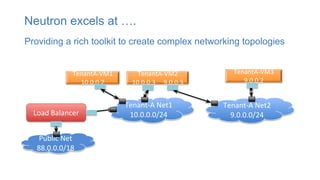
TenantA-VM1
10.0.0.2
TenantA-VM3
9.0.0.2
TenantA-VM2
10.0.0.3 9.0.0.3
Load Balancer
Public Net
88.0.0.0/18
Tenant-A Net1
10.0.0.0/24
Tenant-A Net2
9.0.0.0/24
Providing a rich toolkit to create complex networking topologies
Neutron excels at ….
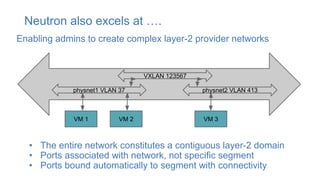
Neutron also excels at ….
VXLAN 123567
physnet1 VLAN 37 physnet2 VLAN 413
VM 1 VM 2 VM 3
• The entire network constitutes a contiguous layer-2 domain
• Ports associated with network, not specific segment
• Ports bound automatically to segment with connectivity
Enabling admins to create complex layer-2 provider networks
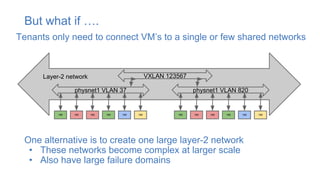
But what if ….
Tenants only need to connect VM’s to a single or few shared networks
VXLAN 123567
physnet1 VLAN 37
VM VMVM VMVMVM
physnet1 VLAN 820
VM VMVM VMVMVM
One alternative is to create one large layer-2 network
• These networks become complex at larger scale
• Also have large failure domains
Layer-2 network
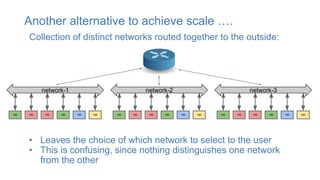
Another alternative to achieve scale ….
Collection of distinct networks routed together to the outside:
network-1
VM VMVM VMVMVM
network-2
VM VMVM VMVMVM
network-3
VM VMVM VMVMVM
• Leaves the choice of which network to select to the user
• This is confusing, since nothing distinguishes one network
from the other
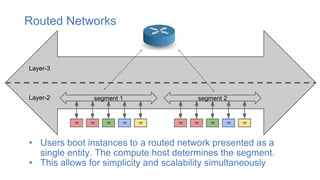
Routed Networks
segment 1
VMVM VM VMVM
segment 2
VM VMVM VMVM
Layer-3
Layer-2
• Users boot instances to a routed network presented as a
single entity. The compute host determines the segment.
• This allows for simplicity and scalability simultaneously
Agenda
• Why Routed Networks
• Layer-2 and layer-3 networks at scale
• Routed Networks implementation
• Changes to Neutron
• Floating IPs and DVR
• Interaction with the Nova scheduler
• Configuration
• Demo
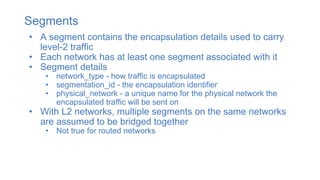
Segments
• A segment contains the encapsulation details used to carry
level-2 traffic
• Each network has at least one segment associated with it
• Segment details
• network_type - how traffic is encapsulated
• segmentation_id - the encapsulation identifier
• physical_network - a unique name for the physical network the
encapsulated traffic will be sent on
• With L2 networks, multiple segments on the same networks
are assumed to be bridged together
• Not true for routed networks
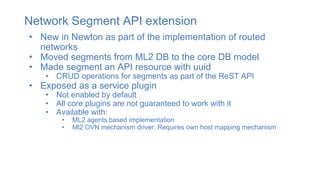
Network Segment API extension
• New in Newton as part of the implementation of routed
networks
• Moved segments from ML2 DB to the core DB model
• Made segment an API resource with uuid
• CRUD operations for segments as part of the ReST API
• Exposed as a service plugin
• Not enabled by default
• All core plugins are not guaranteed to work with it
• Available with:
• ML2 agents based implementation
• Ml2 OVN mechanism driver. Requires own host mapping mechanism
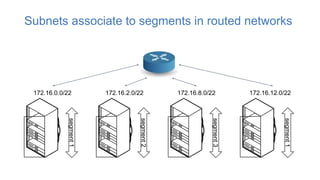
Subnets associate to segments in routed networks
segment1
172.16.0.0/22
segment2
172.16.2.0/22
segment3
172.16.8.0/22
segment1
172.16.12.0/22
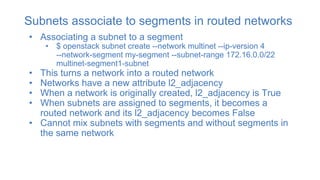
Subnets associate to segments in routed networks
• Associating a subnet to a segment
• $ openstack subnet create --network multinet --ip-version 4
--network-segment my-segment --subnet-range 172.16.0.0/22
multinet-segment1-subnet
• This turns a network into a routed network
• Networks have a new attribute l2_adjacency
• When a network is originally created, l2_adjacency is True
• When subnets are assigned to segments, it becomes a
routed network and its l2_adjacency becomes False
• Cannot mix subnets with segments and without segments in
the same network
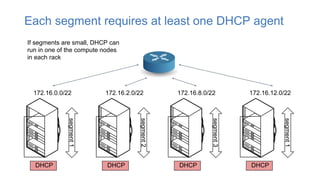
Each segment requires at least one DHCP agent
segment1
172.16.0.0/22
segment2
172.16.2.0/22
segment3
172.16.8.0/22
segment1
172.16.12.0/22
DHCP DHCP DHCP DHCP
If segments are small, DHCP can
run in one of the compute nodes
in each rack
Ports in routed networks
• In a routed network, a port cannot get ip addresses until it is
bound, when the segment it will be connected to is known
• These unbound ports have an empty fixed_ips attribute
• Ports have a new attribute ip_allocation
• immediate for bound and unbound ports in l2 networks
• immediate for ports in routed networks that were bound at creation
• deferred for routed networks ports that were unbound at creation.
• It will remain deferred even after binding
• Neutron maintains a hosts to segments mapping
• Used during host binding to allocate ip addresses
• Available in ML2 agent based implementations and OVN
Agenda
• Why Routed Networks
• Layer 2 and layer-3 networks at scale
• Routed Networks implementation
• Changes to Neutron
• Floating IPs and DVR
• Interaction with the Nova scheduler
• Configuration
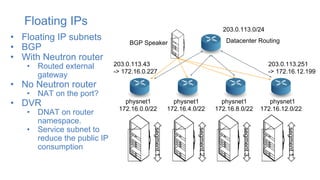
Floating IPs
• Floating IP subnets
• BGP
• With Neutron router
• Routed external
gateway
• No Neutron router
• NAT on the port?
• DVR
• DNAT on router
namespace.
• Service subnet to
reduce the public IP
consumption
segment1
physnet1
172.16.0.0/22
segment2
segment3
segment1
physnet1
172.16.4.0/22
physnet1
172.16.8.0/22
physnet1
172.16.12.0/22
Datacenter Routing
203.0.113.251
-> 172.16.12.199
203.0.113.0/24
203.0.113.43
-> 172.16.0.227
BGP Speaker
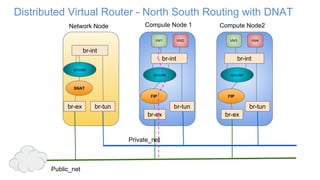
Distributed Virtual Router - North South Routing with DNAT
br-tun
qrouter
br-ex
Network Node Compute Node 1 Compute Node2
br-tunbr-tun
br-int
VM2VM1
br-int br-int
VM4VM3
Private_net
Public_net
qrouter qrouter
FIP FIP
br-ex br-ex
SNAT
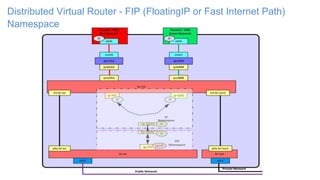
Distributed Virtual Router - FIP (FloatingIP or Fast Internet Path)
Namespace
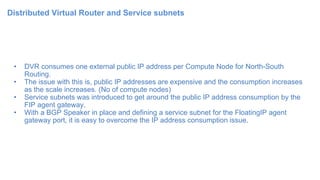
Distributed Virtual Router and Service subnets
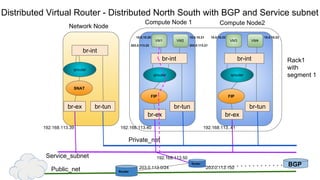
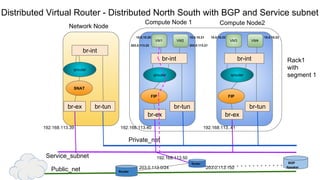
• DVR consumes one external public IP address per Compute Node for North-South
Routing.
• The issue with this is, public IP addresses are expensive and the consumption increases
as the scale increases. (No of compute nodes)
• Service subnets was introduced to get around the public IP address consumption by the
FIP agent gateway.
• With a BGP Speaker in place and defining a service subnet for the FloatingIP agent
gateway port, it is easy to overcome the IP address consumption issue.
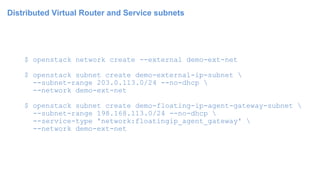
Distributed Virtual Router and Service subnets
$ openstack network create --external demo-ext-net
$ openstack subnet create demo-external-ip-subnet 
--subnet-range 203.0.113.0/24 --no-dhcp 
--network demo-ext-net
$ openstack subnet create demo-floating-ip-agent-gateway-subnet 
--subnet-range 198.168.113.0/24 --no-dhcp 
--service-type 'network:floatingip_agent_gateway' 
--network demo-ext-net
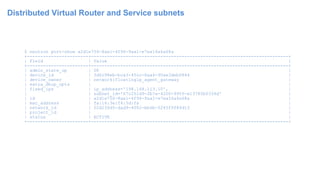
Distributed Virtual Router and Service subnets
$ neutron port-show a2d1e756-8ae1-4f96-9aa1-e7ea16a6a68a
+-----------------------+--------------------------------------------------------------------------+
| Field | Value |
+-----------------------+--------------------------------------------------------------------------+
| admin_state_up | UP |
| device_id | 3d0c98eb-bca3-45cc-8aa4-90ae3deb0844 |
| device_owner | network:floatingip_agent_gateway |
| extra_dhcp_opts | |
| fixed_ips | ip_address='198.168.113.10', |
| | subnet_id='67c251d9-2b7a-4200-99f6-e13785b0334d' |
| id | a2d1e756-8ae1-4f96-9aa1-e7ea16a6a68a |
| mac_address | fa:16:3e:f4:5d:fa |
| network_id | 02d236d5-dad9-4082-bb6b-5245f9f84d13 |
| project_id | |
| status | ACTIVE |
+-----------------------+--------------------------------------------------------------------------+
Distributed Virtual Router - Distributed North South with BGP and Service subnet
br-tun
qrouter
br-ex
Network Node
Compute Node 1 Compute Node2
br-tunbr-tun
br-int
VM2VM1
br-int br-int
VM4VM3
Private_net
Public_net
qrouter qrouter
FIP FIP
br-ex br-ex
SNAT
BGP
Service_subnet
192.168.113.40 192.168.113..41192.168.113.39
Rack1
with
segment 1
Router
Router
192.168.113.50
203.0.113.150203.0.113.0/24
10.0.10.20 10.0.10.21 10.0.10.22 10.0.10.23
203.0.113.22 203.0.113.21
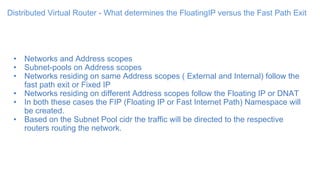
Distributed Virtual Router - What determines the FloatingIP versus the Fast Path Exit
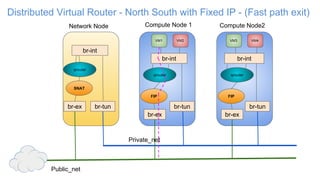
• Networks and Address scopes
• Subnet-pools on Address scopes
• Networks residing on same Address scopes ( External and Internal) follow the
fast path exit or Fixed IP
• Networks residing on different Address scopes follow the Floating IP or DNAT
• In both these cases the FIP (Floating IP or Fast Internet Path) Namespace will
be created.
• Based on the Subnet Pool cidr the traffic will be directed to the respective
routers routing the network.
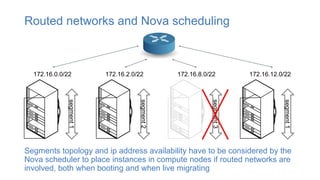
Routed networks and Nova scheduling
Segments topology and ip address availability have to be considered by the
Nova scheduler to place instances in compute nodes if routed networks are
involved, both when booting and when live migrating
segment1
172.16.0.0/22
segment2
172.16.2.0/22
segment3
172.16.8.0/22
segment1
172.16.12.0/22
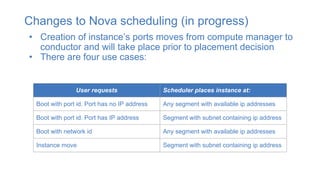
Changes to Nova scheduling (in progress)
• Creation of instance’s ports moves from compute manager to
conductor and will take place prior to placement decision
• There are four use cases:
User requests Scheduler places instance at:
Boot with port id. Port has no IP address Any segment with available ip addresses
Boot with port id. Port has IP address Segment with subnet containing ip address
Boot with network id Any segment with available ip addresses
Instance move Segment with subnet containing ip address
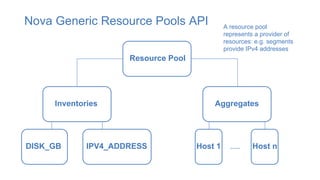
Nova Generic Resource Pools API
Resource Pool
Inventories Aggregates
DISK_GB IPV4_ADDRESS Host 1 Host n…..
A resource pool
represents a provider of
resources: e.g. segments
provide IPv4 addresses
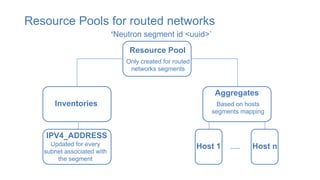
Resource Pools for routed networks
Resource Pool
Inventories
Aggregates
IPV4_ADDRESS
Host 1 Host n…..
Only created for routed
networks segments
‘Neutron segment id <uuid>’
Updated for every
subnet associated with
the segment
Based on hosts
segments mapping
Agenda
• Why Routed Networks
• Layer 2 and layer-3 networks at scale
• Routed Networks implementation
• Changes to Neutron
• Interaction with the Nova scheduler
• Configuration
Physical preparation
• Unique physnet per segment
• VLAN number is independent per physnet
• VLAN ids can be re-used from segment to segment
• DHCP agent hosts per physnet
• Your choice of routing architecture
Neutron Configuration
• Configure segments service plugin
• Bridge mappings
• OVN provides a different way to configure host to segment access
• Create network
• Includes creating the segments with multi-provider extension
• Creating segments after network creation is also supported
• Create subnets
• Include segment_id from previous step with each subnet create
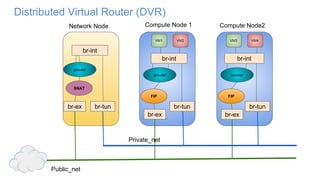
Distributed Virtual Router (DVR)
br-tun
qrouter
br-ex
Network Node Compute Node 1 Compute Node2
br-tunbr-tun
br-int
VM2VM1
br-int br-int
VM4VM3
Private_net
Public_net
qrouter qrouter
FIP FIP
br-ex br-ex
SNAT
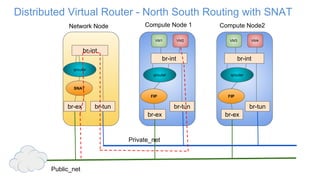
Distributed Virtual Router - North South Routing with SNAT
br-tun
qrouter
br-ex
Network Node Compute Node 1 Compute Node2
br-tunbr-tun
br-int
VM2VM1
br-int br-int
VM4VM3
Private_net
Public_net
qrouter qrouter
FIP FIP
br-ex br-ex
SNAT
Distributed Virtual Router - North South with Fixed IP - (Fast path exit)
br-tun
qrouter
br-ex
Network Node Compute Node 1 Compute Node2
br-tunbr-tun
br-int
VM2VM1
br-int br-int
VM4VM3
Private_net
Public_net
qrouter qrouter
FIP FIP
br-ex br-ex
SNAT
Distributed Virtual Router - Distributed North South with BGP and Service subnet
br-tun
qrouter
br-ex
Network Node
Compute Node 1 Compute Node2
br-tunbr-tun
br-int
VM2VM1
br-int br-int
VM4VM3
Private_net
Public_net
qrouter qrouter
FIP FIP
br-ex br-ex
SNAT
BGP
Speaker
Service_subnet
192.168.113.40 192.168.113..41192.168.113.39
Rack1
with
segment 1
Router
Router
192.168.113.50
203.0.113.150203.0.113.0/24
10.0.10.20 10.0.10.21 10.0.10.22 10.0.10.23
203.0.113.22 203.0.113.21

Routed networks sydney

  • 1.
    Routed Networks Update SwaminathanVasudevan, SUSE Miguel Lavalle, Huawei
  • 2.
    Agenda • Why RoutedNetworks • Layer 2 and layer-3 networks at scale • Routed Networks implementation • Changes to Neutron • Floating IPs and DVR • Interaction with the Nova scheduler • Configuration
  • 3.
    Agenda • Why RoutedNetworks • Layer 2 and layer-3 networks at scale • Routed Networks implementation • Changes to Neutron • Floating IPs and DVR • Interaction with the Nova scheduler • Configuration
  • 4.
    TenantA-VM1 10.0.0.2 TenantA-VM3 9.0.0.2 TenantA-VM2 10.0.0.3 9.0.0.3 Load Balancer PublicNet 88.0.0.0/18 Tenant-A Net1 10.0.0.0/24 Tenant-A Net2 9.0.0.0/24 Providing a rich toolkit to create complex networking topologies Neutron excels at ….
  • 5.
    Neutron also excelsat …. VXLAN 123567 physnet1 VLAN 37 physnet2 VLAN 413 VM 1 VM 2 VM 3 • The entire network constitutes a contiguous layer-2 domain • Ports associated with network, not specific segment • Ports bound automatically to segment with connectivity Enabling admins to create complex layer-2 provider networks
  • 6.
    But what if…. Tenants only need to connect VM’s to a single or few shared networks VXLAN 123567 physnet1 VLAN 37 VM VMVM VMVMVM physnet1 VLAN 820 VM VMVM VMVMVM One alternative is to create one large layer-2 network • These networks become complex at larger scale • Also have large failure domains Layer-2 network
  • 7.
    Another alternative toachieve scale …. Collection of distinct networks routed together to the outside: network-1 VM VMVM VMVMVM network-2 VM VMVM VMVMVM network-3 VM VMVM VMVMVM • Leaves the choice of which network to select to the user • This is confusing, since nothing distinguishes one network from the other
  • 8.
    Routed Networks segment 1 VMVMVM VMVM segment 2 VM VMVM VMVM Layer-3 Layer-2 • Users boot instances to a routed network presented as a single entity. The compute host determines the segment. • This allows for simplicity and scalability simultaneously
  • 9.
    Agenda • Why RoutedNetworks • Layer-2 and layer-3 networks at scale • Routed Networks implementation • Changes to Neutron • Floating IPs and DVR • Interaction with the Nova scheduler • Configuration • Demo
  • 10.
    Segments • A segmentcontains the encapsulation details used to carry level-2 traffic • Each network has at least one segment associated with it • Segment details • network_type - how traffic is encapsulated • segmentation_id - the encapsulation identifier • physical_network - a unique name for the physical network the encapsulated traffic will be sent on • With L2 networks, multiple segments on the same networks are assumed to be bridged together • Not true for routed networks
  • 11.
    Network Segment APIextension • New in Newton as part of the implementation of routed networks • Moved segments from ML2 DB to the core DB model • Made segment an API resource with uuid • CRUD operations for segments as part of the ReST API • Exposed as a service plugin • Not enabled by default • All core plugins are not guaranteed to work with it • Available with: • ML2 agents based implementation • Ml2 OVN mechanism driver. Requires own host mapping mechanism
  • 12.
    Subnets associate tosegments in routed networks segment1 172.16.0.0/22 segment2 172.16.2.0/22 segment3 172.16.8.0/22 segment1 172.16.12.0/22
  • 13.
    Subnets associate tosegments in routed networks • Associating a subnet to a segment • $ openstack subnet create --network multinet --ip-version 4 --network-segment my-segment --subnet-range 172.16.0.0/22 multinet-segment1-subnet • This turns a network into a routed network • Networks have a new attribute l2_adjacency • When a network is originally created, l2_adjacency is True • When subnets are assigned to segments, it becomes a routed network and its l2_adjacency becomes False • Cannot mix subnets with segments and without segments in the same network
  • 14.
    Each segment requiresat least one DHCP agent segment1 172.16.0.0/22 segment2 172.16.2.0/22 segment3 172.16.8.0/22 segment1 172.16.12.0/22 DHCP DHCP DHCP DHCP If segments are small, DHCP can run in one of the compute nodes in each rack
  • 15.
    Ports in routednetworks • In a routed network, a port cannot get ip addresses until it is bound, when the segment it will be connected to is known • These unbound ports have an empty fixed_ips attribute • Ports have a new attribute ip_allocation • immediate for bound and unbound ports in l2 networks • immediate for ports in routed networks that were bound at creation • deferred for routed networks ports that were unbound at creation. • It will remain deferred even after binding • Neutron maintains a hosts to segments mapping • Used during host binding to allocate ip addresses • Available in ML2 agent based implementations and OVN
  • 16.
    Agenda • Why RoutedNetworks • Layer 2 and layer-3 networks at scale • Routed Networks implementation • Changes to Neutron • Floating IPs and DVR • Interaction with the Nova scheduler • Configuration
  • 17.
    Floating IPs • FloatingIP subnets • BGP • With Neutron router • Routed external gateway • No Neutron router • NAT on the port? • DVR • DNAT on router namespace. • Service subnet to reduce the public IP consumption segment1 physnet1 172.16.0.0/22 segment2 segment3 segment1 physnet1 172.16.4.0/22 physnet1 172.16.8.0/22 physnet1 172.16.12.0/22 Datacenter Routing 203.0.113.251 -> 172.16.12.199 203.0.113.0/24 203.0.113.43 -> 172.16.0.227 BGP Speaker
  • 18.
    Distributed Virtual Router- North South Routing with DNAT br-tun qrouter br-ex Network Node Compute Node 1 Compute Node2 br-tunbr-tun br-int VM2VM1 br-int br-int VM4VM3 Private_net Public_net qrouter qrouter FIP FIP br-ex br-ex SNAT
  • 19.
    Distributed Virtual Router- FIP (FloatingIP or Fast Internet Path) Namespace
  • 20.
    Distributed Virtual Routerand Service subnets • DVR consumes one external public IP address per Compute Node for North-South Routing. • The issue with this is, public IP addresses are expensive and the consumption increases as the scale increases. (No of compute nodes) • Service subnets was introduced to get around the public IP address consumption by the FIP agent gateway. • With a BGP Speaker in place and defining a service subnet for the FloatingIP agent gateway port, it is easy to overcome the IP address consumption issue.
  • 21.
    Distributed Virtual Routerand Service subnets $ openstack network create --external demo-ext-net $ openstack subnet create demo-external-ip-subnet --subnet-range 203.0.113.0/24 --no-dhcp --network demo-ext-net $ openstack subnet create demo-floating-ip-agent-gateway-subnet --subnet-range 198.168.113.0/24 --no-dhcp --service-type 'network:floatingip_agent_gateway' --network demo-ext-net
  • 22.
    Distributed Virtual Routerand Service subnets $ neutron port-show a2d1e756-8ae1-4f96-9aa1-e7ea16a6a68a +-----------------------+--------------------------------------------------------------------------+ | Field | Value | +-----------------------+--------------------------------------------------------------------------+ | admin_state_up | UP | | device_id | 3d0c98eb-bca3-45cc-8aa4-90ae3deb0844 | | device_owner | network:floatingip_agent_gateway | | extra_dhcp_opts | | | fixed_ips | ip_address='198.168.113.10', | | | subnet_id='67c251d9-2b7a-4200-99f6-e13785b0334d' | | id | a2d1e756-8ae1-4f96-9aa1-e7ea16a6a68a | | mac_address | fa:16:3e:f4:5d:fa | | network_id | 02d236d5-dad9-4082-bb6b-5245f9f84d13 | | project_id | | | status | ACTIVE | +-----------------------+--------------------------------------------------------------------------+
  • 23.
    Distributed Virtual Router- Distributed North South with BGP and Service subnet br-tun qrouter br-ex Network Node Compute Node 1 Compute Node2 br-tunbr-tun br-int VM2VM1 br-int br-int VM4VM3 Private_net Public_net qrouter qrouter FIP FIP br-ex br-ex SNAT BGP Service_subnet 192.168.113.40 192.168.113..41192.168.113.39 Rack1 with segment 1 Router Router 192.168.113.50 203.0.113.150203.0.113.0/24 10.0.10.20 10.0.10.21 10.0.10.22 10.0.10.23 203.0.113.22 203.0.113.21
  • 24.
    Distributed Virtual Router- What determines the FloatingIP versus the Fast Path Exit • Networks and Address scopes • Subnet-pools on Address scopes • Networks residing on same Address scopes ( External and Internal) follow the fast path exit or Fixed IP • Networks residing on different Address scopes follow the Floating IP or DNAT • In both these cases the FIP (Floating IP or Fast Internet Path) Namespace will be created. • Based on the Subnet Pool cidr the traffic will be directed to the respective routers routing the network.
  • 25.
    Routed networks andNova scheduling Segments topology and ip address availability have to be considered by the Nova scheduler to place instances in compute nodes if routed networks are involved, both when booting and when live migrating segment1 172.16.0.0/22 segment2 172.16.2.0/22 segment3 172.16.8.0/22 segment1 172.16.12.0/22
  • 26.
    Changes to Novascheduling (in progress) • Creation of instance’s ports moves from compute manager to conductor and will take place prior to placement decision • There are four use cases: User requests Scheduler places instance at: Boot with port id. Port has no IP address Any segment with available ip addresses Boot with port id. Port has IP address Segment with subnet containing ip address Boot with network id Any segment with available ip addresses Instance move Segment with subnet containing ip address
  • 27.
    Nova Generic ResourcePools API Resource Pool Inventories Aggregates DISK_GB IPV4_ADDRESS Host 1 Host n….. A resource pool represents a provider of resources: e.g. segments provide IPv4 addresses
  • 28.
    Resource Pools forrouted networks Resource Pool Inventories Aggregates IPV4_ADDRESS Host 1 Host n….. Only created for routed networks segments ‘Neutron segment id <uuid>’ Updated for every subnet associated with the segment Based on hosts segments mapping
  • 29.
    Agenda • Why RoutedNetworks • Layer 2 and layer-3 networks at scale • Routed Networks implementation • Changes to Neutron • Interaction with the Nova scheduler • Configuration
  • 30.
    Physical preparation • Uniquephysnet per segment • VLAN number is independent per physnet • VLAN ids can be re-used from segment to segment • DHCP agent hosts per physnet • Your choice of routing architecture
  • 31.
    Neutron Configuration • Configuresegments service plugin • Bridge mappings • OVN provides a different way to configure host to segment access • Create network • Includes creating the segments with multi-provider extension • Creating segments after network creation is also supported • Create subnets • Include segment_id from previous step with each subnet create
  • 32.
    Distributed Virtual Router(DVR) br-tun qrouter br-ex Network Node Compute Node 1 Compute Node2 br-tunbr-tun br-int VM2VM1 br-int br-int VM4VM3 Private_net Public_net qrouter qrouter FIP FIP br-ex br-ex SNAT
  • 33.
    Distributed Virtual Router- North South Routing with SNAT br-tun qrouter br-ex Network Node Compute Node 1 Compute Node2 br-tunbr-tun br-int VM2VM1 br-int br-int VM4VM3 Private_net Public_net qrouter qrouter FIP FIP br-ex br-ex SNAT
  • 34.
    Distributed Virtual Router- North South with Fixed IP - (Fast path exit) br-tun qrouter br-ex Network Node Compute Node 1 Compute Node2 br-tunbr-tun br-int VM2VM1 br-int br-int VM4VM3 Private_net Public_net qrouter qrouter FIP FIP br-ex br-ex SNAT
  • 35.
    Distributed Virtual Router- Distributed North South with BGP and Service subnet br-tun qrouter br-ex Network Node Compute Node 1 Compute Node2 br-tunbr-tun br-int VM2VM1 br-int br-int VM4VM3 Private_net Public_net qrouter qrouter FIP FIP br-ex br-ex SNAT BGP Speaker Service_subnet 192.168.113.40 192.168.113..41192.168.113.39 Rack1 with segment 1 Router Router 192.168.113.50 203.0.113.150203.0.113.0/24 10.0.10.20 10.0.10.21 10.0.10.22 10.0.10.23 203.0.113.22 203.0.113.21