Firebird and RAID


Choosing the right RAID configuration for
                Firebird.


              Paul Reeves
               IBPhoenix

     mail: preeves@ibphoenix.com
Introduction

Disc drives have become so cheap that im-
plementing RAID for a firebird server is now
very affordable.
Intended Audience
 It is hard enough to sell clients your applica-
tion, never mind get them to invest in a suit-
able server.
 Your clients don't have much of an in-house
IT dept.
 Your Sys Admins don't see why you need a
dedicated RAID array for your departmental
server.
        Unintended Audience
If you are working for a company that can
afford a million dollar SAN this talk may not
be much use to you.
The focus of this talk

Primarily looking at the day to day perform-
ance issues that underly RAID
Data recovery is not really considered.
However data recovery is heavily impacted
by choice of RAID.
What is RAID?

 Redundant Array of Inexpensive Discs

Redundant – if one disc fails the system continues.

Array – Discs grouped together bring better performance.

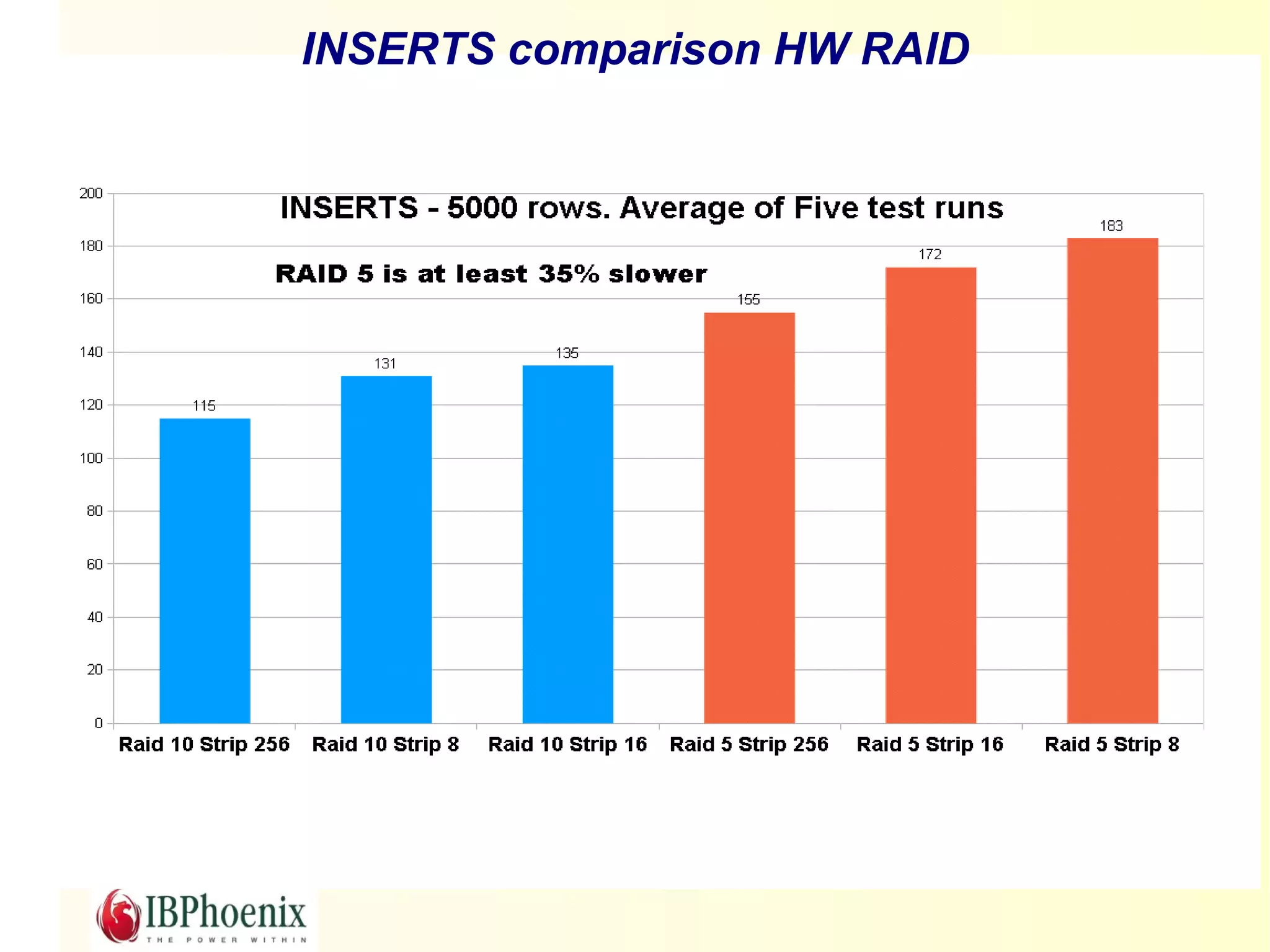
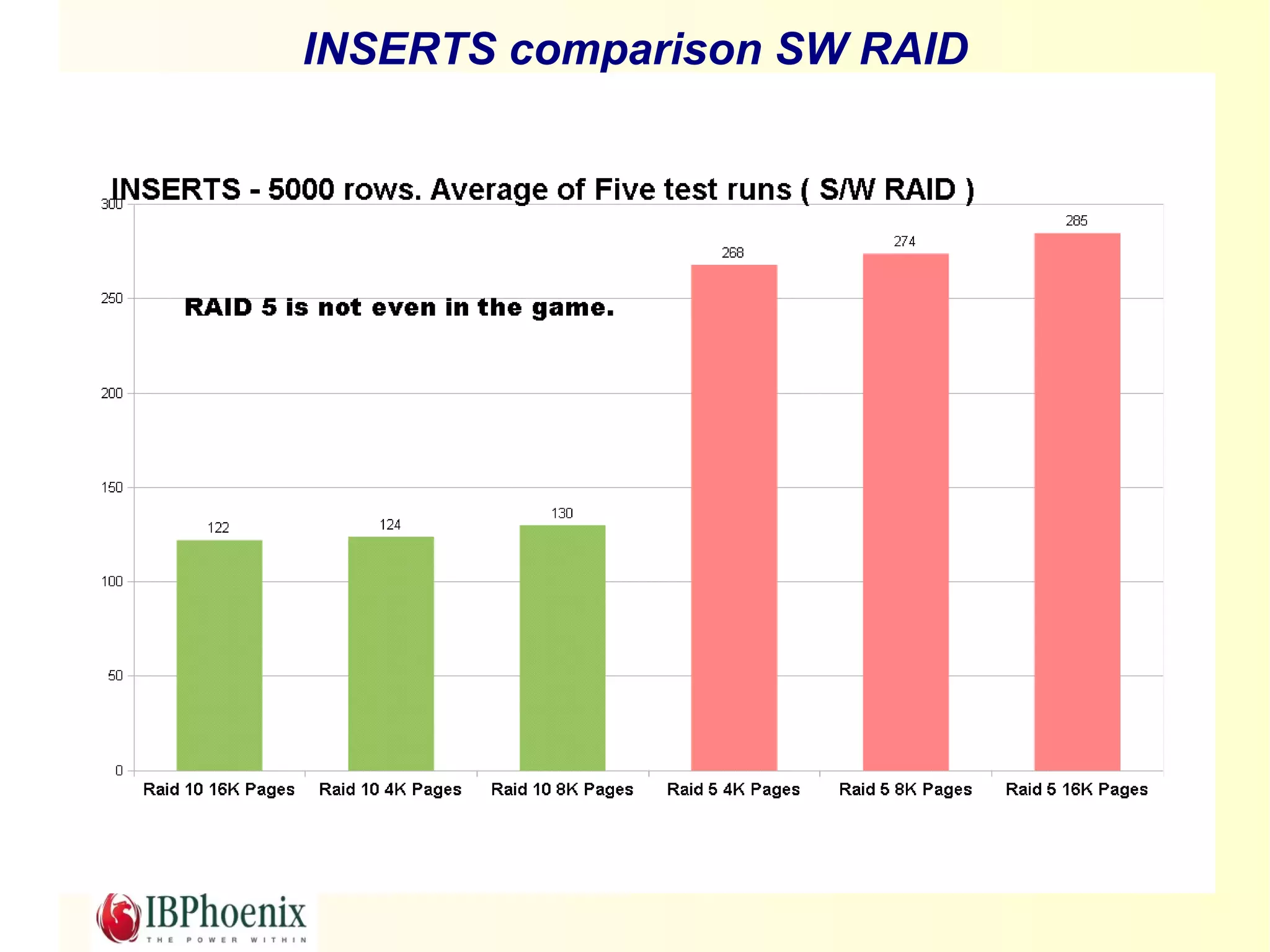
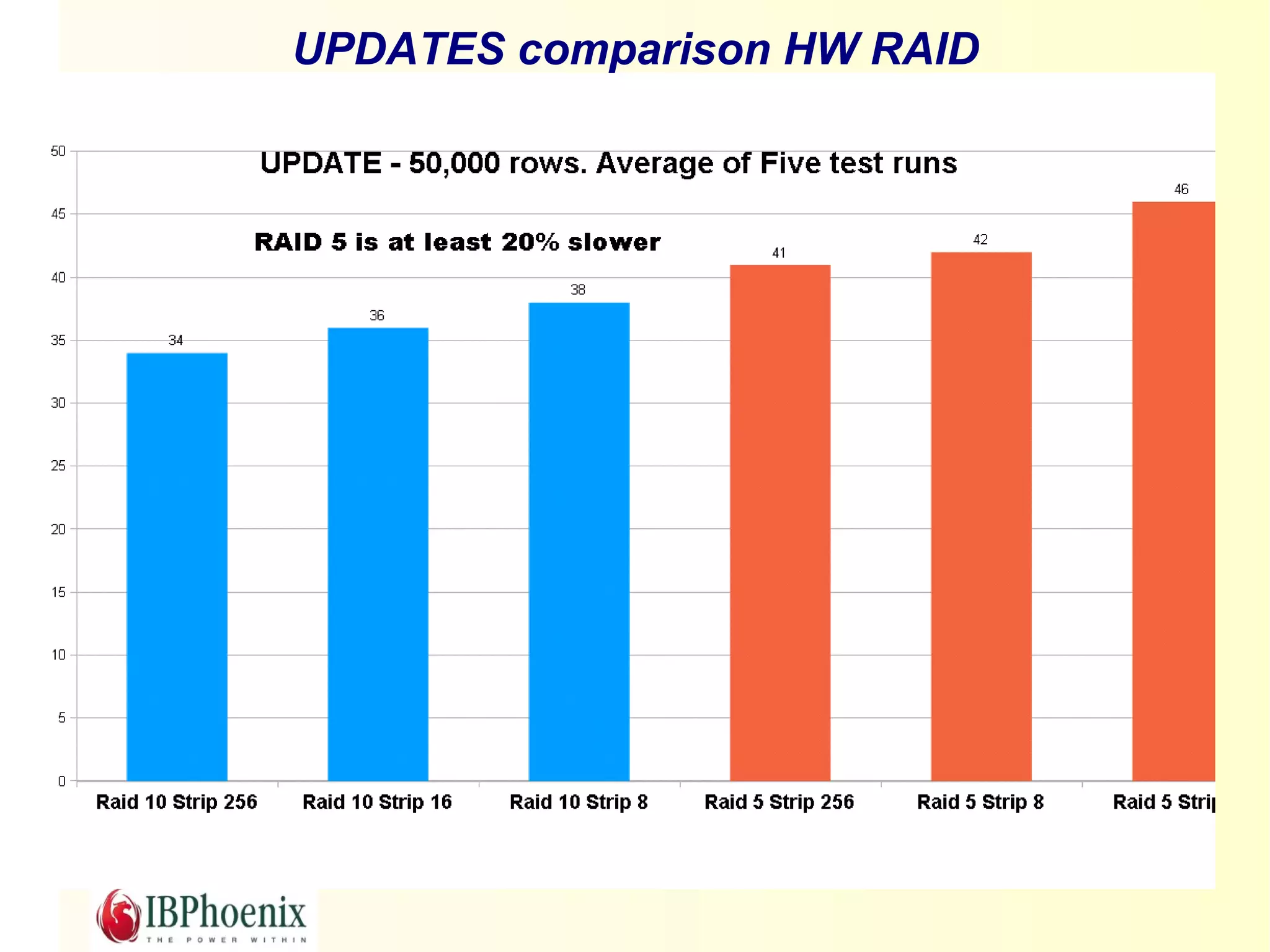
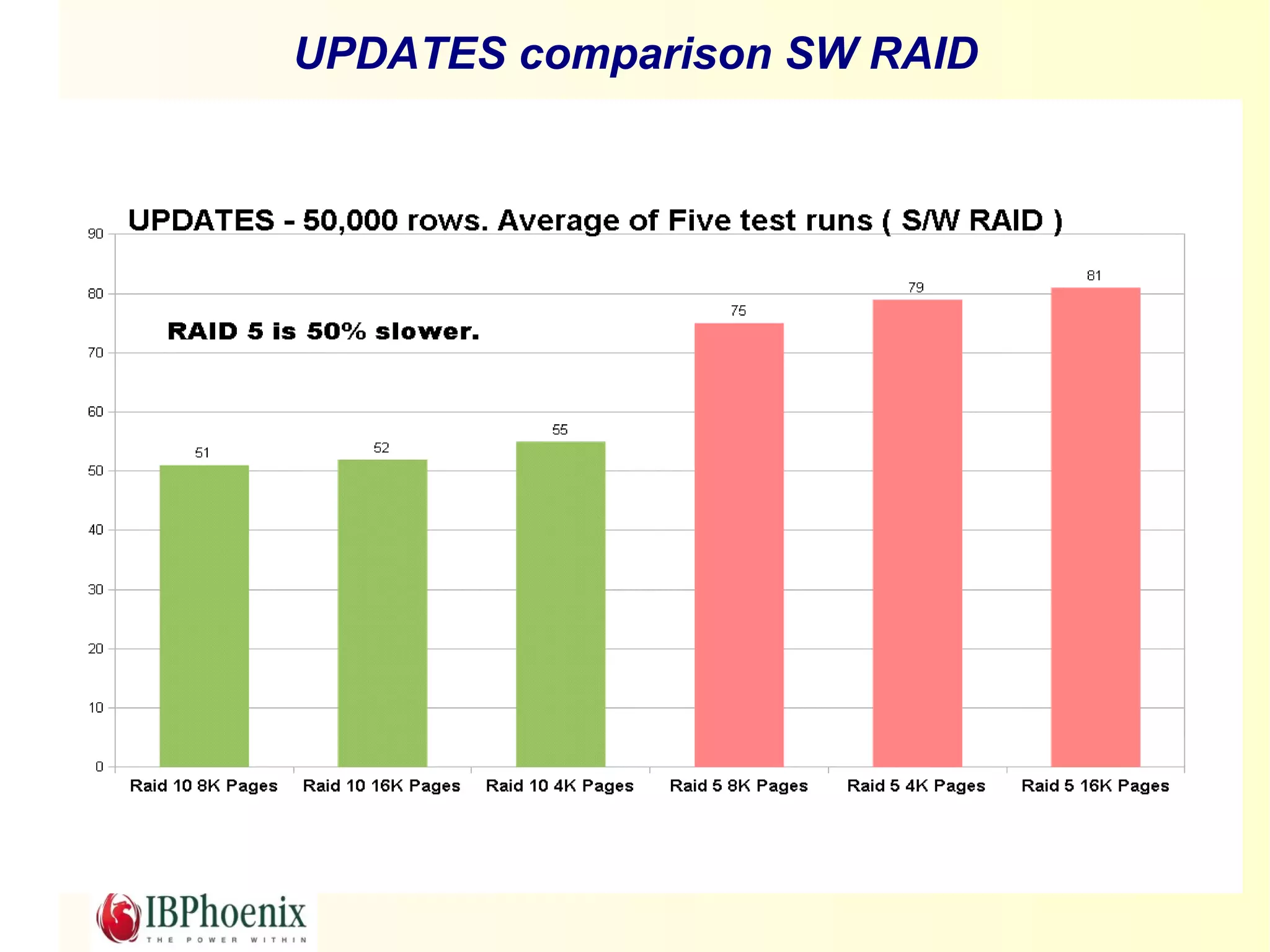
Inexpensive – Many cheap discs combined can work bet-

ter than more expensive discs.
RAID is NOT

An alternative backup strategy

RAID exists to overcome disc failure, not

data corruption.

Data corruption is copied to all discs so al-

ways make sure you make backups.
Redundancy has a price

All RAID implementations require writing to
more than one disc.
Database updates can actually become
slower (in extreme cases).
Forget about the fancy RAID names
There are just two basic types of RAID configuration
 Mirrored
 Parity

And there is two types of No RAID at all
 JBOD
 Disc striping (concatenating) – RAID 0
JBOD

Just a Bunch Of Discs

Where would we be without acronyms?
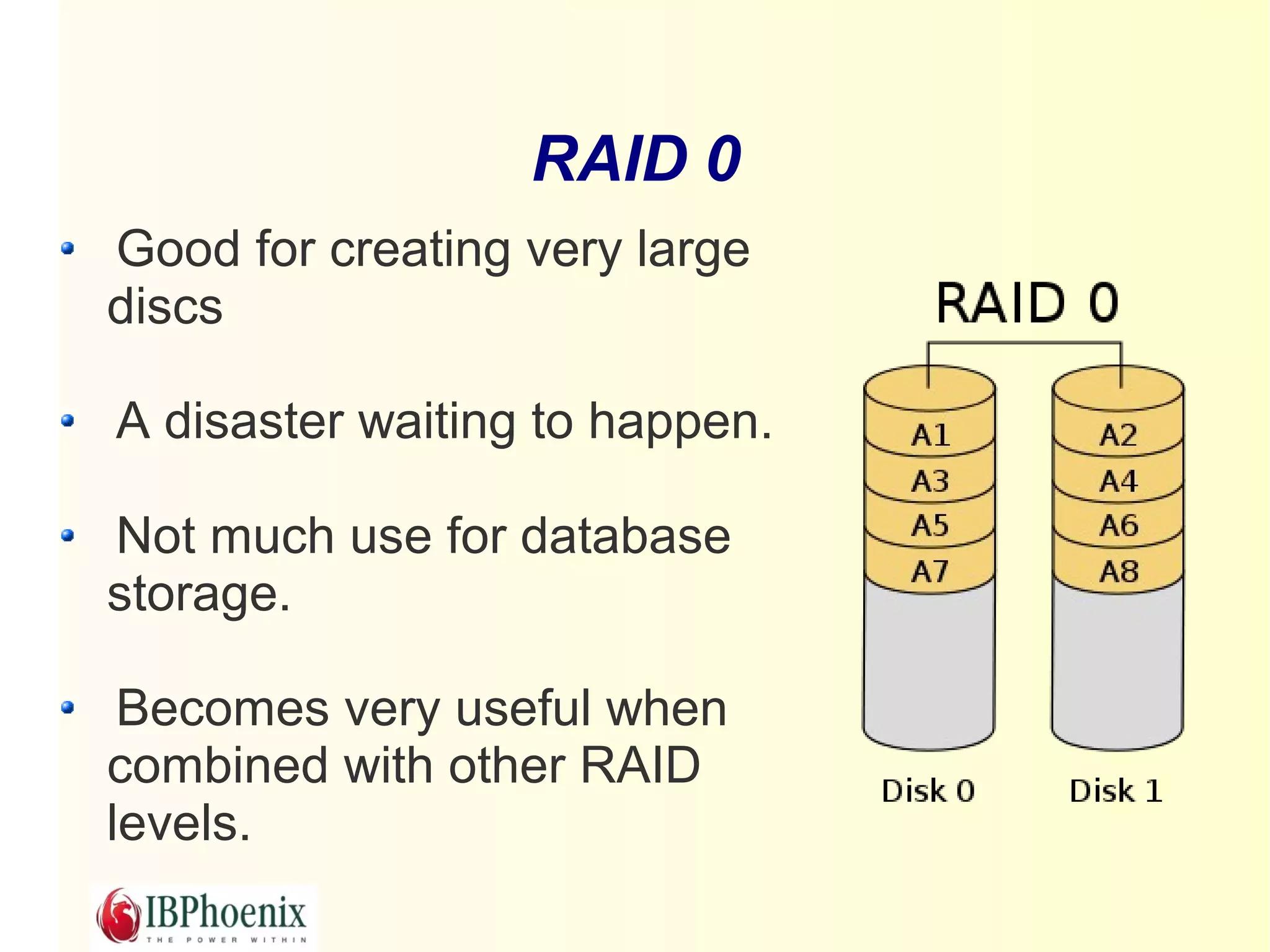
RAID 0
Good for creating very large
discs

A disaster waiting to happen.

Not much use for database
storage.

 Becomes very useful when
combined with other RAID
levels.
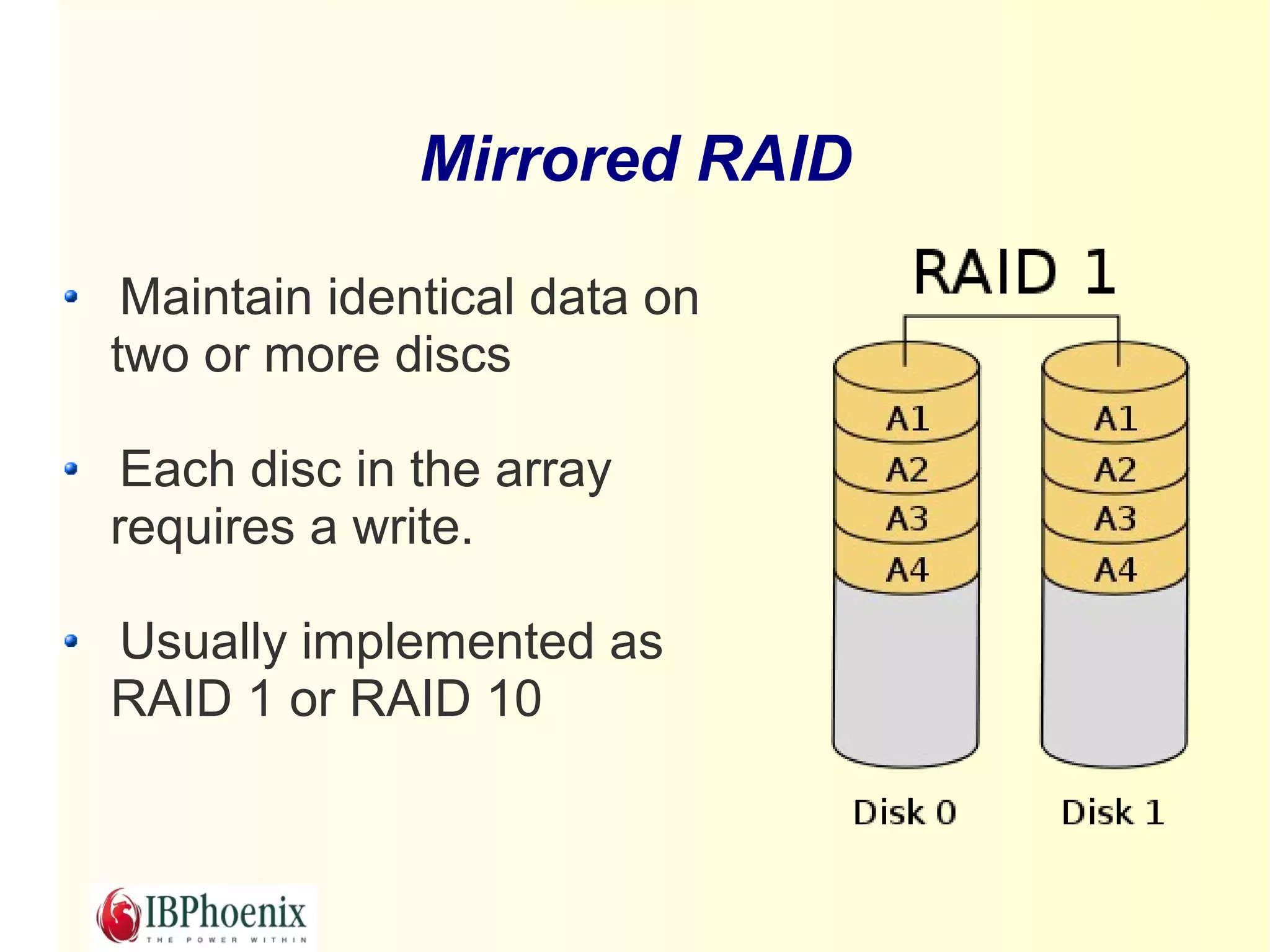
Mirrored RAID

 Maintain identical data on
two or more discs

 Each disc in the array
requires a write.

Usually implemented as
RAID 1 or RAID 10
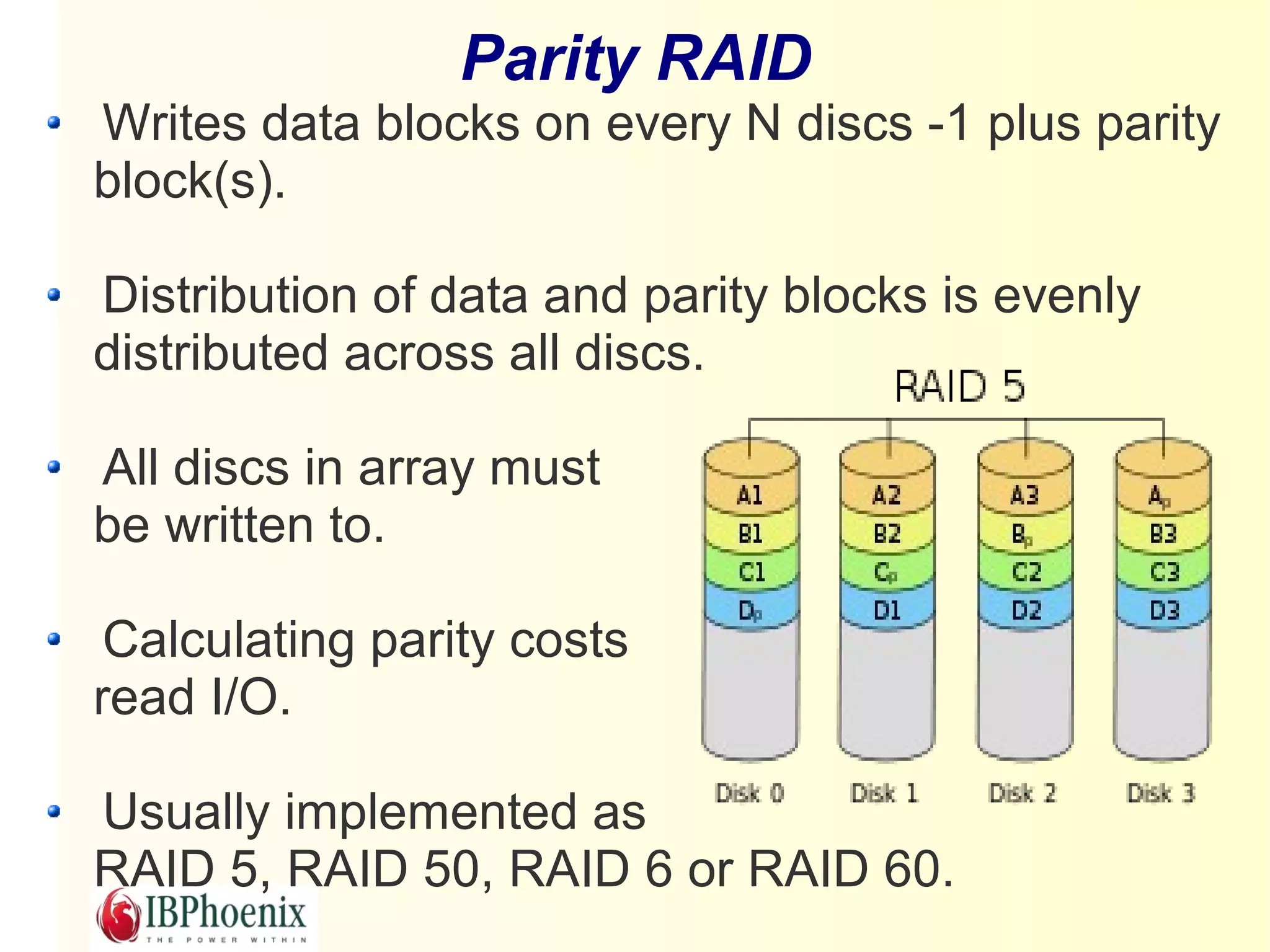
Parity RAID
Writes data blocks on every N discs -1 plus parity
block(s).

Distribution of data and parity blocks is evenly
distributed across all discs.

All discs in array must
be written to.

 Calculating parity costs
read I/O.

Usually implemented as
RAID 5, RAID 50, RAID 6 or RAID 60.
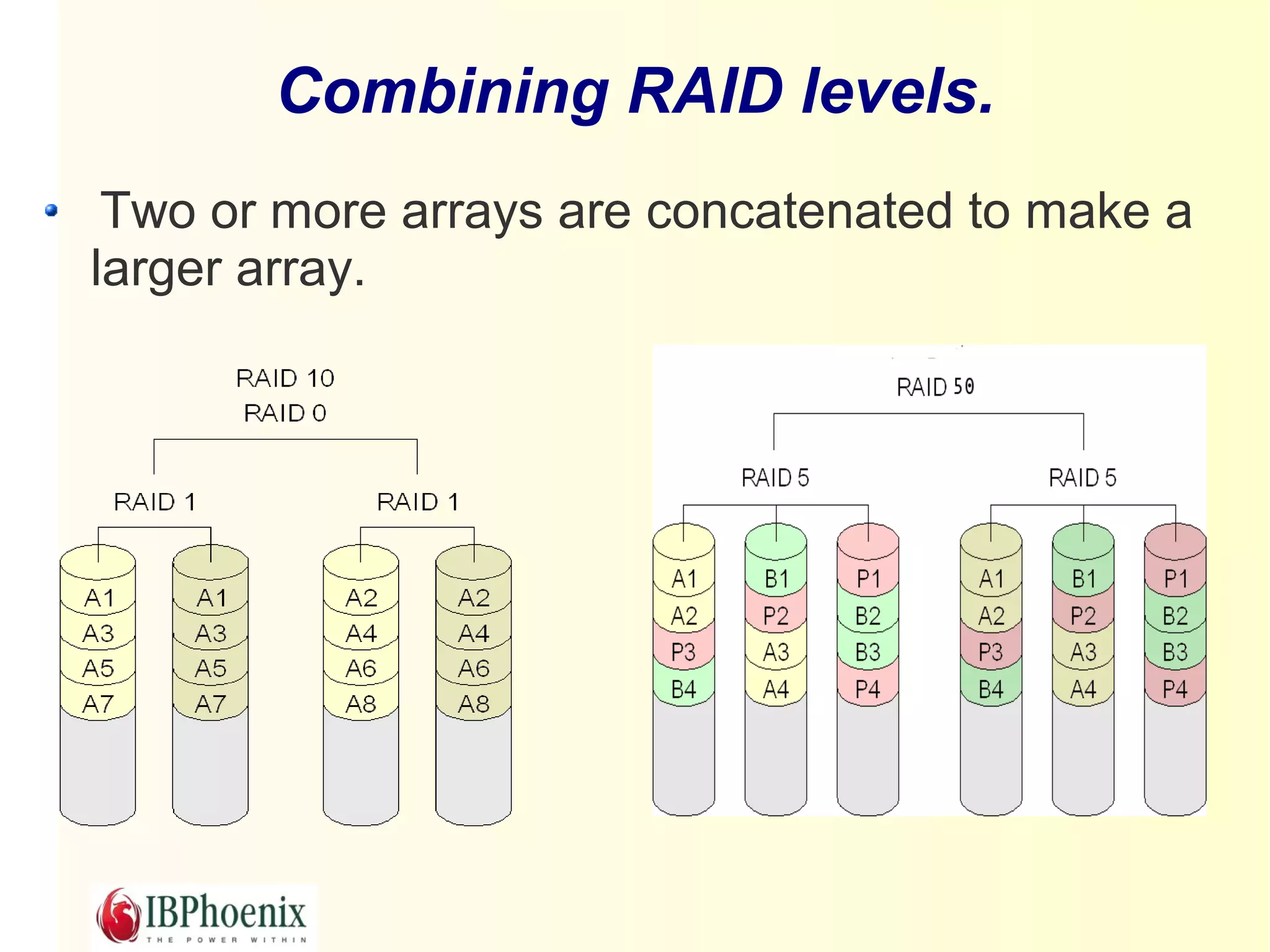
Combining RAID levels.
 Two or more arrays are concatenated to make a
larger array.
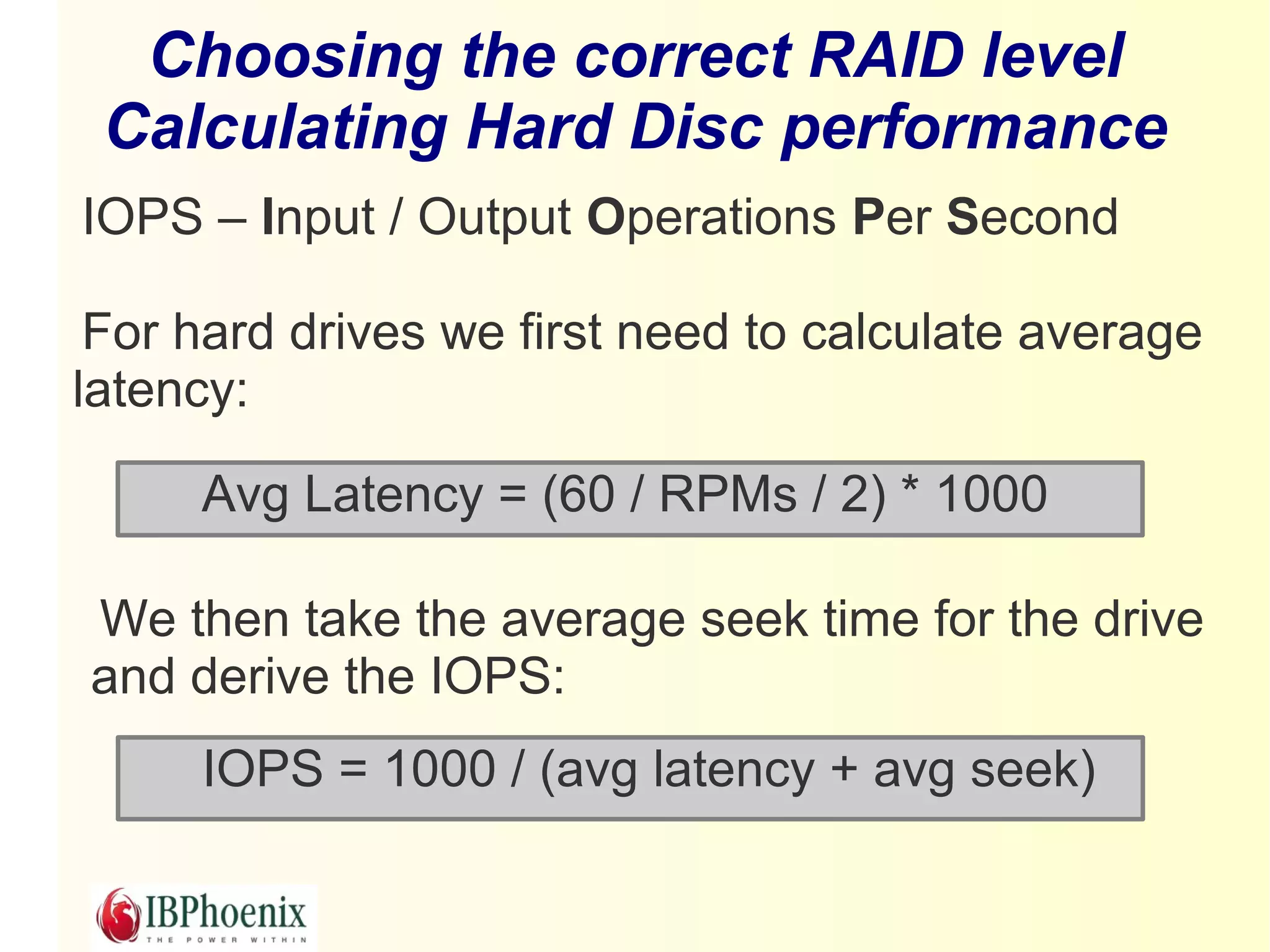
Choosing the correct RAID level
 Calculating Hard Disc performance
IOPS – Input / Output Operations Per Second

 For hard drives we first need to calculate average
latency:

     Avg Latency = (60 / RPMs / 2) * 1000

We then take the average seek time for the drive
and derive the IOPS:
     IOPS = 1000 / (avg latency + avg seek)
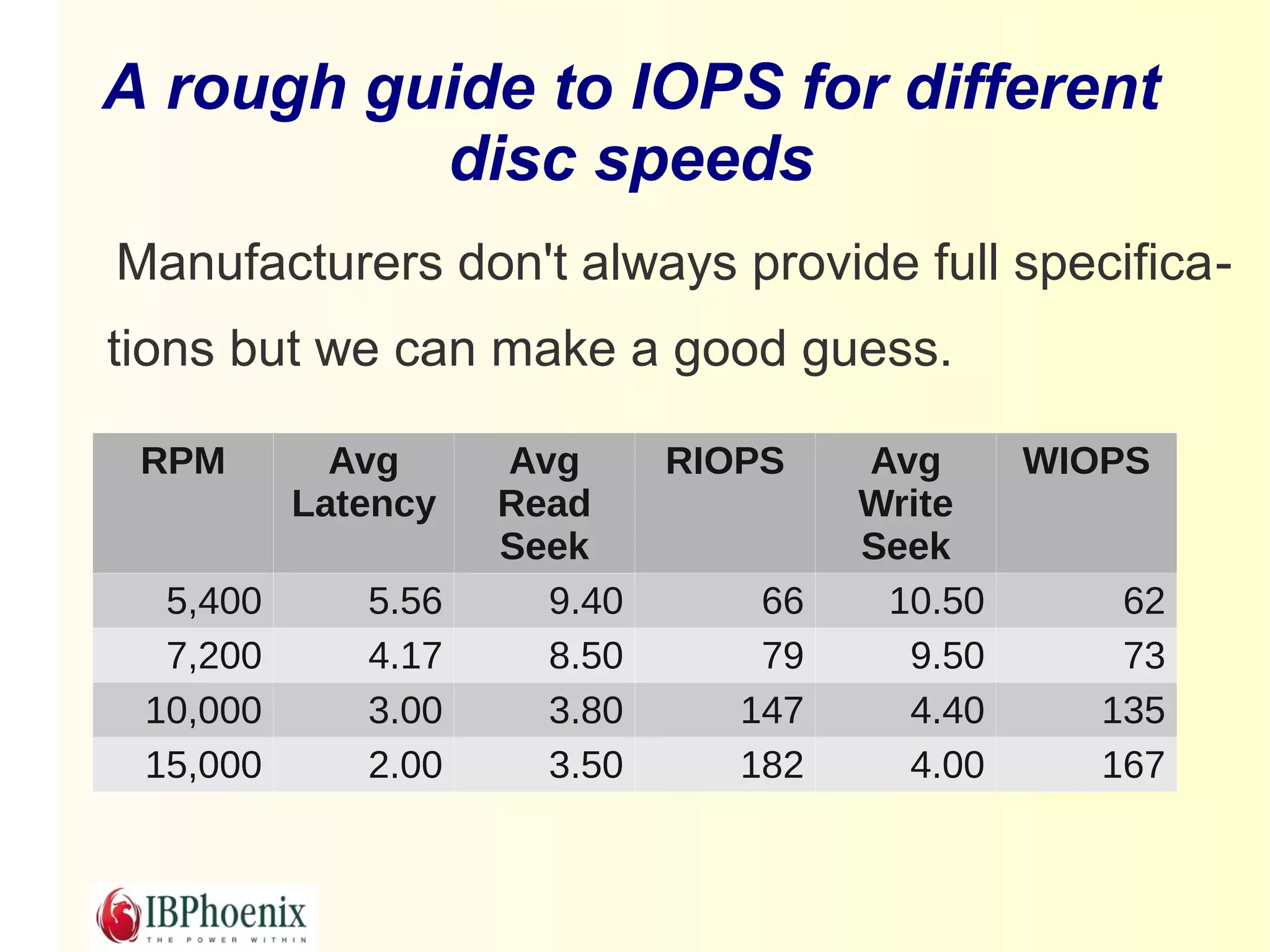
A rough guide to IOPS for different
          disc speeds
Manufacturers don't always provide full specifica-
tions but we can make a good guess.

 RPM        Avg     Avg      RIOPS    Avg    WIOPS
          Latency   Read              Write
                    Seek              Seek
  5,400      5.56     9.40       66    10.50     62
  7,200      4.17     8.50       79     9.50     73
 10,000      3.00     3.80      147     4.40    135
 15,000      2.00     3.50      182     4.00    167
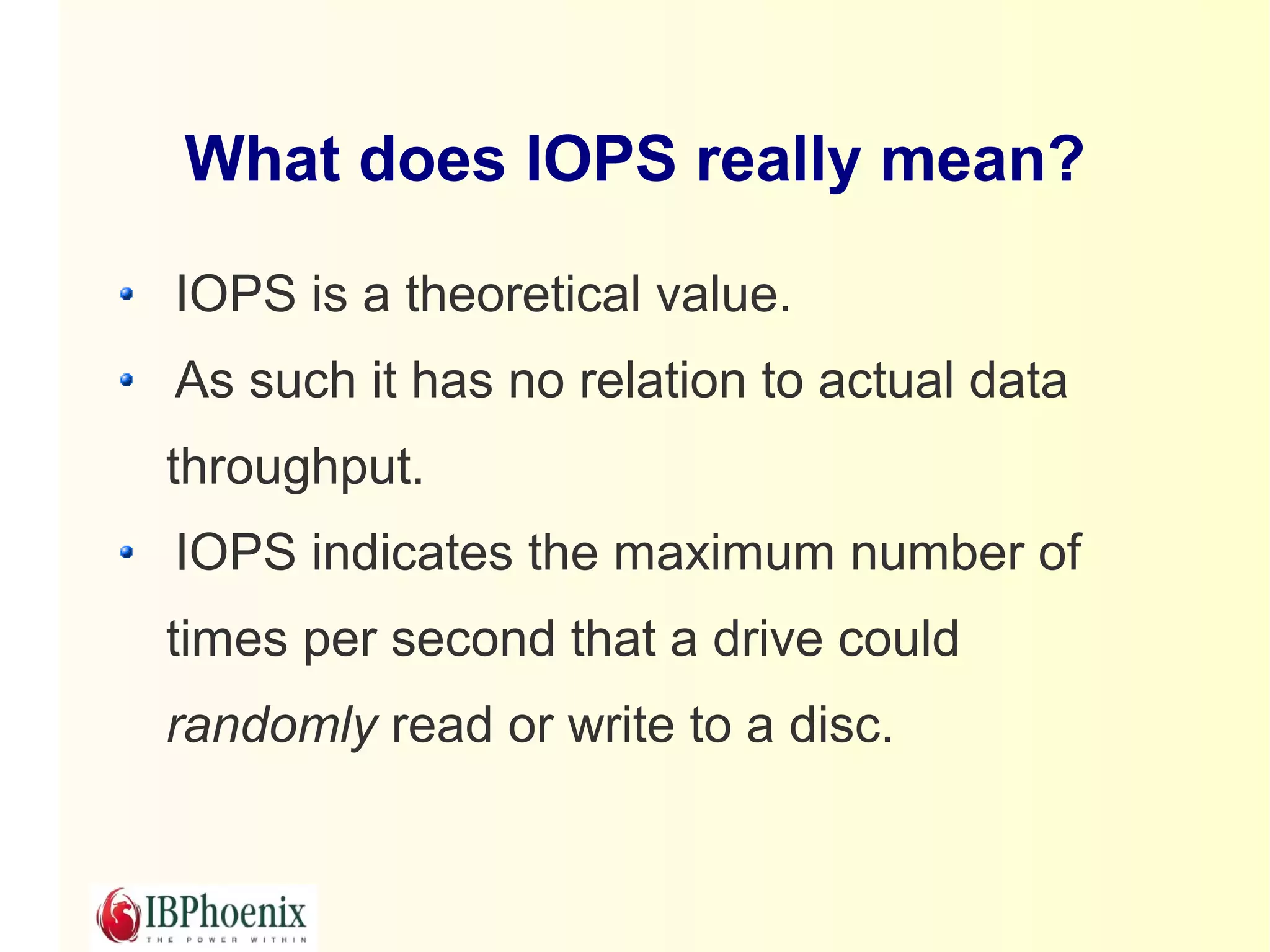
What does IOPS really mean?

IOPS is a theoretical value.
As such it has no relation to actual data
throughput.
IOPS indicates the maximum number of
times per second that a drive could
randomly read or write to a disc.
Random and Sequential Access
    - not what they seem
Sequential access is almost non-existent on
a server if more than one process is
accessing the disc

Random is rarely random – usually several
blocks can be written in a single I/O.
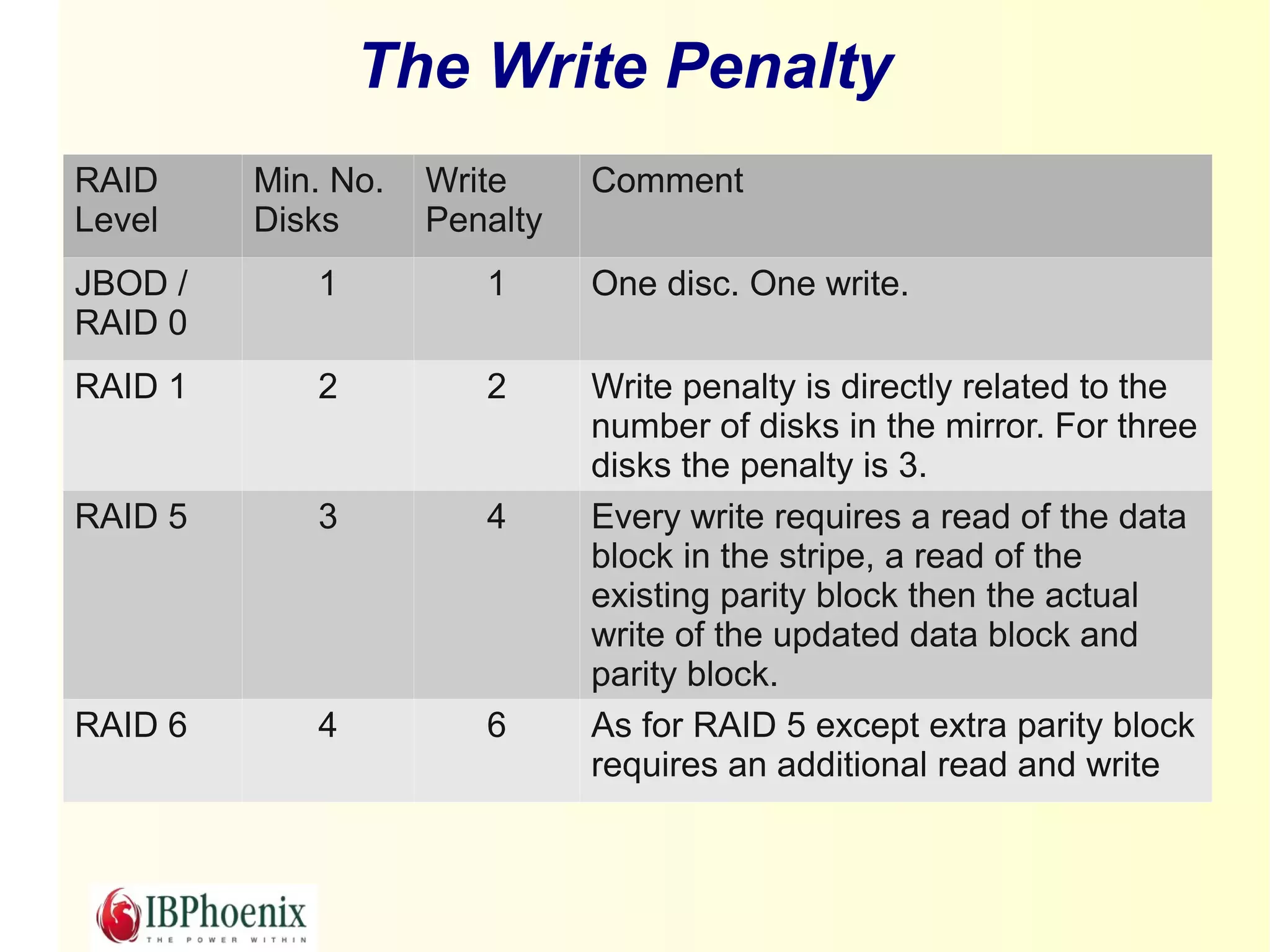
The Write Penalty
RAID     Min. No.   Write     Comment
Level    Disks      Penalty
JBOD /      1          1      One disc. One write.
RAID 0
RAID 1      2          2      Write penalty is directly related to the
                              number of disks in the mirror. For three
                              disks the penalty is 3.
RAID 5      3          4      Every write requires a read of the data
                              block in the stripe, a read of the
                              existing parity block then the actual
                              write of the updated data block and
                              parity block.
RAID 6      4          6      As for RAID 5 except extra parity block
                              requires an additional read and write
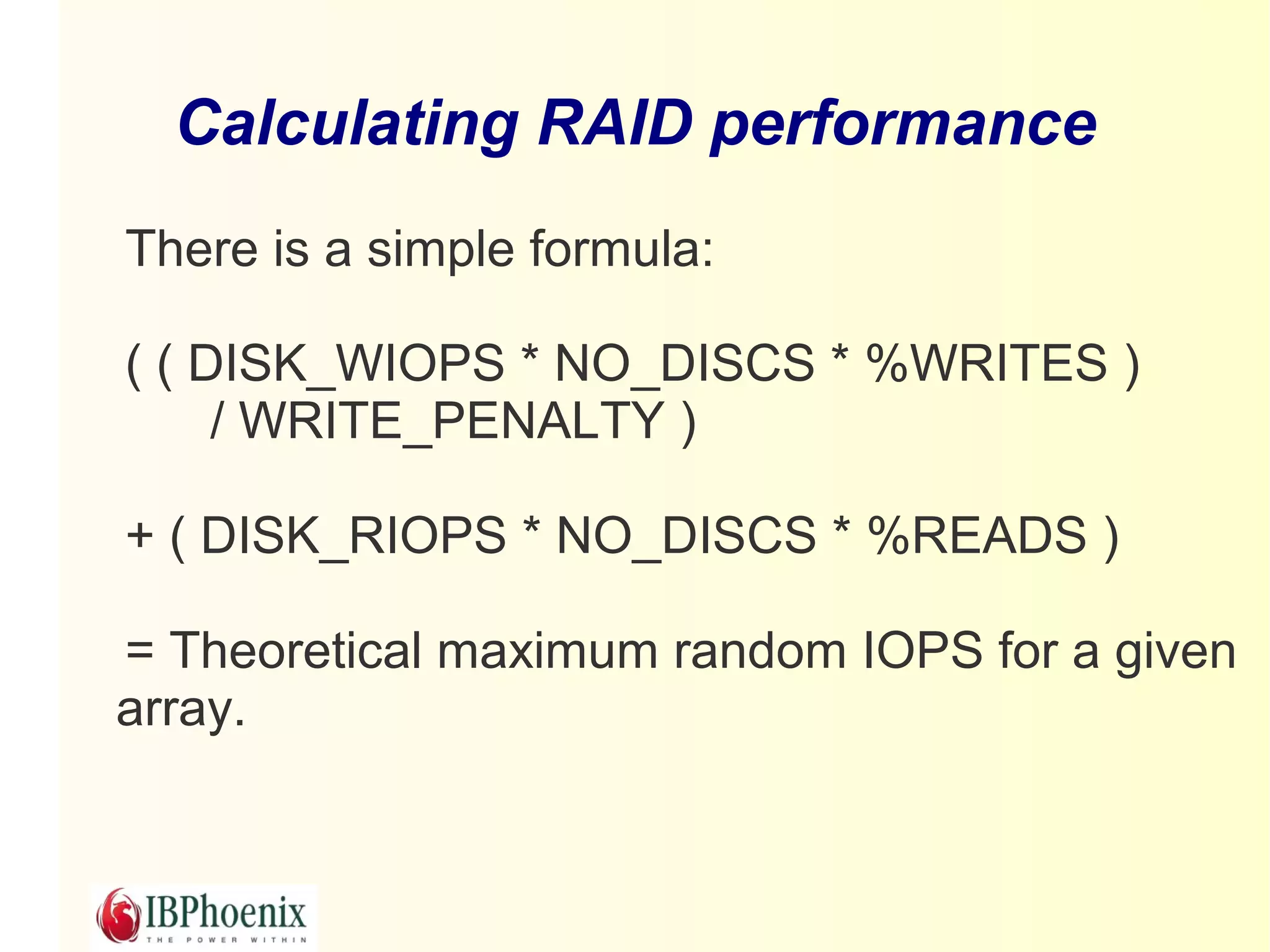
Calculating RAID performance
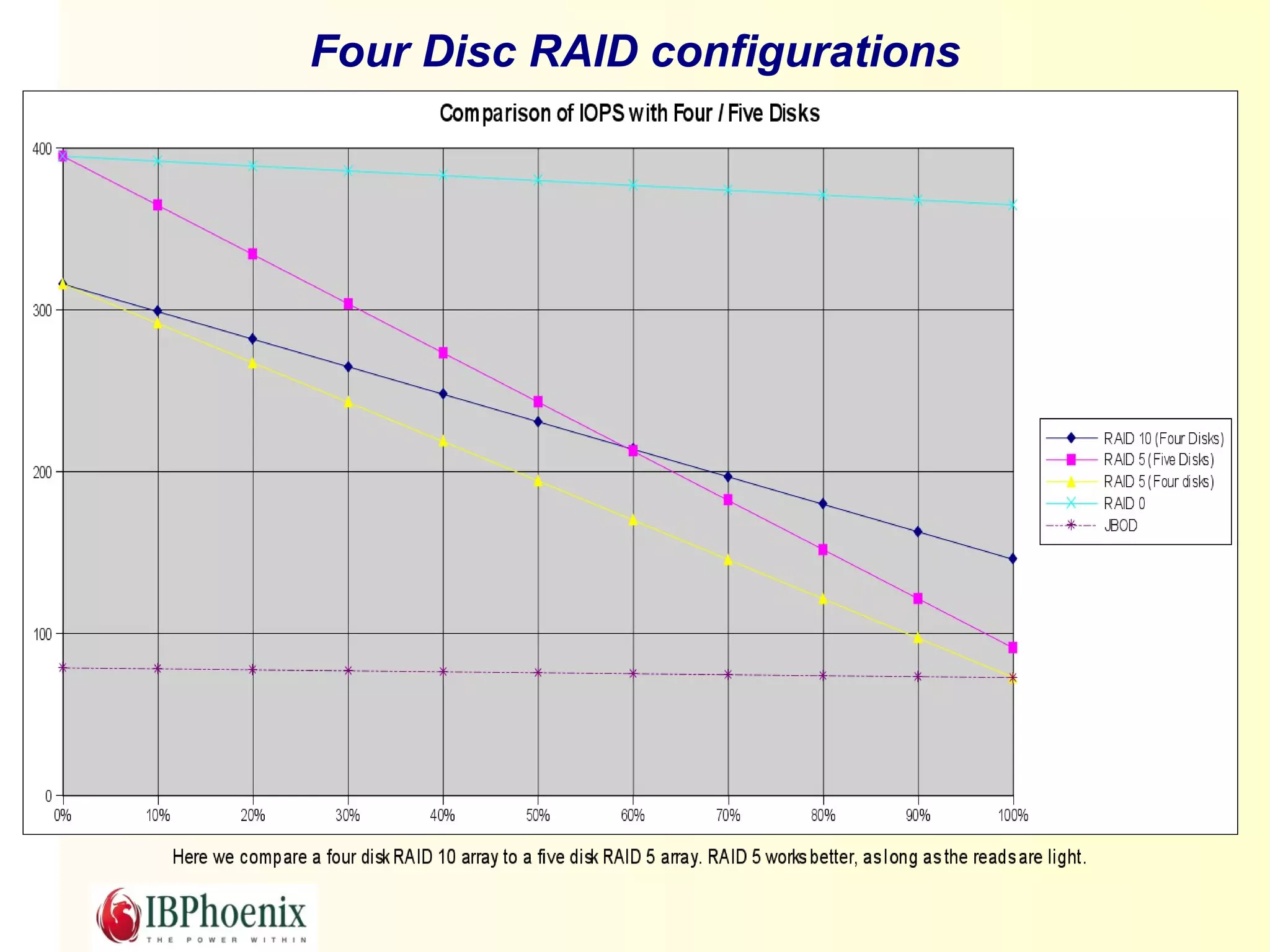
There is a simple formula:

( ( DISK_WIOPS * NO_DISCS * %WRITES )
     / WRITE_PENALTY )

+ ( DISK_RIOPS * NO_DISCS * %READS )

= Theoretical maximum random IOPS for a given
array.
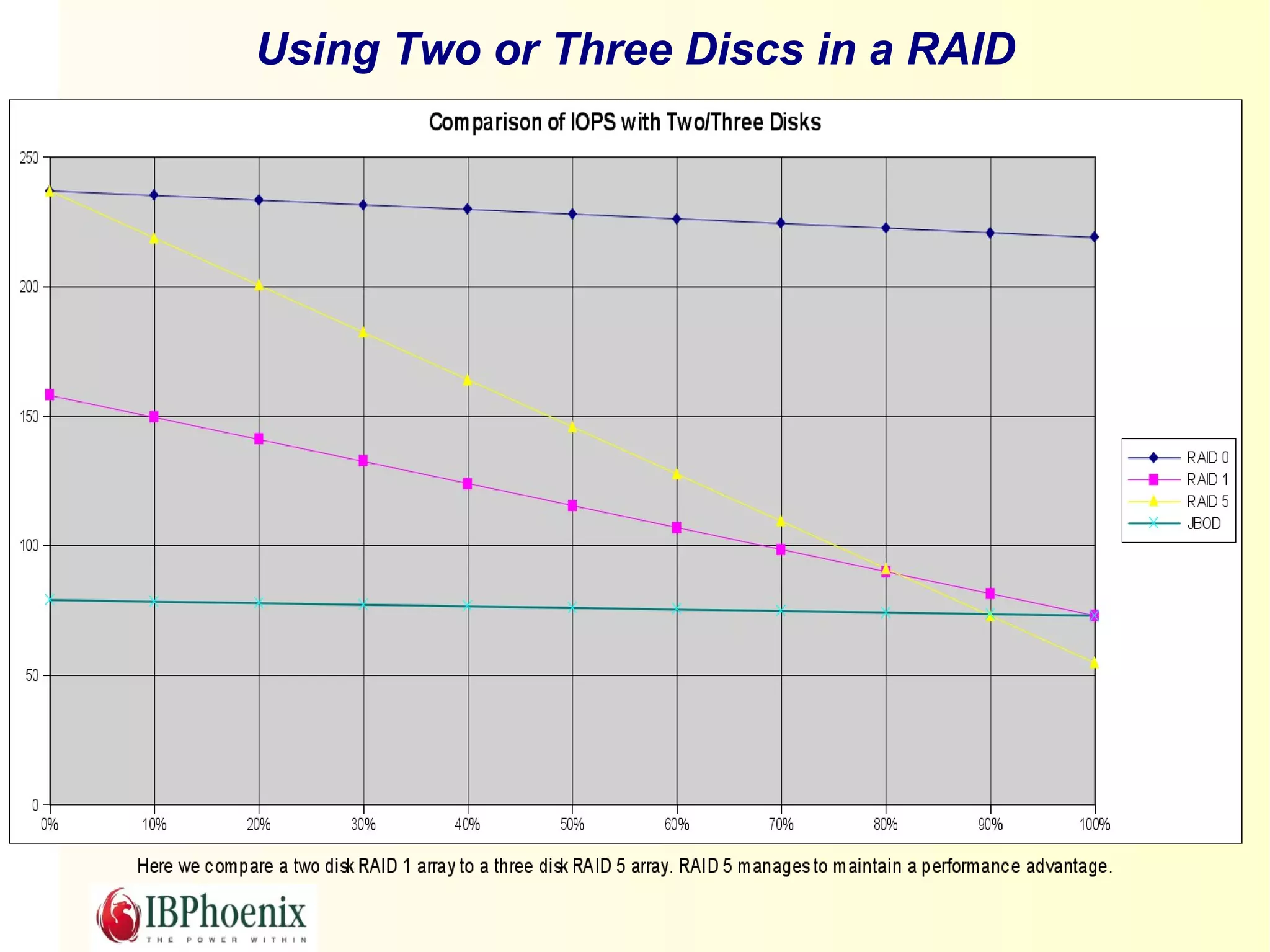
Using Two or Three Discs in a RAID
Four Disc RAID configurations
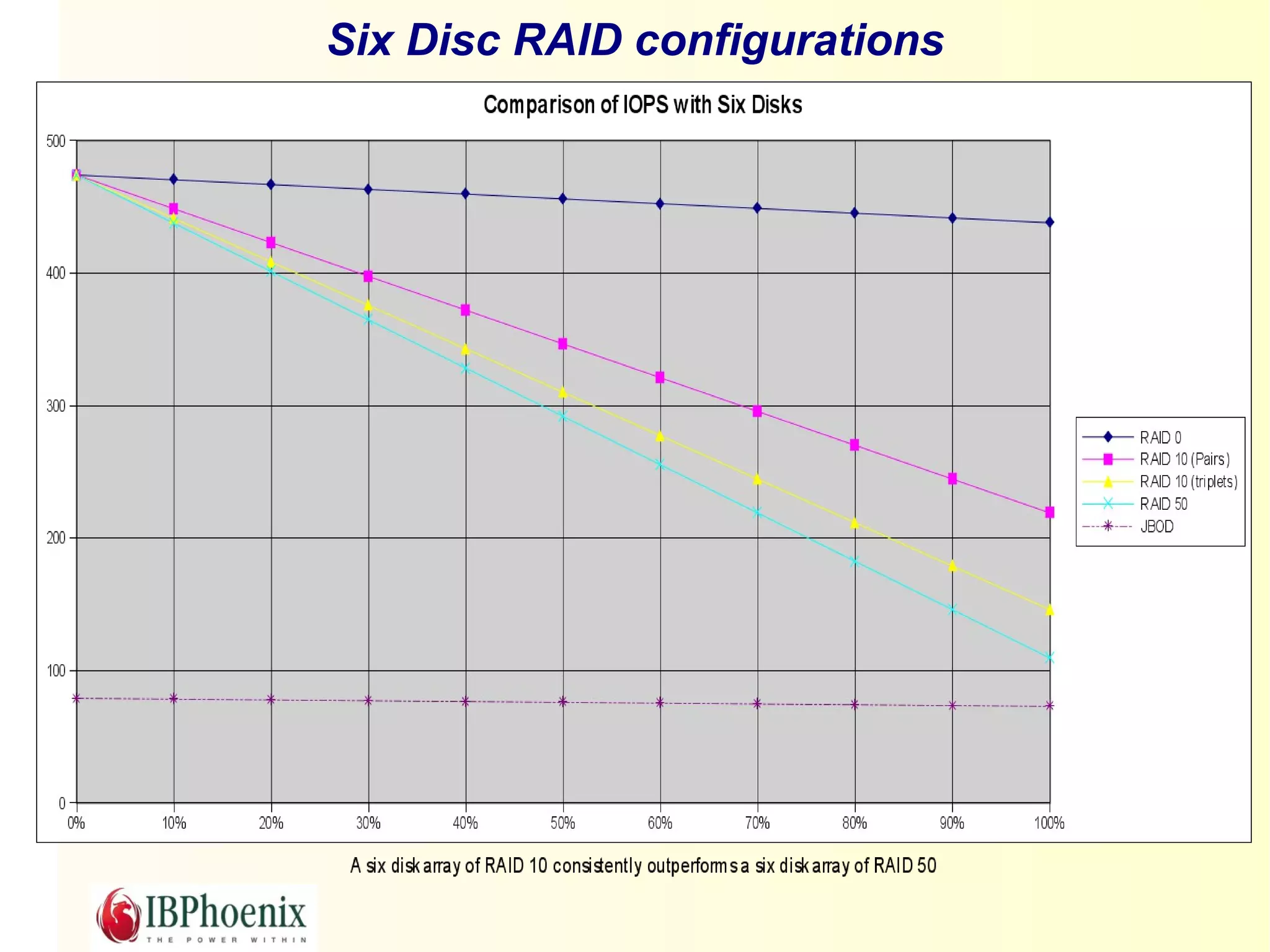
Six Disc RAID configurations
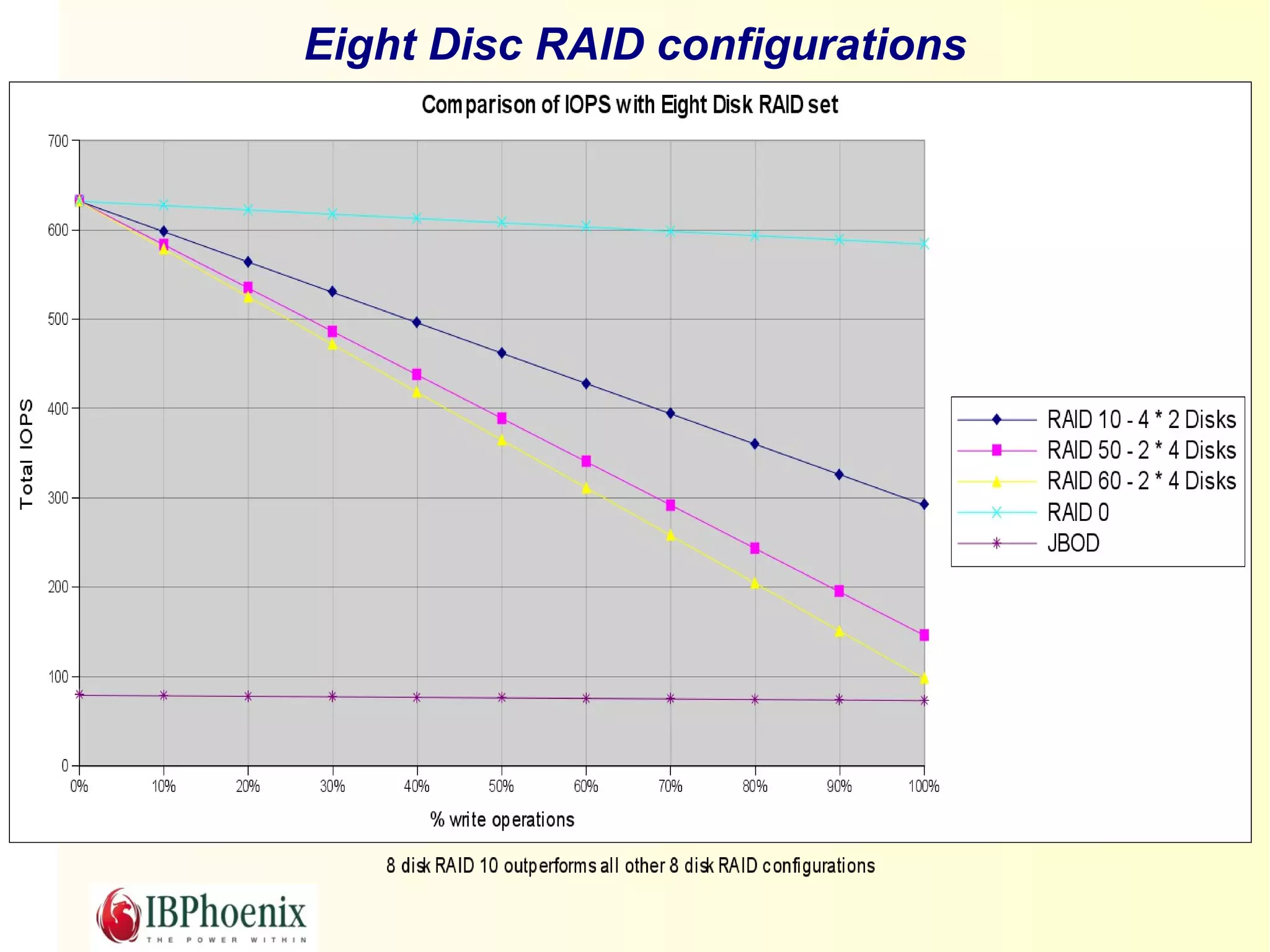
Eight Disc RAID configurations
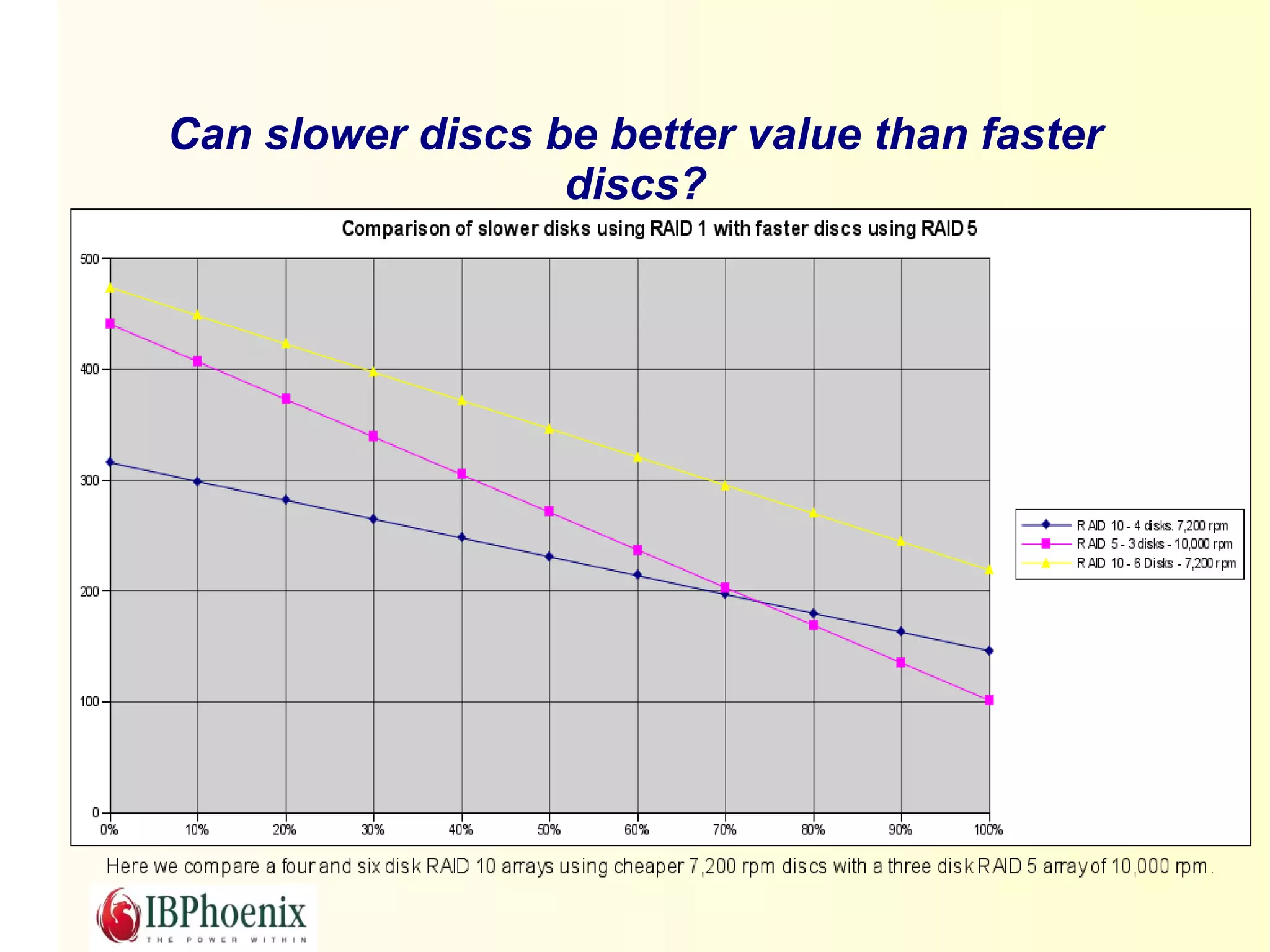
Can slower discs be better value than faster
                  discs?
Summary of Theory
Adding discs increases available IOPS.
The Write Penalty is real.
Write intensive applications always benefit from
Mirrored RAID.
For a given number of discs Mirrored RAID will
always outperform Parity RAID in Random I/O
unless the database is read only.
So much for theory.

What about reality?
First, you need a RAID Controller

Firmware based RAID controllers
Software based RAID controllers
Hardware based RAID controllers
Firmware RAID

AKA Fake RAID or Bios RAID.
Usually built into Motherboard or on cheap disc controller
cards.
Not easily portable in the event of failure.
Requires CPU and RAM from host.
It brings the benefit of configuration in the bios.
  By extension, this allows the O/S to boot from the RAID.
  But it also renders remote recovery a problem.
Software RAID

Part of the O/S
No special hardware required
Requires CPU and RAM from Host.
No Vendor Lock-in.
Portable – if Host fails just pop the discs into an-
other computer.
Linux implementation rich in functionality – aims to
provide top class RAID support.
No BBU
Hardware RAID

CPU independent
Built-in cache
Battery backup of cache
Ease of configuration
Multi-platform client GUI (HP, IBM?)
Disc monitoring
Hot spares
Hot swapping
Vendor lock-in.
A word about Stripe/Strip size

What is it?
Does it affect RAID choice?
Does it affect FB page size?
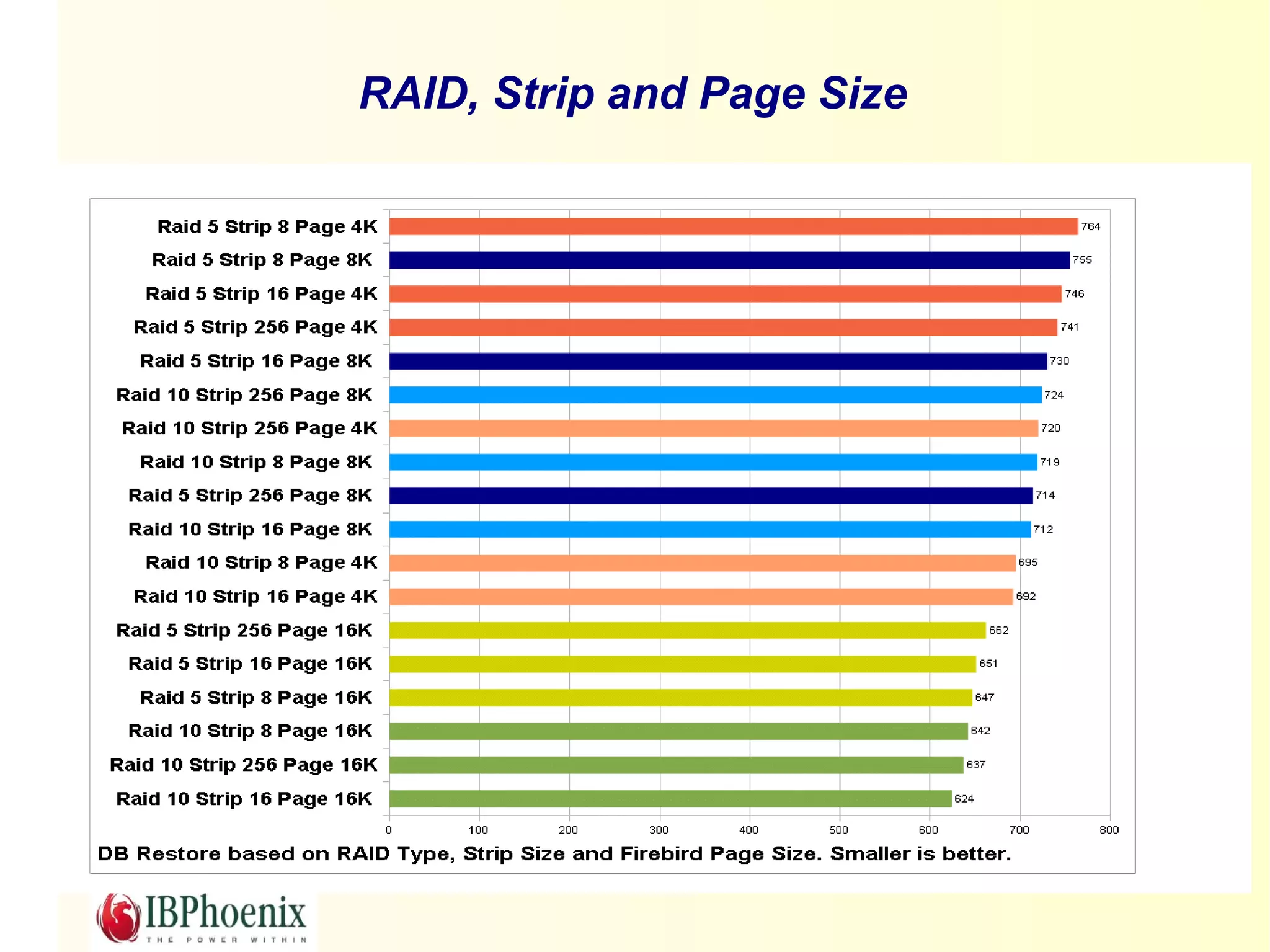
RAID, Strip and Page Size
RAID Performance in the real world

Case study – HP Smart Array 410
Case study – s/w RAID on Linux
INSERTS comparison HW RAID
INSERTS comparison SW RAID
UPDATES comparison HW RAID
UPDATES comparison SW RAID
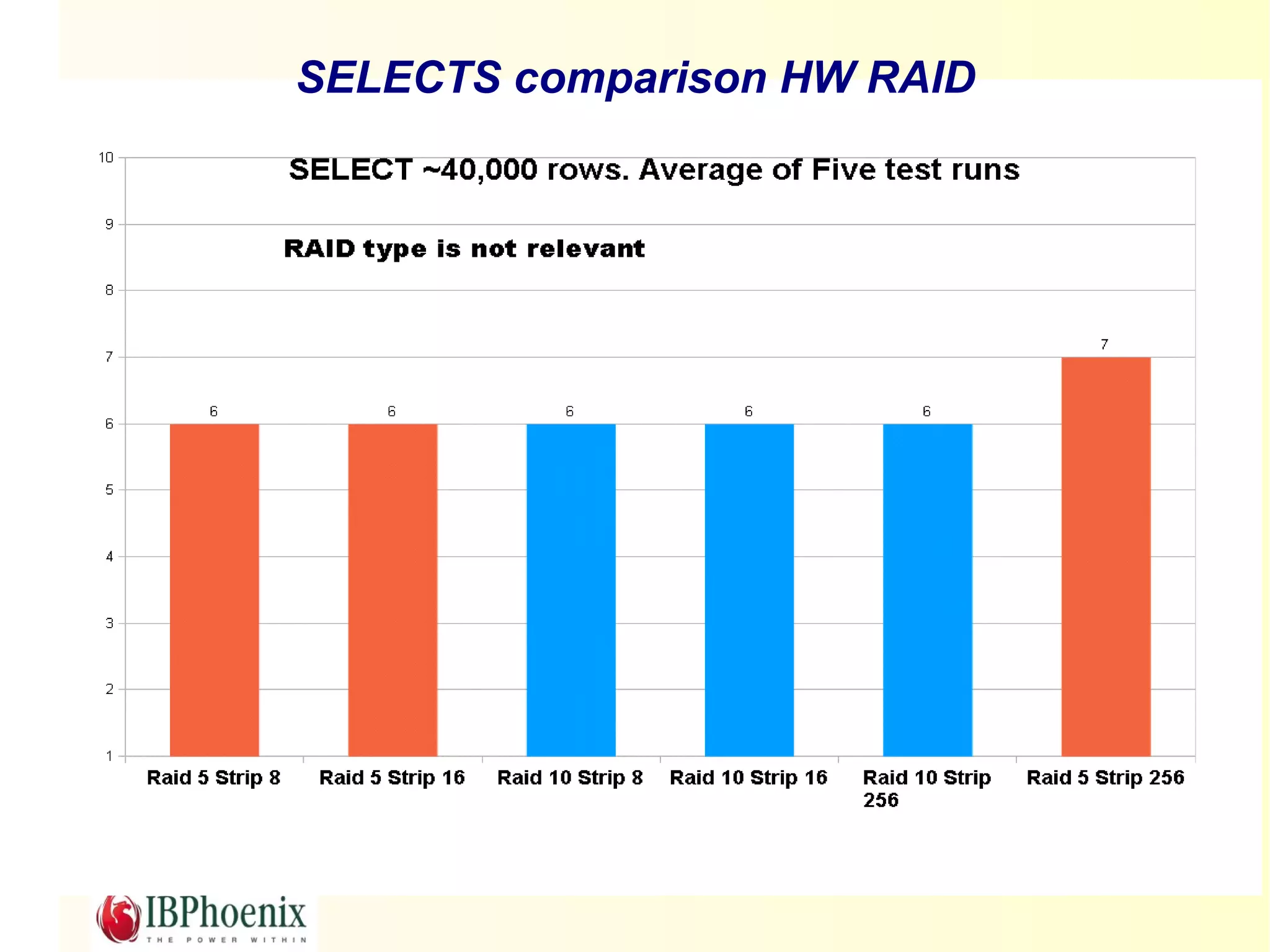
SELECTS comparison HW RAID
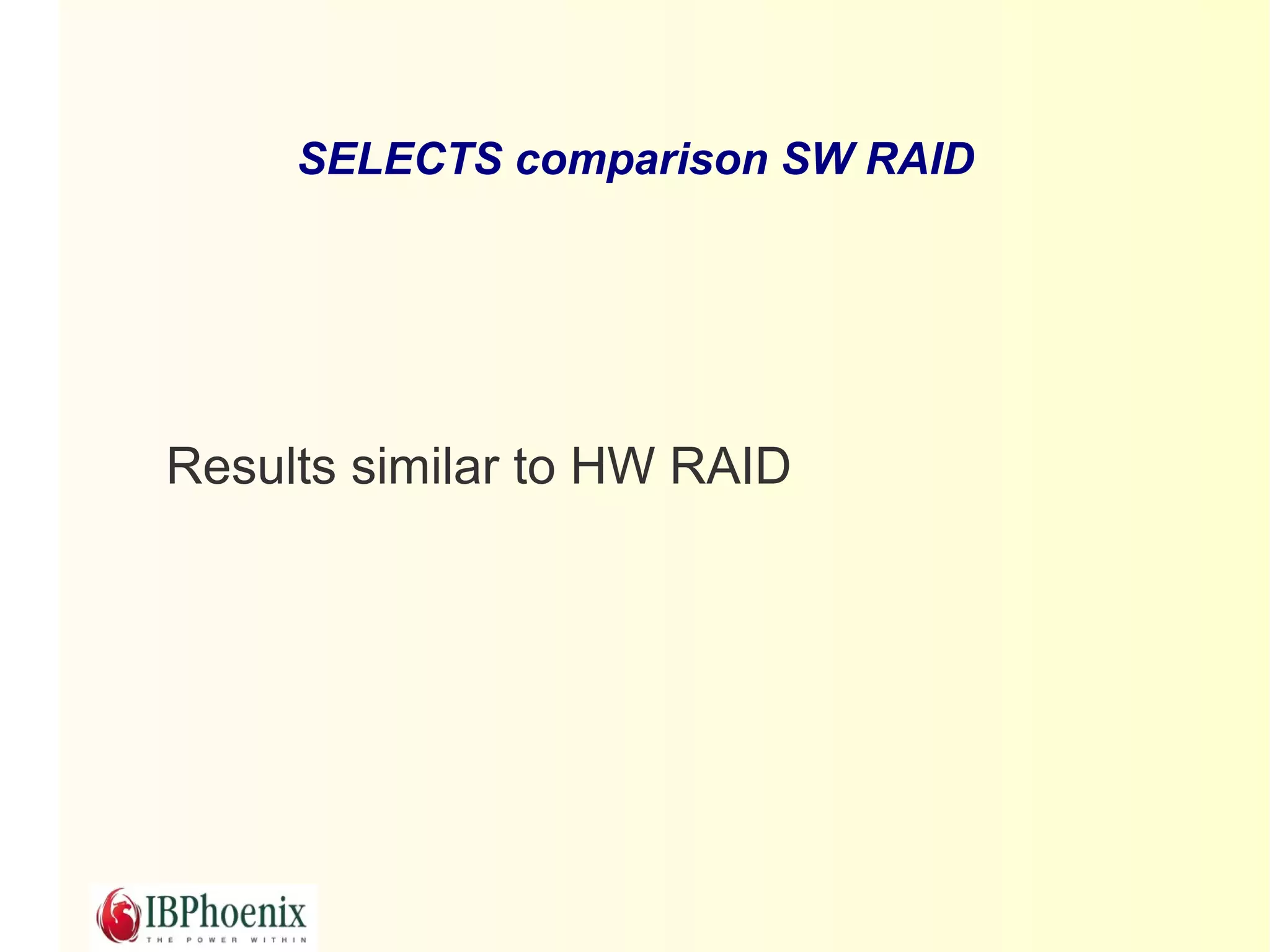
SELECTS comparison SW RAID


Results similar to HW RAID
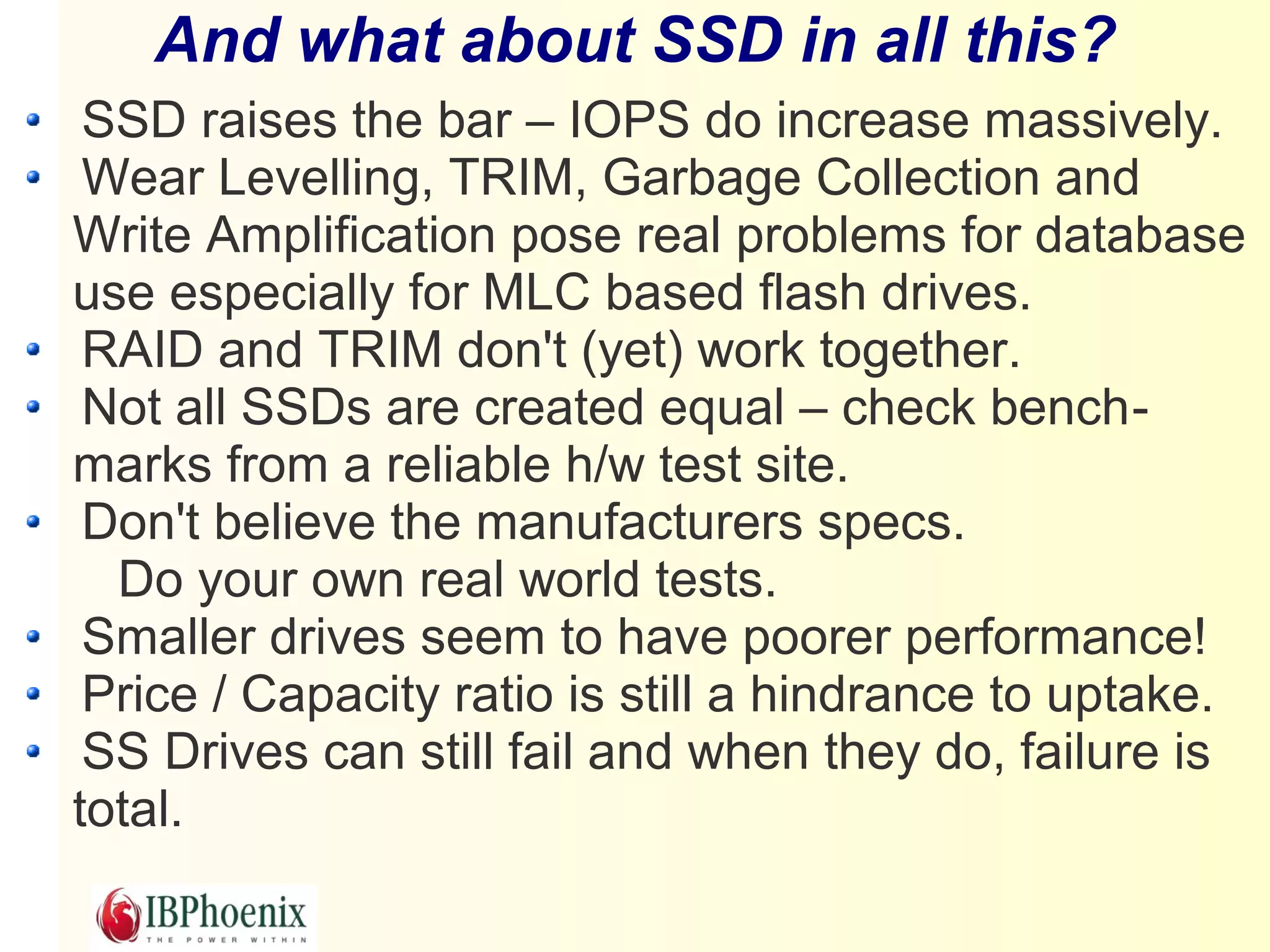
And what about SSD in all this?
 SSD raises the bar – IOPS do increase massively.
 Wear Levelling, TRIM, Garbage Collection and
Write Amplification pose real problems for database
use especially for MLC based flash drives.
 RAID and TRIM don't (yet) work together.
 Not all SSDs are created equal – check bench-
marks from a reliable h/w test site.
 Don't believe the manufacturers specs.
  Do your own real world tests.
 Smaller drives seem to have poorer performance!
 Price / Capacity ratio is still a hindrance to uptake.
 SS Drives can still fail and when they do, failure is
total.
Conclusion

 We've compared parity and mirrored RAID at the
fundamental, theoretical level.

We've also looked at some real world examples
of RAID.

 Although parity RAID can be tweaked it cannot
out perform a mirrored RAID implementation of
the same spec when deploying a database
server.

Firebird and RAID

  • 1.
    Firebird and RAID Choosingthe right RAID configuration for Firebird. Paul Reeves IBPhoenix mail: preeves@ibphoenix.com
  • 2.
    Introduction Disc drives havebecome so cheap that im- plementing RAID for a firebird server is now very affordable.
  • 3.
    Intended Audience Itis hard enough to sell clients your applica- tion, never mind get them to invest in a suit- able server. Your clients don't have much of an in-house IT dept. Your Sys Admins don't see why you need a dedicated RAID array for your departmental server. Unintended Audience If you are working for a company that can afford a million dollar SAN this talk may not be much use to you.
  • 4.
    The focus ofthis talk Primarily looking at the day to day perform- ance issues that underly RAID Data recovery is not really considered. However data recovery is heavily impacted by choice of RAID.
  • 5.
    What is RAID? Redundant Array of Inexpensive Discs Redundant – if one disc fails the system continues. Array – Discs grouped together bring better performance. Inexpensive – Many cheap discs combined can work bet- ter than more expensive discs.
  • 6.
    RAID is NOT Analternative backup strategy RAID exists to overcome disc failure, not data corruption. Data corruption is copied to all discs so al- ways make sure you make backups.
  • 7.
    Redundancy has aprice All RAID implementations require writing to more than one disc. Database updates can actually become slower (in extreme cases).
  • 8.
    Forget about thefancy RAID names There are just two basic types of RAID configuration Mirrored Parity And there is two types of No RAID at all JBOD Disc striping (concatenating) – RAID 0
  • 9.
    JBOD Just a BunchOf Discs Where would we be without acronyms?
  • 10.
    RAID 0 Good forcreating very large discs A disaster waiting to happen. Not much use for database storage. Becomes very useful when combined with other RAID levels.
  • 11.
    Mirrored RAID Maintainidentical data on two or more discs Each disc in the array requires a write. Usually implemented as RAID 1 or RAID 10
  • 12.
    Parity RAID Writes datablocks on every N discs -1 plus parity block(s). Distribution of data and parity blocks is evenly distributed across all discs. All discs in array must be written to. Calculating parity costs read I/O. Usually implemented as RAID 5, RAID 50, RAID 6 or RAID 60.
  • 13.
    Combining RAID levels. Two or more arrays are concatenated to make a larger array.
  • 14.
    Choosing the correctRAID level Calculating Hard Disc performance IOPS – Input / Output Operations Per Second For hard drives we first need to calculate average latency: Avg Latency = (60 / RPMs / 2) * 1000 We then take the average seek time for the drive and derive the IOPS: IOPS = 1000 / (avg latency + avg seek)
  • 15.
    A rough guideto IOPS for different disc speeds Manufacturers don't always provide full specifica- tions but we can make a good guess. RPM Avg Avg RIOPS Avg WIOPS Latency Read Write Seek Seek 5,400 5.56 9.40 66 10.50 62 7,200 4.17 8.50 79 9.50 73 10,000 3.00 3.80 147 4.40 135 15,000 2.00 3.50 182 4.00 167
  • 16.
    What does IOPSreally mean? IOPS is a theoretical value. As such it has no relation to actual data throughput. IOPS indicates the maximum number of times per second that a drive could randomly read or write to a disc.
  • 17.
    Random and SequentialAccess - not what they seem Sequential access is almost non-existent on a server if more than one process is accessing the disc Random is rarely random – usually several blocks can be written in a single I/O.
  • 18.
    The Write Penalty RAID Min. No. Write Comment Level Disks Penalty JBOD / 1 1 One disc. One write. RAID 0 RAID 1 2 2 Write penalty is directly related to the number of disks in the mirror. For three disks the penalty is 3. RAID 5 3 4 Every write requires a read of the data block in the stripe, a read of the existing parity block then the actual write of the updated data block and parity block. RAID 6 4 6 As for RAID 5 except extra parity block requires an additional read and write
  • 19.
    Calculating RAID performance Thereis a simple formula: ( ( DISK_WIOPS * NO_DISCS * %WRITES ) / WRITE_PENALTY ) + ( DISK_RIOPS * NO_DISCS * %READS ) = Theoretical maximum random IOPS for a given array.
  • 20.
    Using Two orThree Discs in a RAID
  • 21.
    Four Disc RAIDconfigurations
  • 22.
    Six Disc RAIDconfigurations
  • 23.
    Eight Disc RAIDconfigurations
  • 24.
    Can slower discsbe better value than faster discs?
  • 25.
    Summary of Theory Addingdiscs increases available IOPS. The Write Penalty is real. Write intensive applications always benefit from Mirrored RAID. For a given number of discs Mirrored RAID will always outperform Parity RAID in Random I/O unless the database is read only.
  • 26.
    So much fortheory. What about reality?
  • 27.
    First, you needa RAID Controller Firmware based RAID controllers Software based RAID controllers Hardware based RAID controllers
  • 28.
    Firmware RAID AKA FakeRAID or Bios RAID. Usually built into Motherboard or on cheap disc controller cards. Not easily portable in the event of failure. Requires CPU and RAM from host. It brings the benefit of configuration in the bios. By extension, this allows the O/S to boot from the RAID. But it also renders remote recovery a problem.
  • 29.
    Software RAID Part ofthe O/S No special hardware required Requires CPU and RAM from Host. No Vendor Lock-in. Portable – if Host fails just pop the discs into an- other computer. Linux implementation rich in functionality – aims to provide top class RAID support. No BBU
  • 30.
    Hardware RAID CPU independent Built-incache Battery backup of cache Ease of configuration Multi-platform client GUI (HP, IBM?) Disc monitoring Hot spares Hot swapping Vendor lock-in.
  • 31.
    A word aboutStripe/Strip size What is it? Does it affect RAID choice? Does it affect FB page size?
  • 32.
    RAID, Strip andPage Size
  • 33.
    RAID Performance inthe real world Case study – HP Smart Array 410 Case study – s/w RAID on Linux
  • 34.
  • 35.
  • 36.
  • 37.
  • 38.
  • 39.
    SELECTS comparison SWRAID Results similar to HW RAID
  • 40.
    And what aboutSSD in all this? SSD raises the bar – IOPS do increase massively. Wear Levelling, TRIM, Garbage Collection and Write Amplification pose real problems for database use especially for MLC based flash drives. RAID and TRIM don't (yet) work together. Not all SSDs are created equal – check bench- marks from a reliable h/w test site. Don't believe the manufacturers specs. Do your own real world tests. Smaller drives seem to have poorer performance! Price / Capacity ratio is still a hindrance to uptake. SS Drives can still fail and when they do, failure is total.
  • 41.
    Conclusion We've comparedparity and mirrored RAID at the fundamental, theoretical level. We've also looked at some real world examples of RAID. Although parity RAID can be tweaked it cannot out perform a mirrored RAID implementation of the same spec when deploying a database server.