FILE SERVER CONFIGURATION  AND INSTALLATION  IN  LINUX
CONTENTS Organization Profile Introduction of Project Hardware and Software Requirement  Working of Project Testing  Screen Shots Advantages  Applications Limitation  Future Scope
Organization Profile
Introduction  In FILE SERVER we can shared files (such as documents, images,sound files, movies and database ) in network using any environment like LINUX and WINDOW . By using four  servers  FTP ,NFS, SAMBA and DHCP in Linux environment with help of these servers we make a project on FILE SERVER.
Hardware and Software Requirement
Working   The basic working is Sharing Data  or Files in NETWORK using any environment  LINUX/WINDOWS by using the following servers. > FTP  > SAMBA  > NFS  >DHCP
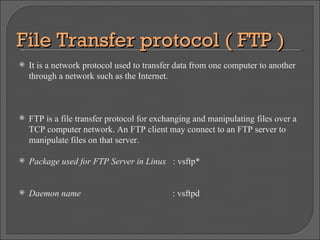
File Transfer protocol ( FTP )‏ It is a network protocol used to transfer data from one computer to another through a network such as the Internet. FTP is a file transfer protocol for exchanging and manipulating files over a TCP computer network. An FTP client may connect to an FTP server to manipulate files on that server. Package used for FTP Server in Linux  : vsftp* Daemon name  : vsftpd
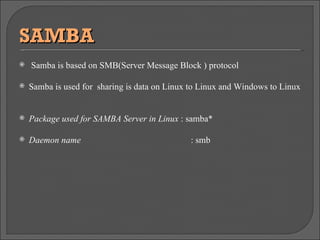
SAMBA Samba is based on SMB(Server Message Block ) protocol  Samba is used for  sharing is data on Linux to Linux and Windows to Linux Package used for SAMBA Server in Linux  : samba* Daemon name    : smb
Dynamic Host Configuration Protocol (DHCP)  It is a network application protocol used by devices (DHCP clients) to obtain configuration information for operation in an Internet Protocol network. This protocol reduces system administration workload, allowing devices to be added to the network with little or no manual intervention. The DHCP server manages a pool of IP addresses and information about client configuration parameters such as the default gateway, the domain name, the DNS servers, other servers such as time servers, and so forth. Package used for DHCP in Linux :  dhcp* Daemon name :  dhcpd
Network File System (NFS)  A network file system is any computer file system that supports sharing of files, printers and other resources as persistent storage over a computer network Package used for DHCP in Linux  : nfs* Daemon name  : nfsd
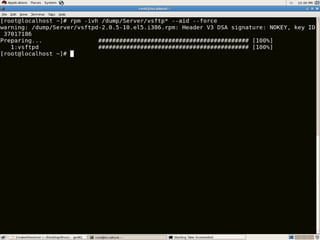
TESTING # First of all we need to install Extended Internet Daemon for support of SAMBA using command. rpm -ivh /dump/Server/xinetd* --aid –force # Then  installing samba packages using command. rpm -ivh /dump/Server/smb* --aid –force # Now install FTP packages using command . rmp -ivh /dump/server/vsftpd* --aid –force # And similarly  install DHCP packages for assign IP address  automatically to all the systems by using command . rmp -ivh /dump/server/dhcpd* --aid --force
Continue…. # now configuring the DHCP for NETWORK  cat /usr/share/doc/dhcp-3.0.5/dhcpd.conf.sample > /etc/dhcpd.conf #After configure the DHCP then Restart  DHCP,NFS,VSFTP,SAMBA service by using commands. service dhcpd restart service vsftpd restart service nfs restart service smb restart # Then  Permanently  ON the all services by using commands.  chkconfig smb on chkconfig dhcpd on chkconfig nfs on chkconfig vsftpd on
Continue…. # Then adding two users named POP and ROCK useradd pop useradd rock # adding files in the directory of USERS for sharing echo "this is a file of users POP " > /home/pop/sales echo "this is a file of users ROCK " > /home/rock/myfile echo "plz assign passwords to both users mannually accroding to your requirement” Also assign the passwd to the users by using command . passwd pop  passwd rock echo " Thanx all things are done and working fine."
SCREEN SHOTS
08/11/09
08/11/09
08/11/09
08/11/09
08/11/09
08/11/09
08/11/09
Advantages  > Larger number of user can access the file at same time. > Share the file by using any environment like Linux and windows. > Reduce number of copies of various programs and also save disk space. > Changes are made to shared file ,they become available to all users immediately. > Also set the  permission to user according to need.
APPLICATIONS
LIMITATION
FUTURE  SCOPE
THANKS   Submitted By :- Jagdeep Singh Malhi 7652 (D3 IT)

File Sever

  • 1.
    FILE SERVER CONFIGURATION AND INSTALLATION IN LINUX
  • 2.
    CONTENTS Organization ProfileIntroduction of Project Hardware and Software Requirement Working of Project Testing Screen Shots Advantages Applications Limitation Future Scope
  • 3.
  • 4.
    Introduction InFILE SERVER we can shared files (such as documents, images,sound files, movies and database ) in network using any environment like LINUX and WINDOW . By using four servers FTP ,NFS, SAMBA and DHCP in Linux environment with help of these servers we make a project on FILE SERVER.
  • 5.
  • 6.
    Working The basic working is Sharing Data or Files in NETWORK using any environment LINUX/WINDOWS by using the following servers. > FTP > SAMBA > NFS >DHCP
  • 7.
    File Transfer protocol( FTP )‏ It is a network protocol used to transfer data from one computer to another through a network such as the Internet. FTP is a file transfer protocol for exchanging and manipulating files over a TCP computer network. An FTP client may connect to an FTP server to manipulate files on that server. Package used for FTP Server in Linux : vsftp* Daemon name : vsftpd
  • 8.
    SAMBA Samba isbased on SMB(Server Message Block ) protocol Samba is used for sharing is data on Linux to Linux and Windows to Linux Package used for SAMBA Server in Linux : samba* Daemon name : smb
  • 9.
    Dynamic Host ConfigurationProtocol (DHCP) It is a network application protocol used by devices (DHCP clients) to obtain configuration information for operation in an Internet Protocol network. This protocol reduces system administration workload, allowing devices to be added to the network with little or no manual intervention. The DHCP server manages a pool of IP addresses and information about client configuration parameters such as the default gateway, the domain name, the DNS servers, other servers such as time servers, and so forth. Package used for DHCP in Linux : dhcp* Daemon name : dhcpd
  • 10.
    Network File System(NFS) A network file system is any computer file system that supports sharing of files, printers and other resources as persistent storage over a computer network Package used for DHCP in Linux : nfs* Daemon name : nfsd
  • 11.
    TESTING # Firstof all we need to install Extended Internet Daemon for support of SAMBA using command. rpm -ivh /dump/Server/xinetd* --aid –force # Then installing samba packages using command. rpm -ivh /dump/Server/smb* --aid –force # Now install FTP packages using command . rmp -ivh /dump/server/vsftpd* --aid –force # And similarly install DHCP packages for assign IP address automatically to all the systems by using command . rmp -ivh /dump/server/dhcpd* --aid --force
  • 12.
    Continue…. # nowconfiguring the DHCP for NETWORK cat /usr/share/doc/dhcp-3.0.5/dhcpd.conf.sample > /etc/dhcpd.conf #After configure the DHCP then Restart DHCP,NFS,VSFTP,SAMBA service by using commands. service dhcpd restart service vsftpd restart service nfs restart service smb restart # Then Permanently ON the all services by using commands. chkconfig smb on chkconfig dhcpd on chkconfig nfs on chkconfig vsftpd on
  • 13.
    Continue…. # Thenadding two users named POP and ROCK useradd pop useradd rock # adding files in the directory of USERS for sharing echo "this is a file of users POP " > /home/pop/sales echo "this is a file of users ROCK " > /home/rock/myfile echo "plz assign passwords to both users mannually accroding to your requirement” Also assign the passwd to the users by using command . passwd pop passwd rock echo " Thanx all things are done and working fine."
  • 14.
  • 15.
  • 16.
  • 17.
  • 18.
  • 19.
  • 20.
  • 21.
  • 22.
    Advantages >Larger number of user can access the file at same time. > Share the file by using any environment like Linux and windows. > Reduce number of copies of various programs and also save disk space. > Changes are made to shared file ,they become available to all users immediately. > Also set the permission to user according to need.
  • 23.
  • 24.
  • 25.
  • 26.
    THANKS Submitted By :- Jagdeep Singh Malhi 7652 (D3 IT)