GNU/Linux Servers


    NFM 2008
Majour Servers
●   Apache HTTP Server
●   Squid Proxy and Cache
●   Samba Server
●   FTP Server [vsftpd]
●   Database Server [Postgresql,Mysql,Sqllite]
●   Email Server [sendmail,postfix]
●   Firewall
Web Server

  Apache
Introduction to Apache
●   The Apache group was formed in 1995
●   Apache => A Patchy Server
    ● Largely because the patches to NCSA server that
     resulted in this new webserver. It actually got its
     name from the native American Tribe
●   Apache Version 1.0 was released in December, 1995
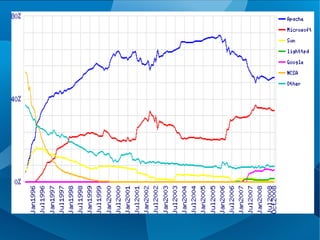
●   World's most used web­server since April, 1996
    ●   http://news.netcraft.com/archives/web_server_survey.ht
    ●   50.43% october 2008
Facts
●    Easy administration using web based
    interface [webmin]
●   No cost to setup a server.
●   As easy as download a CD and install.
●   Lower maintenance.
●   Keeps running for years.
●   Better Security than IIS
Features
●   Virtual Hosting
●   Acess Configuration
●   Security
●   mod_rewrite
Single website/Virtual Hosting
●   Single Website
    ●    The host definitions go into the main configuration
    ●    Any connection to the server returns the same set of page
●   Virtual Hosting
    ●   Ip based virtual hosting
        –     Multiple IP addresses to the same machine
    ●   Name based virtual hosting
        –    Multiple domain names to the same IP address
    ●   Port based virtual hosting
        –   Hanlding the request in a particular port
Access Configuration
●       Allow from
    ●    Allow access from the given networks and addresses or
         when the environment satisfies a condition
●       Deny from
    ●    Deny access from the given networks and addresses or
         when the environment satisfies a condition
Security
●   mod_ssl
    ●   Set SSLCertificateFile and SSLCertificateKeyFile
    ●   Digital certificates from OpenSSL
●   mod_security
    ●     can the incoming requests for attacks and can
        proactively prevent attacks on the server
●   mod_userdir
    ●   nables “~username” urls for user
mod_rewrite
●   Rewrite Incoming Url based on regular
    expressions
●   Help Making Clean Urls in dynamic content
    generation like php
●   Can Use Regular Expressions for rewrite
●   Using .htaccess in each directory
More ...
●    mod_proxy can take care of proxy, both
    reverse and forward
●    Perl, Python and Ruby have script engines
    that come as modules to Apache
●    Apache is the most used webserver, since
    1996 :)
●   59% of world wide web servers are apache
Proxy Server
   Squid
Introduction to Proxy
●     In a typical setup a Web­Proxy requests
    pages from the Internet on behalf of the clients
    on the local network and serves them to the
    local clients.
       –    Enhances security on LAN
       –   When caching is enabled, gives a better browsing
           experience
●    Proxy servers also cache data and avoid
    redundant and repeated requests to servers for
    the same data.
●
Features of Squid
●    Web Proxy and Cache for HTTP, FTP
●    DNS Lookup Cache
●    Reverse Proxy to accelerate speed of web
    servers
●    Access Control Lists
●    Bandwidth management
Network File Sharing Server

           Samba
Introduction to SMB
●    NetBIOS by IBM and Sytec
●    NetBIOS + Disk I/O redirection => SMB
       –   Server Message Block Protocol by Microsoft
       –   Now called the CIFS [Common Internet File System]
●    Windows machines advertise their services
    and presence on the network using this
    protocol
●    The “Network Neighbourhood”
Introduction to Samba
●    Andrew Tridgell published his code in early
    1992
●    Actual development started two years later
●    Opening windows to the wider world
●    Samba runs on unix platforms, but speaks to
    Windows clients like a native windows machine
●    Lets you share files and printers over the
    network
●    Works with SMB as well as its latest form
    CIFS
Features Samba
●   File and Printer sharing
●   Access controls
●   Remote Logons
●   Work As a part of windows Network
●   Can Act as the Primary Domain Controller
●   SWAT (Samba Web Administration Tool)
Ftp Server


  Vsftpd
Introduction to FTP
●   File Transfer Protocol
●   Criticisms
     –   Passwords are sent in clear­text
     –   Multiple TCP/IP connections needed
     –   No integrity check in case of connection failures
●    Alternatives
     –   SFTP and FTPS for secure copying
     –   Secure Copy or SCP is now­a­days largely used
Features of vsftpd
●   A simple FTP server
●   Anonymous access
●   Security considerations
●   Easy Configuration
Active Directory

   Open LDAP
Features
●   Active Directory is essentially LDAP and
    Kerberos tied together (although slightly
    Modified)
●   OpenLDAP is the usual LDAP implementation
●   If you decide to keep Active Directory, Samba
    version 3.0 or higher is needed to integrate well
    with it
Domain Name System (DNS) server

                   BIND
     [Berkeley Internet Name Domain]
Features of BIND
●     Berkeley Internet Name Domain (BIND) is one
    of the many industry standard Open Source
    packages that make up much of the Internet
    infrastructure.
●   Domain name serving is one of the easiest (and
    most transparent to the end user) conversions
    you' face.
●   BIND works from plain text configuration files,
    not a GUI.
Dynamic Host Configuration
         Protocol
        (DHCP) server


        ISC’s DHCP
Features
●   ISC’s DHCP is industry standard Open Source
    Package
●   it works better with Windows clients than a
    Windows DHCP server
●   DHCP server keeps its configuration data in
    a .mdb file
Web Application Server (Java)
●    Lots of products in this area. Probably the
    same ones that you run on Windows are
    available for Linux
       –   WebSphere
       –   BEA WebLogic
       –   Iplanet
       –   Jboss
●   Installation, configuration and management
    should be the same or very similar across
    platforms
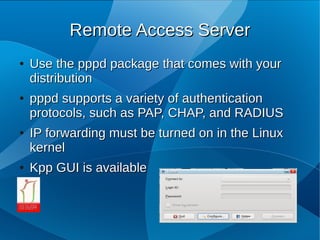
Remote Access Server
●   Use the pppd package that comes with your
    distribution
●   pppd supports a variety of authentication
    protocols, such as PAP, CHAP, and RADIUS
●   IP forwarding must be turned on in the Linux
    kernel
●   Kpp GUI is available
Email Server
●   lots of choices on Linux
    ●   Sendmail,
    ●   Exim,
    ●   Postfix,
●   The email delivery piece is the easy part
Groupware Server
●   Bynari’s Insight server is one, but only scales
    up to about 50,000 email boxes.
●   Ximian Insight Connector (now owned by
    Novell) is another
●
Database Server
●   The two most popular Open Source ones are
●   MySQL and PostgreSQL
●   MySQL easy flexible
●   PostgreSQL is strong and enterprise class.
Firewall
●    Linux comes with a native firewall capability
●   Linux also has native support for Network
    Address Translation (NAT), also known as IP
    masquerading
●   The iptables command is what is used to create
    firewall and NAT rules. There are GUI front­
    ends available to make that easier.
●   • Commercial firewalls are also available for
    Linux, such as Check Point’s Firewall­1,
    Phoenix, StoneGate, etc.
Thanks

Linux Servers

  • 1.
  • 2.
    Majour Servers ● Apache HTTP Server ● Squid Proxy and Cache ● Samba Server ● FTP Server [vsftpd] ● Database Server [Postgresql,Mysql,Sqllite] ● Email Server [sendmail,postfix] ● Firewall
  • 3.
  • 4.
    Introduction to Apache ● The Apache group was formed in 1995 ● Apache => A Patchy Server ● Largely because the patches to NCSA server that resulted in this new webserver. It actually got its name from the native American Tribe ● Apache Version 1.0 was released in December, 1995 ● World's most used web­server since April, 1996 ● http://news.netcraft.com/archives/web_server_survey.ht ● 50.43% october 2008
  • 5.
    Facts ● Easy administration using web based interface [webmin] ● No cost to setup a server. ● As easy as download a CD and install. ● Lower maintenance. ● Keeps running for years. ● Better Security than IIS
  • 7.
    Features ● Virtual Hosting ● Acess Configuration ● Security ● mod_rewrite
  • 8.
    Single website/Virtual Hosting ● Single Website ● The host definitions go into the main configuration ● Any connection to the server returns the same set of page ● Virtual Hosting ● Ip based virtual hosting – Multiple IP addresses to the same machine ● Name based virtual hosting – Multiple domain names to the same IP address ● Port based virtual hosting – Hanlding the request in a particular port
  • 9.
    Access Configuration ● Allow from ● Allow access from the given networks and addresses or when the environment satisfies a condition ● Deny from ● Deny access from the given networks and addresses or when the environment satisfies a condition
  • 10.
    Security ● mod_ssl ● Set SSLCertificateFile and SSLCertificateKeyFile ● Digital certificates from OpenSSL ● mod_security ● can the incoming requests for attacks and can proactively prevent attacks on the server ● mod_userdir ● nables “~username” urls for user
  • 11.
    mod_rewrite ● Rewrite Incoming Url based on regular expressions ● Help Making Clean Urls in dynamic content generation like php ● Can Use Regular Expressions for rewrite ● Using .htaccess in each directory
  • 12.
    More ... ● mod_proxy can take care of proxy, both reverse and forward ● Perl, Python and Ruby have script engines that come as modules to Apache ● Apache is the most used webserver, since 1996 :) ● 59% of world wide web servers are apache
  • 13.
  • 14.
    Introduction to Proxy ● In a typical setup a Web­Proxy requests pages from the Internet on behalf of the clients on the local network and serves them to the local clients. – Enhances security on LAN – When caching is enabled, gives a better browsing experience ● Proxy servers also cache data and avoid redundant and repeated requests to servers for the same data. ●
  • 15.
    Features of Squid ● Web Proxy and Cache for HTTP, FTP ● DNS Lookup Cache ● Reverse Proxy to accelerate speed of web servers ● Access Control Lists ● Bandwidth management
  • 16.
  • 17.
    Introduction to SMB ● NetBIOS by IBM and Sytec ● NetBIOS + Disk I/O redirection => SMB – Server Message Block Protocol by Microsoft – Now called the CIFS [Common Internet File System] ● Windows machines advertise their services and presence on the network using this protocol ● The “Network Neighbourhood”
  • 18.
    Introduction to Samba ● Andrew Tridgell published his code in early 1992 ● Actual development started two years later ● Opening windows to the wider world ● Samba runs on unix platforms, but speaks to Windows clients like a native windows machine ● Lets you share files and printers over the network ● Works with SMB as well as its latest form CIFS
  • 19.
    Features Samba ● File and Printer sharing ● Access controls ● Remote Logons ● Work As a part of windows Network ● Can Act as the Primary Domain Controller ● SWAT (Samba Web Administration Tool)
  • 20.
  • 21.
    Introduction to FTP ● File Transfer Protocol ● Criticisms – Passwords are sent in clear­text – Multiple TCP/IP connections needed – No integrity check in case of connection failures ● Alternatives – SFTP and FTPS for secure copying – Secure Copy or SCP is now­a­days largely used
  • 22.
    Features of vsftpd ● A simple FTP server ● Anonymous access ● Security considerations ● Easy Configuration
  • 23.
  • 24.
    Features ● Active Directory is essentially LDAP and Kerberos tied together (although slightly Modified) ● OpenLDAP is the usual LDAP implementation ● If you decide to keep Active Directory, Samba version 3.0 or higher is needed to integrate well with it
  • 25.
    Domain Name System(DNS) server BIND [Berkeley Internet Name Domain]
  • 26.
    Features of BIND ● Berkeley Internet Name Domain (BIND) is one of the many industry standard Open Source packages that make up much of the Internet infrastructure. ● Domain name serving is one of the easiest (and most transparent to the end user) conversions you' face. ● BIND works from plain text configuration files, not a GUI.
  • 27.
    Dynamic Host Configuration Protocol (DHCP) server ISC’s DHCP
  • 28.
    Features ● ISC’s DHCP is industry standard Open Source Package ● it works better with Windows clients than a Windows DHCP server ● DHCP server keeps its configuration data in a .mdb file
  • 29.
    Web Application Server(Java) ● Lots of products in this area. Probably the same ones that you run on Windows are available for Linux – WebSphere – BEA WebLogic – Iplanet – Jboss ● Installation, configuration and management should be the same or very similar across platforms
  • 30.
    Remote Access Server ● Use the pppd package that comes with your distribution ● pppd supports a variety of authentication protocols, such as PAP, CHAP, and RADIUS ● IP forwarding must be turned on in the Linux kernel ● Kpp GUI is available
  • 31.
    Email Server ● lots of choices on Linux ● Sendmail, ● Exim, ● Postfix, ● The email delivery piece is the easy part
  • 32.
    Groupware Server ● Bynari’s Insight server is one, but only scales up to about 50,000 email boxes. ● Ximian Insight Connector (now owned by Novell) is another ●
  • 33.
    Database Server ● The two most popular Open Source ones are ● MySQL and PostgreSQL ● MySQL easy flexible ● PostgreSQL is strong and enterprise class.
  • 34.
    Firewall ● Linux comes with a native firewall capability ● Linux also has native support for Network Address Translation (NAT), also known as IP masquerading ● The iptables command is what is used to create firewall and NAT rules. There are GUI front­ ends available to make that easier. ● • Commercial firewalls are also available for Linux, such as Check Point’s Firewall­1, Phoenix, StoneGate, etc.
  • 35.