WINDOWS VS LINUX
CONTENTS
 WHAT IS OPERATING SYSTEM?
 DIFFERENT TYPES OF OPERATING SYSTEMS.
 WINDOWS OS
 VERSIONS
 FEATURES OF WINDOWS OS
 LINUX OS
 FEATURES OF LINUX OS
 VERSIONS
 COMPARISON
 CONCLUSION
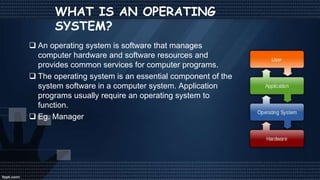
WHAT IS AN OPERATING
SYSTEM?
 An operating system is software that manages
computer hardware and software resources and
provides common services for computer programs.
 The operating system is an essential component of the
system software in a computer system. Application
programs usually require an operating system to
function.
 Eg. Manager
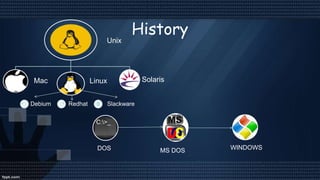
History
Unix
Mac Linux Solaris
Debium Redhat Slackware
DOS MS DOS WINDOWS
Mostly using Operating
Systems
Mac OS by
Apple
Windows by
Microsoft Corp.
Linux by
Community
WINDOWS OS
 Microsoft Windows operating system
was developed by Microsoft to
overcome the limitation of its own MS-
DOS operating system.
 First successful version were Windows
3.0, released in 1990.
 Subsequently released version were
“Windows 95, Windows 98, Windows
2000, Windows XP, Windows XP
Professional , Windows Vista, Windows
7, Windows 8, Windows 8.1 and
nowadays Microsoft launches it’s latest
OS Windows 10.”
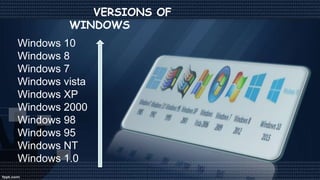
VERSIONS OF
WINDOWS
Windows 10
Windows 8
Windows 7
Windows vista
Windows XP
Windows 2000
Windows 98
Windows 95
Windows NT
Windows 1.0
Features of Windows OS
 Easy to use -> Microsoft windows is easy to use as compared to
other OS most popular OS in the world.
 Performance monitor -> Alt+Ctlr+Del
 Files management -> It manage your files automatically into a
spefic location.
 Based on MS-Dos -> Windows is a MS-DOS based operating
system.
What is
Linux?
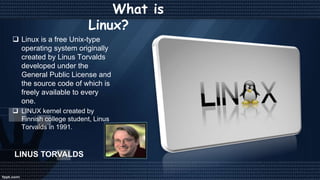
 Linux is a free Unix-type
operating system originally
created by Linus Torvalds
developed under the
General Public License and
the source code of which is
freely available to every
one.
 LINUX kernel created by
Finnish college student, Linus
Torvalds in 1991.
LINUS TORVALDS
VERSIONS OF LINUX
REDHAT
FEDORA
UBANTU
DEBIAN
KNOPPIX
SUSE
SLACKWARE
Features of Linux os
• Open Source Operating System -> Any programmer can modify
it due to it’s needs.
• Free Software -> Linux is a free software any one can download
it from web and install it on it’s pc
• It runs on a wide range of hardware from PCs to Macs -> Many
pc user can install linux to it’s system there is no specific
requirements for installing it.
COMPARISION
Windows OS Linux OS
GUI & CUI
COMPARISION
 THERE ARE MANY
TYPES OF VIRUSES IN
WINDOWS OS
BECAUSE OF A LARGE
AMOUNT OF MARKET
SHARE
 WINDOWS IS
EXPENSIVE
Windows OS Linux OS
 THERE ARE LESSER
AMOUNT OF VIRUSES
IN LINUX AS
COMPARED TO
WINDOWS BECAUSE
LINUX IS AN OPEN
SOURCE OS
 LINUX SOFTWARE IS
TOTALLY FREE
Security & Price
COMPARISION
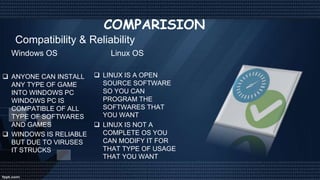
 ANYONE CAN INSTALL
ANY TYPE OF GAME
INTO WINDOWS PC
WINDOWS PC IS
COMPATIBLE OF ALL
TYPE OF SOFTWARES
AND GAMES
 WINDOWS IS RELIABLE
BUT DUE TO VIRUSES
IT STRUCKS
Windows OS Linux OS
 LINUX IS A OPEN
SOURCE SOFTWARE
SO YOU CAN
PROGRAM THE
SOFTWARES THAT
YOU WANT
 LINUX IS NOT A
COMPLETE OS YOU
CAN MODIFY IT FOR
THAT TYPE OF USAGE
THAT YOU WANT
Compatibility & Reliability
COMPARISION
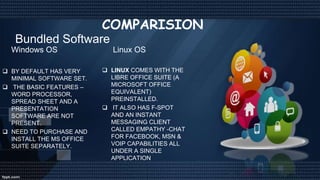
 BY DEFAULT HAS VERY
MINIMAL SOFTWARE SET.
 THE BASIC FEATURES –
WORD PROCESSOR,
SPREAD SHEET AND A
PRESENTATION
SOFTWARE ARE NOT
PRESENT.
 NEED TO PURCHASE AND
INSTALL THE MS OFFICE
SUITE SEPARATELY.
Windows OS Linux OS
 LINUX COMES WITH THE
LIBRE OFFICE SUITE (A
MICROSOFT OFFICE
EQUIVALENT)
PREINSTALLED.
 IT ALSO HAS F-SPOT
AND AN INSTANT
MESSAGING CLIENT
CALLED EMPATHY -CHAT
FOR FACEBOOK, MSN &
VOIP CAPABILITIES ALL
UNDER A SINGLE
APPLICATION
Bundled Software
Comparision
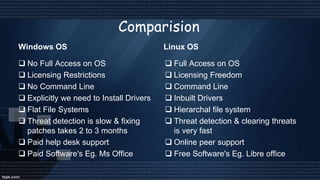
Windows OS
 No Full Access on OS
 Licensing Restrictions
 No Command Line
 Explicitly we need to Install Drivers
 Flat File Systems
 Threat detection is slow & fixing
patches takes 2 to 3 months
 Paid help desk support
 Paid Software's Eg. Ms Office
Linux OS
 Full Access on OS
 Licensing Freedom
 Command Line
 Inbuilt Drivers
 Hierarchal file system
 Threat detection & clearing threats
is very fast
 Online peer support
 Free Software's Eg. Libre office
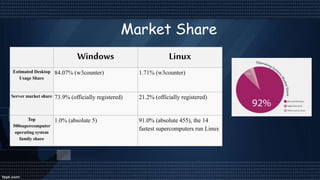
Windows Linux
Estimated Desktop
Usage Share
84.07% (w3counter) 1.71% (w3counter)
Server market share 73.9% (officially registered) 21.2% (officially registered)
Top
500supercomputer
operating system
family share
1.0% (absolute 5) 91.0% (absolute 455), the 14
fastest supercomputers run Linux
Market Share
Conclusion
In conclusion, no operating system is really
better, the choice is up to you. If you're a
gamer, then you have no choice, go for
Windows. Programmers might prefer Linux
and video/graphics producers will probably
tend towards Mac. The best thing to do is
probably to try each OS and see which is best
for you!
THANK YOU
Bhargav

windows vs linux

  • 1.
  • 2.
    CONTENTS  WHAT ISOPERATING SYSTEM?  DIFFERENT TYPES OF OPERATING SYSTEMS.  WINDOWS OS  VERSIONS  FEATURES OF WINDOWS OS  LINUX OS  FEATURES OF LINUX OS  VERSIONS  COMPARISON  CONCLUSION
  • 3.
    WHAT IS ANOPERATING SYSTEM?  An operating system is software that manages computer hardware and software resources and provides common services for computer programs.  The operating system is an essential component of the system software in a computer system. Application programs usually require an operating system to function.  Eg. Manager
  • 4.
    History Unix Mac Linux Solaris DebiumRedhat Slackware DOS MS DOS WINDOWS
  • 5.
    Mostly using Operating Systems MacOS by Apple Windows by Microsoft Corp. Linux by Community
  • 6.
    WINDOWS OS  MicrosoftWindows operating system was developed by Microsoft to overcome the limitation of its own MS- DOS operating system.  First successful version were Windows 3.0, released in 1990.  Subsequently released version were “Windows 95, Windows 98, Windows 2000, Windows XP, Windows XP Professional , Windows Vista, Windows 7, Windows 8, Windows 8.1 and nowadays Microsoft launches it’s latest OS Windows 10.”
  • 7.
    VERSIONS OF WINDOWS Windows 10 Windows8 Windows 7 Windows vista Windows XP Windows 2000 Windows 98 Windows 95 Windows NT Windows 1.0
  • 8.
    Features of WindowsOS  Easy to use -> Microsoft windows is easy to use as compared to other OS most popular OS in the world.  Performance monitor -> Alt+Ctlr+Del  Files management -> It manage your files automatically into a spefic location.  Based on MS-Dos -> Windows is a MS-DOS based operating system.
  • 9.
    What is Linux?  Linuxis a free Unix-type operating system originally created by Linus Torvalds developed under the General Public License and the source code of which is freely available to every one.  LINUX kernel created by Finnish college student, Linus Torvalds in 1991. LINUS TORVALDS
  • 10.
  • 11.
    Features of Linuxos • Open Source Operating System -> Any programmer can modify it due to it’s needs. • Free Software -> Linux is a free software any one can download it from web and install it on it’s pc • It runs on a wide range of hardware from PCs to Macs -> Many pc user can install linux to it’s system there is no specific requirements for installing it.
  • 12.
  • 13.
    COMPARISION  THERE AREMANY TYPES OF VIRUSES IN WINDOWS OS BECAUSE OF A LARGE AMOUNT OF MARKET SHARE  WINDOWS IS EXPENSIVE Windows OS Linux OS  THERE ARE LESSER AMOUNT OF VIRUSES IN LINUX AS COMPARED TO WINDOWS BECAUSE LINUX IS AN OPEN SOURCE OS  LINUX SOFTWARE IS TOTALLY FREE Security & Price
  • 14.
    COMPARISION  ANYONE CANINSTALL ANY TYPE OF GAME INTO WINDOWS PC WINDOWS PC IS COMPATIBLE OF ALL TYPE OF SOFTWARES AND GAMES  WINDOWS IS RELIABLE BUT DUE TO VIRUSES IT STRUCKS Windows OS Linux OS  LINUX IS A OPEN SOURCE SOFTWARE SO YOU CAN PROGRAM THE SOFTWARES THAT YOU WANT  LINUX IS NOT A COMPLETE OS YOU CAN MODIFY IT FOR THAT TYPE OF USAGE THAT YOU WANT Compatibility & Reliability
  • 15.
    COMPARISION  BY DEFAULTHAS VERY MINIMAL SOFTWARE SET.  THE BASIC FEATURES – WORD PROCESSOR, SPREAD SHEET AND A PRESENTATION SOFTWARE ARE NOT PRESENT.  NEED TO PURCHASE AND INSTALL THE MS OFFICE SUITE SEPARATELY. Windows OS Linux OS  LINUX COMES WITH THE LIBRE OFFICE SUITE (A MICROSOFT OFFICE EQUIVALENT) PREINSTALLED.  IT ALSO HAS F-SPOT AND AN INSTANT MESSAGING CLIENT CALLED EMPATHY -CHAT FOR FACEBOOK, MSN & VOIP CAPABILITIES ALL UNDER A SINGLE APPLICATION Bundled Software
  • 16.
    Comparision Windows OS  NoFull Access on OS  Licensing Restrictions  No Command Line  Explicitly we need to Install Drivers  Flat File Systems  Threat detection is slow & fixing patches takes 2 to 3 months  Paid help desk support  Paid Software's Eg. Ms Office Linux OS  Full Access on OS  Licensing Freedom  Command Line  Inbuilt Drivers  Hierarchal file system  Threat detection & clearing threats is very fast  Online peer support  Free Software's Eg. Libre office
  • 17.
    Windows Linux Estimated Desktop UsageShare 84.07% (w3counter) 1.71% (w3counter) Server market share 73.9% (officially registered) 21.2% (officially registered) Top 500supercomputer operating system family share 1.0% (absolute 5) 91.0% (absolute 455), the 14 fastest supercomputers run Linux Market Share
  • 18.
    Conclusion In conclusion, nooperating system is really better, the choice is up to you. If you're a gamer, then you have no choice, go for Windows. Programmers might prefer Linux and video/graphics producers will probably tend towards Mac. The best thing to do is probably to try each OS and see which is best for you!
  • 19.