Introduction to GNU/Linux
Operating Systems
By:
Ahiante Stephen Oriasotie
What is Linux?
Linux is an open source Operating System that was
initially developed for intel x86 processors. It has
however been ported to other platforms.
The Linux Kernel was created by Linus Torvalds.
The Linux Kernel is the brain of any GNU/Linux
operating system (distribution). The Kernel glues both
applications and hardware together.
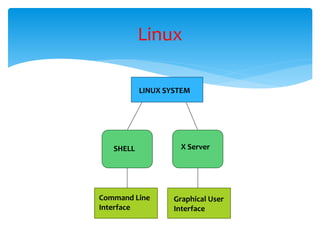
Generally, A Linux System has two operatable modes:
 The Command Line Interface (CLI): provided by the
shell.
 The Graphical User Interface (GUI): provided by the X
server.
Every distribution that offers a GUI employs the X server
to provide a Desktop environment e.g GNOME D.E, KDE,
etc.
Linux
Linux
LINUX SYSTEM
X ServerSHELL
Command Line
Interface
Graphical User
Interface
What is a Distribution (Distro)?
A Distribution is the collection of software making
up a linux based operating system.
There are Literally over hundreds of Linux
Distributions; with some based on others.
The Linux Kernel is common to all Linux
Ditributions; else, it won't be a Linux Operating
system.
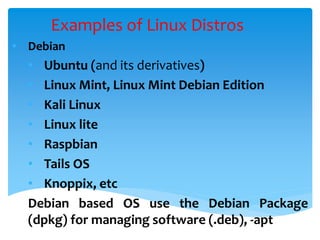
Examples of Linux Distros
• Debian
• Ubuntu (and its derivatives)
• Linux Mint, Linux Mint Debian Edition
• Kali Linux
• Linux lite
• Raspbian
• Tails OS
• Knoppix, etc
Debian based OS use the Debian Package
(dpkg) for managing software (.deb), -apt
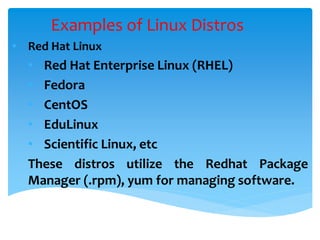
Examples of Linux Distros
• Red Hat Linux
• Red Hat Enterprise Linux (RHEL)
• Fedora
• CentOS
• EduLinux
• Scientific Linux, etc
These distros utilize the Redhat Package
Manager (.rpm), yum for managing software.
Examples of Linux Distros
• Arch Linux
• Antergos Linux
• ArchBang
• Manjaro
Arch Linux and the distributions based on it
utilize the pacman (package manager) for
managing software
Examples of Linux Distros
• Gentoo Linux
• Funtoo Linux
• Chromium OS
• Argent
• Pentoo
• Ututo, etc
These utilize the portage package manager
(emerge) for managing software.
Examples of Linux Distros
There are hundreds of Linux Operating system
with many developed for special Purposes
Examples of Linux Distros
There are hundreds of Linux Operating system
with many developed for special Purposes
There are three basic categories of Linux Distributions:
 Embedded Distros
 Desktop Distros
 Server Distros
Categories of Linux Distributions
Embedded Distros
Embedded Linux Distributions are those Distributions
that run on embedded devices such as mobile phones,
some ATMs, IoT devices, etc.
Examples Include:
• Android
• Tizen
• Meizu's Ubuntu, etc
Desktop Distros
Desktop Distributions are Linux Distros that are
installed on Personal Computers and is used for user
defined purposes.
Examples Include:
• Ubuntu Desktop
• Linux Mint
• Fedora
• Linux Lite, etc
Server Distros
Server Distributions are Linux Distros that are installed
on Dedicated Computers.
Examples Include:
• Ubuntu Server
• CentOS
• RHEL
• openSUSE, etc.
Linux servers are usually installed without X; and even
if X is installed, it doesn't lauch during system startup.
A File system is a way of organizing files. Every thing in
Linux is a File.
Figure I Basic form of the FHS
Linux Filesystem
Linux relies heavily on command line tools. Using the
command line provides the following advantages:
 Basically, all tasks can be done using the CLI
 Tasks and series of procedures can be scripted
 Networked machines on the internet can be logged
on to remotely
 GUI apps can be launched from the CLI
CLI: Terminals & Virtual Terminals
Examples of terminals include:
 bsh
 zsh
 bash
 ksh, etc
CLI: Terminals & Virtual Terminals
Virtual terminals are full screen terminals that do not
run inside the X-window (the GUI). All GNU/Linux
systems possess virtual terminals even ones that do
not employ the X server.
They are usually accessed by pressing the Ctrl + alt +
Fn 1 - 6 keys, and then can be left by pressing the Ctrl
+ alt + Fn 7 or Fn 8 key (s); depending on the system.
CLI: Terminals & Virtual Terminals
Introduction to bash
Introduction to linux

Introduction to linux

  • 1.
    Introduction to GNU/Linux OperatingSystems By: Ahiante Stephen Oriasotie
  • 2.
    What is Linux? Linuxis an open source Operating System that was initially developed for intel x86 processors. It has however been ported to other platforms. The Linux Kernel was created by Linus Torvalds. The Linux Kernel is the brain of any GNU/Linux operating system (distribution). The Kernel glues both applications and hardware together.
  • 3.
    Generally, A LinuxSystem has two operatable modes:  The Command Line Interface (CLI): provided by the shell.  The Graphical User Interface (GUI): provided by the X server. Every distribution that offers a GUI employs the X server to provide a Desktop environment e.g GNOME D.E, KDE, etc. Linux
  • 4.
    Linux LINUX SYSTEM X ServerSHELL CommandLine Interface Graphical User Interface
  • 5.
    What is aDistribution (Distro)? A Distribution is the collection of software making up a linux based operating system. There are Literally over hundreds of Linux Distributions; with some based on others. The Linux Kernel is common to all Linux Ditributions; else, it won't be a Linux Operating system.
  • 6.
    Examples of LinuxDistros • Debian • Ubuntu (and its derivatives) • Linux Mint, Linux Mint Debian Edition • Kali Linux • Linux lite • Raspbian • Tails OS • Knoppix, etc Debian based OS use the Debian Package (dpkg) for managing software (.deb), -apt
  • 7.
    Examples of LinuxDistros • Red Hat Linux • Red Hat Enterprise Linux (RHEL) • Fedora • CentOS • EduLinux • Scientific Linux, etc These distros utilize the Redhat Package Manager (.rpm), yum for managing software.
  • 8.
    Examples of LinuxDistros • Arch Linux • Antergos Linux • ArchBang • Manjaro Arch Linux and the distributions based on it utilize the pacman (package manager) for managing software
  • 9.
    Examples of LinuxDistros • Gentoo Linux • Funtoo Linux • Chromium OS • Argent • Pentoo • Ututo, etc These utilize the portage package manager (emerge) for managing software.
  • 10.
    Examples of LinuxDistros There are hundreds of Linux Operating system with many developed for special Purposes
  • 11.
    Examples of LinuxDistros There are hundreds of Linux Operating system with many developed for special Purposes
  • 12.
    There are threebasic categories of Linux Distributions:  Embedded Distros  Desktop Distros  Server Distros Categories of Linux Distributions
  • 13.
    Embedded Distros Embedded LinuxDistributions are those Distributions that run on embedded devices such as mobile phones, some ATMs, IoT devices, etc. Examples Include: • Android • Tizen • Meizu's Ubuntu, etc
  • 14.
    Desktop Distros Desktop Distributionsare Linux Distros that are installed on Personal Computers and is used for user defined purposes. Examples Include: • Ubuntu Desktop • Linux Mint • Fedora • Linux Lite, etc
  • 15.
    Server Distros Server Distributionsare Linux Distros that are installed on Dedicated Computers. Examples Include: • Ubuntu Server • CentOS • RHEL • openSUSE, etc. Linux servers are usually installed without X; and even if X is installed, it doesn't lauch during system startup.
  • 16.
    A File systemis a way of organizing files. Every thing in Linux is a File. Figure I Basic form of the FHS Linux Filesystem
  • 17.
    Linux relies heavilyon command line tools. Using the command line provides the following advantages:  Basically, all tasks can be done using the CLI  Tasks and series of procedures can be scripted  Networked machines on the internet can be logged on to remotely  GUI apps can be launched from the CLI CLI: Terminals & Virtual Terminals
  • 18.
    Examples of terminalsinclude:  bsh  zsh  bash  ksh, etc CLI: Terminals & Virtual Terminals
  • 19.
    Virtual terminals arefull screen terminals that do not run inside the X-window (the GUI). All GNU/Linux systems possess virtual terminals even ones that do not employ the X server. They are usually accessed by pressing the Ctrl + alt + Fn 1 - 6 keys, and then can be left by pressing the Ctrl + alt + Fn 7 or Fn 8 key (s); depending on the system. CLI: Terminals & Virtual Terminals
  • 20.