Web Server Administration Chapter 9 Extending the Web Environment
Overview Understand File Transfer Protocol (FTP) services Install and configure an FTP server in Windows Install and configure an FTP server in Linux Understand News servers Configure remote access to a server Understand streaming media servers Understand e-commerce software
Understanding FTP Services FTP is used to transfer files from a server to a client (download) and transfer files from a client to a server (upload) FTP client is the browser Also command-line and GUI clients FTP servers can operate as anonymous servers or they can require a valid logon Typically, they are anonymous FTP servers are not secure; user names and passwords are not sent encrypted
Understanding FTP Services The client connects to port 21 (control port) Port 20 (data port) is used to tell the client which unprivileged port to use for data transfer The above describes passive mode FTP, the most common type
Communicating with FTP dir *.rpm Displays the long listing of files and their properties, such as the size and date the file was created dir  filenames ls *.rpm Displays filenames and can use wildcards ls  filenames bye Closes the connection and exits the FTP client quit or bye close Closes the connection but does not exit the FTP client close open 192.168.0.100 Once the FTP client has been started, opens a connection open  host ftp 192.168.0.100 Initiates a connection to FTP server ftp  host Example Description Command
Communicating with FTP prompt Starts prompting prompt prompt no Stops prompting for each file when used before you use  mget  or  mput prompt no mput *.tif Uploads multiple files; used with wildcards mput  filenames mget sendmail*.rpm Downloads multiple files; used with wildcards Mget  filenames put testapp.zip Uploads a single file put  filename get test.rpm Downloads a single file get  filename ascii Transfer files in text mode ascii binary Transfer files in binary mode binary Example Description Command
Communicating with FTP help mget Finds very brief help on FTP commands; if used without a reference to a command, it will give you a list of commands available help  command pwd Displays the current directory on the server pwd lcd /docs Moves to another directory on the client  lcd  directory cd /software Moves to another directory on the FTP server cd  directory hash Displays a hash symbol as files are being downloaded hash Example Description Command
Install and Configure Windows FTP Server Windows component Part of IIS Configured through Internet Information Services (IIS) Manager
Configure FTP Messages Banner appears when client connects Welcome appears when logged on Exit appears when client exits from server Maximum connections appears when limit is reached and client cannot connect
Install FTP in Linux The wu-ftpd FTP server was developed by Washington University Once the rpm is installed, enable FTP chkconfig wu-ftpd on Restart xinetd service to recognize change service xinetd restart
Configure /etc/ftpaccess The /etc/ftpaccess file is the main configuration file By default, users with IDs less than or equal to 99 are not allowed  They are for system users and daemons Because the ftp user is a system user, you have to allow it with allow-uid ftp allow-gid ftp
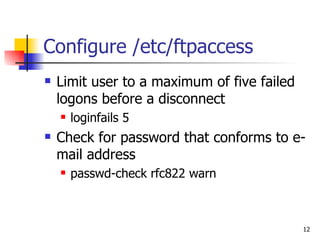
Configure /etc/ftpaccess Limit user to a maximum of five failed logons before a disconnect loginfails 5 Check for password that conforms to e-mail address passwd-check rfc822 warn
Control Access Set up user classes class all real,guest,anonymous * class local real 192.168.0.0/24 Set limits for class file-limit out 25 anonymous file-limit in 10 local byte-limit out 2000000 anonymous
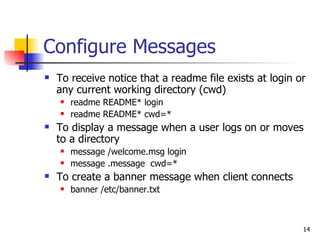
Configure Messages To receive notice that a readme file exists at login or any current working directory (cwd) readme README* login readme README* cwd=* To display a message when a user logs on or moves to a directory message /welcome.msg login message .message  cwd=* To create a banner message when client connects banner /etc/banner.txt
Understanding News Servers News servers allow threaded discussions  You post messages in a newsgroup A newsgroup focuses on a single topic There are more than 40,000 public newsgroups There are hundreds of gigabytes of information generated per day News servers can be set up for use within an organization
Configuring Telnet in Linux By default, telnet is installed but not enabled chkconfig telnet on service xinetd restart Telnet should not be used in a non-secure environment such as over the Internet because user names and passwords are not encrypted ssh is a secure replacement (described in Chapter 10) You cannot log on as root However, you can log on as another user and "su root"
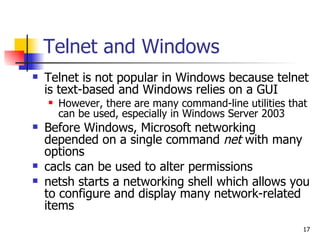
Telnet and Windows Telnet is not popular in Windows because telnet is text-based and Windows relies on a GUI However, there are many command-line utilities that can be used, especially in Windows Server 2003 Before Windows, Microsoft networking depended on a single command  net  with many options cacls can be used to alter permissions netsh starts a networking shell which allows you to configure and display many network-related items
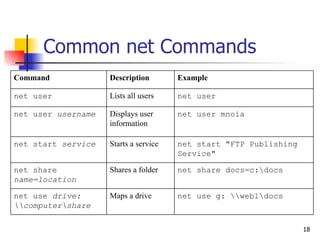
Common net Commands net use g: \\web1\docs Maps a drive  net use  drive: \\computer\share net share docs=c:\docs Shares a folder net share  name=location net start "FTP Publishing Service" Starts a service net start  service net user mnoia Displays user information net user  username net user Lists all users net user  Example Description Command
cacls options The format is: cacls  file or folder name [options] Revokes permission /r  user /e As above, except permissions are replaced /p  user:perm Grants a user specific permissions Permissions are:  f (full control) r (read) w (write) c (change) n (none) /g  user:perm Changes all subfolders /t Changes instead of replaces permission /e Description Option
netsh Examples Create a text file with commands to re-create the IP configuration netsh interface ip dump Ping the gateway IP address of each NIC netsh diag ping gateway In Windows Server 2003 Display errors in system log Manage network monitor and performance Defragment a drive Shut down a server
Terminal Services in Windows GUI-based access to a server Can be used for remote administration or running applications remotely In Windows 2000, you select remote administration on installation In Windows Server 2003, it is installed already and you have to enable it Client software is included in Windows Server 2003 and Windows XP You have to install client software for Windows 2000
Understanding Streaming Media Services Used to transfer video and audio By default, UDP is used Although TCP and HTTP can be used because of firewall issues in an organization No single standard exists as is true with SMTP, HTTP, POP3, and others Broadcast methods unicast – each packet is sent individually to each client multicast – each packet is sent to many clients
Understanding Streaming Media Services Helix Universal Server from Real Networks is popular Recognizes both Real Networks protocols (RTSP, PNA) and the Microsoft protocol (MMS) Windows Media Services is a Windows component Creates a folder called \ASFRoot to store Advanced Streaming Format (ASF) files
Understanding E-Commerce Servers Can be as simple as a product list and a shopping cart Can be as complex as amazon.com or dell.com Microsoft Commerce Server is an add-on to IIS  Incorporates a number of features required for a typical e-commerce site Highly customizable
Summary Use FTP to transfer files You use News servers to set up threaded discussions on a variety of topics Telnet and Windows Terminal Services allow you to remotely administer a server Streaming media servers are used for video and audio E-commerce servers focus on selling and in general, communicating with customers

Cita310chap09

  • 1.
    Web Server AdministrationChapter 9 Extending the Web Environment
  • 2.
    Overview Understand FileTransfer Protocol (FTP) services Install and configure an FTP server in Windows Install and configure an FTP server in Linux Understand News servers Configure remote access to a server Understand streaming media servers Understand e-commerce software
  • 3.
    Understanding FTP ServicesFTP is used to transfer files from a server to a client (download) and transfer files from a client to a server (upload) FTP client is the browser Also command-line and GUI clients FTP servers can operate as anonymous servers or they can require a valid logon Typically, they are anonymous FTP servers are not secure; user names and passwords are not sent encrypted
  • 4.
    Understanding FTP ServicesThe client connects to port 21 (control port) Port 20 (data port) is used to tell the client which unprivileged port to use for data transfer The above describes passive mode FTP, the most common type
  • 5.
    Communicating with FTPdir *.rpm Displays the long listing of files and their properties, such as the size and date the file was created dir filenames ls *.rpm Displays filenames and can use wildcards ls filenames bye Closes the connection and exits the FTP client quit or bye close Closes the connection but does not exit the FTP client close open 192.168.0.100 Once the FTP client has been started, opens a connection open host ftp 192.168.0.100 Initiates a connection to FTP server ftp host Example Description Command
  • 6.
    Communicating with FTPprompt Starts prompting prompt prompt no Stops prompting for each file when used before you use mget or mput prompt no mput *.tif Uploads multiple files; used with wildcards mput filenames mget sendmail*.rpm Downloads multiple files; used with wildcards Mget filenames put testapp.zip Uploads a single file put filename get test.rpm Downloads a single file get filename ascii Transfer files in text mode ascii binary Transfer files in binary mode binary Example Description Command
  • 7.
    Communicating with FTPhelp mget Finds very brief help on FTP commands; if used without a reference to a command, it will give you a list of commands available help command pwd Displays the current directory on the server pwd lcd /docs Moves to another directory on the client lcd directory cd /software Moves to another directory on the FTP server cd directory hash Displays a hash symbol as files are being downloaded hash Example Description Command
  • 8.
    Install and ConfigureWindows FTP Server Windows component Part of IIS Configured through Internet Information Services (IIS) Manager
  • 9.
    Configure FTP MessagesBanner appears when client connects Welcome appears when logged on Exit appears when client exits from server Maximum connections appears when limit is reached and client cannot connect
  • 10.
    Install FTP inLinux The wu-ftpd FTP server was developed by Washington University Once the rpm is installed, enable FTP chkconfig wu-ftpd on Restart xinetd service to recognize change service xinetd restart
  • 11.
    Configure /etc/ftpaccess The/etc/ftpaccess file is the main configuration file By default, users with IDs less than or equal to 99 are not allowed They are for system users and daemons Because the ftp user is a system user, you have to allow it with allow-uid ftp allow-gid ftp
  • 12.
    Configure /etc/ftpaccess Limituser to a maximum of five failed logons before a disconnect loginfails 5 Check for password that conforms to e-mail address passwd-check rfc822 warn
  • 13.
    Control Access Setup user classes class all real,guest,anonymous * class local real 192.168.0.0/24 Set limits for class file-limit out 25 anonymous file-limit in 10 local byte-limit out 2000000 anonymous
  • 14.
    Configure Messages Toreceive notice that a readme file exists at login or any current working directory (cwd) readme README* login readme README* cwd=* To display a message when a user logs on or moves to a directory message /welcome.msg login message .message cwd=* To create a banner message when client connects banner /etc/banner.txt
  • 15.
    Understanding News ServersNews servers allow threaded discussions You post messages in a newsgroup A newsgroup focuses on a single topic There are more than 40,000 public newsgroups There are hundreds of gigabytes of information generated per day News servers can be set up for use within an organization
  • 16.
    Configuring Telnet inLinux By default, telnet is installed but not enabled chkconfig telnet on service xinetd restart Telnet should not be used in a non-secure environment such as over the Internet because user names and passwords are not encrypted ssh is a secure replacement (described in Chapter 10) You cannot log on as root However, you can log on as another user and "su root"
  • 17.
    Telnet and WindowsTelnet is not popular in Windows because telnet is text-based and Windows relies on a GUI However, there are many command-line utilities that can be used, especially in Windows Server 2003 Before Windows, Microsoft networking depended on a single command net with many options cacls can be used to alter permissions netsh starts a networking shell which allows you to configure and display many network-related items
  • 18.
    Common net Commandsnet use g: \\web1\docs Maps a drive net use drive: \\computer\share net share docs=c:\docs Shares a folder net share name=location net start "FTP Publishing Service" Starts a service net start service net user mnoia Displays user information net user username net user Lists all users net user Example Description Command
  • 19.
    cacls options Theformat is: cacls file or folder name [options] Revokes permission /r user /e As above, except permissions are replaced /p user:perm Grants a user specific permissions Permissions are: f (full control) r (read) w (write) c (change) n (none) /g user:perm Changes all subfolders /t Changes instead of replaces permission /e Description Option
  • 20.
    netsh Examples Createa text file with commands to re-create the IP configuration netsh interface ip dump Ping the gateway IP address of each NIC netsh diag ping gateway In Windows Server 2003 Display errors in system log Manage network monitor and performance Defragment a drive Shut down a server
  • 21.
    Terminal Services inWindows GUI-based access to a server Can be used for remote administration or running applications remotely In Windows 2000, you select remote administration on installation In Windows Server 2003, it is installed already and you have to enable it Client software is included in Windows Server 2003 and Windows XP You have to install client software for Windows 2000
  • 22.
    Understanding Streaming MediaServices Used to transfer video and audio By default, UDP is used Although TCP and HTTP can be used because of firewall issues in an organization No single standard exists as is true with SMTP, HTTP, POP3, and others Broadcast methods unicast – each packet is sent individually to each client multicast – each packet is sent to many clients
  • 23.
    Understanding Streaming MediaServices Helix Universal Server from Real Networks is popular Recognizes both Real Networks protocols (RTSP, PNA) and the Microsoft protocol (MMS) Windows Media Services is a Windows component Creates a folder called \ASFRoot to store Advanced Streaming Format (ASF) files
  • 24.
    Understanding E-Commerce ServersCan be as simple as a product list and a shopping cart Can be as complex as amazon.com or dell.com Microsoft Commerce Server is an add-on to IIS Incorporates a number of features required for a typical e-commerce site Highly customizable
  • 25.
    Summary Use FTPto transfer files You use News servers to set up threaded discussions on a variety of topics Telnet and Windows Terminal Services allow you to remotely administer a server Streaming media servers are used for video and audio E-commerce servers focus on selling and in general, communicating with customers