WHAT’S NEW IN
EXCEL 2016
New Charts
(Tree Map, Waterfall & Histogram)
New Charts
(Tree Map, Waterfall & Histogram)
New Charts
(Tree Map, Waterfall & Histogram)
Get & Transform
New Charts
(Tree Map, Waterfall & Histogram)
One-Click Forecasting
Data Loss Prevention
One-Click Forecasting
Office Anywhere
Get & Transform
One-Click Forecasting
Data Loss Prevention
Office Anywhere
New Analysis Capabilities
(Relationship Detection, Time Grouping,
Drill Down & Field Searching)
Publish to Power BI
New Charts
(Tree Map, Waterfall & Histogram)
Get & Transform Get & Transform
Tell Me
Key Office Enhancements
(Simplified Sharing & Insights)
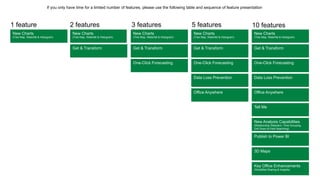
If you only have time for a limited number of features, please use the following table and sequence of feature presentation
1 feature 2 features 3 features 5 features 10 features
3D Maps
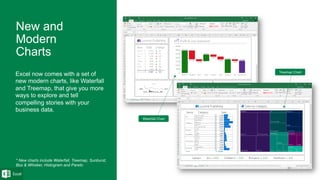
Excel now comes with a set of
new modern charts, like Waterfall
and Treemap, that give you more
ways to explore and tell
compelling stories with your
business data.
* New charts include Waterfall, Treemap, Sunburst,
Box & Whisker, Histogram and Pareto
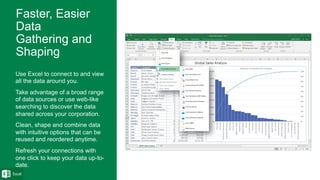
Use Excel to connect to and view
all the data around you.
Take advantage of a broad range
of data sources or use web-like
searching to discover the data
shared across your corporation.
Clean, shape and combine data
with intuitive options that can be
reused and reordered anytime.
Refresh your connections with
one click to keep your data up-to-
date.
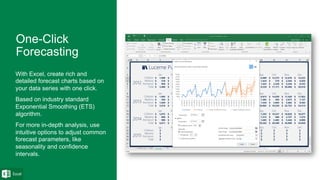
With Excel, create rich and
detailed forecast charts based on
your data series with one click.
Based on industry standard
Exponential Smoothing (ETS)
algorithm.
For more in-depth analysis, use
intuitive options to adjust common
forecast parameters, like
seasonality and confidence
intervals.
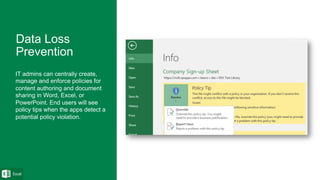
IT admins can centrally create,
manage and enforce policies for
content authoring and document
sharing in Word, Excel, or
PowerPoint. End users will see
policy tips when the apps detect a
potential policy violation.
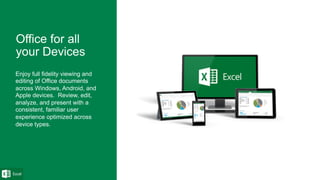
Enjoy full fidelity viewing and
editing of Office documents
across Windows, Android, and
Apple devices. Review, edit,
analyze, and present with a
consistent, familiar user
experience optimized across
device types.
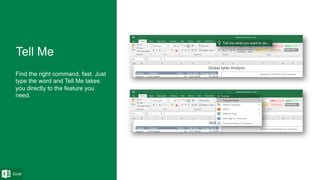
Find the right command, fast. Just
type the word and Tell Me takes
you directly to the feature you
need.
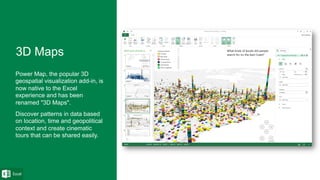
Power Map, the popular 3D
geospatial visualization add-in, is
now native to the Excel
experience and has been
renamed "3D Maps".
Discover patterns in data based
on location, time and geopolitical
context and create cinematic
tours that can be shared easily.
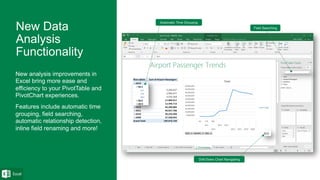
New analysis improvements in
Excel bring more ease and
efficiency to your PivotTable and
PivotChart experiences.
Features include automatic time
grouping, field searching,
automatic relationship detection,
inline field renaming and more!
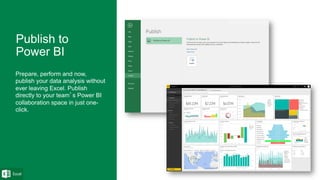
Prepare, perform and now,
publish your data analysis without
ever leaving Excel. Publish
directly to your team’s Power BI
collaboration space in just one-
click.
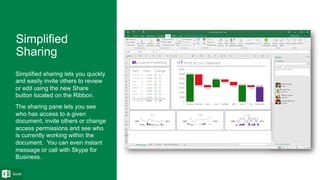
Simplified sharing lets you quickly
and easily invite others to review
or edit using the new Share
button located on the Ribbon.
The sharing pane lets you see
who has access to a given
document, invite others or change
access permissions and see who
is currently working within the
document. You can even instant
message or call with Skype for
Business.
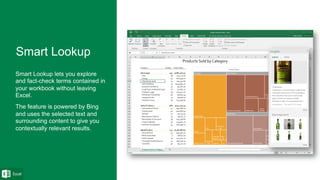
Smart Lookup lets you explore
and fact-check terms contained in
your workbook without leaving
Excel.
The feature is powered by Bing
and uses the selected text and
surrounding content to give you
contextually relevant results.
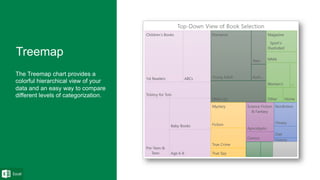
The Treemap chart provides a
colorful hierarchical view of your
data and an easy way to compare
different levels of categorization.
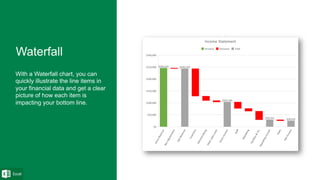
With a Waterfall chart, you can
quickly illustrate the line items in
your financial data and get a clear
picture of how each item is
impacting your bottom line.
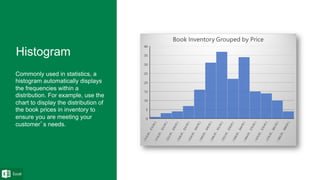
Commonly used in statistics, a
histogram automatically displays
the frequencies within a
distribution. For example, use the
chart to display the distribution of
the book prices in inventory to
ensure you are meeting your
customer’s needs.
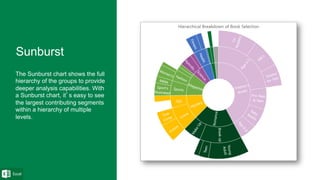
The Sunburst chart shows the full
hierarchy of the groups to provide
deeper analysis capabilities. With
a Sunburst chart, it’s easy to see
the largest contributing segments
within a hierarchy of multiple
levels.
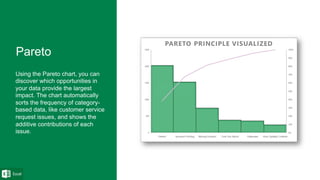
Using the Pareto chart, you can
discover which opportunities in
your data provide the largest
impact. The chart automatically
sorts the frequency of category-
based data, like customer service
request issues, and shows the
additive contributions of each
issue.
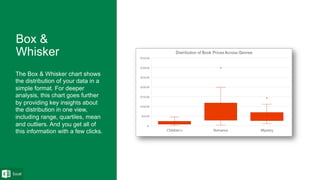
The Box & Whisker chart shows
the distribution of your data in a
simple format. For deeper
analysis, this chart goes further
by providing key insights about
the distribution in one view,
including range, quartiles, mean
and outliers. And you get all of
this information with a few clicks.

Excel 2016 top features

  • 1.
  • 2.
    New Charts (Tree Map,Waterfall & Histogram) New Charts (Tree Map, Waterfall & Histogram) New Charts (Tree Map, Waterfall & Histogram) Get & Transform New Charts (Tree Map, Waterfall & Histogram) One-Click Forecasting Data Loss Prevention One-Click Forecasting Office Anywhere Get & Transform One-Click Forecasting Data Loss Prevention Office Anywhere New Analysis Capabilities (Relationship Detection, Time Grouping, Drill Down & Field Searching) Publish to Power BI New Charts (Tree Map, Waterfall & Histogram) Get & Transform Get & Transform Tell Me Key Office Enhancements (Simplified Sharing & Insights) If you only have time for a limited number of features, please use the following table and sequence of feature presentation 1 feature 2 features 3 features 5 features 10 features 3D Maps
  • 3.
    Excel now comeswith a set of new modern charts, like Waterfall and Treemap, that give you more ways to explore and tell compelling stories with your business data. * New charts include Waterfall, Treemap, Sunburst, Box & Whisker, Histogram and Pareto
  • 4.
    Use Excel toconnect to and view all the data around you. Take advantage of a broad range of data sources or use web-like searching to discover the data shared across your corporation. Clean, shape and combine data with intuitive options that can be reused and reordered anytime. Refresh your connections with one click to keep your data up-to- date.
  • 5.
    With Excel, createrich and detailed forecast charts based on your data series with one click. Based on industry standard Exponential Smoothing (ETS) algorithm. For more in-depth analysis, use intuitive options to adjust common forecast parameters, like seasonality and confidence intervals.
  • 6.
    IT admins cancentrally create, manage and enforce policies for content authoring and document sharing in Word, Excel, or PowerPoint. End users will see policy tips when the apps detect a potential policy violation.
  • 7.
    Enjoy full fidelityviewing and editing of Office documents across Windows, Android, and Apple devices. Review, edit, analyze, and present with a consistent, familiar user experience optimized across device types.
  • 8.
    Find the rightcommand, fast. Just type the word and Tell Me takes you directly to the feature you need.
  • 9.
    Power Map, thepopular 3D geospatial visualization add-in, is now native to the Excel experience and has been renamed "3D Maps". Discover patterns in data based on location, time and geopolitical context and create cinematic tours that can be shared easily.
  • 10.
    New analysis improvementsin Excel bring more ease and efficiency to your PivotTable and PivotChart experiences. Features include automatic time grouping, field searching, automatic relationship detection, inline field renaming and more!
  • 11.
    Prepare, perform andnow, publish your data analysis without ever leaving Excel. Publish directly to your team’s Power BI collaboration space in just one- click.
  • 12.
    Simplified sharing letsyou quickly and easily invite others to review or edit using the new Share button located on the Ribbon. The sharing pane lets you see who has access to a given document, invite others or change access permissions and see who is currently working within the document. You can even instant message or call with Skype for Business.
  • 13.
    Smart Lookup letsyou explore and fact-check terms contained in your workbook without leaving Excel. The feature is powered by Bing and uses the selected text and surrounding content to give you contextually relevant results.
  • 14.
    The Treemap chartprovides a colorful hierarchical view of your data and an easy way to compare different levels of categorization.
  • 15.
    With a Waterfallchart, you can quickly illustrate the line items in your financial data and get a clear picture of how each item is impacting your bottom line.
  • 16.
    Commonly used instatistics, a histogram automatically displays the frequencies within a distribution. For example, use the chart to display the distribution of the book prices in inventory to ensure you are meeting your customer’s needs.
  • 17.
    The Sunburst chartshows the full hierarchy of the groups to provide deeper analysis capabilities. With a Sunburst chart, it’s easy to see the largest contributing segments within a hierarchy of multiple levels.
  • 18.
    Using the Paretochart, you can discover which opportunities in your data provide the largest impact. The chart automatically sorts the frequency of category- based data, like customer service request issues, and shows the additive contributions of each issue.
  • 19.
    The Box &Whisker chart shows the distribution of your data in a simple format. For deeper analysis, this chart goes further by providing key insights about the distribution in one view, including range, quartiles, mean and outliers. And you get all of this information with a few clicks.