u
Presented by
Anil Pokhrel
BscCSIT
CAB
contents
 What is software
 Introduction to system software
 Features of system software
 Types of system software
 Operating system
 Types of operating system
 Function of operating system
 Classification of operating system
 Utilities software
 Compilers and interpreters
 Conclusion
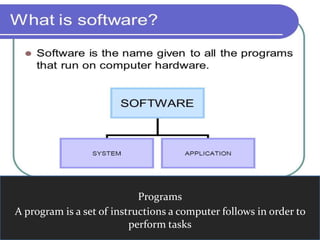
Programs
A program is a set of instructions a computer follows in order to
perform tasks
Introduction of system software
 System software is a type of computer software that is
designed to run a computer’s hardware and application
software
 Most system software works in the background and is not
controlled by the end user
 It is used to start and run computer systems and
networks
 System software consists of low level program that
interact with the computer at a very basic level
Features of system software
 Ease of use
 More powerful features
 High quality and reliability
 Better security
 Multiplatform capability
 Compatibility with other software
 Web and mail enabling
 Network and mobile computing
Types of system software
 Operating system
 Utilities
 Compilers
 Interpreter
 Assemblers
 Debuggers
Operating system(OS)
 The operating system (OS) is the best-known example of
system software. The OS manages all the other programs
in a compute
 An operating system (OS) is a set of programs
containing instructions that coordinate all the activities
among computer hardware devices
 Helps the applications run, and controls the display and
the keyboard.
 Example: Linux, MAC OS, Microsoft Windows,etc
Function Of OS
 Job Management
 Data Management
 Online processing
 Process Scheduling
 Memory Management
 I/O Management
 Serves as resource manager
Classification of Operating
System
 Desktop Operating system
 Server Operating system
 Mainframe Operating system
 Multi User Operating system
 Multi Processing: (more than 1 CPU used for
processing of data) Operating system
 Multi Tasking:(1 CPU; Cooperative & Preemptive
mechanism is used) Operating system
 Multithreading :(Different part of the program run
concurrently)
 Real Time Operating system
Utilities software
 It is a program that performs a very specific task, usually
managing managing system resources
 It differs from application mostly in terms of size and
complexity
 Examples:
Antivirus
Disk Cleaner
Data compression
Disk compression
Dackup software
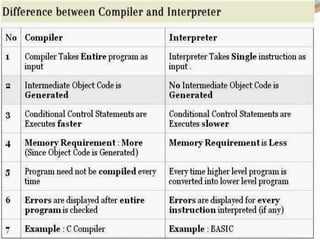
Compilers and Interpreters
Conclusion
 Software-based protection systems are coming into
common use, with advantages in both performance
and portability
 Operating system are the most important programs
that runs on a computer
References
www.gogle.com
Mathews Leon/Alexis Leon-
Fundamentals of IT
System software
System software

System software

  • 1.
  • 2.
    contents  What issoftware  Introduction to system software  Features of system software  Types of system software  Operating system  Types of operating system  Function of operating system  Classification of operating system  Utilities software  Compilers and interpreters  Conclusion
  • 3.
    Programs A program isa set of instructions a computer follows in order to perform tasks
  • 4.
    Introduction of systemsoftware  System software is a type of computer software that is designed to run a computer’s hardware and application software  Most system software works in the background and is not controlled by the end user  It is used to start and run computer systems and networks  System software consists of low level program that interact with the computer at a very basic level
  • 5.
    Features of systemsoftware  Ease of use  More powerful features  High quality and reliability  Better security  Multiplatform capability  Compatibility with other software  Web and mail enabling  Network and mobile computing
  • 6.
    Types of systemsoftware  Operating system  Utilities  Compilers  Interpreter  Assemblers  Debuggers
  • 7.
    Operating system(OS)  Theoperating system (OS) is the best-known example of system software. The OS manages all the other programs in a compute  An operating system (OS) is a set of programs containing instructions that coordinate all the activities among computer hardware devices  Helps the applications run, and controls the display and the keyboard.  Example: Linux, MAC OS, Microsoft Windows,etc
  • 9.
    Function Of OS Job Management  Data Management  Online processing  Process Scheduling  Memory Management  I/O Management  Serves as resource manager
  • 10.
    Classification of Operating System Desktop Operating system  Server Operating system  Mainframe Operating system  Multi User Operating system  Multi Processing: (more than 1 CPU used for processing of data) Operating system  Multi Tasking:(1 CPU; Cooperative & Preemptive mechanism is used) Operating system  Multithreading :(Different part of the program run concurrently)  Real Time Operating system
  • 11.
    Utilities software  Itis a program that performs a very specific task, usually managing managing system resources  It differs from application mostly in terms of size and complexity  Examples: Antivirus Disk Cleaner Data compression Disk compression Dackup software
  • 12.
  • 13.
    Conclusion  Software-based protectionsystems are coming into common use, with advantages in both performance and portability  Operating system are the most important programs that runs on a computer
  • 14.