





Evaluating 1:1 Learning
Programs
IETC November 4, 2015
Lindsay N. Abbeduto
Steven M. Baule
Retrieved from David Berliner’s IASB Presentation:
http://isba-ind.org/wp-content/uploads/2015/09/Berliner.pdf/
Education is the only business still
debating the usefulness of technology.
Schools remain unchanged for the most
part, despite numerous reforms and
increased investments in computers and
networks.
• U.S. Secretary of Education Rod Paige,
quoted in National Educational Technology Plan, 2004
Program evaluation is
essential in today’s high
stakes accountability
environment
Why Program Evaluation
• Demonstrate program effectiveness to administration and
Board of Education
• Improve the implementation and effectiveness of programs
• Better manage limited resources
• Document program accomplishments
• Justify current program funding or support the need for
increased levels of funding
• Demonstrate positive and negative effects of program
participation
• Document program development and activities to help ensure
successful replication
Retrieved From: WSJ, Sept 15, 2015 http://www.wsj.com/articles/technology-
in-classrooms-doesnt-always-boost-education-results-oecd-says-
1442343420
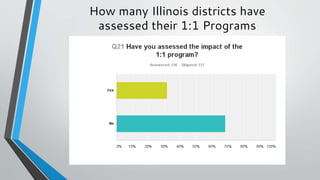
How many Illinois districts have
assessed their 1:1 Programs
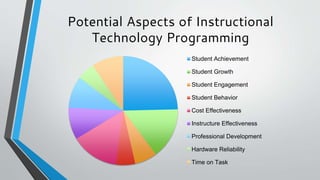
Potential Aspects of Instructional
Technology Programming
Student Achievement
Student Growth
Student Engagement
Student Behavior
Cost Effectiveness
Instructure Effectiveness
Professional Development
Hardware Reliability
Time on Task
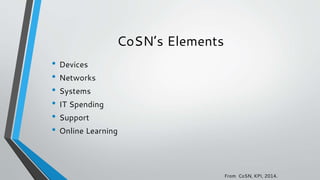
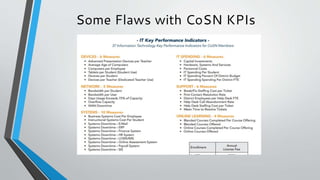
CoSN’s Elements
• Devices
• Networks
• Systems
• IT Spending
• Support
• Online Learning
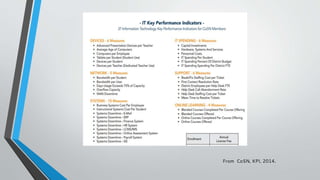
From CoSN, KPI, 2014.
Some Flaws with CoSN KPIs
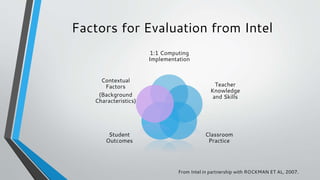
Factors for Evaluation from Intel
1:1 Computing
Implementation
Teacher
Knowledge
and Skills
Classroom
Practice
Student
Outcomes
Contextual
Factors
(Background
Characteristics)
From Intel in partnership with ROCKMAN ET AL, 2007.
What does ProjectRED say?
First and foremost, the 1:1 program needs to be
focused on student learning, personalization and the
most effective methods for the delivery of instruction.
A 1:1 program’s vision and goals will vary from
district to district, but maximizing the learning
potential of each individual student must remain the
core of established goals.
How can district leaders help this
happen?
-Providing ongoing systemic professional learning for everyone, at
all levels
-Being skilled in leading reform measures
-Creating a shared vision based on research and best practices
-Ensuring the use of assessments and evaluations to collect data
that will be used to continuously improving learning and instruction.
-Transformative leadership
And you must consider...
• How to cultivate district, building and staff leadership
-What is the short and long-term financial planning
-Expectation management
-Infrastructure
-Technology preparation, rollout and support
-Communications
-Policies
-Of major importance in successfully engaging a 1:1 program is the
community’s will to let go of outdated, ineffective practices to make
way for the new
CoSN’s Elements
• Devices
• Networks
• Systems
• IT Spending
• Support
• Online Learning
From CoSN, KPI, 2014.
Technology Facets
• Hardware
• Software
• Administrative Software
• Service and Support
• Technology Staff Development
• Integration into the General Instructional Program
• Integration into the Special Education Instructional Program
• Instructional Technology Courses
• Technology Facilities
• Internet Presence
From Baule, 2001.
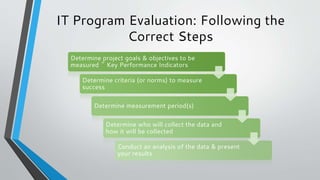
IT Program Evaluation: Following the
Correct Steps
Determine project goals & objectives to be
measured ~ Key Performance Indicators
Determine criteria (or norms) to measure
success
Determine measurement period(s)
Determine who will collect the data and
how it will be collected
Conduct an analysis of the data & present
your results
How to Measure Success
• Compare to Benchmarks
• Criterion Referenced
• Rubrics can work well here
• Measure Growth
• Norm Referenced
• Qualitative Measures
Evaluation Design Models
• Experimental Design (Possible in some cases using control and
experimental groups; requires random assignment of students)
• Quasi-experimental design
• Non-experimental design (Comparison of variables within a single
sample; Pre-test / Post-test model)
• Qualitative methods (Interviews, observations and descriptive data)
From Intel in partnership with ROCKMAN ET AL, 2007. & KC-AERC, 1:1
Technology in Classrooms: Establishing Plans for Evaluation
For a 1:1 Program
• What would you want to measure?
• How would you measure each?
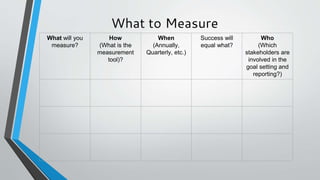
What to Measure
What will you
measure?
How
(What is the
measurement
tool)?
When
(Annually,
Quarterly, etc.)
Success will
equal what?
Who
(Which
stakeholders are
involved in the
goal setting and
reporting?)
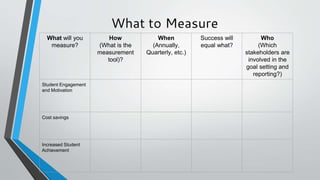
What to Measure
What will you
measure?
How
(What is the
measurement
tool)?
When
(Annually,
Quarterly, etc.)
Success will
equal what?
Who
(Which
stakeholders are
involved in the
goal setting and
reporting?)
Student Engagement
and Motivation
Cost savings
Increased Student
Achievement
A Student Engagement Example
• Goal to increase student engagement through the implementation
of 1:1 technology
• How will you measure student engagement?
• Survey data?
• Attendance?
• Observation?
Better Student Engagement
“The use of todays meet resulted in the participation of 100% of the
students. So many students are too shy to share aloud, but a discussion
board gives them an opportunity to express themselves without feeling as
self-conscious.”
“The discussion board then served as a quick-reference. I could quickly
and easily see and address any misconceptions and provide reinforcement
of how accurate the students were.”
Dana Rosenquist, 7th grade language arts teacher
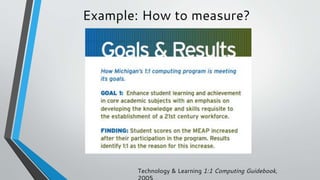
Example: How to measure?
Technology & Learning 1:1 Computing Guidebook,
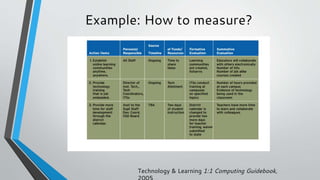
Example: How to measure?
Technology & Learning 1:1 Computing Guidebook,
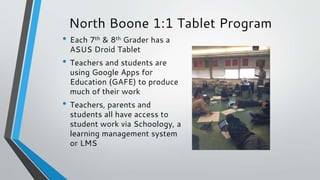
North Boone 1:1 Tablet Program
• Each 7th & 8th Grader has a
ASUS Droid Tablet
• Teachers and students are
using Google Apps for
Education (GAFE) to produce
much of their work
• Teachers, parents and
students all have access to
student work via Schoology, a
learning management system
or LMS
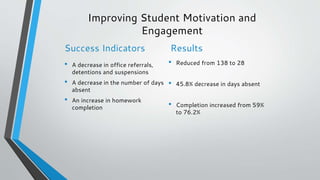
Improving Student Motivation and
Engagement
Success Indicators
• A decrease in office referrals,
detentions and suspensions
• A decrease in the number of days
absent
• An increase in homework
completion
Results
• Reduced from 138 to 28
• 45.8% decrease in days absent
• Completion increased from 59%
to 76.2%
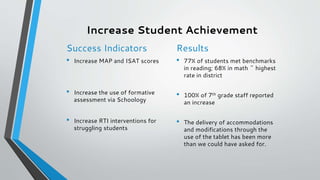
Increase Student Achievement
Success Indicators
• Increase MAP and ISAT scores
• Increase the use of formative
assessment via Schoology
• Increase RTI interventions for
struggling students
Results
• 77% of students met benchmarks
in reading; 68% in math ~ highest
rate in district
• 100% of 7th grade staff reported
an increase
• The delivery of accommodations
and modifications through the
use of the tablet has been more
than we could have asked for.
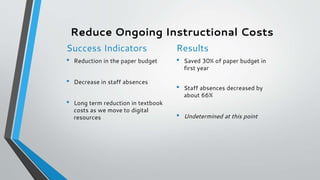
Reduce Ongoing Instructional Costs
Success Indicators
• Reduction in the paper budget
• Decrease in staff absences
• Long term reduction in textbook
costs as we move to digital
resources
Results
• Saved 30% of paper budget in
first year
• Staff absences decreased by
about 66%
• Undetermined at this point
1:1 Evaluation Resources
• 12 Questions to ask about devices & carts
• http://www.nbcusd.org/administration/superintendent/12QuestionsChoosingTabletandLaptopCarts.pdf
• Intel/Rockman Evaluation Toolkit
• http://www.nbcusd.org/administration/superintendent/FullSet_of_One-to-One_Evaluation_Toolkit.pdf
• Orange County, NC 1:1 Program Evaluation
• http://www.orange.k12.nc.us/1to1/Program_Planning_Evaluation.pdf
• Technology & Learning 1:1 Computing Guidebook
• http://www.techlearning.com/techlearning/events/techforum06/LeslieWilson_onetoone2.pdf
•Project Red: Global toolkit for transformation
• http://www.intel.com/content/www/us/en/education/solutions/project-red.html
Performance Management
Resources
• CoSNs KPI
• http://cosn.org/key-performance-indicators-kpis
• Information Technology Infrastructure Library (Best Practices)
• http://www.itil-officialsite.com/
• ISTE Standards and Performance Indicators
• http://www.slideshare.net/mictwell/iste-nets-and-performance-indicators-for-teachers
• ISTE Essential Conditions
• http://www.iste.org/standards/essential-conditions
Rubric Websites
• Rubistar
• http://rubistar.4teachers.org
• iRubric
• http://www.rcampus.com/indexrubric.cfm
• Teacher Planet
• http://www.sites4teachers.com/ (search for rubric or assessment generators)
• How & When to Use Rubrics
• http://pareonline.net/getvn.asp?v=7&n=3
Questions to us at
Steve: sbaule@muncie.k12.in.us
or 765-747-5205
Lindsay: lindsay.abbeduto@d300.org
Or 847.551.8447

Evaluating 1 to 1 Learning Programs

  • 1.
    Evaluating 1:1 Learning Programs IETCNovember 4, 2015 Lindsay N. Abbeduto Steven M. Baule
  • 2.
    Retrieved from DavidBerliner’s IASB Presentation: http://isba-ind.org/wp-content/uploads/2015/09/Berliner.pdf/
  • 3.
    Education is theonly business still debating the usefulness of technology. Schools remain unchanged for the most part, despite numerous reforms and increased investments in computers and networks. • U.S. Secretary of Education Rod Paige, quoted in National Educational Technology Plan, 2004
  • 4.
    Program evaluation is essentialin today’s high stakes accountability environment
  • 5.
    Why Program Evaluation •Demonstrate program effectiveness to administration and Board of Education • Improve the implementation and effectiveness of programs • Better manage limited resources • Document program accomplishments • Justify current program funding or support the need for increased levels of funding • Demonstrate positive and negative effects of program participation • Document program development and activities to help ensure successful replication
  • 6.
    Retrieved From: WSJ,Sept 15, 2015 http://www.wsj.com/articles/technology- in-classrooms-doesnt-always-boost-education-results-oecd-says- 1442343420
  • 7.
    How many Illinoisdistricts have assessed their 1:1 Programs
  • 8.
    Potential Aspects ofInstructional Technology Programming Student Achievement Student Growth Student Engagement Student Behavior Cost Effectiveness Instructure Effectiveness Professional Development Hardware Reliability Time on Task
  • 9.
    CoSN’s Elements • Devices •Networks • Systems • IT Spending • Support • Online Learning From CoSN, KPI, 2014.
  • 10.
  • 11.
    Some Flaws withCoSN KPIs
  • 12.
    Factors for Evaluationfrom Intel 1:1 Computing Implementation Teacher Knowledge and Skills Classroom Practice Student Outcomes Contextual Factors (Background Characteristics) From Intel in partnership with ROCKMAN ET AL, 2007.
  • 13.
    What does ProjectREDsay? First and foremost, the 1:1 program needs to be focused on student learning, personalization and the most effective methods for the delivery of instruction. A 1:1 program’s vision and goals will vary from district to district, but maximizing the learning potential of each individual student must remain the core of established goals.
  • 14.
    How can districtleaders help this happen? -Providing ongoing systemic professional learning for everyone, at all levels -Being skilled in leading reform measures -Creating a shared vision based on research and best practices -Ensuring the use of assessments and evaluations to collect data that will be used to continuously improving learning and instruction. -Transformative leadership
  • 15.
    And you mustconsider... • How to cultivate district, building and staff leadership -What is the short and long-term financial planning -Expectation management -Infrastructure -Technology preparation, rollout and support -Communications -Policies -Of major importance in successfully engaging a 1:1 program is the community’s will to let go of outdated, ineffective practices to make way for the new
  • 16.
    CoSN’s Elements • Devices •Networks • Systems • IT Spending • Support • Online Learning From CoSN, KPI, 2014.
  • 17.
    Technology Facets • Hardware •Software • Administrative Software • Service and Support • Technology Staff Development • Integration into the General Instructional Program • Integration into the Special Education Instructional Program • Instructional Technology Courses • Technology Facilities • Internet Presence From Baule, 2001.
  • 18.
    IT Program Evaluation:Following the Correct Steps Determine project goals & objectives to be measured ~ Key Performance Indicators Determine criteria (or norms) to measure success Determine measurement period(s) Determine who will collect the data and how it will be collected Conduct an analysis of the data & present your results
  • 19.
    How to MeasureSuccess • Compare to Benchmarks • Criterion Referenced • Rubrics can work well here • Measure Growth • Norm Referenced • Qualitative Measures
  • 20.
    Evaluation Design Models •Experimental Design (Possible in some cases using control and experimental groups; requires random assignment of students) • Quasi-experimental design • Non-experimental design (Comparison of variables within a single sample; Pre-test / Post-test model) • Qualitative methods (Interviews, observations and descriptive data) From Intel in partnership with ROCKMAN ET AL, 2007. & KC-AERC, 1:1 Technology in Classrooms: Establishing Plans for Evaluation
  • 21.
    For a 1:1Program • What would you want to measure? • How would you measure each?
  • 22.
    What to Measure Whatwill you measure? How (What is the measurement tool)? When (Annually, Quarterly, etc.) Success will equal what? Who (Which stakeholders are involved in the goal setting and reporting?)
  • 23.
    What to Measure Whatwill you measure? How (What is the measurement tool)? When (Annually, Quarterly, etc.) Success will equal what? Who (Which stakeholders are involved in the goal setting and reporting?) Student Engagement and Motivation Cost savings Increased Student Achievement
  • 24.
    A Student EngagementExample • Goal to increase student engagement through the implementation of 1:1 technology • How will you measure student engagement? • Survey data? • Attendance? • Observation?
  • 25.
    Better Student Engagement “Theuse of todays meet resulted in the participation of 100% of the students. So many students are too shy to share aloud, but a discussion board gives them an opportunity to express themselves without feeling as self-conscious.” “The discussion board then served as a quick-reference. I could quickly and easily see and address any misconceptions and provide reinforcement of how accurate the students were.” Dana Rosenquist, 7th grade language arts teacher
  • 26.
    Example: How tomeasure? Technology & Learning 1:1 Computing Guidebook,
  • 27.
    Example: How tomeasure? Technology & Learning 1:1 Computing Guidebook,
  • 28.
    North Boone 1:1Tablet Program • Each 7th & 8th Grader has a ASUS Droid Tablet • Teachers and students are using Google Apps for Education (GAFE) to produce much of their work • Teachers, parents and students all have access to student work via Schoology, a learning management system or LMS
  • 29.
    Improving Student Motivationand Engagement Success Indicators • A decrease in office referrals, detentions and suspensions • A decrease in the number of days absent • An increase in homework completion Results • Reduced from 138 to 28 • 45.8% decrease in days absent • Completion increased from 59% to 76.2%
  • 30.
    Increase Student Achievement SuccessIndicators • Increase MAP and ISAT scores • Increase the use of formative assessment via Schoology • Increase RTI interventions for struggling students Results • 77% of students met benchmarks in reading; 68% in math ~ highest rate in district • 100% of 7th grade staff reported an increase • The delivery of accommodations and modifications through the use of the tablet has been more than we could have asked for.
  • 31.
    Reduce Ongoing InstructionalCosts Success Indicators • Reduction in the paper budget • Decrease in staff absences • Long term reduction in textbook costs as we move to digital resources Results • Saved 30% of paper budget in first year • Staff absences decreased by about 66% • Undetermined at this point
  • 33.
    1:1 Evaluation Resources •12 Questions to ask about devices & carts • http://www.nbcusd.org/administration/superintendent/12QuestionsChoosingTabletandLaptopCarts.pdf • Intel/Rockman Evaluation Toolkit • http://www.nbcusd.org/administration/superintendent/FullSet_of_One-to-One_Evaluation_Toolkit.pdf • Orange County, NC 1:1 Program Evaluation • http://www.orange.k12.nc.us/1to1/Program_Planning_Evaluation.pdf • Technology & Learning 1:1 Computing Guidebook • http://www.techlearning.com/techlearning/events/techforum06/LeslieWilson_onetoone2.pdf •Project Red: Global toolkit for transformation • http://www.intel.com/content/www/us/en/education/solutions/project-red.html
  • 34.
    Performance Management Resources • CoSNsKPI • http://cosn.org/key-performance-indicators-kpis • Information Technology Infrastructure Library (Best Practices) • http://www.itil-officialsite.com/ • ISTE Standards and Performance Indicators • http://www.slideshare.net/mictwell/iste-nets-and-performance-indicators-for-teachers • ISTE Essential Conditions • http://www.iste.org/standards/essential-conditions
  • 35.
    Rubric Websites • Rubistar •http://rubistar.4teachers.org • iRubric • http://www.rcampus.com/indexrubric.cfm • Teacher Planet • http://www.sites4teachers.com/ (search for rubric or assessment generators) • How & When to Use Rubrics • http://pareonline.net/getvn.asp?v=7&n=3
  • 36.
    Questions to usat Steve: sbaule@muncie.k12.in.us or 765-747-5205 Lindsay: lindsay.abbeduto@d300.org Or 847.551.8447