Initial Results from North Carolina’s 1:1 Learning Initiative Pilot
A 1907 Learning Ecology
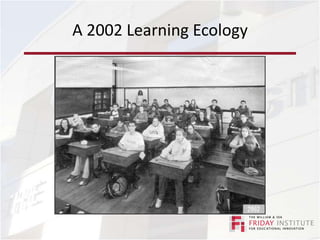
A 2002 Learning Ecology
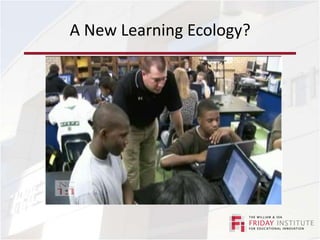
A New Learning Ecology?
Overview: Requirements for SuccessCommitted school and district leadership teams made up of instructional, curriculum, technology, and administrative leaders;Updated curriculum, teaching methods, and assessments that incorporate 21st century skills as central goals;Professional development and ongoing support for teachers as they reshape and update teaching practices and curriculum content;School-based staff who provide instructional support for the use of technology to enhance learning and technical support to ensure that the technology is reliable and up-to-date;
Overview: Requirements for SuccessHigh bandwidth connectivity to the school and sufficient wireless connectivity throughout the school;A laptop computer for each student, teacher, and administrator;Technology tools in each classroom, such as productivity software, printers, projectors, digital white boards, document cameras, digital cameras, and curriculum specific resources;Strategies for ensuring student safety and appropriate use of computers in accord with the Children’s Internet Protection Act (CIPA), while still enabling teacher and student access to a wide range of information and communication resources.
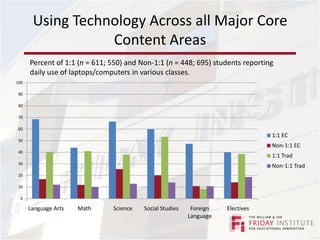
Using Technology Across all Major Core Content AreasPercent of 1:1 (n = 611; 550) and Non-1:1 (n = 448; 695) students reporting daily use of laptops/computers in various classes.
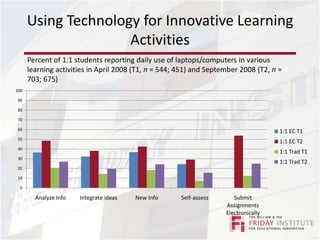
Using Technology for Innovative Learning ActivitiesPercent of 1:1 students reporting daily use of laptops/computers in various learning activities in April 2008 (T1, n = 544; 451) and September 2008 (T2, n = 703; 675)
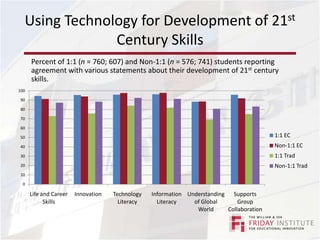
Using Technology for Development of 21st Century SkillsPercent of 1:1 (n = 760; 607) and Non-1:1 (n = 576; 741) students reporting agreement with various statements about their development of 21st century skills.
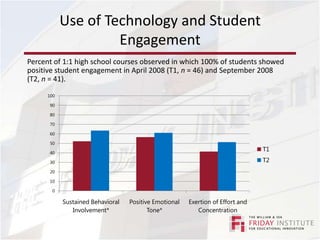
Use of Technology and Student EngagementPercent of 1:1 high school courses observed in which 100% of students showed positive student engagement in April 2008 (T1, n = 46) and September 2008 (T2, n = 41).
1:1 Evaluation Results: Lessons Learned
InfrastructureWireless access points Some schools reported needing double the amount of wireless routers than initially thoughtSecure server
Core classroom equipment
Laptop storage/transportSelecting MachinesSchools reported almost no loss or theft of laptops and limited breakage except for the tablet-style PCsPlans need to be in place for smooth replacement of machines in need of repairLoaner laptopsNetwork backup of teacher and student work
PersonnelOnsite technology facilitatorHelp teachers and students use technology to improve learningOnsite technicianHelp teachers and students troubleshootStudent Tech TeamEnables quick assistance and tech-savvy students opportunities to share their expertise
Professional DevelopmentOngoing PD is essentialDifferentiatedTeachers are eager to not only learn how to use technology, but they also want to see models of how to effectively integrate technologyRegularly survey staff for PD needs/requestsAsk staff to evaluate PD experiences
Professional DevelopmentProvide opportunities for large blocks of planning time and collaboration among teachersUtilize the 1:1 technology to provide training and support for teachersInclude parents, students, and community in PD plans
Policies and ProceduresEnsure same policies/consequences are applied the same way in every classroomMust keep students safe while also enabling the use of educationally appropriate digital resourcesConsider allowing teachers to unblock sitesInsist that teachers learn to monitor student useEncourage teachers to decide when it is appropriate to use or not use the laptops
Policies and ProceduresProvide training on AUP for students, teachers, administrators, and parentsProvide district-managed insurance policies for laptopsConsider asking families for nominal feePlans for laptop imaging, maintenance, storage, and distribution
Promote Innovative LeadershipConsistent, supportive, distributive leadership promotes adoption and buy-inTeachers emphasized the importance of:Supporting teacher PDReasonable expectations for effective technology integrationModeling technology useReadily addressing instructional and technical needsCommunicating commitment to the purpose of the 1:1 learning initiative
Initial Results From 1 1 Learning Initiative Pilot

Initial Results From 1 1 Learning Initiative Pilot

  • 1.
    Initial Results fromNorth Carolina’s 1:1 Learning Initiative Pilot
  • 2.
  • 3.
  • 4.
  • 5.
    Overview: Requirements forSuccessCommitted school and district leadership teams made up of instructional, curriculum, technology, and administrative leaders;Updated curriculum, teaching methods, and assessments that incorporate 21st century skills as central goals;Professional development and ongoing support for teachers as they reshape and update teaching practices and curriculum content;School-based staff who provide instructional support for the use of technology to enhance learning and technical support to ensure that the technology is reliable and up-to-date;
  • 6.
    Overview: Requirements forSuccessHigh bandwidth connectivity to the school and sufficient wireless connectivity throughout the school;A laptop computer for each student, teacher, and administrator;Technology tools in each classroom, such as productivity software, printers, projectors, digital white boards, document cameras, digital cameras, and curriculum specific resources;Strategies for ensuring student safety and appropriate use of computers in accord with the Children’s Internet Protection Act (CIPA), while still enabling teacher and student access to a wide range of information and communication resources.
  • 7.
    Using Technology Acrossall Major Core Content AreasPercent of 1:1 (n = 611; 550) and Non-1:1 (n = 448; 695) students reporting daily use of laptops/computers in various classes.
  • 8.
    Using Technology forInnovative Learning ActivitiesPercent of 1:1 students reporting daily use of laptops/computers in various learning activities in April 2008 (T1, n = 544; 451) and September 2008 (T2, n = 703; 675)
  • 9.
    Using Technology forDevelopment of 21st Century SkillsPercent of 1:1 (n = 760; 607) and Non-1:1 (n = 576; 741) students reporting agreement with various statements about their development of 21st century skills.
  • 10.
    Use of Technologyand Student EngagementPercent of 1:1 high school courses observed in which 100% of students showed positive student engagement in April 2008 (T1, n = 46) and September 2008 (T2, n = 41).
  • 11.
  • 12.
    InfrastructureWireless access pointsSome schools reported needing double the amount of wireless routers than initially thoughtSecure server
  • 13.
  • 14.
    Laptop storage/transportSelecting MachinesSchoolsreported almost no loss or theft of laptops and limited breakage except for the tablet-style PCsPlans need to be in place for smooth replacement of machines in need of repairLoaner laptopsNetwork backup of teacher and student work
  • 15.
    PersonnelOnsite technology facilitatorHelpteachers and students use technology to improve learningOnsite technicianHelp teachers and students troubleshootStudent Tech TeamEnables quick assistance and tech-savvy students opportunities to share their expertise
  • 16.
    Professional DevelopmentOngoing PDis essentialDifferentiatedTeachers are eager to not only learn how to use technology, but they also want to see models of how to effectively integrate technologyRegularly survey staff for PD needs/requestsAsk staff to evaluate PD experiences
  • 17.
    Professional DevelopmentProvide opportunitiesfor large blocks of planning time and collaboration among teachersUtilize the 1:1 technology to provide training and support for teachersInclude parents, students, and community in PD plans
  • 18.
    Policies and ProceduresEnsuresame policies/consequences are applied the same way in every classroomMust keep students safe while also enabling the use of educationally appropriate digital resourcesConsider allowing teachers to unblock sitesInsist that teachers learn to monitor student useEncourage teachers to decide when it is appropriate to use or not use the laptops
  • 19.
    Policies and ProceduresProvidetraining on AUP for students, teachers, administrators, and parentsProvide district-managed insurance policies for laptopsConsider asking families for nominal feePlans for laptop imaging, maintenance, storage, and distribution
  • 20.
    Promote Innovative LeadershipConsistent,supportive, distributive leadership promotes adoption and buy-inTeachers emphasized the importance of:Supporting teacher PDReasonable expectations for effective technology integrationModeling technology useReadily addressing instructional and technical needsCommunicating commitment to the purpose of the 1:1 learning initiative

Editor's Notes

  • #11 ECHS were offered a total of 239 hours - monitoring software such as E-Chalk and DyKnow; course management including Moodle and Eduplatform; the implementation of techniques learned at outside workshops and conferences; gaming technology such as Second Life and Study Island; tools such as VoiceThread, podcasting, and United Streaming; and Web 2.0 tools including wikis, blogs, and social bookmarkingthe 1:1 traditional high school were offered a total of 195 hours of professional development by their school or district on topics such as Microsoft Office; SmartBoards; website design; assessment tools such as clickers or ClassScapes; and photo editing. Like the 1:1 ECHS, the traditional high school held professional development regarding classroom management and monitoring software.