
Python for Everyone
Introduction

                Presenters:


   Rudolf      Eduard     Matthew   Lawrence
Presentation Outline
1.   Introduction.

2.   What is Python?

3.   Why Python?

4.   Where does it fit in?

5.   Automate Workflow (Desktop)

6.   Automate Workflow (Server)

7.   ArcGIS Resources centres

8.   Training

9.   Closing
What is Python?
• Python was created in 1990 by Guido van Rossum


“Python is an easy to learn, powerful language… (with) high-level
data structures and a simple but effective approach to
object-oriented   programming.   Python’s   elegant   syntax   and
dynamic typing…make it an ideal language for scripting…in many
areas and on most platforms.” –python.org


• Scripting language of ArcGIS

• Free, cross-platform, easy to learn, widely used, great
  community
Why Python?

• Automating workflow

• Productivity (faster)

• Cross platform

• Industry and Open Standards

• Scripting language

• Extend Model builder

• Scheduled tasks

• Standard install with ArcGIS

• Integrated with ArcGIS (ArcPy)
ArcGIS integration (ArcPY)
• Creates a useful and productive way to execute geographic
   data analysis, data conversion, data management, and map
   automation within the Python framework.

• ArcGIS applications written with ArcPy provide access to
   numerous additional libraries available in the Python
   community.

• GIS professionals and programmers can

  benefit from integration with these

  various disciplines.
Where does it fit in?
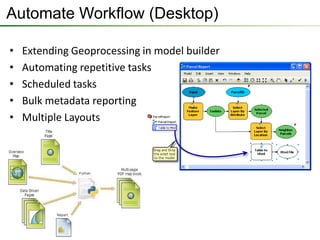
Automate Workflow (Desktop)

•   Extending Geoprocessing in model builder
•   Automating repetitive tasks
•   Scheduled tasks
•   Bulk metadata reporting
•   Multiple Layouts
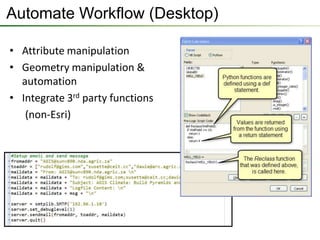
Automate Workflow (Desktop)

• Attribute manipulation
• Geometry manipulation &
  automation
• Integrate 3rd party functions
   (non-Esri)
Demo (Desktop)
• Field calculator
• From model to script
• Script scheduling
• Batch process with log
• Batch process with email
• Batch metadata extraction
• Enhanced Data Driven Pages
• Geometry operations
• Sample Scripts
Demo (Desktop)


• ArcPY Documentation / Help reference

• Python window – (run buffer example)

• ArcPY list function – (list layers or MXD’s)

• Working with selections – (sample from training)

• Geometry – (sample from training)

• Sharing Geoprocessing package – (buffer / clip tool)
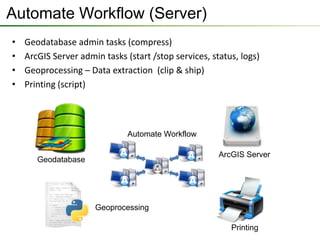
Automate Workflow (Server)
•   Geodatabase admin tasks (compress)
•   ArcGIS Server admin tasks (start /stop services, status, logs)
•   Geoprocessing – Data extraction (clip & ship)
•   Printing (script)


                               Automate Workflow

                                                       ArcGIS Server
       Geodatabase


                      Geoprocessing

                                                          Printing
Demo (Server)

• Geodatabase automation tasks
 − Compress
 − Replication
 − other
• ArcGIS Server
 − Data extraction
 − Advanced printing
 − Administrative tasks
Need more info on Python…?
• Resources.esri.com
  − Concepts
  − Samples
  − Community
  − Video
  − Galleries

• Desktop Help and Tutorials

• Official Training courses
Official Python Training

• ArcGIS 3 Performing Analysis

• Introduction to Geo-processing Scripts using Python.
Are there any Questions?

Esri South Africa Python for Everyone

  • 1.
  • 2.
    Introduction Presenters: Rudolf Eduard Matthew Lawrence
  • 3.
    Presentation Outline 1. Introduction. 2. What is Python? 3. Why Python? 4. Where does it fit in? 5. Automate Workflow (Desktop) 6. Automate Workflow (Server) 7. ArcGIS Resources centres 8. Training 9. Closing
  • 4.
    What is Python? •Python was created in 1990 by Guido van Rossum “Python is an easy to learn, powerful language… (with) high-level data structures and a simple but effective approach to object-oriented programming. Python’s elegant syntax and dynamic typing…make it an ideal language for scripting…in many areas and on most platforms.” –python.org • Scripting language of ArcGIS • Free, cross-platform, easy to learn, widely used, great community
  • 5.
    Why Python? • Automatingworkflow • Productivity (faster) • Cross platform • Industry and Open Standards • Scripting language • Extend Model builder • Scheduled tasks • Standard install with ArcGIS • Integrated with ArcGIS (ArcPy)
  • 6.
    ArcGIS integration (ArcPY) •Creates a useful and productive way to execute geographic data analysis, data conversion, data management, and map automation within the Python framework. • ArcGIS applications written with ArcPy provide access to numerous additional libraries available in the Python community. • GIS professionals and programmers can benefit from integration with these various disciplines.
  • 7.
  • 8.
    Automate Workflow (Desktop) • Extending Geoprocessing in model builder • Automating repetitive tasks • Scheduled tasks • Bulk metadata reporting • Multiple Layouts
  • 9.
    Automate Workflow (Desktop) •Attribute manipulation • Geometry manipulation & automation • Integrate 3rd party functions (non-Esri)
  • 10.
    Demo (Desktop) • Fieldcalculator • From model to script • Script scheduling • Batch process with log • Batch process with email • Batch metadata extraction • Enhanced Data Driven Pages • Geometry operations • Sample Scripts
  • 11.
    Demo (Desktop) • ArcPYDocumentation / Help reference • Python window – (run buffer example) • ArcPY list function – (list layers or MXD’s) • Working with selections – (sample from training) • Geometry – (sample from training) • Sharing Geoprocessing package – (buffer / clip tool)
  • 12.
    Automate Workflow (Server) • Geodatabase admin tasks (compress) • ArcGIS Server admin tasks (start /stop services, status, logs) • Geoprocessing – Data extraction (clip & ship) • Printing (script) Automate Workflow ArcGIS Server Geodatabase Geoprocessing Printing
  • 13.
    Demo (Server) • Geodatabaseautomation tasks − Compress − Replication − other • ArcGIS Server − Data extraction − Advanced printing − Administrative tasks
  • 14.
    Need more infoon Python…? • Resources.esri.com − Concepts − Samples − Community − Video − Galleries • Desktop Help and Tutorials • Official Training courses
  • 15.
    Official Python Training •ArcGIS 3 Performing Analysis • Introduction to Geo-processing Scripts using Python.
  • 16.
    Are there anyQuestions?