SciPipe
A light-weight workflow library
inspired by flow-based
programming
Samuel Lampa, @smllmp, bionics.it
Dept. Pharm. Biosci. UU, 2016-04-28
Top light-weight workflow tools
Snakemake
● Great for short one-off explorative stuff
● Tricky for complex graphs
Bpipe
● Easy to use for highly linear workflows
● Not so easy with branching workflows
Nextflow
● Dataflow means dynamic scheduling possible(!)
● Own way of organizing outputs
● No “re-usable components” support
SciLuigi and SciPipe
SciLuigi
● Great re-usable components story
● Highly customizable output file naming
● Easy to extend API
● No dynamic scheduling :(
● Performance problems with more than 64 workers
SciPipe
● (Same benefits as SciLuigi)
● Also: Allows dynamic scheduling
● Also: Much lower resource usage
(1000s of workers is OK)
● Also: Simpler, less code, less maintenance
● Also: High-performance for in-line components
SciPipe in brief
● Website: scipipe.org
● Simple, very little code => maintainable
● Write workflows in a subset of Go(lang)
● Execute readable .go-files:
go run myworkflow.go
● Optional compilation to static executable files:
go build; ./myworkflow
● No new language. Use existing Go tooling:
● Editors, Debuggers, Linters, Profilers ...
Flow-based programming
www.jpaulmorrison.com/fbp
Flow-based programming principles
● Separate network definition
(separate from process definitions)
● Named ports
● Channels with bounded buffers
● Information packets (IPs) with defined lifetimes
● More info:
en.wikipedia.org/wiki/Flow-based programming
www.jpaulmorrison.com/fbp
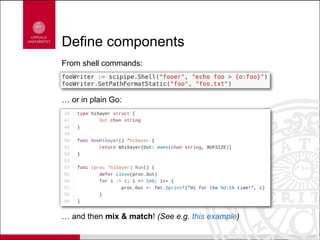
Define components
From shell commands:
… or in plain Go:
… and then mix & match! (See e.g. this example)
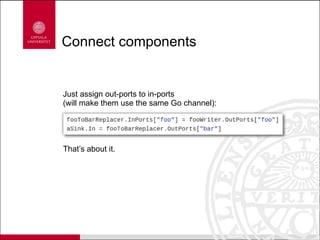
Connect components
Just assign out-ports to in-ports
(will make them use the same Go channel):
That’s about it.
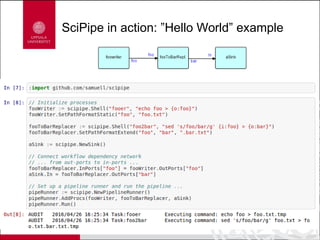
SciPipe in action: ”Hello World” example
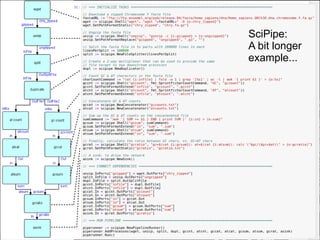
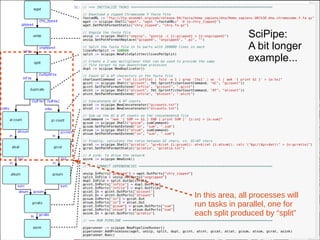
SciPipe:
A bit longer
example...
SciPipe:
A bit longer
example...
In this area, all processes will
run tasks in parallel, one for
each split produced by “split”
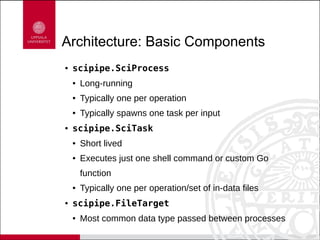
Architecture: Basic Components
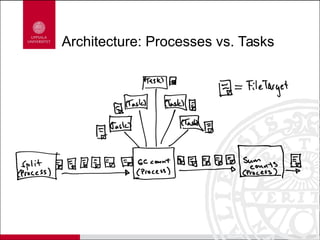
● scipipe.SciProcess
● Long-running
● Typically one per operation
● Typically spawns one task per input
● scipipe.SciTask
● Short lived
● Executes just one shell command or custom Go
function
● Typically one per operation/set of in-data files
● scipipe.FileTarget
● Most common data type passed between processes
Architecture: Processes vs. Tasks
Thank you!
@smllmp
bionics.it

SciPipe - A light-weight workflow library inspired by flow-based programming

  • 1.
    SciPipe A light-weight workflowlibrary inspired by flow-based programming Samuel Lampa, @smllmp, bionics.it Dept. Pharm. Biosci. UU, 2016-04-28
  • 2.
    Top light-weight workflowtools Snakemake ● Great for short one-off explorative stuff ● Tricky for complex graphs Bpipe ● Easy to use for highly linear workflows ● Not so easy with branching workflows Nextflow ● Dataflow means dynamic scheduling possible(!) ● Own way of organizing outputs ● No “re-usable components” support
  • 3.
    SciLuigi and SciPipe SciLuigi ●Great re-usable components story ● Highly customizable output file naming ● Easy to extend API ● No dynamic scheduling :( ● Performance problems with more than 64 workers SciPipe ● (Same benefits as SciLuigi) ● Also: Allows dynamic scheduling ● Also: Much lower resource usage (1000s of workers is OK) ● Also: Simpler, less code, less maintenance ● Also: High-performance for in-line components
  • 4.
    SciPipe in brief ●Website: scipipe.org ● Simple, very little code => maintainable ● Write workflows in a subset of Go(lang) ● Execute readable .go-files: go run myworkflow.go ● Optional compilation to static executable files: go build; ./myworkflow ● No new language. Use existing Go tooling: ● Editors, Debuggers, Linters, Profilers ...
  • 5.
  • 6.
    Flow-based programming principles ●Separate network definition (separate from process definitions) ● Named ports ● Channels with bounded buffers ● Information packets (IPs) with defined lifetimes ● More info: en.wikipedia.org/wiki/Flow-based programming www.jpaulmorrison.com/fbp
  • 7.
    Define components From shellcommands: … or in plain Go: … and then mix & match! (See e.g. this example)
  • 8.
    Connect components Just assignout-ports to in-ports (will make them use the same Go channel): That’s about it.
  • 9.
    SciPipe in action:”Hello World” example
  • 10.
  • 11.
    SciPipe: A bit longer example... Inthis area, all processes will run tasks in parallel, one for each split produced by “split”
  • 12.
    Architecture: Basic Components ●scipipe.SciProcess ● Long-running ● Typically one per operation ● Typically spawns one task per input ● scipipe.SciTask ● Short lived ● Executes just one shell command or custom Go function ● Typically one per operation/set of in-data files ● scipipe.FileTarget ● Most common data type passed between processes
  • 13.
  • 14.