Introduction to Python
• Python is a high-level programming language
• Open source and community driven
• “Batteries Included”
– a standard distribution includes many modules
• Dynamic typed
• Source can be compiled or run just-in-time
• Similar to perl, tcl, ruby
Why Python?
• Unlike AML and Avenue, there is a
considerable base of developers already using
the language
• “Tried and true” language that has been in
development since 1991
• Can interface with the Component Object
Model (COM) used by Windows
• Can interface with Open Source GIS toolsets
Why not Visual Basic?
• Visual Basic is still the method of configuring
and customizing ArcMap
• If you have a button on the toolbar, it’s VB
• Python scripts can be placed in ArcToolbox
• Python can be run from the command line
without ArcMap or ArcCatalog being open
• Using just the GIS Engine, lower overhead
• Rapid prototyping, ease of authoring, etc.
Python Interfaces
• IDLE – a cross-platform Python development
environment
• PythonWin – a Windows only interface to
Python
• Python Shell – running 'python' from the
Command Line opens this interactive shell
• For the exercises, we'll use IDLE, but you can
try them all and pick a favorite
IDLE – Development Environment
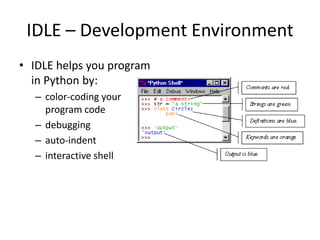
• IDLE helps you program
in Python by:
– color-coding your
program code
– debugging
– auto-indent
– interactive shell
Example Python
• Hello World
print “hello world”
• Prints hello world to
standard out
• Open IDLE and try it out
yourself
• Follow along using IDLE
More than just printing
• Python is an object oriented language
• Practically everything can be treated as an
object
• “hello world” is a string
• Strings, as objects, have methods that return
the result of a function on the string
String Methods
• Assign a string to a
variable
• In this case “hw”
• hw.title()
• hw.upper()
• hw.isdigit()
• hw.islower()
String Methods
• The string held in your variable remains the
same
• The method returns an altered string
• Changing the variable requires reassignment
– hw = hw.upper()
– hw now equals “HELLO WORLD”
Other Python Objects
• Lists (mutable sets of strings)
– var = [] # create list
– var = [‘one’, 2, ‘three’, ‘banana’]
• Tuples (immutable sets)
– var = (‘one’, 2, ‘three’, ‘banana’)
• Dictionaries (associative arrays or ‘hashes’)
– var = {} # create dictionary
– var = {‘lat’: 40.20547, ‘lon’: -74.76322}
– var[‘lat’] = 40.2054
• Each has its own set of methods
Lists
• Think of a list as a stack of cards, on which
your information is written
• The information stays in the order you place it
in until you modify that order
• Methods return a string or subset of the list or
modify the list to add or remove components
• Written as var[index], index refers to order
within set (think card number, starting at 0)
• You can step through lists as part of a loop
List Methods
• Adding to the List
– var[n] = object
• replaces n with object
– var.append(object)
• adds object to the end of the list
• Removing from the List
– var[n] = []
• empties contents of card, but preserves order
– var.remove(n)
• removes card at n
– var.pop(n)
• removes n and returns its value
Lists in ArcToolbox
You will create lists:
• Layers as inputs
• Attributes to match
• Arrays of objects
You will work with lists:
• List of field names
• List of selected features
Tuples
• Like a list, tuples are iterable arrays of objects
• Tuples are immutable –
once created, unchangeable
• To add or remove items, you must redeclare
• Example uses of tuples
– County Names
– Land Use Codes
– Ordered set of functions
Dictionaries
• Dictionaries are sets of key & value pairs
• Allows you to identify values by a descriptive
name instead of order in a list
• Keys are unordered unless explicitly sorted
• Keys are unique:
– var[‘item’] = “apple”
– var[‘item’] = “banana”
– print var[‘item’] prints just banana
Indentation and Blocks
• Python uses whitespace and indents to
denote blocks of code
• Lines of code that begin a block end in a
colon:
• Lines within the code block are indented at
the same level
• To end a code block, remove the indentation
• You'll want blocks of code that run only when
certain conditions are met
Conditional Branching
• if and else
if variable == condition:
#do something based on v == c
else:
#do something based on v != c
• elif allows for additional branching
if condition:
elif another condition:
…
else: #none of the above
Looping with For
• For allows you to loop over a block of code a set
number of times
• For is great for manipulating lists:
a = ['cat', 'window', 'defenestrate']
for x in a:
print x, len(x)
Results:
cat 3
window 6
defenestrate 12
Looping with For
• We could use a for loop to perform
geoprocessing tasks on each layer in a list
• We could get a list of features in a feature
class and loop over each, checking attributes
• Anything in a sequence or list can be used in a
For loop
• Just be sure not to modify the list while
looping
Modules
• Modules are additional pieces of code that
further extend Python’s functionality
• A module typically has a specific function
– additional math functions, databases, network…
• Python comes with many useful modules
• arcgisscripting is the module we will use to
load ArcGIS toolbox functions into Python
Modules
• Modules are accessed using import
– import sys, os # imports two modules
• Modules can have subsets of functions
– os.path is a subset within os
• Modules are then addressed by
modulename.function()
– sys.argv # list of arguments
– filename = os.path.splitext("points.txt")
– filename[1] # equals ".txt"
Files
• Files are manipulated by creating a file object
– f = open("points.txt", "r")
• The file object then has new methods
– print f.readline() # prints line from file
• Files can be accessed to read or write
– f = open("output.txt", "w")
– f.write("Important Output!")
• Files are iterable objects, like lists
Error Capture
• Check for type assignment errors, items not in
a list, etc.
• Try & Except
try:
a block of code that might have an error
except:
code to execute if an error occurs in "try"
• Allows for graceful failure
– important in ArcGIS
Additional Python Resources
• Python Homepage
http://www.python.org/
• Dive Into Python
http://www.diveintopython.org/
• Learning Python, 3rd Edition
http://www.oreilly.com/catalog/9780596513986/
• Getting Started Writing Geoprocessing Scripts
Available on ESRI's support page

Python first day

  • 1.
  • 2.
    Introduction to Python •Python is a high-level programming language • Open source and community driven • “Batteries Included” – a standard distribution includes many modules • Dynamic typed • Source can be compiled or run just-in-time • Similar to perl, tcl, ruby
  • 3.
    Why Python? • UnlikeAML and Avenue, there is a considerable base of developers already using the language • “Tried and true” language that has been in development since 1991 • Can interface with the Component Object Model (COM) used by Windows • Can interface with Open Source GIS toolsets
  • 4.
    Why not VisualBasic? • Visual Basic is still the method of configuring and customizing ArcMap • If you have a button on the toolbar, it’s VB • Python scripts can be placed in ArcToolbox • Python can be run from the command line without ArcMap or ArcCatalog being open • Using just the GIS Engine, lower overhead • Rapid prototyping, ease of authoring, etc.
  • 5.
    Python Interfaces • IDLE– a cross-platform Python development environment • PythonWin – a Windows only interface to Python • Python Shell – running 'python' from the Command Line opens this interactive shell • For the exercises, we'll use IDLE, but you can try them all and pick a favorite
  • 6.
    IDLE – DevelopmentEnvironment • IDLE helps you program in Python by: – color-coding your program code – debugging – auto-indent – interactive shell
  • 7.
    Example Python • HelloWorld print “hello world” • Prints hello world to standard out • Open IDLE and try it out yourself • Follow along using IDLE
  • 8.
    More than justprinting • Python is an object oriented language • Practically everything can be treated as an object • “hello world” is a string • Strings, as objects, have methods that return the result of a function on the string
  • 9.
    String Methods • Assigna string to a variable • In this case “hw” • hw.title() • hw.upper() • hw.isdigit() • hw.islower()
  • 10.
    String Methods • Thestring held in your variable remains the same • The method returns an altered string • Changing the variable requires reassignment – hw = hw.upper() – hw now equals “HELLO WORLD”
  • 11.
    Other Python Objects •Lists (mutable sets of strings) – var = [] # create list – var = [‘one’, 2, ‘three’, ‘banana’] • Tuples (immutable sets) – var = (‘one’, 2, ‘three’, ‘banana’) • Dictionaries (associative arrays or ‘hashes’) – var = {} # create dictionary – var = {‘lat’: 40.20547, ‘lon’: -74.76322} – var[‘lat’] = 40.2054 • Each has its own set of methods
  • 12.
    Lists • Think ofa list as a stack of cards, on which your information is written • The information stays in the order you place it in until you modify that order • Methods return a string or subset of the list or modify the list to add or remove components • Written as var[index], index refers to order within set (think card number, starting at 0) • You can step through lists as part of a loop
  • 13.
    List Methods • Addingto the List – var[n] = object • replaces n with object – var.append(object) • adds object to the end of the list • Removing from the List – var[n] = [] • empties contents of card, but preserves order – var.remove(n) • removes card at n – var.pop(n) • removes n and returns its value
  • 14.
    Lists in ArcToolbox Youwill create lists: • Layers as inputs • Attributes to match • Arrays of objects You will work with lists: • List of field names • List of selected features
  • 15.
    Tuples • Like alist, tuples are iterable arrays of objects • Tuples are immutable – once created, unchangeable • To add or remove items, you must redeclare • Example uses of tuples – County Names – Land Use Codes – Ordered set of functions
  • 16.
    Dictionaries • Dictionaries aresets of key & value pairs • Allows you to identify values by a descriptive name instead of order in a list • Keys are unordered unless explicitly sorted • Keys are unique: – var[‘item’] = “apple” – var[‘item’] = “banana” – print var[‘item’] prints just banana
  • 17.
    Indentation and Blocks •Python uses whitespace and indents to denote blocks of code • Lines of code that begin a block end in a colon: • Lines within the code block are indented at the same level • To end a code block, remove the indentation • You'll want blocks of code that run only when certain conditions are met
  • 18.
    Conditional Branching • ifand else if variable == condition: #do something based on v == c else: #do something based on v != c • elif allows for additional branching if condition: elif another condition: … else: #none of the above
  • 19.
    Looping with For •For allows you to loop over a block of code a set number of times • For is great for manipulating lists: a = ['cat', 'window', 'defenestrate'] for x in a: print x, len(x) Results: cat 3 window 6 defenestrate 12
  • 20.
    Looping with For •We could use a for loop to perform geoprocessing tasks on each layer in a list • We could get a list of features in a feature class and loop over each, checking attributes • Anything in a sequence or list can be used in a For loop • Just be sure not to modify the list while looping
  • 21.
    Modules • Modules areadditional pieces of code that further extend Python’s functionality • A module typically has a specific function – additional math functions, databases, network… • Python comes with many useful modules • arcgisscripting is the module we will use to load ArcGIS toolbox functions into Python
  • 22.
    Modules • Modules areaccessed using import – import sys, os # imports two modules • Modules can have subsets of functions – os.path is a subset within os • Modules are then addressed by modulename.function() – sys.argv # list of arguments – filename = os.path.splitext("points.txt") – filename[1] # equals ".txt"
  • 23.
    Files • Files aremanipulated by creating a file object – f = open("points.txt", "r") • The file object then has new methods – print f.readline() # prints line from file • Files can be accessed to read or write – f = open("output.txt", "w") – f.write("Important Output!") • Files are iterable objects, like lists
  • 24.
    Error Capture • Checkfor type assignment errors, items not in a list, etc. • Try & Except try: a block of code that might have an error except: code to execute if an error occurs in "try" • Allows for graceful failure – important in ArcGIS
  • 25.
    Additional Python Resources •Python Homepage http://www.python.org/ • Dive Into Python http://www.diveintopython.org/ • Learning Python, 3rd Edition http://www.oreilly.com/catalog/9780596513986/ • Getting Started Writing Geoprocessing Scripts Available on ESRI's support page