E-MAIL Designed By: Uma Ojha (M.E.S College)
OBJECTIVES Email Advantages of E-mail Email Etiquette Email Security
ELECTRONIC MAIL (E-MAIL) Definition: E-mail is the technology of sanding and receiving electronic messages over the internet. Email is the most widely used and popular form of communication over the internet
ADVANTAGES  OF E-MAIL E-mail enables speedy communication . E-mail is reliable. E-mail is inexpensive E-mail can be automated to perform certain task automatically. E-mail messages are always easy to locate. It’s easy to send your messages to more than one person. More delightful fast and rich media presentation for receiver
EMAIL   ETIQUETTE
WHY IS EMAIL ETIQUETTE IMPORTANT? We all interact with the printed word as though it has a personality and that personality makes positive and negative impressions upon us. Without immediate feedback your document can easily be misinterpreted by your reader, so it is crucial that you follow the basic rules of etiquette to construct an appropriate tone.
WHY COMPANY NEED TO IMPLEMENT ETIQUETTE RULES? Professionalism : by using email language your company will convey a professional image. Efficiency : E-mails that get to the point are much more effective than poorly worded emails. Protection from liability : Employee awareness of email risk will protect from costly law suits.
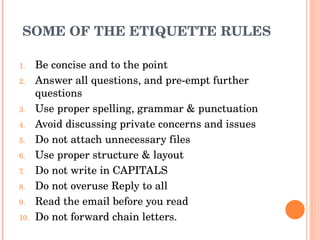
SOME OF THE ETIQUETTE RULES Be concise and to the point Answer all questions, and pre-empt further questions Use proper spelling, grammar & punctuation Avoid discussing private concerns and issues Do not attach unnecessary files Use proper structure & layout Do not write in CAPITALS Do not overuse Reply to all Read the email before you read Do not forward chain letters.
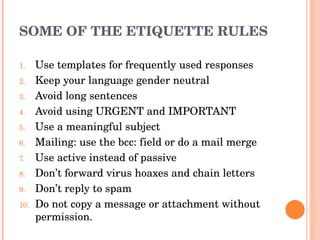
SOME OF THE ETIQUETTE RULES Use templates for frequently used responses Keep your language gender neutral Avoid long sentences Avoid using URGENT and IMPORTANT Use a meaningful subject Mailing: use the bcc: field or do a mail merge Use active instead of passive Don’t forward virus hoaxes and chain letters Don’t reply to spam Do not copy a message or attachment without permission.
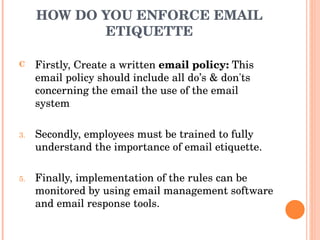
HOW DO YOU ENFORCE EMAIL ETIQUETTE Firstly, Create a written  email policy:  This email policy should include all do’s & don'ts concerning the email the use of the email system Secondly, employees must be trained to fully understand the importance of email etiquette. Finally, implementation of the rules can be monitored by using email management software and email response tools.
E-MAIL SECURITY
ASPECTS OF DATA SECURITY Privacy Keeping your information private Integrity Knowing that the information has not been changed Authenticity Knowing who sent the information
WHAT ARE THE THREATS TO EMAIL SECURITY? Viruses & Worms SPAM Phishing
VIRUSES AND WORMS Self replicating, malicious codes that attach to an application program or other executable system component and leave no obvious signs of their presence Can arrive via emails or downloads Can slow down your company’s systems and productivity as you need to dedicate resources to remove it
VIRUSES AND WORMS Other impacts Increased spam Denial of service Deleted files Allow remote access to your computer No particular way to identify that your computer has been infected Some may destroy files and shut down your computer Others may only subtly affect computer normal operations Anti-virus software may alert you that it’s found malicious code and may be able to clean it automatically
VIRUSES AND WORMS What to do if infected Minimize the damage – contact your IT dept For home computers – disconnect your computer from the Interne t Remove malicious code Update virus definitions for your anti-virus software Perform manual scan of entire system If software can’t locate and remove code, you may need to reinstall your operating system NOTE: Reinstalling or restoring your operating system typically erases all your files and additional software you have installed on your machine
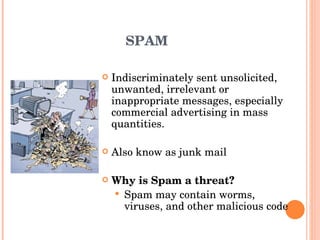
SPAM Indiscriminately sent unsolicited, unwanted, irrelevant or inappropriate messages, especially commercial advertising in mass quantities. Also know as junk mail Why is Spam a threat? Spam may contain worms, viruses, and other malicious code
SPAM Cost of spam Loss of productivity is the main concern There is also the cost of bandwidth taken  by spam Storage and network infrastructure costs.  Loss of legitimate email messages
PHISHING Occurs when ID thieves trick people into providing their Social Security number, financial account numbers, PINs, mother’s maiden name and other personal information by pretending to be someone they are not.
PHISING Usually achieved by creating a website identical to the secure site User is sent email requesting them to log in, and providing a link to the bogus site When user logs in, password is stored and used to access the account by the attacker Difficult to guard against, particularly if using HTML email
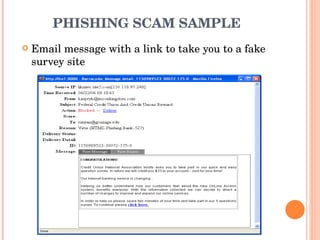
PHISHING SCAM SAMPLE Email message with a link to take you to a fake survey site
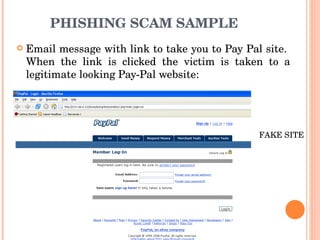
PHISHING SCAM SAMPLE Email message with link to take you to Pay Pal site.  When the link is clicked the victim is taken to a legitimate looking Pay-Pal website:  FAKE SITE
PHISHING, WHAT TO LOOK FOR  To check whether a message is legite, call the company directly or go to   their website (use a search engine to find it) Pop Up Screens Never enter personal information in a pop up screen Phisher will direct you to the real company’s website but an unauthorized screen created by the scammer will appear with blanks to provide your personal information Legite company, organization won’t ask for personal info via a pop up screen Install pop up blocking software to help prevent this type of phishing
PHISHING, HOW TO PROTECT YOURSELF Protect your PC with spam filters, anti-virus and anti-spyware software and a firewall and keep them up to date Phishing can occur by phone too Verify the person’s identity before providing any personal info (ask for person’s name, name of agency, phone number, physical address)
MEASURES FOR E-MAIL SECURITY Email Encryption :  Email encryption protects private, sensitive and valuable information communicated via email. Secure Email Gateway :  Secure email gateways protect your electronic boundary-both entering and leaving your organization. Secure Web Mail : Secure web mail makes it possible to protect email going outside of your organization. Content Filtering : It is the technique whereby content is blocked or allowed based on analysis of its content, rather than its source or other criteria. Email Compliance : It can include corporate policy compliance to protect intellectual property, prevent harassment and vulgarity and protect the corporate brands .

Email

  • 1.
    E-MAIL Designed By:Uma Ojha (M.E.S College)
  • 2.
    OBJECTIVES Email Advantagesof E-mail Email Etiquette Email Security
  • 3.
    ELECTRONIC MAIL (E-MAIL)Definition: E-mail is the technology of sanding and receiving electronic messages over the internet. Email is the most widely used and popular form of communication over the internet
  • 4.
    ADVANTAGES OFE-MAIL E-mail enables speedy communication . E-mail is reliable. E-mail is inexpensive E-mail can be automated to perform certain task automatically. E-mail messages are always easy to locate. It’s easy to send your messages to more than one person. More delightful fast and rich media presentation for receiver
  • 5.
    EMAIL ETIQUETTE
  • 6.
    WHY IS EMAILETIQUETTE IMPORTANT? We all interact with the printed word as though it has a personality and that personality makes positive and negative impressions upon us. Without immediate feedback your document can easily be misinterpreted by your reader, so it is crucial that you follow the basic rules of etiquette to construct an appropriate tone.
  • 7.
    WHY COMPANY NEEDTO IMPLEMENT ETIQUETTE RULES? Professionalism : by using email language your company will convey a professional image. Efficiency : E-mails that get to the point are much more effective than poorly worded emails. Protection from liability : Employee awareness of email risk will protect from costly law suits.
  • 8.
    SOME OF THEETIQUETTE RULES Be concise and to the point Answer all questions, and pre-empt further questions Use proper spelling, grammar & punctuation Avoid discussing private concerns and issues Do not attach unnecessary files Use proper structure & layout Do not write in CAPITALS Do not overuse Reply to all Read the email before you read Do not forward chain letters.
  • 9.
    SOME OF THEETIQUETTE RULES Use templates for frequently used responses Keep your language gender neutral Avoid long sentences Avoid using URGENT and IMPORTANT Use a meaningful subject Mailing: use the bcc: field or do a mail merge Use active instead of passive Don’t forward virus hoaxes and chain letters Don’t reply to spam Do not copy a message or attachment without permission.
  • 10.
    HOW DO YOUENFORCE EMAIL ETIQUETTE Firstly, Create a written email policy: This email policy should include all do’s & don'ts concerning the email the use of the email system Secondly, employees must be trained to fully understand the importance of email etiquette. Finally, implementation of the rules can be monitored by using email management software and email response tools.
  • 11.
  • 12.
    ASPECTS OF DATASECURITY Privacy Keeping your information private Integrity Knowing that the information has not been changed Authenticity Knowing who sent the information
  • 13.
    WHAT ARE THETHREATS TO EMAIL SECURITY? Viruses & Worms SPAM Phishing
  • 14.
    VIRUSES AND WORMSSelf replicating, malicious codes that attach to an application program or other executable system component and leave no obvious signs of their presence Can arrive via emails or downloads Can slow down your company’s systems and productivity as you need to dedicate resources to remove it
  • 15.
    VIRUSES AND WORMSOther impacts Increased spam Denial of service Deleted files Allow remote access to your computer No particular way to identify that your computer has been infected Some may destroy files and shut down your computer Others may only subtly affect computer normal operations Anti-virus software may alert you that it’s found malicious code and may be able to clean it automatically
  • 16.
    VIRUSES AND WORMSWhat to do if infected Minimize the damage – contact your IT dept For home computers – disconnect your computer from the Interne t Remove malicious code Update virus definitions for your anti-virus software Perform manual scan of entire system If software can’t locate and remove code, you may need to reinstall your operating system NOTE: Reinstalling or restoring your operating system typically erases all your files and additional software you have installed on your machine
  • 17.
    SPAM Indiscriminately sentunsolicited, unwanted, irrelevant or inappropriate messages, especially commercial advertising in mass quantities. Also know as junk mail Why is Spam a threat? Spam may contain worms, viruses, and other malicious code
  • 18.
    SPAM Cost ofspam Loss of productivity is the main concern There is also the cost of bandwidth taken by spam Storage and network infrastructure costs. Loss of legitimate email messages
  • 19.
    PHISHING Occurs whenID thieves trick people into providing their Social Security number, financial account numbers, PINs, mother’s maiden name and other personal information by pretending to be someone they are not.
  • 20.
    PHISING Usually achievedby creating a website identical to the secure site User is sent email requesting them to log in, and providing a link to the bogus site When user logs in, password is stored and used to access the account by the attacker Difficult to guard against, particularly if using HTML email
  • 21.
    PHISHING SCAM SAMPLEEmail message with a link to take you to a fake survey site
  • 22.
    PHISHING SCAM SAMPLEEmail message with link to take you to Pay Pal site. When the link is clicked the victim is taken to a legitimate looking Pay-Pal website: FAKE SITE
  • 23.
    PHISHING, WHAT TOLOOK FOR To check whether a message is legite, call the company directly or go to their website (use a search engine to find it) Pop Up Screens Never enter personal information in a pop up screen Phisher will direct you to the real company’s website but an unauthorized screen created by the scammer will appear with blanks to provide your personal information Legite company, organization won’t ask for personal info via a pop up screen Install pop up blocking software to help prevent this type of phishing
  • 24.
    PHISHING, HOW TOPROTECT YOURSELF Protect your PC with spam filters, anti-virus and anti-spyware software and a firewall and keep them up to date Phishing can occur by phone too Verify the person’s identity before providing any personal info (ask for person’s name, name of agency, phone number, physical address)
  • 25.
    MEASURES FOR E-MAILSECURITY Email Encryption : Email encryption protects private, sensitive and valuable information communicated via email. Secure Email Gateway : Secure email gateways protect your electronic boundary-both entering and leaving your organization. Secure Web Mail : Secure web mail makes it possible to protect email going outside of your organization. Content Filtering : It is the technique whereby content is blocked or allowed based on analysis of its content, rather than its source or other criteria. Email Compliance : It can include corporate policy compliance to protect intellectual property, prevent harassment and vulgarity and protect the corporate brands .