PUBLIC
January, 2020
Invoice Reference Number (IRN) for India
SAP eInvoice for India
2PUBLIC© 2019 SAP SE or an SAP affiliate company. All rights reserved. ǀ
Legal Disclaimer
The information in this presentation is confidential and proprietaryto SAP and may not be disclosed without the
permission of SAP. This presentation is not subject to your license agreement or any other service or subscription
agreement with SAP. SAP has no obligation to pursue any course of business outlined in this document or any
related presentation, or to develop or release any functionality mentioned therein. This document, or any related
presentation and SAP's strategy and possible future developments, products and or platforms directions and
functionality are all subject to change and may be changed by SAP at any time for any reasonwithout notice. The
information in this document is not a commitment, promise or legal obligation to deliver any material, code or
functionality. This document is provided without a warranty of any kind, either express or implied, including but not
limited to, the implied warranties of merchantability, fitness for a particular purpose, or non-infringement. This
document is for informational purposes and may not be incorporatedinto a contract. SAP assumes no
responsibility for errors or omissions in this document, except if such damages were caused by SAP´s willful
misconduct or gross negligence.
All forward-looking statements are subject to various risks and uncertainties that could cause actual results to
differ materially from expectations. Readers are cautioned not to place undue reliance on these forward-looking
statements, which speak only as of their dates, and they should not be relied upon in making purchasing
decisions.
3PUBLIC© 2019 SAP SE or an SAP affiliate company. All rights reserved. ǀ
The GST Council has decided to introduce with centralized issuance of an unique number (Invoice
Reference number) for each B2B invoice on reporting of invoice data to a central portal with
effective(Mandate) date from 1st April 2020 for all Tax payers
The new system will lead to one-time reporting on B2B invoice data in the form it is generated to reduce
reporting in multiple formats (one for GSTR 1 and the other for e-way bill) and to generate Sales and
Purchase Registers (ANX-1 and ANX-2) and from this data to keep the Return (RET-1 etc.) ready for
filing.
Status of legislation in India
GST council – Goods and Services Tax Council
GSTR 1 - monthly return that summarizes all sales (outward supplies) of a taxpayer
ANX 1 - FORM GST ANX-1 – Annexure Of Outward Supplies
ANX 2 - FORM GST ANX-2 – Annexure Of Inward Supplies
RET 1 – FORM GST RET-1 – Monthly Return for normal tax payer
Businesses having a turnover of ₹500 crore or more would take up e-invoicing
from January 1, 2020 on voluntary
and trial basis while the businesses with turnover of ₹100 crore or more would
start e-invoicing on voluntary and trial basis from February 1, 2020.
However, from April 1, 2020, the e-invoicing will be mandatory for both these
categories
4PUBLIC© 2019 SAP SE or an SAP affiliate company. All rights reserved. ǀ
Legal changes, effective date and Impact
eInvoicing || effective from Jan 2020 on voluntary basis || mandatory on 1st April 2020
• Real Time – 64 digits (alpha numeric) || QR code || Digital Signature
• An invoice is valid only if invoice is registeredin IRP.
• Input tax credit can be availed only invoices with valid IRN/eInvoice
• Manual update in ECC/S4 with 64 digits IRN is not practical
GST Simplification - Continuous upload|| effective from 1st April 2020 ||ANX-1, ANX-2 & RET-1
Invoice Reconciliation, Avail Input tax credit & Vendor payment after invoice is uploaded to GSTN
https://einv-apisandbox.nic.in/index.html
https://www.gstn.org/e-invoice/
5PUBLIC© 2019 SAP SE or an SAP affiliate company. All rights reserved. ǀ
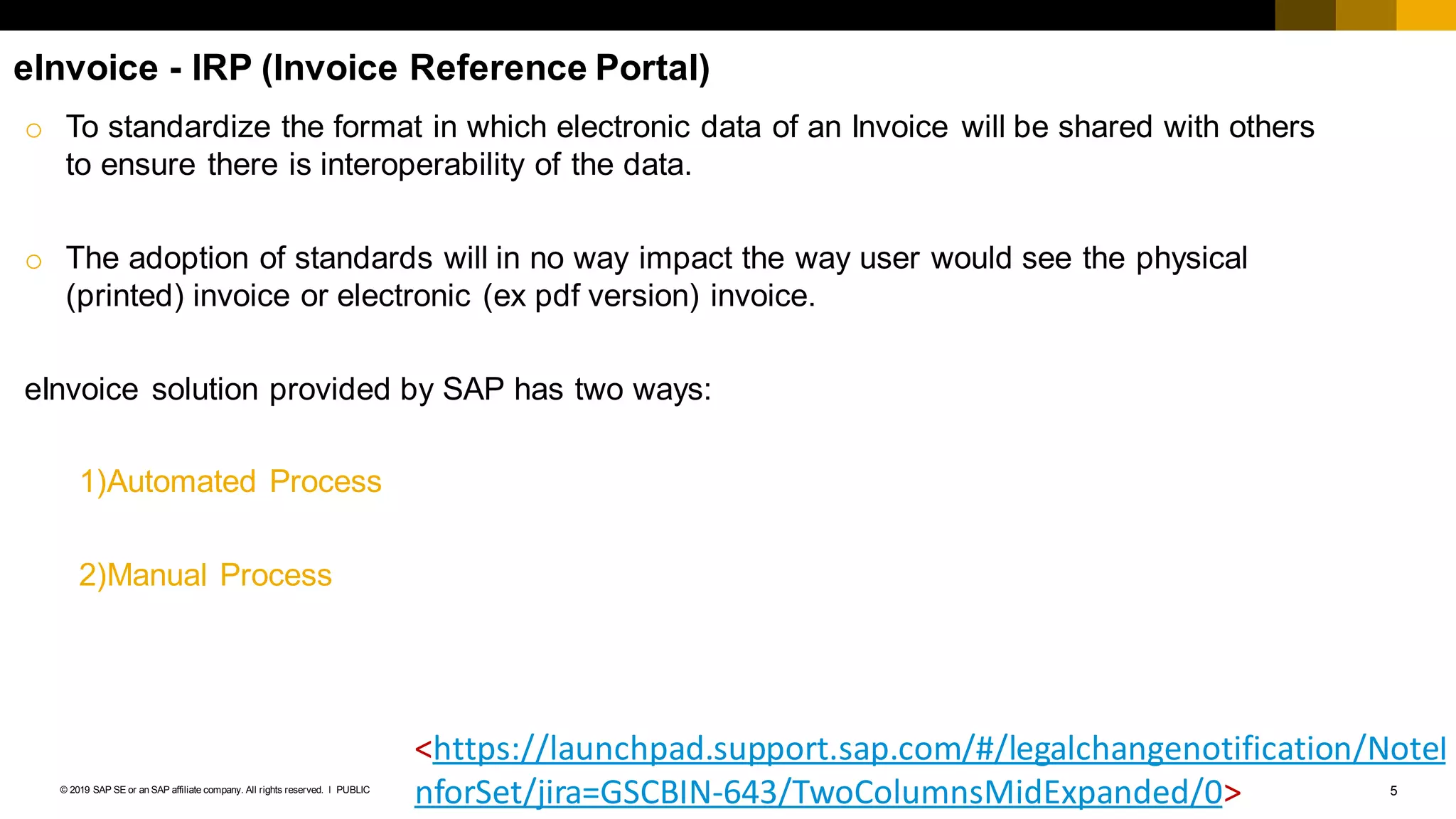
eInvoice - IRP (Invoice Reference Portal)
o To standardize the format in which electronic data of an Invoice will be shared with others
to ensure there is interoperability of the data.
o The adoption of standards will in no way impact the way user would see the physical
(printed) invoice or electronic (ex pdf version) invoice.
eInvoice solution provided by SAP has two ways:
1)Automated Process
2)Manual Process
<https://launchpad.support.sap.com/#/legalchangenotification/NoteI
nforSet/jira=GSCBIN-643/TwoColumnsMidExpanded/0>
6PUBLIC© 2019 SAP SE or an SAP affiliate company. All rights reserved. ǀ
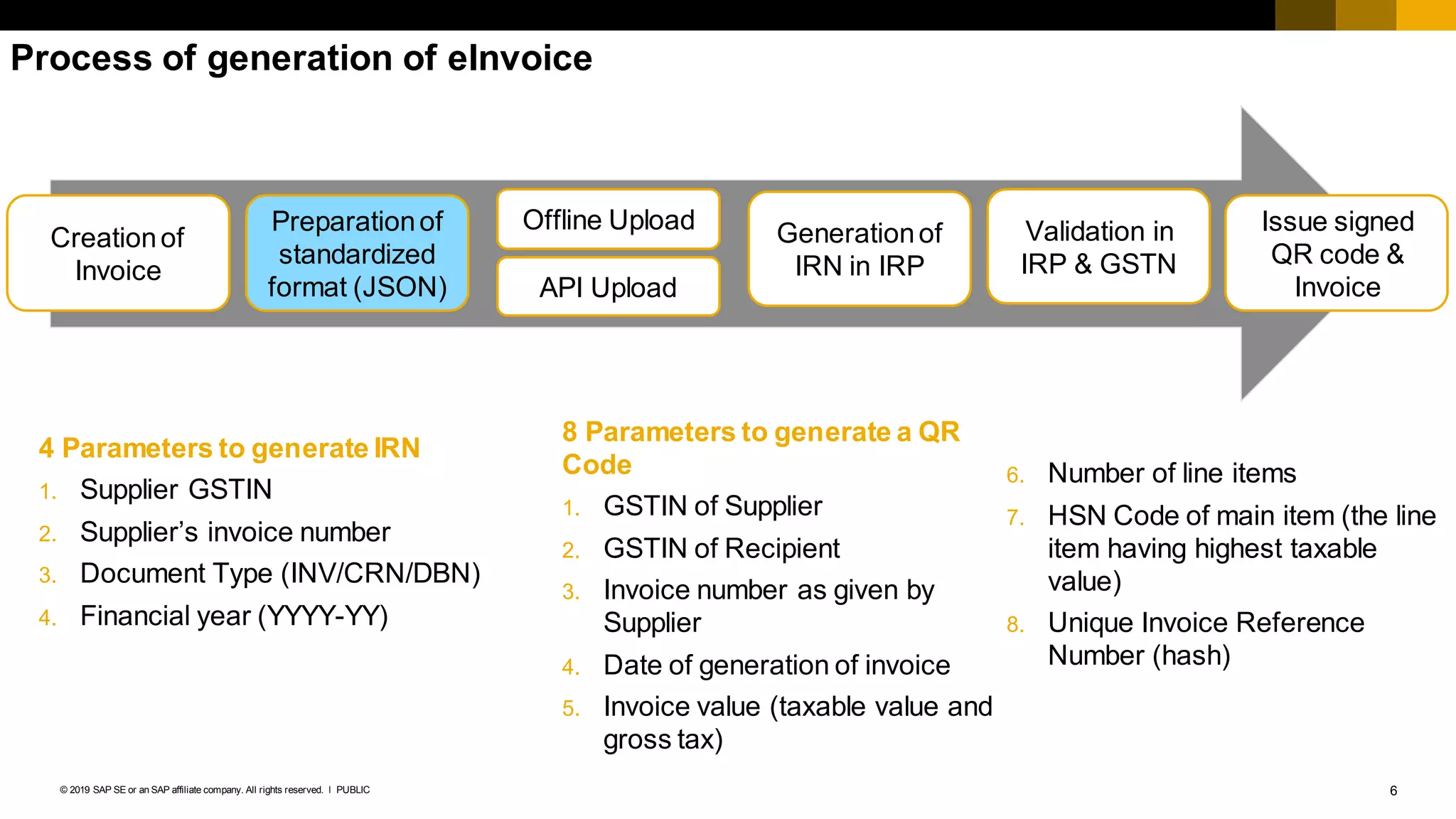
Process of generation of eInvoice
Creationof
Invoice
Preparationof
standardized
format (JSON)
Offline Upload
API Upload
Generationof
IRN in IRP
Validation in
IRP & GSTN
Issue signed
QR code &
Invoice
4 Parameters to generate IRN
1. Supplier GSTIN
2. Supplier’s invoice number
3. Document Type (INV/CRN/DBN)
4. Financial year (YYYY-YY)
8 Parameters to generate a QR
Code
1. GSTIN of Supplier
2. GSTIN of Recipient
3. Invoice number as given by
Supplier
4. Date of generation of invoice
5. Invoice value (taxable value and
gross tax)
6. Number of line items
7. HSN Code of main item (the line
item having highest taxable
value)
8. Unique Invoice Reference
Number (hash)
7PUBLIC© 2019 SAP SE or an SAP affiliate company. All rights reserved. ǀ
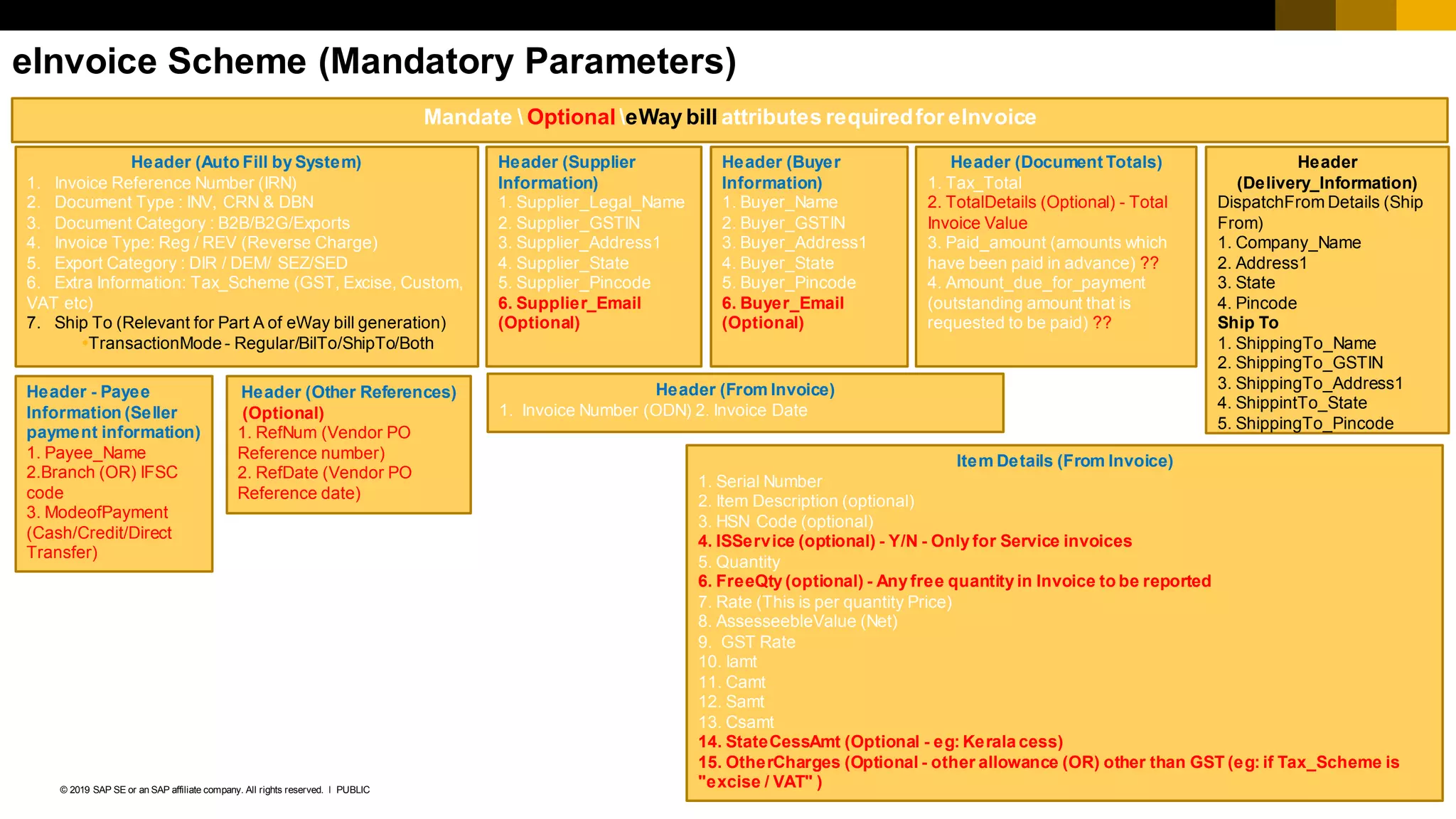
eInvoice Scheme (Mandatory Parameters)
Mandate  Optional eWay bill attributes requiredfor eInvoice
Header (Auto Fill by System)
1. Invoice Reference Number (IRN)
2. Document Type : INV, CRN & DBN
3. Document Category : B2B/B2G/Exports
4. Invoice Type: Reg / REV (Reverse Charge)
5. Export Category : DIR / DEM/ SEZ/SED
6. Extra Information: Tax_Scheme (GST, Excise, Custom,
VAT etc)
7. Ship To (Relevant for Part A of eWay bill generation)
TransactionMode - Regular/BilTo/ShipTo/Both
Header (From Invoice)
1. Invoice Number (ODN) 2. Invoice Date
Header
(Delivery_Information)
DispatchFrom Details (Ship
From)
1. Company_Name
2. Address1
3. State
4. Pincode
Ship To
1. ShippingTo_Name
2. ShippingTo_GSTIN
3. ShippingTo_Address1
4. ShippintTo_State
5. ShippingTo_Pincode
Header (Supplier
Information)
1. Supplier_Legal_Name
2. Supplier_GSTIN
3. Supplier_Address1
4. Supplier_State
5. Supplier_Pincode
6. Supplier_Email
(Optional)
Header (Buyer
Information)
1. Buyer_Name
2. Buyer_GSTIN
3. Buyer_Address1
4. Buyer_State
5. Buyer_Pincode
6. Buyer_Email
(Optional)
Header - Payee
Information (Seller
payment information)
1. Payee_Name
2.Branch (OR) IFSC
code
3. ModeofPayment
(Cash/Credit/Direct
Transfer)
Header (Document Totals)
1. Tax_Total
2. TotalDetails (Optional) - Total
Invoice Value
3. Paid_amount (amounts which
have been paid in advance) ??
4. Amount_due_for_payment
(outstanding amount that is
requested to be paid) ??
Header (Other References)
(Optional)
1. RefNum (Vendor PO
Reference number)
2. RefDate (Vendor PO
Reference date)
Item Details (From Invoice)
1. Serial Number
2. Item Description (optional)
3. HSN Code (optional)
4. ISService (optional) - Y/N - Only for Service invoices
5. Quantity
6. FreeQty (optional) - Any free quantity in Invoice to be reported
7. Rate (This is per quantity Price)
8. AssesseebleValue (Net)
9. GST Rate
10. Iamt
11. Camt
12. Samt
13. Csamt
14. StateCessAmt (Optional - eg: Kerala cess)
15. OtherCharges (Optional - other allowance (OR) other than GST (eg: if Tax_Scheme is
"excise / VAT" )
8PUBLIC© 2019 SAP SE or an SAP affiliate company. All rights reserved. ǀ
SAP eInvoice for India (Manual)
9PUBLIC© 2019 SAP SE or an SAP affiliate company. All rights reserved. ǀ
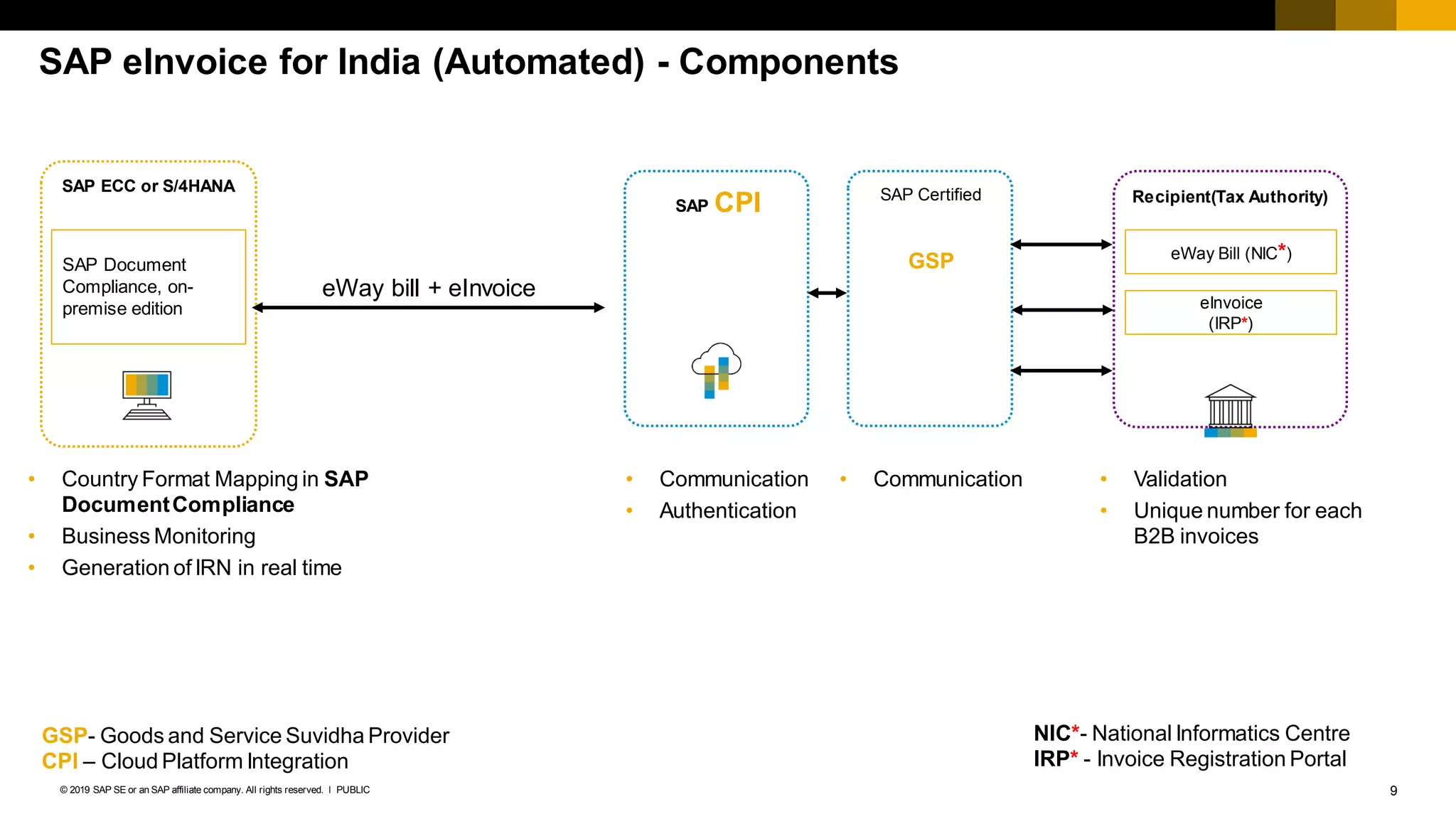
SAP eInvoice for India (Automated) - Components
SAP ECC or S/4HANA
SAP CPI SAP Certified
GSP
Recipient(Tax Authority)
eWay Bill (NIC*)
eInvoice
(IRP*)
eWay bill + eInvoice
SAP Document
Compliance, on-
premise edition
• Country Format Mapping in SAP
DocumentCompliance
• Business Monitoring
• Generation of IRN in real time
• Communication
• Authentication
• Communication • Validation
• Unique number for each
B2B invoices
NIC*- National Informatics Centre
IRP* - Invoice Registration Portal
GSP- Goods and Service Suvidha Provider
CPI – Cloud Platform Integration
10PUBLIC© 2019 SAP SE or an SAP affiliate company. All rights reserved. ǀ
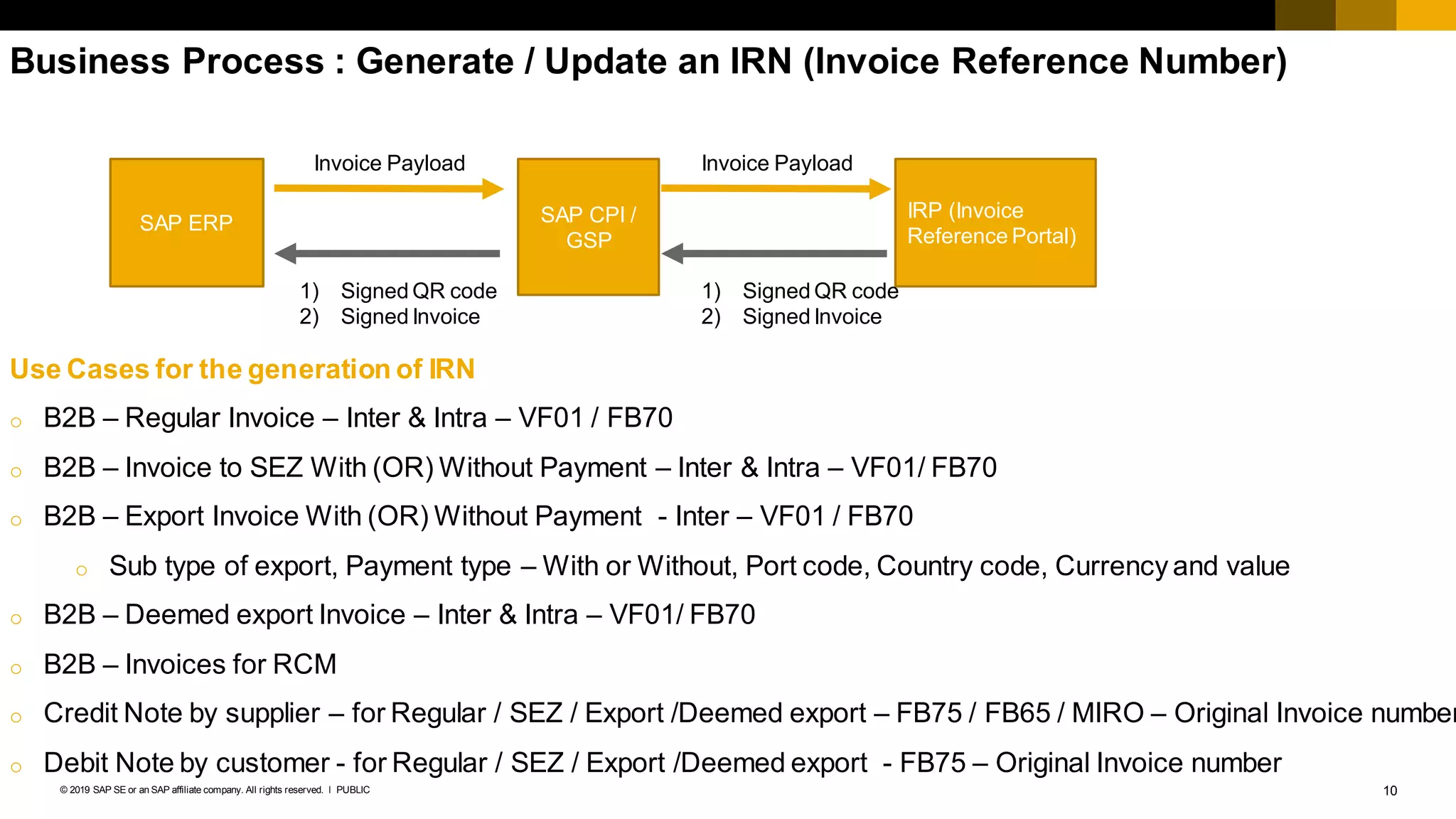
Business Process : Generate / Update an IRN (Invoice Reference Number)
SAP ERP SAP CPI /
GSP
IRP (Invoice
Reference Portal)
Invoice Payload
1) Signed QR code
2) Signed Invoice
Invoice Payload
1) Signed QR code
2) Signed Invoice
Use Cases for the generation of IRN
o B2B – Regular Invoice – Inter & Intra – VF01 / FB70
o B2B – Invoice to SEZ With (OR) Without Payment – Inter & Intra – VF01/ FB70
o B2B – Export Invoice With (OR) Without Payment - Inter – VF01 / FB70
o Sub type of export, Payment type – With or Without, Port code, Country code, Currency and value
o B2B – Deemed export Invoice – Inter & Intra – VF01/ FB70
o B2B – Invoices for RCM
o Credit Note by supplier – for Regular / SEZ / Export /Deemed export – FB75 / FB65 / MIRO – Original Invoice number
o Debit Note by customer - for Regular / SEZ / Export /Deemed export - FB75 – Original Invoice number
11PUBLIC© 2019 SAP SE or an SAP affiliate company. All rights reserved. ǀ
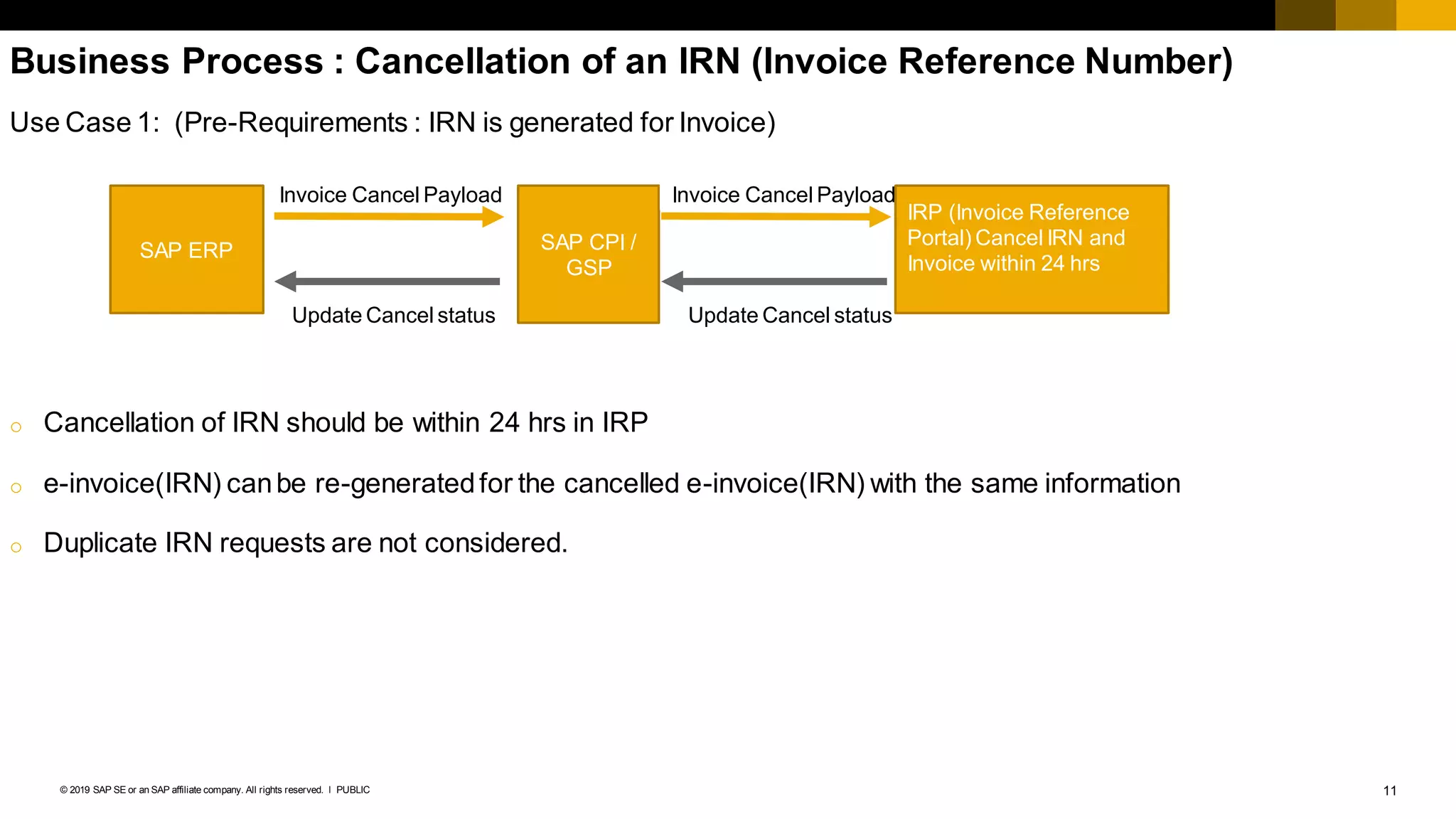
Business Process : Cancellation of an IRN (Invoice Reference Number)
Use Case 1: (Pre-Requirements : IRN is generated for Invoice)
o Cancellation of IRN should be within 24 hrs in IRP
o e-invoice(IRN) canbe re-generatedfor the cancelled e-invoice(IRN) with the same information
o Duplicate IRN requests are not considered.
SAP ERP SAP CPI /
GSP
IRP (Invoice Reference
Portal) Cancel IRN and
Invoice within 24 hrs
Invoice Cancel Payload
Update Cancel status
Invoice Cancel Payload
Update Cancel status
12PUBLIC© 2019 SAP SE or an SAP affiliate company. All rights reserved. ǀ
SAP eInvoice for India (IRN) – Proposed roadmap
Roadmap is based on the release date of LIVE API by NIC/GSTN.
SAP as an Application Service
Provider
▪ Delivered on SAP Cloud
Platform Integration –
Consumer based Model
Q1 2020 (Automated)
January 2020
• Generation of IRN in real time
• All B2B invoices
(Regular/SEZ/Export/Deemed export )
– VF01/FB70
• Credit/Debit - FB75
• RCM (only for B2B)
• Update – IRN, Acknowledgement number &
Date in real time
• Update – QR Code in real time
• Cancellation of IRN
• Compliance Check for IRN generation
February 2020
• Print of IRN and QR Code
The above roadmap for the simplification is based on the draft simplification notification publishedby the government of India.
Legal Changes can be delivered only after availability of Legal Notification as well as the release of LIVE API by GSTN
Q1 2020 (Manual)
February2020 (SAP ECC & S4/HANA)
• Report to LINK Billingdocument with IRN
(Invoice Reference Number)
• Print of IRN and QR code
March 2020 (S4C)
• Report to LINK Billingdocument with IRN
(Invoice Reference Number)
• Print of IRN and QR code
© 2016 SAP SE or an SAP affiliate company. All rights reserved. 13Internal
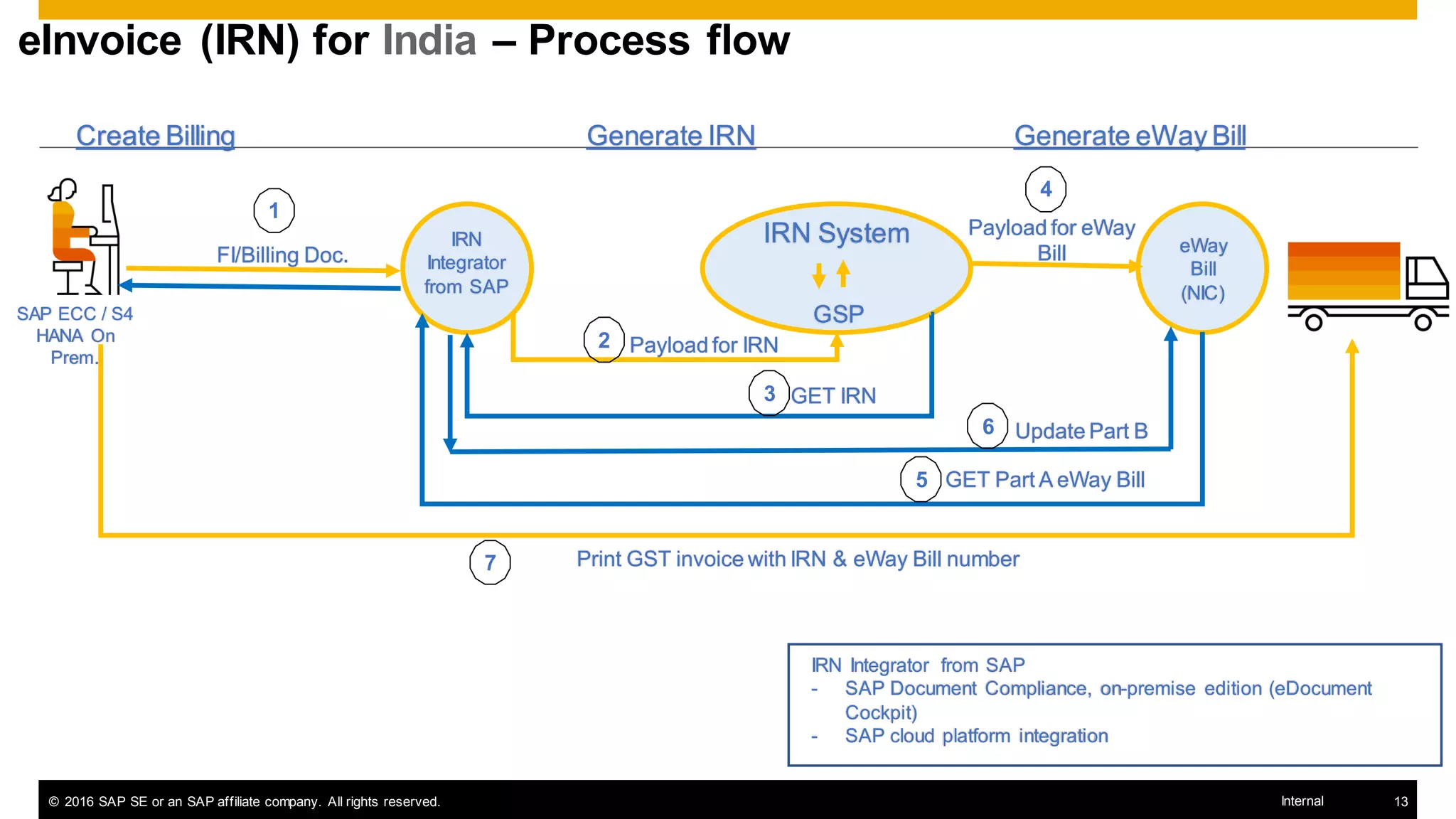
eInvoice (IRN) for India – Process flow
SAP ECC / S4
HANA On
Prem.
IRN Integrator from SAP
- SAP Document Compliance, on-premise edition (eDocument
Cockpit)
- SAP cloud platform integration
FI/Billing Doc.
IRN
Integrator
from SAP
Create Billing
IRN System
GSP
Payload for IRN
GET IRN
Generate IRN
Print GST invoice with IRN & eWay Bill number
1
2
3
7
eWay
Bill
(NIC)
Payload for eWay
Bill
4
GET Part A eWay Bill5
Generate eWay Bill
Update Part B6
14PUBLIC© 2019 SAP SE or an SAP affiliate company. All rights reserved. ǀ
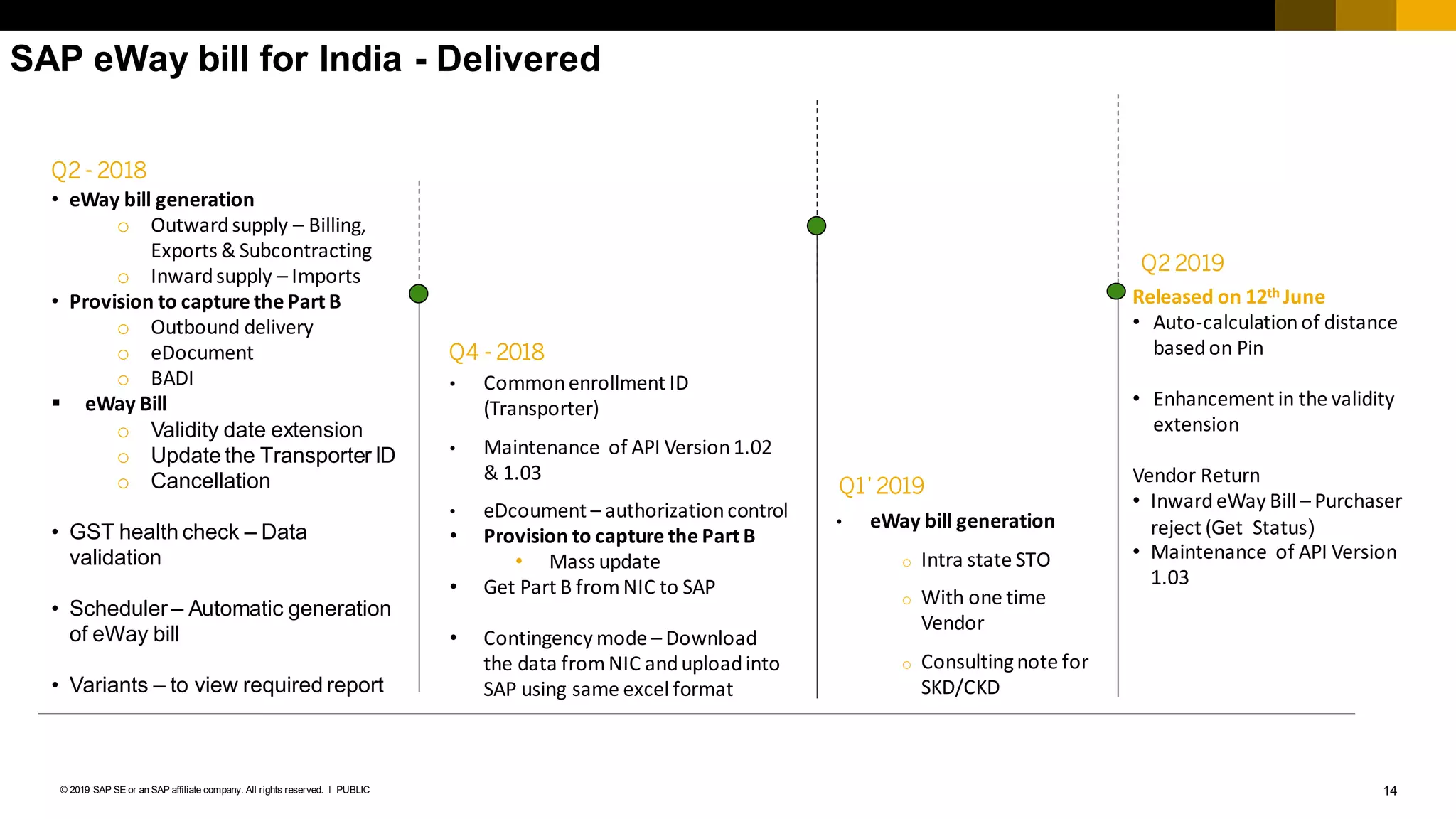
SAP eWay bill for India - Delivered
Q2 2019
Released on 12th June
• Auto-calculationof distance
basedon Pin
• Enhancement in the validity
extension
Vendor Return
• InwardeWay Bill – Purchaser
reject (Get Status)
• Maintenance of API Version
1.03
• eWay bill generation
o Intra state STO
o With one time
Vendor
o Consultingnote for
SKD/CKD
Q4 - 2018
Q1’ 2019
Q2 - 2018
• eWay bill generation
o Outwardsupply – Billing,
Exports & Subcontracting
o Inwardsupply – Imports
• Provision to capture the Part B
o Outbound delivery
o eDocument
o BADI
▪ eWay Bill
o Validity date extension
o Update the Transporter ID
o Cancellation
• GST health check – Data
validation
• Scheduler – Automatic generation
of eWay bill
• Variants – to view required report
• Commonenrollment ID
(Transporter)
• Maintenance of API Version1.02
& 1.03
• eDcoument – authorizationcontrol
• Provision to capture the Part B
• Mass update
• Get Part B fromNIC to SAP
• Contingency mode – Download
the data fromNIC anduploadinto
SAP using same excel format
15PUBLIC© 2019 SAP SE or an SAP affiliate company. All rights reserved. ǀ
Minimum Supported Release (SAP ERP , S/4HANA)
SAP_APPL Release Support Pack
SAP ERP 6.0 (600) SP 26
EHP2 FOR SAP ERP 6.0 (602) SP 16
EHP3 FOR SAP ERP 6.0 (603) SP 15
EHP4 FOR SAP ERP 6.0 (604) SP 16
EHP5 FOR SAP ERP 6.0 (605) SP 13
EHP6 FOR SAP ERP 6.0 (606) SP 14
EHP6 FOR SAP ERP 6.0 for HANA (616- SAP HANA) SP 08
EHP7 FOR SAP ERP 6.0(617) SP 07
EHP8 FOR SAP ERP 6.0(618) SP 02
SAP S/4HANA ON-PREMISE 1511 SP 02
SAP Note 1175384
16PUBLIC© 2019 SAP SE or an SAP affiliate company. All rights reserved. ǀ
SAP eInvoice for India (Automated) - SAP Document Compliance
17PUBLIC© 2019 SAP SE or an SAP affiliate company. All rights reserved. ǀ
Print of IRN and QR Code
18PUBLIC© 2019 SAP SE or an SAP affiliate company. All rights reserved. ǀ
Information
1. To know the licensing details, please contact your SAP AE (Account Executives) or Tripathi,
Vinay vinay.tripathi@sap.com
2. List of certified GSP’s
Sr.no GSP Name Contact
1 Vayana Private Limited
Sanjay Phadke -> sanjay@vayana.in -> 9820339044
Amit Parmar -> amit@vayana.com-> 8390108989
2 Excellon Software Private limited
Vinodkumar Tambi -> vinod@excellonsoft.com->
94221 13491
Thank you
Contact information:
▪ Karthiheyini Subbiah – Localization Product Manager (LPM)
▪ Karthiheyini.subbiah@sap.com
21PUBLIC© 2019 SAP SE or an SAP affiliate company. All rights reserved. ǀ
© 2019 SAP SE or an SAP affiliatecompany. All rightsreserved.
No part of thispublication may be reproduced or transmittedin any form or for any purpose without the expresspermission of
SAP SE or an SAP affiliate company.
The information containedhereinmay be changed without prior notice. Some software productsmarketed by SAP SE and its
distributorscontain proprietary software componentsof other software vendors. National product specificationsmay vary.
These materialsare provided by SAP SE or an SAP affiliatecompany for informational purposesonly, without representation or
warranty of any kind, and SAP or its affiliatedcompaniesshall not be liablefor errors or omissions with respect to the materials.
The only warrantiesfor SAP or SAP affiliate company productsand servicesare those that are set forth in the express warranty
statementsaccompanying such productsand services, if any. Nothing hereinshould be construed asconstituting an additional
warranty.
In particular, SAP SE or itsaffiliatedcompanieshave no obligationto pursue any course of business outlinedin thisdocument or
any related presentation, or to develop or release any functionality mentionedtherein. Thisdocument,or any related presentation,
and SAP SE’s or its affiliated companies’ strategy and possible future developments, products, and/or platforms, directions, and
functionality are all subject to changeand may be changedby SAP SE or itsaffiliated companiesat any time for any reason
without notice.The information in thisdocument isnot a commitment, promise, or legal obligation to deliver any material,code, or
functionality. All forward-lookingstatementsare subject to variousrisks and uncertaintiesthat could cause actual resultsto differ
materially from expectations. Readersare cautionednot to placeunduerelianceon these forward-lookingstatements, and they
should not be relied uponin making purchasing decisions.
SAP and other SAP productsand services mentioned herein aswell astheir respective logosare trademarksor registered
trademarks of SAP SE (or an SAP affiliatecompany) in Germany and other countries. All other product and service names
mentioned are the trademarksof their respective companies.
See www.sap.com/copyright for additional trademarkinformation andnotices.
www.sap.com/contactsap
Follow us

E invoice webinar_jan2020_v2

  • 1.
    PUBLIC January, 2020 Invoice ReferenceNumber (IRN) for India SAP eInvoice for India
  • 2.
    2PUBLIC© 2019 SAPSE or an SAP affiliate company. All rights reserved. ǀ Legal Disclaimer The information in this presentation is confidential and proprietaryto SAP and may not be disclosed without the permission of SAP. This presentation is not subject to your license agreement or any other service or subscription agreement with SAP. SAP has no obligation to pursue any course of business outlined in this document or any related presentation, or to develop or release any functionality mentioned therein. This document, or any related presentation and SAP's strategy and possible future developments, products and or platforms directions and functionality are all subject to change and may be changed by SAP at any time for any reasonwithout notice. The information in this document is not a commitment, promise or legal obligation to deliver any material, code or functionality. This document is provided without a warranty of any kind, either express or implied, including but not limited to, the implied warranties of merchantability, fitness for a particular purpose, or non-infringement. This document is for informational purposes and may not be incorporatedinto a contract. SAP assumes no responsibility for errors or omissions in this document, except if such damages were caused by SAP´s willful misconduct or gross negligence. All forward-looking statements are subject to various risks and uncertainties that could cause actual results to differ materially from expectations. Readers are cautioned not to place undue reliance on these forward-looking statements, which speak only as of their dates, and they should not be relied upon in making purchasing decisions.
  • 3.
    3PUBLIC© 2019 SAPSE or an SAP affiliate company. All rights reserved. ǀ The GST Council has decided to introduce with centralized issuance of an unique number (Invoice Reference number) for each B2B invoice on reporting of invoice data to a central portal with effective(Mandate) date from 1st April 2020 for all Tax payers The new system will lead to one-time reporting on B2B invoice data in the form it is generated to reduce reporting in multiple formats (one for GSTR 1 and the other for e-way bill) and to generate Sales and Purchase Registers (ANX-1 and ANX-2) and from this data to keep the Return (RET-1 etc.) ready for filing. Status of legislation in India GST council – Goods and Services Tax Council GSTR 1 - monthly return that summarizes all sales (outward supplies) of a taxpayer ANX 1 - FORM GST ANX-1 – Annexure Of Outward Supplies ANX 2 - FORM GST ANX-2 – Annexure Of Inward Supplies RET 1 – FORM GST RET-1 – Monthly Return for normal tax payer Businesses having a turnover of ₹500 crore or more would take up e-invoicing from January 1, 2020 on voluntary and trial basis while the businesses with turnover of ₹100 crore or more would start e-invoicing on voluntary and trial basis from February 1, 2020. However, from April 1, 2020, the e-invoicing will be mandatory for both these categories
  • 4.
    4PUBLIC© 2019 SAPSE or an SAP affiliate company. All rights reserved. ǀ Legal changes, effective date and Impact eInvoicing || effective from Jan 2020 on voluntary basis || mandatory on 1st April 2020 • Real Time – 64 digits (alpha numeric) || QR code || Digital Signature • An invoice is valid only if invoice is registeredin IRP. • Input tax credit can be availed only invoices with valid IRN/eInvoice • Manual update in ECC/S4 with 64 digits IRN is not practical GST Simplification - Continuous upload|| effective from 1st April 2020 ||ANX-1, ANX-2 & RET-1 Invoice Reconciliation, Avail Input tax credit & Vendor payment after invoice is uploaded to GSTN https://einv-apisandbox.nic.in/index.html https://www.gstn.org/e-invoice/
  • 5.
    5PUBLIC© 2019 SAPSE or an SAP affiliate company. All rights reserved. ǀ eInvoice - IRP (Invoice Reference Portal) o To standardize the format in which electronic data of an Invoice will be shared with others to ensure there is interoperability of the data. o The adoption of standards will in no way impact the way user would see the physical (printed) invoice or electronic (ex pdf version) invoice. eInvoice solution provided by SAP has two ways: 1)Automated Process 2)Manual Process <https://launchpad.support.sap.com/#/legalchangenotification/NoteI nforSet/jira=GSCBIN-643/TwoColumnsMidExpanded/0>
  • 6.
    6PUBLIC© 2019 SAPSE or an SAP affiliate company. All rights reserved. ǀ Process of generation of eInvoice Creationof Invoice Preparationof standardized format (JSON) Offline Upload API Upload Generationof IRN in IRP Validation in IRP & GSTN Issue signed QR code & Invoice 4 Parameters to generate IRN 1. Supplier GSTIN 2. Supplier’s invoice number 3. Document Type (INV/CRN/DBN) 4. Financial year (YYYY-YY) 8 Parameters to generate a QR Code 1. GSTIN of Supplier 2. GSTIN of Recipient 3. Invoice number as given by Supplier 4. Date of generation of invoice 5. Invoice value (taxable value and gross tax) 6. Number of line items 7. HSN Code of main item (the line item having highest taxable value) 8. Unique Invoice Reference Number (hash)
  • 7.
    7PUBLIC© 2019 SAPSE or an SAP affiliate company. All rights reserved. ǀ eInvoice Scheme (Mandatory Parameters) Mandate Optional eWay bill attributes requiredfor eInvoice Header (Auto Fill by System) 1. Invoice Reference Number (IRN) 2. Document Type : INV, CRN & DBN 3. Document Category : B2B/B2G/Exports 4. Invoice Type: Reg / REV (Reverse Charge) 5. Export Category : DIR / DEM/ SEZ/SED 6. Extra Information: Tax_Scheme (GST, Excise, Custom, VAT etc) 7. Ship To (Relevant for Part A of eWay bill generation) TransactionMode - Regular/BilTo/ShipTo/Both Header (From Invoice) 1. Invoice Number (ODN) 2. Invoice Date Header (Delivery_Information) DispatchFrom Details (Ship From) 1. Company_Name 2. Address1 3. State 4. Pincode Ship To 1. ShippingTo_Name 2. ShippingTo_GSTIN 3. ShippingTo_Address1 4. ShippintTo_State 5. ShippingTo_Pincode Header (Supplier Information) 1. Supplier_Legal_Name 2. Supplier_GSTIN 3. Supplier_Address1 4. Supplier_State 5. Supplier_Pincode 6. Supplier_Email (Optional) Header (Buyer Information) 1. Buyer_Name 2. Buyer_GSTIN 3. Buyer_Address1 4. Buyer_State 5. Buyer_Pincode 6. Buyer_Email (Optional) Header - Payee Information (Seller payment information) 1. Payee_Name 2.Branch (OR) IFSC code 3. ModeofPayment (Cash/Credit/Direct Transfer) Header (Document Totals) 1. Tax_Total 2. TotalDetails (Optional) - Total Invoice Value 3. Paid_amount (amounts which have been paid in advance) ?? 4. Amount_due_for_payment (outstanding amount that is requested to be paid) ?? Header (Other References) (Optional) 1. RefNum (Vendor PO Reference number) 2. RefDate (Vendor PO Reference date) Item Details (From Invoice) 1. Serial Number 2. Item Description (optional) 3. HSN Code (optional) 4. ISService (optional) - Y/N - Only for Service invoices 5. Quantity 6. FreeQty (optional) - Any free quantity in Invoice to be reported 7. Rate (This is per quantity Price) 8. AssesseebleValue (Net) 9. GST Rate 10. Iamt 11. Camt 12. Samt 13. Csamt 14. StateCessAmt (Optional - eg: Kerala cess) 15. OtherCharges (Optional - other allowance (OR) other than GST (eg: if Tax_Scheme is "excise / VAT" )
  • 8.
    8PUBLIC© 2019 SAPSE or an SAP affiliate company. All rights reserved. ǀ SAP eInvoice for India (Manual)
  • 9.
    9PUBLIC© 2019 SAPSE or an SAP affiliate company. All rights reserved. ǀ SAP eInvoice for India (Automated) - Components SAP ECC or S/4HANA SAP CPI SAP Certified GSP Recipient(Tax Authority) eWay Bill (NIC*) eInvoice (IRP*) eWay bill + eInvoice SAP Document Compliance, on- premise edition • Country Format Mapping in SAP DocumentCompliance • Business Monitoring • Generation of IRN in real time • Communication • Authentication • Communication • Validation • Unique number for each B2B invoices NIC*- National Informatics Centre IRP* - Invoice Registration Portal GSP- Goods and Service Suvidha Provider CPI – Cloud Platform Integration
  • 10.
    10PUBLIC© 2019 SAPSE or an SAP affiliate company. All rights reserved. ǀ Business Process : Generate / Update an IRN (Invoice Reference Number) SAP ERP SAP CPI / GSP IRP (Invoice Reference Portal) Invoice Payload 1) Signed QR code 2) Signed Invoice Invoice Payload 1) Signed QR code 2) Signed Invoice Use Cases for the generation of IRN o B2B – Regular Invoice – Inter & Intra – VF01 / FB70 o B2B – Invoice to SEZ With (OR) Without Payment – Inter & Intra – VF01/ FB70 o B2B – Export Invoice With (OR) Without Payment - Inter – VF01 / FB70 o Sub type of export, Payment type – With or Without, Port code, Country code, Currency and value o B2B – Deemed export Invoice – Inter & Intra – VF01/ FB70 o B2B – Invoices for RCM o Credit Note by supplier – for Regular / SEZ / Export /Deemed export – FB75 / FB65 / MIRO – Original Invoice number o Debit Note by customer - for Regular / SEZ / Export /Deemed export - FB75 – Original Invoice number
  • 11.
    11PUBLIC© 2019 SAPSE or an SAP affiliate company. All rights reserved. ǀ Business Process : Cancellation of an IRN (Invoice Reference Number) Use Case 1: (Pre-Requirements : IRN is generated for Invoice) o Cancellation of IRN should be within 24 hrs in IRP o e-invoice(IRN) canbe re-generatedfor the cancelled e-invoice(IRN) with the same information o Duplicate IRN requests are not considered. SAP ERP SAP CPI / GSP IRP (Invoice Reference Portal) Cancel IRN and Invoice within 24 hrs Invoice Cancel Payload Update Cancel status Invoice Cancel Payload Update Cancel status
  • 12.
    12PUBLIC© 2019 SAPSE or an SAP affiliate company. All rights reserved. ǀ SAP eInvoice for India (IRN) – Proposed roadmap Roadmap is based on the release date of LIVE API by NIC/GSTN. SAP as an Application Service Provider ▪ Delivered on SAP Cloud Platform Integration – Consumer based Model Q1 2020 (Automated) January 2020 • Generation of IRN in real time • All B2B invoices (Regular/SEZ/Export/Deemed export ) – VF01/FB70 • Credit/Debit - FB75 • RCM (only for B2B) • Update – IRN, Acknowledgement number & Date in real time • Update – QR Code in real time • Cancellation of IRN • Compliance Check for IRN generation February 2020 • Print of IRN and QR Code The above roadmap for the simplification is based on the draft simplification notification publishedby the government of India. Legal Changes can be delivered only after availability of Legal Notification as well as the release of LIVE API by GSTN Q1 2020 (Manual) February2020 (SAP ECC & S4/HANA) • Report to LINK Billingdocument with IRN (Invoice Reference Number) • Print of IRN and QR code March 2020 (S4C) • Report to LINK Billingdocument with IRN (Invoice Reference Number) • Print of IRN and QR code
  • 13.
    © 2016 SAPSE or an SAP affiliate company. All rights reserved. 13Internal eInvoice (IRN) for India – Process flow SAP ECC / S4 HANA On Prem. IRN Integrator from SAP - SAP Document Compliance, on-premise edition (eDocument Cockpit) - SAP cloud platform integration FI/Billing Doc. IRN Integrator from SAP Create Billing IRN System GSP Payload for IRN GET IRN Generate IRN Print GST invoice with IRN & eWay Bill number 1 2 3 7 eWay Bill (NIC) Payload for eWay Bill 4 GET Part A eWay Bill5 Generate eWay Bill Update Part B6
  • 14.
    14PUBLIC© 2019 SAPSE or an SAP affiliate company. All rights reserved. ǀ SAP eWay bill for India - Delivered Q2 2019 Released on 12th June • Auto-calculationof distance basedon Pin • Enhancement in the validity extension Vendor Return • InwardeWay Bill – Purchaser reject (Get Status) • Maintenance of API Version 1.03 • eWay bill generation o Intra state STO o With one time Vendor o Consultingnote for SKD/CKD Q4 - 2018 Q1’ 2019 Q2 - 2018 • eWay bill generation o Outwardsupply – Billing, Exports & Subcontracting o Inwardsupply – Imports • Provision to capture the Part B o Outbound delivery o eDocument o BADI ▪ eWay Bill o Validity date extension o Update the Transporter ID o Cancellation • GST health check – Data validation • Scheduler – Automatic generation of eWay bill • Variants – to view required report • Commonenrollment ID (Transporter) • Maintenance of API Version1.02 & 1.03 • eDcoument – authorizationcontrol • Provision to capture the Part B • Mass update • Get Part B fromNIC to SAP • Contingency mode – Download the data fromNIC anduploadinto SAP using same excel format
  • 15.
    15PUBLIC© 2019 SAPSE or an SAP affiliate company. All rights reserved. ǀ Minimum Supported Release (SAP ERP , S/4HANA) SAP_APPL Release Support Pack SAP ERP 6.0 (600) SP 26 EHP2 FOR SAP ERP 6.0 (602) SP 16 EHP3 FOR SAP ERP 6.0 (603) SP 15 EHP4 FOR SAP ERP 6.0 (604) SP 16 EHP5 FOR SAP ERP 6.0 (605) SP 13 EHP6 FOR SAP ERP 6.0 (606) SP 14 EHP6 FOR SAP ERP 6.0 for HANA (616- SAP HANA) SP 08 EHP7 FOR SAP ERP 6.0(617) SP 07 EHP8 FOR SAP ERP 6.0(618) SP 02 SAP S/4HANA ON-PREMISE 1511 SP 02 SAP Note 1175384
  • 16.
    16PUBLIC© 2019 SAPSE or an SAP affiliate company. All rights reserved. ǀ SAP eInvoice for India (Automated) - SAP Document Compliance
  • 17.
    17PUBLIC© 2019 SAPSE or an SAP affiliate company. All rights reserved. ǀ Print of IRN and QR Code
  • 18.
    18PUBLIC© 2019 SAPSE or an SAP affiliate company. All rights reserved. ǀ Information 1. To know the licensing details, please contact your SAP AE (Account Executives) or Tripathi, Vinay vinay.tripathi@sap.com 2. List of certified GSP’s Sr.no GSP Name Contact 1 Vayana Private Limited Sanjay Phadke -> sanjay@vayana.in -> 9820339044 Amit Parmar -> amit@vayana.com-> 8390108989 2 Excellon Software Private limited Vinodkumar Tambi -> vinod@excellonsoft.com-> 94221 13491
  • 19.
    Thank you Contact information: ▪Karthiheyini Subbiah – Localization Product Manager (LPM) ▪ Karthiheyini.subbiah@sap.com
  • 20.
    21PUBLIC© 2019 SAPSE or an SAP affiliate company. All rights reserved. ǀ © 2019 SAP SE or an SAP affiliatecompany. All rightsreserved. No part of thispublication may be reproduced or transmittedin any form or for any purpose without the expresspermission of SAP SE or an SAP affiliate company. The information containedhereinmay be changed without prior notice. Some software productsmarketed by SAP SE and its distributorscontain proprietary software componentsof other software vendors. National product specificationsmay vary. These materialsare provided by SAP SE or an SAP affiliatecompany for informational purposesonly, without representation or warranty of any kind, and SAP or its affiliatedcompaniesshall not be liablefor errors or omissions with respect to the materials. The only warrantiesfor SAP or SAP affiliate company productsand servicesare those that are set forth in the express warranty statementsaccompanying such productsand services, if any. Nothing hereinshould be construed asconstituting an additional warranty. In particular, SAP SE or itsaffiliatedcompanieshave no obligationto pursue any course of business outlinedin thisdocument or any related presentation, or to develop or release any functionality mentionedtherein. Thisdocument,or any related presentation, and SAP SE’s or its affiliated companies’ strategy and possible future developments, products, and/or platforms, directions, and functionality are all subject to changeand may be changedby SAP SE or itsaffiliated companiesat any time for any reason without notice.The information in thisdocument isnot a commitment, promise, or legal obligation to deliver any material,code, or functionality. All forward-lookingstatementsare subject to variousrisks and uncertaintiesthat could cause actual resultsto differ materially from expectations. Readersare cautionednot to placeunduerelianceon these forward-lookingstatements, and they should not be relied uponin making purchasing decisions. SAP and other SAP productsand services mentioned herein aswell astheir respective logosare trademarksor registered trademarks of SAP SE (or an SAP affiliatecompany) in Germany and other countries. All other product and service names mentioned are the trademarksof their respective companies. See www.sap.com/copyright for additional trademarkinformation andnotices. www.sap.com/contactsap Follow us