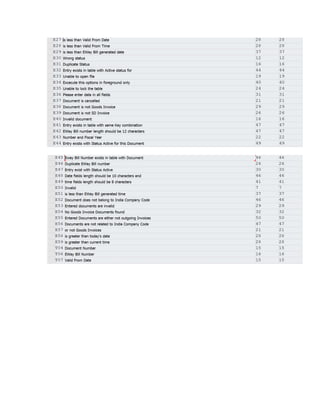
Note: Maximum length of the text in Max. column should be as shown in the attachment. If it exceeds it
may cause dump.
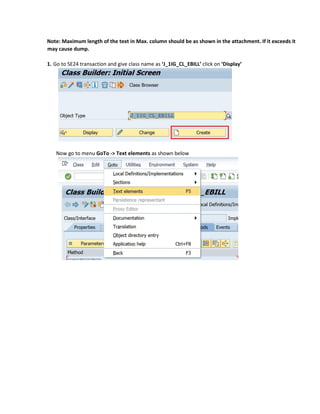
1. Go to SE24 transaction and give class name as ‘J_1IG_CL_EBILL’ click on ‘Display’
Now go to menu GoTo -> Text elements as shown below
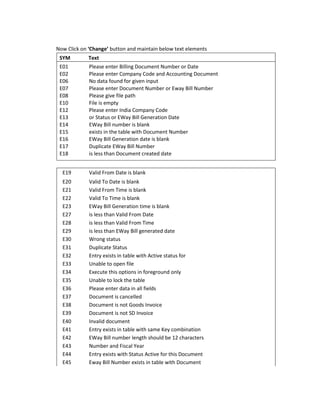
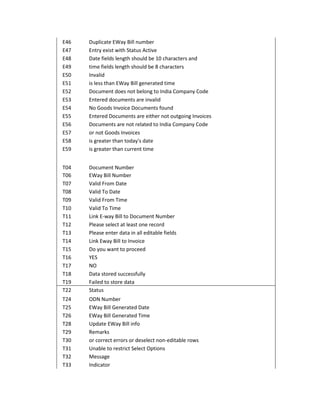
Now Click on ‘Change’ button and maintain below text elements
SYM Text
E01 Please enter Billing Document Number or Date
E02 Please enter Company Code and Accounting Document
E06 No data found for given input
E07 Please enter Document Number or Eway Bill Number
E08 Please give file path
E10 File is empty
E12 Please enter India Company Code
E13 or Status or EWay Bill Generation Date
E14 EWay Bill number is blank
E15 exists in the table with Document Number
E16 EWay Bill Generation date is blank
E17 Duplicate EWay Bill Number
E18 is less than Document created date
E19 Valid From Date is blank
E20 Valid To Date is blank
E21 Valid From Time is blank
E22 Valid To Time is blank
E23 EWay Bill Generation time is blank
E27 is less than Valid From Date
E28 is less than Valid From Time
E29 is less than EWay Bill generated date
E30 Wrong status
E31 Duplicate Status
E32 Entry exists in table with Active status for
E33 Unable to open file
E34 Execute this options in foreground only
E35 Unable to lock the table
E36 Please enter data in all fields
E37 Document is cancelled
E38 Document is not Goods Invoice
E39 Document is not SD Invoice
E40 Invalid document
E41 Entry exists in table with same Key combination
E42 EWay Bill number length should be 12 characters
E43 Number and Fiscal Year
E44 Entry exists with Status Active for this Document
E45 Eway Bill Number exists in table with Document
E46 Duplicate EWay Bill number
E47 Entry exist with Status Active
E48 Date fields length should be 10 characters and
E49 time fields length should be 8 characters
E50 Invalid
E51 is less than EWay Bill generated time
E52 Document does not belong to India Company Code
E53 Entered documents are invalid
E54 No Goods Invoice Documents found
E55 Entered Documents are either not outgoing Invoices
E56 Documents are not related to India Company Code
E57 or not Goods Invoices
E58 is greater than today's date
E59 is greater than current time
T04 Document Number
T06 EWay Bill Number
T07 Valid From Date
T08 Valid To Date
T09 Valid From Time
T10 Valid To Time
T11 Link E-way Bill to Document Number
T12 Please select at least one record
T13 Please enter data in all editable fields
T14 Link Eway Bill to Invoice
T15 Do you want to proceed
T16 YES
T17 NO
T18 Data stored successfully
T19 Failed to store data
T22 Status
T24 ODN Number
T25 EWay Bill Generated Date
T26 EWay Bill Generated Time
T28 Update EWay Bill info
T29 Remarks
T30 or correct errors or deselect non-editable rows
T31 Unable to restrict Select Options
T32 Message
T33 Indicator
T34 EBillDate
T35 EBill Generated Date
T36 EBillTime
T37 EBill Generated Time
T38 Valid From
T39 ValFmTime
T40 Valid To
T41 ValToTime
Refer the below screen shot
Save and activate in package ‘J1I_GST_LO’

Class text elements

  • 1.
    Note: Maximum lengthof the text in Max. column should be as shown in the attachment. If it exceeds it may cause dump. 1. Go to SE24 transaction and give class name as ‘J_1IG_CL_EBILL’ click on ‘Display’ Now go to menu GoTo -> Text elements as shown below
  • 2.
    Now Click on‘Change’ button and maintain below text elements SYM Text E01 Please enter Billing Document Number or Date E02 Please enter Company Code and Accounting Document E06 No data found for given input E07 Please enter Document Number or Eway Bill Number E08 Please give file path E10 File is empty E12 Please enter India Company Code E13 or Status or EWay Bill Generation Date E14 EWay Bill number is blank E15 exists in the table with Document Number E16 EWay Bill Generation date is blank E17 Duplicate EWay Bill Number E18 is less than Document created date E19 Valid From Date is blank E20 Valid To Date is blank E21 Valid From Time is blank E22 Valid To Time is blank E23 EWay Bill Generation time is blank E27 is less than Valid From Date E28 is less than Valid From Time E29 is less than EWay Bill generated date E30 Wrong status E31 Duplicate Status E32 Entry exists in table with Active status for E33 Unable to open file E34 Execute this options in foreground only E35 Unable to lock the table E36 Please enter data in all fields E37 Document is cancelled E38 Document is not Goods Invoice E39 Document is not SD Invoice E40 Invalid document E41 Entry exists in table with same Key combination E42 EWay Bill number length should be 12 characters E43 Number and Fiscal Year E44 Entry exists with Status Active for this Document E45 Eway Bill Number exists in table with Document
  • 3.
    E46 Duplicate EWayBill number E47 Entry exist with Status Active E48 Date fields length should be 10 characters and E49 time fields length should be 8 characters E50 Invalid E51 is less than EWay Bill generated time E52 Document does not belong to India Company Code E53 Entered documents are invalid E54 No Goods Invoice Documents found E55 Entered Documents are either not outgoing Invoices E56 Documents are not related to India Company Code E57 or not Goods Invoices E58 is greater than today's date E59 is greater than current time T04 Document Number T06 EWay Bill Number T07 Valid From Date T08 Valid To Date T09 Valid From Time T10 Valid To Time T11 Link E-way Bill to Document Number T12 Please select at least one record T13 Please enter data in all editable fields T14 Link Eway Bill to Invoice T15 Do you want to proceed T16 YES T17 NO T18 Data stored successfully T19 Failed to store data T22 Status T24 ODN Number T25 EWay Bill Generated Date T26 EWay Bill Generated Time T28 Update EWay Bill info T29 Remarks T30 or correct errors or deselect non-editable rows T31 Unable to restrict Select Options T32 Message T33 Indicator
  • 4.
    T34 EBillDate T35 EBillGenerated Date T36 EBillTime T37 EBill Generated Time T38 Valid From T39 ValFmTime T40 Valid To T41 ValToTime Refer the below screen shot
  • 6.
    Save and activatein package ‘J1I_GST_LO’