Introduction to Firewalls
           through

           Linux iptables


By: Buddhika Siddhisena <bud@thinkcube.com>
Co-Founder & CTO, THINKCube,
Avid FOSS advocate
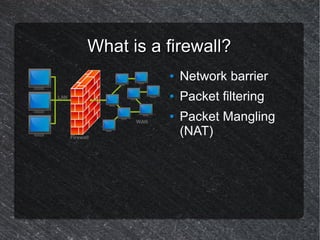
What is a firewall?
          ●   Network barrier
          ●   Packet filtering
          ●   Packet Mangling
              (NAT)
Firewall Usage
●   Personal Firewall
●   Multi-homed (DMZ) Firewall
●   Router Firewall
●   Internet connection sharing (NAT)
●   Transparent Proxying
●   Content filtering
●   Poor-mans load balancer
●   Internet Hotspots
What is iptables?

 ●   Linux's built in firewall
 ●   Successor to ipchains
 ●   Organizes several chains into
     tables, hence iptables
 ●   Consists of Userspace tool
     (iptables) and kernel drivers
A table of Chains
    Filter Table (default)
    INPUT                                 FORWARD           OUTPUT
    NAT Table
    PREROUTING                INPUT       OUTPUT            POSTROUTING
    Mangle Table
    PREROUTING        INPUT   OUTPUT      FORWARD           POSTROUTING
    X Table (user defined)

●   INPUT – Packets entering an interface and destined to a local process.
●   FORWARD – Only packets routed from one interface to another.
●   OUTPUT – Packets leaving an interface which originated from a local process.
●   PREROUTING – Before deciding to use INPUT or FORWARD. DNAT is
    configured here.
●   POSTROUTING – After OUTPUT or FORWARD but before leaving interface.
    SNAT is configured here.
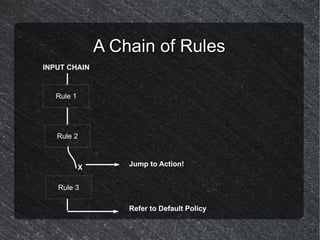
A Chain of Rules
INPUT CHAIN


   Rule 1


   Rule 2


            X       Jump to Action!


   Rule 3

                    Refer to Default Policy
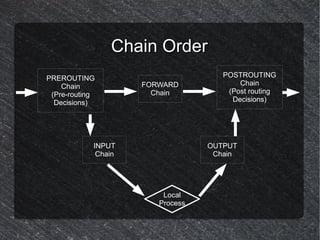
Chain Order
PREROUTING                           POSTROUTING
    Chain            FORWARD             Chain
 (Pre-routing          Chain          (Post routing
  Decisions)                           Decisions)


            INPUT                 OUTPUT
             Chain                 Chain


                         Local
                        Process
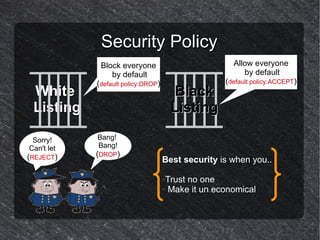
Security Policy
             Block everyone                          Allow everyone
                by default                              by default
            (default policy:DROP)                  (default policy:ACCEPT)
 White                                  Black
 Listing                                Listing

 Sorry!     Bang!
Can't let   Bang!
(REJECT)    (DROP)
                                    Best security is when you..

                                    ●Trust no one
                                    ● Make it un economical
Using iptables
Synopsis
iptables [table] [action] [chain] [option] [target]

table – {filter, nat, mangle}
 action – {-A (add), -D (delete), -R (replace)}
 chain – {INPUT, FORWARD, OUTPUT etc.}
 options - {-s(source), -d(destination), --sport(source port,
--dport(destination port), -m (module), --sync (sync
packed) etc.}
  target – {ACCEPT, DROP, REJECT, MASQUERADE,
DNAT etc.}
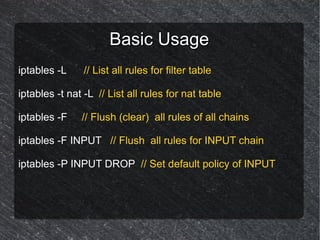
Basic Usage
iptables -L     // List all rules for filter table

iptables -t nat -L // List all rules for nat table

iptables -F    // Flush (clear) all rules of all chains

iptables -F INPUT // Flush all rules for INPUT chain

iptables -P INPUT DROP // Set default policy of INPUT
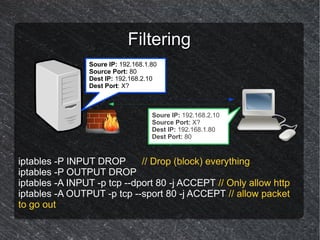
Filtering
                Soure IP: 192.168.1.80
                Source Port: 80
                Dest IP: 192.168.2.10
                Dest Port: X?


                                    Soure IP: 192.168.2.10
                                    Source Port: X?
                                    Dest IP: 192.168.1.80
                                    Dest Port: 80


iptables -P INPUT DROP       // Drop (block) everything
iptables -P OUTPUT DROP
iptables -A INPUT -p tcp --dport 80 -j ACCEPT // Only allow http
iptables -A OUTPUT -p tcp --sport 80 -j ACCEPT // allow packet
to go out
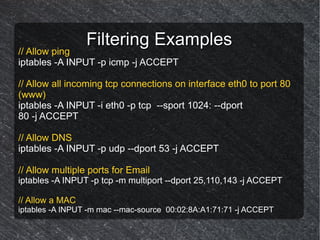
Filtering Examples
// Allow ping
iptables -A INPUT -p icmp -j ACCEPT

// Allow all incoming tcp connections on interface eth0 to port 80
(www)
iptables -A INPUT -i eth0 -p tcp --sport 1024: --dport
80 -j ACCEPT

// Allow DNS
iptables -A INPUT -p udp --dport 53 -j ACCEPT

// Allow multiple ports for Email
iptables -A INPUT -p tcp -m multiport --dport 25,110,143 -j ACCEPT

// Allow a MAC
iptables -A INPUT -m mac --mac-source 00:02:8A:A1:71:71 -j ACCEPT
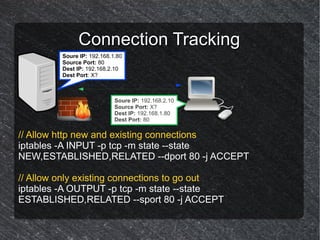
Connection Tracking
         Soure IP: 192.168.1.80
         Source Port: 80
         Dest IP: 192.168.2.10
         Dest Port: X?


                            Soure IP: 192.168.2.10
                            Source Port: X?
                            Dest IP: 192.168.1.80
                            Dest Port: 80

// Allow http new and existing connections
iptables -A INPUT -p tcp -m state --state
NEW,ESTABLISHED,RELATED --dport 80 -j ACCEPT

// Allow only existing connections to go out
iptables -A OUTPUT -p tcp -m state --state
ESTABLISHED,RELATED --sport 80 -j ACCEPT
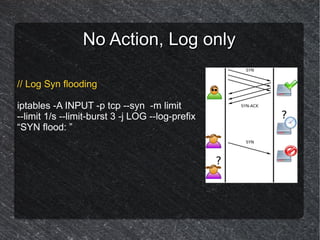
No Action, Log only

// Log Syn flooding

iptables -A INPUT -p tcp --syn -m limit
--limit 1/s --limit-burst 3 -j LOG --log-prefix
“SYN flood: ”
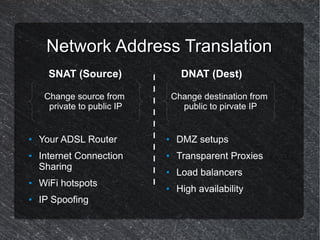
Network Address Translation
      SNAT (Source)                DNAT (Dest)

     Change source from          Change destination from
      private to public IP         public to pirvate IP


●   Your ADSL Router         ●    DMZ setups
●   Internet Connection      ●    Transparent Proxies
    Sharing                  ●    Load balancers
●   WiFi hotspots            ●    High availability
●   IP Spoofing
NATing Examples
// First enable ip forwarding
echo 1 > /proc/sys/net/ipv4/ip_forward

// Sharing internet (3G)
iptables -t nat -A POSTROUTING -o ppp0 -j MASQUERADE

// Poor man's http load balancer
iptables -t nat -A PREROUTING -p tcp --dport 80 -j DNAT --to
192.168.1.80:8080

// Transparent Proxy
iptables -t nat -A PREROUTING -i eth0 -p tcp --dport 80 -j
REDIRECT --to-port 3128
Persistence
// Save rules
iptables-save > /etc/iptables.conf

// Restore rules
iptables-restore < /etc/iptables.conf

// If you have virtual service
/etc/init.d/iptables [stop|start|save]

// If you don't have virtual service to auto start add restore
command to /etc/rc.local or any other bootup script
Thank You!

Introduction to firewalls through Iptables

  • 1.
    Introduction to Firewalls through Linux iptables By: Buddhika Siddhisena <bud@thinkcube.com> Co-Founder & CTO, THINKCube, Avid FOSS advocate
  • 2.
    What is afirewall? ● Network barrier ● Packet filtering ● Packet Mangling (NAT)
  • 3.
    Firewall Usage ● Personal Firewall ● Multi-homed (DMZ) Firewall ● Router Firewall ● Internet connection sharing (NAT) ● Transparent Proxying ● Content filtering ● Poor-mans load balancer ● Internet Hotspots
  • 4.
    What is iptables? ● Linux's built in firewall ● Successor to ipchains ● Organizes several chains into tables, hence iptables ● Consists of Userspace tool (iptables) and kernel drivers
  • 5.
    A table ofChains Filter Table (default) INPUT FORWARD OUTPUT NAT Table PREROUTING INPUT OUTPUT POSTROUTING Mangle Table PREROUTING INPUT OUTPUT FORWARD POSTROUTING X Table (user defined) ● INPUT – Packets entering an interface and destined to a local process. ● FORWARD – Only packets routed from one interface to another. ● OUTPUT – Packets leaving an interface which originated from a local process. ● PREROUTING – Before deciding to use INPUT or FORWARD. DNAT is configured here. ● POSTROUTING – After OUTPUT or FORWARD but before leaving interface. SNAT is configured here.
  • 6.
    A Chain ofRules INPUT CHAIN Rule 1 Rule 2 X Jump to Action! Rule 3 Refer to Default Policy
  • 7.
    Chain Order PREROUTING POSTROUTING Chain FORWARD Chain (Pre-routing Chain (Post routing Decisions) Decisions) INPUT OUTPUT Chain Chain Local Process
  • 8.
    Security Policy Block everyone Allow everyone by default by default (default policy:DROP) (default policy:ACCEPT) White Black Listing Listing Sorry! Bang! Can't let Bang! (REJECT) (DROP) Best security is when you.. ●Trust no one ● Make it un economical
  • 9.
    Using iptables Synopsis iptables [table][action] [chain] [option] [target] table – {filter, nat, mangle} action – {-A (add), -D (delete), -R (replace)} chain – {INPUT, FORWARD, OUTPUT etc.} options - {-s(source), -d(destination), --sport(source port, --dport(destination port), -m (module), --sync (sync packed) etc.} target – {ACCEPT, DROP, REJECT, MASQUERADE, DNAT etc.}
  • 10.
    Basic Usage iptables -L // List all rules for filter table iptables -t nat -L // List all rules for nat table iptables -F // Flush (clear) all rules of all chains iptables -F INPUT // Flush all rules for INPUT chain iptables -P INPUT DROP // Set default policy of INPUT
  • 11.
    Filtering Soure IP: 192.168.1.80 Source Port: 80 Dest IP: 192.168.2.10 Dest Port: X? Soure IP: 192.168.2.10 Source Port: X? Dest IP: 192.168.1.80 Dest Port: 80 iptables -P INPUT DROP // Drop (block) everything iptables -P OUTPUT DROP iptables -A INPUT -p tcp --dport 80 -j ACCEPT // Only allow http iptables -A OUTPUT -p tcp --sport 80 -j ACCEPT // allow packet to go out
  • 12.
    Filtering Examples // Allowping iptables -A INPUT -p icmp -j ACCEPT // Allow all incoming tcp connections on interface eth0 to port 80 (www) iptables -A INPUT -i eth0 -p tcp --sport 1024: --dport 80 -j ACCEPT // Allow DNS iptables -A INPUT -p udp --dport 53 -j ACCEPT // Allow multiple ports for Email iptables -A INPUT -p tcp -m multiport --dport 25,110,143 -j ACCEPT // Allow a MAC iptables -A INPUT -m mac --mac-source 00:02:8A:A1:71:71 -j ACCEPT
  • 13.
    Connection Tracking Soure IP: 192.168.1.80 Source Port: 80 Dest IP: 192.168.2.10 Dest Port: X? Soure IP: 192.168.2.10 Source Port: X? Dest IP: 192.168.1.80 Dest Port: 80 // Allow http new and existing connections iptables -A INPUT -p tcp -m state --state NEW,ESTABLISHED,RELATED --dport 80 -j ACCEPT // Allow only existing connections to go out iptables -A OUTPUT -p tcp -m state --state ESTABLISHED,RELATED --sport 80 -j ACCEPT
  • 14.
    No Action, Logonly // Log Syn flooding iptables -A INPUT -p tcp --syn -m limit --limit 1/s --limit-burst 3 -j LOG --log-prefix “SYN flood: ”
  • 15.
    Network Address Translation SNAT (Source) DNAT (Dest) Change source from Change destination from private to public IP public to pirvate IP ● Your ADSL Router ● DMZ setups ● Internet Connection ● Transparent Proxies Sharing ● Load balancers ● WiFi hotspots ● High availability ● IP Spoofing
  • 16.
    NATing Examples // Firstenable ip forwarding echo 1 > /proc/sys/net/ipv4/ip_forward // Sharing internet (3G) iptables -t nat -A POSTROUTING -o ppp0 -j MASQUERADE // Poor man's http load balancer iptables -t nat -A PREROUTING -p tcp --dport 80 -j DNAT --to 192.168.1.80:8080 // Transparent Proxy iptables -t nat -A PREROUTING -i eth0 -p tcp --dport 80 -j REDIRECT --to-port 3128
  • 17.
    Persistence // Save rules iptables-save> /etc/iptables.conf // Restore rules iptables-restore < /etc/iptables.conf // If you have virtual service /etc/init.d/iptables [stop|start|save] // If you don't have virtual service to auto start add restore command to /etc/rc.local or any other bootup script
  • 18.