Microsoft Communications Sector
hosting | media & entertainment | telecommunications


Dynamic Data Center
Managing Virtual Infrastructure


Stefan Simon
Hosting Technology Specialist
Microsoft CEE HQ
i-stesim@microsoft.com
Agenda

∙DDC Overview

∙DDC Components

∙DDC Solution Set
What is Dynamic Data Center?
∙ Industry term
∙ Exists for many years
∙ Works not only on Microsoft
 ◉ VMWare, Linux…
∙ Let your infrastructure be dynamic and on demand

   ∙ Real time provisioning                ∙   High availability
   ∙ API for extending to the cloud        ∙   Unlimited Capacity
   ∙ Resource monitoring and application   ∙   Outsourcing of problems
     monitoring                            ∙   Self healing infrastructure
   ∙ Logical datacenter                    ∙   High performance
     ◉ Application aware
     ◉ Utility based resources
   ∙ HW optimisation
   ∙ Security and domain control
   ∙ GEO indepedence (omipresence)
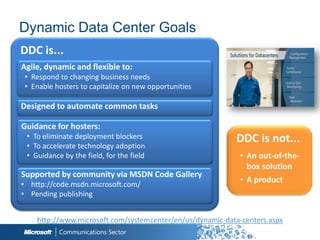
Dynamic Data Center Goals
DDC is...
Agile, dynamic and flexible to:
• Respond to changing business needs
• Enable hosters to capitalize on new opportunities

Designed to automate common tasks

Guidance for hosters:
 • To eliminate deployment blockers                        DDC is not...
 • To accelerate technology adoption
 • Guidance by the field, for the field                     • An out-of-the-
                                                              box solution
Supported by community via MSDN Code Gallery
• http://code.msdn.microsoft.com/
                                                            • A product
• Pending publishing


    http://www.microsoft.com/systemcenter/en/us/dynamic-data-centers.aspx
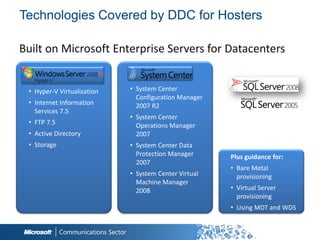
Technologies Covered by DDC for Hosters

Built on Microsoft Enterprise Servers for Datacenters


 • Hyper-V Virtualization   • System Center
                              Configuration Manager
 • Internet Information       2007 R2
   Services 7.5
                            • System Center
 • FTP 7.5                    Operations Manager
 • Active Directory           2007
 • Storage                  • System Center Data
                              Protection Manager      Plus guidance for:
                              2007
                                                      • Bare Metal
                            • System Center Virtual     provisioning
                              Machine Manager
                              2008                    • Virtual Server
                                                        provisioning
                                                      • Using MDT and WDS


                                                            5
Hyper-V
Overview
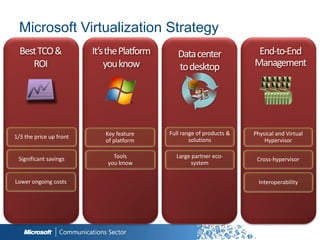
Microsoft Virtualization Strategy
  Best TCO &             It’s the Platform      Data center              End-to-End
     ROI                     you know           to desktop              Management


                            Key feature      Full range of products &   Physical and Virtual
1/3 the price up front
                            of platform              solutions              Hypervisor

 Significant savings           Tools           Large partner eco-
                                                                         Cross-hypervisor
                             you know                system


Lower ongoing costs                                                       Interoperability
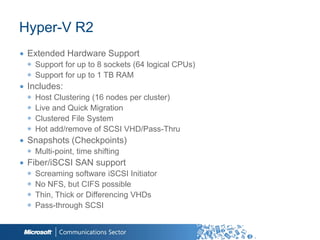
Hyper-V R2
∙ Extended Hardware Support
  ◉ Support for up to 8 sockets (64 logical CPUs)
  ◉ Support for up to 1 TB RAM
∙ Includes:
  ◉   Host Clustering (16 nodes per cluster)
  ◉   Live and Quick Migration
  ◉   Clustered File System
  ◉   Hot add/remove of SCSI VHD/Pass-Thru
∙ Snapshots (Checkpoints)
  ◉ Multi-point, time shifting
∙ Fiber/iSCSI SAN support
  ◉   Screaming software iSCSI Initiator
  ◉   No NFS, but CIFS possible
  ◉   Thin, Thick or Differencing VHDs
  ◉   Pass-through SCSI

                                                    8
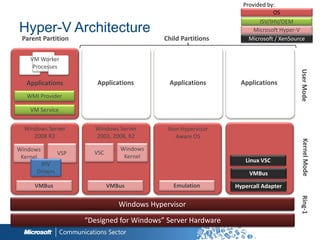
Provided by:
                                                                             OS
                                                                        ISV/IHV/OEM
Hyper-V Architecture                                                  Microsoft Hyper-V
 Parent Partition                            Child Partitions       Microsoft / XenSource


    VM Worker
     Processes


                                                                                       User Mode
  Applications           Applications         Applications        Applications
  WMI Provider

    VM Service


  Windows Server         Windows Server       Non-Hypervisor
     2008 R2             2003, 2008, R2         Aware OS


                                                                                        Kernel Mode
Windows                          Windows
                VSP     VSC
 Kernel                           Kernel
                                                                   Linux VSC
       IHV
      Drivers                                                        VMBus
     VMBus                    VMBus             Emulation       Hypercall Adapter


                                                                                       Ring-1
                                 Windows Hypervisor

                      “Designed for Windows” Server Hardware
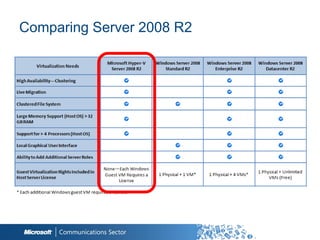
Comparing Server 2008 R2
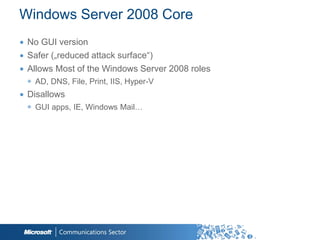
Windows Server 2008 Core
∙ No GUI version
∙ Safer („reduced attack surface“)
∙ Allows Most of the Windows Server 2008 roles
 ◉ AD, DNS, File, Print, IIS, Hyper-V
∙ Disallows
 ◉ GUI apps, IE, Windows Mail…
Hyper-V Storage Options
∙ Performance wise from fastest to slowest…
 ◉ Fixed Disk VHDs/Pass Through Disks
   ○ About the same in terms of performance
 ◉ Dynamically Expanding VHDs
   ○ Grow as needed
∙ Pass Through Disks
 ◉ Pro: VM writes directly to a disk/LUN without encapsulation in a VHD
 ◉ Cons:
   ○ You can‟t use VM snapshots
   ○ Dedicating a disk to a vm
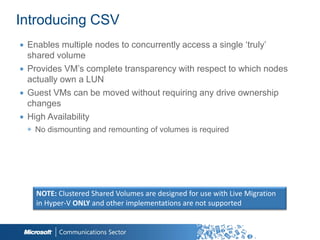
Introducing CSV
∙ Enables multiple nodes to concurrently access a single „truly‟
  shared volume
∙ Provides VM‟s complete transparency with respect to which nodes
  actually own a LUN
∙ Guest VMs can be moved without requiring any drive ownership
  changes
∙ High Availability
 ◉ No dismounting and remounting of volumes is required


    NOTE: Clustered Shared Volumes are designed for use with Live Migration
    in Hyper-V ONLY and other implementations are not supported
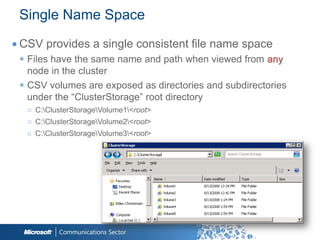
Single Name Space
∙ CSV provides a single consistent file name space
 ◉ Files have the same name and path when viewed from any
   node in the cluster
 ◉ CSV volumes are exposed as directories and subdirectories
   under the “ClusterStorage” root directory
   ○ C:ClusterStorageVolume1<root>
   ○ C:ClusterStorageVolume2<root>
   ○ C:ClusterStorageVolume3<root>
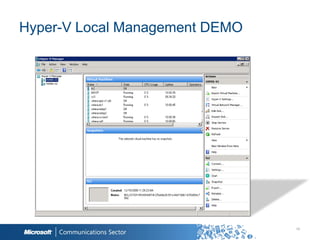
Hyper-V Local Management DEMO


                                15
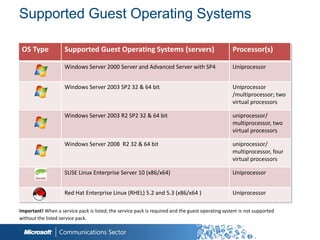
Supported Guest Operating Systems

 OS Type             Supported Guest Operating Systems (servers)                                  Processor(s)

                     Windows Server 2000 Server and Advanced Server with SP4                      Uniprocessor


                     Windows Server 2003 SP2 32 & 64 bit                                          Uniprocessor
                                                                                                  /multiprocessor; two
                                                                                                  virtual processors

                     Windows Server 2003 R2 SP2 32 & 64 bit                                       uniprocessor/
                                                                                                  multiprocessor, two
                                                                                                  virtual processors

                     Windows Server 2008 R2 32 & 64 bit                                           uniprocessor/
                                                                                                  multiprocessor, four
                                                                                                  virtual processors

                     SUSE Linux Enterprise Server 10 (x86/x64)                                    Uniprocessor


                     Red Hat Enterprise Linux (RHEL) 5.2 and 5.3 (x86/x64 )                       Uniprocessor

Important! When a service pack is listed, the service pack is required and the guest operating system is not supported
without the listed service pack.
Live Migration Requirements
∙ Hyper-V failover cluster with shared storage
∙ Hyper-V failover cluster nodes must be configured on the same
  TCP/IP subnet
∙ Hyper-V failover cluster nodes must have access to shared
  storage
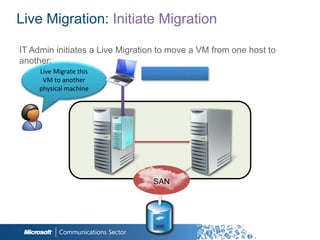
Live Migration: Initiate Migration

IT Admin initiates a Live Migration to move a VM from one host to
another:
     Live Migrate this         Client accessing VM
      VM to another
     physical machine


                                 SAN
                                 SAN


                                  VHD
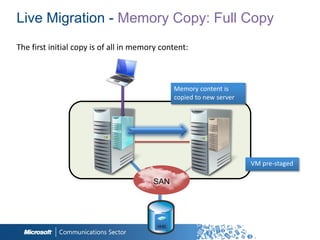
Live Migration - Memory Copy: Full Copy


                           Memory content is
                           copied to new server


                                                  VM pre-staged

                    SAN
                    SAN


                     VHD
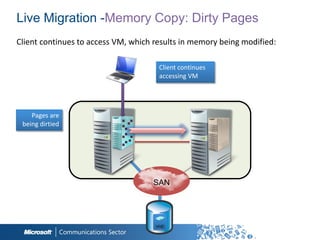
Live Migration -Memory Copy: Dirty Pages


                        Client continues
                        accessing VM


   Pages are
being dirtied


                      SAN
                      SAN


                       VHD
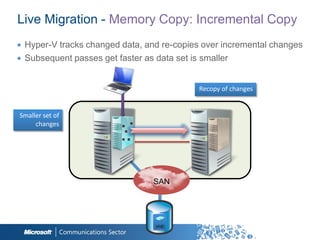
Live Migration - Memory Copy: Incremental Copy
∙ Hyper-V tracks changed data, and re-copies over incremental changes
∙ Subsequent passes get faster as data set is smaller


                                            Recopy of changes


Smaller set of
     changes


                                SAN
                                SAN


                                 VHD
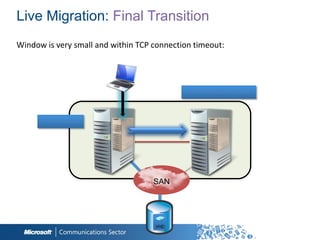
Live Migration: Final Transition


                             Partition State copied


     VM Paused


                      SAN
                      SAN


                       VHD
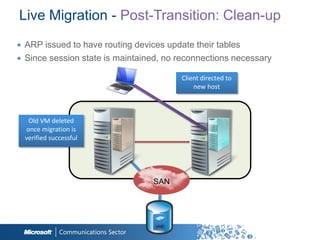
Live Migration - Post-Transition: Clean-up
∙ ARP issued to have routing devices update their tables
∙ Since session state is maintained, no reconnections necessary

                                        Client directed to
                                            new host


   Old VM deleted
  once migration is
  verified successful


                                 SAN
                                 SAN


                                  VHD
CSV and Failover
Cluster Demo


              24
System Center
Virtual Machine
Manager
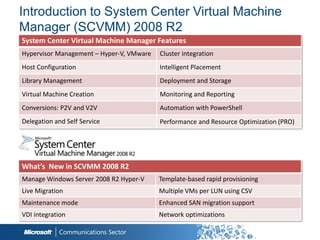
Introduction to System Center Virtual Machine
Manager (SCVMM) 2008 R2
System Center Virtual Machine Manager Features
Hypervisor Management – Hyper-V, VMware   Cluster integration
Host Configuration                        Intelligent Placement
Library Management                        Deployment and Storage
Virtual Machine Creation                  Monitoring and Reporting
Conversions: P2V and V2V                  Automation with PowerShell
Delegation and Self Service               Performance and Resource Optimization (PRO)


What’s New in SCVMM 2008 R2
Manage Windows Server 2008 R2 Hyper-V     Template-based rapid provisioning
Live Migration                            Multiple VMs per LUN using CSV
Maintenance mode                          Enhanced SAN migration support
VDI integration                           Network optimizations
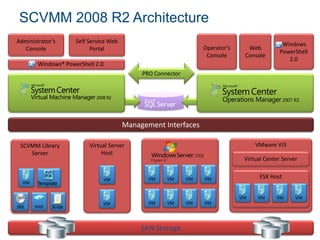
SCVMM 2008 R2 Architecture
Administrator’s       Self Service Web                                                          Windows
   Console                  Portal                                 Operator’s     Web
                                                                                               PowerShell
                                                                    Console      Console
                                                                                                  2.0
        Windows® PowerShell 2.0
                                              PRO Connector


                                         Management Interfaces

 SCVMM Library             Virtual Server                                            VMware VI3
    Server                      Host
                                                                                 Virtual Center Server


                                VM              VM    VM      VM   VM                  ESX Host
  VM    Template

                                                                                VM    VM     VM      VM
                                VM              VM    VM      VM   VM
ISO    VHD   Script


                                              SAN Storage
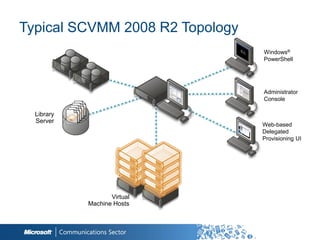
Typical SCVMM 2008 R2 Topology
                                 Windows®
                                 PowerShell


                                 Administrator
                                 Console

  Library
  Server
                                 Web-based
                                 Delegated
                                 Provisioning UI


                   Virtual
            Machine Hosts
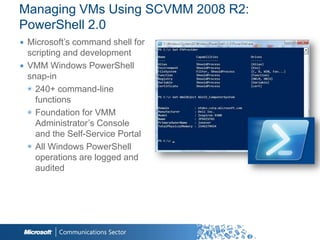
Managing VMs Using SCVMM 2008 R2:
PowerShell 2.0
∙ Microsoft‟s command shell for
  scripting and development
∙ VMM Windows PowerShell
  snap-in
  ◉ 240+ command-line
    functions
  ◉ Foundation for VMM
    Administrator‟s Console
    and the Self-Service Portal
  ◉ All Windows PowerShell
    operations are logged and
    audited
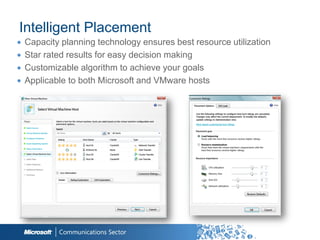
Intelligent Placement
∙   Capacity planning technology ensures best resource utilization
∙   Star rated results for easy decision making
∙   Customizable algorithm to achieve your goals
∙   Applicable to both Microsoft and VMware hosts
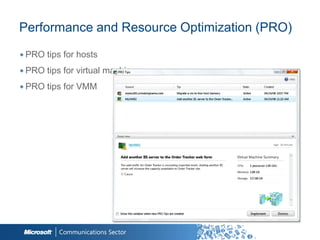
Performance and Resource Optimization (PRO)
∙ PRO tips for hosts
∙ PRO tips for virtual machines
∙ PRO tips for VMM
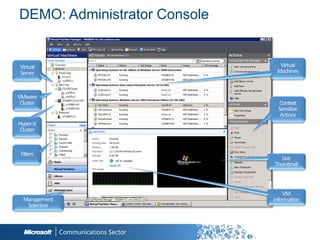
DEMO: Administrator Console
VMM Library
∙ Provides a central store for all the building blocks of virtualization
  ◉ Virtual Machines/VHDs store for re-deployment
  ◉ Templates to create new Virtual Machines (VM)
  ◉ ISO images used in VM management and creation
  ◉ Hardware configurations profiles
  ◉ Guest operating system configuration profiles
  ◉ Scripts to customize base VMs
∙ Support for Multiple Libraries
∙ Automatic discovery of new library objects
∙ Enable/Disable resources


                                                          33
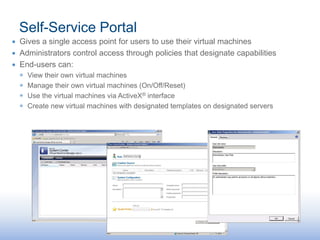
Self-Service Portal
∙ Gives a single access point for users to use their virtual machines
∙ Administrators control access through policies that designate capabilities
∙ End-users can:
  ◉   View their own virtual machines
  ◉   Manage their own virtual machines (On/Off/Reset)
  ◉   Use the virtual machines via ActiveX® interface
  ◉   Create new virtual machines with designated templates on designated servers
SC VMM Library
Demo
System Center
Operations Manager 2007 (SP1)
Benefits to service providers
∙   Possible additional revenue for service provider
∙   Value add to the service providers offerings
∙   Ability to show SLA
∙   If service provider owns hardware
    ◉   Can ensure hardware is healthy
    ◉   Response time to fix issues is decreased
    ◉   Can scale hardware more accurately
    ◉   Able to avoid downtime by fixing small
        issues before they snowball
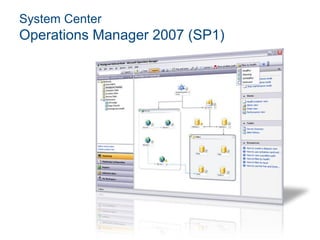
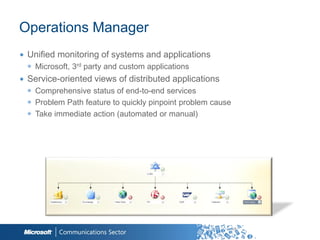
Operations Manager
∙ Unified monitoring of systems and applications
  ◉ Microsoft, 3rd party and custom applications
∙ Service-oriented views of distributed applications
  ◉ Comprehensive status of end-to-end services
  ◉ Problem Path feature to quickly pinpoint problem cause
  ◉ Take immediate action (automated or manual)


                                                             38
Operations Manager
∙ Robust, customizable reporting
  ◉ IT and management to quickly
∙ Client monitoring
  ◉ Software crashes, hardware failures, system SLA
  ◉ Agentless exception monitoring
  ◉ Client health/performance monitoring and reporting
∙ Extensible through Management Packs
∙ PRO Tips integrations with VMM 2008


                                                         39
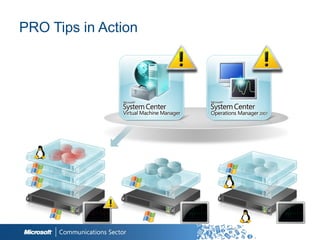
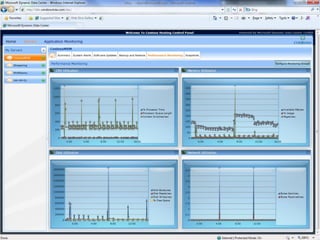
PRO Tips in Action


                     40
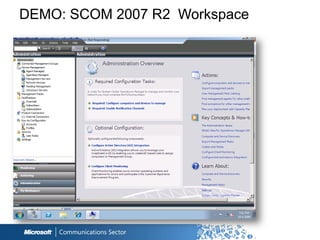
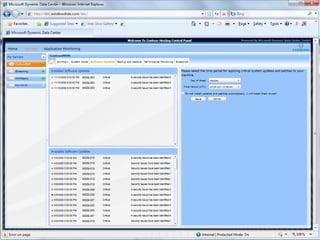
DEMO: SCOM 2007 R2 Workspace
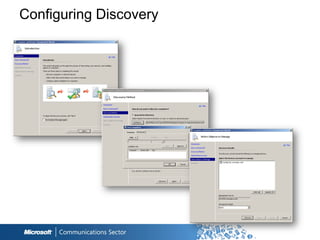
Configuring Discovery
Scenario 1: Virtual Dedicated
∙ Example a VM running on shared hardware
∙ Host OS (Hyper-V, Virtual Server, VMWare) can be
  monitored by the service provider
∙ Guest OS can also be monitored
 ◉ Alerts can be sent directly to the customer
∙ Can perform synthetic transactions to ensure system is
  working
Scenario 2: Managed

∙ In this scenario the service provider will manage the servers
  and hardware allowing the customer to use resources
 ◉ Example would be IIS website farm, online backup, shared Exchange
∙ Operations Manager can monitor the hardware and
  operating systems
 ◉ Possibly as a value add service provider can monitor the application
   (website, backups, Exchange etc)
∙ Likely most alerts would go to service provider
∙ Reports can be useful for diagnosing issues
∙ Can perform synthetic transactions to ensure system is
  working
SCVMM and SCOM integration
∙ Make sure the SPN is set (this is an Operations Manager best
  practice, and Operations Manager will alert you if it isn‟t set). Setspn
  is familiar to most Windows admins who have done anything with
  SQL or IIS over the years.
∙ Import the SQL & IIS Management Packs (most admins would
  probably have this already)
∙ On your VMM server, install the OpsMgr console
∙ On your OpsMgr server, insert the VMM disk & run configure
  Operations Manager
∙ Set the PowerShell execution policy
∙ Add the VMM user to the OpsMgr console
∙ Enable PRO
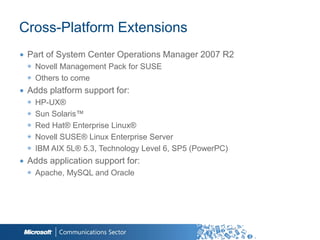
Cross-Platform Extensions
∙ Part of System Center Operations Manager 2007 R2
  ◉ Novell Management Pack for SUSE
  ◉ Others to come
∙ Adds platform support for:
  ◉   HP-UX®
  ◉   Sun Solaris™
  ◉   Red Hat® Enterprise Linux®
  ◉   Novell SUSE® Linux Enterprise Server
  ◉   IBM AIX 5L® 5.3, Technology Level 6, SP5 (PowerPC)
∙ Adds application support for:
  ◉ Apache, MySQL and Oracle


                                                           46
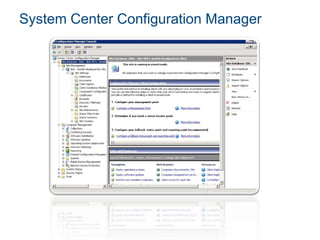
System Center Configuration Manager
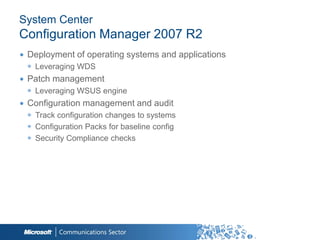
System Center
Configuration Manager 2007 R2
∙ Deployment of operating systems and applications
 ◉ Leveraging WDS
∙ Patch management
 ◉ Leveraging WSUS engine
∙ Configuration management and audit
 ◉ Track configuration changes to systems
 ◉ Configuration Packs for baseline config
 ◉ Security Compliance checks
System Center Data
Protection Manager


                     Microsoft confidential |
                                          49
SCDPM 2007 Overview
∙ SCDPM is a backup solution providing continuous data protection for
  Windows Applications and File Servers
∙ SCDPM provides protection of the following items:
  ◉ File data from volumes, shares, and folders
  ◉ Application data, such as Microsoft Exchange Server storage groups,
    Microsoft SQL Server databases, Windows SharePoint Services farms,
    and Microsoft Hyper-V and Virtual Server and its virtual machines
  ◉ Files for workstations running Windows XP Professional SP2 and all
    Windows Vista editions except Home
  ◉ Files and application data on clustered servers
  ◉ System state for protected file and application servers
What‟s New in SCDPM 2007 SP1
∙ Support for Microsoft Exchange Server (2003 and 2007)
∙ Support for Microsoft SQL Server (2000/2005/2008)
∙ Support for Microsoft SharePoint (MOSS 2007 and WSS 3.0)
∙ Zero data loss recovery for Microsoft applications
∙ Shorter backup windows + smaller full backups due to Express Full
  technology
∙ Efficient use of existing infrastructure, including reduced space
  requirements for Backup to Disk thanks to innovative data
  De-Duplication technology


Module 6
SCDPM vs. Traditional Backup Solutions
∙ Traditional backup copies all the data every time a backup is
  requested
∙ SCDPM utilizes Volume Shadow Services to only copy data that has
  changed since last backup
∙ SCDPM can provide multi-tiered Data Protection
∙ SCDPM provides a seamless Disk- and tape-based recovery


Module 6
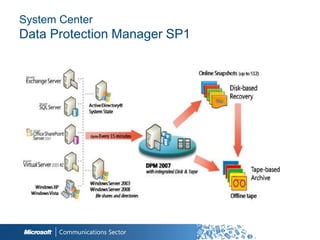
System Center
Data Protection Manager SP1


                              53
What‟s New in SCDPM 2010 RC
∙ Reliability Enhancements
 ◉   Engine Crash
 ◉   Continue on Failure
 ◉   Auto-Heal Features
 ◉   Auto-Rerun
 ◉   Auto-Consistency Checks
 ◉   Auto-Grow
 ◉   Multiple Administrator Consoles
∙ Support Windows Server 2008 R2
 ◉ Virtualization
 ◉ Clustered Shared Volumes
∙ Support for Exchange 2010
∙ Support for SharePoint 2010
∙ RTM planned to Q2 2010


                                       54
Dynamic Data Center
Solution
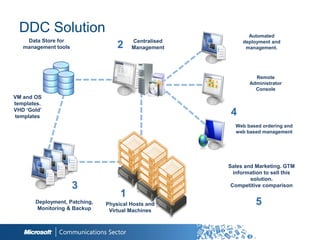
DDC Solution                                               Automated
    Data Store for                      Centralised        deployment and
   management tools                2    Management          management.


                                                                Remote
                                                              Administrator
                                                                Console
VM and OS
templates.
VHD ‘Gold’
templates                                              4
                                                        Web based ordering and
                                                        web based management


                                                      Sales and Marketing. GTM
                                                        information to sell this
                                                              solution.
                      3                                Competitive comparison
                                    1
       Deployment, Patching,
       Monitoring & Backup
                               Physical Hosts and               5
                                Virtual Machines
Dynamic Data Center Toolkit (DDTK)?


Prescriptive guidance for creating managed services and hosted Cloud
offerings:
 • Documentation
    Technical best practices, FAQs, white papers
    Installation guides specific to hosting scenarios
    www.windowshda.com
 • Managed Services
    On-demand VM provisioning
    WCF based services for all Servers and server roles that are supported
     by DDC
    Services are JSON enabled for use for LAMP*
 • Portal
    Sample Silverlight or ASP.net portal helps provide hosters‟ customers an
     integrated view of services
  * About 50% of hosters have control panels hosted on LAMP
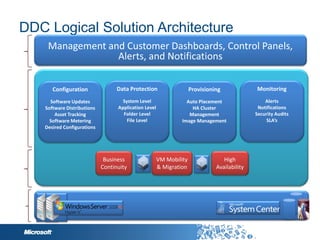
DDC Logical Solution Architecture
Control Panel
 Web based
      Web Services


                              Business    VM Mobility      High
Services
 Goals


                             Continuity   & Migration   Availability
Foundational
Technologies
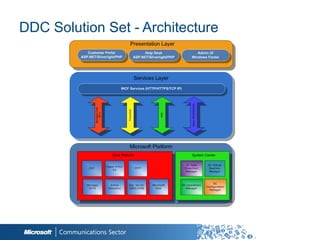
DDC Solution Set - Architecture
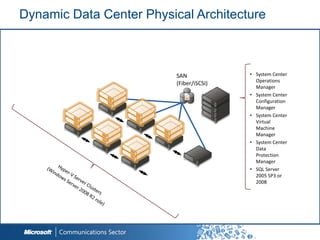
Dynamic Data Center Physical Architecture


                                SAN                             • System Center
                                                                      Operations
                                (Fiber/iSCSI)
      Hyper-V Server Clusters
                                                                      Manager
                                                System Center Operations
                                                Manager
                                                System Center •       System Center
                                                Configuration Manager
                                                System Center Virtual Configuration
                                                Machine Manager
                                                System Center Data
                                                                      Manager
                                                Protection Manager
                                                SQL Server 2005 • System Center
                                                                      Virtual
                                                                      Machine
                                                                      Manager
                                                                • System Center
                                                                      Data
                                                                      Protection
                                                                      Manager
                                                                • SQL Server
                                                                      2005 SP3 or
                                                                      2008
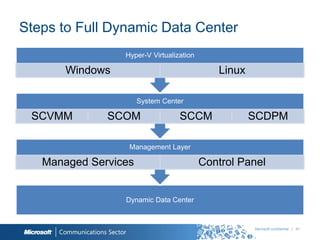
Steps to Full Dynamic Data Center
                 Hyper-V Virtualization

       Windows                               Linux

                      System Center

 SCVMM        SCOM                SCCM               SCDPM

                  Management Layer

   Managed Services                       Control Panel


                 Dynamic Data Center


                                                     Microsoft confidential | 61
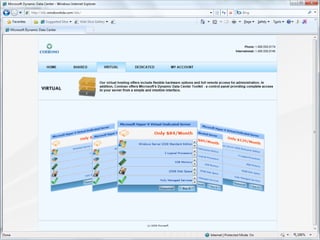
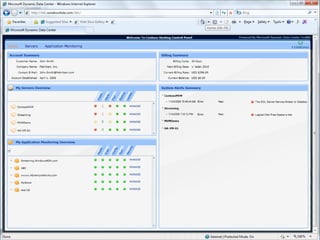
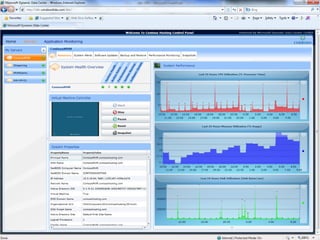
DDC Portal Sample
Demo


             62
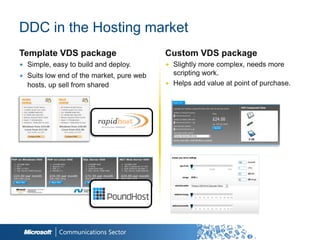
DDC in the Hosting market
Template VDS package                      Custom VDS package
∙ Simple, easy to build and deploy.       ∙ Slightly more complex, needs more
∙ Suits low end of the market, pure web     scripting work.
  hosts, up sell from shared              ∙ Helps add value at point of purchase.
Momentum


The Dynamic Data Centre toolkit has enabled us to build a suite of next generation
hosting services, providing our customers with an infrastructure that offers them
greater levels of business agility. - James Griffin, Head of Hosting Strategy, Star UK
Summary
∙ DDC
  ◉ Enables your datacenter to be dynamic and on demand
  ◉ Important mile to cloud offerings
  ◉ Is built on Hyper-V and System Center products

∙ DDC Toolkit (www.windowshda.com) contains
   ○ Hosting Guidances
   ○ Managed Web Services
   ○ Sample portal application (http://code.msdn.microsoft.com/ddc)
Q&A
Stefan Simon
i-stesim@microsoft.com
© 2009 Microsoft Corporation. All rights reserved. Microsoft, Windows, Windows Vista and other product names are or may be
registered trademarks and/or trademarks in the U.S. and/or other countries.

The information herein is for informational purposes only and represents the current view of Microsoft Corporation as of the date
of this presentation. Because Microsoft must respond to changing market conditions, it should not be interpreted to be a
commitment on the part of Microsoft, and Microsoft cannot guarantee the accuracy of any information provided after the date of
this presentation.

MICROSOFT MAKES NO WARRANTIES, EXPRESS, IMPLIED OR STATUTORY, AS TO THE INFORMATION IN THIS
PRESENTATION.

Dynamic Data Center for Hosters, by Stefan Simon

  • 1.
    Microsoft Communications Sector hosting| media & entertainment | telecommunications Dynamic Data Center Managing Virtual Infrastructure Stefan Simon Hosting Technology Specialist Microsoft CEE HQ i-stesim@microsoft.com
  • 2.
  • 3.
    What is DynamicData Center? ∙ Industry term ∙ Exists for many years ∙ Works not only on Microsoft ◉ VMWare, Linux… ∙ Let your infrastructure be dynamic and on demand ∙ Real time provisioning ∙ High availability ∙ API for extending to the cloud ∙ Unlimited Capacity ∙ Resource monitoring and application ∙ Outsourcing of problems monitoring ∙ Self healing infrastructure ∙ Logical datacenter ∙ High performance ◉ Application aware ◉ Utility based resources ∙ HW optimisation ∙ Security and domain control ∙ GEO indepedence (omipresence)
  • 4.
    Dynamic Data CenterGoals DDC is... Agile, dynamic and flexible to: • Respond to changing business needs • Enable hosters to capitalize on new opportunities Designed to automate common tasks Guidance for hosters: • To eliminate deployment blockers DDC is not... • To accelerate technology adoption • Guidance by the field, for the field • An out-of-the- box solution Supported by community via MSDN Code Gallery • http://code.msdn.microsoft.com/ • A product • Pending publishing http://www.microsoft.com/systemcenter/en/us/dynamic-data-centers.aspx
  • 5.
    Technologies Covered byDDC for Hosters Built on Microsoft Enterprise Servers for Datacenters • Hyper-V Virtualization • System Center Configuration Manager • Internet Information 2007 R2 Services 7.5 • System Center • FTP 7.5 Operations Manager • Active Directory 2007 • Storage • System Center Data Protection Manager Plus guidance for: 2007 • Bare Metal • System Center Virtual provisioning Machine Manager 2008 • Virtual Server provisioning • Using MDT and WDS 5
  • 6.
  • 7.
    Microsoft Virtualization Strategy Best TCO & It’s the Platform Data center End-to-End ROI you know to desktop Management Key feature Full range of products & Physical and Virtual 1/3 the price up front of platform solutions Hypervisor Significant savings Tools Large partner eco- Cross-hypervisor you know system Lower ongoing costs Interoperability
  • 8.
    Hyper-V R2 ∙ ExtendedHardware Support ◉ Support for up to 8 sockets (64 logical CPUs) ◉ Support for up to 1 TB RAM ∙ Includes: ◉ Host Clustering (16 nodes per cluster) ◉ Live and Quick Migration ◉ Clustered File System ◉ Hot add/remove of SCSI VHD/Pass-Thru ∙ Snapshots (Checkpoints) ◉ Multi-point, time shifting ∙ Fiber/iSCSI SAN support ◉ Screaming software iSCSI Initiator ◉ No NFS, but CIFS possible ◉ Thin, Thick or Differencing VHDs ◉ Pass-through SCSI 8
  • 9.
    Provided by: OS ISV/IHV/OEM Hyper-V Architecture Microsoft Hyper-V Parent Partition Child Partitions Microsoft / XenSource VM Worker Processes User Mode Applications Applications Applications Applications WMI Provider VM Service Windows Server Windows Server Non-Hypervisor 2008 R2 2003, 2008, R2 Aware OS Kernel Mode Windows Windows VSP VSC Kernel Kernel Linux VSC IHV Drivers VMBus VMBus VMBus Emulation Hypercall Adapter Ring-1 Windows Hypervisor “Designed for Windows” Server Hardware
  • 10.
  • 11.
    Windows Server 2008Core ∙ No GUI version ∙ Safer („reduced attack surface“) ∙ Allows Most of the Windows Server 2008 roles ◉ AD, DNS, File, Print, IIS, Hyper-V ∙ Disallows ◉ GUI apps, IE, Windows Mail…
  • 12.
    Hyper-V Storage Options ∙Performance wise from fastest to slowest… ◉ Fixed Disk VHDs/Pass Through Disks ○ About the same in terms of performance ◉ Dynamically Expanding VHDs ○ Grow as needed ∙ Pass Through Disks ◉ Pro: VM writes directly to a disk/LUN without encapsulation in a VHD ◉ Cons: ○ You can‟t use VM snapshots ○ Dedicating a disk to a vm
  • 13.
    Introducing CSV ∙ Enablesmultiple nodes to concurrently access a single „truly‟ shared volume ∙ Provides VM‟s complete transparency with respect to which nodes actually own a LUN ∙ Guest VMs can be moved without requiring any drive ownership changes ∙ High Availability ◉ No dismounting and remounting of volumes is required NOTE: Clustered Shared Volumes are designed for use with Live Migration in Hyper-V ONLY and other implementations are not supported
  • 14.
    Single Name Space ∙CSV provides a single consistent file name space ◉ Files have the same name and path when viewed from any node in the cluster ◉ CSV volumes are exposed as directories and subdirectories under the “ClusterStorage” root directory ○ C:ClusterStorageVolume1<root> ○ C:ClusterStorageVolume2<root> ○ C:ClusterStorageVolume3<root>
  • 15.
  • 16.
    Supported Guest OperatingSystems OS Type Supported Guest Operating Systems (servers) Processor(s) Windows Server 2000 Server and Advanced Server with SP4 Uniprocessor Windows Server 2003 SP2 32 & 64 bit Uniprocessor /multiprocessor; two virtual processors Windows Server 2003 R2 SP2 32 & 64 bit uniprocessor/ multiprocessor, two virtual processors Windows Server 2008 R2 32 & 64 bit uniprocessor/ multiprocessor, four virtual processors SUSE Linux Enterprise Server 10 (x86/x64) Uniprocessor Red Hat Enterprise Linux (RHEL) 5.2 and 5.3 (x86/x64 ) Uniprocessor Important! When a service pack is listed, the service pack is required and the guest operating system is not supported without the listed service pack.
  • 17.
    Live Migration Requirements ∙Hyper-V failover cluster with shared storage ∙ Hyper-V failover cluster nodes must be configured on the same TCP/IP subnet ∙ Hyper-V failover cluster nodes must have access to shared storage
  • 18.
    Live Migration: InitiateMigration IT Admin initiates a Live Migration to move a VM from one host to another: Live Migrate this Client accessing VM VM to another physical machine SAN SAN VHD
  • 19.
    Live Migration -Memory Copy: Full Copy Memory content is copied to new server VM pre-staged SAN SAN VHD
  • 20.
    Live Migration -MemoryCopy: Dirty Pages Client continues accessing VM Pages are being dirtied SAN SAN VHD
  • 21.
    Live Migration -Memory Copy: Incremental Copy ∙ Hyper-V tracks changed data, and re-copies over incremental changes ∙ Subsequent passes get faster as data set is smaller Recopy of changes Smaller set of changes SAN SAN VHD
  • 22.
    Live Migration: FinalTransition Partition State copied VM Paused SAN SAN VHD
  • 23.
    Live Migration -Post-Transition: Clean-up ∙ ARP issued to have routing devices update their tables ∙ Since session state is maintained, no reconnections necessary Client directed to new host Old VM deleted once migration is verified successful SAN SAN VHD
  • 24.
  • 25.
  • 26.
    Introduction to SystemCenter Virtual Machine Manager (SCVMM) 2008 R2 System Center Virtual Machine Manager Features Hypervisor Management – Hyper-V, VMware Cluster integration Host Configuration Intelligent Placement Library Management Deployment and Storage Virtual Machine Creation Monitoring and Reporting Conversions: P2V and V2V Automation with PowerShell Delegation and Self Service Performance and Resource Optimization (PRO) What’s New in SCVMM 2008 R2 Manage Windows Server 2008 R2 Hyper-V Template-based rapid provisioning Live Migration Multiple VMs per LUN using CSV Maintenance mode Enhanced SAN migration support VDI integration Network optimizations
  • 27.
    SCVMM 2008 R2Architecture Administrator’s Self Service Web Windows Console Portal Operator’s Web PowerShell Console Console 2.0 Windows® PowerShell 2.0 PRO Connector Management Interfaces SCVMM Library Virtual Server VMware VI3 Server Host Virtual Center Server VM VM VM VM VM ESX Host VM Template VM VM VM VM VM VM VM VM VM ISO VHD Script SAN Storage
  • 28.
    Typical SCVMM 2008R2 Topology Windows® PowerShell Administrator Console Library Server Web-based Delegated Provisioning UI Virtual Machine Hosts
  • 29.
    Managing VMs UsingSCVMM 2008 R2: PowerShell 2.0 ∙ Microsoft‟s command shell for scripting and development ∙ VMM Windows PowerShell snap-in ◉ 240+ command-line functions ◉ Foundation for VMM Administrator‟s Console and the Self-Service Portal ◉ All Windows PowerShell operations are logged and audited
  • 30.
    Intelligent Placement ∙ Capacity planning technology ensures best resource utilization ∙ Star rated results for easy decision making ∙ Customizable algorithm to achieve your goals ∙ Applicable to both Microsoft and VMware hosts
  • 31.
    Performance and ResourceOptimization (PRO) ∙ PRO tips for hosts ∙ PRO tips for virtual machines ∙ PRO tips for VMM
  • 32.
  • 33.
    VMM Library ∙ Providesa central store for all the building blocks of virtualization ◉ Virtual Machines/VHDs store for re-deployment ◉ Templates to create new Virtual Machines (VM) ◉ ISO images used in VM management and creation ◉ Hardware configurations profiles ◉ Guest operating system configuration profiles ◉ Scripts to customize base VMs ∙ Support for Multiple Libraries ∙ Automatic discovery of new library objects ∙ Enable/Disable resources 33
  • 34.
    Self-Service Portal ∙ Givesa single access point for users to use their virtual machines ∙ Administrators control access through policies that designate capabilities ∙ End-users can: ◉ View their own virtual machines ◉ Manage their own virtual machines (On/Off/Reset) ◉ Use the virtual machines via ActiveX® interface ◉ Create new virtual machines with designated templates on designated servers
  • 35.
  • 36.
  • 37.
    Benefits to serviceproviders ∙ Possible additional revenue for service provider ∙ Value add to the service providers offerings ∙ Ability to show SLA ∙ If service provider owns hardware ◉ Can ensure hardware is healthy ◉ Response time to fix issues is decreased ◉ Can scale hardware more accurately ◉ Able to avoid downtime by fixing small issues before they snowball
  • 38.
    Operations Manager ∙ Unifiedmonitoring of systems and applications ◉ Microsoft, 3rd party and custom applications ∙ Service-oriented views of distributed applications ◉ Comprehensive status of end-to-end services ◉ Problem Path feature to quickly pinpoint problem cause ◉ Take immediate action (automated or manual) 38
  • 39.
    Operations Manager ∙ Robust,customizable reporting ◉ IT and management to quickly ∙ Client monitoring ◉ Software crashes, hardware failures, system SLA ◉ Agentless exception monitoring ◉ Client health/performance monitoring and reporting ∙ Extensible through Management Packs ∙ PRO Tips integrations with VMM 2008 39
  • 40.
    PRO Tips inAction 40
  • 41.
    DEMO: SCOM 2007R2 Workspace
  • 42.
  • 43.
    Scenario 1: VirtualDedicated ∙ Example a VM running on shared hardware ∙ Host OS (Hyper-V, Virtual Server, VMWare) can be monitored by the service provider ∙ Guest OS can also be monitored ◉ Alerts can be sent directly to the customer ∙ Can perform synthetic transactions to ensure system is working
  • 44.
    Scenario 2: Managed ∙In this scenario the service provider will manage the servers and hardware allowing the customer to use resources ◉ Example would be IIS website farm, online backup, shared Exchange ∙ Operations Manager can monitor the hardware and operating systems ◉ Possibly as a value add service provider can monitor the application (website, backups, Exchange etc) ∙ Likely most alerts would go to service provider ∙ Reports can be useful for diagnosing issues ∙ Can perform synthetic transactions to ensure system is working
  • 45.
    SCVMM and SCOMintegration ∙ Make sure the SPN is set (this is an Operations Manager best practice, and Operations Manager will alert you if it isn‟t set). Setspn is familiar to most Windows admins who have done anything with SQL or IIS over the years. ∙ Import the SQL & IIS Management Packs (most admins would probably have this already) ∙ On your VMM server, install the OpsMgr console ∙ On your OpsMgr server, insert the VMM disk & run configure Operations Manager ∙ Set the PowerShell execution policy ∙ Add the VMM user to the OpsMgr console ∙ Enable PRO
  • 46.
    Cross-Platform Extensions ∙ Partof System Center Operations Manager 2007 R2 ◉ Novell Management Pack for SUSE ◉ Others to come ∙ Adds platform support for: ◉ HP-UX® ◉ Sun Solaris™ ◉ Red Hat® Enterprise Linux® ◉ Novell SUSE® Linux Enterprise Server ◉ IBM AIX 5L® 5.3, Technology Level 6, SP5 (PowerPC) ∙ Adds application support for: ◉ Apache, MySQL and Oracle 46
  • 47.
  • 48.
    System Center Configuration Manager2007 R2 ∙ Deployment of operating systems and applications ◉ Leveraging WDS ∙ Patch management ◉ Leveraging WSUS engine ∙ Configuration management and audit ◉ Track configuration changes to systems ◉ Configuration Packs for baseline config ◉ Security Compliance checks
  • 49.
    System Center Data ProtectionManager Microsoft confidential | 49
  • 50.
    SCDPM 2007 Overview ∙SCDPM is a backup solution providing continuous data protection for Windows Applications and File Servers ∙ SCDPM provides protection of the following items: ◉ File data from volumes, shares, and folders ◉ Application data, such as Microsoft Exchange Server storage groups, Microsoft SQL Server databases, Windows SharePoint Services farms, and Microsoft Hyper-V and Virtual Server and its virtual machines ◉ Files for workstations running Windows XP Professional SP2 and all Windows Vista editions except Home ◉ Files and application data on clustered servers ◉ System state for protected file and application servers
  • 51.
    What‟s New inSCDPM 2007 SP1 ∙ Support for Microsoft Exchange Server (2003 and 2007) ∙ Support for Microsoft SQL Server (2000/2005/2008) ∙ Support for Microsoft SharePoint (MOSS 2007 and WSS 3.0) ∙ Zero data loss recovery for Microsoft applications ∙ Shorter backup windows + smaller full backups due to Express Full technology ∙ Efficient use of existing infrastructure, including reduced space requirements for Backup to Disk thanks to innovative data De-Duplication technology Module 6
  • 52.
    SCDPM vs. TraditionalBackup Solutions ∙ Traditional backup copies all the data every time a backup is requested ∙ SCDPM utilizes Volume Shadow Services to only copy data that has changed since last backup ∙ SCDPM can provide multi-tiered Data Protection ∙ SCDPM provides a seamless Disk- and tape-based recovery Module 6
  • 53.
  • 54.
    What‟s New inSCDPM 2010 RC ∙ Reliability Enhancements ◉ Engine Crash ◉ Continue on Failure ◉ Auto-Heal Features ◉ Auto-Rerun ◉ Auto-Consistency Checks ◉ Auto-Grow ◉ Multiple Administrator Consoles ∙ Support Windows Server 2008 R2 ◉ Virtualization ◉ Clustered Shared Volumes ∙ Support for Exchange 2010 ∙ Support for SharePoint 2010 ∙ RTM planned to Q2 2010 54
  • 55.
  • 56.
    DDC Solution Automated Data Store for Centralised deployment and management tools 2 Management management. Remote Administrator Console VM and OS templates. VHD ‘Gold’ templates 4 Web based ordering and web based management Sales and Marketing. GTM information to sell this solution. 3 Competitive comparison 1 Deployment, Patching, Monitoring & Backup Physical Hosts and 5 Virtual Machines
  • 57.
    Dynamic Data CenterToolkit (DDTK)? Prescriptive guidance for creating managed services and hosted Cloud offerings: • Documentation  Technical best practices, FAQs, white papers  Installation guides specific to hosting scenarios  www.windowshda.com • Managed Services  On-demand VM provisioning  WCF based services for all Servers and server roles that are supported by DDC  Services are JSON enabled for use for LAMP* • Portal  Sample Silverlight or ASP.net portal helps provide hosters‟ customers an integrated view of services * About 50% of hosters have control panels hosted on LAMP
  • 58.
    DDC Logical SolutionArchitecture Control Panel Web based Web Services Business VM Mobility High Services Goals Continuity & Migration Availability Foundational Technologies
  • 59.
    DDC Solution Set- Architecture
  • 60.
    Dynamic Data CenterPhysical Architecture SAN • System Center Operations (Fiber/iSCSI) Hyper-V Server Clusters Manager System Center Operations Manager System Center • System Center Configuration Manager System Center Virtual Configuration Machine Manager System Center Data Manager Protection Manager SQL Server 2005 • System Center Virtual Machine Manager • System Center Data Protection Manager • SQL Server 2005 SP3 or 2008
  • 61.
    Steps to FullDynamic Data Center Hyper-V Virtualization Windows Linux System Center SCVMM SCOM SCCM SCDPM Management Layer Managed Services Control Panel Dynamic Data Center Microsoft confidential | 61
  • 62.
  • 68.
    DDC in theHosting market Template VDS package Custom VDS package ∙ Simple, easy to build and deploy. ∙ Slightly more complex, needs more ∙ Suits low end of the market, pure web scripting work. hosts, up sell from shared ∙ Helps add value at point of purchase.
  • 69.
    Momentum The Dynamic DataCentre toolkit has enabled us to build a suite of next generation hosting services, providing our customers with an infrastructure that offers them greater levels of business agility. - James Griffin, Head of Hosting Strategy, Star UK
  • 70.
    Summary ∙ DDC ◉ Enables your datacenter to be dynamic and on demand ◉ Important mile to cloud offerings ◉ Is built on Hyper-V and System Center products ∙ DDC Toolkit (www.windowshda.com) contains ○ Hosting Guidances ○ Managed Web Services ○ Sample portal application (http://code.msdn.microsoft.com/ddc)
  • 71.
  • 72.
    © 2009 MicrosoftCorporation. All rights reserved. Microsoft, Windows, Windows Vista and other product names are or may be registered trademarks and/or trademarks in the U.S. and/or other countries. The information herein is for informational purposes only and represents the current view of Microsoft Corporation as of the date of this presentation. Because Microsoft must respond to changing market conditions, it should not be interpreted to be a commitment on the part of Microsoft, and Microsoft cannot guarantee the accuracy of any information provided after the date of this presentation. MICROSOFT MAKES NO WARRANTIES, EXPRESS, IMPLIED OR STATUTORY, AS TO THE INFORMATION IN THIS PRESENTATION.